AI Email Management and Filtering
Turn this article into takeaways for your work.


Each assistant summarizes the article only for you and suggests best practices for your work.
The average professional receives 126 emails per day. That's 630 emails per week, over 30,000 per year. And we spend an average of 2.5 hours daily managing this flood. Reading, sorting, responding, archiving, searching for that one important message buried under newsletters and notifications.
The math is brutal. That's 12.5 hours per week, 650 hours per year, on email management. For a knowledge worker making $100,000 annually, that's over $30,000 in productivity cost just processing messages.
This is precisely where AI productivity tools deliver immediate, measurable value.
Traditional email hasn't changed much in 20 years. Folders, labels, search, filters. These are organizational tools, not intelligence tools. They help you manage email you've already read, but they don't help you avoid reading irrelevant email in the first place.
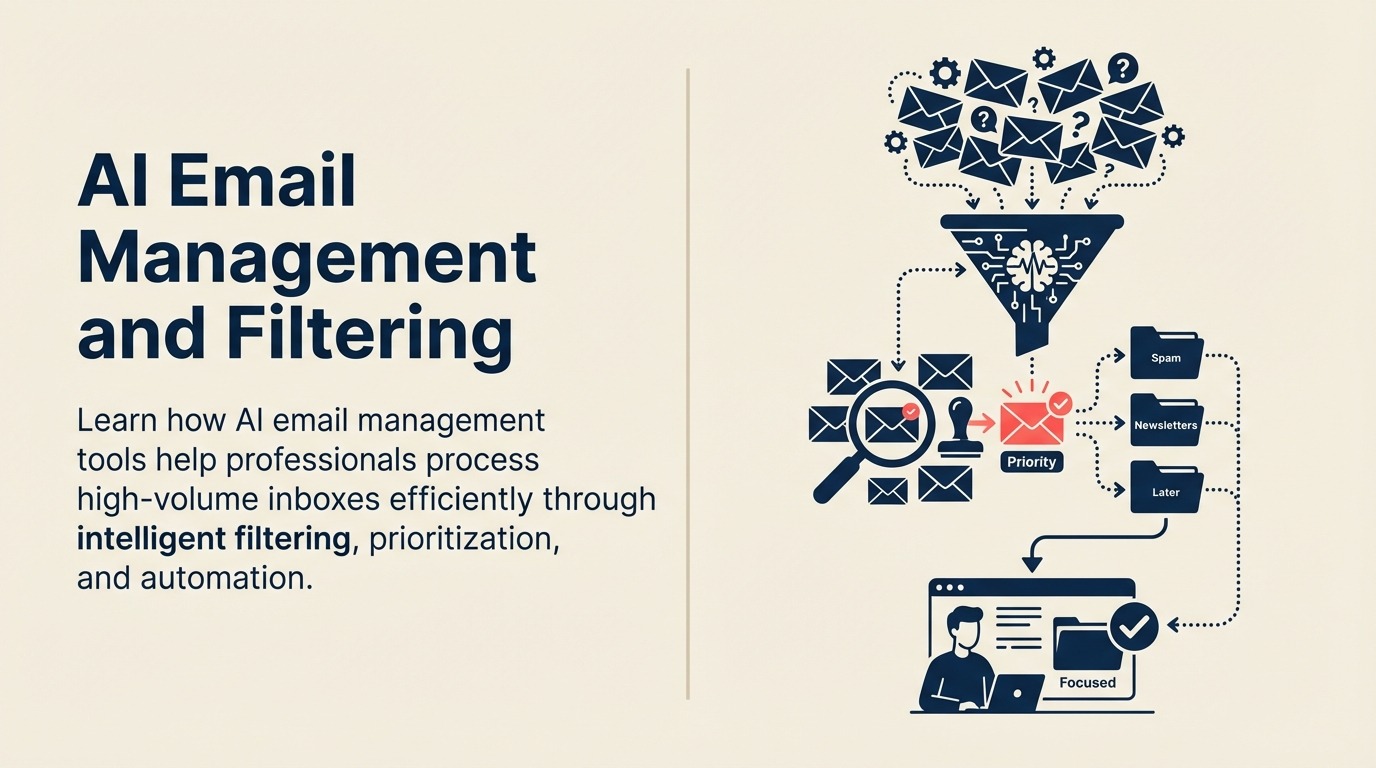
AI email management changes the fundamental equation. Instead of you sorting through hundreds of messages to find the dozen that matter, the AI does it. Instead of writing the same response for the twentieth time, the AI drafts it. Instead of losing important follow-ups in the shuffle, the AI tracks them.
The result isn't just faster email processing. It's reclaiming hours of productive time and reducing the cognitive load that makes email exhausting.
How AI Transforms Email Management
AI email tools work fundamentally differently than traditional filters and rules.
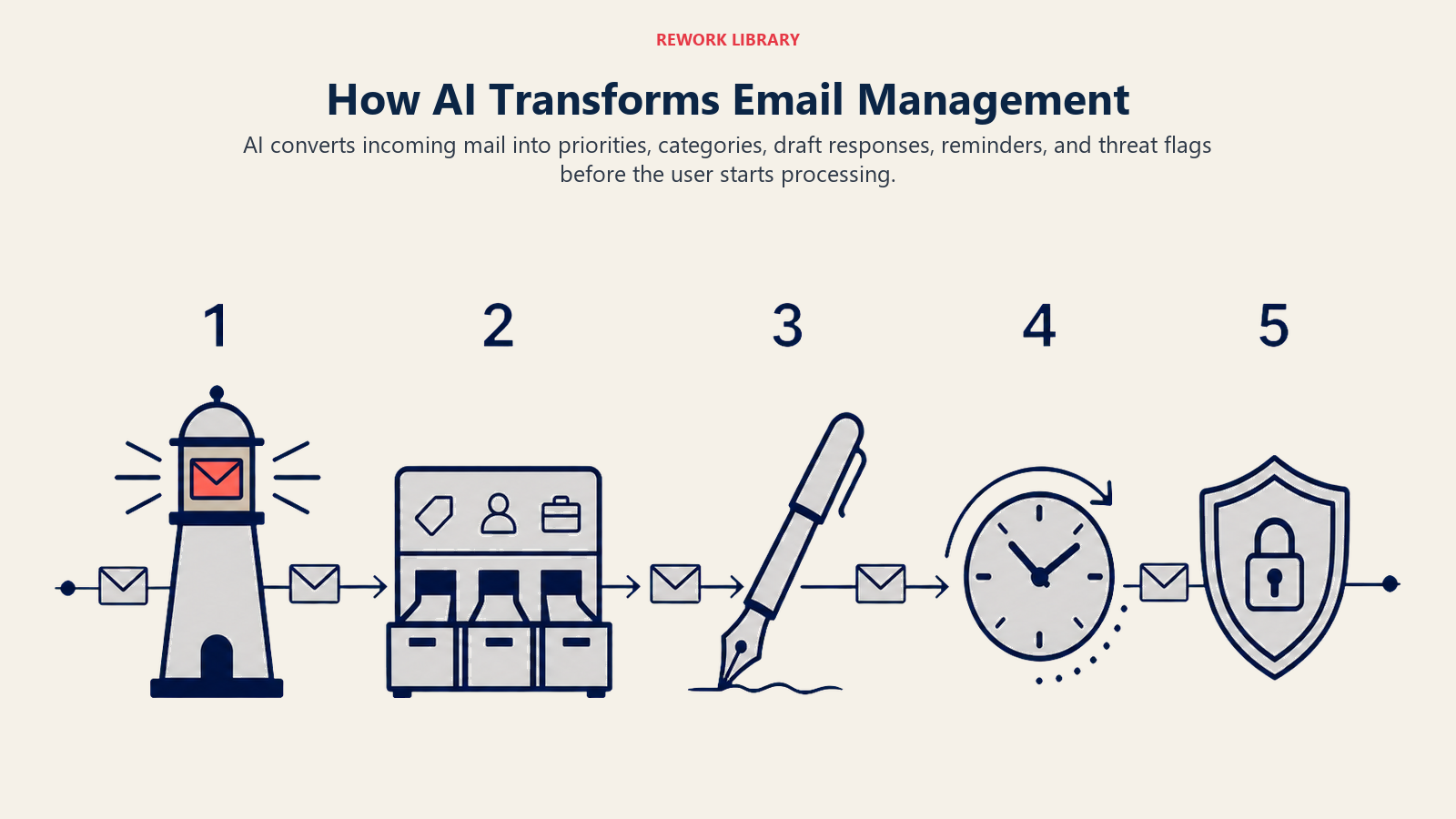
Intelligent prioritization learns what matters to you. Not based on simple rules like "if from boss, mark important." Based on actual behavioral patterns. Which emails do you open immediately versus ignore for days? Which senders consistently require action versus FYI? Which subject patterns indicate urgency versus noise?
The AI builds a model of your actual priorities by watching your behavior. Then it surfaces high-priority messages automatically while keeping low-priority ones out of your primary view. You see the signal without having to filter through the noise.
Automated categorization goes beyond folder filing. AI understands email content and intent. It can distinguish between a customer support request, a sales inquiry, a team update, and a newsletter even when they all arrive in the same inbox. It groups related messages into conversation threads automatically. It identifies emails that require action versus those that are informational.
This categorization happens in real-time as messages arrive. You don't sort email. You open your inbox and it's already organized by what needs your attention.
Response suggestion uses natural language processing to draft replies. For routine emails, the questions being asked, the information being requested, or the confirmation being sought, the AI can generate accurate responses based on your previous communication patterns. You review, maybe edit slightly, and send. What took 5 minutes to compose now takes 30 seconds to approve.
Follow-up reminders track commitments automatically. Someone says they'll send you something by Friday. The AI catches that commitment and creates a reminder. Friday arrives with no response, you get prompted to follow up. You don't maintain a mental list of pending items. The AI does it.
Unsubscribe automation identifies newsletters and promotional emails you never open. Instead of making you manually unsubscribe from each one, the AI does it automatically or batches them for your one-click approval. Your inbox stops accumulating subscriptions you signed up for once and never read.
Spam and phishing detection uses sophisticated pattern recognition far beyond traditional spam filters. AI can identify phishing attempts that mimic legitimate senders, detect social engineering tactics, and flag suspicious links or attachments before you click.
Leading AI Email Management Tools
Different tools take different approaches to solving the email problem. Here's what works.
Gmail Priority Inbox and Smart Features bring AI to the world's most popular email platform. Priority Inbox uses machine learning to identify important messages based on your interaction patterns. Smart Compose suggests full sentences as you type. Smart Reply offers one-click responses for simple messages. Nudges remind you to follow up on emails or respond to messages you haven't answered.
For organizations using Google Workspace, these features are built-in. No separate tool to adopt. The AI learns from your Gmail usage and gets better over time without any configuration required.
Outlook Focused Inbox with AI provides similar capabilities in the Microsoft ecosystem. It separates important messages from the rest based on learned patterns. Clutter automatically moves low-priority emails out of your inbox. @mentions highlights messages where you were specifically called out. For Microsoft 365 users, this is native functionality that works across devices.
Superhuman is an AI-first email client built for speed. Every interaction is keyboard-optimized. The Superhuman AI learns your email patterns and provides split-inbox views customized to your work style. Snippets let you create text expansion templates for common responses. Read statuses show when recipients open your messages. Reminders surface buried emails automatically.
Superhuman isn't cheap ($30/month), but for executives and high-volume email users, the time savings justify the cost. Users report saving 3-4 hours per week on email management.
SaneBox works with any email provider as an intelligent layer on top. SaneBox analyzes your email patterns and automatically filters less important messages into separate folders like SaneLater or SaneNews. It includes features like SaneBlackHole for automatic unsubscribe, SaneReminders for follow-up tracking, and SaneAttachments for file organization.
The advantage is portability. You can use SaneBox with Gmail, Outlook, Apple Mail, or any IMAP email. Your AI email management isn't locked to a specific platform.
Shortwave reimagines email as a team collaboration tool with AI at its core. Shortwave bundles related messages into threads automatically, suggests responses using GPT-powered drafting, and includes scheduling, reminders, and pinning directly in the interface. It's designed for teams who use email as their primary coordination tool.
Priority-Based Inbox Management
The key to AI email management is surfacing what matters while suppressing what doesn't.
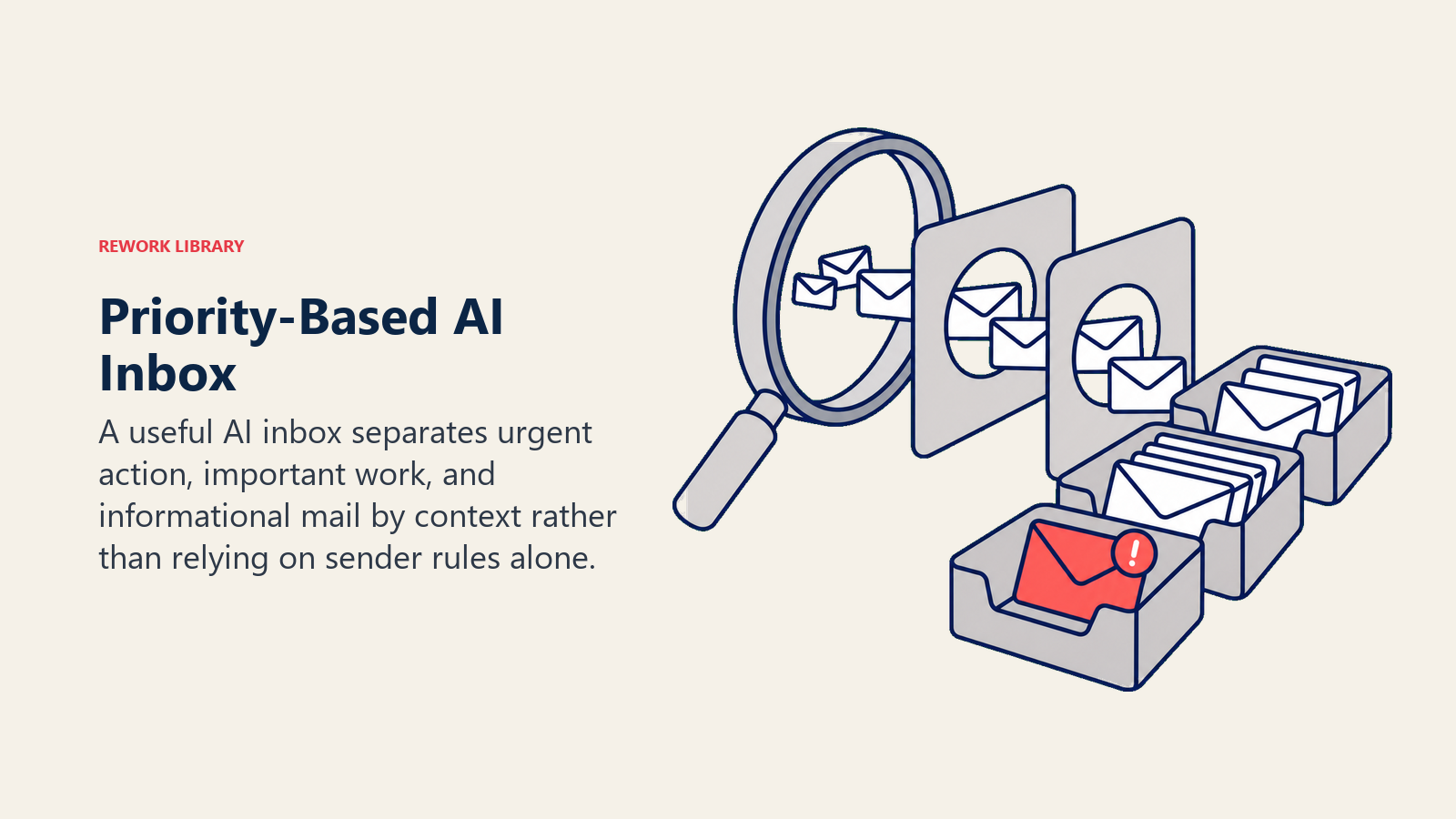
VIP sender detection identifies people who always require your attention. Your boss, key customers, direct reports, important partners. The AI learns this from your response patterns and consistently surfaces their messages regardless of subject or content. You won't miss an email from someone who matters.
Urgent vs important classification separates things that need immediate response from things that matter but can wait. A customer escalation is urgent. A monthly report is important. The AI understands this distinction based on content analysis and historical context. Urgent items appear first. Important items are surfaced but don't trigger the same immediate-response pressure.
Action-required identification flags messages that need something from you. A question that requires an answer. A document that needs review and approval. A meeting request that needs confirmation. These messages get tagged automatically so you can batch-process them during dedicated email time rather than interrupting deep work.
FYI and archive suggestions help you quickly process informational emails. The AI identifies messages that don't require action, just awareness. It can automatically archive them after you've seen them once or bundle them into daily digest format. You stay informed without letting FYI messages clutter your action-required inbox.
Email Management by Role
Different roles have different email patterns. AI tools adapt to these differences.
Executives need signal-to-noise filtering more than anyone. They're copied on everything "just FYI." They get requests from across the organization. They receive high volumes of external communications. AI email management for executives focuses on VIP detection, delegation identification (which emails can be handled by someone else), and aggressive noise suppression. The goal: reduce 200 daily emails to the 20 that require executive attention.
Sales teams need lead response prioritization. An inbound inquiry from a Fortune 500 company requires immediate response. A cold email from a consultant can wait. AI email tools for sales integrate with CRM systems to add account context. They identify hot leads based on message content and sending domain. They flag responses to outbound campaigns. Sales reps see prospect emails first, administrative updates later.
Support teams need customer issue routing and priority detection. AI analyzes incoming support emails to determine urgency, categorize issue type, and route to the appropriate team member. It can identify angry customers based on language tone and flag for priority handling. It detects duplicate issues and suggests linking them. Support teams spend less time triaging and more time solving.
Operations teams need alert management. Systems send automated notifications. Some are critical (production down). Others are informational (daily backup completed). AI learns which alerts require immediate action versus background monitoring. It can bundle routine notifications into hourly or daily digests while surfacing critical issues immediately.
The Zero-Inbox Workflow with AI
The zero-inbox methodology works, but it's exhausting to maintain manually. AI makes it sustainable.
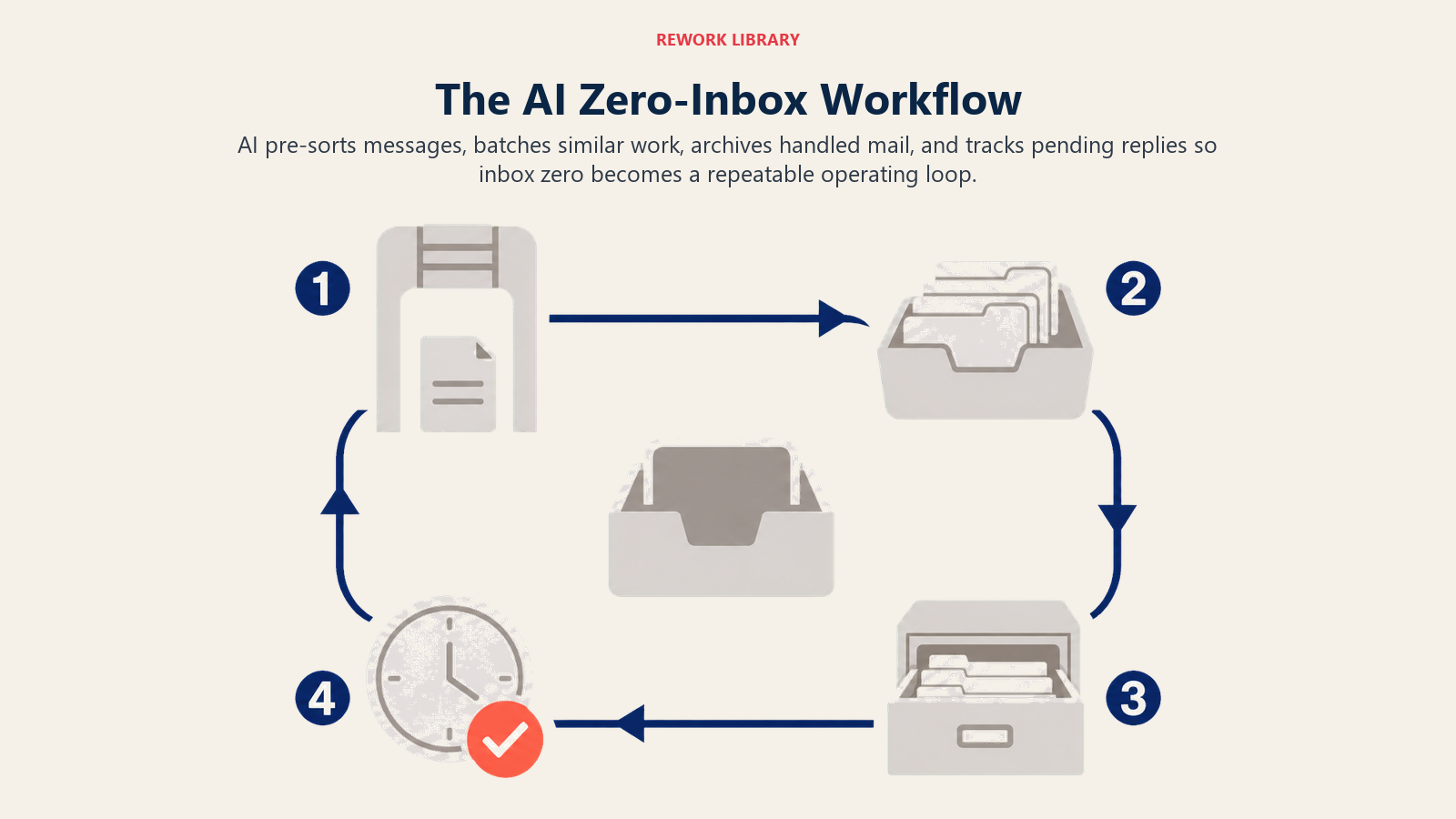
Auto-categorization happens before you see messages. Emails arrive pre-sorted into categories: action required, awaiting response, FYI, newsletters, automated notifications. You don't decide where each message goes. The AI already did it.
Batched processing lets you handle similar emails together. Process all action-required messages in one session. Review all FYI updates in another. Respond to all customer emails together. This reduces context switching and makes email processing more efficient.
Smart archiving removes messages from your inbox automatically once they're handled. You read it, take the required action, and it archives. No manual filing. The AI knows what "handled" looks like based on your patterns. If you typically archive customer thank-you emails immediately after reading, the AI does it automatically.
Follow-up tracking ensures nothing falls through the cracks. The AI identifies messages where you're waiting for someone else's response. It reminds you to follow up if they don't respond within a reasonable timeframe. You achieve zero inbox without losing important threads.
This workflow paired with comprehensive AI workflow automation creates a complete communication management system. Email doesn't pile up. Important messages get handled. Nothing gets lost.
Email Analytics and Insights
AI email tools don't just manage messages. They surface patterns about your communication habits.
Response time tracking shows how quickly you respond to different types of messages and senders. Are you responding to customer emails within your SLA? Are internal messages sitting for days? This visibility helps you identify bottlenecks and adjust your processing rhythm.
Email load analysis quantifies your incoming message volume over time. Is email increasing or stabilizing? Which types of messages are growing? Where is noise coming from? This data helps you make decisions about automation, delegation, or process changes.
Sender patterns reveal who you communicate with most, who consumes your time, and where your attention goes. You might discover you're spending 5 hours per week on internal status updates that could be handled asynchronously. Or that customer communications take more time than you realized, justifying additional support headcount.
These analytics inform workflow improvements. You can't optimize what you don't measure. AI email tools make email patterns visible and actionable.
Privacy and Security Considerations
AI email management requires giving the AI access to your messages. That raises legitimate concerns.
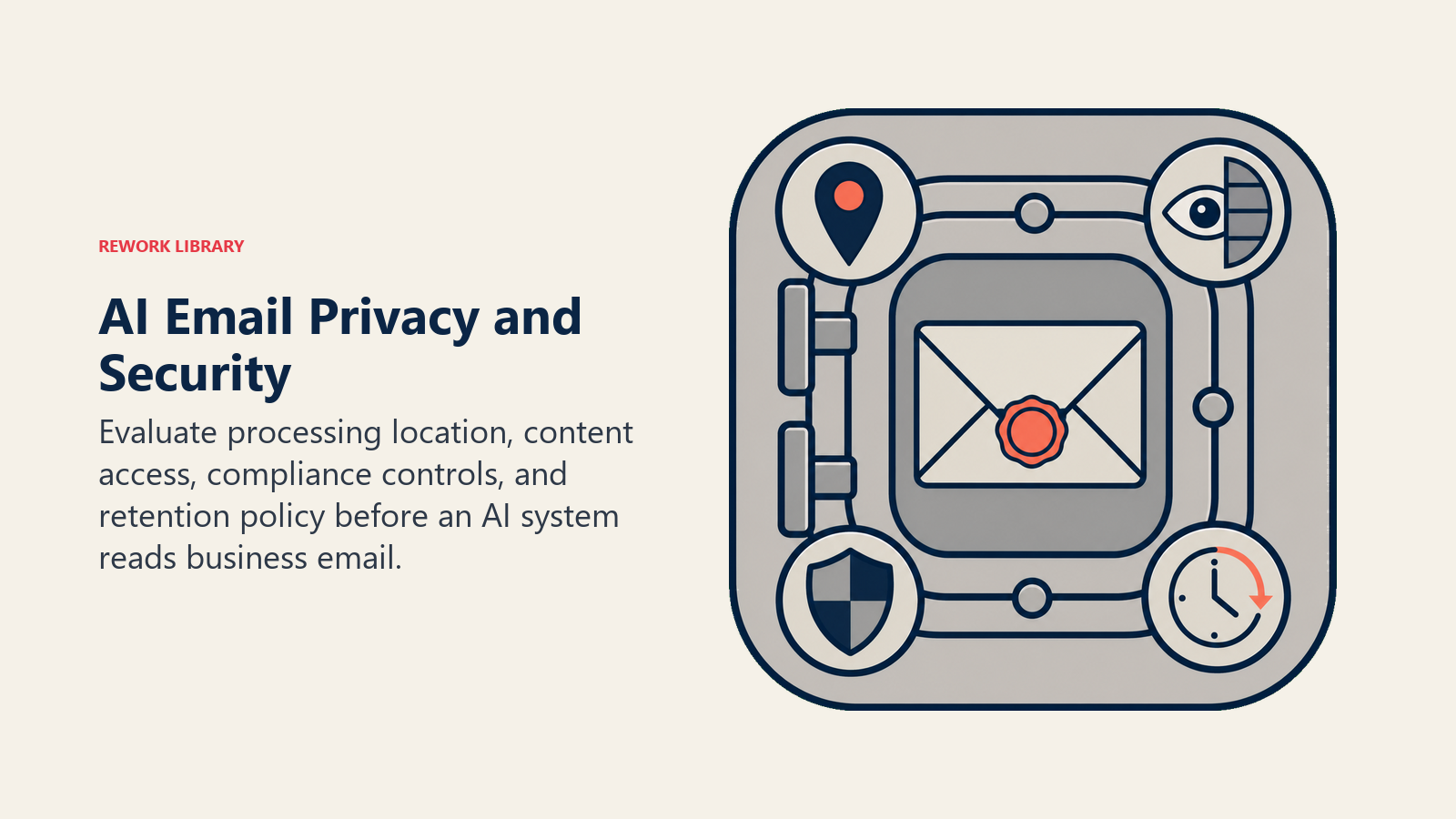
Data processing model varies by tool. Some process emails on-device or within your organization's environment. Others send message data to cloud servers for analysis. Understanding where and how your email data is processed is crucial, especially for sensitive business communications.
Content access scope differs across tools. Some only analyze metadata (sender, subject, timestamps) without reading message content. Others perform full content analysis to enable features like response suggestion and sentiment detection. Know what level of access you're granting.
Compliance requirements matter for regulated industries. Healthcare organizations need HIPAA compliance. Financial services need SOC 2 and data residency controls. Legal teams have confidentiality obligations. Ensure your AI email tool meets relevant compliance standards before deployment.
Data retention and deletion policies should align with your organization's practices. How long does the AI retain email data for training purposes? Can you delete data on request? What happens to your data if you cancel the service?
The AI ethics and data privacy framework provides comprehensive guidance for evaluating these concerns. For business-critical email, privacy and security aren't optional considerations.
Integration with Productivity Stack
AI email management delivers maximum value when connected to your other tools.
AI for email writing complements email management. One tool handles incoming messages. The other handles outgoing composition. Together, they create a complete email productivity system. You spend less time reading, sorting, and writing messages.
AI task management tools can create tasks automatically from action-required emails. When a message needs follow-up beyond a simple response, it becomes a task with context, due date, and relevant attachments. Email and task management stay synchronized without manual transfer.
AI scheduling and calendar tools connect email discussions with actual availability. When someone proposes a meeting time via email, the AI can check your calendar and suggest alternatives automatically.
CRM and customer database integration provides context for customer emails. When a message arrives, you see their account history, purchase data, support tickets, and previous communications. You respond with full context instead of searching for information.
Implementation and Adoption
Getting value from AI email management requires thoughtful rollout.
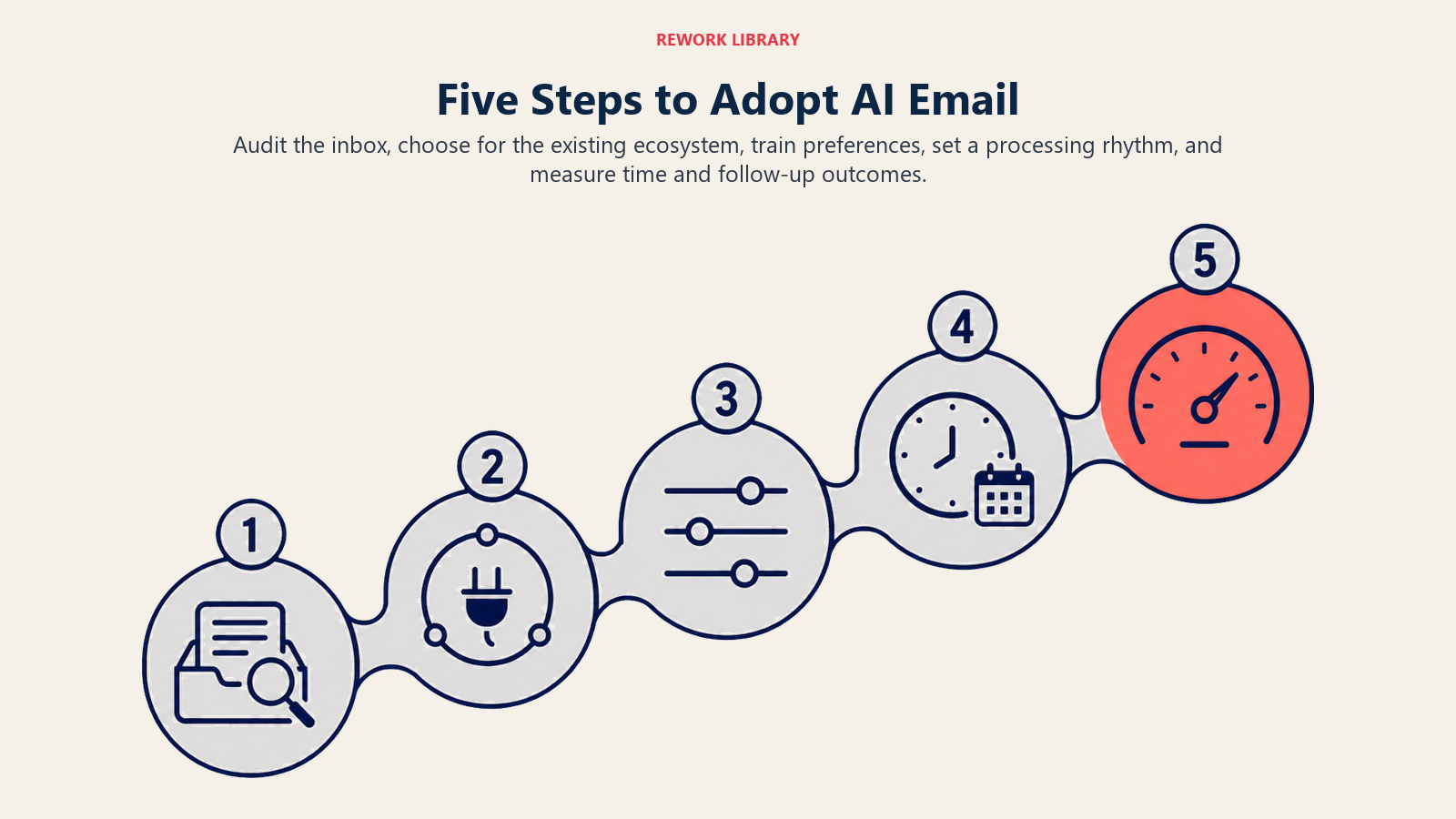
Start with inbox audit. How many emails do you receive daily? What percentage require action versus FYI? How much time do you currently spend on email? This baseline helps you measure improvement.
Choose the right tool for your ecosystem. If you're deeply invested in Google Workspace, Gmail's native AI features make sense. If you need cross-platform support, SaneBox provides more flexibility. If email volume is extreme, Superhuman's focused experience might justify the cost.
Configure preferences and training. Most AI email tools improve with explicit feedback. Mark messages as important or not important. Confirm or override categorizations. The more you train the AI, the better it performs.
Create email processing rhythm. Don't check email constantly. Process in batches two or three times daily. Let the AI surface truly urgent items while everything else waits for your scheduled processing time. This reduces context switching while ensuring responsiveness.
Measure the impact. Track time spent on email before and after AI implementation. Monitor inbox zero achievement. Count the number of missed follow-ups. Quantitative data shows whether the tool is delivering value or just adding complexity.
The connection to AI productivity ROI metrics ensures you're measuring what matters, not just feeling more organized.
The Email Management Mindset Shift
AI email management requires rethinking your relationship with your inbox.
You're not responsible for reading every message. You're responsible for handling messages that matter. The AI helps you distinguish between the two.
You don't have to respond to everything. The AI helps you identify what requires response versus what's just noise. Automated unsubscribe and filtering mean you only see messages worth considering.
You can trust the AI to surface important items. This trust takes time to build. Initially, you'll check the "other" folder constantly, worried you're missing something. After weeks of the AI consistently surfacing everything important, you'll stop checking. That's when the time savings compound.
Your inbox becomes a managed communication channel instead of a source of anxiety. The pile doesn't grow because the AI is constantly processing, sorting, and archiving. Zero inbox becomes sustainable instead of a weekly heroic effort.
The 2.5 hours per day spent on email management compresses to 30-45 minutes of focused processing. That's not a small improvement. That's reclaiming 10 hours per week for actual work.
And unlike most productivity improvements that add complexity, AI email management reduces it. You're doing less work, not different work. Reading fewer messages, not reading them differently. Processing one inbox view, not maintaining elaborate folder structures.
The inbox time sink is solvable. The tools exist. The question is whether you're ready to let AI handle the filtering, sorting, and prioritization that's been consuming your time and attention for years.
Because once you do, those 10 hours per week become available for work that actually matters. Work that moves your business forward instead of just keeping up with message flow.
That's not email management. That's time freedom.

On this page
- How AI Transforms Email Management
- Leading AI Email Management Tools
- Priority-Based Inbox Management
- Email Management by Role
- The Zero-Inbox Workflow with AI
- Email Analytics and Insights
- Privacy and Security Considerations
- Integration with Productivity Stack
- Implementation and Adoption
- The Email Management Mindset Shift