AI Data Entry Automation
Turn this article into takeaways for your work.


Each assistant summarizes the article only for you and suggests best practices for your work.
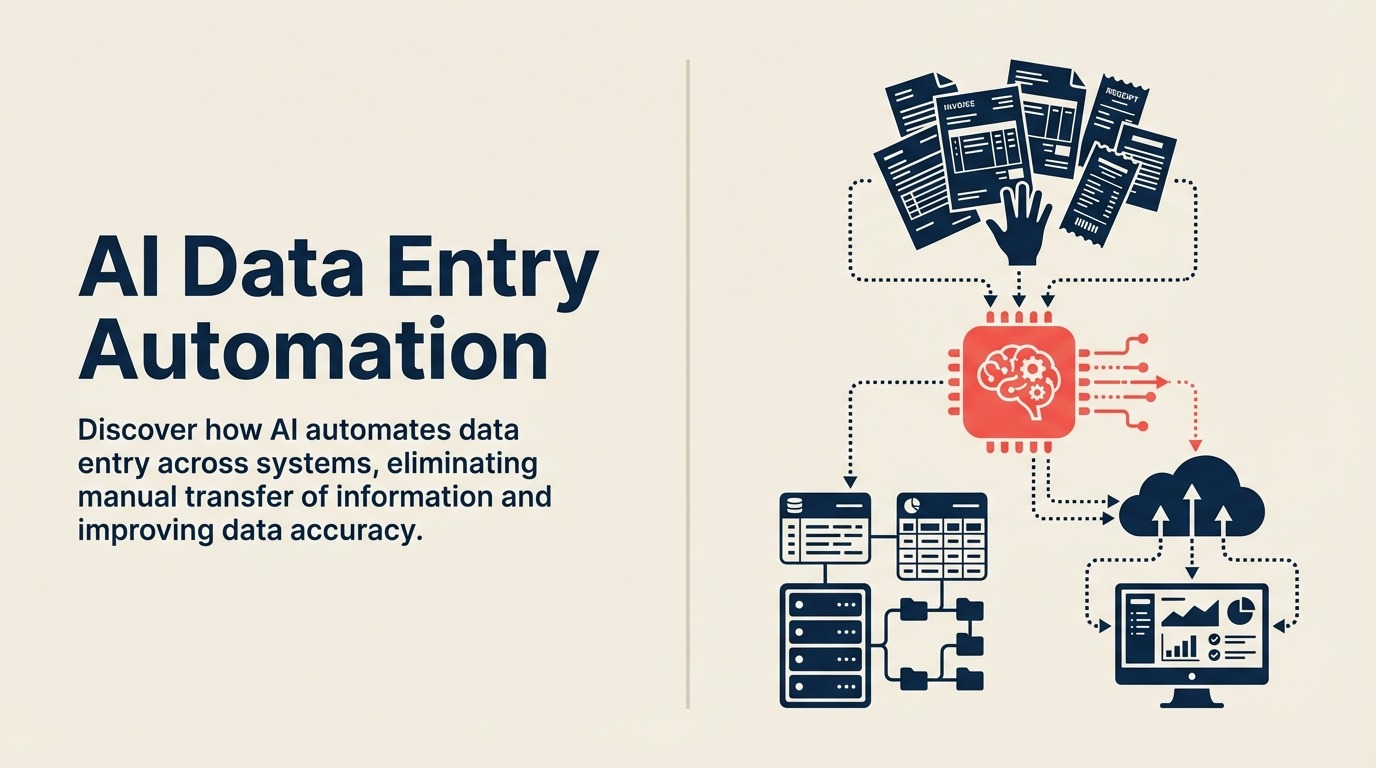
Here's a productivity calculation that should make you angry. Research shows businesses spend 10-15% of their total operational costs on manual data entry. For a company with $10 million in annual operating expenses, that's up to $1.5 million per year paying humans to copy information from one system to another.
When evaluating AI vs traditional productivity software, data entry automation shows the starkest difference. Traditional tools help humans enter data faster. AI eliminates the need for humans to enter data at all.
A salesperson takes notes during a customer call, then manually enters contact details, opportunity information, and next steps into the CRM. An accounts payable clerk opens an email with an invoice PDF attached, reads the vendor name, invoice number, and line items, then types them into the ERP system. An HR coordinator receives a job application, extracts the candidate's information, and enters it into the applicant tracking system.
This is the data entry tax. Information exists in one place (email, PDF, form, spreadsheet) and needs to be in another place (CRM, ERP, database). Humans bridge the gap by reading and typing. It's slow, it's expensive, and it's mind-numbingly boring. And worse, it's error-prone. Manual data entry has a 1-3% error rate on average, which creates downstream problems that cost even more to fix.
AI data entry automation eliminates this entire category of work. Not by making humans faster at typing. By removing humans from the loop entirely. The information gets extracted, validated, and synchronized automatically. The result is faster processing, near-zero errors, and capacity to handle volume growth without adding headcount.
How AI Automates Data Entry
AI-powered data entry combines several technologies to replace manual information transfer.
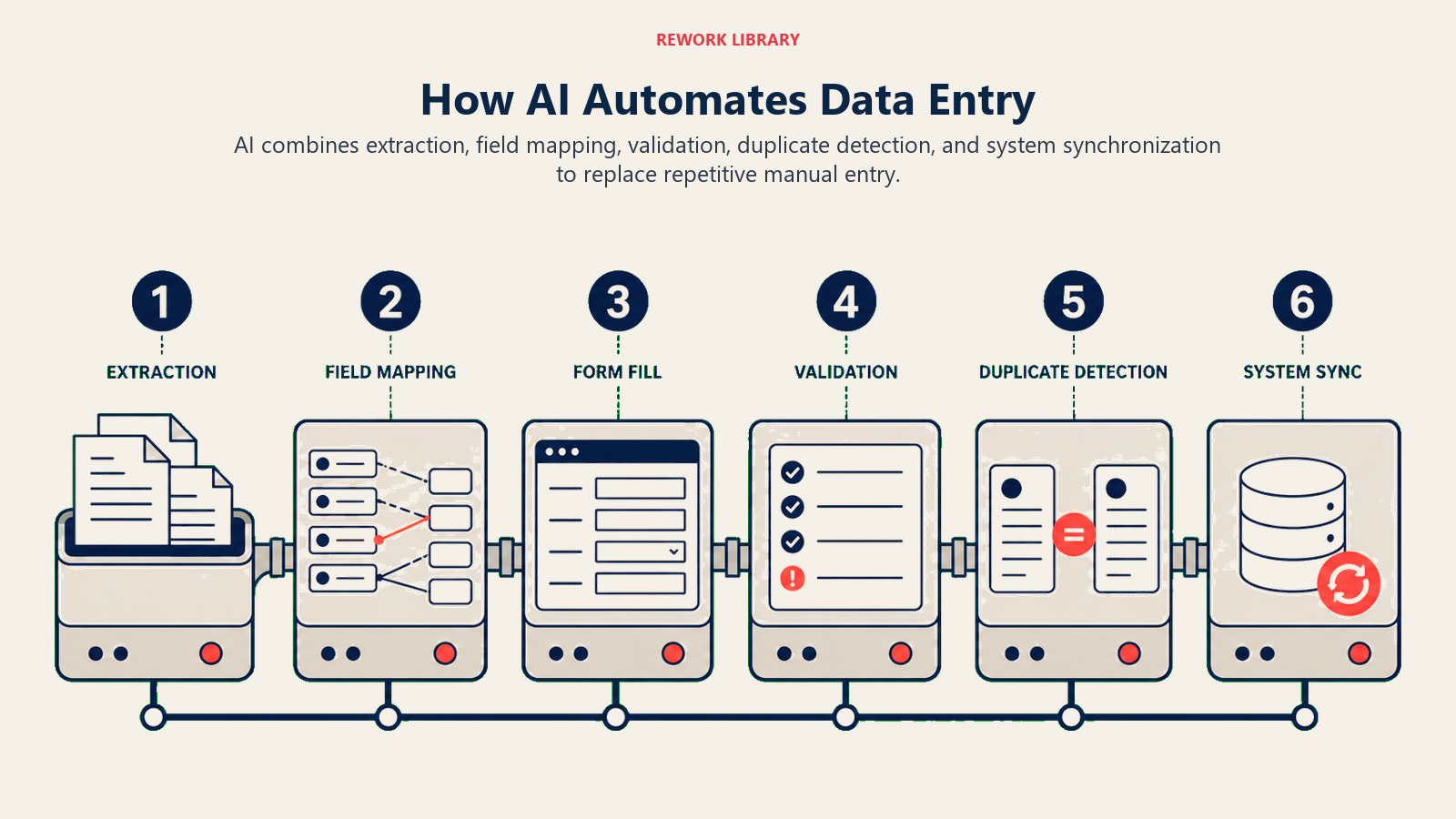
Cross-system data synchronization keeps information consistent across platforms without human intervention. A new lead fills out a contact form on your website. The AI extracts the information and creates records in your CRM, marketing automation platform, and customer database simultaneously. One submission, multiple systems updated, zero manual entry.
The AI handles field mapping between systems. The "Company Name" field in your web form becomes "Account Name" in Salesforce and "Organization" in HubSpot. The AI translates between different field names and data formats automatically.
Form auto-population fills in information you already have. A customer starts an order form. The AI recognizes their email address and automatically populates their name, company, billing address, and payment method from previous orders. What would take 2 minutes of typing happens in seconds without the customer doing anything.
This works across systems. Information entered in one context becomes available everywhere. Your sales team updates contact information in the CRM. That update automatically flows to invoicing, support ticketing, and email marketing systems. No manual syncing required.
Email and document data extraction pulls structured information from unstructured sources. An invoice arrives via email as a PDF attachment. The AI extracts vendor name, invoice number, date, line items, and total amount. It creates the invoice record in your accounting system with all fields populated. The accounts payable team reviews and approves instead of entering data.
The same capability works for purchase orders, contracts, applications, forms, anything with information that needs to flow into structured systems. The AI reads, interprets, and extracts without human intervention.
Data validation and cleansing ensures accuracy as information enters your systems. The AI checks that email addresses are valid, phone numbers have the right format, addresses are real locations, and company names match known entities. It can standardize variations (IBM vs IBM Corporation vs International Business Machines) automatically.
Validation catches errors immediately rather than letting bad data propagate through your systems. And it happens in real-time as data is processed, not during manual cleanup projects months later.
Duplicate detection prevents the same information from being entered multiple times. A prospect fills out two different forms on your website. The AI recognizes they're the same person based on email, name, or company and merges the records instead of creating duplicates. This keeps your database clean without requiring humans to constantly deduplicate.
Common Data Entry Use Cases
Different business functions have different high-volume data entry needs. Here's how AI automation addresses them.
CRM data entry from emails and calls is one of the biggest time sinks for sales teams. After every customer interaction, reps are supposed to log the conversation, update contact details, record next steps, and move the opportunity forward. Many skip it because it takes time away from selling.
AI automation captures this information automatically. The sales rep has a recorded call or email thread. The AI extracts action items, updates, and relevant details, then writes them to the appropriate CRM fields. The rep reviews for accuracy and submits. What took 5-10 minutes now takes 30 seconds.
ERP updates from invoices and purchase orders consume significant time in finance and operations. Every invoice needs vendor details, line items, amounts, and GL codes entered. Every purchase order needs similar information in a different system.
AI extraction pulls this data from documents automatically. The finance team validates that extracted information is correct, approves for processing, and moves on. Data entry time per document drops from 2-3 minutes to 15-30 seconds.
HR system updates from applications happen during recruiting cycles. Every applicant submits a resume, cover letter, and application form. Someone needs to extract contact information, work history, education, and qualifications into the applicant tracking system.
AI document processing reads resumes and applications, extracts structured information, and populates candidate records automatically. Recruiters review candidates instead of entering their information manually.
Inventory updates from receipts keep inventory systems accurate. Goods arrive, the warehouse team receives them, and someone enters quantities and item numbers into the inventory management system based on the packing slip or receipt.
AI can process packing slips photographed on a mobile device, extract items and quantities, and update inventory records automatically. Real-time accuracy without manual entry delays.
Financial system reconciliation matches transactions across systems. Credit card statements need to be reconciled with expense reports. Bank deposits need to match invoices. The AI extracts transaction details from statements, matches them to corresponding records in your systems, and flags exceptions automatically.
Reconciliation time drops from hours to minutes. The accounting team handles exceptions and reviews rather than manually matching hundreds of line items.
Leading AI Data Entry Solutions
The technology landscape includes both platform approaches and specialized tools.
RPA platforms with AI like UiPath, Automation Anywhere, and Blue Prism combine robotic process automation with AI extraction. RPA bots can interact with any application, even legacy systems without APIs. The AI extracts data from documents or emails. The RPA bot enters that data into target systems by navigating screens just like a human would.
This approach works for systems that don't have modern integration options. Your 20-year-old proprietary ERP system doesn't have an API. But an RPA bot can log in, navigate to the right screen, and fill in fields automatically. The AI provides the intelligence, the RPA provides the execution.
Specialized extraction tools like Parseur and Docparser focus specifically on extracting data from emails and documents. You define templates for the documents you receive regularly. The tool extracts information based on those templates and sends it to destination systems via webhooks or integrations.
These tools work well when you have standardized document types (invoices, purchase orders, applications) and need to extract information reliably without building custom code.
Integration platforms with AI like Zapier and Make include AI-powered data extraction capabilities. You can create workflows that trigger when an email arrives, use AI to extract information from the email or attachment, and write that data to your CRM, database, or spreadsheet automatically.
The advantage is low-code implementation. Business users can build these automations without developers. The limitation is complexity, these platforms work for straightforward workflows but struggle with complex multi-step processes.
Custom solutions using AI APIs give you maximum flexibility. You build exactly the data entry automation you need using APIs from OpenAI (GPT-4), Anthropic (Claude), or Google (Gemini). This approach requires development resources but delivers tailored solutions for unique requirements.
A custom solution might extract data from emails, validate it against your business rules, enrich it with information from other systems, and write it to multiple destinations with custom logic for each. You get exactly what you need, not a pre-built workflow that's almost right.
The Data Entry Automation Workflow
Understanding how these automations work helps you implement them effectively.
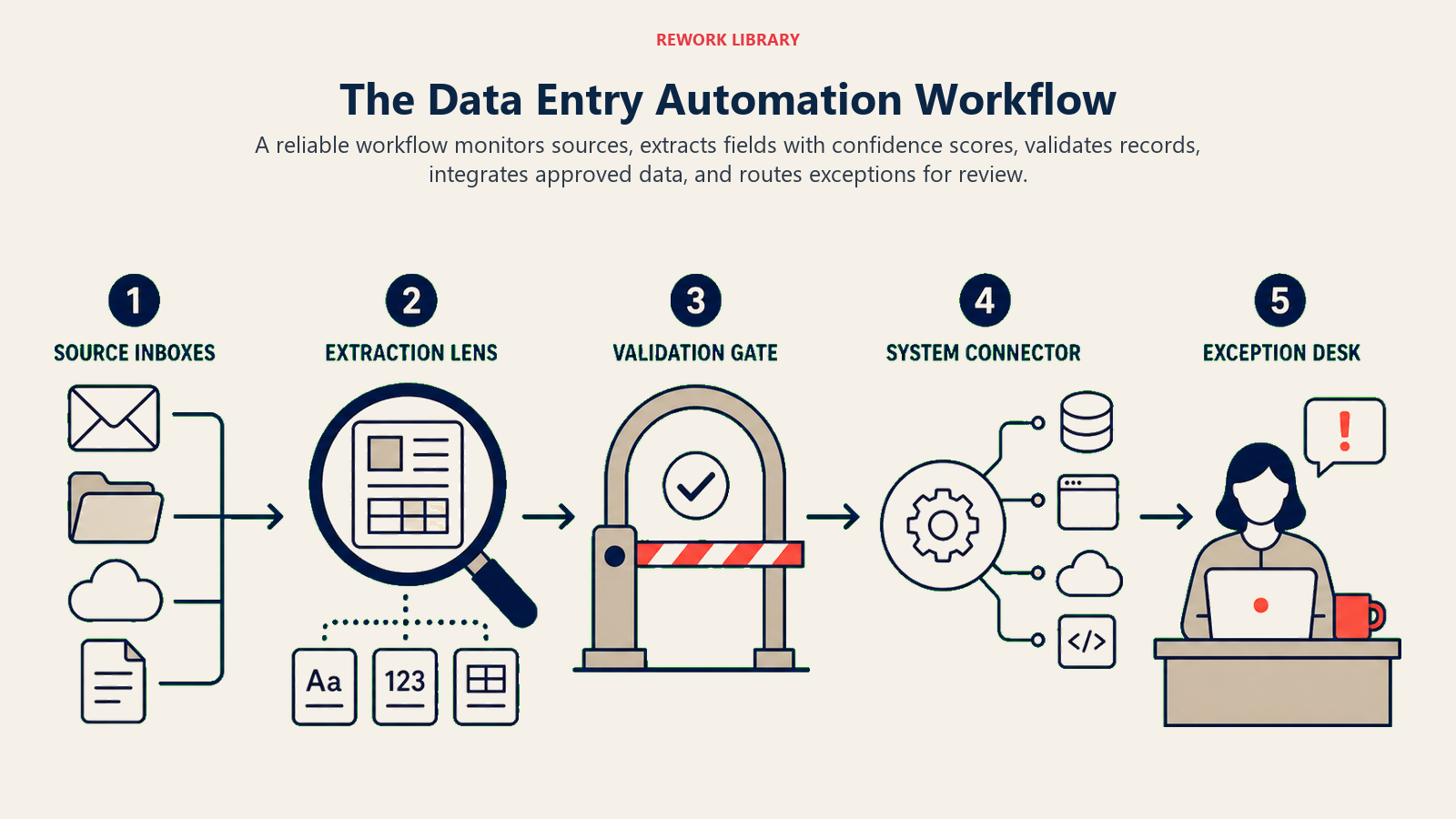
Source monitoring watches for information that needs to be transferred. This might be monitoring an email inbox for invoices, watching a folder for uploaded documents, listening to a webhook for form submissions, or checking an API for new records.
The monitoring component needs to be reliable. Missed emails or documents mean missed data entry. Good solutions include redundancy, error handling, and alerting when monitoring fails.
Data extraction pulls relevant information from the source. For structured sources like databases or APIs, this is straightforward field mapping. For unstructured sources like emails, PDFs, or images, AI extraction identifies and captures the information you need.
Extraction includes confidence scoring. The AI might be 98% confident it found the invoice number but only 75% confident about a handwritten notation. Low-confidence extractions can be flagged for human verification.
Validation and enrichment ensures data quality before it enters your systems. The AI validates formats (is this a real email address?), checks business rules (is this vendor in our approved supplier list?), and enriches with additional information (geocode this address to add city and state fields).
Validation prevents garbage data from entering your systems. It's easier to catch errors during extraction than to clean them up later after they've propagated through multiple systems.
System integration writes the validated data to destination systems. This might be via API calls, database writes, file exports, or RPA screen automation. The method depends on what your target systems support.
Good integration handles errors gracefully. If the API call fails, the automation retries with exponential backoff. If retries fail, it logs the error and alerts someone to investigate. Data doesn't get lost when temporary issues occur.
Error handling manages the inevitable edge cases. Documents that don't match expected formats. Validation failures. System integration errors. These exceptions need to route somewhere for human attention.
Effective error handling includes clear alerting, easy access to source documents and extracted data, simple tools for correction, and feedback loops so the AI learns from corrections.
Data Quality Improvement Through Automation
AI data entry automation doesn't just match manual entry accuracy. It exceeds it significantly.
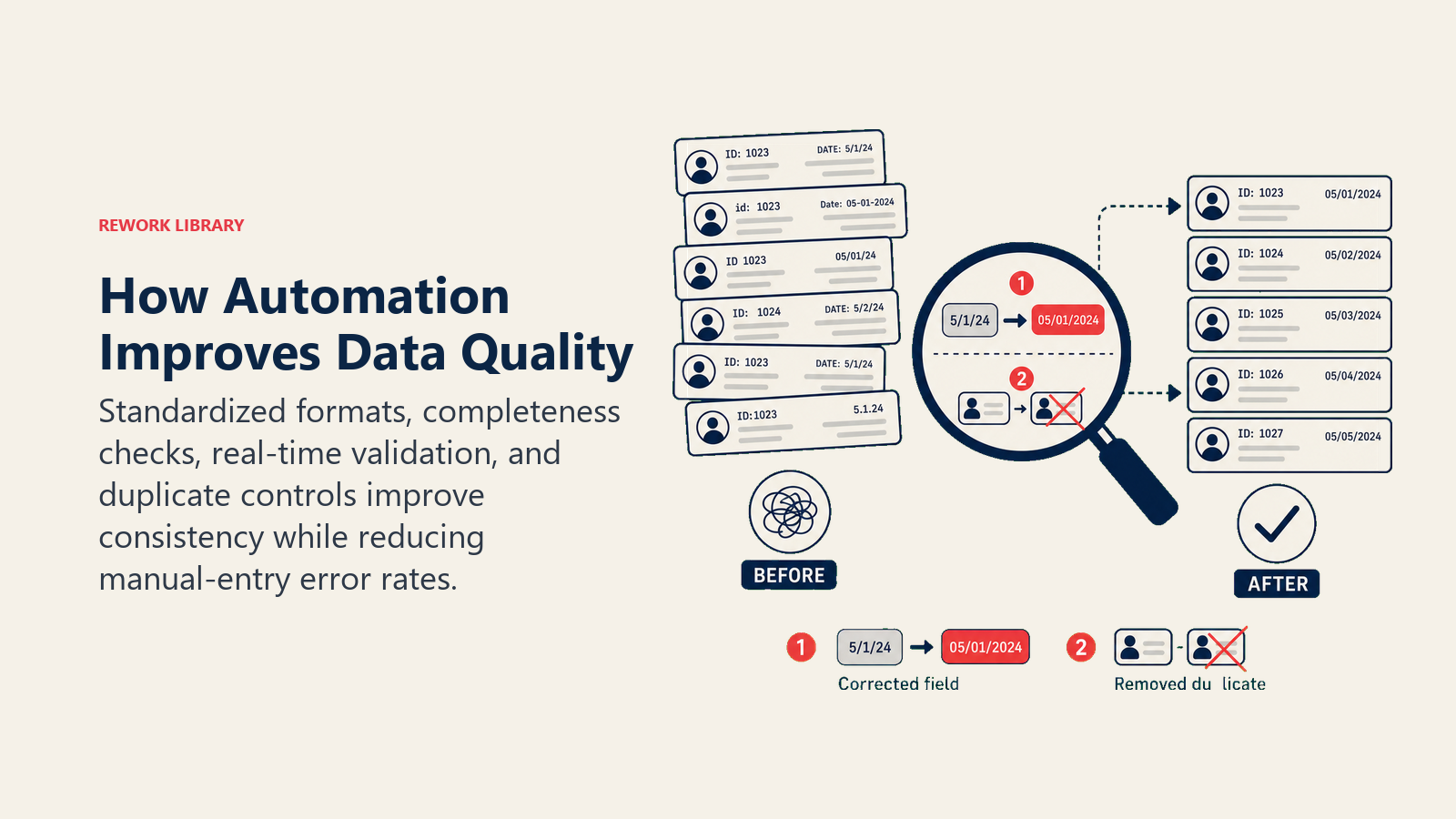
Error rate reduction is dramatic. Manual data entry has 1-3% error rates depending on complexity and volume. AI-powered extraction typically achieves 95-98% accuracy for standard documents. That's a 90-95% reduction in errors.
Fewer errors mean less time fixing downstream problems. Invoices don't get paid to wrong vendors. Customer records don't have typos in email addresses. Inventory counts stay accurate. The cost savings from error reduction often exceed the cost savings from labor reduction.
Standardization happens automatically. Humans enter company names inconsistently: IBM, I.B.M., International Business Machines, IBM Corp. The AI standardizes to your preferred format. Addresses get formatted consistently. Phone numbers use the same structure. This standardization makes data actually usable for analysis.
Completeness checking ensures all required fields are populated. Manual entry often leaves fields blank because the person didn't notice them or couldn't find the information. AI extraction flags incomplete data automatically. You can require human verification for incomplete records or route them for additional information gathering.
Real-time validation catches errors immediately. Traditional manual entry might not discover errors until days or weeks later during reconciliation or auditing. AI validation happens as data is extracted. Invalid formats, missing required fields, failed business rules, all flagged before the data enters your systems.
This real-time feedback creates a virtuous cycle. Errors get caught and corrected immediately. The corrections train the AI to handle similar cases better in the future. Accuracy improves continuously.
Integration Patterns for Different Systems
Different technical approaches work for different system types.
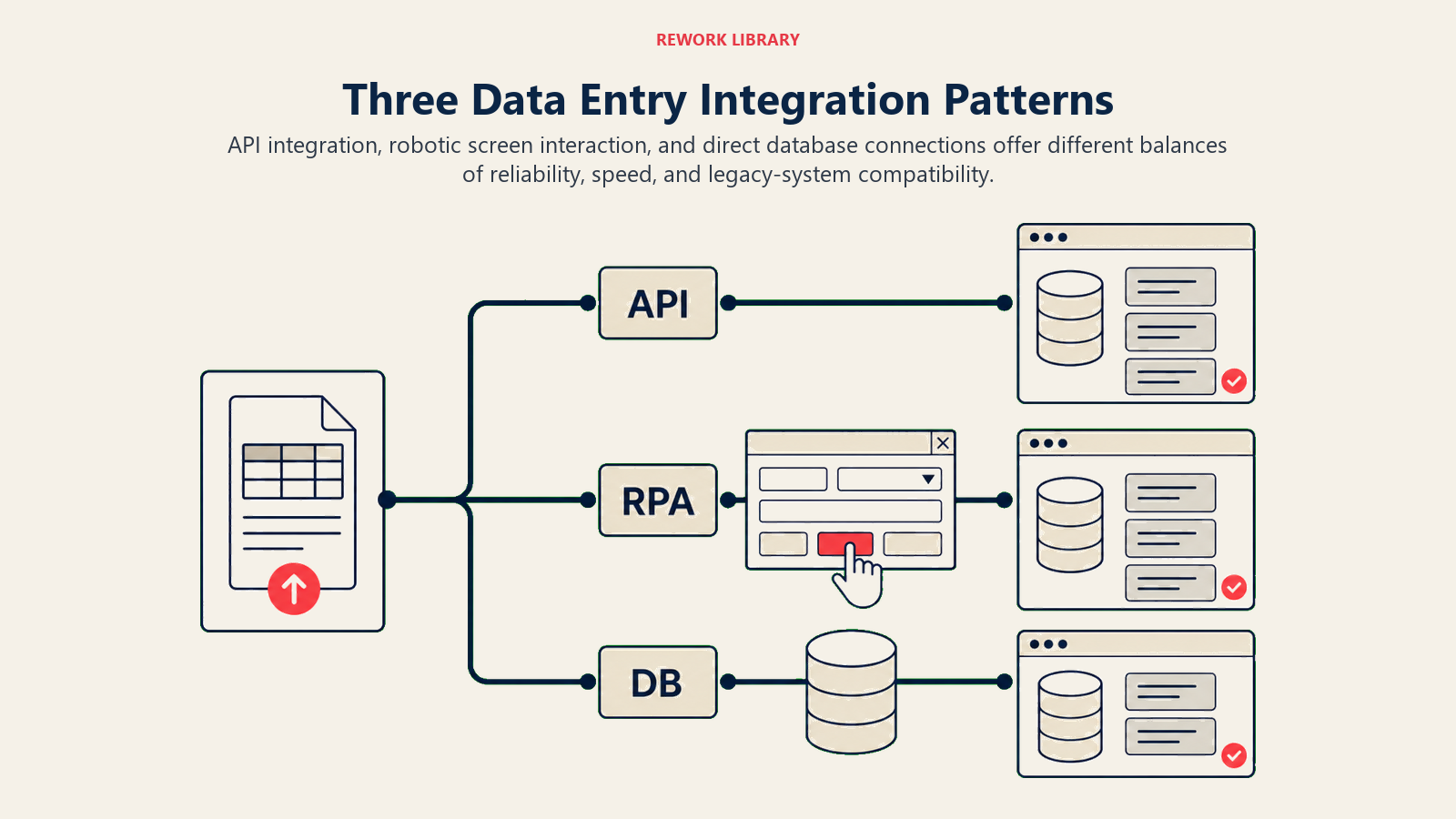
API-based integration is ideal for modern cloud applications. Salesforce, HubSpot, QuickBooks Online, most SaaS tools have robust APIs. The AI extracts data and makes API calls to create or update records. This is fast, reliable, and fully automated.
API integration requires some technical setup. You need to authenticate, handle rate limits, map fields correctly, and manage errors. But once it's working, it scales effortlessly.
Screen scraping for legacy systems uses RPA to automate data entry into applications without APIs. The bot navigates through screens, fills in fields, and clicks buttons just like a human would. This works for old enterprise software, government systems, or proprietary applications.
Screen scraping is more fragile than API integration. If the application's user interface changes, the automation breaks until you update it. But it's often the only option for systems that can't be modernized.
Database direct access writes data directly to application databases when APIs aren't available but database access is. This is faster than screen automation but requires deep understanding of the database schema. And it can void support agreements if the application vendor doesn't support direct database modification.
Use this approach carefully and only when necessary. But for data warehouse loading or legacy systems with documented database structures, it can be effective.
The connection to AI integration with existing systems provides comprehensive guidance on choosing and implementing these integration patterns. Integration architecture determines whether your data entry automation saves 50% of manual effort or 90%.
ROI Framework for Data Entry Automation
Data entry automation delivers returns across multiple dimensions.
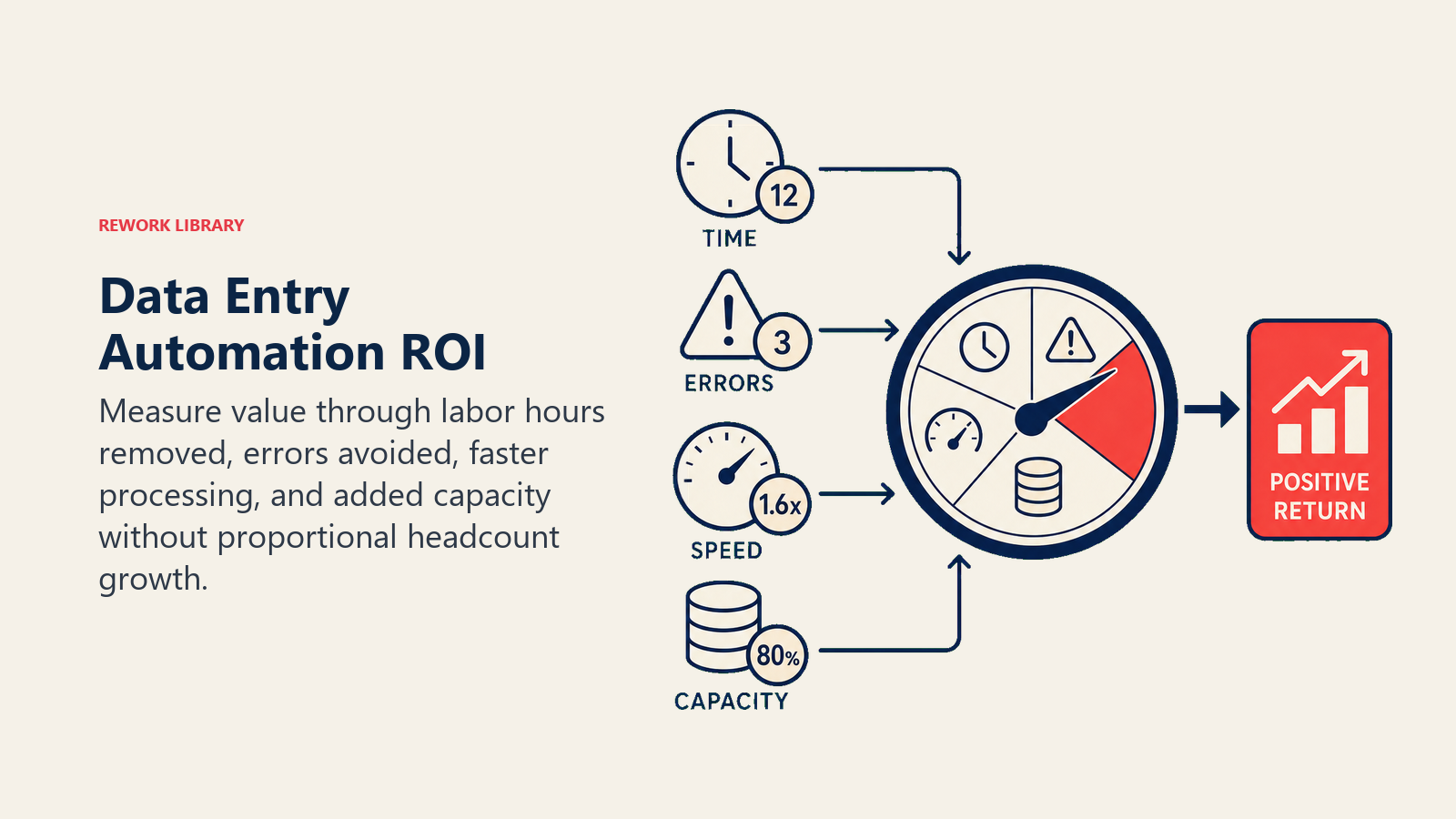
Labor savings are the most obvious. Calculate hours spent on manual data entry currently. If three people spend 50% of their time on data entry at $25/hour, that's 3,000 hours annually, $75,000 in labor cost. AI automation that eliminates 80% of that work saves $60,000 annually in labor.
But don't just cut headcount. Redeploy those people to higher-value work. The accounts payable clerk who stops entering invoices can focus on supplier relationship management and payment optimization. The sales rep who stops logging CRM data can make more sales calls. The productivity gain is larger than the labor savings.
Error reduction value comes from avoiding downstream costs. If 2% of manually entered invoices have errors and each error costs $100 to identify and correct (research, communication, system updates), that's significant expense. For 10,000 invoices annually, that's 200 errors, $20,000 in correction costs. Eliminating 90% of errors saves $18,000 annually.
This doesn't include the value of avoiding major errors like duplicate payments, wrong addresses causing shipment failures, or compliance violations from incorrect data.
Speed improvement enables faster business processes. Invoice processing cycle time drops from 3 days to same-day. Customer onboarding goes from one week to 24 hours. Faster processing improves cash flow, customer satisfaction, and operational responsiveness.
Quantify this by looking at cycle time reduction and its business impact. If faster invoice processing improves early payment discount capture by $50,000 annually, that's real ROI.
Capacity gains let you handle volume growth without proportional headcount growth. If your business is growing 20% annually and data entry volume grows with it, you'd need 20% more staff to maintain service levels. AI automation absorbs that growth without headcount increase.
Calculate the hiring cost avoided. One FTE avoided is salary plus benefits plus overhead, often $80,000-120,000 annually depending on role and location.
The AI performance measurement framework provides detailed methodology for tracking these metrics and building a comprehensive ROI case.
Implementation Best Practices
Getting value from data entry automation requires thoughtful rollout.
Start with highest-volume, most-standardized processes. Invoice processing, lead capture, or application intake make excellent starting points. High volume justifies the automation effort. Standardization makes implementation easier and accuracy higher.
Pilot before full rollout. Automate one workflow completely while maintaining manual backup. Process 500-1,000 records through automation while still doing manual entry. Compare results. Measure accuracy. Identify edge cases. Tune the system before committing fully.
Build exception handling into the design. You won't achieve 100% automation. Plan for 10-20% exception rates initially. Define how exceptions route, who handles them, and how corrections feed back to improve the AI. Exception handling capability is what separates successful implementations from failed ones.
Integrate from the start. Data entry automation that dumps extracted data into spreadsheets for manual upload isn't real automation. Build the integrations that enable straight-through processing. Extracted data should flow directly to target systems without human transfer.
Train with real data. Generic AI models work for standard documents but your specific formats need custom training. Upload hundreds or thousands of your actual invoices, forms, or documents. Label the fields you want to extract. Let the AI learn your specific patterns.
Monitor and optimize continuously. Track extraction accuracy by document type. Measure exception rates. Monitor processing time and cost. This data helps you identify opportunities for improvement and demonstrates ongoing value.
The integration with AI workflow automation and AI document processing creates comprehensive automation that extends beyond just data entry to complete business processes.
When combined with AI email management, data entry automation can extract information from emails, validate it, and populate multiple systems without any manual data transfer.
The Data Entry Elimination Mindset
AI data entry automation requires changing how you think about information flow.
Data shouldn't be entered. It should be captured once at the source and flow automatically to everywhere it's needed. Every manual data entry task is a potential automation target.
Quality improves when humans stop typing. Automated extraction is more accurate and consistent than manual entry. The validation rules you encode ensure data quality that's hard to maintain with human processes.
Speed becomes the default. Information flows from source to destination in seconds or minutes instead of hours or days. This velocity enables faster decision-making and responsiveness.
Capacity becomes elastic. Volume doubles and your automation handles it without requiring more people, more time, or more cost. Growth doesn't automatically mean headcount growth.
The 10-15% of operational costs spent on manual data entry gets compressed to 2-3% for automated extraction with human exception handling. That's not incremental improvement. That's an order of magnitude reduction in a major cost category.
And the humans freed from data entry work? They do work that creates value instead of just transferring it. The sales rep sells more. The accountant optimizes cash flow. The HR coordinator builds better candidate relationships. The capacity is there. It was just buried under data entry overhead.
The technology is mature. The tools are available. The ROI is proven. The question is whether your organization is ready to stop paying humans to copy information from one place to another when AI can do it faster, cheaper, and more accurately.
Because once you eliminate manual data entry, those labor hours become available for work that actually matters. Work that requires judgment, creativity, and human intelligence. Work that moves your business forward instead of just keeping systems synchronized.
That's not cost reduction. That's capability transformation.

On this page
- How AI Automates Data Entry
- Common Data Entry Use Cases
- Leading AI Data Entry Solutions
- The Data Entry Automation Workflow
- Data Quality Improvement Through Automation
- Integration Patterns for Different Systems
- ROI Framework for Data Entry Automation
- Implementation Best Practices
- The Data Entry Elimination Mindset