AI Document Processing
Turn this article into takeaways for your work.


Each assistant summarizes the article only for you and suggests best practices for your work.
Walk into any back-office operation and you'll see it. Stacks of invoices, contracts, forms, and applications waiting for someone to manually read them and enter data into systems. A person opens a PDF invoice, reads the vendor name, invoice number, line items, and total, then types each field into the accounting system. Repeat 500 times per day.
This is the document processing bottleneck. Critical business information trapped in unstructured formats, PDFs, scanned images, handwritten forms, requiring human eyes and hands to transfer it into usable digital systems. Organizations spend millions annually on this manual work. And it's slow, error-prone, and mind-numbingly repetitive.
Understanding types of AI productivity tools reveals how document processing sits at the intersection of extraction, automation, and integration capabilities.
Traditional OCR (Optical Character Recognition) helped by converting images to text. But it couldn't understand what the text meant. It might extract "Total: $1,247.92" from an invoice, but it didn't know that was the amount to pay versus a subtotal or tax amount. Humans still had to read, interpret, and classify the extracted text.
AI document processing changes this completely. It doesn't just extract text. It understands document structure, identifies data fields, validates information, and routes documents automatically. The same invoice that took 2-3 minutes of manual processing now gets handled in seconds with 95%+ accuracy.
The result isn't just faster processing. It's eliminating entire categories of manual work and unlocking information that was previously too expensive to extract.
How AI Transforms Document Processing
AI-powered document processing combines multiple technologies that work together seamlessly.
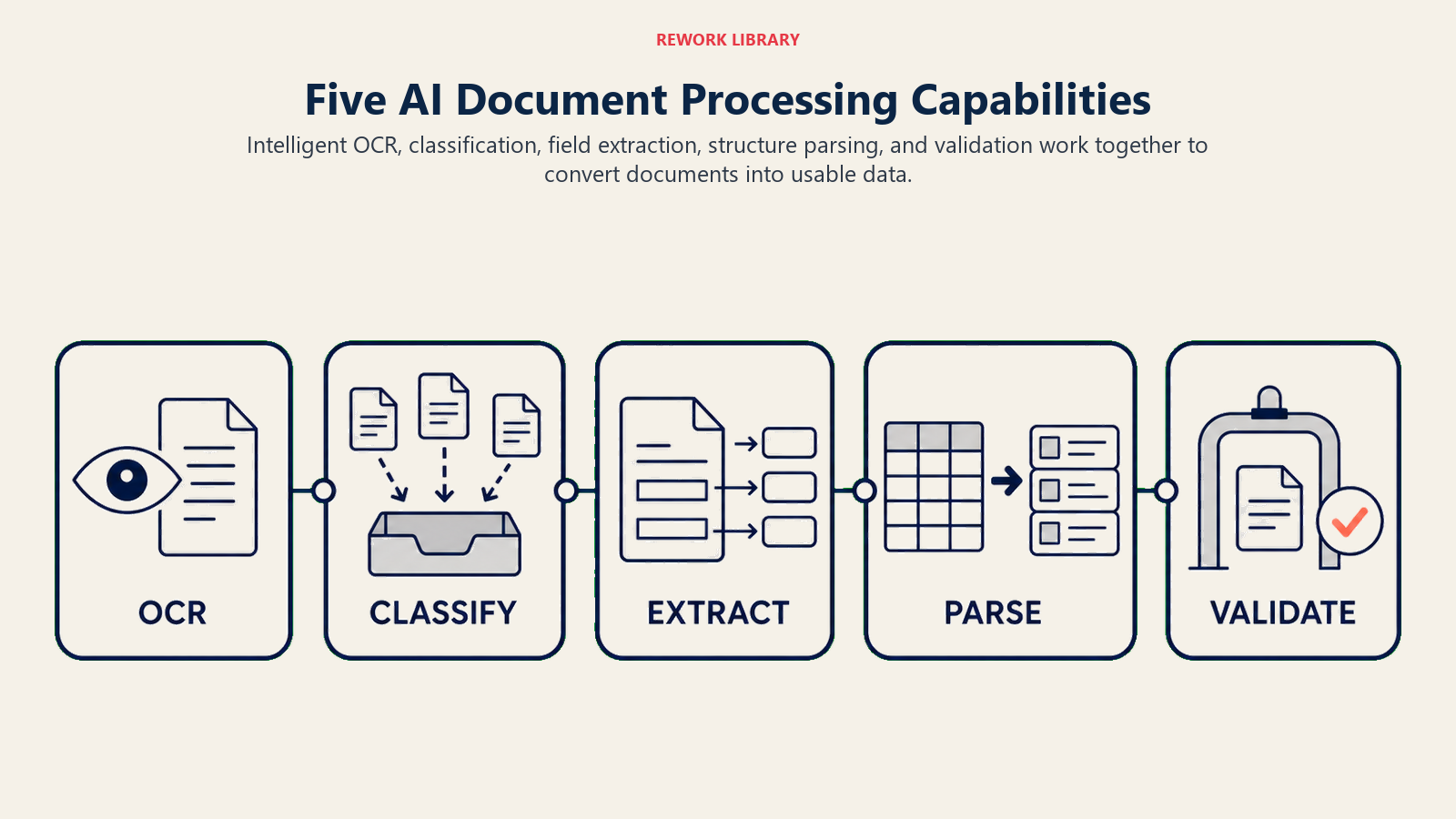
Intelligent OCR goes beyond character recognition. Traditional OCR struggles with different fonts, handwriting, poor scan quality, or complex layouts. AI-enhanced OCR uses deep learning models trained on millions of documents to handle these variations. It can read handwriting with high accuracy, process low-quality scans, and extract text from complex multi-column layouts.
The AI understands that documents have structure. An invoice has a header with vendor information, a table of line items, and a footer with totals. A contract has clauses, signatures, and dates. The AI extracts text while preserving this structural understanding.
Document classification identifies what type of document you're processing before extraction begins. Is this an invoice, a purchase order, a contract, or a tax form? The AI analyzes the document layout, common keywords, and field patterns to classify it automatically.
This classification determines which extraction template to apply. Invoices get processed for vendor, date, line items, and total. Resumes get processed for contact information, work history, and education. The right fields get extracted for each document type.
Key data extraction identifies and captures specific information you care about. From an invoice: vendor name, invoice number, date, line items with quantities and prices, subtotals, tax, and total amount due. From a contract: party names, effective date, term length, renewal clauses, termination conditions.
The AI doesn't just find text that looks like a date or number. It understands field relationships. It knows that "Total" on line 47 is more likely to be the invoice total than "Total" on line 12 in the middle of a description. It uses context and position to extract the right data.
Table and form parsing handles structured data within documents. Invoices contain tables of line items. Applications contain forms with labeled fields. The AI recognizes these structures and extracts them as structured data, not just blocks of text.
A table of 20 line items becomes 20 structured records with product, quantity, unit price, and extended price for each. A form becomes a set of field-value pairs. This structured extraction makes the data immediately usable in downstream systems.
Document validation checks that extracted data makes sense. Does the math add up? Do line items total to the subtotal? Is the date format valid? Is this vendor in our approved supplier list? The AI can flag inconsistencies and route exceptions for human review rather than passing bad data downstream.
Leading AI Document Processing Platforms
The document processing market includes both cloud platforms and specialized solutions.
Microsoft Form Recognizer (part of Azure AI) provides pre-built models for common document types like invoices, receipts, ID cards, and business cards. You can also train custom models on your specific document formats. It handles both printed and handwritten text, extracts tables, and provides confidence scores for each field.
The advantage is integration with the Azure ecosystem. If you're already using Azure services, Form Recognizer connects seamlessly to Azure Storage, Logic Apps, and other tools. Pricing is consumption-based, so you pay only for documents processed.
Google Document AI offers similar capabilities in the Google Cloud Platform. Pre-trained processors handle invoices, receipts, W-2s, driver's licenses, and other standard forms. You can create custom processors for your specific document types using their AutoML technology.
Document AI includes the Document AI Warehouse for storing and searching processed documents. This is valuable if you need to maintain a searchable archive of processed documents, not just extract data from them.
AWS Textract specializes in extracting text and structured data from scanned documents. AWS Textract automatically detects document layout, identifies form fields and tables, and extracts the information. Textract works particularly well with financial documents like invoices, tax forms, and loan applications.
The integration with AWS services like Lambda, S3, and DynamoDB makes it easy to build automated document processing workflows entirely within the AWS environment.
Rossum is purpose-built for accounts payable automation. Rossum focuses specifically on invoice processing with very high accuracy rates (95-99% for standard invoices). Rossum learns from corrections, so accuracy improves over time. It includes validation rules, multi-way matching with purchase orders, and direct integration with ERP systems.
For organizations processing high volumes of invoices, Rossum's specialized focus often delivers better results than general-purpose platforms.
Nanonets provides a no-code platform for building custom document processing models. You upload sample documents, label the fields you want to extract, and Nanonets trains a custom AI model. It's designed for teams who need document processing but don't have machine learning expertise.
Nanonets works well for non-standard documents that don't fit pre-built models. Custom forms, internal documents, legacy formats, anything where you have examples and want to automate extraction.
UiPath Document Understanding combines AI extraction with robotic process automation. It can process documents, extract data, validate it, and then use RPA bots to enter that data into any system, even those without APIs. This end-to-end capability makes UiPath attractive for complex workflows that involve multiple systems.
Document Types and Processing Approaches
Different document types require different processing strategies.
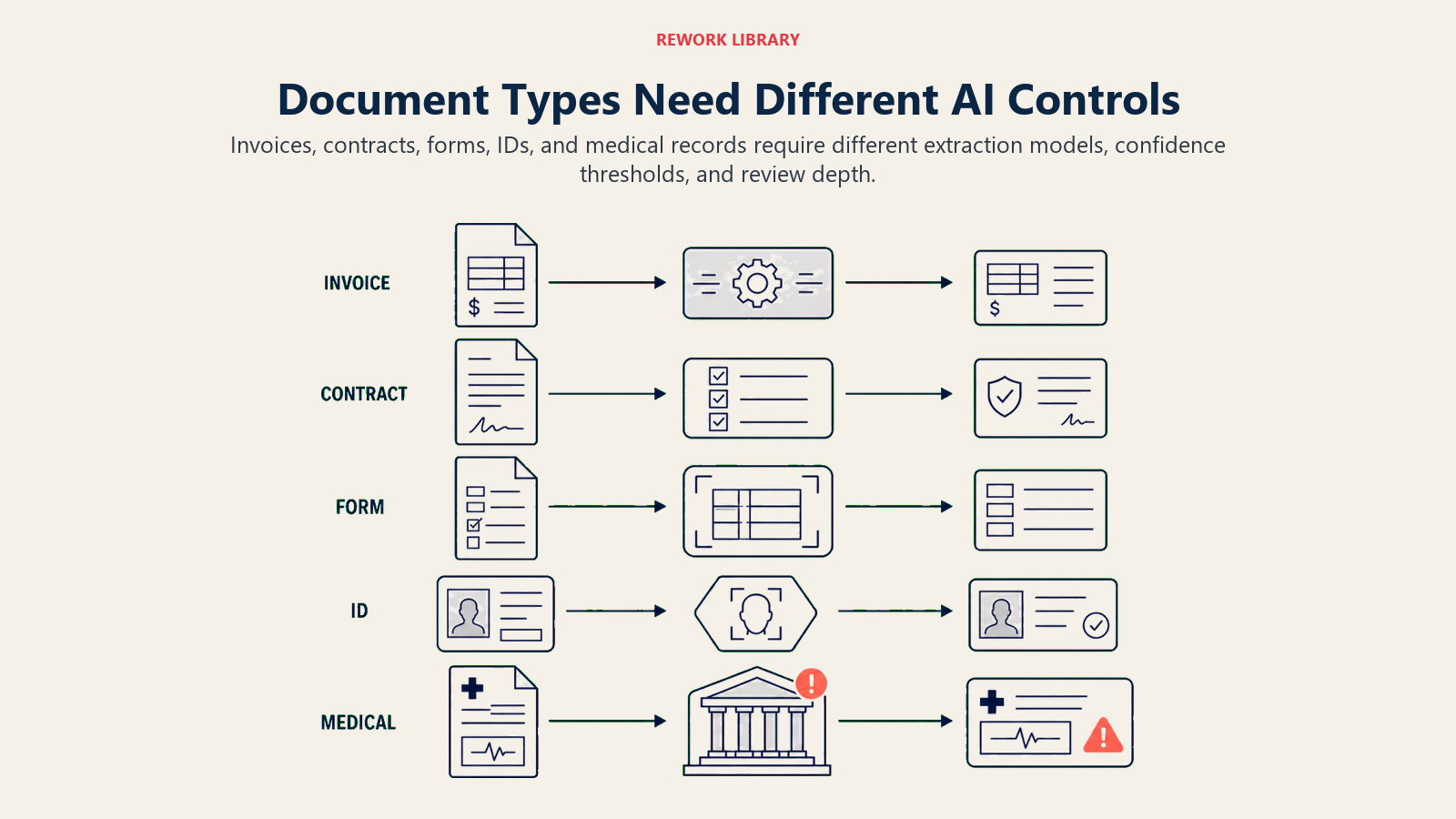
Invoices and receipts are the highest-volume use case. Organizations process thousands or millions annually. AI extraction captures vendor information, line items, taxes, and totals. The extracted data feeds into accounts payable systems for payment processing.
The key challenge is variation. Every vendor uses different invoice formats. The AI needs to handle this variety while maintaining high accuracy. This is where template-based extraction falls short and AI-powered understanding becomes essential.
Contracts and agreements require clause extraction and analysis. When processing a vendor contract, you need to extract party names, effective dates, term length, pricing schedules, liability caps, termination clauses, and renewal terms.
AI document processing can identify these elements even when they're buried in dense legal text. Some platforms can also flag non-standard or risky clauses by comparing against your standard contract templates.
Forms and applications often contain both printed fields and handwritten responses. Job applications, loan applications, insurance claims, government forms. The AI needs to read handwriting accurately, which is still challenging but improving rapidly.
Form processing typically achieves 90-95% accuracy on handwritten fields, with lower confidence items flagged for human verification. This is good enough to automate most processing while catching potential errors.
IDs and credentials like driver's licenses, passports, and professional certifications need to be verified as part of onboarding or compliance processes. AI extraction pulls name, ID number, issue date, expiration date, and other relevant fields.
The AI can also verify that the document is authentic and hasn't been tampered with by analyzing image characteristics and security features. This catches most fake or altered documents automatically.
Medical records contain critical health information in unstructured formats. Clinical notes, lab results, prescription records, discharge summaries. AI document processing can extract diagnoses, medications, procedures, and outcomes for clinical decision support or quality analysis.
The challenge here is accuracy requirements. Medical errors can be life-threatening. Document processing for healthcare typically includes multiple verification steps and lower automation thresholds than other industries.
The AI Document Processing Workflow
Understanding the end-to-end workflow helps you implement document processing effectively.
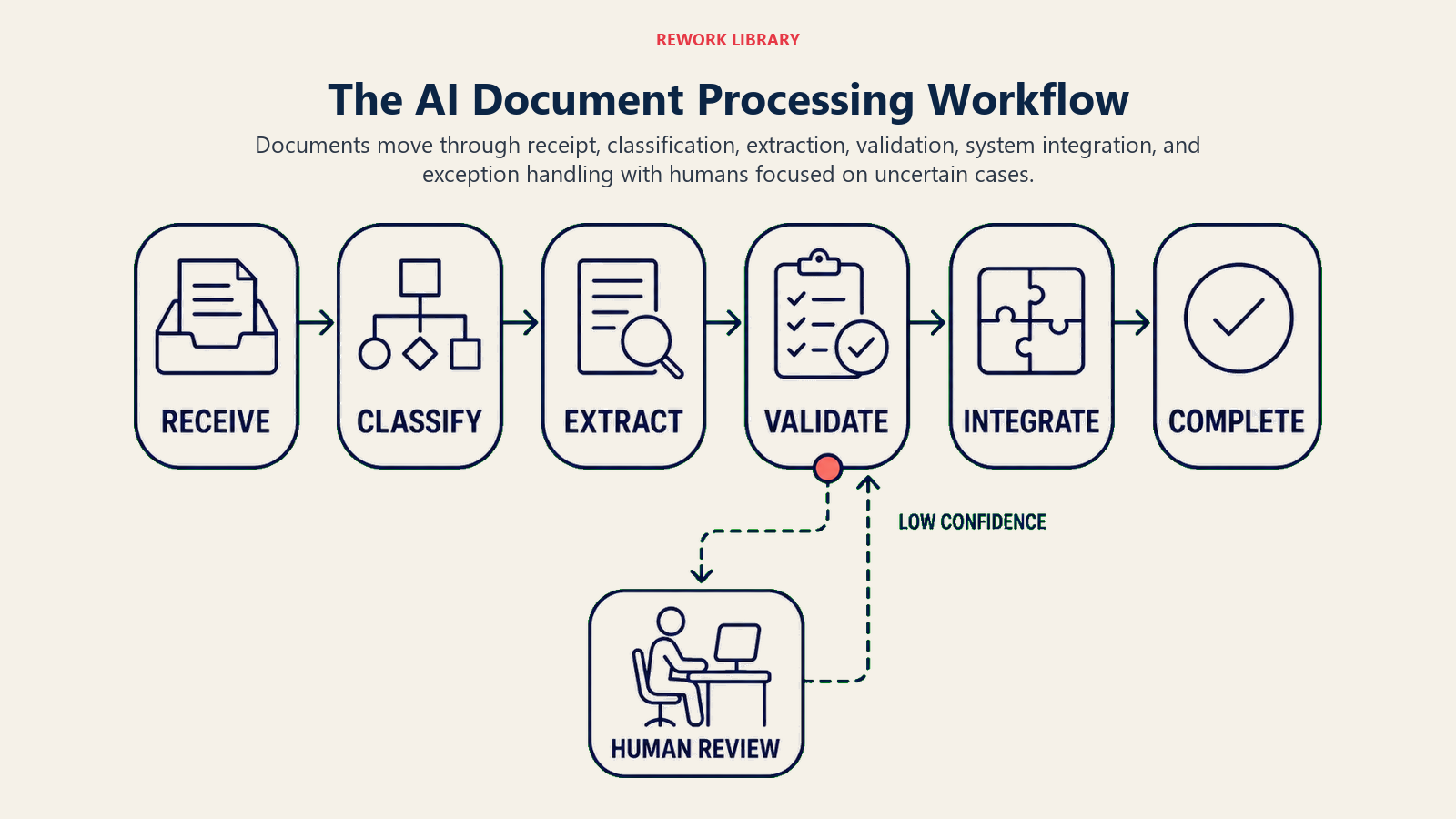
Document receipt and classification starts when a document enters your system. It might arrive via email, file upload, scanned at a physical location, or retrieved from cloud storage. The AI analyzes the document to determine type and selects the appropriate processing model.
Classification can also route documents to different queues. Invoices over $10,000 might go to a high-value queue with extra validation. Customer applications might route based on product type.
Data extraction applies the appropriate AI model to pull key information. The system identifies fields, extracts values, and assigns confidence scores. High-confidence extractions can proceed automatically. Low-confidence items get flagged for review.
Some platforms allow for multi-model approaches. They might use one AI model for initial extraction and a second model to validate or enhance results. This layered approach improves accuracy but increases processing time and cost.
Validation and verification checks that extracted data makes sense. Does the invoice math add up? Is the vendor in our approved supplier list? Is the contract date in a reasonable range? Validation rules can be simple (date format check) or complex (three-way matching between invoice, purchase order, and receiving record).
Failed validations route to exception queues for human review. The goal is catching errors before bad data enters downstream systems.
System integration sends extracted data to its destination. Invoice data goes to the ERP system. Application data goes to the HR management system. Contract data goes to the contract management database.
Integration can happen via API, file export, or database write. The best approach depends on your target system's capabilities. APIs provide real-time integration. File exports work for batch processes. Database writes offer direct data access.
Exception handling routes documents that don't fit standard patterns to human reviewers. Low confidence scores, validation failures, or classification uncertainty all trigger exceptions. Humans review, correct, and submit the document. Their corrections train the AI to handle similar cases better in the future.
Good exception handling is crucial. The goal isn't 100% automation. It's automating 85-95% of straightforward cases while routing the genuinely complex or ambiguous 5-15% to humans.
Business Process Applications
AI document processing transforms specific high-volume business processes.
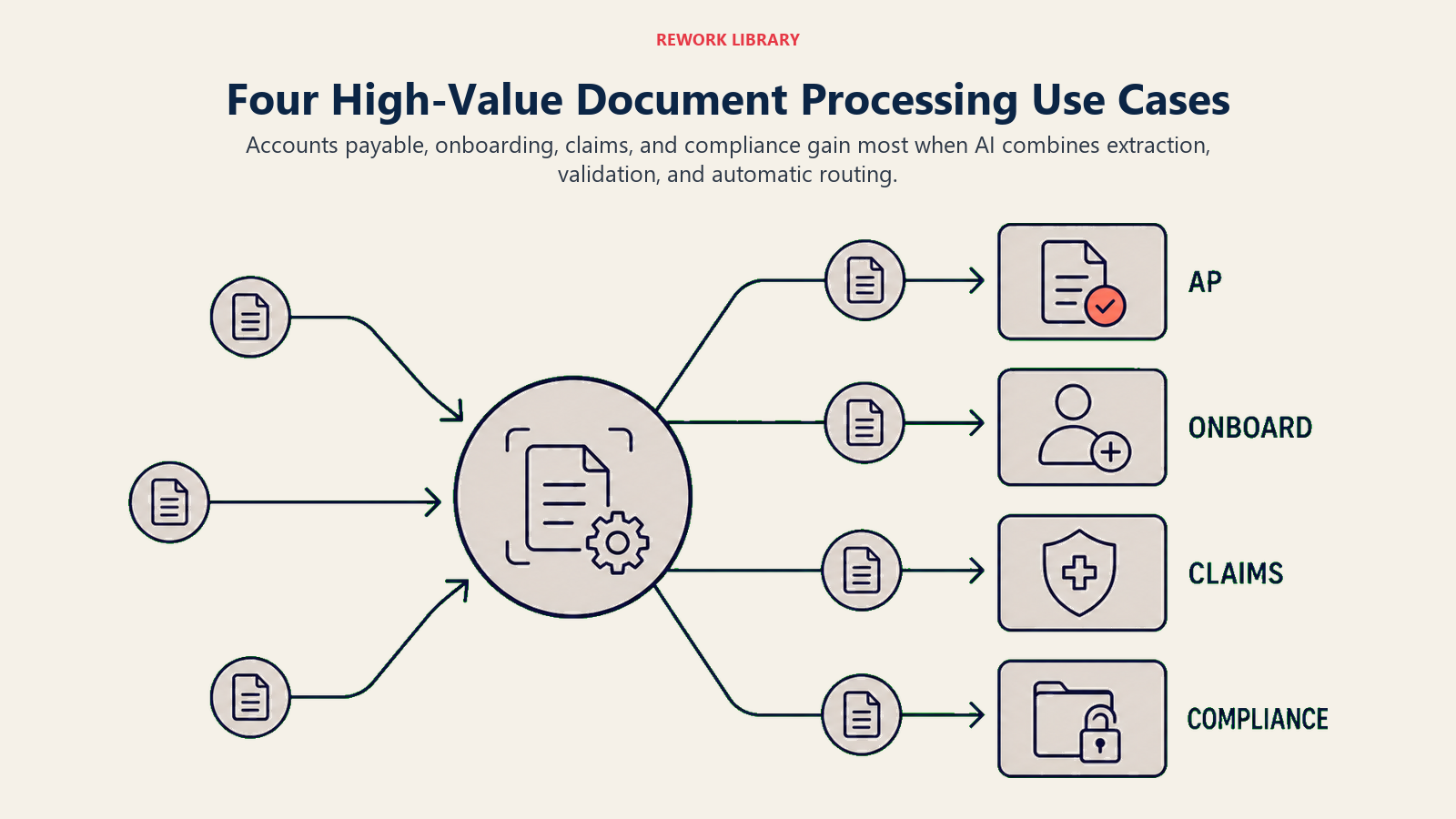
Accounts payable automation eliminates manual invoice entry. Invoices arrive via email or supplier portal. AI extracts vendor, date, line items, and totals. The system matches to purchase orders automatically. Matched invoices get routed for approval. Approved invoices feed directly into payment processing.
Organizations processing 1,000+ invoices monthly commonly achieve 70-80% straight-through processing rates (no human touch). The remaining 20-30% get flagged for exceptions like PO mismatches or missing vendor records.
Customer onboarding requires collecting documents like ID verification, financial statements, or business licenses. AI processes these documents, extracts required information, validates against requirements, and populates customer records automatically.
Onboarding time drops from days to hours. Manual data entry errors that cause downstream problems get eliminated. Compliance checks happen automatically rather than requiring manual review.
Claims processing in insurance involves reviewing claim forms, supporting documentation, medical records, or damage reports. AI extracts claim details, validates against policy coverage, checks for duplicate claims, and routes for approval or denial.
The same claim that took 3-5 days for manual review can be processed in hours or even minutes for straightforward cases. This speed improves customer satisfaction while reducing processing costs.
Compliance documentation like tax forms, regulatory filings, or audit support documents needs to be extracted and validated. AI ensures all required information is present, extracts it into structured formats for analysis, and maintains an organized archive for audits.
This reduces the panic that typically accompanies audit requests. Instead of searching through file cabinets or email for documents, everything is processed, indexed, and searchable.
Accuracy and Quality Assurance
AI document processing isn't perfect. Managing accuracy is critical to success.
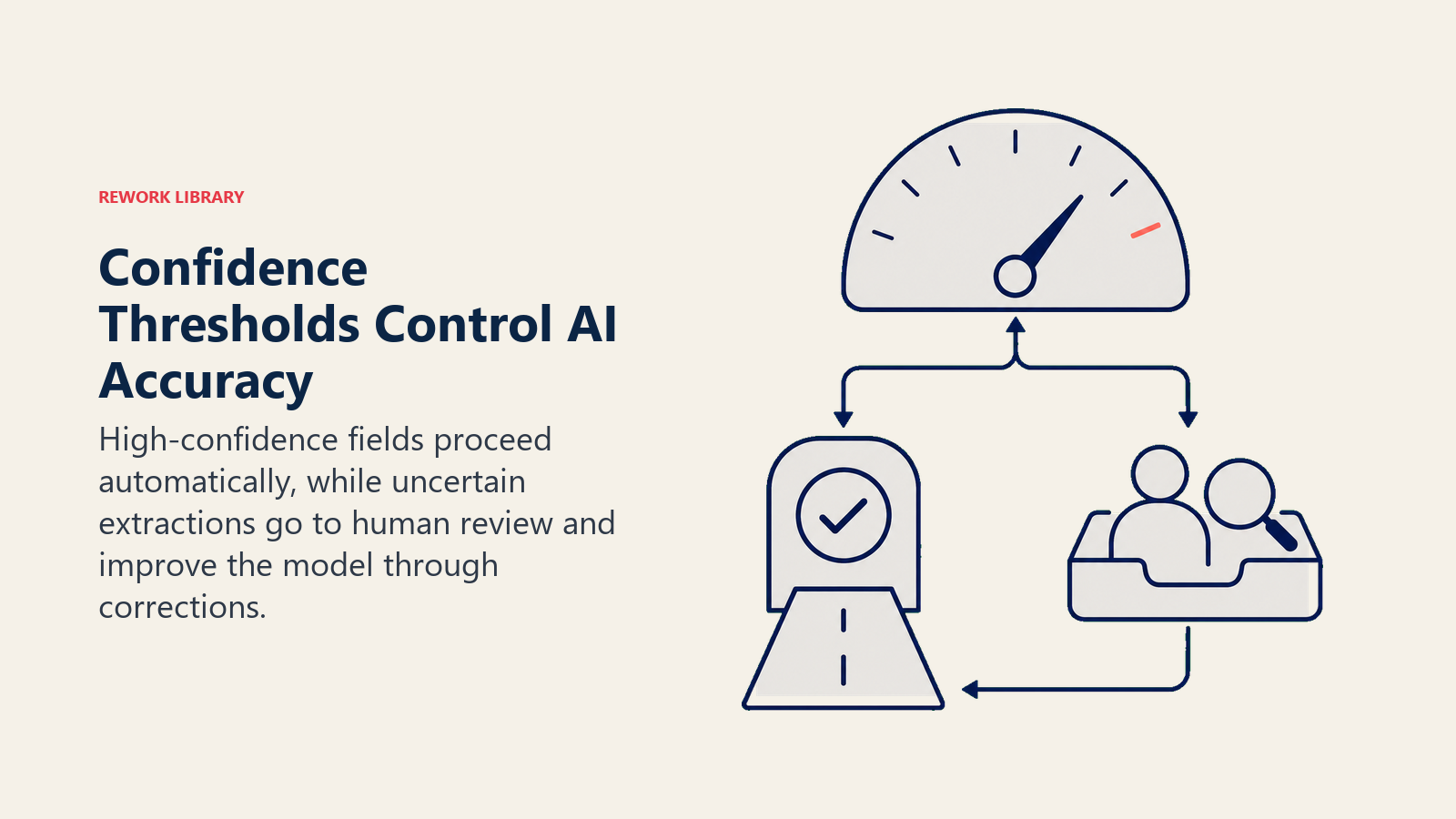
Confidence scoring tells you how certain the AI is about each extraction. A confidence score of 98% means the AI is very confident. A score of 65% means uncertainty. You set thresholds for automatic processing versus human review based on your accuracy requirements and cost tolerance.
High-value transactions might require 95%+ confidence for automatic processing. High-volume, low-value transactions might accept 85% confidence. The thresholds balance automation rates against error risk.
Human-in-the-loop validation routes low-confidence extractions to human reviewers. They see the original document alongside the AI's extraction. They confirm correct fields, fix errors, and submit. Their corrections feed back into the AI training process.
This creates a quality assurance checkpoint while also improving the AI over time. The system gets more accurate by learning from human corrections.
Continuous learning means the AI improves with use. Initial accuracy might be 85%. After processing 10,000 documents with human corrections on uncertain cases, accuracy reaches 92%. After 50,000 documents, it hits 95%.
This learning curve is why document processing gets more valuable over time. The investment in setup and training pays dividends as accuracy improves and exception rates drop.
The connection to AI process mining and optimization helps you identify where document processing bottlenecks exist and measure improvement over time. Process mining reveals that document handling often consumes 30-40% of total process cycle time in accounts payable, customer onboarding, and claims processing workflows.
Integration with Automation Ecosystem
Document processing delivers maximum value when integrated with your broader automation strategy.
AI workflow automation orchestrates document processing as part of larger workflows. A purchase order arrives via email. Document processing extracts the PO details. Workflow automation creates the record in the ERP system, routes it for approval based on amount, and sends confirmation to the supplier.
AI data entry automation picks up where document processing leaves off. The document processing extracts the data. Data entry automation validates it, enriches it with additional information, and writes it to multiple systems as needed.
AI integration with existing systems enables document processing to connect to your ERP, CRM, HR systems, and databases without custom development. The processed data flows to where it needs to go automatically.
AI email management and filtering works hand-in-hand with document processing. Emails with invoice attachments get routed automatically to document processing workflows, eliminating manual forwarding and filing.
This integrated approach transforms document processing from a point solution into a foundational capability that enables multiple process automations.
ROI Calculation Framework
Document processing delivers measurable returns. Here's how to calculate them.
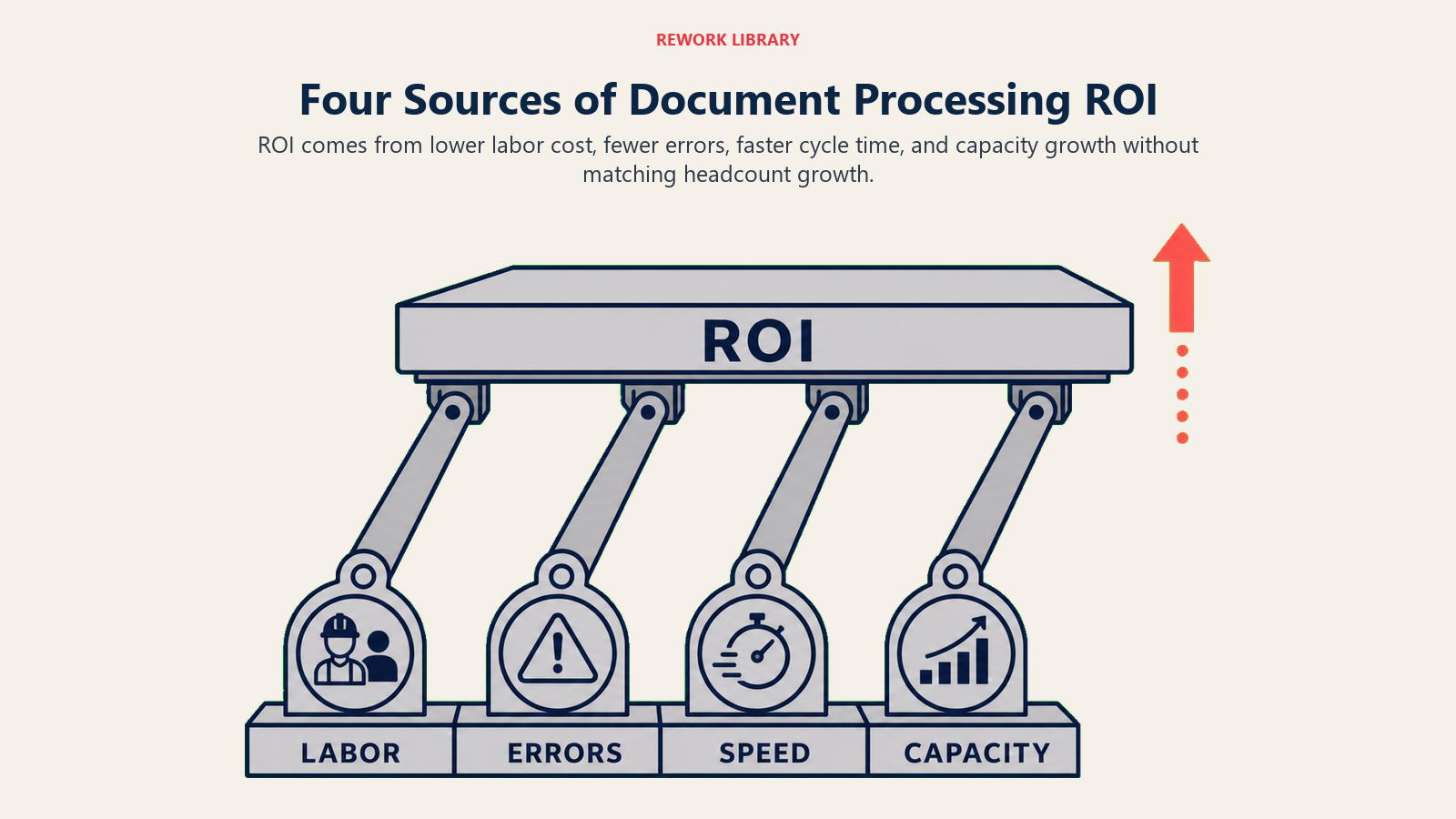
Labor savings come from eliminating manual data entry. If processing an invoice manually takes 3 minutes and you process 5,000 invoices monthly, that's 250 hours per month. At $25 per hour, that's $6,250 in monthly labor cost. AI processing at $0.10 per document costs $500 monthly. Net savings: $5,750 per month, $69,000 annually.
Error reduction prevents downstream costs. Manual data entry typically has 1-3% error rates. Errors cause payment delays, duplicate payments, reconciliation issues, and customer service problems. If 2% of manually processed invoices have errors and each error costs $50 to resolve, that's $5,000 in error costs monthly for 5,000 invoices. AI processing with 95%+ accuracy reduces this by 80-90%.
Speed improvement enables faster cycle times. Invoice processing goes from 3-5 days to same-day. Customer onboarding drops from one week to 24 hours. Claims processing falls from five days to two days. Faster processing improves cash flow, customer satisfaction, and business velocity.
Capacity gains let existing staff handle higher volumes without adding headcount. If your team processes 5,000 documents monthly and volume is growing 20% annually, you'd need to hire another person within a year. AI document processing absorbs the growth without headcount increase.
The AI performance measurement framework provides detailed guidance on tracking these metrics and demonstrating ROI to stakeholders.
Implementation Considerations
Getting value from AI document processing requires careful planning.
Start with high-volume, standardized documents. Invoices, purchase orders, or common forms make great initial use cases. High volume justifies the implementation effort. Standardization increases accuracy and reduces exceptions.
Pilot with a subset before full deployment. Process 500-1,000 documents while maintaining parallel manual processing. Measure accuracy, identify edge cases, and tune the system before committing to full automation.
Plan for exceptions from the start. You won't achieve 100% automation. Build the exception handling workflow and staffing before go-live. Decide who reviews exceptions, how quickly they need to be processed, and how corrections feed back to improve the AI.
Integrate with downstream systems early. Document processing isn't valuable if humans still copy-paste the extracted data. Build the integrations that enable straight-through processing so extracted data flows automatically to where it needs to go.
Train the AI with your actual documents. Pre-built models work for standard forms but custom documents need custom training. Upload hundreds or thousands of examples, label the fields you want to extract, and let the AI learn your specific document formats.
Monitor accuracy and cost continuously. Track extraction accuracy by document type. Measure exception rates. Monitor per-document processing costs. This data helps you optimize the system and demonstrate ongoing value.
The Document Processing Transformation
AI document processing eliminates one of the most persistent drains on business productivity: manual handling of unstructured information.
The invoice processing team that manually entered 5,000 invoices monthly now handles 15,000 with the same headcount because 80% process automatically. The customer onboarding team that took five days to process applications now completes them in 24 hours because documents are extracted and validated automatically. The accounts payable clerk who spent 6 hours daily on data entry now spends 2 hours reviewing exceptions and 4 hours on higher-value supplier relationship management.
This isn't about replacing people. It's about eliminating the work that wastes human intelligence on repetitive data transfer. The humans still do the complex judgment, handle exceptions, manage relationships, and make decisions. The AI handles the mindless extraction and validation that computers should have been doing all along.
The document processing bottleneck is solved. The technology works. The platforms exist. The question is whether your organization is ready to stop paying humans to do work that AI can handle faster, cheaper, and more accurately.
Because once you automate document processing, those labor hours become available for work that creates value instead of just transferring it from one format to another. That's not cost savings. That's capability expansion.

On this page
- How AI Transforms Document Processing
- Leading AI Document Processing Platforms
- Document Types and Processing Approaches
- The AI Document Processing Workflow
- Business Process Applications
- Accuracy and Quality Assurance
- Integration with Automation Ecosystem
- ROI Calculation Framework
- Implementation Considerations
- The Document Processing Transformation