AI Workflow Automation Overview
Turn this article into takeaways for your work.


Each assistant summarizes the article only for you and suggests best practices for your work.
Most businesses hit a ceiling with traditional automation. You've automated the straightforward stuff: the repetitive data entry, the basic routing rules, the predictable workflows. But then you're stuck. The complex processes that involve judgment calls, unstructured data, or changing conditions? Those still need humans.
That's where AI workflow automation changes the game. As organizations evaluate types of AI productivity tools, workflow automation represents one of the highest-impact categories for operational transformation.
The Automation Ceiling: Why Rule-Based Systems Fall Short
Traditional robotic process automation (RPA) works beautifully for structured, predictable processes. It follows rules: if this happens, do that. But business reality isn't that simple.
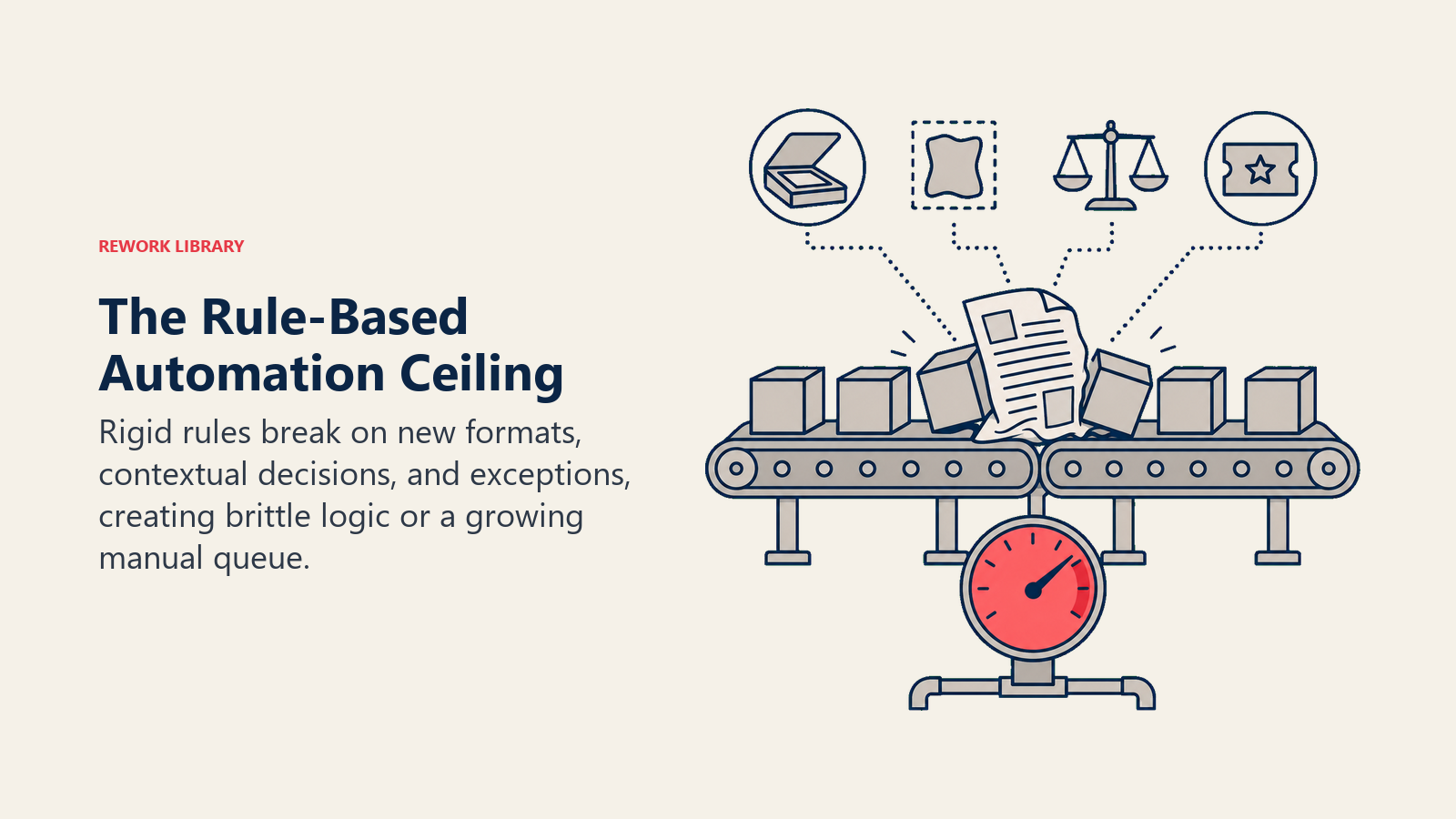
Consider invoice processing. Traditional RPA can extract data from invoices that follow a standard format. But what happens when:
- A vendor sends a scanned PDF instead of a structured document
- The invoice format changes slightly
- There's a discrepancy that needs judgment to resolve
- The approval routing depends on context, not just dollar amounts
That's where traditional automation breaks down. You either build increasingly complex rule sets (which become brittle and hard to maintain) or you route exceptions to humans (which defeats the purpose of automation).
AI workflow automation doesn't hit the same ceiling. It handles variation, interprets context, and makes intelligent decisions without requiring a human for every exception.
AI Automation vs Traditional RPA: Key Differences
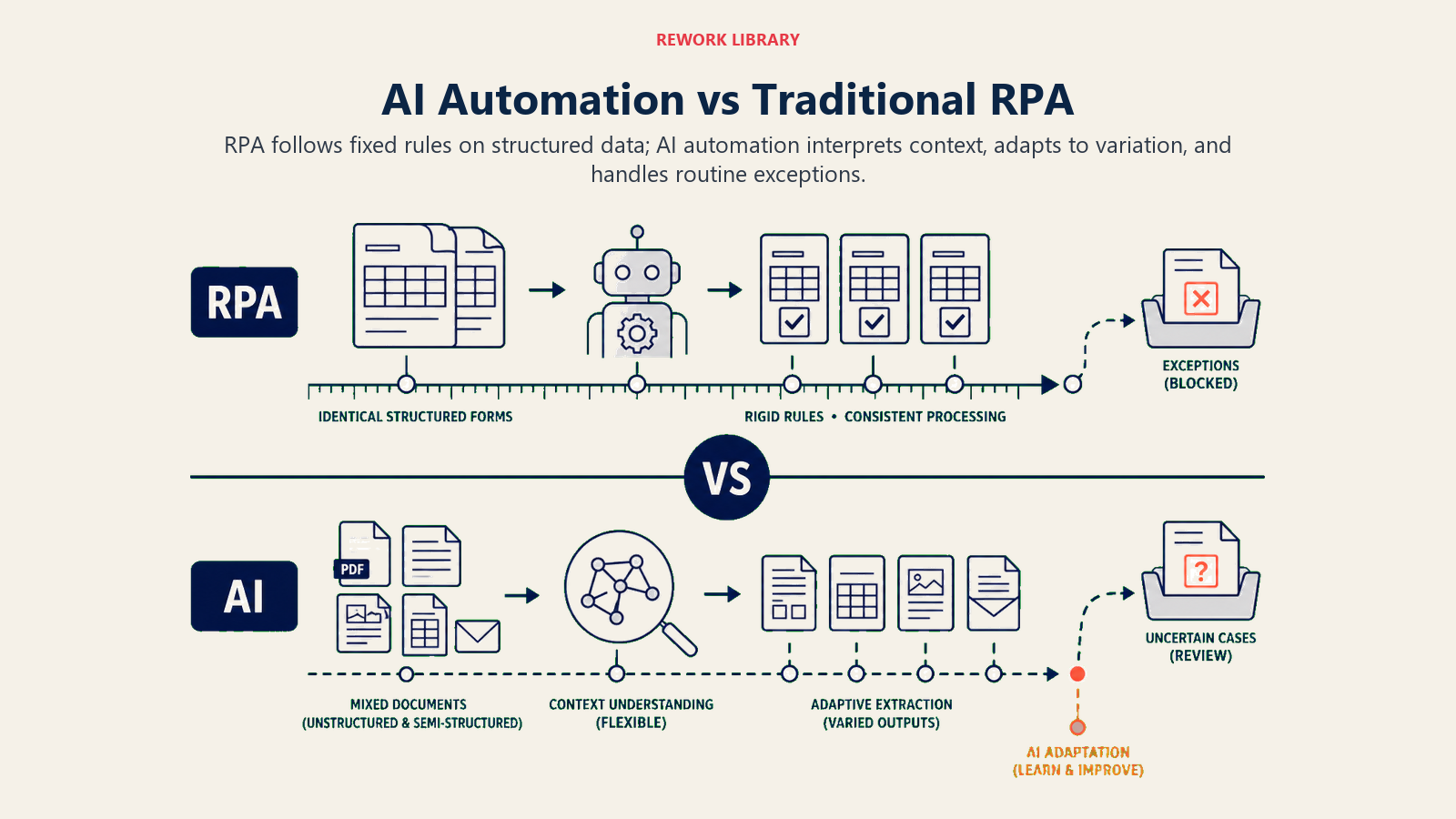
The distinction between traditional RPA and AI-powered automation isn't just incremental. It's fundamental.
Decision-Making Approach
Traditional RPA follows explicit rules ("If invoice amount exceeds $10,000, route to CFO"). It can't handle nuance or context.
AI automation makes intelligent decisions based on patterns and context. It might route an invoice to the CFO because it's from a new vendor, the amount is high, and the category matches purchases that typically require executive approval.
Data Processing Capabilities
RPA needs structured data in predictable formats. Spreadsheets, databases, form fields. It works great with these.
AI automation handles unstructured data: emails, documents, images, PDFs with varying layouts, even handwritten notes. It extracts meaning from context, not just fields.
Adaptability
With traditional RPA, process changes mean reprogramming workflows. A vendor changes their invoice format? You're updating your automation.
AI automation adapts. It learns from new examples and handles variations without constant reprogramming. The vendor's format changes? The AI figures it out.
Exception Handling
RPA hits exceptions constantly. Every scenario that doesn't fit the rules becomes a manual process.
AI automation handles exceptions as part of normal processing. It's designed to work with variability and edge cases.
How AI Workflow Automation Actually Works
Understanding the mechanics helps you identify where AI automation fits in your business.
Workflow Analysis and Mapping
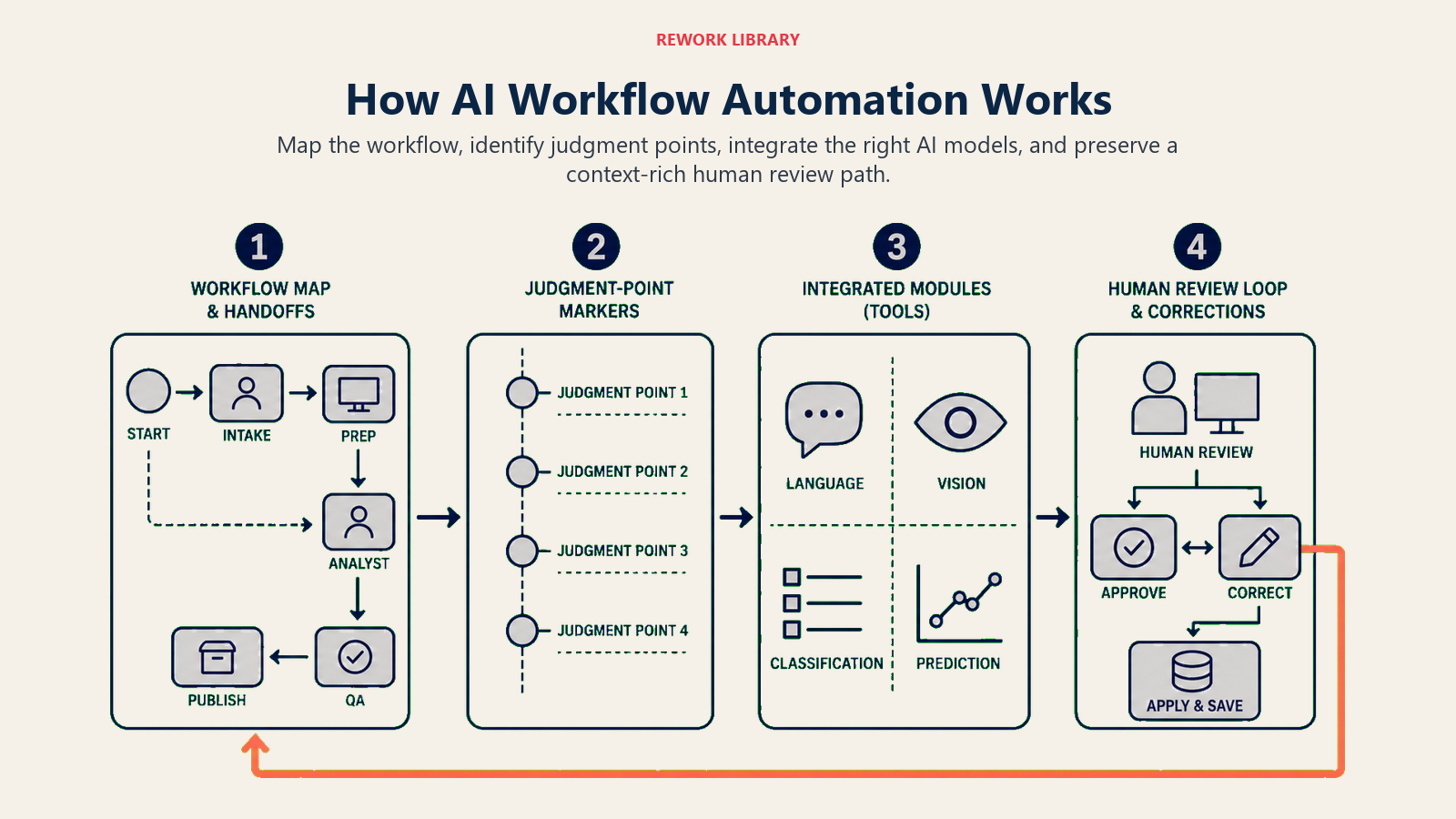
Start by mapping your current process (every step, every decision point, every handoff). But instead of just documenting the "happy path," you're capturing variations and exceptions too.
The goal isn't to replicate your current workflow. It's to understand what decisions humans are making and why.
Decision Point Identification
Look for places where people exercise judgment:
- Routing decisions based on context
- Quality assessments
- Priority determinations
- Category classifications
- Risk evaluations
These are prime candidates for AI automation. Not because AI replaces human judgment entirely, but because it can handle routine decisions and flag edge cases for human review.
AI Model Integration
The AI models that power workflow automation typically include:
- Natural language processing for understanding documents and communications
- Computer vision for extracting data from images and scanned documents
- Classification algorithms for routing and categorization
- Prediction models for estimating timelines and outcomes
- Decision trees for complex rule evaluation with contextual factors
These aren't separate tools. They're integrated into workflow platforms that handle the entire process.
Human-in-the-Loop Design
Effective AI automation doesn't eliminate humans. It positions them where they add the most value.
Design workflows where:
- AI handles routine decisions with high confidence
- Humans review borderline cases
- The system learns from human corrections
- Escalation paths are clear and context-preserving
The goal is augmentation, not replacement.
Business Process Categories for AI Automation
Not all processes benefit equally from AI automation. Focus on these categories first.
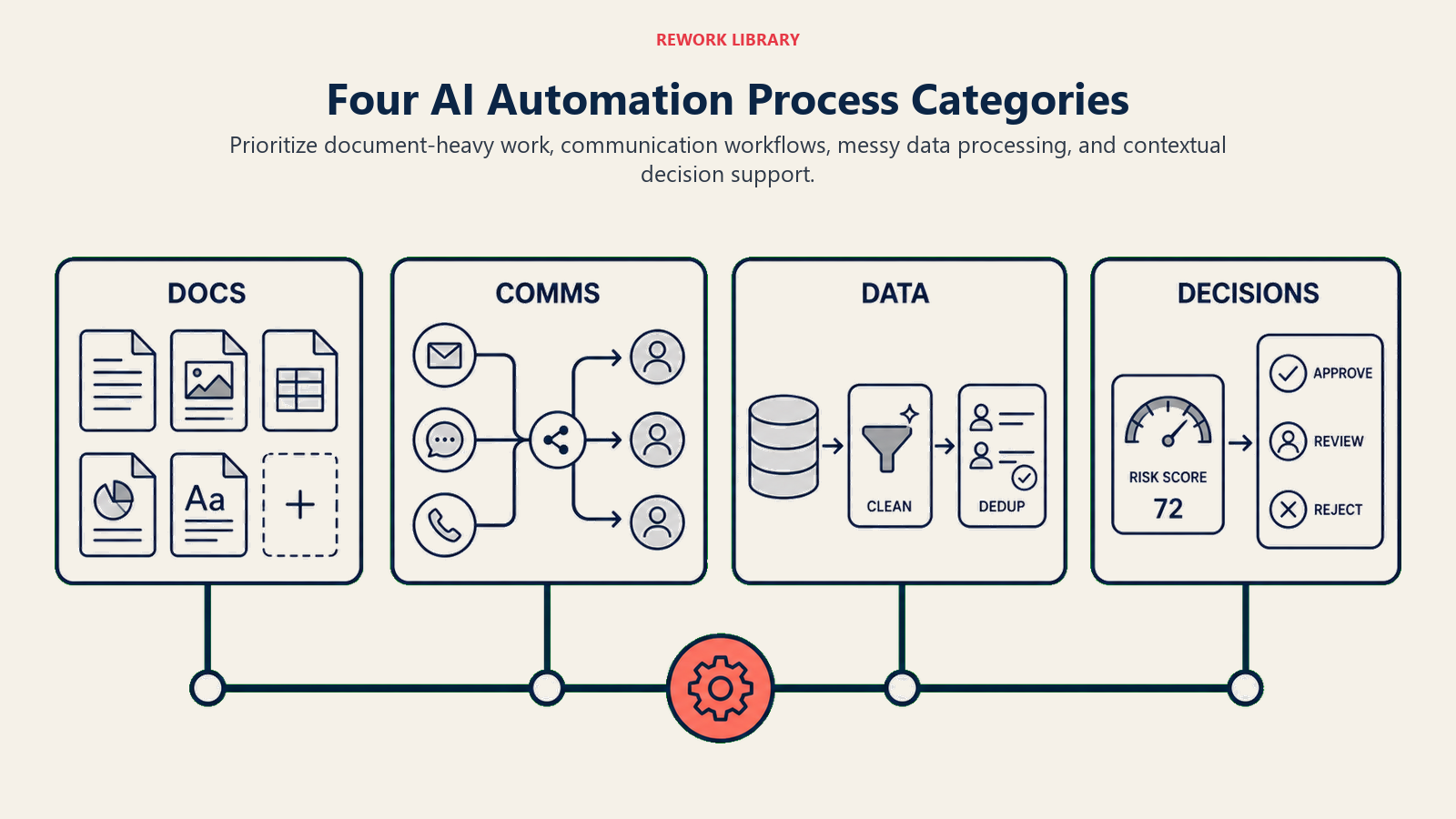
Document-Heavy Processes
Invoice processing, contract management, purchase orders, claims processing. Basically, anything that involves extracting information from documents and making routing or approval decisions.
AI automation can:
- Extract data regardless of document format
- Validate information against business rules and historical patterns
- Route for approval based on content and context
- Flag anomalies and potential issues
- Update systems automatically
A mid-sized company processing 5,000 invoices monthly can typically reduce processing time from 2-3 days to a few hours, with error rates dropping from 3-5% to under 1%. Organizations implementing document automation benefit from specialized AI document processing capabilities designed for unstructured data extraction.
Communication Workflows
Email routing, customer inquiry handling, internal request management. These are processes where understanding intent and context matters more than following rigid rules.
AI automation handles:
- Intelligent routing based on email content and urgency
- Automated responses for common inquiries
- Escalation when human expertise is needed
- Follow-up task creation
- Communication summarization for busy executives
Data Processing
Data entry, validation, enrichment, and synchronization across systems. Especially useful when source data is messy or inconsistent.
AI excels at:
- Cleaning and standardizing data from multiple sources
- Enriching records with additional context
- Identifying and resolving duplicates
- Validating data quality
- Maintaining synchronization across platforms
Decision Support
Approval workflows, prioritization, resource allocation. Anywhere judgment and context matter.
AI provides:
- Risk scoring and priority ranking
- Recommendation engines for routing and assignment
- Deadline prediction and capacity planning
- Bottleneck identification
- Optimization suggestions
Leading AI Workflow Platforms
The market for AI workflow automation has matured rapidly. Here's what the leading platforms offer.
UiPath with AI Capabilities
UiPath started as traditional RPA but has integrated significant AI capabilities. Their Document Understanding and Communications Mining products use AI to extract data and understand processes.
Best for: Organizations already using UiPath RPA who want to add AI capabilities to existing automations.
Automation Anywhere IQ Bot
Automation Anywhere AI product focuses on intelligent document processing and cognitive automation. It's particularly strong at learning from examples rather than requiring extensive training data.
Best for: Document-centric workflows with high variability in formats.
Microsoft Power Automate with AI Builder
Power Automate integrates tightly with Microsoft's ecosystem and includes AI Builder for creating custom AI models without code. It's accessible but limited compared to enterprise-focused platforms.
Best for: Microsoft-centric organizations and teams new to automation.
Zapier with AI Integrations
Zapier connects thousands of apps and increasingly includes AI capabilities through integrations with ChatGPT, Claude, and specialized AI services. It's low-code and accessible but less sophisticated for complex workflows.
Best for: Small to medium businesses with straightforward automation needs.
Make (formerly Integromat)
Make offers visual workflow building with powerful AI integrations. It's more flexible than Zapier for complex scenarios but still accessible to non-technical users.
Best for: Teams that need sophisticated workflows without enterprise platform complexity.
ROI Framework for Workflow Automation
Quantifying the value of AI workflow automation means looking beyond simple time savings.
Process Time Reduction
Measure cycle time from initiation to completion. AI automation typically cuts this by 60-80% for document-heavy processes.
Calculate: (Current average process time - Automated process time) × Process volume × Hourly cost
Error Rate Improvement
Track errors that require rework or correction. AI automation usually reduces errors by 70-90% compared to manual processing.
Calculate: Error volume × Cost per error × Reduction percentage
Capacity Unlocking
The real value often isn't headcount reduction. It's what your team can do with freed-up capacity. Track the value of new initiatives that became possible because people aren't stuck in repetitive workflows.
Scalability Without Headcount
As business grows, can you handle increased volume without proportional staffing increases? AI automation enables non-linear scaling.
Project: Process volume increase × Manual handling cost per unit × Percentage automated
A realistic example: A company processing 800 contracts monthly with 3 people spending 60% of their time on contract review and data entry. After implementing AI automation:
- Processing time dropped from 3 days to 4 hours average
- Error rate decreased from 5% to 0.8%
- The team focused on complex negotiations and strategic vendor relationships
- They handled a 40% volume increase without additional headcount
- Annual value: approximately $180,000 in capacity gains plus $45,000 in error reduction
Implementation Approach
Successful AI workflow automation follows a clear progression. Don't try to automate everything at once.
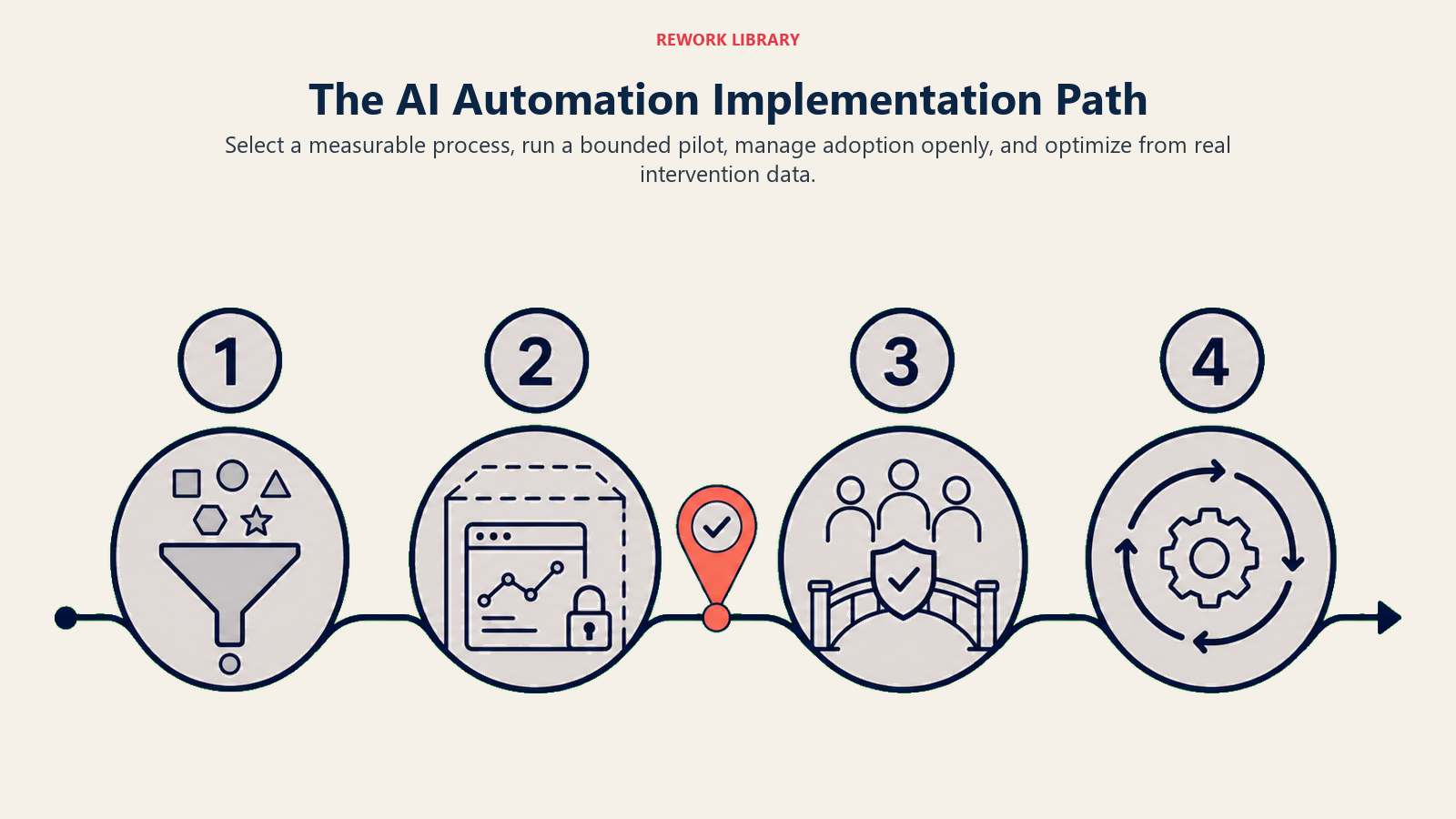
Process Selection Criteria
Choose your first automation based on:
- High volume and repetition
- Clear business rules with some variability
- Measurable outcomes
- Stakeholder frustration with current manual process
- Data availability for training AI models
Avoid starting with:
- Highly variable, low-volume processes
- Critical processes where errors have severe consequences
- Processes that are actively changing
- Workflows with unclear business rules
Pilot Program Design
Run a focused pilot before scaling:
- Choose one process or a subset of a larger process
- Set clear success metrics (time, error rate, user satisfaction)
- Define a 6-8 week evaluation period
- Include representative edge cases
- Document human intervention points
The pilot isn't just about proving the technology. It's about learning what works in your environment and building organizational confidence.
Change Management
Technology is rarely the bottleneck. People are.
Address these concerns upfront:
- Job security: Frame automation as capacity creation, not job elimination
- Skill development: Provide training on working alongside AI
- Process ownership: Involve process owners in design
- Trust building: Show AI decision-making logic, don't hide it in a black box
- Feedback loops: Create ways for users to improve the automation
Successful automation initiatives follow proven AI change management strategies that address both technical and human factors.
Continuous Optimization
AI automation improves with use, but only if you build feedback loops:
- Track where human intervention is needed most
- Monitor accuracy and identify drift
- Update training data with new examples
- Refine decision thresholds based on results
- Expand scope as confidence grows
Plan for quarterly reviews where you analyze performance and identify expansion opportunities.
Common Pitfalls That Kill Automation Projects
Learn from others' mistakes. These are the patterns that derail AI automation initiatives.
Automating Broken Processes
Don't automate a bad process faster. Fix the process first, then automate it. If your current workflow involves unnecessary handoffs, approvals that don't add value, or redundant data entry, automation just enshrines that waste.
Over-Engineering the First Project
The temptation is to build the perfect, comprehensive automation that handles every edge case. That's how projects stall. Start simple, learn fast, and iterate.
Ignoring Data Quality
AI models are only as good as the data they learn from. If your historical data is inconsistent, incomplete, or inaccurate, your automation will be too. Clean your data before automating.
Underestimating Change Management
Technical success doesn't equal business success. If users resist, work around, or don't trust the automation, it fails regardless of how well it works technically.
Setting It and Forgetting It
AI automation requires ongoing monitoring and refinement. Business processes change, data patterns shift, edge cases emerge. Plan for maintenance and continuous improvement, not just initial deployment.
The goal isn't just to automate workflows. It's to transform how your business operates. AI workflow automation removes friction, eliminates bottlenecks, and frees your team to focus on work that requires human creativity and judgment.
Start with one process. Learn what works. Build confidence. Then scale.
Related Resources
Explore these related topics to deepen your understanding of AI workflow automation:
- AI Integration with Existing Systems - Connect AI tools to your tech stack for seamless automation
- AI Task Management Tools - Optimize team workflows with intelligent task prioritization
- AI Document Processing - Extract and process information from unstructured documents
- AI Data Entry Automation - Eliminate manual data entry with AI-powered automation
- AI Process Mining and Optimization - Discover bottlenecks and optimization opportunities in your workflows

On this page
- The Automation Ceiling: Why Rule-Based Systems Fall Short
- AI Automation vs Traditional RPA: Key Differences
- How AI Workflow Automation Actually Works
- Business Process Categories for AI Automation
- Leading AI Workflow Platforms
- ROI Framework for Workflow Automation
- Implementation Approach
- Common Pitfalls That Kill Automation Projects
- Related Resources