AI Documentation Tools: Maintain Comprehensive Documentation Without the Overhead
Turn this article into takeaways for your work.


Each assistant summarizes the article only for you and suggests best practices for your work.
Documentation is everyone's least favorite task. Developers hate writing it. Product managers delay it. Operations teams know it's outdated but lack time to fix it. The result? 68% of companies have documentation debt (missing docs, outdated information, and incomplete knowledge bases).
This isn't laziness. It's a resource problem. Documentation takes significant time, and it requires constant maintenance as products and processes change. Most teams can barely keep up with building and operating their business, much less documenting everything.
AI documentation tools change the economics. They can generate initial documentation, maintain it as things change, and keep knowledge bases current without consuming massive team resources. As specialized AI writing assistants, documentation tools address the unique challenges of technical and process documentation.
But they're not magic. They need proper implementation, quality control, and integration with your actual workflows. Here's how they work and how to use them effectively.
AI Documentation Capabilities
Understanding what AI can actually do for documentation helps set realistic expectations.
Auto-generation from code, APIs, and processes is the most powerful capability. AI can analyze code repositories and generate documentation explaining what the code does, how to use APIs, what parameters mean, and how systems interact.
Tools like GitHub Copilot can document functions as you write them. More sophisticated tools analyze entire codebases and generate comprehensive API documentation, SDK guides, and technical references.
For process documentation, AI tools can watch you perform tasks and automatically generate step-by-step instructions with screenshots. This is dramatically faster than manually writing and illustrating every process.
Documentation maintenance and updates addresses the drift problem (when code changes but docs don't). AI tools can detect when code has changed in ways that affect documentation, flag outdated sections, and suggest updates.
Some tools automatically update docs when underlying systems change, though human review of auto-updates is essential for accuracy.
Version control and change tracking helps teams understand what's changed in documentation over time. AI-powered tools can generate changelogs, identify significant updates, and help users find what's new.
This is particularly valuable for API documentation where users need to know what changed between versions.
Multi-format output means writing documentation once and generating multiple formats (web pages, PDFs, in-app help, printed manuals) automatically. AI handles formatting and adaptation for different contexts.
Documentation Types and AI Tools
Different documentation needs require different AI approaches.
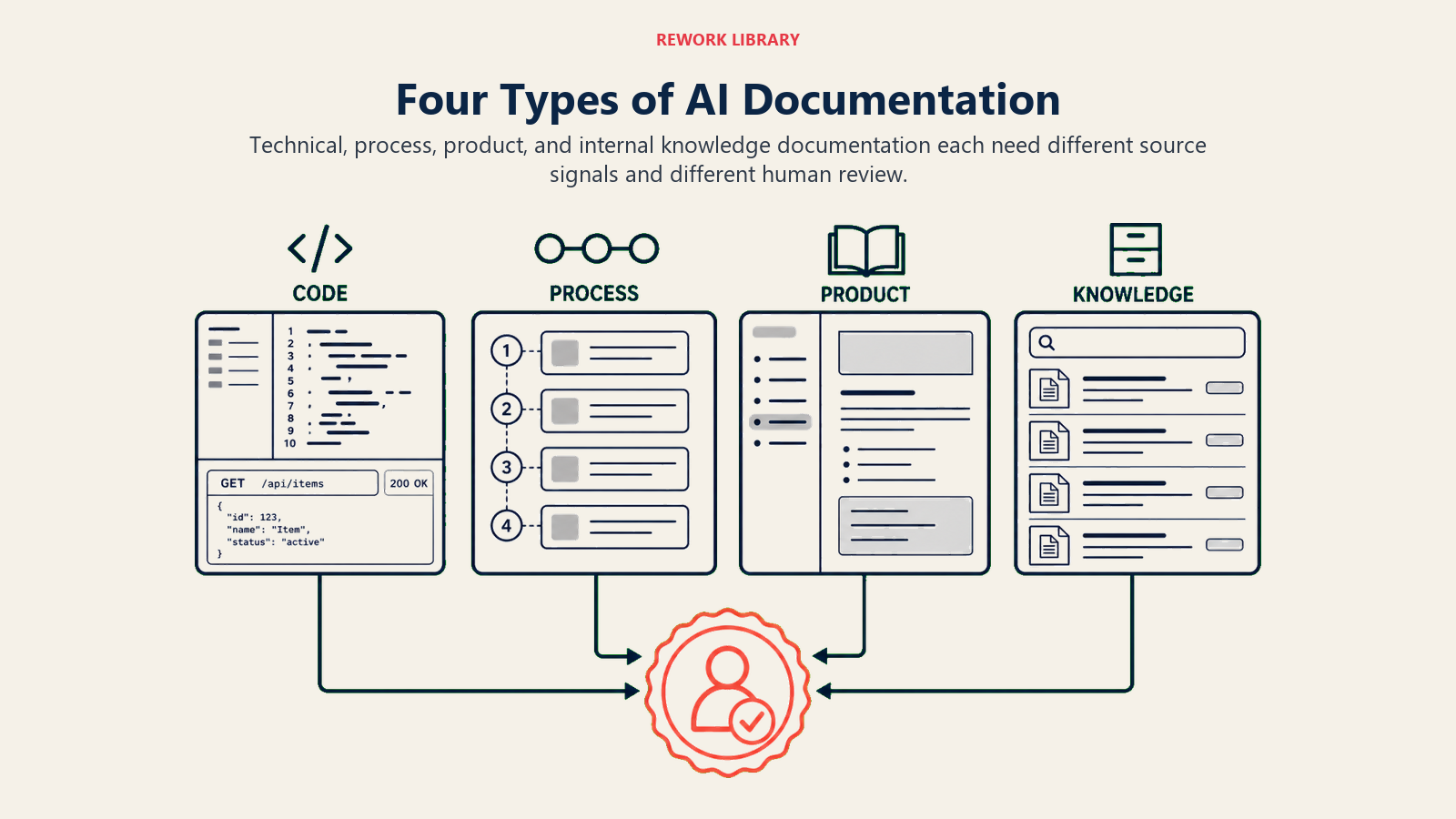
Technical documentation for APIs, SDKs, and code benefits most from direct code analysis. AI tools read your code and generate reference documentation automatically.
GitHub Copilot helps document functions and classes as you write them. Type a comment describing what your function should do, and Copilot suggests the implementation. Or write the implementation, and Copilot suggests documentation.
For API documentation specifically, tools like Mintlify and ReadMe use AI to generate and maintain API references from your codebase. They keep documentation synchronized with code changes and generate interactive examples.
The limitation? AI-generated technical docs are accurate about what code does but don't explain why it does it or how it should be used strategically. You need human input for architecture decisions, best practices, and strategic guidance.
Process documentation for SOPs, workflows, and procedures gets help from tools like Scribe that watch you perform tasks and automatically create step-by-step guides with screenshots.
Instead of writing "Click the menu in the top right, then select Settings, then navigate to Account," you just do it once and Scribe generates the documented process. Updates are similarly easy: perform the process again and Scribe updates the documentation.
This works exceptionally well for software workflows but less well for physical processes or complex decision-making procedures that don't follow linear steps. For organizations documenting complex workflows, these capabilities complement broader AI workflow automation initiatives.
Product documentation including user guides and help centers benefits from AI's ability to explain technical features in accessible language. Engineers write technical specifications; AI translates them into user-friendly help articles.
Notion AI and similar tools can take technical details and generate customer-facing documentation with appropriate tone and structure. Human editors still need to verify accuracy and usefulness, but the initial draft happens in minutes instead of hours.
Internal knowledge bases get populated and maintained more easily with AI. AI can analyze Slack conversations, support tickets, and email threads to identify common questions and generate knowledge base articles answering them.
Rather than waiting for someone to write "How do we handle X?" articles, AI drafts them based on how your team actually handles X in practice. Subject matter experts then review and approve.
Leading AI Documentation Platforms
Different tools serve different documentation needs.
GitHub Copilot for code documentation integrates directly into developer workflows. It suggests documentation as code is written and can generate documentation for existing undocumented code.
Works across multiple programming languages and development environments. Best for teams that need code-level documentation maintained by developers as they work.
Scribe for process documentation automates the creation of step-by-step guides. Turn on Scribe, perform a process, and it captures every step with screenshots and descriptions.
Particularly valuable for IT operations, customer support procedures, and any workflow involving software interfaces. Less useful for conceptual documentation or strategic guides.
Notion AI for knowledge management helps teams build and maintain internal knowledge bases. It can generate draft articles, summarize meeting notes into documentation, and help organize information logically.
Best for teams already using Notion who want AI assistance with their existing knowledge base. It won't replace a structured documentation tool but it makes knowledge management more manageable.
Specialized tools like Document360, GitBook with AI features, and Archbee provide full documentation platforms with AI enhancement. They combine documentation hosting, version control, search, and AI generation in integrated systems.
These work well for companies that need comprehensive documentation solutions and want AI as part of the platform rather than bolted on afterward.
General-purpose AI models like GPT-4 and Claude can generate documentation from prompts but require more manual process. You describe what needs documenting, provide technical details, and AI generates draft documentation.
More flexible than purpose-built tools but also more friction. Best for one-off documentation needs or teams that want maximum control over the process.
The AI Documentation Workflow
Effective AI documentation follows systematic workflows, not ad-hoc generation.
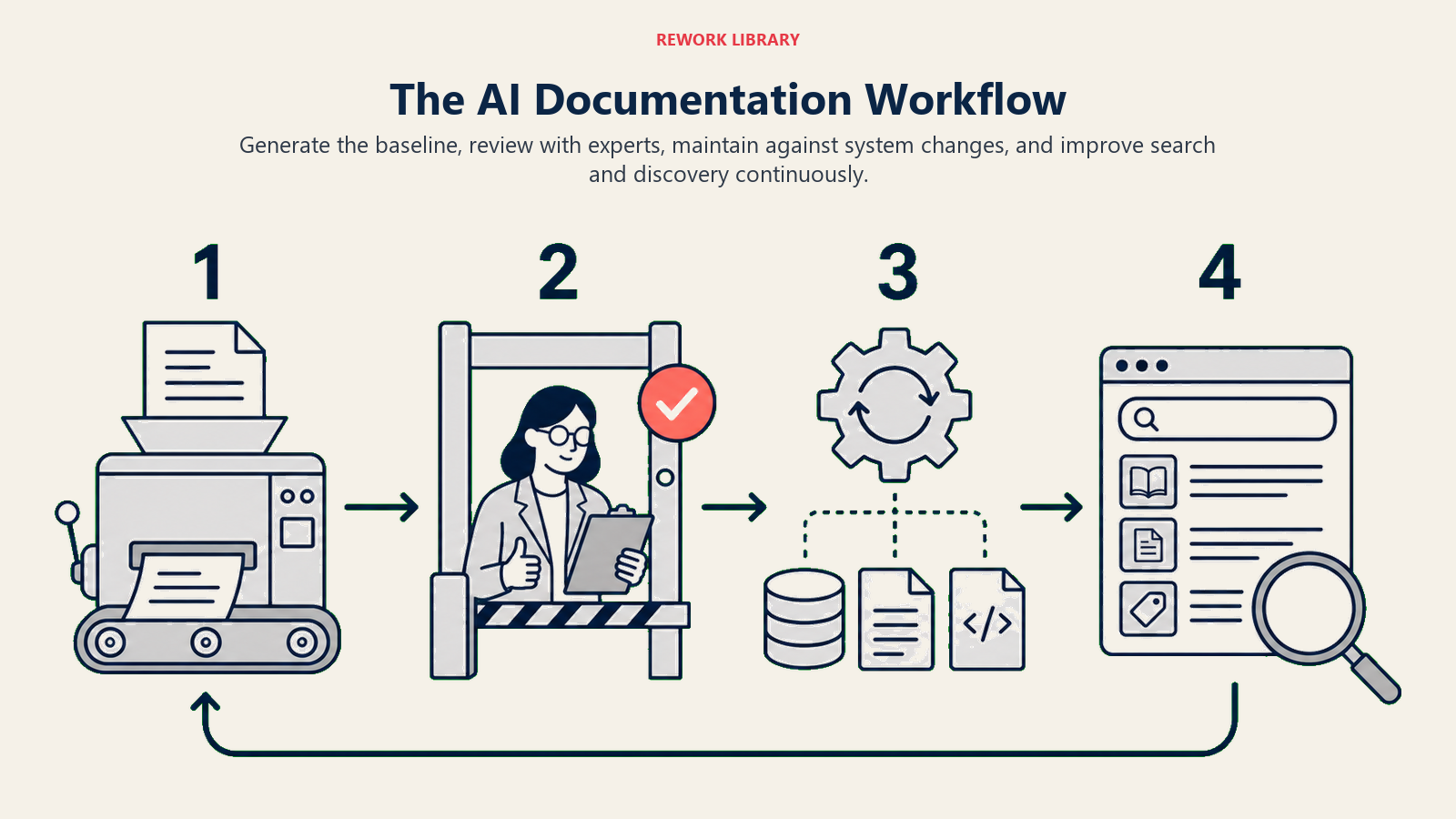
Initial generation creates baseline documentation quickly. For new features or systems, AI generates first drafts based on code, specifications, or recorded processes.
This is the biggest time savings: going from zero documentation to 70% complete documentation in hours instead of weeks. But that 70% complete status is critical. It's not publication-ready.
Human review and refinement focuses on what AI can't do: strategic context, usage best practices, troubleshooting guidance, and ensuring the documentation actually helps users.
Subject matter experts review AI-generated docs for accuracy and completeness. Technical writers refine for clarity and structure. Product managers ensure strategic context is included.
Plan for AI to save 50-70% of documentation time, not 100%. The time savings comes from eliminating blank page syndrome and mechanical writing, not from eliminating human expertise.
Automated maintenance keeps documentation current as systems change. AI tools detect when code or processes change and flag affected documentation for update.
Some changes can be auto-applied (parameter name changes, function signature updates). Others require human review like changes in behavior, deprecated features, or new best practices.
Set up automated checks that flag documentation as "needs review" when underlying systems change. Don't let docs silently drift out of sync.
Search and discovery benefits from AI understanding context. Modern documentation platforms use AI to improve search relevance, suggest related articles, and help users find what they need.
This doesn't require you to do anything different. It's infrastructure improvement that makes existing documentation more useful.
Integration with Development and Operations
Documentation tools work best when integrated into existing workflows, not added as separate processes.
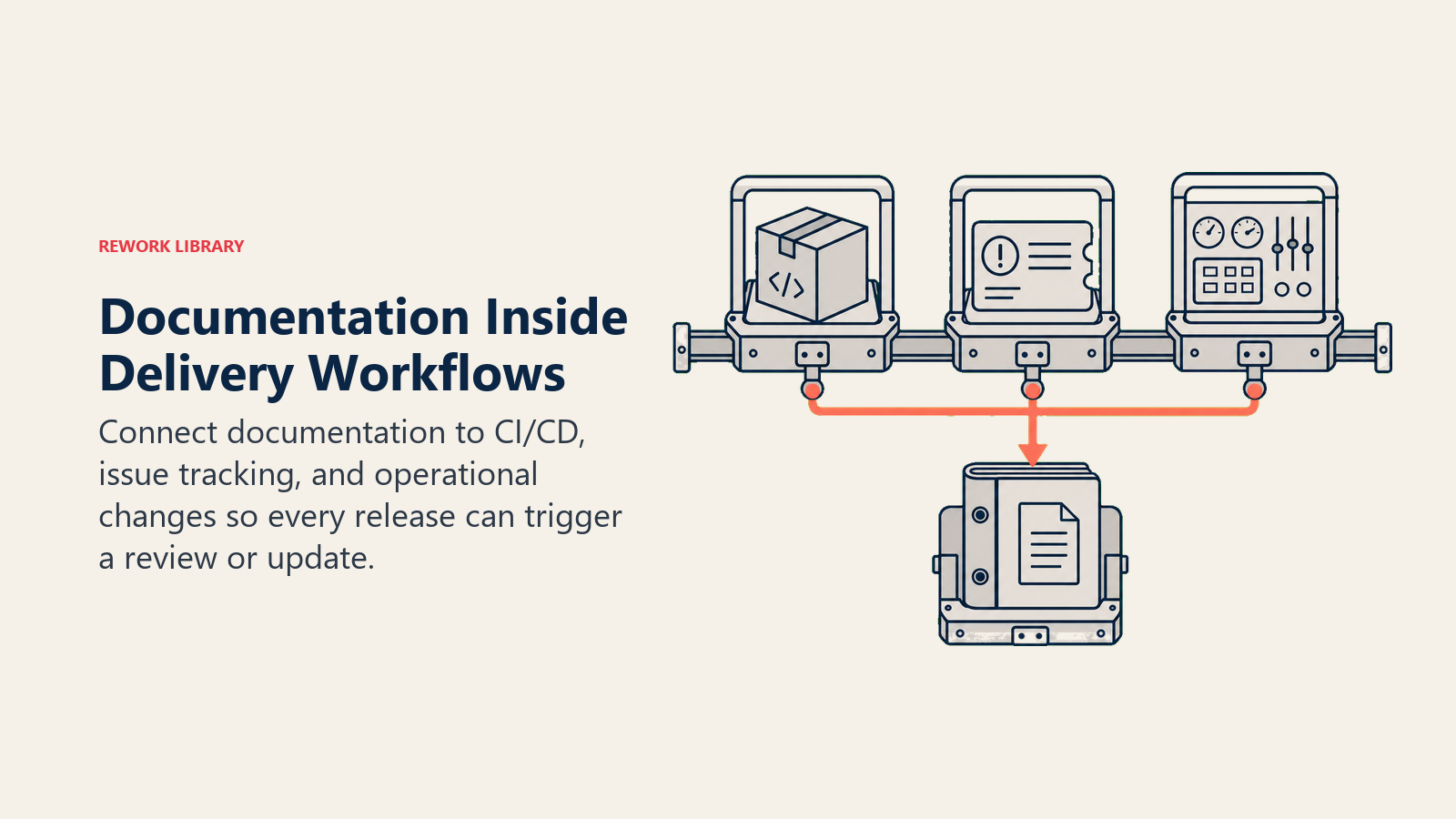
CI/CD pipeline integration means documentation updates happen as part of deployment. When code is committed, documentation gets automatically generated or flagged for update.
This prevents the "we'll document it later" problem. Later never comes. But automated documentation generation happens every release. Organizations integrating documentation into development workflows often apply AI integration with existing systems principles to ensure seamless operation.
Issue tracking linkage connects documentation to the work being done. When developers close issues or complete features, AI can generate documentation based on issue descriptions and generate changelog entries.
GitHub, Jira, and Linear all support integrations that can trigger documentation generation from issue activity.
Real-time updates for documentation that needs to stay perfectly current. When configurations change, infrastructure updates, or operational procedures shift, connected AI tools can update documentation automatically or alert documentation owners.
This is particularly valuable for DevOps teams where documentation about infrastructure and deployments must stay current or it becomes dangerous.
ROI of AI Documentation
The business impact of AI documentation tools is measurable.
Onboarding time reduction happens when documentation is comprehensive and current. New engineers, support reps, or operations team members can find answers instead of interrupting senior team members.
Companies with strong AI-maintained documentation report 30-40% faster onboarding for technical roles and a 50-60% reduction in "how do I...?" questions during first months.
Support ticket reduction occurs when customer-facing documentation is complete and accessible. Customers find answers themselves instead of creating tickets.
One SaaS company implemented AI documentation tools and saw a 35% reduction in basic support tickets over six months. These were tickets that asked questions clearly answered in newly comprehensive documentation.
Developer productivity gains come from not having to reverse-engineer undocumented code or ask teammates how legacy systems work. AI-generated code documentation means developers spend less time figuring out what code does and more time building.
GitHub's internal data suggests Copilot-documented code is understood 40% faster by new team members than undocumented or manually documented code.
Reduced knowledge loss when team members leave. Their knowledge is captured in documentation instead of walking out the door. AI tools can even generate documentation from their work artifacts before they leave.
Quality Standards: Ensuring AI-Generated Docs Are Useful
AI documentation is only valuable if it's accurate and helpful.
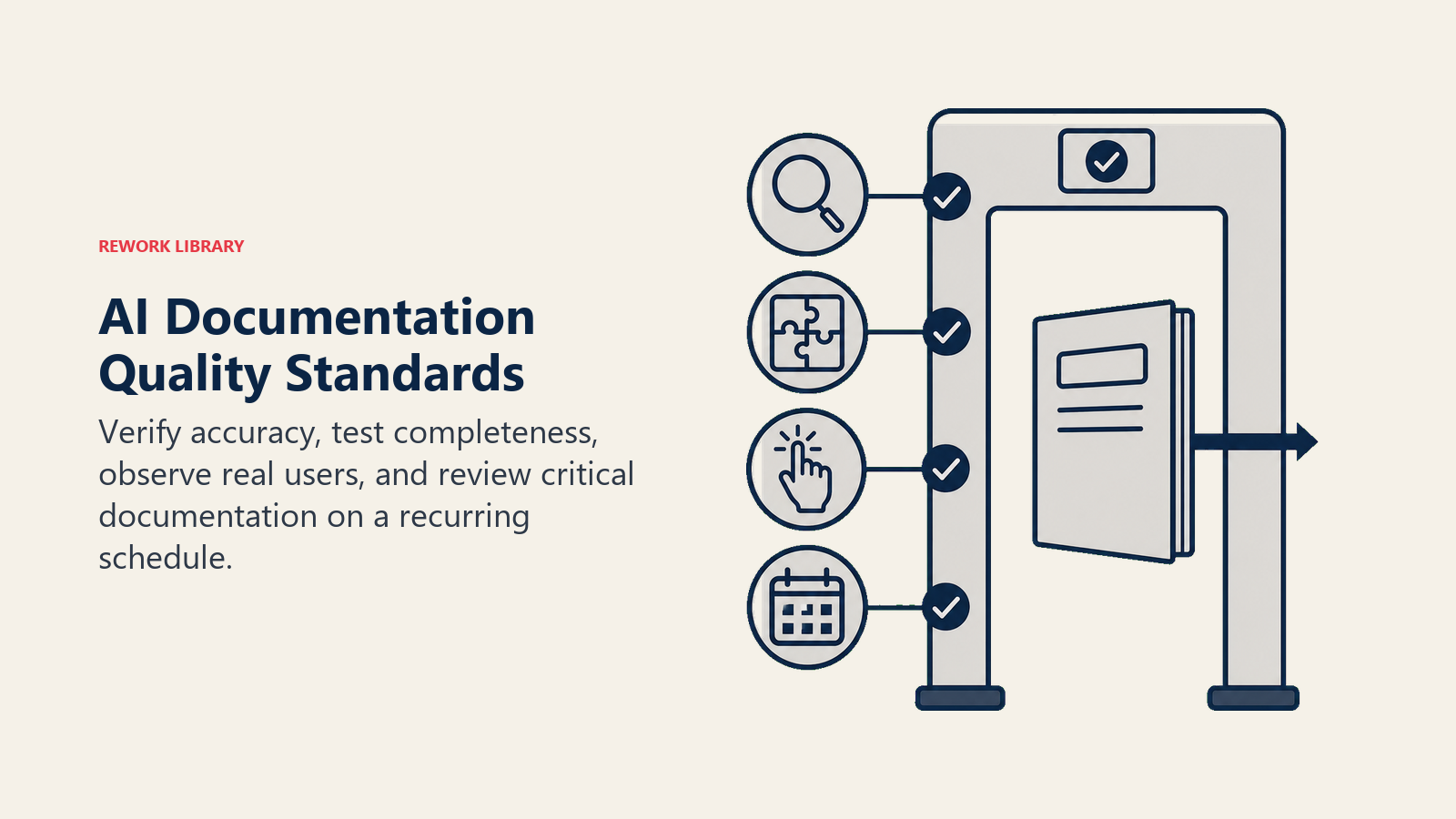
Accuracy verification requires subject matter experts reviewing AI-generated documentation. They need to check that technical details are correct, examples actually work, edge cases are documented, and security implications are noted.
Never publish AI-generated technical documentation without expert review. The risk of confidently incorrect documentation is too high.
Completeness checks ensure AI-generated docs cover what users actually need. AI might document what exists but miss why it exists, how to choose between options, or what to do when things go wrong.
Create documentation standards that specify what must be included. Checklists for API documentation, process docs, and user guides ensure completeness.
Usability testing with actual users reveals whether AI-generated documentation actually helps. Just because documentation exists doesn't mean it's useful.
Have new team members use documentation for onboarding. Track support tickets to identify documentation gaps. Survey users about documentation quality.
Maintenance schedules prevent documentation from getting outdated even with AI assistance. Schedule quarterly reviews of critical documentation to ensure accuracy.
AI can flag potential updates, but humans need to verify and approve them regularly.
Moving Forward with AI Documentation Tools
The companies eliminating documentation debt with AI share common patterns.
They start with high-pain documentation areas (whatever documentation gap causes the most problems right now). They implement AI tools that integrate with existing workflows rather than adding separate processes. They maintain rigorous quality standards even as generation becomes easier. And they measure impact through onboarding time, support tickets, and developer productivity.
Documentation will never be anyone's favorite task. But AI makes it manageable. Comprehensive documentation becomes achievable without dedicating entire teams to documentation maintenance.
Start with one documentation type. Learn what works. Expand gradually. Build quality control processes that scale. And maintain realistic expectations: AI dramatically reduces documentation burden but doesn't eliminate the need for subject matter expertise and editorial judgment. Successful implementations align with broader AI change management strategies to ensure team adoption and sustained usage.
For related capabilities, see AI Writing Assistants Overview for writing assistance context, AI Content Generation Tools for content creation strategies, AI Process Mining and Optimization for process analysis, and AI Training and Onboarding for learning and development applications.
