AI Task Management Tools
Turn this article into takeaways for your work.


Each assistant summarizes the article only for you and suggests best practices for your work.
Your team's task list keeps growing. You've got competing priorities, shifting deadlines, and limited capacity. Everyone's busy, but are they working on what matters most?
That's the prioritization problem that crushes team productivity. Traditional task management tools just track work. They don't help you decide what to do next or when to do it. AI task management tools change that equation. As a core component of AI productivity tools, intelligent task management transforms how teams plan and execute work.
The Prioritization Problem: Why Teams Struggle to Focus
Most teams don't struggle with tracking tasks. They struggle with deciding which tasks matter most right now, for this person, given everything else going on.
Traditional task management relies on manual prioritization: someone marks tasks as high, medium, or low priority. But that breaks down quickly:
- Priorities become stale as situations change
- People have different ideas about what's urgent
- Individual task lists don't reflect team capacity
- Dependencies aren't visible until they become blockers
- Estimation is guesswork, making planning unreliable
The result? People work hard on the wrong things. Or they constantly context-switch between tasks because they can't figure out what to focus on.
AI task management tools solve this by continuously analyzing your workload, deadlines, dependencies, and capacity, then telling you what to work on next.
AI Capabilities in Task Management
AI transforms task management from a passive tracking system to an active optimization engine. Here's what that means in practice.
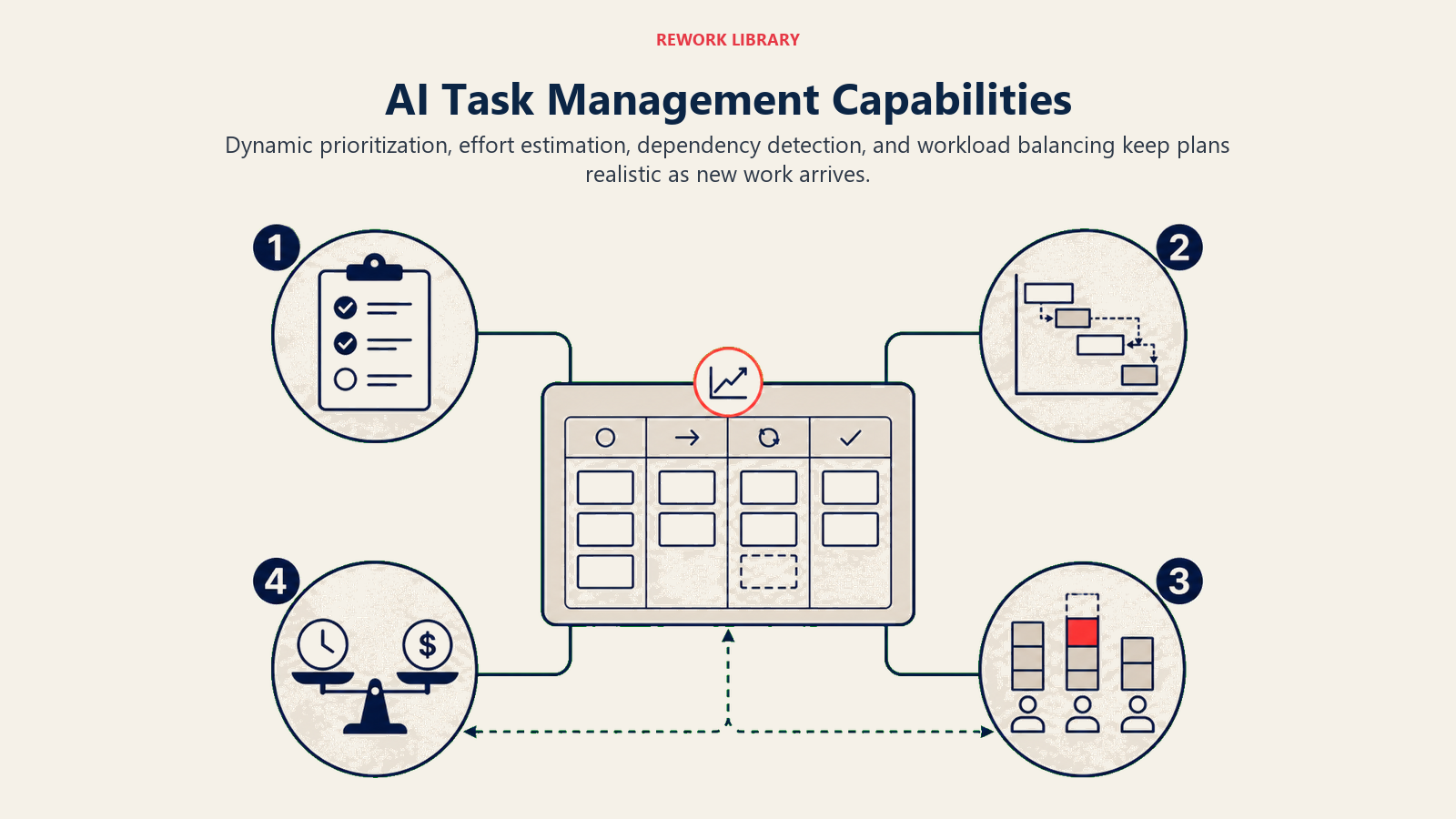
Intelligent Prioritization
Traditional prioritization is static: you rank tasks once, then they sit in that order until someone manually changes them.
AI prioritization is dynamic. The system continuously evaluates:
- Deadline urgency relative to estimated effort
- Dependencies that might block other work
- Strategic importance based on project goals
- Individual capacity and current workload
- Historical patterns of what actually gets completed
It surfaces the task that should be your next focus. Not based on arbitrary priority labels, but on real-time analysis of your entire workload. Tools like Motion and Reclaim.ai excel at this dynamic prioritization by integrating with your calendar and task list.
Effort Estimation
Most teams are terrible at estimating how long work takes. They're either wildly optimistic or pad estimates so much that planning becomes meaningless.
AI learns from your historical data: how long similar tasks actually took, who completed them, what factors influenced duration. It provides estimates based on reality, not guesswork.
More importantly, it gets better over time. The AI notices patterns: certain types of tasks always take longer than estimated, specific team members consistently over- or under-estimate, particular projects have more complexity than anticipated. This historical analysis builds on capabilities similar to AI data analysis tools that identify patterns in operational data.
Dependency Detection
You can't start task B until task A is complete. Someone's waiting on your approval before they can proceed. Two people are unknowingly working on the same thing.
AI tools analyze task relationships, project structures, and even communication patterns to identify dependencies (including ones you didn't explicitly document).
Some tools go further, analyzing how work actually flows through your team to suggest better sequencing or highlight where handoffs create delays.
Resource Allocation Optimization
Who should work on this task? When should they do it? How does this fit with everything else on their plate?
AI optimization considers:
- Individual skills and past performance on similar work
- Current workload and capacity
- Working patterns (when someone is most productive)
- Team distribution (avoiding bottlenecks)
- Development goals (stretch assignments vs. core competencies)
The goal isn't micromanagement. It's making smart suggestions that humans can accept, modify, or override.
Deadline Prediction
Based on current workload, historical velocity, and planned capacity, when will this project actually finish?
AI provides realistic projections that account for:
- Current team capacity
- Historical completion rates
- Upcoming holidays and planned time off
- Typical interruption patterns
- Scope changes and additions
This lets you answer "When will this be done?" with confidence instead of guesswork.
Leading AI Task Management Platforms
The market has evolved rapidly. Here are the platforms that deliver real AI capabilities, not just marketing claims.
Motion
Motion's AI scheduling engine automatically plans your day based on your tasks, calendar, and priorities. It rearranges your schedule dynamically as new tasks arrive or priorities change.
Key strength: Auto-scheduling that actually works. You define deadlines and priority levels; Motion figures out when you'll work on each task and blocks time on your calendar.
Best for: Individuals and small teams who want automated daily planning.
Asana with AI Features
Asana has integrated AI capabilities including smart project templates, task suggestions, and status updates that write themselves based on completed work.
Their AI analyzes project data to predict potential delays, suggest task assignments based on workload, and automatically update stakeholders.
Key strength: AI features integrated into a full-featured project management platform teams already use.
Best for: Mid-size to large teams with complex projects and multiple stakeholders.
ClickUp Brain
ClickUp's AI assistant answers questions about your tasks, summarizes project status, generates subtasks from descriptions, and automates updates and reporting.
It's particularly strong at natural language interaction. You can ask "What's blocking the marketing launch?" and get a synthesized answer from your project data.
Key strength: Conversational AI that makes project information accessible without manual reporting.
Best for: Teams drowning in status meetings who need better visibility without more overhead.
Monday.com AI
Monday.com's AI capabilities focus on automation, smart notifications, and workload management. The platform learns your team's patterns and suggests optimizations.
Key strength: Visual workload balancing and capacity planning with AI recommendations.
Best for: Operations-focused teams managing repeatable workflows.
Todoist Smart Schedule
Todoist uses AI to suggest when to schedule tasks based on your patterns, deadlines, and available time. It's simpler than enterprise platforms but effective for individual productivity.
Key strength: Personal productivity AI without enterprise complexity.
Best for: Individuals and freelancers who need smart task prioritization.
Key AI Features Explained
Understanding these capabilities helps you evaluate tools and implement them effectively.
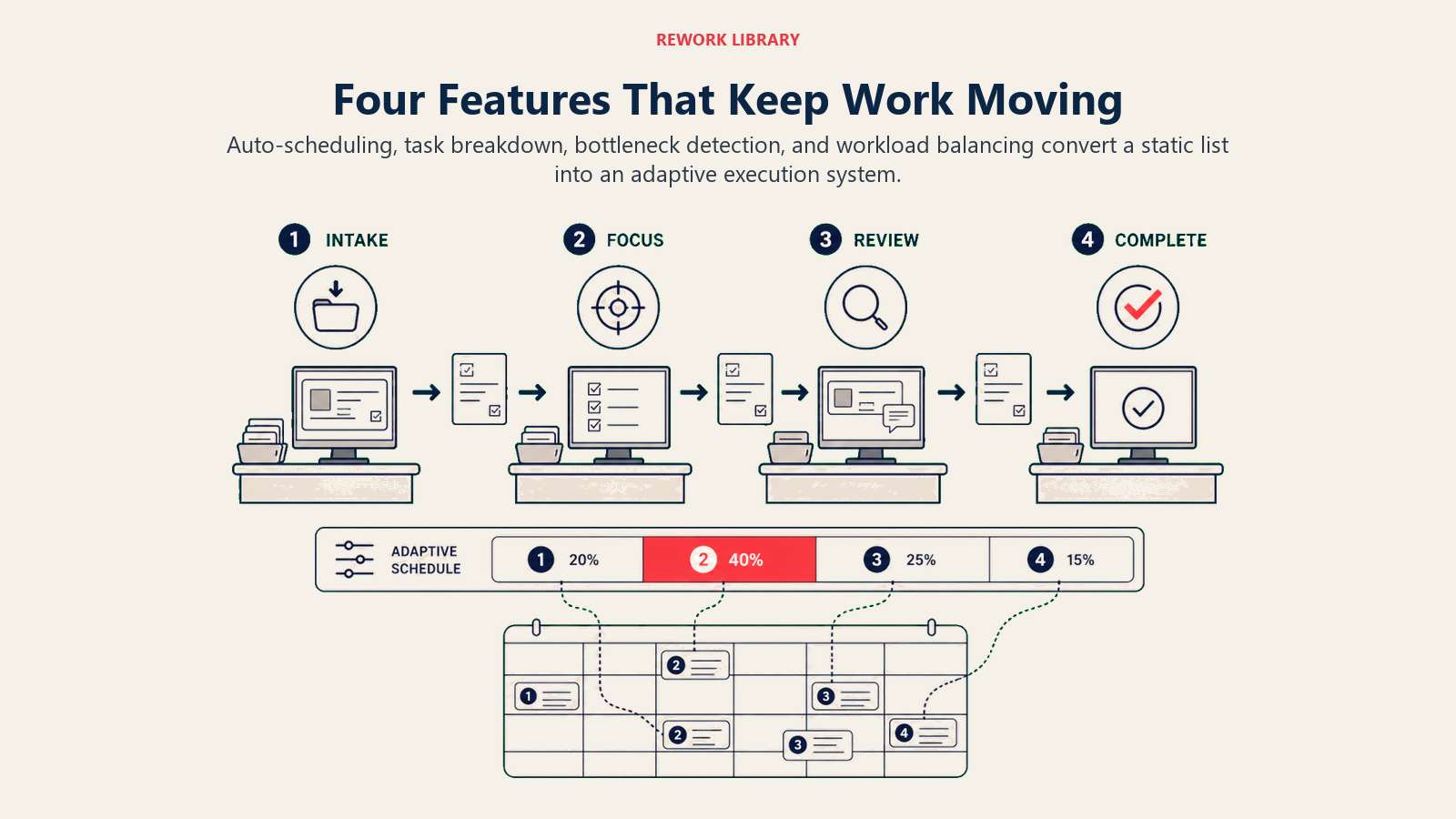
Auto-Scheduling Based on Capacity
The AI looks at your available time, task estimates, and deadlines, then schedules tasks automatically.
This works because:
- It considers your calendar, not just task deadlines
- It accounts for typical meeting patterns and interruptions
- It adjusts when priorities change or new work arrives
- It respects focus time and batches similar tasks
The result is a realistic daily plan that actually fits in your available time.
Smart Task Breakdown
You enter a large task like "Launch new product website." The AI suggests subtasks based on similar projects:
- Design mockups
- Develop landing page
- Write product copy
- Set up analytics
- Test across browsers
- Deploy to production
This helps teams avoid incomplete planning and missing steps.
Bottleneck Identification
The AI analyzes your project workflow to identify:
- Tasks sitting unassigned for too long
- People who are consistently overloaded
- Dependencies that repeatedly cause delays
- Work that's started but not finished
It doesn't just report problems. It suggests solutions: reassign this task, break down that epic, adjust these deadlines.
Workload Balancing
The system tracks each team member's capacity and current commitments. When you add new work, it suggests who has bandwidth and what might need to be reprioritized or delegated.
This prevents the common pattern where work gravitates to whoever responds first, creating imbalance and burnout.
Use Cases by Team Type
Different teams benefit from AI task management in different ways.
Product Teams: Sprint Planning and Backlog Prioritization
AI helps product teams:
- Prioritize backlog items based on strategic goals, user impact, and technical dependencies
- Estimate sprint capacity more accurately using historical velocity
- Identify scope creep and suggest what to defer
- Balance feature work, technical debt, and bug fixes
The result is sprints that accomplish realistic amounts of high-impact work.
Sales Teams: Deal Progression and Activity Optimization
For sales teams, AI task management focuses on:
- Prioritizing deals based on close probability, timeline, and value
- Suggesting next actions based on deal stage and historical patterns
- Balancing prospecting, follow-up, and closing activities
- Identifying deals at risk due to inactivity
Reps know exactly which prospects to focus on and what actions move deals forward.
Operations Teams: Process Management and Capacity Planning
Operations teams use AI for:
- Workload distribution across team members
- Processing time predictions for customer requests
- Bottleneck identification in service delivery
- Resource allocation for projects and maintenance
The goal is consistent delivery without overload or idle capacity.
Executive Teams: Strategic Initiative Tracking
For executives, AI task management provides:
- High-level visibility across all strategic initiatives
- Risk identification when key projects are off track
- Resource allocation recommendations
- Impact analysis when priorities shift
Leaders can make informed decisions without drowning in status updates.
Integration with Existing Workflows
AI task management only works if it fits into how your team already works.
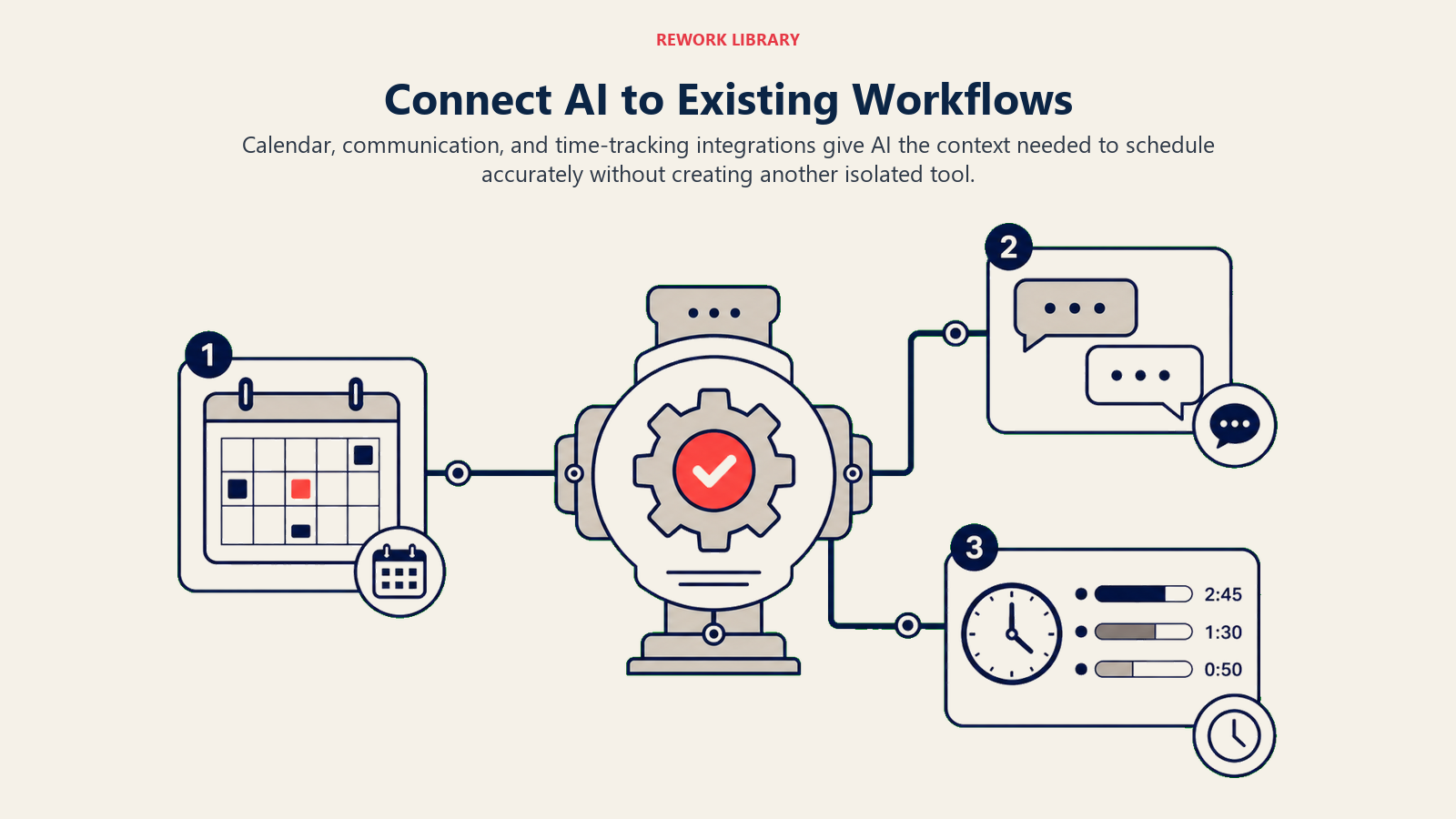
Calendar Sync
Your task tool should integrate with your calendar so that:
- Scheduled task time blocks appear on your calendar
- Meeting changes trigger task rescheduling
- You see conflicts between tasks and meetings
- Focus time is protected automatically
The best tools treat tasks and calendar as a unified system, not separate domains. Advanced platforms offer AI scheduling and calendar tools that optimize both task work and meeting time holistically.
Communication Tool Integration
Slack and Microsoft Teams integration lets you:
- Create tasks from messages without leaving the conversation
- Get AI-suggested tasks based on commitments made in chat
- Receive smart notifications about high-priority work
- Update task status directly from communication tools
This reduces context switching and ensures work discussed doesn't get lost.
Time Tracking Connection
When task management integrates with time tracking:
- The AI learns how long work actually takes
- You can compare estimates to actuals
- Capacity planning becomes more accurate
- Project profitability is visible
This closes the feedback loop that makes AI recommendations smarter over time.
Productivity Metrics That Actually Matter
Track these metrics to measure whether AI task management is working.
Task Completion Rates
Are people finishing what they start? Track:
- Percentage of tasks completed within estimated time
- Number of tasks started vs. finished
- Overdue task trends
- Abandonment rate (tasks that get deleted without completion)
AI tools should increase completion rates by making workloads realistic and priorities clear.
Estimation Accuracy
How close are your time estimates to reality?
- Average variance between estimated and actual time
- Improvement trend as AI learns
- Variation by task type, project, or team member
Better estimation means better planning and more reliable commitments.
Time to Delivery Improvement
Are projects finishing faster?
- Cycle time from task creation to completion
- Project duration vs. planned timeline
- Time spent in each workflow stage
- Reduction in rework and blocked tasks
The goal isn't just working faster. It's reducing waste and friction.
Team Capacity Utilization
Is work distributed effectively?
- Percentage of available capacity used (target: 70-85%)
- Variation in workload across team members
- Frequency of overload periods
- Idle time or underutilization
Good AI task management balances workloads without overloading anyone.
Implementation Best Practices
Getting your team to actually use AI task management requires more than just signing up for a tool.
Start with Individual Adoption
Don't mandate team-wide use immediately. Let individuals try the AI features first:
- Smart prioritization for personal tasks
- Auto-scheduling for their own work
- AI suggestions they can accept or ignore
When individuals see value, they'll advocate for team adoption.
Define Clear Team Standards
For AI to work effectively, establish:
- How to write task descriptions (specificity helps AI understand context)
- When to set deadlines vs. leave them flexible
- How to indicate dependencies
- What level of granularity for task breakdown
Consistency in how tasks are managed makes AI recommendations more accurate.
Trust but Verify
AI suggestions aren't always perfect. Encourage your team to:
- Review AI-generated estimates and priorities
- Override when they have context the AI doesn't
- Provide feedback when AI is wrong (some tools learn from corrections)
- Treat AI as a smart assistant, not an oracle
The goal is augmentation, not blind automation.
Measure and Communicate Wins
Track and share successes:
- Time saved on planning and prioritization
- Improved project delivery
- Reduced stress from unclear priorities
- Better workload balance
When people see concrete benefits, adoption accelerates.
Iterate on Configuration
Most AI tools let you adjust:
- Priority weighting (deadline urgency vs. strategic importance)
- Workload capacity assumptions
- Notification preferences
- Automation triggers
Don't just use the defaults. Tune the AI to match how your team works.
The promise of AI task management isn't just better task tracking. It's transforming how teams decide what to work on, when to do it, and who should handle it. Replacing gut feel and manual juggling with data-driven optimization.
But the technology only delivers value when it fits your workflow, respects team autonomy, and continuously learns from how your team actually works. Before implementation, develop a clear AI tool selection framework to ensure the platform aligns with your team's specific needs and workflows.
Related Resources
Deepen your understanding of AI-powered productivity with these related topics:
- AI Workflow Automation Overview - Transform business processes with intelligent automation
- AI Scheduling and Calendar Tools - Optimize your calendar with AI-powered scheduling
- AI Data Analysis Tools - Make better decisions with AI analytics
- AI Performance Measurement - Track and optimize AI tool effectiveness
