5S Methodology: The 5 Steps, Office Examples & Checklist
Turn this article into takeaways for your work.


Each assistant summarizes the article only for you and suggests best practices for your work.
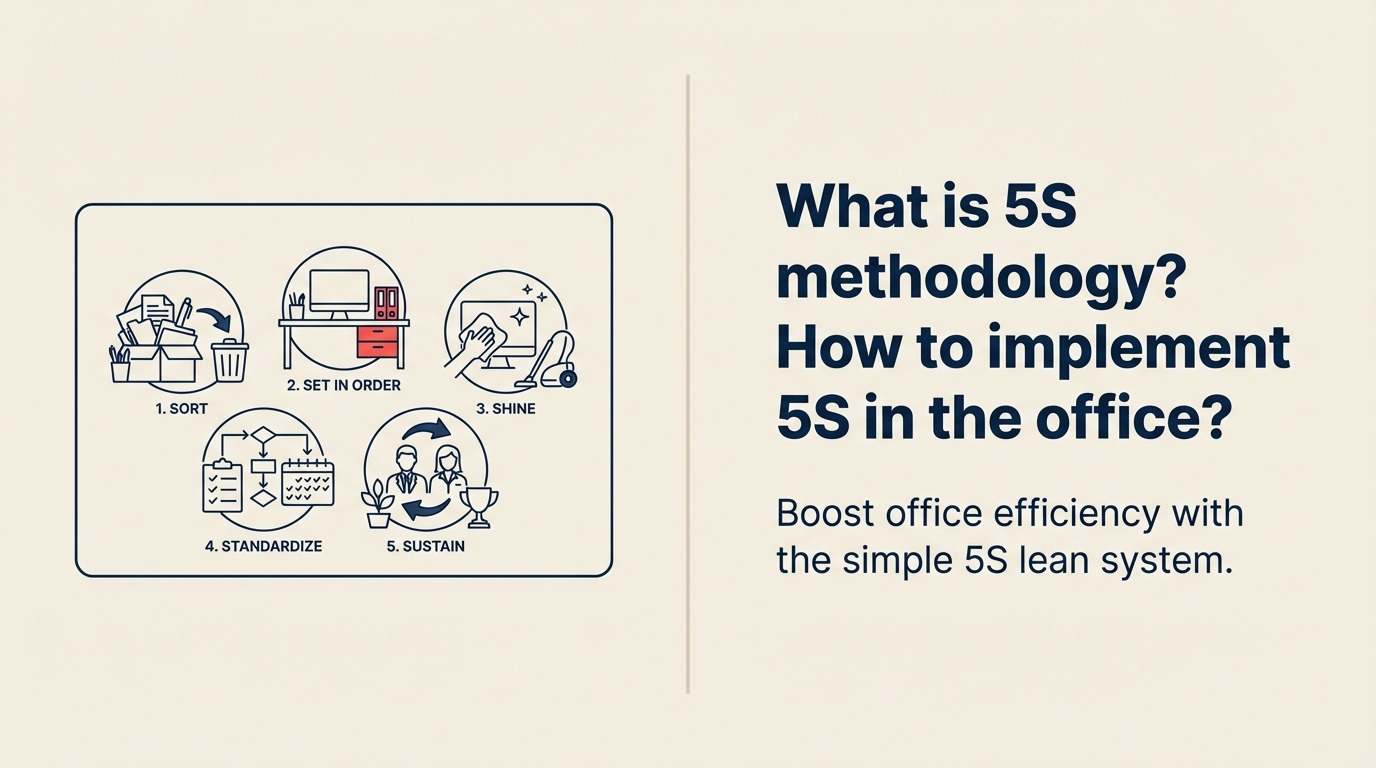
5S is a workplace organization method built on five steps: Sort, Set in Order, Shine, Standardize and Sustain. Each step removes clutter, gives every item a fixed place, keeps the area clean, and turns the result into a habit. It started on factory floors in Japan, and it works just as well on a desk, a shared drive or a support queue.
This guide covers the five steps in plain language, how 5S compares with 6S, Kaizen and Lean, a six-step rollout plan, a ready-to-copy audit checklist, and concrete examples for offices, digital workspaces, customer-facing teams and warehouses.
What is 5S?
5S is a system for reducing waste and keeping a workspace orderly so that work flows without friction. The US Environmental Protection Agency describes it as a system to reduce waste and optimize productivity through maintaining an orderly workplace and using visual cues, and notes it is typically the first lean method an organization adopts.
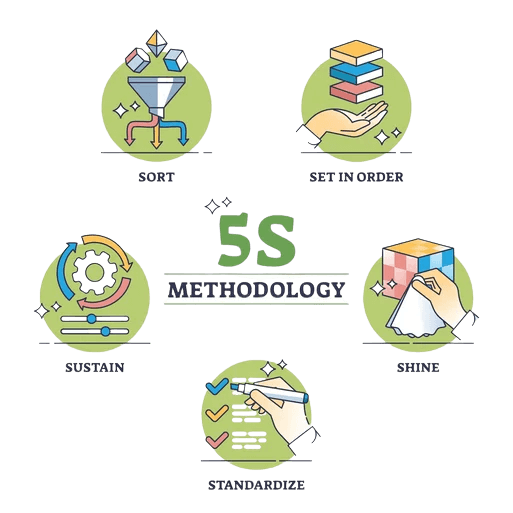
The name comes from five Japanese words that each start with "S" when written in English letters. Most teams know them by the translated names, so here's the quick map before we go deeper:
| Step | Japanese term | Plain meaning | One-line test |
|---|---|---|---|
| 1. Sort | Seiri | Remove what isn't needed | "Have I used this in the last few months?" |
| 2. Set in order | Seiton | A place for everything | "Can a new person find it in 30 seconds?" |
| 3. Shine | Seiso | Clean and inspect | "Would I notice a problem here if one started?" |
| 4. Standardize | Seiketsu | Make the rules visible | "Is the standard written down and shared?" |
| 5. Sustain | Shitsuke | Make it a habit | "Does it still look right a month from now?" |
Where 5S came from
5S is usually traced to Japanese manufacturing in the decades after the Second World War and is closely tied to the Toyota Production System. Car plants needed tools and parts to be in the same place every time, because a worker who loses two minutes looking for a wrench loses it on every cycle, all shift long.
The method then spread to hospitals, schools, software teams and service desks. The reason is simple: clutter and searching cost the same in any setting. In an office the "wrench" is a contract, a login, a template or a customer record.
The 5 S's explained
Sort (Seiri)
Sort means separating what the work needs from what it doesn't, and removing the second group. This is usually the hardest step, because every item feels like it might be useful someday.
A practical method from lean practice is red tagging. The EPA describes it as evaluating the necessity of each item in a work area and tagging anything that isn't needed, in the wrong place or in the wrong quantity. Tagged items move to a holding area, and then get disposed of, recycled or reassigned.
What to do:
- Pull everything out of one area (a desk, a cabinet, a folder tree).
- Sort it into three piles: needed daily, needed occasionally, not needed.
- Tag the "not needed" pile with a date. If nobody claims an item within two weeks, it goes.
- Rule of thumb: if you haven't touched it in 12 months and no law or contract requires it, it leaves the workspace.
Set in order (Seiton)
Set in order means giving every remaining item a defined, labeled home that's close to where it's used. The test is speed: anyone should be able to find an item, use it and return it without asking.
Place things by frequency. What you use every day sits within arm's reach. What you use weekly lives in a nearby drawer or a top-level folder. What you use rarely goes to shared storage or an archive. Labels do most of the work, and they work best when they are visible from a few steps away, the idea behind visual management.
What to do:
- Label every drawer, shelf, cable and folder with the same naming pattern.
- Mark shared equipment locations (outlines, shadow boards, color codes).
- Put the label on the home as well as the item, so a missing item shows up as an empty space.
Shine (Seiso)
Shine means cleaning the workspace and, just as important, using the cleaning to inspect it. The EPA notes that working in a clean environment lets workers notice malfunctions such as leaks, vibrations, breakages and misalignments before they cause failures.
In an office, "shine" covers physical cleaning (screens, desks, meeting rooms, kitchen) and digital housekeeping (broken links, duplicate files, abandoned dashboards, stale tickets). The point is the same: a tidy baseline makes the odd thing stand out.
What to do:
- Set a five-minute daily reset at the start or end of the day.
- Assign each shared area to a named person or a rotation, not to "everyone".
- When you find the same mess twice, fix the cause (not enough bins, no home for a tool) instead of cleaning it again.
Standardize (Seiketsu)
Standardize turns the first three steps from a one-off cleanup into the default. A workplace that looked great after a Friday cleanup and a mess by Wednesday had no standard.
The EPA lists three parts: assigning 5S job responsibilities, integrating 5S duties into regular work, and checking on the maintenance of 5S. Useful tools include checklists, signs and scoreboards, and short scheduled 5S periods.
What to do:
- Write a one-page standard per area: what "good" looks like, with a photo.
- Name an owner, a frequency and a check method.
- Fold it into existing documentation. If you already keep a standard operating procedure for the area, add the 5S standard to it rather than creating a parallel document. For the underlying idea, see standard work.
Sustain (Shitsuke)
Sustain is the discipline to keep doing the first four steps. The EPA calls it often the most difficult S to implement, because changing entrenched behavior is hard and the pull back to the "old way" is strong.
Sustain isn't a project phase. It's the loop that makes 5S a cycle: audit, find drift, fix, and start over with a fresh Sort.
What to do:
- Audit on a fixed rhythm (weekly for a team area, monthly for a whole floor).
- Make results visible: post scores where the team can see them.
- Recognize teams that hold their standard, and ask managers to walk the area with the team. A short gemba walk is a natural way to do this.
5S vs 6S vs Kaizen vs Lean
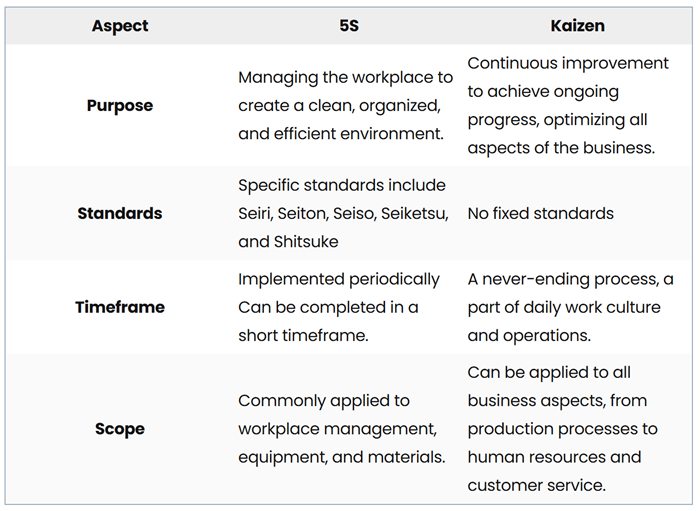
People mix these up because they all come from the same family of improvement ideas. The simplest way to hold them apart: 5S is a method, 6S is 5S plus safety, Kaizen is a mindset, and Lean is the overall system.
| 5S | 6S | Kaizen | Lean | |
|---|---|---|---|---|
| What it is | Workplace organization method | 5S with a sixth S, Safety | Philosophy of continuous, small improvement | Management system focused on value and waste |
| Main question | Is the workspace organized and standardized? | Is it organized and safe? | How can we make this a little better, again? | What does the customer value, and what's waste? |
| Scope | One area or team | One area, with hazards in view | Any process, any level | The whole value stream |
| Typical output | Labeled, clean, standardized space | Same, plus safety checks and hazard marking | Many small improvements and experiments | Redesigned flow, less waste |
| When to start | First, as the foundation | When physical risk matters (plants, labs, warehouses) | After 5S makes problems visible | Once basics and discipline are in place |
| Related guide | This page | This page | What is Kaizen | Lean methodology |
5S vs 6S
6S adds Safety as a sixth step. Teams in warehouses, labs, kitchens and plants add it so hazards (spills, blocked exits, trailing cables) are reviewed as part of every audit, not left to a separate program. If nobody on your team can be hurt by the workspace, plain 5S is enough. If they can, treat safety as a standing audit line.
5S vs Kaizen
Both aim at less waste and smoother work, and both come from Japan. The difference is scope. 5S is a defined routine with a fixed set of steps for one workspace. Kaizen is an ongoing habit of improving anything, often through short workshops such as a kaizen event.
They work well together. 5S makes problems visible (a missing tool, a pile of rework), and Kaizen gives the team a way to fix them. Some companies call the combination "Kaizen 5S": a 5S audit feeds the list of small improvements the team tackles next. And leadership has to model it, because a team won't hold a standard its managers ignore.
5S vs Lean
Lean is the bigger system. 5S is one of its basic tools, and as the EPA puts it, 5S provides the foundation on which other lean methods can be introduced. Skip 5S and the later steps (flow, pull, standard work) tend to wobble, because the workplace underneath them is still chaotic.
How to implement 5S in 6 steps
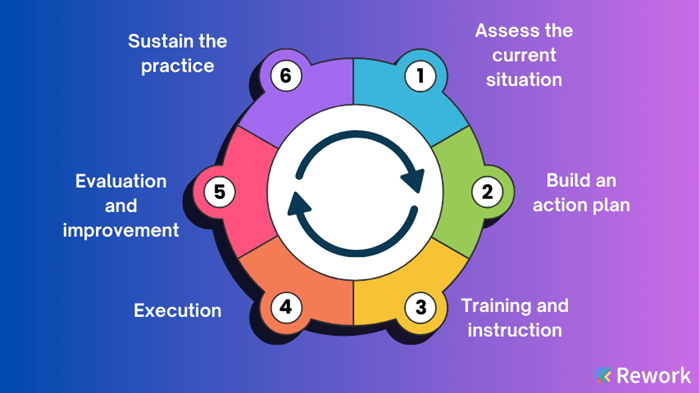
This plan works for a ten-person office, a shared Google Drive, or a warehouse aisle. The main rule: start with one small, visible area, win there, then copy the pattern.
Step 1: Assess the current state
Walk the area and take "before" photos. Then ask:
- Do people struggle to find documents or files, on paper or on screen?
- Are cables loose or tangled?
- Are folders, drawers or cabinets unlabeled or full of unmarked items?
- Do unneeded items occupy prime working space?
- Do people know their own role in keeping the space in order?
Count the yeses. Any yes is a reason to start, and the "before" photos are what you will compare against later.
Step 2: Choose a pilot area and build the plan
Pick one area with a visible pain, such as a shared supply cabinet, the team's drive or the returns bench. Write a short plan:
- The goal, in one sentence ("find any contract in under a minute")
- Tools and supplies needed (labels, bins, tags, a camera)
- A schedule for each of the five steps, usually one to two weeks in total for a small area
- An owner for the area and a sponsor who can approve disposal
- A budget, even if it's tiny
Share the plan with everyone who works in the area before you start. Surprises create resistance.
Step 3: Train the team
Give people a 30 minute walkthrough of the five steps using their own area's photos. Training can be in person, a short video, or a one-page guide. What matters is that everyone knows what "good" looks like and what's expected of them, not just the person running the pilot.
Step 4: Run the first pass (Sort, Set in order, Shine)
Block a half day. Sort first, then set in order, then shine, in that order, because labeling clutter just gives you a labeled mess. Keep a log of what you removed and why. Take "after" photos.
Management support is part of execution. Someone has to approve the disposal of old equipment and defend the time spent, or the pass quietly stalls at "we'll finish it later".
Step 5: Standardize and audit
Write the one-page standard, post it in the area, and run the first audit with the checklist below. Fix gaps immediately, then record the score as your baseline. This is also the moment to recognize the people who did the work.
Step 6: Sustain and expand
Schedule recurring audits and the daily five-minute reset. Review scores in a regular meeting, and when a score drops, ask what changed rather than who failed. Once the pilot holds for a month, copy the same pattern to the next area. If you're building a process practice around this, process maturity levels help you see where 5S fits as your habits improve.
5S audit checklist (copy and use)
Use this checklist for any area. Score each line 0 (not in place), 1 (partly in place), or 2 (fully in place). Maximum score is 30. Run it weekly for a team area and monthly for a larger zone, and have someone outside the area do the scoring at least once a quarter so familiar mess doesn't go unnoticed.
| S | Check | Score (0-2) | Evidence / action |
|---|---|---|---|
| Sort | Nothing in the area is unneeded, expired or broken | ||
| Sort | Items not used in the last 12 months have been removed or archived | ||
| Sort | Personal items are limited to an agreed amount | ||
| Set in order | Every item has a labeled, defined home | ||
| Set in order | Daily-use items are within arm's reach | ||
| Set in order | A missing item is obvious at a glance (outline, empty slot, empty folder) | ||
| Shine | Surfaces, screens and floors are clean | ||
| Shine | Equipment and tools are in working condition | ||
| Shine | Trash, recycling and digital clutter (downloads, desktop) are cleared daily | ||
| Standardize | A one-page standard with photos is posted | ||
| Standardize | Owner, frequency and check method are named for the area | ||
| Standardize | Labels and naming follow the same pattern across areas | ||
| Sustain | The last three audits are recorded and visible | ||
| Sustain | Actions from the last audit were closed on time | ||
| Sustain | New team members have been trained on the standard |
How to read the total:
| Total score | What it means | Next move |
|---|---|---|
| 26-30 | Standard is holding | Audit monthly and look for small improvements |
| 20-25 | Mostly in place with gaps | Fix the lowest-scoring S this week |
| 12-19 | Drifting | Re-run a short Sort and Set in order pass, then re-audit |
| 0-11 | No working standard | Treat it as a new pilot, starting at Step 2 above |
To keep audits honest, take a photo of each line that scores 0 or 1 and attach it to the action. A photo is harder to argue with than a feeling.
5S examples by function
The method stays the same across functions. What changes is what counts as an "item" and where clutter hides.
Office desks and shared spaces
- Sort: Clear the desk, drawers and the shared printer area. Dead cables, expired supplies and duplicate notebooks go.
- Set in order: Label drawers, give each shared item (chargers, adapters, whiteboard markers) a home, and mark the meeting room reset layout with a photo.
- Shine: Wipe surfaces and screens, and check the projector, chairs and cables while you do.
- Standardize: A one-page "meeting room reset" checklist on the wall: markers back, chairs in, screen off.
- Sustain: A five-minute end-of-day reset and a monthly walk-through of shared spaces.
Digital files and shared drives
Digital clutter hides better than physical clutter, which is why it grows faster. Asana's Anatomy of Work Index, a survey of more than 10,000 knowledge workers, found that 60% of time at work goes to "work about work", a category it defines to include searching for information and switching between apps. Not all of that is a filing problem, but a messy drive is a direct contributor.
| S | Digital version | Example |
|---|---|---|
| Sort | Delete or archive duplicates, drafts, old versions and abandoned folders | Archive any folder untouched for 12 months into a read-only "Archive" space |
| Set in order | One folder structure and one naming rule | YYYY-MM-DD_client_doc-type_v2, with top-level folders by function |
| Shine | Fix broken links, remove dead dashboards, empty the downloads folder | Monthly "link check" of the 20 most-used documents |
| Standardize | A written rule for where each document type lives | A one-page "where things go" guide pinned in the team channel |
| Sustain | Quarterly drive audit with a score | Use the checklist above, with "digital clutter" lines |
Two practical tips: limit the number of top-level folders (seven or fewer is easier to remember), and use search-friendly names so people don't have to rely on memory of where something sits.
Support and sales team tools and workflows
Customer-facing teams carry clutter in tools, not drawers: duplicate contact records, stale deals, dozens of near-identical email templates and a ticket queue nobody has groomed in months.
- Sort: Close or archive deals and tickets with no activity in a set period. Merge duplicate contacts. Delete unused templates and saved replies.
- Set in order: Give each template, macro and saved view a clear name by use case ("Pricing follow-up, day 3"), and put the top five where reps can reach them in one click.
- Shine: Fix required fields that are always blank, clean up tags, and check that automations still fire.
- Standardize: Write down stage definitions, ticket priorities and handoff rules. Everyone should read a pipeline stage the same way.
- Sustain: Review a sample of records weekly and score them with the checklist.
This is where the discipline of standard work pays off fastest, because a clean workflow is easier to measure and improve. If you want the standard to live inside the tool instead of on a wiki page, teams on a work-management platform such as Rework's Work Ops can turn the checklist into a recurring task with a named owner, so the audit shows up on its own instead of relying on someone's memory.
Warehouse and field teams
This is the classic home of 5S, and it's where 6S earns its place.
- Sort: Red-tag obsolete stock, broken pallets and spare parts nobody has ordered in a year.
- Set in order: Floor markings for aisles and staging, shadow boards for tools, bin labels with item codes, and a fixed location for each vehicle's van stock.
- Shine: A daily sweep that doubles as an inspection of racks, forklifts and spill points.
- Standardize: Photos of the correct layout at each station and a shift-start check.
- Sustain: Weekly supervisor audits with scores posted at the entrance. Add a safety line (blocked exits, loose cables, spills) to turn it into 6S.
Benefits of 5S
- Less time wasted searching: When everything has a place, people stop hunting for tools, files and information.
- Less waste: Removing unneeded items frees up space. The EPA notes that 5S often lets organizations reclaim valuable floor space and eliminate broken tools, scrap and excess material.
- Earlier problem detection: A clean, ordered area makes leaks, damage and drift obvious, so small issues get fixed before they become failures.
- Better quality: When everything is in its proper place, mistakes like using the wrong part, template or version go down.
- Safer workplaces: Clear aisles, marked hazards and tidy cables mean fewer trips and spills.
- Better morale: People generally work better in a space that looks cared for, and they notice when management cares about it too.
These are the effects teams report from experience and from lean practice. Measure your own: time to find a standard item, number of misplaced-item complaints, audit scores before and after, and square footage reclaimed.
Common 5S mistakes
- Skipping Sort and going straight to labels. You end up with beautifully labeled junk.
- Treating 5S as a one-day cleanup. Without a standard and an audit rhythm, the area is back to its old state within weeks.
- Making it somebody else's job. If 5S belongs to a facilities person or a single champion, the team never owns it. Responsibility has to sit with the people who use the space.
- Starting too big. A whole-company launch with no pilot produces a lot of posters and few results.
- Ignoring digital space. Office 5S that stops at the desk misses where most of the clutter now lives.
- No visible leadership. If managers' desks, inboxes and drives are exempt, the message is that 5S is for everyone else.
- Scoring without acting. An audit that doesn't lead to a closed action teaches people that the score doesn't matter.
5S do's and don'ts
Do
- Start with one pilot area and show a before and after photo.
- Sort first, then set in order, then shine, in that order.
- Name an owner and a frequency for every area.
- Keep standards to one page with pictures.
- Audit on a fixed rhythm and rotate the auditor.
- Include digital spaces (drives, inboxes, CRM, ticket queues) from the start.
- Recognize teams that sustain their standard, not only those that finish the first cleanup.
Don't
- Don't throw things out without a holding period and a sponsor's approval.
- Don't buy labels, bins and shelves before you sort.
- Don't turn the audit into a blame exercise. Ask what in the system allowed the drift.
- Don't write a 20-page manual nobody will read.
- Don't exempt leaders or "special" areas.
- Don't declare victory after the first audit. Sustain is the step that decides whether it lasts.
It's more than organizing things
5S looks like housekeeping, and that's the point: it's a cheap, visible way to build the habit of noticing problems and fixing them close to where they happen. Teams that hold the standard tend to find that Kaizen and other improvement work get easier, because the workspace stops hiding the problems.
Pick one area this week, take the "before" photo, and run the checklist above. You'll learn more from one real audit than from any further reading.

On this page
- What is 5S?
- Where 5S came from
- The 5 S's explained
- Sort (Seiri)
- Set in order (Seiton)
- Shine (Seiso)
- Standardize (Seiketsu)
- Sustain (Shitsuke)
- 5S vs 6S vs Kaizen vs Lean
- 5S vs 6S
- 5S vs Kaizen
- 5S vs Lean
- How to implement 5S in 6 steps
- Step 1: Assess the current state
- Step 2: Choose a pilot area and build the plan
- Step 3: Train the team
- Step 4: Run the first pass (Sort, Set in order, Shine)
- Step 5: Standardize and audit
- Step 6: Sustain and expand
- 5S audit checklist (copy and use)
- 5S examples by function
- Office desks and shared spaces
- Digital files and shared drives
- Support and sales team tools and workflows
- Warehouse and field teams
- Benefits of 5S
- Common 5S mistakes
- 5S do's and don'ts
- Do
- Don't
- It's more than organizing things