Standard Operating Procedure (SOP): Examples & Free Template
Turn this article into takeaways for your work.


Each assistant summarizes the article only for you and suggests best practices for your work.
A standard operating procedure (SOP) is a written, step-by-step document that tells people exactly how to perform a routine task, who does each part, and what "done correctly" looks like. It turns one person's know-how into a repeatable standard, so the result is the same whoever does the work and whenever they do it.
SOPs are the thing most teams reach for first when someone says "we need to standardize how we work." They serve as the official process documentation that turns a one-off way of working into a repeatable standard. In that sense an SOP is the final, written output of process standardization: the modelling stage decides how the process should run, and the SOP locks it in.
This guide covers the definition, how an SOP differs from a policy or a checklist, the three common formats, a 7-step method for writing one, a template you can copy today, and worked examples for customer support, HR, finance, and sales.
What is a standard operating procedure?
An SOP answers three questions: what is done, who does it, and how it is done. It covers one process, from trigger to finish, in plain action-oriented language. A good SOP is short enough that a new hire can follow it on their first day without asking a colleague.
SOPs matter most in three situations:
- Onboarding. A new hire reads the procedure instead of shadowing someone for two weeks.
- Quality and consistency. Two people doing the same job produce the same output.
- Audits and regulated work. Some industries require them. In US pharmaceutical manufacturing, for instance, 21 CFR 211.100 requires written production and process control procedures that are reviewed and approved, followed during execution, and documented at the time of performance, with any deviation recorded and justified.
And here's the short answer to "why bother?": if it isn't written down, it doesn't exist. When someone new walks in, when something breaks, or when an audit knocks, you don't pull out a diagram. You reach for the document that tells people exactly what to do.
SOP vs process vs policy vs work instruction vs checklist
These terms get mixed up constantly, and the mix-up produces documents that try to do five jobs and do none well. Here's how they differ.
| Document | What it answers | Typical length | Example |
|---|---|---|---|
| Policy | What rules apply, and why? | 1-2 pages | "All vendor payments above a set limit need two approvals." |
| Process | What happens, end to end, and in what order? | A diagram plus notes | The procure-to-pay process map |
| SOP | Who does what, step by step, for one process? | 1-5 pages | "How to process a vendor invoice" |
| Work instruction | How exactly do I do one task inside a step? | Half a page to 1 page | "How to enter an invoice in the ERP screen" |
| Checklist | Did I complete every required item? | A few lines | Pre-shipment inspection list |
A quick way to remember it: the policy sets the rule, the process shows the flow, the SOP assigns the steps, the work instruction zooms into one step, and the checklist confirms nothing was skipped. If your SOP is running past five pages, you've probably buried work instructions inside it. Split them out and link to them.
Two close relatives are worth a mention. Standard work comes from lean manufacturing and adds takt time and work-in-process limits to the sequence of steps. A business process map is the visual model that an SOP puts into words.
Which SOP format fits your process?
The right format depends on how complex the process is and how much judgment it requires. Match the format to the task instead of forcing every procedure into the same shape.
| Format | Best for | Example process | Watch out for |
|---|---|---|---|
| Step-by-step | Simple, linear, routine tasks | Submitting an expense report | Gets unreadable past about 10 steps |
| Hierarchical | Multi-level tasks with sub-steps | Onboarding a new vendor | Deep nesting (1.1.1.1) loses readers |
| Flowchart | Decision-heavy processes with branches | Approving a discount request | Needs a short legend and a text fallback |
| Checklist | Compliance-critical, must-not-miss steps | Pre-shipment quality inspection | Tells people what, rarely how |
Step-by-step is the default. Number each action, keep one action per step, and put the actor at the start of the sentence ("Support agent assigns the ticket...").
Hierarchical works when a step has its own sub-steps. Use "3. Verify the vendor" with "3a. Check tax ID" and "3b. Check bank details" underneath. Stop at two levels.
Flowchart is the right call when the path forks, such as "if the amount is over the approval limit, route to the director." Pair the SOP with a flowchart or a swimlane diagram and keep the labels identical to the text.
Checklist suits tasks where missing one item causes harm. Many teams combine formats: a step-by-step body with a checklist at the end for sign-off.
Key components of an SOP
Whatever format you choose, a well-structured SOP carries the same building blocks.
| Section | Purpose |
|---|---|
| Title and ID | Give the SOP a clear name and code for easy tracking. Often include version info and effective dates. For example: Finance: Processing Vendor Invoices [SOP ID #FIN-003, Version 2.0, Effective Jan 2026] |
| Purpose | State what the SOP is intended to accomplish and why it exists. This purpose should be aligned with the business goal. |
| Scope | Define where and when this SOP applies, what it covers and what it doesn't. |
| Roles and responsibilities | Specify who performs each task, who has approval authority, and who is accountable for outcomes for each stage of the process. Use job titles, not individual names. |
| Materials and tools (if needed) | List anything required to execute the task: software, forms, equipment. |
| Step-by-step procedure | Numbered steps written in plain, action-oriented language. Keep it chronological and specific. This is also where you include the diagram from the modelling stage. |
| Safety/compliance notes | Call out anything critical to safety, quality, or regulatory compliance. |
| References and appendices | Related policies, diagrams, forms, or instructions. |
| Revision history and approvals | Track changes over time and who signed off on each version. |
Some SOPs also include a glossary when the work uses industry-specific terms or acronyms.
Is there a formal standard for all this? Not a single global rulebook. ISO 9001 (quality management) and ISO 27001 (information security) both expect documented processes, and ISO 10013:2021 gives guidance on documented information. Regulated industries such as pharmaceuticals and food safety add their own expectations for content, control, and change tracking. The practical rule: pick one structure and apply it uniformly across every SOP you write.
How to write an SOP in 7 steps
Writing an SOP is about clarity, not creativity. This sequence works for a first SOP or a fiftieth.
Step 1: Pick one process and define its boundaries
Choose a process that is repeated often, fails visibly, or depends on one person's memory. Write one sentence for the trigger ("a customer ticket is marked urgent") and one for the end state ("the ticket is resolved or handed to engineering"). If you can't state both, the scope is too fuzzy to document.
Step 2: Watch the work as it really happens
Don't write from memory or from the way the org chart says it works. Shadow the person who does the task today, and write down what they actually do, including the workarounds. A short gemba walk style observation beats a two-hour meeting. The gap between "documented" and "actual" is usually where the problems live.
Step 3: Assign roles
For every step, name a role (not a person) that performs it, and name who approves. If roles are tangled, build a RACI matrix first. It takes 20 minutes and prevents the classic SOP failure where every step says "the team will..." and nobody owns it.
Step 4: Draft the steps in plain language
Write for the person doing the task, not for an auditor.
- One action per step. "Open the ticket and assign a priority" is two steps.
- Start with a verb. "Email the invoice to the finance team," not "Ensure the document is properly communicated."
- Replace vague words with numbers. Swap "frequently" and "as needed" for "every Monday" or "within 4 business hours."
- Define jargon once, or avoid it.
- Use the same names as your diagram. If the flowchart says "Validate Payment Request," the SOP shouldn't say "Review Payment Form."
Step 5: Add what people need at the moment of doing
Add links to the form, the system, or the template at the exact step that needs it. Add a screenshot only when the screen is confusing. Add an "if something goes wrong" line for the one or two most common failures. For error-prone steps, consider whether the process itself can prevent the mistake, which is the idea behind poka-yoke.
Step 6: Test it with someone who has never done the task
This is the step most teams skip, and it's the one that matters. Hand the draft to a person who doesn't know the process and ask them to follow it while you stay silent. Every question they ask is a gap in the SOP. Fix the gaps, then test again.
Step 7: Review, approve, publish, and version it
Get sign-off from the process owner and anyone with compliance responsibility. Give the SOP an ID and a version number, record the effective date, and publish it where people already work, not in a forgotten shared drive. Retire the old version visibly so nobody follows it by accident. Then set a review date before you close the document.
Free SOP template (copy and use)
Copy the block below into a doc or wiki page and fill in the brackets. It follows the components above and fits on two pages for most processes.
SOP TITLE: [Verb + object, e.g. Process a vendor invoice]
SOP ID: [DEPT-000]        VERSION: [1.0]        EFFECTIVE DATE: [YYYY-MM-DD]
PROCESS OWNER: [Job title]        NEXT REVIEW DATE: [YYYY-MM-DD]

1. PURPOSE
[One or two sentences: what this SOP achieves and why it exists.]

2. SCOPE
Applies to: [teams, products, locations, situations]
Does not apply to: [exclusions, and where to look instead]

3. ROLES AND RESPONSIBILITIES
- [Role A]: performs steps [x-y]
- [Role B]: reviews and approves
- [Role C]: accountable for the outcome
- [Role D]: informed when complete

4. TOOLS, FORMS, AND MATERIALS
- [System or software, with link]
- [Form or template, with link]
- [Equipment, if any]

5. DEFINITIONS (only if needed)
- [Term]: [plain-language meaning]

6. PROCEDURE
Trigger: [What starts this procedure]
Step 1. [Role] [does one action]. [Link to form or work instruction.]
Step 2. [Role] [does one action]. Time limit: [e.g. within 1 business day].
Step 3. If [condition], go to Step 4. If not, go to Step 5.
Step 4. [Role] [action]. Approval required from [role].
Step 5. [Role] [action].
End state: [What "done" looks like]

7. EXCEPTIONS AND ESCALATION
- If [problem], then [action] and notify [role] within [time].

8. COMPLIANCE AND SAFETY NOTES
- [Regulation, internal policy, or safety rule that applies]

9. RECORDS
- What is recorded: [e.g. approved invoice, ticket notes]
- Where it is stored: [system or folder]
- How long it is kept: [period]

10. REFERENCES
- [Related policy, SOP, diagram, or work instruction]

11. REVISION HISTORY
| Version | Date | Change | Author | Approved by |
|---|---|---|---|---|
| 1.0 | [date] | First release | [name] | [name] |
Two tips for using it. First, delete any section that doesn't apply instead of writing "N/A" everywhere, because a shorter SOP gets read. Second, keep the template itself under version control so every SOP in the company starts from the current layout.
SOP examples by function
The four examples below are illustrative. They show the level of detail to aim for, not a rule for your exact business. Adjust the times, roles, and tools to fit.
Example 1: Customer support ticket escalation
Purpose: Make sure urgent or unresolved tickets reach the right person fast. Scope: All tickets in the support queue. Excludes billing disputes, which follow the finance SOP. Roles: Support agent (performs), Support lead (approves), Engineer on call (resolves technical issues).
- Support agent reads the ticket and assigns a priority (P1 urgent, P2 high, P3 normal) using the priority table in the help desk.
- For P1, the agent pings the Support lead in the escalation channel within 15 minutes of the ticket arriving.
- Support lead reviews the ticket and confirms whether it is a product defect or a usage question.
- If it is a defect, the lead creates an engineering ticket, links it to the customer ticket, and assigns the Engineer on call.
- Support agent sends the customer a status update that names the next update time.
- If the ticket stays unresolved after 4 business hours for P1, the Support lead notifies the Head of Support.
- When resolved, the agent confirms the fix with the customer and closes the ticket with a root-cause tag.
Escalation clocks like these usually come from a customer promise, so tie them to your service level agreement.
Example 2: Employee onboarding
Purpose: Give every new hire a working laptop, accounts, and a clear first week. Roles: HR coordinator (performs), Hiring manager (accountable), IT (performs access setup), New hire (completes forms).
- HR coordinator sends the offer paperwork and opens an onboarding record at least 10 business days before the start date.
- HR coordinator submits an equipment and access request to IT as soon as the offer is signed.
- IT prepares the laptop and creates accounts for email, chat, and the role's core tools. IT confirms completion to HR 2 business days before day one.
- Hiring manager prepares a first-week plan with three goals and one buddy assigned.
- On day one, HR coordinator runs the orientation and collects the new hire's signed policy acknowledgments.
- At the end of week one, hiring manager holds a check-in and records feedback in the onboarding record.
- HR coordinator closes the record after the 30-day check-in.
Example 3: Month-end close
Purpose: Close the books on a fixed schedule with a complete audit trail. Roles: Accounts payable and receivable clerks (perform), Accountant (reconciles), Finance controller (approves).
- On the last business day, AP and AR clerks stop posting entries for the period and confirm that all invoices received are entered.
- On business day 1, the accountant reconciles each bank account to the ledger and lists unreconciled items.
- On business day 2, the accountant posts accruals and depreciation using the standard journal templates.
- On business day 3, the accountant runs the trial balance and investigates any account that moved more than the agreed threshold from last month.
- On business day 4, the Finance controller reviews the trial balance, approves adjustments, and locks the period in the system.
- The controller saves the close checklist, reconciliations, and approvals to the shared close folder.
Month-end close is a good candidate for a checklist at the end, because a missed reconciliation is expensive.
Example 4: Sales lead handoff (marketing to sales)
Purpose: Make sure every qualified lead gets a fast, informed first touch. Roles: Marketing operations (performs), SDR (performs), Sales manager (accountable).
- Marketing operations marks a lead as marketing-qualified when it meets the agreed score and has a business email.
- The CRM assigns the lead to an SDR using the round-robin rule for that region.
- SDR contacts the lead within 1 business hour, using the first-touch template and referencing the content the lead engaged with.
- SDR logs the outcome in the CRM the same day: connected, no answer, or not a fit.
- If the lead is qualified, the SDR books a meeting and moves the lead to the "sales-qualified" stage with notes attached.
- If there is no contact after 5 attempts over 10 business days, the SDR returns the lead to marketing with a reason code.
- Sales manager reviews returned leads weekly and flags any pattern to marketing.
If you're documenting a flow like this one, a workflow tool that routes tasks and approvals automatically keeps the SOP and the system in sync. This is the kind of cross-team process Rework Work Ops is built for.
Ready-made HR and finance SOP templates
Two more templates, ready to download and adapt.
Standard operating procedures for HR: Employee offboarding process
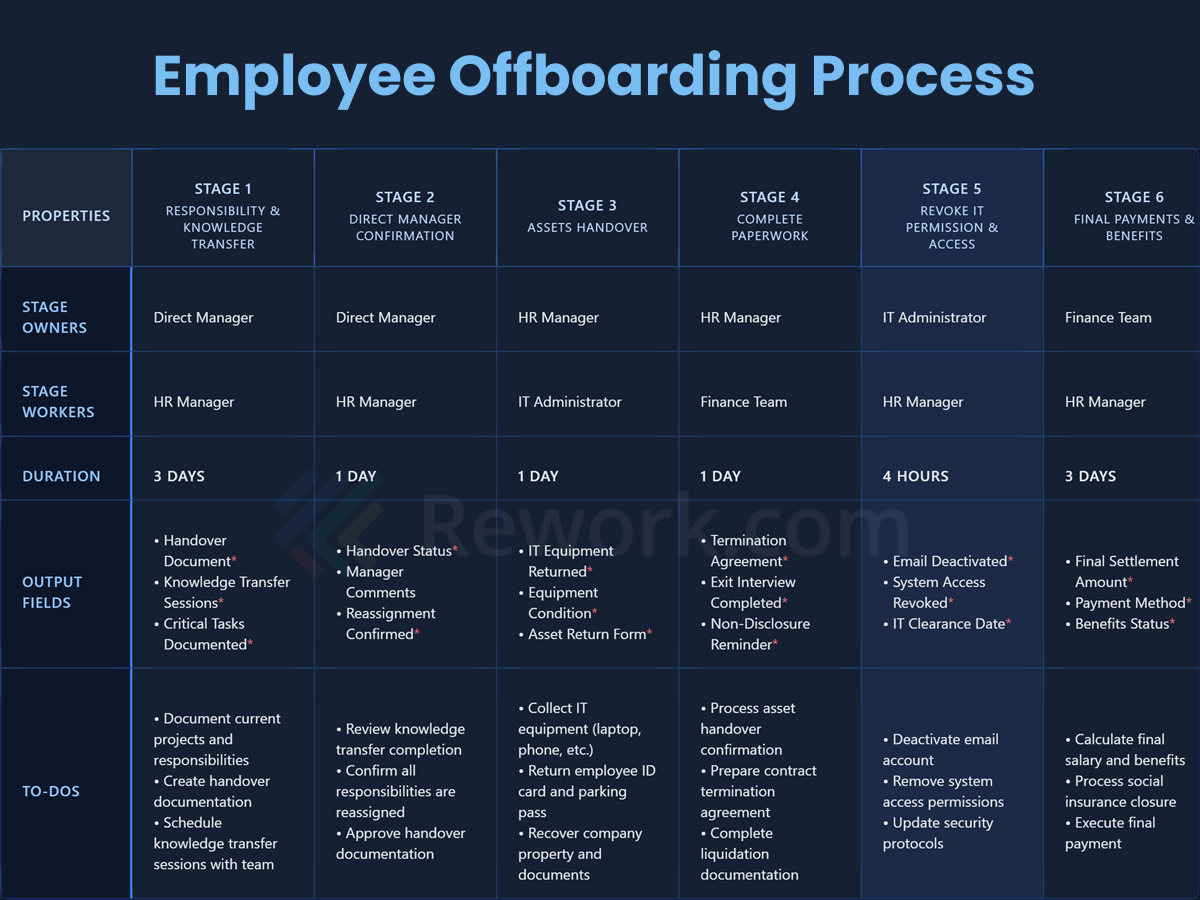
This Employee Offboarding SOP template shows a clear six-step process to safely remove departing employees, recover company property, and follow legal requirements while keeping good relationships.
Download the full Employee Offboarding SOP template here.
Standard operating procedures for finance: Payment request process
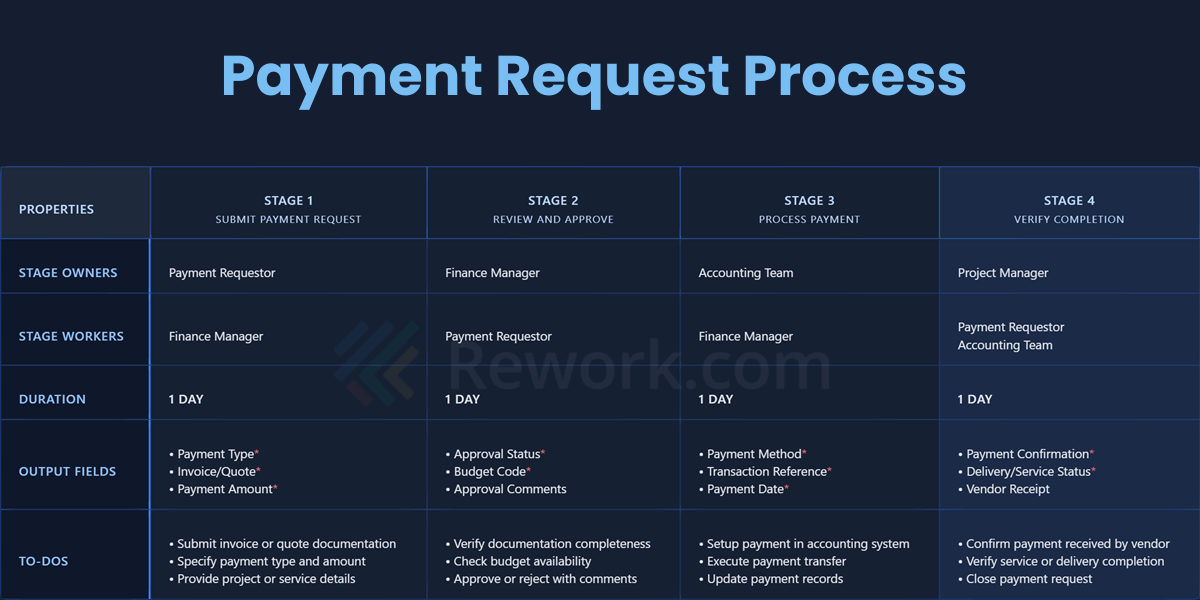
This Payment Request workflow template ensures vendors receive accurate, timely payments while maintaining proper authorization, budget compliance, and complete transaction documentation throughout the process.
Download the full Payment Request SOP template here.
Common SOP mistakes (and how to avoid them)
Most failed SOPs fail for the same few reasons.
- Written once, never reviewed. The process changes and the document doesn't, so people learn to ignore it.
- Written from the desk, not the floor. The SOP describes the ideal process, and the real one keeps running next to it.
- Too long. A 20-page SOP is a reference book. Nobody opens it mid-task.
- Too vague. "Review the request" tells nobody what to check. "Check that the amount matches the purchase order" does.
- No owner. An SOP with no named process owner decays within a year.
- Impossible to find. If it takes three clicks and a search to locate, people will ask a colleague instead.
- Untested. Nobody outside the author has ever followed it.
SOP do's and don'ts
| Do | Don't |
|---|---|
| Write one SOP per process, with a single named owner | Merge several processes into one long document |
| Use job titles for roles | Use individual names that change with turnover |
| Start every step with a verb and keep one action per step | Write paragraphs of narrative |
| Put time limits and thresholds in numbers | Rely on "promptly," "as needed," or "frequently" |
| Link to forms, systems, and work instructions at the step that needs them | Make people hunt for the template |
| Test with someone who has never done the task | Assume the author's version is clear |
| Keep the SOP and its diagram in sync | Update one and forget the other |
| Record version, date, and approver on every release | Overwrite the old file with no history |
How to keep SOPs from going stale
Think of your SOPs as living guides, not one-time projects. A dusty SOP in a forgotten folder won't help anyone. A few habits keep them alive.
- Set a review date on every SOP. Twelve months is a common default. Review high-risk or fast-changing procedures every 3 to 6 months.
- Trigger a review on events, not just dates. A new tool, a regulation change, an audit finding, or a recurring incident should each reopen the relevant SOP.
- Give frontline staff an easy way to flag errors. A "report an issue with this SOP" link at the top of the page beats a yearly survey.
- Track reading and use. If nobody opens an SOP, either it's unnecessary or people can't find it.
- Retire what you don't use. Archive obsolete SOPs and record why. A smaller set of accurate SOPs beats a large set of doubtful ones.
- Measure the process, not just the document. When error rates or cycle times drift, check the SOP first. Process KPIs help you spot the drift early.
If you're building out a documentation program across many teams, it helps to know where you stand. The process maturity levels model gives you a way to judge whether your processes are ad hoc, repeatable, defined, measured, or optimizing. And if your workspace is cluttered or disorganized, the 5S methodology is a good companion to SOP work, because a standardized workspace is easier to document.
For high-volume or cross-team processes, an SOP works best as part of broader business process management, where the written procedure, the visual model, and the tracking system all stay in sync.
Frequently Asked Questions about Standard Operating Procedures
What is a standard operating procedure (SOP)?
An SOP is a documented, step-by-step procedure that describes how to perform a routine task or process so it is carried out correctly and consistently across an organization. It answers what is done, who does it, and how it is done.
What is the difference between an SOP and a policy?
A policy states the rule and the reason for it, such as "payments above a set limit need two approvals." An SOP describes the exact steps, roles, and records needed to follow that rule in daily work. Policies change rarely, while SOPs change whenever the process or tools do.
How long should an SOP be?
Most SOPs fit on one to five pages. If yours runs longer, split detailed task instructions into separate work instructions and link to them. A new employee should be able to follow the SOP in the moment without searching for missing information.
What should an SOP include?
A solid SOP includes a title and ID, purpose, scope, roles and responsibilities, tools and materials, numbered steps, exceptions and escalation, compliance notes, records, references, and a revision history with approvals. You can use the template in this guide as a starting point.
How often should SOPs be reviewed?
Review each SOP at least once a year, and every 3 to 6 months for high-risk or fast-changing processes. Also reopen an SOP whenever a tool, regulation, or role changes, or when an incident shows the written steps no longer match the real process.

On this page
- What is a standard operating procedure?
- SOP vs process vs policy vs work instruction vs checklist
- Which SOP format fits your process?
- Key components of an SOP
- How to write an SOP in 7 steps
- Step 1: Pick one process and define its boundaries
- Step 2: Watch the work as it really happens
- Step 3: Assign roles
- Step 4: Draft the steps in plain language
- Step 5: Add what people need at the moment of doing
- Step 6: Test it with someone who has never done the task
- Step 7: Review, approve, publish, and version it
- Free SOP template (copy and use)
- SOP examples by function
- Example 1: Customer support ticket escalation
- Example 2: Employee onboarding
- Example 3: Month-end close
- Example 4: Sales lead handoff (marketing to sales)
- Ready-made HR and finance SOP templates
- Common SOP mistakes (and how to avoid them)
- SOP do's and don'ts
- How to keep SOPs from going stale