More in
CRM Comparisons
Rework vs Monday Sales CRM: Flexibility vs Depth in 2026
Apr 14, 2026
Rework vs Close: Modern CRMs Head to Head for Mid-Size Sales Teams in 2026
Apr 9, 2026
Rework vs Copper: Which CRM Fits a Google Workspace Team in 2026
Apr 8, 2026
Rework vs Pipedrive: The SMB CRM Showdown in 2026
Apr 6, 2026
Rework vs Folk: Relationship CRMs Compared for Mid-Size Teams in 2026
Mar 31, 2026
Rework vs Salesforce: Which Fits a Growing Sales Team in 2026
Mar 30, 2026 · Currently reading
Rework vs SugarCRM: Enterprise Flexibility vs Unified Operations in 2026
Mar 30, 2026
Rework vs Zoho CRM: What You Gain and Lose in 2026
Mar 24, 2026
Rework vs Insightly: Project-Aware CRMs Compared for Mid-Size Teams in 2026
Mar 19, 2026
Rework vs Freshsales: Which CRM Is Easier to Adopt in 2026
Mar 17, 2026
Rework vs Salesforce: Which Fits a Growing Sales Team in 2026
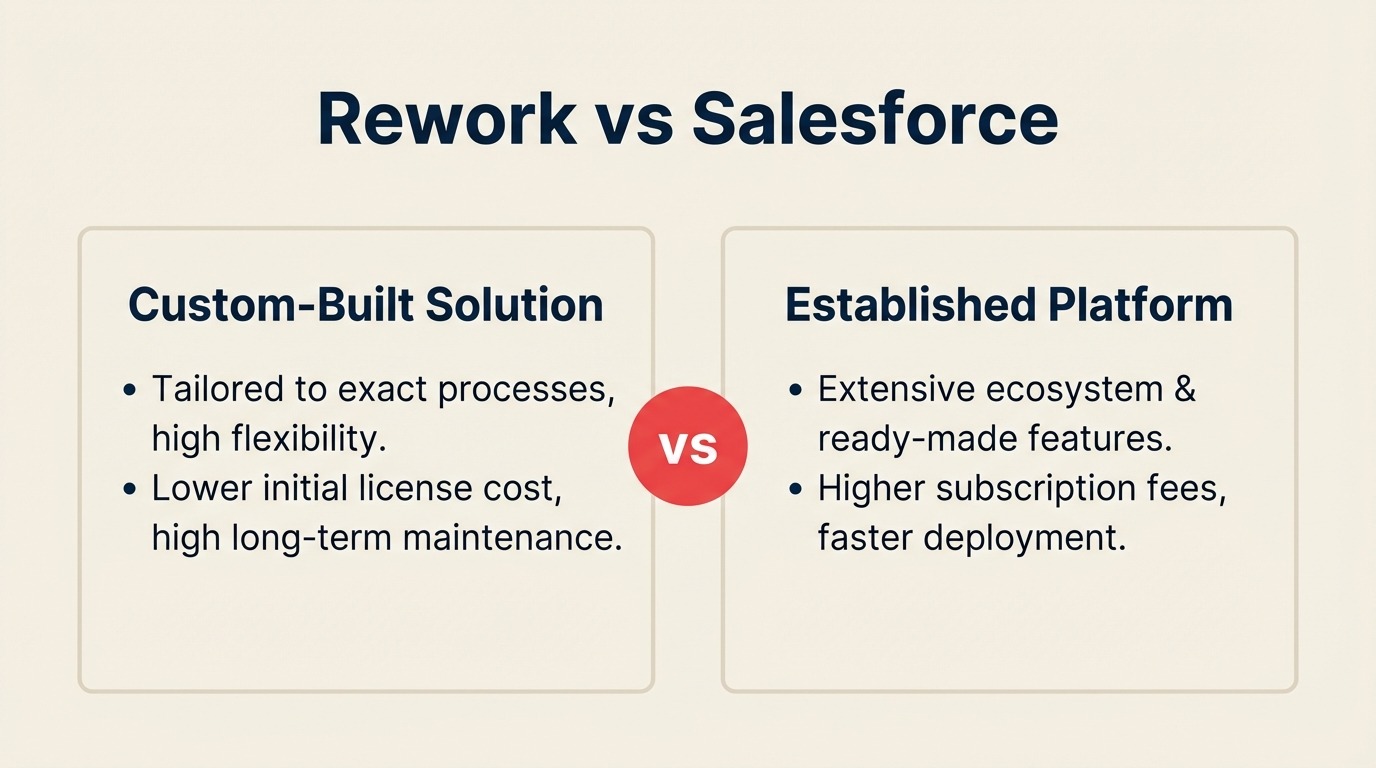
"You've outgrown your current CRM. You need Salesforce."
That line gets said in a lot of board meetings and sales kick-offs, and sometimes it's right. But it's also said reflexively, by advisors who haven't priced a Salesforce implementation lately and haven't watched a 40-person sales team slowly stop logging deals because the system is too complex to use on a Monday morning.
This comparison is for two kinds of readers. The first is actively evaluating Salesforce and wondering whether it's the right move. The second is already in Salesforce and quietly asking whether they're getting the value they're paying for. Both are legitimate positions. Both deserve an honest answer, not a vendor pitch.
Rework wins some of this comparison. Salesforce wins more of it on raw capability. What matters is whether you need what Salesforce does.
How Each CRM Works
Before the feature-by-feature breakdown, here's a quick visual overview of what each product is and how it's structured. Rework and Salesforce sit at opposite ends of the CRM market, seeing the architecture side-by-side makes the pricing, implementation, and admin-burden sections later in this article easier to read.
How Rework Works
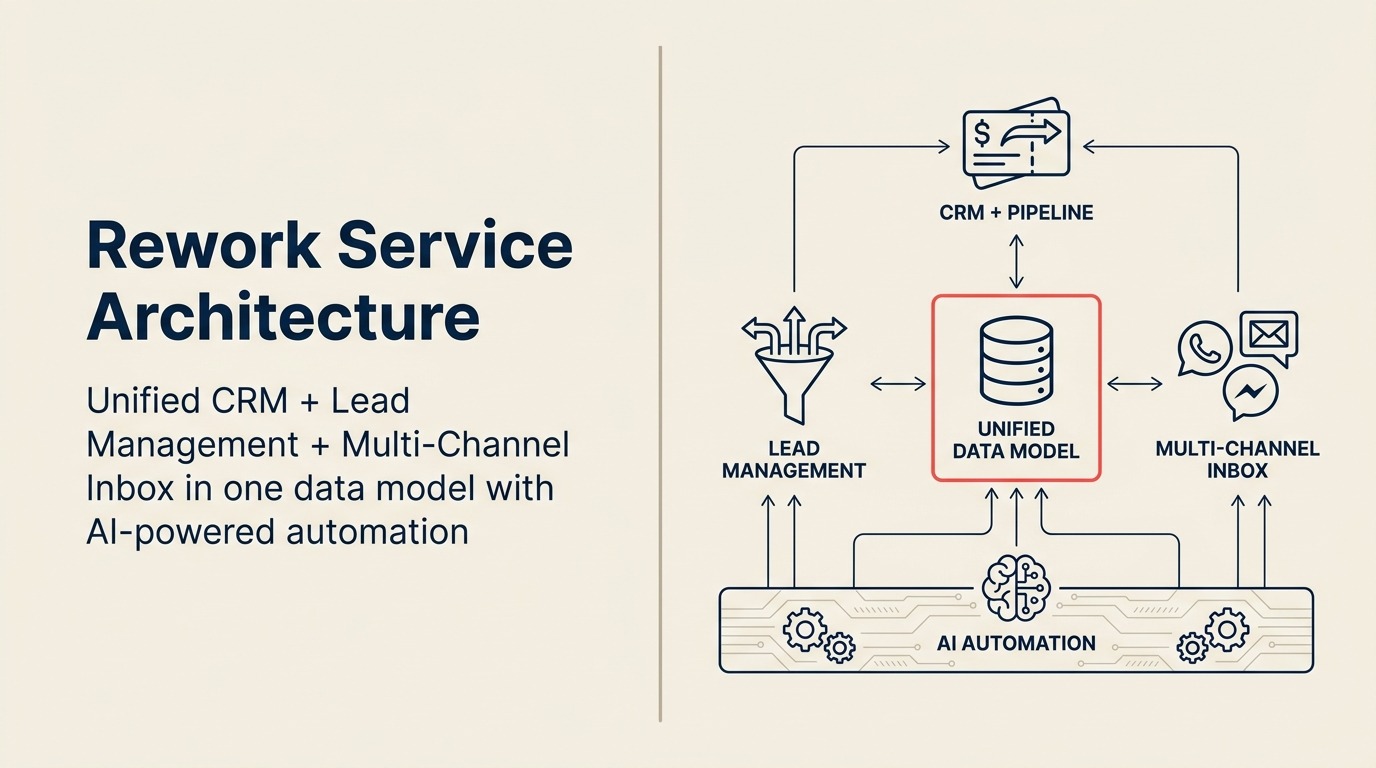
Rework is a unified CRM built for mid-size cross-functional teams (20-500 employees). CRM pipeline, Lead Management, and multi-channel inbox (WhatsApp, Messenger, email, SMS) sit on one data model, so sales, marketing, and CS see the same contact timeline without integrations. One product, one price, self-serve setup, the opposite of enterprise complexity.
How Salesforce Works
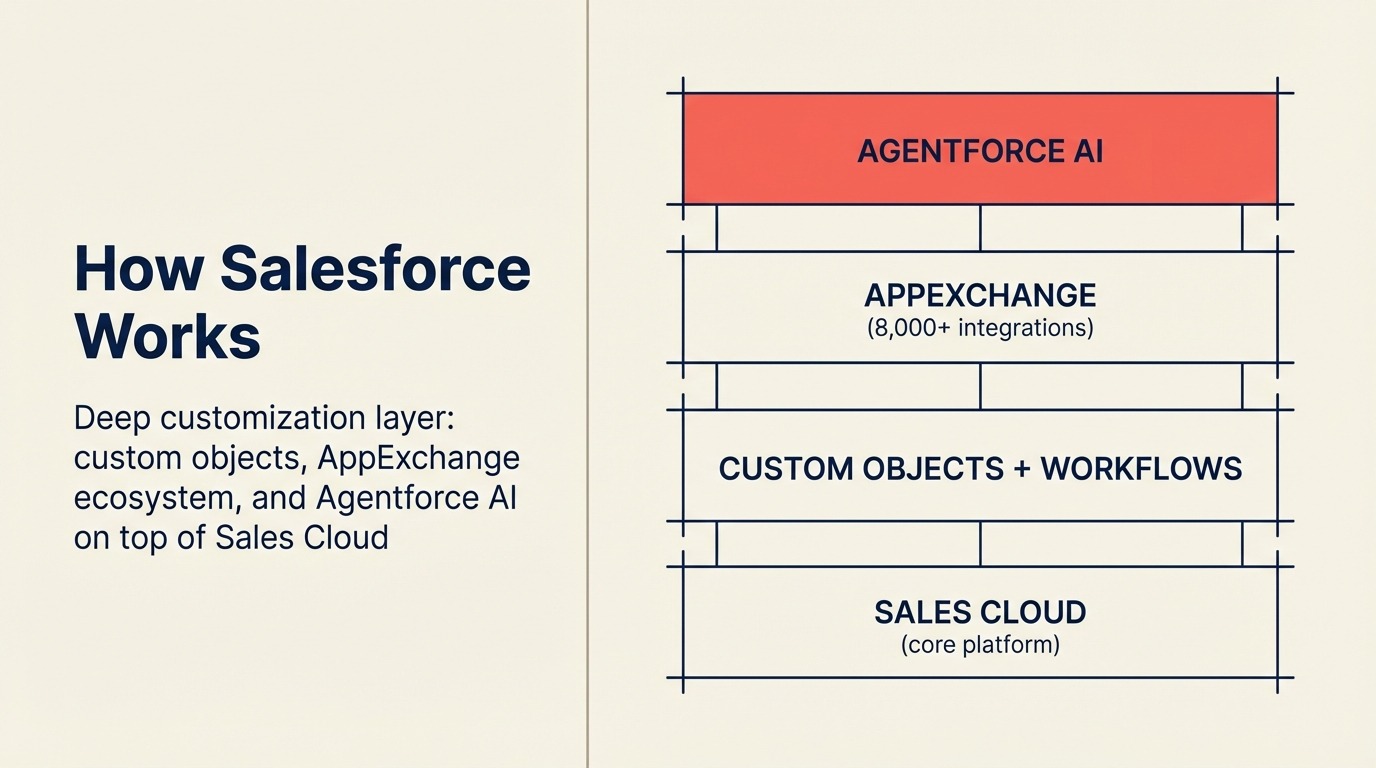
Salesforce is an enterprise platform of separate "Clouds" (Sales Cloud, Service Cloud, Marketing Cloud, and more) running on a shared data backbone, extended by 3,000+ AppExchange apps and consulting partners. It's the most capable CRM on the market at the high end, the tradeoff is cost, admin burden, and a 4-12 week implementation that typically needs a paid partner or in-house admin to run.
The Head-to-Head at a Glance
| Factor | Rework | Salesforce Sales Cloud |
|---|---|---|
| Pricing | $999/yr Starter (5 users) or $1,999/yr Standard (10 users) + $12/user/mo above | $25/user/mo Starter Suite or $80/user/mo Professional (billed annually) |
| Support | Email + chat + phone on all plans | Standard support; Premier add-on for priority support |
| Enterprise price | See rework.com/pricing | $165/user/mo (Enterprise) |
| Implementation cost | $0-$5k self-serve | $15k-$150k+ with SI partner |
| Time to value | 1-2 weeks | 2-6 months typical |
| Setup speed | 1-3 days for basic CRM; 1-2 weeks for full Lead Management + chat, led by a team with hands-on experience onboarding mid-size sales, marketing, and ops departments end-to-end | Under a day for Starter Suite basics; 4-8 weeks for a functional Professional deployment, often months for a full implementation, Salesforce has no in-house team experienced with mid-size cross-department rollouts; customers rely on SI partners ($50,000-$500,000) to fill that gap |
| Customization depth | Moderate | Very high |
| Admin burden | Low | High (often requires dedicated admin) |
| AppExchange ecosystem | 80+ native integrations | 7,000+ apps |
| Reporting depth | Good (Standard tier) | Best-in-class (Einstein Analytics) |
| Compliance features | Basic | Advanced (HIPAA, SOC2, FedRAMP options) |
| Rep adoption | High | Variable (often struggles without training) |
Pricing Deep Dive
Salesforce Sales Cloud pricing
Salesforce publishes four Sales Cloud tiers (2026 pricing, billed annually per user). You can verify current figures on the Salesforce Sales Cloud pricing page:
- Starter Suite ($25/user/month): Basic CRM with accounts, contacts, leads, opportunities, and email integration. Limited automation and reporting. Honest assessment: this tier is undersized for most sales teams past 5 people.
- Professional ($80/user/month): Full pipeline management, customizable sales processes, role-based access, basic forecasting. This is where most growing teams actually land.
- Enterprise ($165/user/month): Workflow automation, advanced API access, territory management, custom objects. Built for complex organizations.
- Unlimited ($330/user/month): Full platform, unlimited sandboxes, 24/7 support, Einstein AI features.
| Team Size | Salesforce Starter | Salesforce Professional | Salesforce Enterprise |
|---|---|---|---|
| 10 seats | $3,000/yr | $9,600/yr | $19,800/yr |
| 25 seats | $7,500/yr | $24,000/yr | $49,500/yr |
| 50 seats | $15,000/yr | $48,000/yr | $99,000/yr |
The costs nobody puts in the budget
The seat price is the visible part. Here's what gets missed:
Implementation: A Salesforce implementation for a 25-person team done right (data migration, custom fields, process setup, user training) runs $15,000-$50,000 through a Salesforce partner. Enterprise-complexity implementations run $100,000+. DIY implementations frequently fail or drag on for months. The data preparation work alone (cleaning duplicates, mapping fields, deduplicating contacts) is routinely underestimated in scope and budget.
Admin or ops hire: Salesforce without someone who knows how to maintain it degrades fast. Workflows break, duplicate records pile up, reports stop being trusted. A part-time Salesforce admin costs $30-$60/hour. A full-time Salesforce admin is $80,000-$130,000 in annual salary in most US markets. Small teams often underestimate this until it bites them.
Training: Salesforce onboarding for reps isn't trivial. Formal training costs $500-$2,000 per seat. Many teams skip this and pay the adoption tax instead.
Ongoing customization: Every time your sales process changes, someone needs to update Salesforce. If that's a paid consultant, add $150-$250/hour.
12-month total cost scenario: 25-seat team
| Cost Category | Salesforce Professional | Rework Sales Ops |
|---|---|---|
| Seat licenses | $24,000 | $4,159 |
| Implementation | $20,000 | $0-$3,000 |
| Admin (partial FTE or consultant) | $15,000 | $0 |
| Training | $5,000 | $500 |
| Year 1 total | ~$64,000 | ~$7,659 |
| Year 2 total (licenses + admin) | ~$40,000 | ~$4,659 |
Year 1 is where the Salesforce cost shock happens. Implementation and admin overhead frequently double or triple the license cost. Teams that budget only for seats get surprised.
Rework's pricing model
Rework doesn't have an implementation tax. Rework Sales Ops has two packages:
- Starter, $999/year for up to 5 users
- Standard, $1,999/year with 10 users included, plus $12/user/month for each additional user
Both packages include the full CRM, lead management module, and unified multi-channel inbox. Most teams are live within two weeks without a consultant.
For a 25-seat team, Rework costs $4,159/yr. See rework.com/pricing for the full tier breakdown and what's included at each level.
Feature-by-Feature
Pipeline and opportunity management
Salesforce has the most mature opportunity management in the category. You can build custom sales processes per record type, enforce required fields at each stage, and run complex multi-product deals with separate line items. The opportunity object is endlessly configurable.
Rework has clean multi-pipeline management with drag-and-drop stage views. Deal records track the essentials: contacts, activity, notes, documents. You can't build multi-product line items or complex approval processes.
Winner: Salesforce. No close contest here if your deals are complex.
Lead and contact management
Salesforce separates leads from contacts until conversion, which is powerful for teams with distinct lead qualification workflows but confusing for everyone else. The data model is flexible enough to model almost any B2B relationship.
Rework treats contacts and leads as contacts from the start, which is simpler but occasionally creates friction for teams with strict MQL-to-SQL handoff processes.
Winner: Salesforce for teams with formal lead qualification workflows; Rework for teams that find the lead/contact split more annoying than useful.
Workflow and process automation
Salesforce Flow (formerly Process Builder and Workflow Rules) can automate almost anything in the platform. Multi-step, conditional, record-triggered, scheduled. Enterprise-tier teams build automation logic that rivals custom software.
Rework automation covers the common patterns well: deal stage triggers, task creation, email notifications, follow-up reminders. But it doesn't support complex branching logic or cross-object automation.
Winner: Salesforce, significantly.
Reporting, forecasting, and dashboards
Salesforce reporting is best-in-class for CRM. Report builder, dashboards, joined reports, historical trending. At Enterprise you get Einstein Analytics (now Tableau CRM), which is genuinely powerful BI inside the CRM. Forecasting is customizable with multiple forecast categories and adjustable roll-up logic. CROs who rely on weekly forecast reviews should read about forecasting discipline. The process matters more than the tool, but Salesforce's depth gives ops teams the levers to enforce it.
Rework Standard tier has solid pipeline health, activity, and rep performance dashboards. Forecasting uses deal stage probabilities. Not bad, but it's not Salesforce reports.
Winner: Salesforce by a clear margin. If your VP Revenue or CFO wants detailed pipeline analytics, Salesforce's reporting wins.
Mobile and offline access
Both products have functional mobile apps. Salesforce's mobile app is more complete but also more complex. Rework's mobile experience is faster for quick deal updates and call logging.
Winner: Tie for most uses. Rework wins on speed; Salesforce wins on completeness.
AppExchange / integrations ecosystem
Salesforce AppExchange has 7,000+ apps. CPQ tools, document generation, conversation intelligence, industry-specific add-ons. If you need a specific integration, it almost certainly exists.
Rework covers the standard mid-market stack natively (Gmail, Outlook, Slack, Zapier, Stripe, Gong, Zoom) and uses Zapier for everything else. It works for most teams, but if your stack is complex, you'll hit Rework's integration ceiling before Salesforce's.
Winner: Salesforce.
Where Salesforce Genuinely Wins
Customization depth: If your sales process doesn't fit a standard CRM model, Salesforce can be bent to match it. Custom objects, custom fields, page layouts per record type, role-based views. This level of flexibility has no equivalent in Rework.
Enterprise data model: Large sales orgs with territories, overlapping account ownership, hierarchical companies, and multi-division deals need the Salesforce data model. It's built for this.
AppExchange ecosystem: Salesforce AppExchange with 7,000+ apps means you can add CPQ, contract management, revenue intelligence, and hundreds of vertical-specific tools without leaving the platform.
Compliance and security: HIPAA-eligible, FedRAMP authorized, SOC 2 Type II. If you're selling into healthcare, government, or financial services with strict data residency requirements, Salesforce's trust and compliance documentation confirms the certifications. Rework doesn't match this.
Einstein AI and Tableau CRM: At Enterprise and above, Salesforce's AI layer adds predictive scoring, next-step suggestions, conversation intelligence integration, and BI-grade analytics. These are real capabilities, not feature theater.
Partner ecosystem: Thousands of certified Salesforce consultants, SIs, and admins exist. If you need help, you can find it.
Where Rework Wins
Time to value: Most Rework implementations go live in 1-2 weeks. A self-serve team with clean data can be up and running without a single vendor call. Salesforce's implementation timeline, even for a Professional-tier deployment, is typically 6-12 weeks with a partner.
Admin simplicity: Rework was built for teams without a dedicated CRM admin. Field configurations, pipeline setup, and user management are accessible to a non-technical sales ops person. Salesforce without an admin degrades.
Cost at 10-100 seats: For a 25-person team over two years, Rework costs around $8,318 in license cost alone ($4,159/yr x 2). Salesforce Professional for the same team, with a realistic implementation and partial admin allocation, runs $100,000+. That's real money.
Rep adoption: The number-one failure mode for CRMs is rep non-adoption. When reps don't log deals, the pipeline becomes fiction. Rework's simpler interface has a shorter learning curve. Teams with CRM adoption problems often recover on Rework because there's less to learn and fewer clicks to log basic activity. The CRM rollout and adoption guide covers the change management steps that determine whether either product actually gets used.
The Admin Burden Question
This deserves its own section because it's the most underrated factor in the Salesforce decision.
Salesforce is not a self-maintaining system. It requires active administration. And the need for that administration grows with every customization you add, which is the whole point of buying Salesforce. This is a version of the broader RevOps maturity question: teams at earlier maturity stages often lack the processes and personnel to extract value from a highly configurable platform.
Common patterns when teams underinvest in admin:
- Automation rules fire on the wrong records because a condition was misconfigured months ago and nobody noticed
- Duplicate records proliferate because deduplication rules were never set up
- Reporting stops being trusted because field values are inconsistent
- New hires get wrong permissions because the onboarding process wasn't updated after a configuration change
None of this is Salesforce's fault. It's the predictable outcome of buying a highly configurable platform without staffing for its maintenance.
The honest question: does your team have, or can it hire, someone who will actively manage this system? If yes, Salesforce's power is accessible. If not, that power becomes technical debt.
Implementation and Time-to-Value
| Dimension | Rework | Salesforce |
|---|---|---|
| Basic CRM setup | 1-3 days, led by team experienced with the full lead lifecycle | 1-2 weeks for Starter Suite; Professional typically 4-8 weeks |
| Team onboarding (reps) | 3-5 days for full product, included | 1-2 weeks minimum; formal training costs $500-$2,000/seat |
| Lead management configuration | 3-7 days with onboarding team walking through scoring, routing, forms | 4-12 weeks via custom Flow automation or partner; not a standard out-of-box feature |
| Chat inbox connection | 1-2 hours per channel, led by team with mid-size multi-department onboarding experience | Requires 3rd-party apps or Einstein Messaging add-on; no self-serve path |
| Full implementation (CRM + lead mgmt + chat) | 1-2 weeks, led by team with mid-size multi-department onboarding experience | 2-6 months with a Salesforce SI partner ($50,000-$500,000); Enterprise-complexity implementations exceed $100,000 |
| Data migration from prior CRM | CSV import + API, migration support on all plans | Self-serve CSV + API; data prep work routinely underestimated |
| Admin overhead post-launch | Low, no dedicated admin required | High, Salesforce without active admin degrades quickly; in-house admin costs $80,000-$130,000/year |
| Support model | Email + chat + phone on all plans | Standard support; Premier add-on for priority |
Salesforce wins on setup speed only at the simplest level. For a solo founder importing a contact list into Starter Suite, it's fast. But for the team that needs lead management, multi-channel chat, and cross-team handoffs, Salesforce provides none of that out of the box, and Salesforce has no in-house team experienced with mid-size cross-department rollouts. A properly scoped Salesforce Professional deployment for a 25-person team, done right with a certified SI partner, runs $50,000-$500,000 depending on complexity. Enterprise configurations regularly exceed $100,000 before a single rep logs a deal. Rework's edge is institutional experience: the team has onboarded full Sales, Marketing, RevOps, and CS departments at mid-size companies and applies that hard-earned knowledge of what actually breaks during a multi-team rollout to every new customer. The full stack ships in one product, so the 1-2 week implementation includes everything, not just the pipeline.
Who Should Pick Salesforce
- Your sales process is genuinely complex: multi-product line items, multi-stage approval workflows, territory-based routing that doesn't fit a simple pipeline
- You're 100+ reps and growing, where the configuration overhead is justified by the customization depth
- You need enterprise compliance certifications (HIPAA, FedRAMP, SOC 2 with specific controls)
- You have or will hire a Salesforce admin, either in-house or via a managed services partner
- Your tech stack requires integrations that only exist on AppExchange
- You're building toward Salesforce's Einstein AI or Revenue Cloud capabilities and that's part of the business case
Who Should Pick Rework
- You're a 10-100 person team with a straightforward B2B sales process: pipeline stages, sequences, activity tracking, basic forecasting
- You need to be live in weeks, not months, without an implementation partner
- Your budget can't absorb $20,000-$50,000 in Year 1 implementation costs on top of license fees. The true cost of software sprawl is worth reading before you finalize the business case either way
- CRM adoption is a recurring problem. Your last system had low utilization and you want something reps will actually open
- You don't have a dedicated CRM admin and don't plan to hire one
Rework is not the right call if: You're in an industry with strict data compliance requirements, your deals require line-item-level pricing, you need complex territory management, or your RevOps team needs the reporting depth that only Salesforce provides.
Decision Framework: Revenue Complexity vs. Administrative Capacity
The real trade-off in this comparison isn't features. It's this: how complex is your revenue motion, and how much can you invest in managing the tool that supports it?
High revenue complexity + high admin capacity: Salesforce. The platform pays for itself when used properly by teams with the resources to maintain it.
Moderate revenue complexity + low admin capacity: Rework. You get 80% of what Salesforce provides at 30% of the total cost, with a system your team will actually use.
Low revenue complexity + any admin capacity: Rework. Salesforce is over-engineered for a team with a simple pipeline and standard outreach workflow.
High revenue complexity + low admin capacity: Neither product will save you. Fix the process first.
What to Do Next
If you're leaning toward Rework: start with a trial using real data. Import your current pipeline, run one sequence, build the reports your manager asks for weekly. If it covers your workflow, the cost and speed argument is straightforward.
If you're leaning toward Salesforce: get three implementation quotes from certified Salesforce partners before you commit. Before those conversations, work through a CRM buyer's checklist so you know exactly which requirements to scope. The license cost is the number you know. The implementation cost is the number that surprises teams. Make sure your Year 1 budget includes both, plus either an admin hire or a managed services retainer.
If you're already in Salesforce and questioning the value: the issue is rarely the platform. It's almost always adoption or admin debt. Before switching, audit your actual utilization: how many reps logged activity last week, how many pipeline records are current, how much of the configuration is actively used versus accumulating technical debt. The answer tells you whether you have a tools problem or a process problem.
For the full picture on what a Salesforce migration involves, read Switching from Salesforce to Rework. For a side-by-side with the other major CRM in this space, Rework vs HubSpot CRM covers that comparison at the same level of detail.
If you're considering other enterprise-adjacent CRMs, Rework vs SugarCRM covers the on-premise deployment and AI forecasting trade-offs for compliance-sensitive teams. And before you finalize any CRM data model, CRM data model design walks through the structural decisions that shape whether the platform scales cleanly with your team.

Principal Product Marketing Strategist
On this page
- How Each CRM Works
- How Rework Works
- How Salesforce Works
- The Head-to-Head at a Glance
- Pricing Deep Dive
- Salesforce Sales Cloud pricing
- The costs nobody puts in the budget
- 12-month total cost scenario: 25-seat team
- Rework's pricing model
- Feature-by-Feature
- Pipeline and opportunity management
- Lead and contact management
- Workflow and process automation
- Reporting, forecasting, and dashboards
- Mobile and offline access
- AppExchange / integrations ecosystem
- Where Salesforce Genuinely Wins
- Where Rework Wins
- The Admin Burden Question
- Implementation and Time-to-Value
- Who Should Pick Salesforce
- Who Should Pick Rework
- Decision Framework: Revenue Complexity vs. Administrative Capacity
- What to Do Next