More in
CRM Comparisons
Rework vs Monday Sales CRM: Flexibility vs Depth in 2026
Apr 14, 2026
Rework vs Close: Modern CRMs Head to Head for Mid-Size Sales Teams in 2026
Apr 9, 2026
Rework vs Copper: Which CRM Fits a Google Workspace Team in 2026
Apr 8, 2026
Rework vs Pipedrive: The SMB CRM Showdown in 2026
Apr 6, 2026
Rework vs Folk: Relationship CRMs Compared for Mid-Size Teams in 2026
Mar 31, 2026
Rework vs Salesforce: Which Fits a Growing Sales Team in 2026
Mar 30, 2026
Rework vs SugarCRM: Enterprise Flexibility vs Unified Operations in 2026
Mar 30, 2026
Rework vs Zoho CRM: What You Gain and Lose in 2026
Mar 24, 2026
Rework vs Insightly: Project-Aware CRMs Compared for Mid-Size Teams in 2026
Mar 19, 2026
Rework vs Freshsales: Which CRM Is Easier to Adopt in 2026
Mar 17, 2026
Rework vs HubSpot CRM: Pricing, Features, and Which Fits Your Team in 2026
HubSpot's free CRM is one of the best acquisition moves in B2B software history. You sign up to track a few deals, the product is genuinely good, and six months later half your company is inside it. Then you try to add sequences, or custom reporting, or a second pipeline, and the pricing page opens.
That moment, the first time you see what HubSpot Professional actually costs for your 20-person team, is why this article exists.
This comparison is written for the sales leader who has used HubSpot or is actively evaluating it, and wants a straight answer: is Rework worth the switch, or the consideration? We'll be fair to both products. HubSpot has real strengths that Rework doesn't match. But there are scenarios where the math, the adoption curve, and the long-term cost make Rework the better call. You'll know which camp you're in by the end.
How Each CRM Works
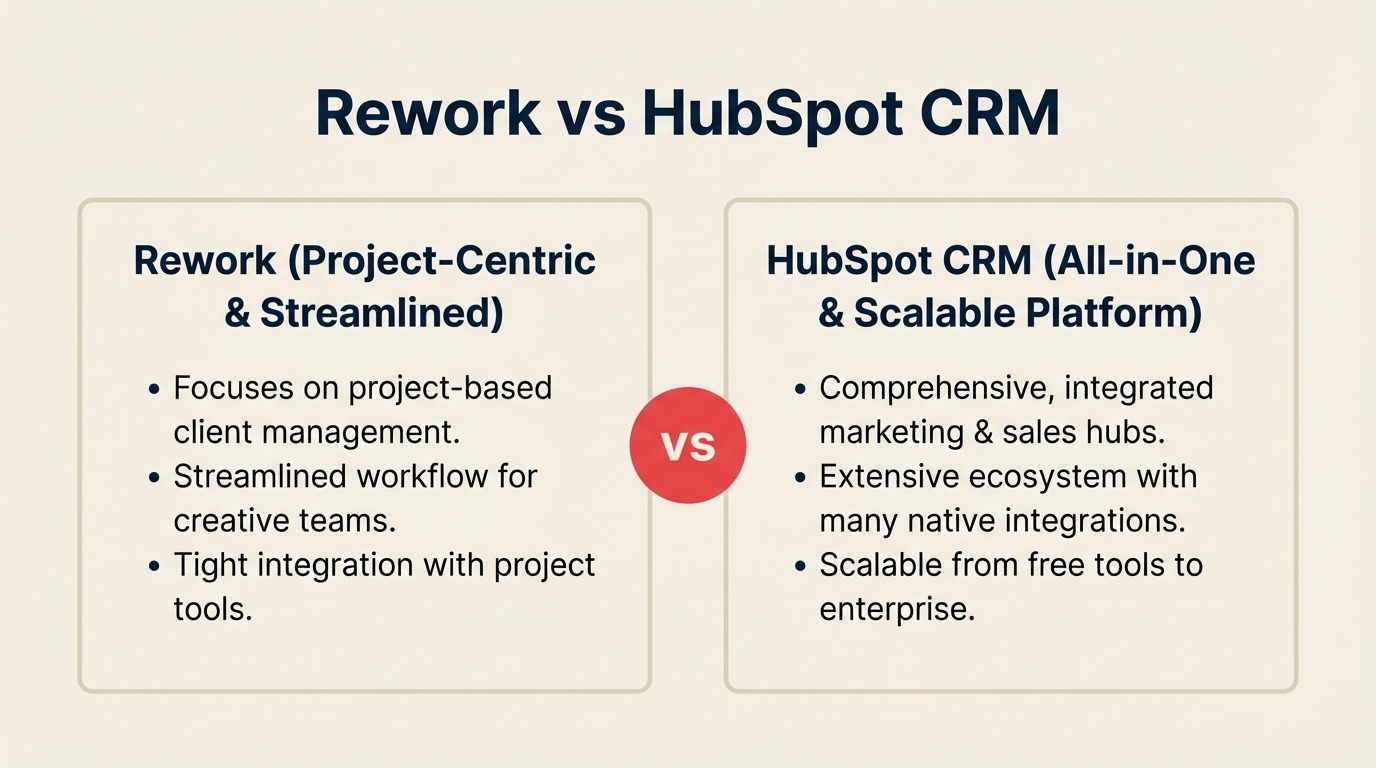
Before the feature-by-feature breakdown, here's a quick visual overview of what each product is and how it's structured. Rework and HubSpot solve overlapping problems at very different price points and product footprints, seeing the architecture side-by-side makes the pricing math in the rest of this article easier to interpret.
How Rework Works
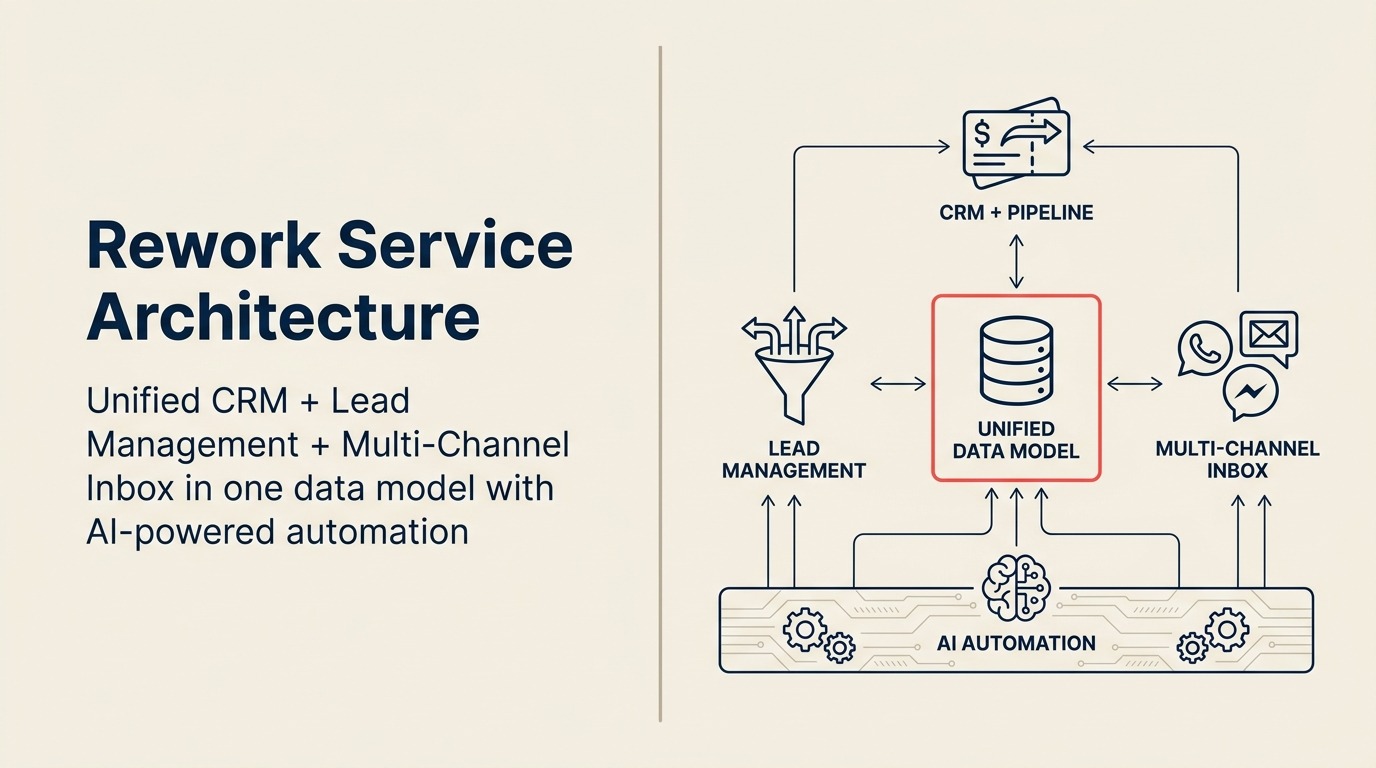
Rework is a unified CRM built for mid-size cross-functional teams. CRM pipeline, Lead Management, and multi-channel inbox (WhatsApp, Messenger, email, SMS) sit on one data model, so sales, marketing, and CS see the same contact timeline without integrations. Features like multi-pipeline, sequences, automation, and custom reporting are included from the base tier, no Professional upgrade required.
How HubSpot Works
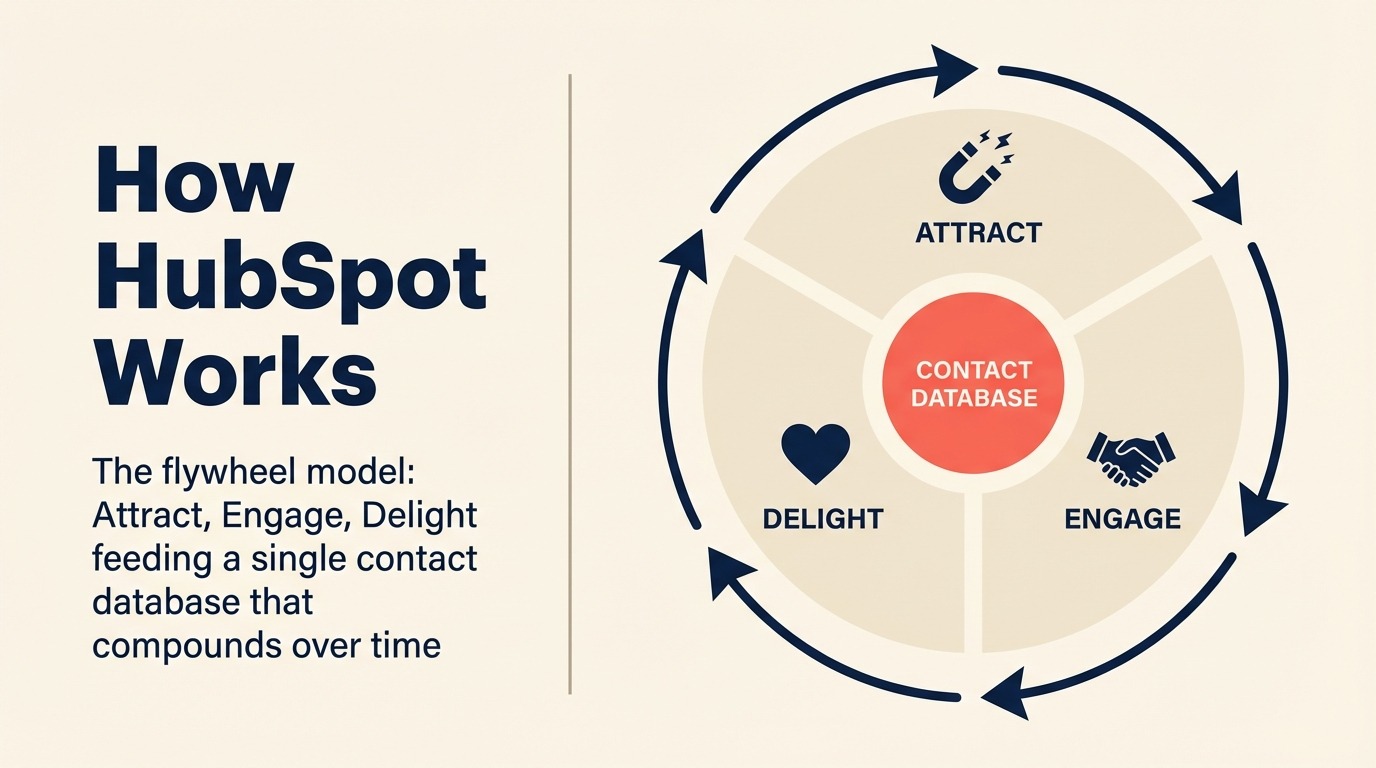
HubSpot is a multi-hub platform built around the flywheel model: Marketing Hub, Sales Hub, and Service Hub sharing one contact database. The free CRM is generous to get you in the door; sequences, multi-pipeline, automation, and custom reports unlock at Professional. Deep marketing automation is a core HubSpot strength Rework does not match, the tradeoff is price, with Professional starting at $100/user/mo.
The Head-to-Head at a Glance
| Factor | Rework | HubSpot CRM |
|---|---|---|
| Starting price | $999/yr Starter (5 users) or $1,999/yr Standard (10 users) + $12/user/mo above | Free (limited); $20/user/mo (Starter) |
| Mid-tier price | See rework.com/pricing | $100/user/mo (Professional) |
| Pipeline management | Multi-pipeline, drag-and-drop | Multi-pipeline from Professional ($100/mo+) |
| Email sequences | Included in all plans | Professional tier ($100/user/mo) |
| Workflow automation | Included in all plans | Professional tier ($100/user/mo) |
| Custom reporting | Included in all plans | Professional tier ($100/user/mo) |
| Onboarding | Self-serve + live chat | Self-serve; paid onboarding mandatory at Pro+ |
| Marketing automation | Not included | Deep (a core HubSpot strength) |
| Ecosystem / integrations | 80+ native integrations | 1,500+ app marketplace |
| Free tier | No | Yes (genuinely useful) |
| Support | Email + chat + phone on all plans | Limited at Starter; phone from Professional |
| Setup speed | 1-3 days for basic CRM; 1-2 weeks for full Lead Management + chat, led by a team with hands-on experience onboarding mid-size sales, marketing, and ops departments end-to-end | Under a day for a functional free-tier pipeline; 4-8 weeks or a HubSpot Solution Partner ($5,000-$50,000) for full lead management + chat since HubSpot has no in-house team experienced with mid-size cross-department rollouts |
Pricing Deep Dive
HubSpot's pricing ladder
HubSpot's free CRM is real: you get contact management, a deal pipeline, basic email logging, and reporting without paying anything. For a solo founder or a two-person sales team, it's a serious tool.
The jump starts when you need features most sales teams require:
- HubSpot Starter ($20/user/month, billed annually): Removes HubSpot branding, adds basic email sequences (up to 5 sequences) and some automation. Fine for very small teams.
- HubSpot Sales Hub Professional ($100/user/month, billed annually): This is where most functionality lives: full sequences, custom reporting, multiple pipelines, predictive lead scoring, team management. This is the tier most growing SMBs actually need.
- HubSpot Sales Hub Enterprise ($150/user/month): Advanced forecasting, custom objects, conversation intelligence. Built for teams of 50+ reps with dedicated ops support.
There's also a mandatory onboarding fee at Professional ($1,500) and Enterprise ($3,500) tiers. HubSpot's full Sales Hub pricing page lists what's included at each tier.
Where the seat math breaks down
The Professional tier is where HubSpot gets expensive fast. At $100/user/month:
| Team Size | HubSpot Starter | HubSpot Professional | HubSpot Enterprise |
|---|---|---|---|
| 10 seats | $2,400/yr | $12,000/yr | $18,000/yr |
| 25 seats | $6,000/yr | $30,000/yr | $45,000/yr |
| 50 seats | $12,000/yr | $60,000/yr | $90,000/yr |
Note: These figures are seat costs only. Onboarding fees, Marketing Hub add-ons (if you want CRM + marketing in one), and premium support are separate.
The Starter tier underdelivers for most teams past 5 reps. You're missing sequences, custom reports, and full automation. The Professional jump from $20 to $100 per seat is a 5x increase for features most sales teams consider basic.
Rework's pricing model
Rework doesn't have a free tier. Rework Sales Ops has two packages:
- Starter, $999/year for up to 5 users
- Standard, $1,999/year with 10 users included, plus $12/user/month for each additional user
See rework.com/pricing for current details, every tier already includes the full CRM, lead management module, and unified multi-channel inbox.
| Team Size | Rework Sales Ops | HubSpot Starter | HubSpot Professional |
|---|---|---|---|
| 5 seats | $999/yr (Starter) | $1,200/yr | $6,000/yr |
| 10 seats | $1,999/yr (Standard base) | $2,400/yr | $12,000/yr |
| 25 seats | $4,159/yr | $6,000/yr | $30,000/yr |
| 50 seats | $7,759/yr | $12,000/yr | $60,000/yr |
For a 25-person team that needs sequences, automation, and reporting, Rework Standard runs $4,159/yr, roughly 86% less than HubSpot Professional ($30,000/yr). Even comparing against HubSpot Starter, Rework's package pricing is lower while bundling features HubSpot gates to the Professional tier.
The caveat: Rework doesn't include marketing automation. If you're currently using HubSpot for both marketing and sales, you're comparing a bundled product against a sales-only tool.
Feature-by-Feature
Pipeline and deal management
HubSpot gives you multiple pipelines but only from Professional. Each deal record is detailed: you can attach contacts, companies, activities, documents, and custom properties. Deal stages have automation triggers built in.
Rework includes multiple pipelines from the Starter plan. The deal record is cleaner and less cluttered. Some users find HubSpot's record view overwhelming; Rework trades customization depth for clarity. How you design your pipeline stages at setup shapes whether either product delivers value in practice.
Winner: Tie for most teams. HubSpot wins on customization depth; Rework wins on usability.
Contact and company records
HubSpot has one of the best contact record designs in the category. Activity timeline, associated deals, marketing interactions, email history all visible in one scroll. The data model is mature.
Rework has a solid contact record but less depth in the activity timeline. If you need a complete view of marketing touchpoints alongside sales activity, HubSpot's contact record is better.
Winner: HubSpot.
Email sequences and templates
HubSpot Professional sequences are powerful: branching logic, A/B testing, task-based steps, sequence analytics. But you need the $100/user tier to access them.
Rework includes sequences with step-level analytics and template libraries. Fewer branching options but faster to set up and good for most outbound workflows. See rework.com/pricing for which tier unlocks advanced sequence features.
Winner: HubSpot on depth; Rework on value for the feature.
Workflow automation
HubSpot Professional automation is genuinely good. You can build complex multi-step workflows with conditional logic, delays, and actions across the CRM and connected tools. HubSpot's documentation on workflow automation shows the depth of what's available at this tier.
Rework automation covers the most common use cases: deal stage transitions, task creation, follow-up reminders, notification triggers. Not as powerful as HubSpot Pro but sufficient for most mid-market sales ops. If you want a benchmark for what automation coverage actually looks like in practice, CRM workflow automation walks through the common patterns and where both products land.
Winner: HubSpot at Professional tier.
Reporting and forecasting
HubSpot Professional custom reporting is strong. You can build pipeline reports, activity dashboards, and funnel analysis with a drag-and-drop report builder. The forecast module uses weighted deal probabilities and is customizable.
Rework reporting covers pipeline health, activity tracking, and rep performance. The forecasting module is simpler: deal stage probabilities, not weighted pipeline models. At the Standard tier you get more advanced forecasting. Teams where a RevOps function drives the reporting decision should read about pipeline hygiene as a culture problem. The tool choice matters less than whether your reps maintain data quality consistently.
Winner: HubSpot, especially for teams with a RevOps function building detailed reports.
Mobile app
Both products have functional iOS and Android apps with deal and contact management. HubSpot's mobile app has more surface area but can feel busy. Rework's mobile experience is faster to navigate for field reps who need quick logging.
Winner: Tie.
Where HubSpot Genuinely Wins
Marketing automation depth: HubSpot's Marketing Hub is a complete marketing platform: landing pages, email campaigns, lead scoring, blog CMS, social scheduling. If your team is trying to run sales and marketing from one tool, HubSpot is the only product in this comparison that can do both at scale. Teams evaluating how structured their lead nurturing programs should be often find this is the deciding factor, if nurture sequences need to run across marketing and sales touchpoints in one system, HubSpot's edge here is real.
Ecosystem size: 1,500+ integrations in the HubSpot app marketplace. If your stack is unusual, HubSpot almost certainly has a native connector for it. Rework has 80+ and relies on Zapier for the long tail.
Free tier for early-stage teams: A 3-person seed-stage startup with no sales ops budget and basic needs will find genuine value in HubSpot's free CRM. There's no Rework equivalent.
Data model maturity: HubSpot's contact, company, deal, and ticket objects (plus the ability to create custom objects at Enterprise) give RevOps teams more flexibility to model complex B2B relationships.
Community and resources: HubSpot Academy, the HubSpot user community, and the sheer volume of third-party documentation and consultants means your team will never be stuck for long.
Where Rework Wins
Pricing predictability at mid-market scale: Rework's package model (rework.com/pricing) means a 25-person team pays $4,159/year versus $30,000/year on HubSpot Professional. That's a real budget difference, not a rounding error.
Onboarding speed: Rework implementations typically go live in 1-2 weeks without external consultants. HubSpot Professional setups commonly take 4-8 weeks when you factor in configuration, data migration and field mapping, and mandatory onboarding.
Rep adoption at mid-market: Rework's interface has fewer features, which means fewer decisions for reps who just want to log calls and move deals. Teams with low CRM adoption often recover faster on Rework than HubSpot because there's less overhead. The CRM rollout and adoption playbook outlines what drives adoption regardless of which product you choose.
No surprise fees: HubSpot's per-contact pricing on Marketing Hub and mandatory onboarding fees create budget surprises. Rework's pricing is per seat with no usage-based billing.
Integrations: Common Stack Coverage
| Integration | Rework | HubSpot |
|---|---|---|
| Gmail / Google Workspace | Native | Native |
| Outlook / Microsoft 365 | Native | Native |
| Slack | Native | Native |
| Zapier | Yes | Yes |
| Stripe | Native | Native (via app) |
| LinkedIn Sales Navigator | All plans | Professional+ |
| Zoom | Yes | Yes |
| Gong | Yes | Yes |
For the standard mid-market B2B stack, both products have you covered. Rework's edge cases fall back to Zapier, which works but adds maintenance overhead.
Implementation and Time-to-Value
| Dimension | Rework | HubSpot |
|---|---|---|
| Basic CRM setup | 1-3 days, led by team experienced with the full lead lifecycle | Under a day for the free tier; genuinely fast self-serve |
| Team onboarding (reps) | 3-5 days for full product, included | 1-2 days for pipeline basics; free tier is approachable |
| Lead management configuration | 3-7 days with onboarding team walking through scoring, routing, forms | 2-6 weeks if built via workflow automation at Professional tier; no guided path below that |
| Chat inbox connection | 1-2 hours per channel, led by team with mid-size multi-department onboarding experience | WhatsApp and Instagram DM require paid add-ons; web chat bundled but configuration takes 1-3 days |
| Full implementation (CRM + lead mgmt + chat) | 1-2 weeks, led by team with mid-size multi-department onboarding experience | 4-8 weeks self-serve or with a HubSpot Solution Partner ($5,000-$50,000); mandatory onboarding fee at Professional adds $1,500 |
| Data migration from prior CRM | CSV import + API, migration support on all plans | CSV import + API; well-documented, self-serve |
| Admin overhead post-launch | Moderate, more moving parts | Low for Starter; high at Professional if you've built complex workflows |
| Support model | Email + chat + phone on all plans | Email on Starter; phone from Professional |
HubSpot wins on speed for a basic pipeline, the free tier is live within hours, no setup call required. But that speed advantage narrows fast once you need lead management, multi-channel chat, and marketing handoffs. HubSpot has no in-house team experienced with mid-size cross-department rollouts, so customers either build everything themselves over weeks or hire a HubSpot Solution Partner (typically $5,000-$50,000 for a full implementation). That $1,500 mandatory onboarding fee at Professional is a gate on a product most teams need to configure themselves anyway. Rework's edge is institutional experience: the team has onboarded full Sales, Marketing, RevOps, and CS departments at mid-size companies and applies that hard-earned knowledge of what actually breaks during a multi-team rollout to every new customer. The full stack ships in one product, so the 1-2 week implementation includes everything, not just the pipeline.
Support: Reality Check
HubSpot Starter: Email support, access to the community and Academy. No phone support. Response times can be slow.
HubSpot Professional: Phone and email support, but the $1,500 mandatory onboarding fee is a requirement before you get the keys. Some teams find the onboarding genuinely useful; others feel it's a gate on a product they should be able to set up themselves.
Rework Starter: Email and chat support. No mandatory onboarding fee. A free setup call is available but not required.
Rework Standard: Dedicated CSM available. Chat support with stated SLA on all plans.
Who Should Pick HubSpot
- You're running marketing and sales from one platform. HubSpot's combined hub model is genuinely hard to replicate elsewhere
- You're at the seed or early Series A stage and need a capable free CRM to get started
- Your RevOps or marketing ops team builds complex workflows and reports that need HubSpot's data model depth
- You have or plan to hire a HubSpot admin/ops person to manage the platform
- Your integrations are unusual enough that you need the 1,500+ app marketplace
Who Should Pick Rework
- You're a 10-100 person sales team that needs sequences, pipelines, and reporting without paying $100/user/month for them
- Your last CRM implementation was painful and you want to go live in days, not months
- You're replacing a CRM your reps aren't actually using. Rework's simplicity often recovers adoption faster
- You don't need marketing automation inside your CRM (you're using a separate tool for that)
- Budget predictability matters: you don't want per-contact pricing or mandatory fees showing up mid-year
Rework is not the right call if: You need a combined sales + marketing platform, you require Salesforce-level customization of the data model, or you're managing a 200+ rep team with complex territory and quota structures.
Decision Framework: 3 Questions
1. Do you need marketing automation in the same tool as your CRM? If yes, HubSpot. Nothing else at this price point does both as well.
2. What's your team size and how long can you absorb the Professional pricing? At 25 seats, HubSpot Professional costs roughly $30,000/year. Rework starts at $3,600/year for the same team. If that difference is meaningful to your budget, Rework is worth a serious look.
3. How much CRM admin capacity does your team have? HubSpot Professional rewards teams with someone who actively manages the platform. If you're a CRO or VP Sales who needs a CRM that runs itself, Rework's lower configuration ceiling is a feature, not a limitation.
What to Do Next
If you're leaning toward Rework, the honest starting point is a 14-day trial with your actual pipeline data. Import your current deals and contacts, run one sequence, and see if the interface fits how your team works. You'll know within a week.
If HubSpot is the right answer (especially if you're running marketing through it too), that's a legitimate call. The free tier is worth starting on even if you're eventually heading to Professional, because the migration cost from free to paid is low.
For teams already paying HubSpot Professional who are questioning the value: the comparison that matters isn't features, it's whether your reps are actually using the features you're paying for. If utilization is low, a simpler tool at lower cost often improves both adoption and pipeline visibility.
If you're evaluating Salesforce at the same time, Rework vs Salesforce covers that decision in the same honest format. And if you're already on HubSpot and considering a migration, Switching from HubSpot to Rework walks through what the process actually involves.
For teams where lead management depth matters as much as pipeline features, Rework vs Zoho CRM covers how another full-suite platform compares on cross-team ops. And if your RevOps team is part of the evaluation, pipeline hygiene as a culture problem is worth reading. It reframes what CRM success actually requires beyond the tooling choice itself.

Principal Product Marketing Strategist
On this page
- How Each CRM Works
- How Rework Works
- How HubSpot Works
- The Head-to-Head at a Glance
- Pricing Deep Dive
- HubSpot's pricing ladder
- Where the seat math breaks down
- Rework's pricing model
- Feature-by-Feature
- Pipeline and deal management
- Contact and company records
- Email sequences and templates
- Workflow automation
- Reporting and forecasting
- Mobile app
- Where HubSpot Genuinely Wins
- Where Rework Wins
- Integrations: Common Stack Coverage
- Implementation and Time-to-Value
- Support: Reality Check
- Who Should Pick HubSpot
- Who Should Pick Rework
- Decision Framework: 3 Questions
- What to Do Next