Rework vs Folk: Relationship CRMs Compared for Mid-Size Teams in 2026
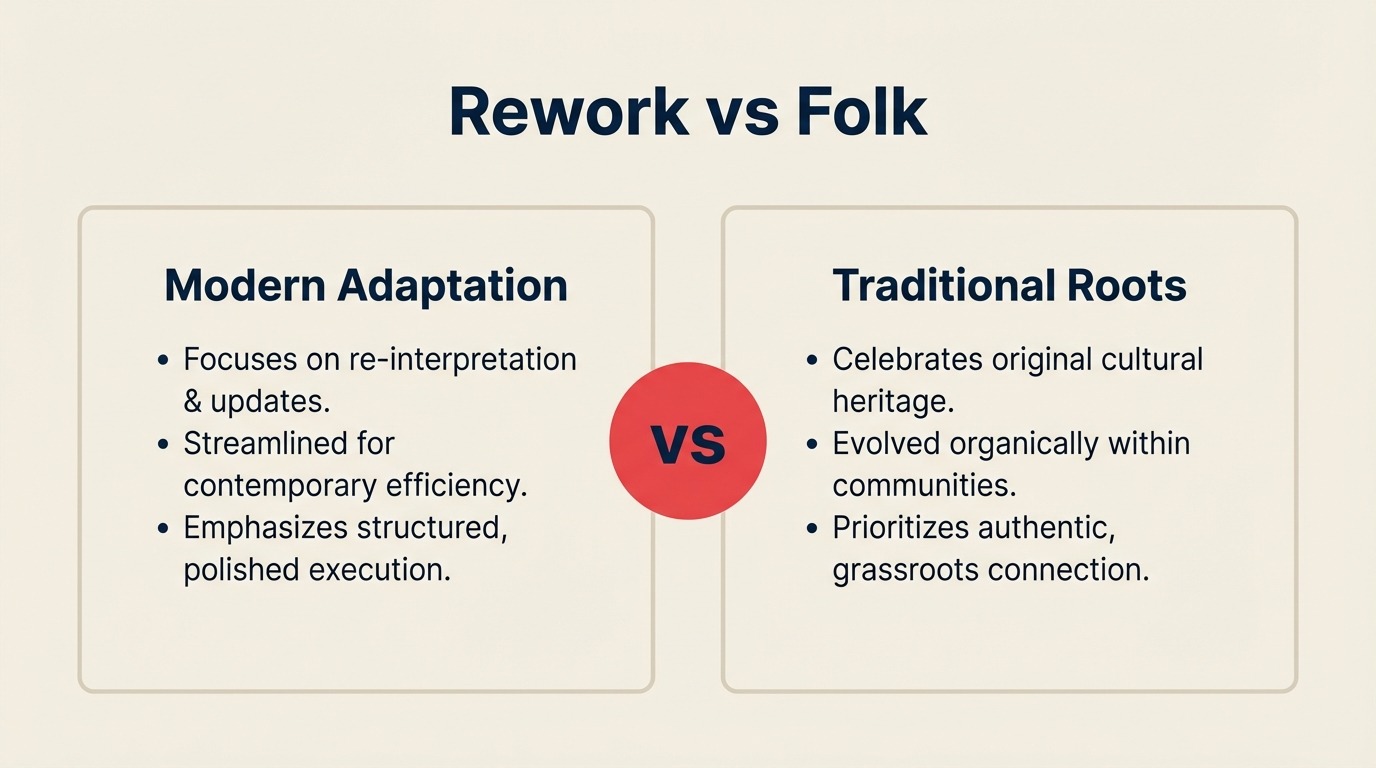
Folk has built something genuinely attractive: a CRM that feels like it was designed by people who were tired of enterprise software. Clean interface, a Chrome extension that adds contacts from LinkedIn in two clicks, mail merge that doesn't require a marketing ops hire to configure, and a pipeline view that your whole team will actually open. If you're a small team running on spreadsheets and a shared Gmail inbox, Folk is the fastest path from chaos to organized.
But mid-size teams, specifically those with 25 to 200 people where sales, marketing, ops, and customer success all touch the same lead or customer record, tend to hit the edge of what Folk is built to do. When leads start arriving through WhatsApp campaigns, Instagram DM, and Facebook Messenger alongside your email, when your marketing team needs nurture workflows tied to pipeline stage, and when ops needs to enforce SLAs on lead routing, Folk's lightweight philosophy becomes a constraint rather than a feature. That's the comparison this article is built for: your team is past spreadsheets, not yet at Salesforce scale, and you're trying to figure out which tool actually fits what you're running.
How Each CRM Works
Before the feature-by-feature breakdown, here's a quick visual overview of what each product is and how it's structured. Rework and Folk both rethink the CRM, but at different altitudes of team complexity, seeing the architecture side-by-side makes the rest of this comparison easier to read.
How Rework Works
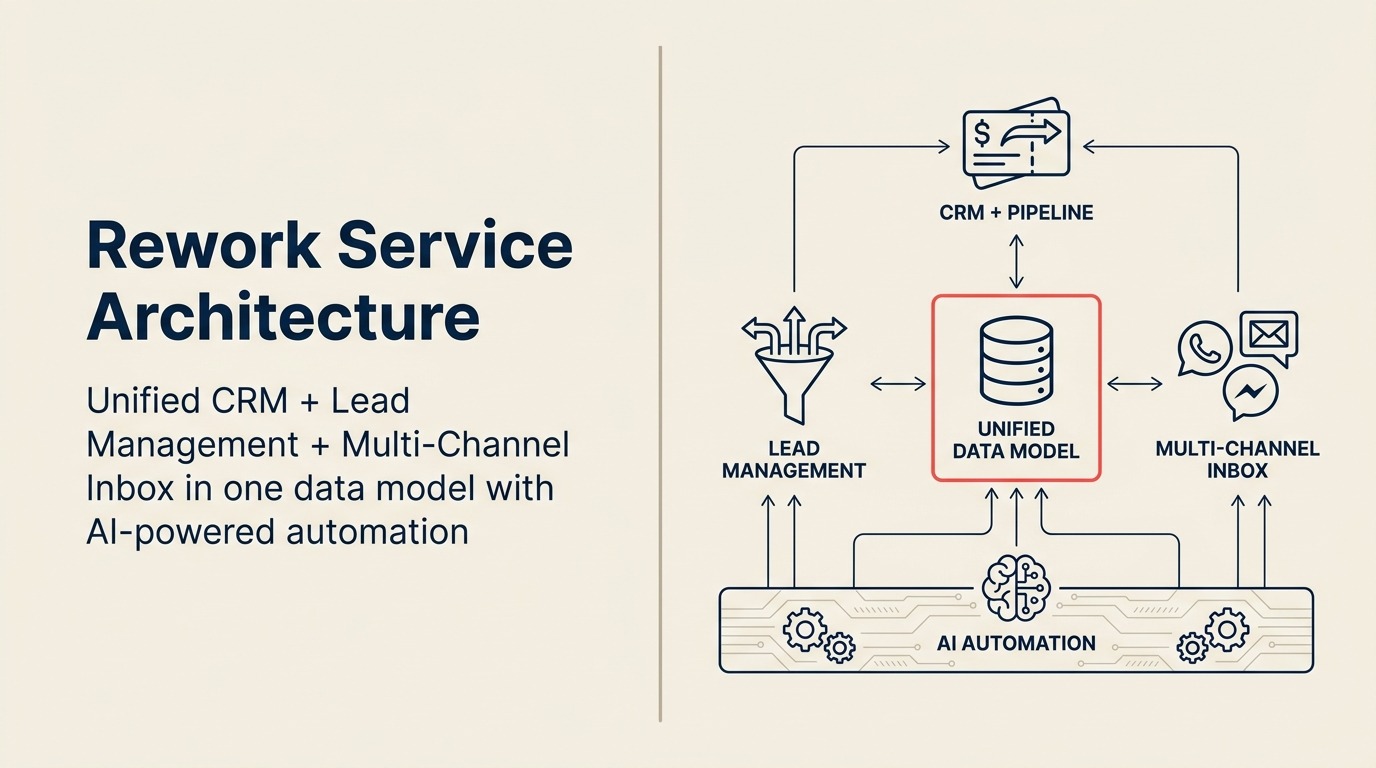
Rework is a unified CRM built for mid-size cross-functional teams. CRM pipeline, Lead Management, and multi-channel inbox (WhatsApp, Messenger, email, SMS) sit on one data model, so sales, marketing, and CS see the same contact timeline without integrations. It's designed for the team that's past spreadsheets and needs SLA-backed routing and cross-team ops, not just a nicer contact list.
How Folk Works
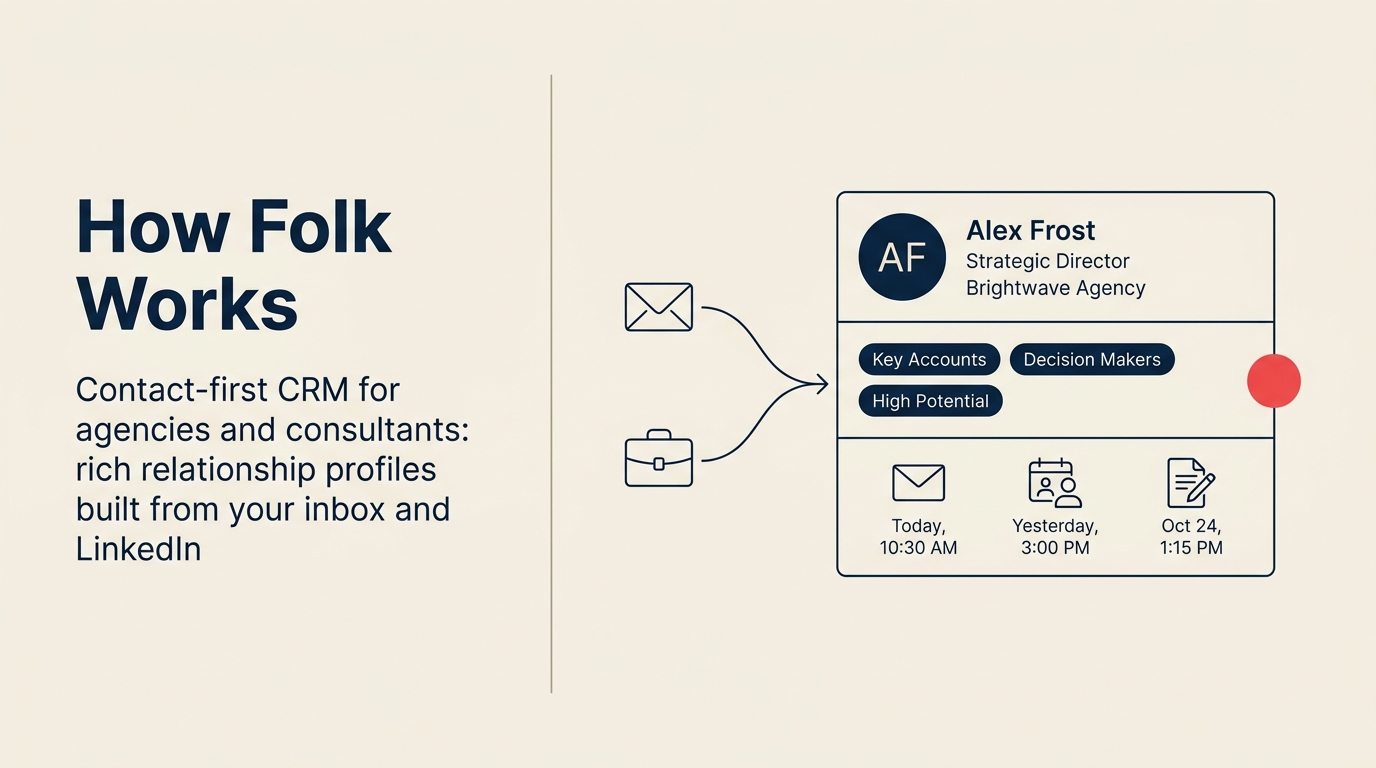
Folk is a contact-first, relationship-driven CRM for small teams, agencies, and consultants. Its sweet spot is rich profile cards, mail merge, and a Chrome extension that pulls contacts from LinkedIn in two clicks. The tradeoff: Folk is deliberately lightweight, multi-channel chat inbox, rule-based lead routing, and cross-team SLA tracking are not part of the core product.
TL;DR
| Dimension | Folk | Rework |
|---|---|---|
| Best fit | Small teams wanting fast setup and relationship-first simplicity | Mid-size cross-functional teams: sales + marketing + ops + CS |
| Company size sweet spot | 3-50 employees | 20-500 employees |
| Core strength | Beautiful UX, Chrome extension, mail merge, fast onboarding | Unified CRM + Lead Management + multi-channel chat inbox + cross-team ops |
| Lead management | Basic pipeline stages; no native distribution rules | Full: capture, score, distribute (round-robin, territory, SLA), nurture |
| Unified chat inbox | Email + some integrations | WhatsApp, Messenger, Instagram DM, web chat, email, SMS native |
| Marketing features | Mail merge campaigns; no native landing pages or forms | Lead capture forms, landing pages, lead scoring, nurture workflows |
| Cross-team workflows | Sales and networking-focused | Sales, Marketing, RevOps, CS, Ops in one platform |
| Pricing | $20/user/mo Standard; $40/user/mo Premium (billed annually) | $999/yr Starter (5 users) or $1,999/yr Standard (10 users) + $12/user/mo above |
| Support | Email support; chat on Premium | Email + chat + phone on all plans |
| Setup time | 1-3 days | 1-3 weeks (more to configure, more infrastructure to gain) |
| Setup speed | Under a day for a functional contact + pipeline setup; building full lead management + chat is self-serve only, Folk is a small-team tool with no in-house team experienced with mid-size cross-department rollouts | 1-3 days for basic CRM; 1-2 weeks for full Lead Management + chat, led by a team with hands-on experience onboarding mid-size sales, marketing, and ops departments end-to-end |
| Best for | Founder-led sales, agencies, investors, small service businesses | Revenue and ops teams needing a full GTM stack without Salesforce complexity |
Who Each Tool Is Built For
Folk was built for relationship-driven sales. Founders who want to manage their investor network and their customer pipeline in the same place. Agencies keeping tabs on 400 contacts across LinkedIn, email, and events. Recruiting teams and venture funds where the product is the relationship itself. Folk's philosophy is that CRM software has been over-engineered for most of the people using it, and a tool that's fast to set up and easy to actually use will beat a more powerful platform that people avoid opening.
Rework was built for operators at mid-size companies who've run into the ceiling of lightweight tools. The problem isn't that their current stack is too simple. It's that their data is scattered: marketing captures leads in one system, sales works them in another, customer success tracks conversations in a shared inbox, and ops manages approvals in a spreadsheet. Rework collapses that into a single system where a lead captured through a WhatsApp chat flows through scoring, gets routed to the right rep by territory, enters a nurture sequence if it's not sales-ready, and carries its full conversation history into the deal record when it closes.
| ICP Dimension | Folk | Rework |
|---|---|---|
| Ideal company size | 3-50 employees | 20-500 employees |
| Team maturity | Outgrowing spreadsheets; don't need ops infrastructure yet | Past spreadsheets; need cross-team process without Salesforce overhead |
| Primary buyer | Founder, agency owner, investor, small sales team lead | COO, Head of Revenue, RevOps lead, Head of Sales at a scaling company |
| Decision driver | Speed, simplicity, design quality | Cross-team unification, lead management depth, multi-channel coverage |
| Typical stack before switching | Spreadsheets, Notion, Gmail shared inbox | HubSpot Starter, Pipedrive, disconnected marketing + sales tools |
Team Fit
| Team | Folk | Rework |
|---|---|---|
| Sales (SDRs / AEs) | Good: pipeline stages, contact enrichment, activity logging | Strong: full pipeline, quota tracking, forecasting, territory-based routing |
| Marketing | Limited: mail merge only; no forms or landing pages native | Strong: lead capture, landing pages, scoring, nurture, attribution |
| RevOps | Limited: no unified data model across functions | Strong: single data model across sales + marketing + CS, SLA tracking |
| Customer Success | Partial: contact history; no unified multi-channel timeline | Strong: unified contact timeline across chat, email, and tickets |
| Operations / Approvals | Not built for this | Built-in: approval chains, cross-team workflows, process templates |
Core CRM Capability Comparison
Both tools let you store contacts, add notes, and move deals through a pipeline. But the underlying philosophy diverges sharply, and it matters more at 50 people than it does at 5.
Folk organizes everything around contact groups and relationships. You tag and segment people, enrich them from LinkedIn with the Chrome extension, send personalized mail merge campaigns, and track where each contact sits in your pipeline. The data model is flat and readable: contacts, companies, lists, pipeline stages. That's intentional.
Rework's data model is wider. Contacts and companies are there, but so are lead records that carry scoring data, distribution history, attribution source, and nurture stage alongside the pipeline record. Where Folk treats a contact as the center of the universe, Rework treats the revenue process as the center and attaches all the relevant objects to it.
| Capability | Folk | Rework |
|---|---|---|
| Contact & company records | Yes, with enrichment | Yes, with enrichment |
| Pipeline stages | Yes, configurable | Yes, with probability, forecasting, and quota tracking |
| Activity logging | Manual + some auto-logging | Manual + auto-logging across all channels |
| Chrome / LinkedIn extension | Yes (folk's biggest differentiator) | Not a core feature |
| Contact enrichment | Yes, native | Yes, native |
| Custom fields | Yes | Yes |
| Email integration | Native Gmail/Outlook sync | Yes |
| API access | Yes (Premium plan) | Yes |
| Mobile app | iOS available | Yes |
Lead Management Deep Dive
This is where the two tools are genuinely different products. Folk has a pipeline, which means you can move contacts through stages and track where deals are. But Lead Management as a purpose-built module, covering capture, scoring, distribution, and nurture across the full marketing-to-sales lifecycle, is not what Folk is designed for.
Rework ships Lead Management as a first-class module, not an add-on. Every part of the lead journey has dedicated functionality.
| Lead Management Capability | Folk | Rework |
|---|---|---|
| Lead capture forms | No native form builder | Yes, with landing page builder |
| Ad network integrations (Meta, Google) | No | Yes |
| Lead scoring | No | Yes, rule-based scoring |
| Round-robin distribution | No | Yes, built-in |
| Territory-based routing | No | Yes |
| Skill-based assignment | No | Yes |
| SLA rules on lead response time | No | Yes |
| Marketing-to-sales handoff automation | No | Yes, with stage triggers |
| Nurture sequences | Mail merge only (manual segments) | Yes, automated workflows |
| Attribution back to pipeline | No | Yes |
| Lead source tracking | Basic | Full multi-touch attribution |
If your team has an SDR running outbound alongside a marketing channel that generates inbound leads through paid ads and WhatsApp campaigns, and those leads need to be scored, routed to the right rep within 5 minutes, and enrolled in a follow-up sequence if not contacted, Folk doesn't have the infrastructure to do that without stitching in HubSpot or a separate marketing automation platform. Rework handles it natively.
Unified Chat Channels
Folk's communication foundation is email. It syncs with Gmail and Outlook, logs email activity, and runs mail merge campaigns from your contact list. That works well for businesses where email is the primary channel.
But a growing share of mid-market lead volume in 2026 arrives through channels that aren't email. WhatsApp campaign replies, Messenger conversations from Facebook ad click-throughs, Instagram DMs from influencer posts, web chat from visitors hitting your site. If those conversations live in separate inboxes and need to be manually copied into the CRM, the contact timeline is never accurate and reps are slower to respond.
| Channel | Folk | Rework |
|---|---|---|
| Email (Gmail / Outlook) | Yes, native sync | Yes, native |
| Mail merge / sequences | Yes, native | Yes, native |
| No native; 3rd-party integrations | Yes, native | |
| Facebook Messenger | No native | Yes, native |
| Instagram DM | No native | Yes, native |
| Live web chat | No native | Yes, native |
| SMS | No native | Yes, native |
| Zalo / other regional channels | No | Partial (check current roadmap) |
Every conversation on Rework's supported channels lands in a unified inbox tied to the contact record. A rep can see the full history of a contact's WhatsApp exchange alongside their email thread and their pipeline stage without switching tools.
Contact Management and Enrichment
Both tools handle contact management well at the core level. Where they differ is in how contacts get in and how much you can do with them automatically.
Folk's Chrome extension is the standout. You can add someone from LinkedIn to your CRM in two clicks, have their role, company, and email pulled in automatically, and assign them to a pipeline or a campaign immediately. For teams doing outbound prospecting where a rep is reviewing LinkedIn profiles daily, this saves real time.
| Contact Capability | Folk | Rework |
|---|---|---|
| Chrome extension for LinkedIn import | Yes, a core feature | Not a focus |
| Contact enrichment (auto-fill fields) | Yes | Yes |
| Duplicate detection | Yes | Yes |
| List segmentation | Yes, flexible group tagging | Yes |
| Contact merge | Yes | Yes |
| Company hierarchy | Basic | Yes |
| Activity timeline | Email + notes | All channels: chat, email, calls, tasks |
| Import / CSV | Yes | Yes |
| GDPR consent tracking | Basic | Yes |
The trade-off is that Folk's timeline is email-centric. If your team works a contact through a WhatsApp thread, a web chat session, and then a sales call, Folk's record will be incomplete. Rework's contact timeline captures all of those automatically because the channels run through the same platform.
Pricing at 25, 50, and 100 Seats
Folk publishes pricing at folk.app/pricing. As of April 2026:
- Standard: $20/user/month billed annually ($240/year per seat)
- Premium: $40/user/month billed annually ($480/year per seat)
- Custom / Enterprise: Contact sales
Rework Sales Ops has two packages:
- Starter, $999/year for up to 5 users
- Standard, $1,999/year with 10 users included, plus $12/user/month for each additional user
See rework.com/pricing for current details.
| Tier | 5 seats/year | 10 seats/year | 25 seats/year | 50 seats/year | 100 seats/year |
|---|---|---|---|---|---|
| Folk Standard | ~$1,200 | ~$2,400 | ~$6,000 | ~$12,000 | ~$24,000 |
| Folk Premium | ~$2,400 | ~$4,800 | ~$12,000 | ~$24,000 | ~$48,000 |
| Rework Sales Ops | $999 (Starter) | $1,999 (Standard base) | $4,159 | $7,759 | $14,959 |
Rework's package pricing is lower than Folk Standard at every seat count. Folk's pricing is transparent and scales predictably. For teams at 10-25 people, Folk Standard is a reasonable entry point, but Rework competes on price while including the operational infrastructure (lead routing, unified chat, cross-team workflows) that Folk doesn't provide.
Implementation and Time-to-Value
| Dimension | Folk | Rework |
|---|---|---|
| Basic CRM setup | Under a day, simple and fast | 1-3 days, led by team experienced with the full lead lifecycle |
| Team onboarding (reps) | Same day; intuitive interface | 3-5 days for full product, included |
| Lead management configuration | Not available, no native lead routing, scoring, or distribution | 3-7 days with onboarding team walking through scoring, routing, forms |
| Chat inbox connection | Not available, email only | 1-2 hours per channel, led by team with mid-size multi-department onboarding experience |
| Full implementation (CRM + lead mgmt + chat) | Not achievable within Folk, the full stack doesn't exist; Folk is self-serve only with no in-house team experienced with mid-size cross-department rollouts | 1-2 weeks, led by team with mid-size multi-department onboarding experience |
| Data migration | Simple CSV import | Assisted migration for larger datasets |
| Admin overhead post-launch | Minimal | Moderate; workflow and routing rules need maintenance |
| Support model | Email support; chat on Premium | Email + chat + phone on all plans |
Folk wins on setup speed for the exact use case it's designed for: a small team that needs a contact database, a pipeline view, and email outreach. Getting from zero to productive takes a day. But Folk has no in-house team experienced with mid-size cross-department rollouts, and lead routing, multi-channel chat, and cross-team workflows simply aren't in the product. Teams that outgrow Folk's lightweight model end up building out a separate marketing tool, a chat platform, and a workflow layer alongside it. Rework's edge is institutional experience: the team has onboarded full Sales, Marketing, RevOps, and CS departments at mid-size companies and applies that hard-earned knowledge of what actually breaks during a multi-team rollout to every new customer. The full stack ships in one product, which is the trade-off for the longer initial setup.
When Folk Is the Right Call
Folk is the better fit in these situations:
You're a small team doing relationship-first sales. If you're under 25 people, your primary channel is email, and your sales motion is founder-led or network-driven, Folk's simplicity is a feature. You'll be up and running in a day, and you won't be paying for infrastructure you don't need.
LinkedIn prospecting is a core daily workflow. Folk's Chrome extension for LinkedIn import is genuinely good. If your reps spend time reviewing profiles and adding contacts to sequences, Folk handles that workflow faster than most tools in the market.
You need fast setup without an ops investment. Folk's interface is clean enough that non-technical team members adopt it without training. If you don't have a RevOps person to configure and maintain a system, Folk asks less of you operationally.
Your outreach is email-first. Mail merge in Folk is native, well-designed, and doesn't require a separate marketing tool. If email campaigns to segmented contact lists cover 90% of your outreach, Folk has what you need.
When Rework Is the Right Call
Rework fits better in these situations:
Leads arrive through multiple channels. If your team works leads from WhatsApp, Instagram DM, Facebook Messenger, web chat, and email in the same week, Rework's unified inbox means those conversations all land in one place tied to the contact record. Folk requires integrations for every non-email channel, and those integrations create gaps in the timeline.
You need marketing and sales in one system. Rework handles lead capture forms, landing pages, lead scoring, nurture sequences, and pipeline in one product. Folk doesn't do the capture and nurture side natively. If marketing and sales both need to see and act on the same data without a middleware layer, Rework removes the need for a separate marketing automation platform.
Your sales team needs lead routing rules. Round-robin assignment, territory-based routing, SLA rules on response time, and skill-based distribution are built into Rework. Folk has no native distribution logic. If you have more than two or three reps sharing a lead pool, manual assignment stops working at scale.
Ops, CS, and RevOps are in the same motion. Rework's cross-team workflow infrastructure, approval chains, SLA tracking, and unified contact timeline matter when multiple teams touch the same customer journey. Folk is built for sales; Rework is built for the full revenue operation.
Decision Framework
| Pick Folk if... | Pick Rework if... |
|---|---|
| You're under 25 people and email is your primary channel | You're 25-500 people and multiple teams share the same lead and customer data |
| Your sales motion is relationship-first and outbound-heavy via LinkedIn | Leads arrive through WhatsApp, Messenger, Instagram DM, or web chat alongside email |
| You need to be running in 1-3 days without RevOps support | You need lead scoring, routing rules, and nurture workflows built in |
| Budget is a primary constraint and you want transparent per-seat pricing | You want marketing, sales, and CS in one data model without stitching tools together |
| Your team is small enough that manual lead assignment works fine | Your team has grown past the point where manual processes hold |
| Beautiful UX and fast adoption matter more than operational depth | Operational infrastructure matters more than setup speed |
Both tools are well-built for different jobs. Folk is honest about being a lightweight relationship CRM, and it delivers on that. Rework is built for teams that have outgrown lightweight tools and need the full revenue operation in one place.
If you're between 20 and 50 people and starting to feel the friction of disconnected tools, a 30-minute demo on either platform will tell you more than any comparison article. The right question to ask in the demo isn't "what features do you have?" It's "show me what happens when a lead comes in through WhatsApp and needs to be routed to a rep in the Southeast territory who hasn't hit quota yet." How a platform answers that question tells you whether it was built for the operation you're running.
For teams weighing other relationship-first CRMs, Rework vs Attio covers a similar comparison for technically-minded teams that want a modern data model. If your team is scaling into territory-based selling and you need to think through how routing rules get structured, lead routing automation explains the mechanics before you evaluate them in a demo. And if the decision will be driven partly by a new sales leader coming in, the first 90 days as a sales leader covers how CRM selection fits into the broader tool and process reset at that stage.

Principal Product Marketing Strategist
On this page
- How Each CRM Works
- How Rework Works
- How Folk Works
- TL;DR
- Who Each Tool Is Built For
- Team Fit
- Core CRM Capability Comparison
- Lead Management Deep Dive
- Unified Chat Channels
- Contact Management and Enrichment
- Pricing at 25, 50, and 100 Seats
- Implementation and Time-to-Value
- When Folk Is the Right Call
- When Rework Is the Right Call
- Decision Framework