Rework vs Pipedrive: The SMB CRM Showdown, Which Fits a Growing Sales Team in 2026?
If your sales team has grown past 10 people, Pipedrive probably came up in a conversation. It's genuinely popular, genuinely affordable, and genuinely good at what it does: giving sales reps a clean pipeline view and getting them to log activity without much friction. For a focused outbound sales operation, it's one of the better tools on the market.
But here's where it gets complicated for growing companies. You hit 25 seats. Marketing wants to see lead sources and attribution. Customer success needs visibility into what sales promised. RevOps wants to automate handoffs between teams. And someone in leadership wants to know why your WhatsApp leads aren't showing up next to the email leads in the same contact record. Pipedrive was built to manage pipeline for salespeople. It wasn't built for the cross-functional operations layer that mid-size teams run into when they scale. This comparison is written for the team that's already using or evaluating Pipedrive and wants a straight answer on whether Rework makes sense for where they're headed.
How Each CRM Works
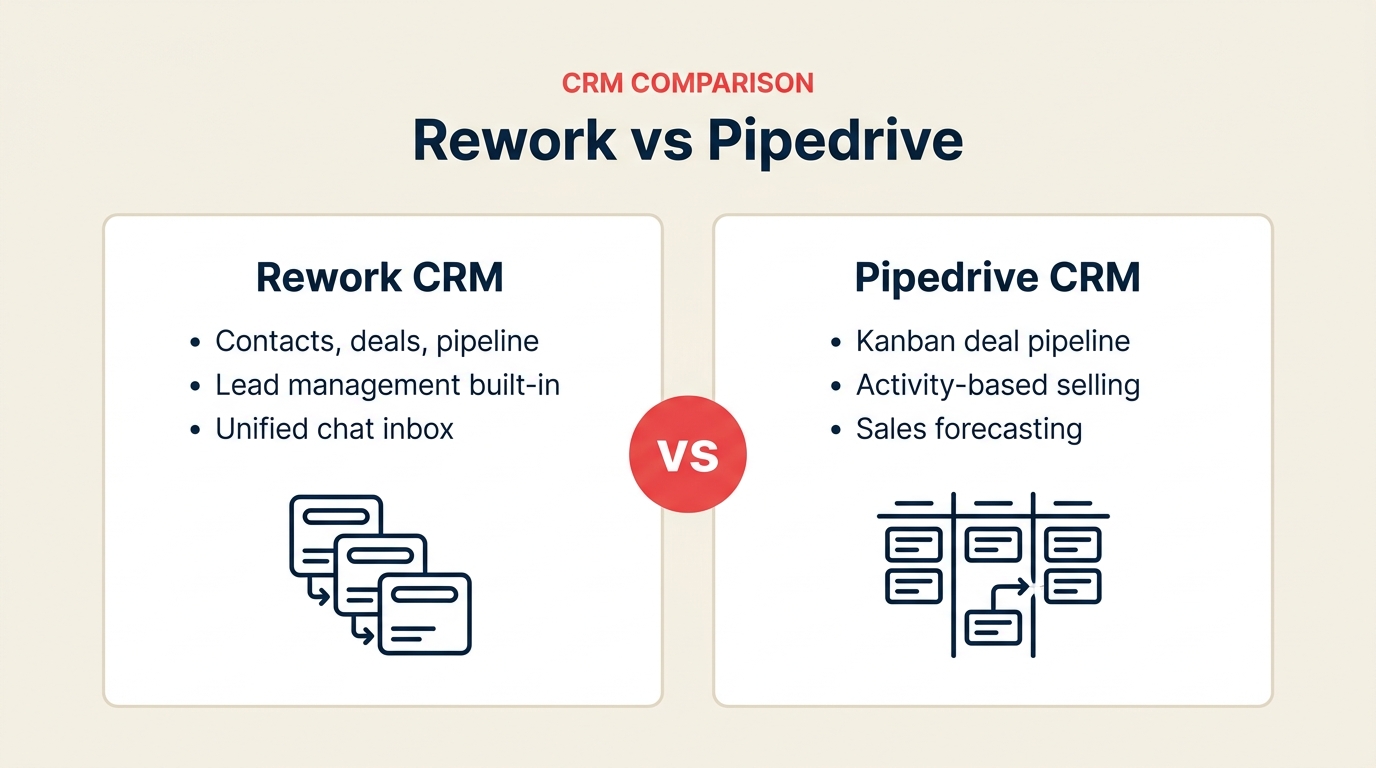
Before the feature-by-feature breakdown, here's a quick visual overview of what each product actually is and how it's structured. Rework and Pipedrive solve different problems at different layers of the revenue stack, understanding the architecture makes the rest of this comparison easier to read.
How Rework Works
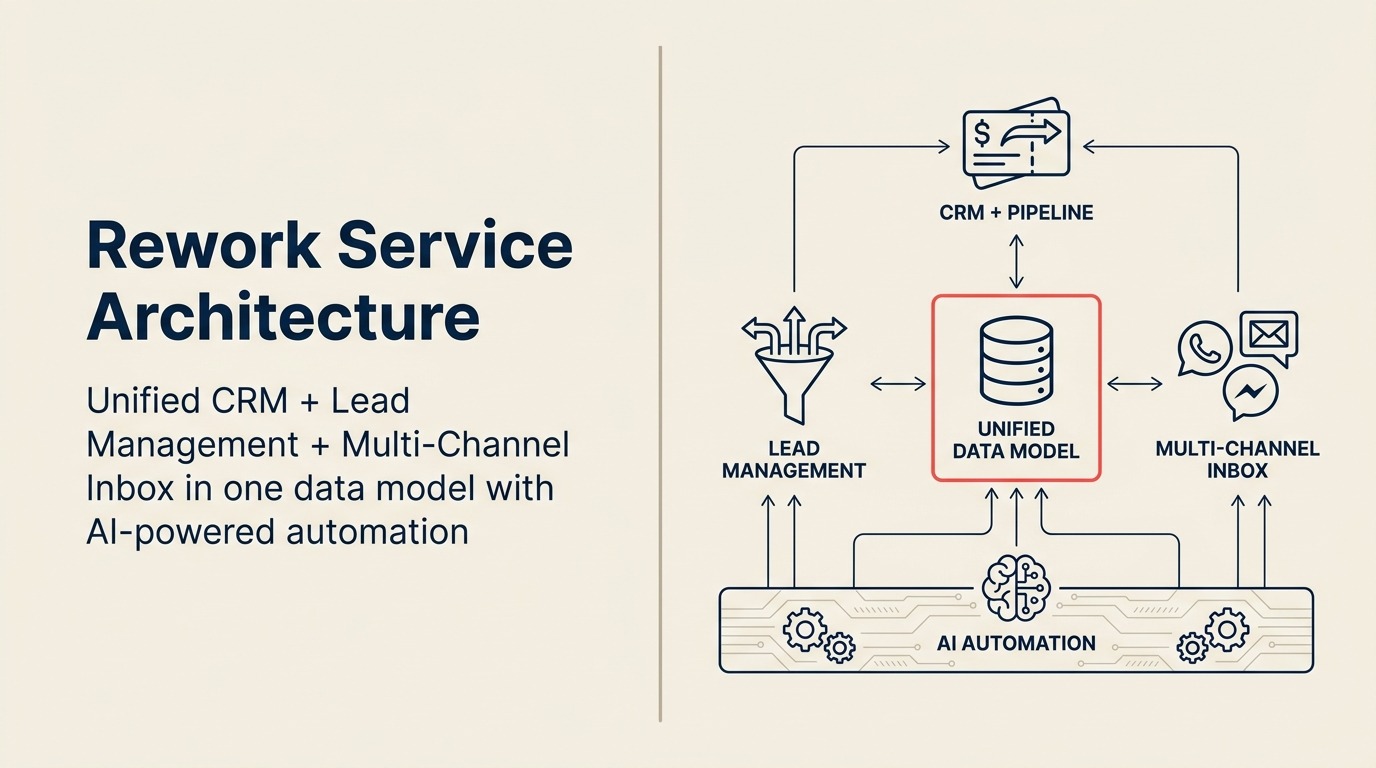
Rework is a unified CRM built for mid-size cross-functional teams. CRM pipeline, Lead Management, and multi-channel inbox (WhatsApp, Messenger, email, SMS) sit on one data model, so sales, marketing, and CS see the same contact timeline without integrations. AI automation runs underneath all three modules, which is why teams can go from capture to close without bolting on separate marketing, lead-routing, and chat tools.
How Pipedrive Works

Pipedrive is a pipeline-first sales CRM built around activity-based selling. Reps drag deal cards across kanban stages, log calls and emails, and see exactly which activity to do next, it's one of the cleanest rep UX experiences on the market. The product is deliberately scoped to sales; marketing, lead routing, and cross-team workflows are handled via the Pipedrive Marketplace or separate tools.
TL;DR
| Factor | Rework | Pipedrive |
|---|---|---|
| Best for | Mid-size cross-functional teams (20-500 employees) needing CRM + Lead Management + unified chat in one product | Small to mid sales teams (5-100 people) that need a clean, fast pipeline with minimal setup |
| Pricing | $999/yr Starter (5 users) or $1,999/yr Standard (10 users) + $12/user/mo above | $14/user/mo Essential or $49/user/mo Professional (billed annually) |
| Support | Email + chat + phone on all plans | Email on lower tiers; phone requires Power plan |
| Lead Management | Full module: capture, score, distribute, nurture, handoff, built in on every plan | Basic leads inbox; distribution requires Professional + custom rules or Zapier |
| Unified chat inbox | WhatsApp, Messenger, Instagram DM, web chat, email, SMS, native in one contact timeline | Requires 3rd-party integrations for all social/messaging channels |
| Marketing + Sales in one product | Yes, single data model serves both teams | Sales-only; marketing workflows require 3rd-party stack |
| Pipeline UX | Clean, functional | One of the best in class, minimal friction for reps |
| Setup speed | 1-3 days for basic CRM; 1-2 weeks for full Lead Management + chat, led by a team with hands-on experience onboarding mid-size sales, marketing, and ops departments end-to-end | Under a day for a functional pipeline; 4-8 weeks or a paid 3rd-party partner for full lead management + chat since Pipedrive has no in-house team experienced with mid-size cross-department rollouts |
| Integrations | 80+ native | 400+ apps via Pipedrive Marketplace |
| Ideal buyer | COO, Head of RevOps, Founder running cross-team ops | Sales Manager, VP Sales focused on rep activity and pipeline hygiene |
Who Each Tool Is Built For
Target customer profile
| Dimension | Rework | Pipedrive |
|---|---|---|
| Company size | 20-500 employees | 5-200 employees |
| Revenue range | $2M-$100M ARR | $500K-$30M ARR |
| Team maturity | Past spreadsheets; sales + marketing + ops sharing workflows | Small sales team outgrowing spreadsheets; or sales team that needs a clean dedicated CRM |
| Org shape | Cross-functional, sales, marketing, CS, ops all touching shared pipelines | Sales-first, other teams use separate tools |
| Primary pain | Disconnected tools, leads falling through handoffs, no single source of truth | No clear pipeline visibility, reps not logging activity, deal forecasting is manual |
| Decision maker | COO, Head of Revenue, RevOps lead, founder-operator | Sales Manager, VP Sales, Office Manager at small company |
Team fit matrix
| Team | Rework | Pipedrive |
|---|---|---|
| Sales (reps + managers) | Full pipeline, activity logging, forecasting, quota tracking, territory routing | Excellent, this is its primary design target; rep UX is best-in-class |
| Marketing | Lead capture, scoring, nurture workflows, attribution, marketing-to-sales handoff | Minimal; marketing needs a separate tool (Mailchimp, ActiveCampaign, etc.) |
| RevOps | Unified data model across sales + marketing + CS; SLA tracking; reporting across teams | Limited; reports are sales-only; no unified cross-team view |
| Customer Success | Unified contact timeline from chat + email + sales history; handoff from sales | Read-only deal view possible; CS operates separately |
| Operations | Cross-team workflows, approval chains, process templates, automation across functions | Sales workflow automation only (automation available from Advanced plan) |
Core CRM Capability Comparison
Both tools cover the fundamentals: contact records, deal pipelines, activity logging, email sync, and basic reporting. The difference isn't in the list of features, it's in the depth and the teams those features are designed to serve.
Pipedrive's pipeline management is genuinely excellent. The visual board is clean, drag-and-drop is fast, and the interface keeps reps focused without overwhelming them. Setting up a new pipeline takes about 15 minutes. That simplicity is a deliberate product decision, and for sales-only teams, it pays off in adoption.
Rework's CRM covers the same pipeline fundamentals but adds the lead lifecycle layer that sits upstream of the pipeline. Lead capture forms, scoring rules, distribution routing, and marketing nurture sequences are part of the same product, not bolted on from a third-party integration. The tradeoff is a slightly steeper onboarding for reps coming from minimal tools, but it's manageable within a week.
| CRM Feature | Rework | Pipedrive |
|---|---|---|
| Visual deal pipeline | Yes, multi-pipeline | Yes, multi-pipeline, industry-leading UX |
| Contact & company records | Full, with unified chat + email history | Full, email + call history |
| Activity logging | Automated + manual | Automated + manual; strong rep reminders |
| Email sync (two-way) | Yes | Yes |
| Email sequences | Yes, included on every plan | Yes, from Professional tier ($49/user/mo) |
| Custom fields | Yes | Yes |
| Multiple pipelines | Yes, all plans | Yes, Essential plan+ |
| Deal rotting / inactivity alerts | Yes | Yes, native feature, well-executed |
| Sales forecasting | Yes | Yes (from Professional) |
| Mobile app | Yes | Yes, strong mobile execution |
| API access | Yes | Yes, well-documented |
Lead Management Deep Dive
This is where the comparison stops being close. Pipedrive has a "Leads Inbox" feature that lets you park unqualified contacts before they become deals. But it's a staging area, not a lead management system. There's no native scoring, no round-robin distribution, no SLA routing, and no marketing-to-sales handoff logic. Getting any of that on Pipedrive requires either reaching the Professional tier and building custom automation, or wiring in a Zapier workflow, or buying a separate tool.
Rework treats lead management as a first-class module. Marketing and sales share the same lead object. A lead captured from a Facebook ad form flows through scoring rules, gets assigned to the right rep based on territory or round-robin rotation, enters a nurture sequence if it's not sales-ready, and lands in the CRM pipeline with full attribution when it qualifies. The handoff is logged. The source is tracked. Nothing falls through.
| Lead Management Capability | Rework | Pipedrive |
|---|---|---|
| Lead capture: web forms | Yes, native, embeddable | Yes, LeadBooster add-on ($32.50/company/mo) |
| Lead capture: Facebook/Google Ads | Yes, native integration | Via Zapier or 3rd-party |
| Lead capture: chat / conversational | Yes, unified chat inbox feeds leads directly | Via LeadBooster chatbot (add-on pricing) |
| Lead scoring | Yes, rule-based and behavioral, built in | Not available natively |
| Lead distribution: round-robin | Yes, built in on all plans | Requires Professional tier + custom pipeline rules or Zapier |
| Lead distribution: territory routing | Yes, built in | Requires custom setup or Zapier |
| Lead distribution: SLA rules | Yes, built in | Not available natively |
| Marketing nurture sequences | Yes, built in; tied to lead record | Not available; requires separate marketing tool |
| Marketing-to-sales handoff | Native, same product, same data model | Manual or Zapier-dependent |
| Attribution back to pipeline | Yes, lead source tracked through to deal | Partial; depends on integration quality |
Unified Chat Channels
This section matters if any of your leads come from WhatsApp, Messenger, Instagram DM, or your website's chat widget. For many mid-size teams in e-commerce, education, real estate, professional services, and B2B SaaS, that's a significant lead source.
Rework's unified inbox pulls all of these channels into a single conversation view tied to the contact record. A prospect who messages you on Instagram, then sends an email, then fills out a form shows up as one contact with one timeline. Your rep sees the full history before they pick up the phone.
Pipedrive handles email well. For every other channel, you're connecting a third-party integration or installing an add-on, and those conversations don't show up natively in the contact timeline.
| Channel | Rework | Pipedrive |
|---|---|---|
| Native, unified inbox, tied to contact record | 3rd-party integration (e.g., Twilio, Trengo, Sirena) | |
| Facebook Messenger | Native, unified inbox | 3rd-party integration |
| Instagram DM | Native, unified inbox | 3rd-party integration |
| Live web chat | Native, feeds directly to CRM | LeadBooster add-on ($32.50/company/mo) |
| Email (two-way sync) | Native | Native, strong execution |
| SMS | Native, unified inbox | 3rd-party integration |
| Phone / call logging | Call logging + recording | Call logging + Smart Docs calling; well-executed |
Automation, Rules, and Integrations
| Automation Feature | Rework | Pipedrive |
|---|---|---|
| Workflow automation | Built in on every plan with triggers on lead, deal, contact, and form events | From Advanced tier ($29/user/mo); deal and activity triggers |
| Multi-step automations | Yes | Yes (Advanced+) |
| Cross-team automation | Yes, trigger across sales, marketing, ops objects | Sales objects only |
| SLA-based routing rules | Yes, built in | Not available natively |
| Email sequence automation | Yes, included from Growth | Yes, from Professional ($49/user/mo) |
| Zapier / Make support | Yes | Yes, strong ecosystem |
| Native integrations | 80+ | 400+ via Pipedrive Marketplace |
| Open API | Yes | Yes, well-documented REST API |
Pipedrive's marketplace is broader. If your stack is built around third-party connections, Pipedrive likely has a native integration for whatever you're using. Rework's 80+ native integrations cover the common stack (Slack, Google Workspace, Zapier, major ad platforms, email tools) but it's a smaller selection.
Reporting and Dashboards
Pipedrive's reporting is solid for sales-focused metrics: pipeline velocity, activity tracking, deal conversion rates, and rep performance. The dashboards are clean and configurable. For a VP Sales who wants to know how the pipeline is moving, it works well.
Rework's reporting spans the full lead lifecycle. You can report on lead source, conversion from lead to pipeline, rep assignment SLA compliance, nurture sequence performance, and cross-channel attribution. The tradeoff is that setting up those reports takes more configuration than Pipedrive's out-of-the-box sales dashboards.
Pricing at 25, 50, and 100 Seats
All prices are annual billing (per user per month). Pipedrive pricing sourced from pipedrive.com/pricing.
Pipedrive plans (per user/month, annual billing)
| Plan | Price | Key features unlocked |
|---|---|---|
| Essential | $14/user/mo | Basic pipeline, contacts, activities, email sync |
| Advanced | $29/user/mo | Email sequences, workflow automation, group emailing |
| Professional | $49/user/mo | AI sales assistant, revenue forecasting, e-signatures, team management |
| Power | $64/user/mo | Projects, phone support, implementation program |
| Enterprise | $99/user/mo | Unlimited features, enhanced security, unlimited automations |
Add-ons sold separately: LeadBooster (chatbot + forms + live chat, $32.50/company/mo); Web Visitors ($41/company/mo); Campaigns email marketing ($16/company/mo).
Rework pricing
Rework Sales Ops has two packages:
- Starter, $999/year for up to 5 users
- Standard, $1,999/year with 10 users included, plus $12/user/month for each additional user
See rework.com/pricing for current details. Both packages already include the full CRM, Lead Management module, and unified multi-channel inbox, which in Pipedrive would require Professional plus LeadBooster plus Campaigns add-ons.
Total annual cost comparison at real seat counts
| Seats | Pipedrive Advanced | Pipedrive Professional | Rework Sales Ops |
|---|---|---|---|
| 5 seats | $1,740/yr | $2,940/yr | $999/yr (Starter) |
| 10 seats | $3,480/yr | $5,880/yr | $1,999/yr (Standard base) |
| 25 seats | $8,700/yr | $14,700/yr | $4,159/yr |
| 50 seats | $17,400/yr | $29,400/yr | $7,759/yr |
| 100 seats | $34,800/yr | $58,800/yr | $14,959/yr |
Even compared to Pipedrive Advanced, Rework's packages cost less while bundling features that Pipedrive reserves for Professional ($49/user/mo) plus paid add-ons (LeadBooster $390/yr, Campaigns $192/yr, plus Zapier for WhatsApp/Instagram). The real cost gap is wider than the headline number suggests because Pipedrive buyers typically end up buying Professional + 2-3 add-ons to match what Rework includes on the base plan.
Implementation and Time-to-Value
| Dimension | Rework | Pipedrive |
|---|---|---|
| Basic CRM setup | 1-3 days with guided onboarding | Under a day, self-serve and genuinely fast |
| Team onboarding (reps) | 3-5 days for full product, included | 1-2 days for pipeline basics; minimal learning curve |
| Lead management configuration | 3-7 days with onboarding team walking through scoring, routing, forms | 2-6 weeks if built via Zapier or custom workflows, no guided path |
| Chat inbox connection | 1-2 hours per channel, configured during onboarding | 1-2 days per channel via 3rd-party tool (LeadBooster, Twilio, or Zapier stack) |
| Full implementation (CRM + lead mgmt + chat) | 1-2 weeks with onboarding support | 4-8 weeks self-serve or requires a paid Pipedrive partner; no in-house implementation team |
| Data migration from prior CRM | CSV import + API, migration support on all plans | CSV import + API; well-documented but self-serve |
| Admin overhead post-launch | Moderate, more moving parts | Low for basic pipeline; high if you stitched lead management through 3rd parties |
| Support model | Email + chat + phone on all plans | Email + chat; phone from Professional tier |
Pipedrive wins on setup speed only if your definition of "setup" is "a working pipeline for reps." That's a real strength for small sales teams under time pressure. The story changes when you need lead management, multi-channel chat, and marketing handoffs. Pipedrive has no in-house team experienced with mid-size multi-department rollouts, so customers either build everything themselves through trial and error or hire a Pipedrive partner agency (typically $2,000-$10,000) to stitch the pieces together. Rework's edge is institutional experience: the team has onboarded full Sales, Marketing, RevOps, and CS departments at mid-size companies and applies that hard-earned knowledge of what actually breaks during a multi-team rollout to every new customer. The full stack ships in one product, so the 1-2 week implementation includes everything, not just the pipeline.
When Pipedrive Is the Right Call
Be honest with yourself about whether these scenarios apply to your team:
Your team is purely sales-focused and under 20 people. Pipedrive's Essential or Advanced tier is genuinely the right tool. The interface is built for reps, setup is fast, and you won't pay for features your team won't use.
You just need a clean pipeline and your reps hate learning new software. Pipedrive has one of the best rep-side UX designs in the CRM category. If your biggest problem is getting salespeople to log activity, Pipedrive's interface will beat Rework on adoption speed.
You already have a marketing automation stack and you want a standalone sales CRM. If HubSpot Marketing Hub (or Mailchimp, ActiveCampaign, Klaviyo) is already handling your leads and nurture, you don't need Rework's lead management. Pipedrive integrates with all of these and handles the pipeline side cleanly.
Your budget is tight and you need a functional CRM at the lowest monthly cost. Pipedrive Essential at $14/user/month is one of the most affordable functional CRMs on the market. Rework's Starter package at $999/year covers up to 5 users (rework.com/pricing), which is lower than 5 seats of Pipedrive Essential, so budget alone is rarely a reason to pick Pipedrive over Rework. If Pipedrive wins for you, it's the UX and setup speed, not the price.
When Rework Is the Right Call
Your leads come from multiple channels and you need them all in one place. If WhatsApp, Messenger, Instagram DM, web chat, and email are all lead sources for your team, and you want reps to see the full conversation history in one timeline, Rework's unified inbox is the capability that eliminates the biggest manual work and the most frequent dropped leads.
Marketing and sales are sharing responsibility for revenue. Pipedrive is a sales CRM. If your marketing team is running lead gen campaigns, scoring prospects, and handing off to sales based on behavior, they need to be in the same tool as sales. Rework's lead management module is designed for this joint ownership. Pipedrive requires a separate marketing tool and a Zapier bridge to approximate it.
You need lead routing without manual assignments or custom Zapier workflows. Round-robin assignment, territory routing, and SLA-based escalation are part of Rework's standard lead distribution setup. On Pipedrive, building the same logic requires automation workflows at the Professional tier, plus Zapier for anything involving external sources or channel-based routing.
You're a 30-150 person company where sales, marketing, ops, and CS are all involved in revenue operations. Rework's cross-team data model means a RevOps lead can build reports that span the full pipeline from lead capture to closed deal without exporting data from three different tools. For Pipedrive, that view lives in a spreadsheet or a BI tool.
Decision Framework
| Pick Pipedrive if... | Pick Rework if... |
|---|---|
| Your team is under 20 people and sales-only | Your team is 20-500 and sales + marketing share workflows |
| Fast setup is the top priority | You need lead management (scoring, routing, SLA) built in |
| Your reps need the simplest possible pipeline UX | Leads come from WhatsApp, Messenger, or Instagram and need to land in one contact timeline |
| You already have a marketing automation tool and need a sales-only CRM to integrate with it | Marketing and sales need a shared data model, not two stitched tools |
| Budget is tightly constrained and you need a functional CRM at minimum cost | You need round-robin or territory routing without building Zapier flows |
| You don't need WhatsApp or social messaging channels tied to the CRM | RevOps needs reporting that spans lead capture → pipeline → close in one product |
What to Do Next
If you're currently on Pipedrive and feeling the friction of adding tools for lead routing, marketing handoffs, or chat channel management, the clearest next step is to map the external tools your team has added to work around Pipedrive's gaps. Count the integrations. Add up the monthly costs. Add the hours your ops team spends maintaining those connections.
That exercise often does the math faster than any feature comparison.
If you're evaluating both tools fresh, start with two questions: Does your team have dedicated marketing ownership of leads before they hit the pipeline? And do your leads come from social or chat channels that need to be tracked against the contact record? If both answers are yes, Rework's trial will show you immediately whether the unified model matches how your team actually works.
If your team is purely sales-focused with under 20 reps and the pipeline is the whole operation, Pipedrive is the right tool and you should start the trial today.
Before committing to either platform, work through a CRM buyer's checklist to confirm your requirements are scoped correctly. If you're also evaluating Salesforce or HubSpot, Rework vs Salesforce and Rework vs HubSpot CRM cover those decisions in the same format. For teams thinking through how to structure their pipeline before migrating, pipeline stages that match your selling motion is a practical starting point.

Principal Product Marketing Strategist
On this page
- How Each CRM Works
- How Rework Works
- How Pipedrive Works
- TL;DR
- Who Each Tool Is Built For
- Target customer profile
- Team fit matrix
- Core CRM Capability Comparison
- Lead Management Deep Dive
- Unified Chat Channels
- Automation, Rules, and Integrations
- Reporting and Dashboards
- Pricing at 25, 50, and 100 Seats
- Pipedrive plans (per user/month, annual billing)
- Rework pricing
- Total annual cost comparison at real seat counts
- Implementation and Time-to-Value
- When Pipedrive Is the Right Call
- When Rework Is the Right Call
- Decision Framework
- What to Do Next