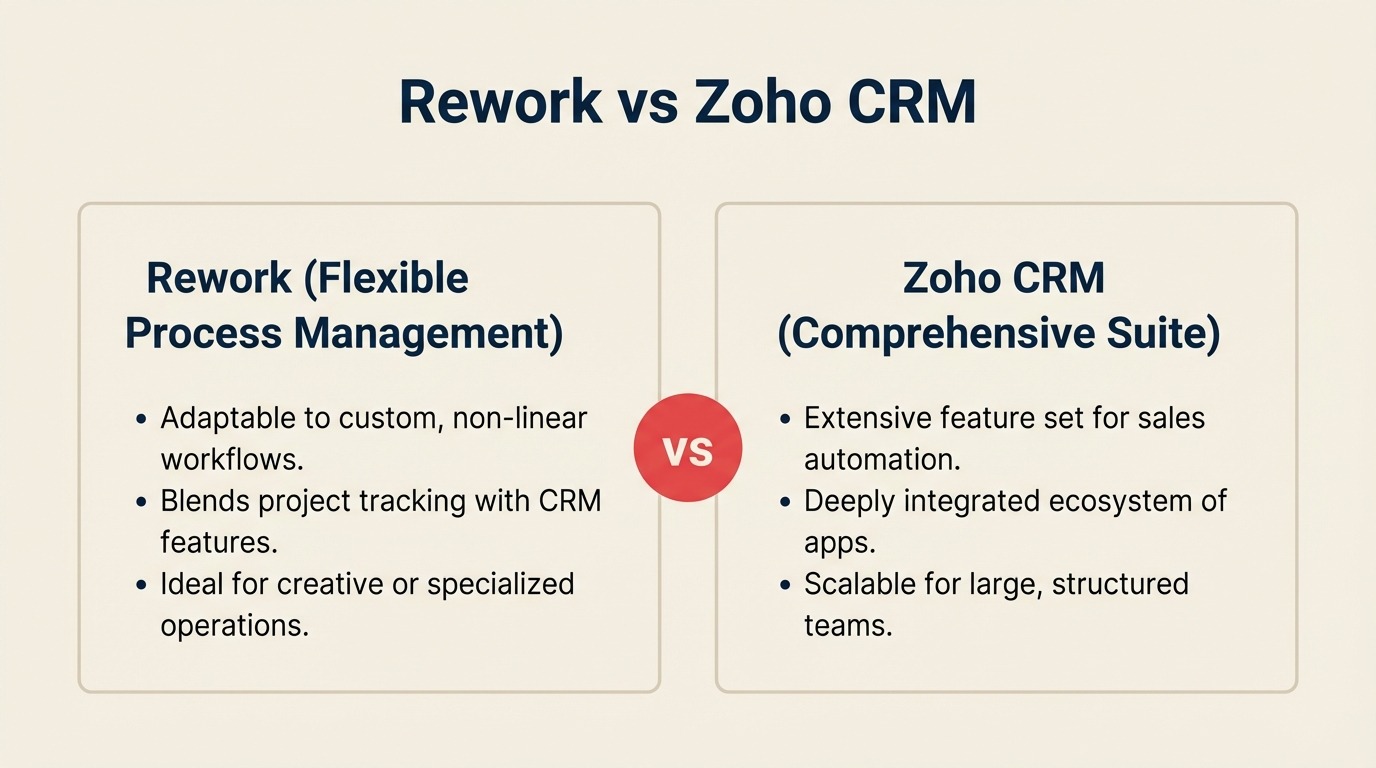
You're running a 30-to-200-person team where sales, marketing, and operations share the same customer record but work in different tools. Leads fall through the handoff between marketing and sales. Chat conversations happen in WhatsApp and Instagram but don't show up in the pipeline. Your ops team tracks approvals in a spreadsheet. You know a CRM upgrade is overdue and Zoho CRM keeps appearing in every shortlist because of its price and the breadth of the Zoho One suite.
This comparison is written for exactly that situation, a mid-size, cross-functional team that needs more than a pipeline tracker but can't justify Salesforce-scale complexity or cost. We'll go through what Zoho CRM does genuinely well, where Rework's unified approach changes the calculus for cross-team ops, and the exact scenarios where one wins over the other. No spin. No screenshots. Tables and specifics only.
How Each CRM Works
Before the feature-by-feature breakdown, here's a quick visual overview of what each product is and how it's structured. Rework and Zoho take opposite approaches to "one vendor for everything", seeing the architecture side-by-side makes the rest of this comparison easier to read.
How Rework Works
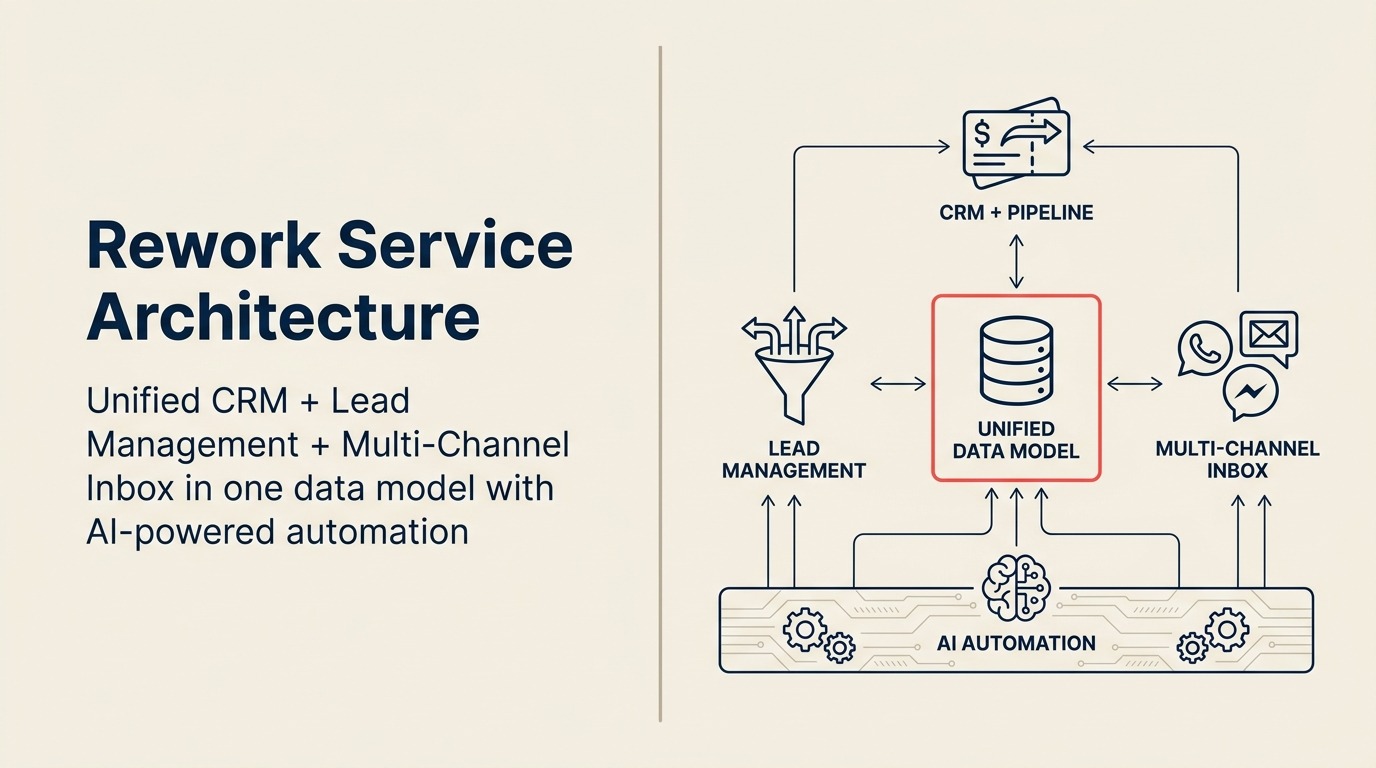
Rework is a unified CRM built for mid-size cross-functional teams. CRM pipeline, Lead Management, and multi-channel inbox (WhatsApp, Messenger, email, SMS) sit on one data model, so sales, marketing, and CS see the same contact timeline without integrations. One product, one data model, the cross-team handoff problem is solved by design, not by bolting apps together.
How Zoho Works
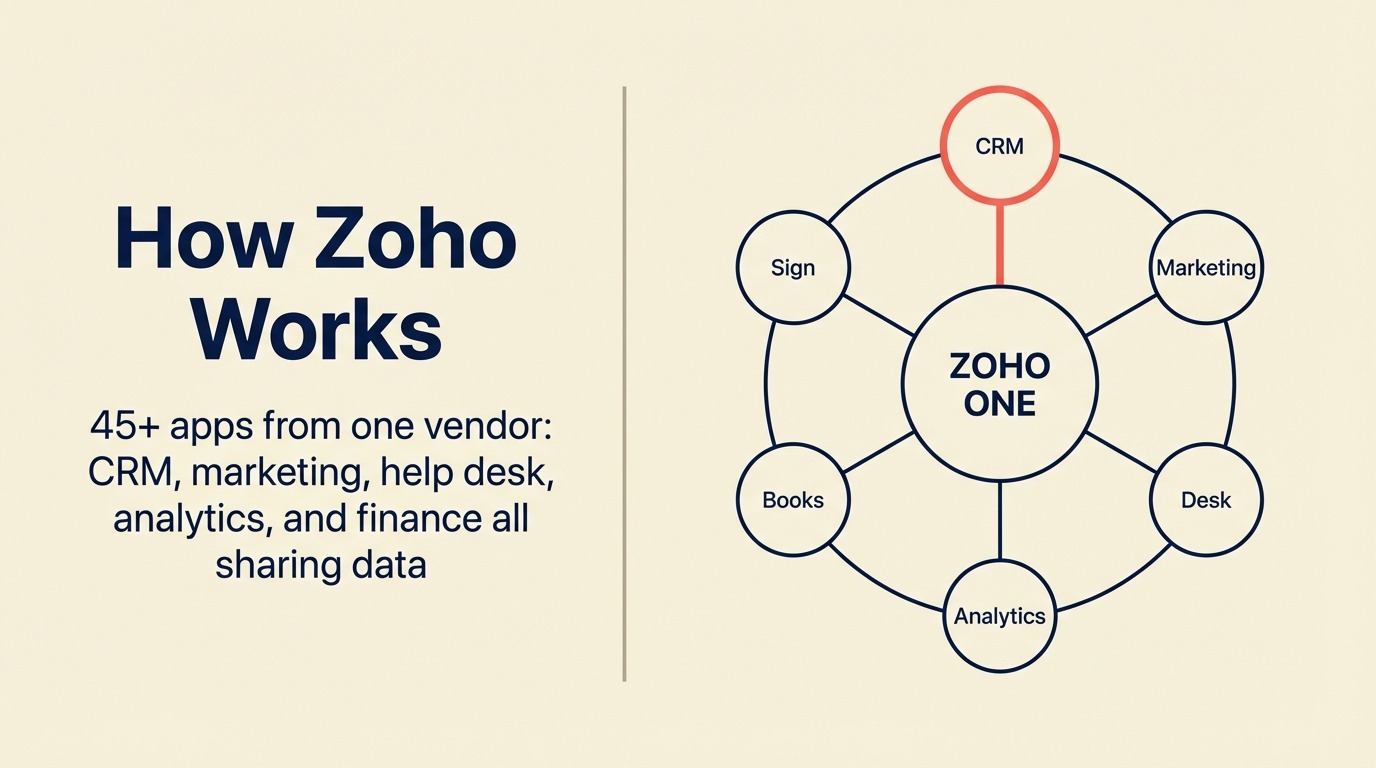
Zoho's pitch is breadth: 45+ apps from one vendor (CRM, Marketing, Desk, Analytics, Books, Sign, and more) that share data through the Zoho One suite. Zoho CRM itself is a deep, feature-rich sales CRM at the lowest per-seat price on the market. The tradeoff is that cross-team workflows like unified chat, lead routing, and service often require composing multiple Zoho apps (SalesIQ, Desk, Social, Flow) rather than operating inside a single product.
TL;DR
| Dimension | Rework | Zoho CRM |
|---|---|---|
| Best fit | Mid-size (20-500), cross-functional sales + marketing + ops | SMB to enterprise, sales-primary teams, Zoho ecosystem buyers |
| Core strength | Unified CRM + Lead Management + chat inbox in one product | Deep sales CRM, lowest per-seat price, Zoho One ecosystem breadth |
| Lead Management | Built-in module, capture, score, distribute, SLA, handoff | Available but requires Professional tier + manual configuration |
| Unified chat inbox | WhatsApp, Messenger, Instagram DM, web chat, email, SMS native | Requires Zoho SalesIQ + Zoho Desk + Zoho Social separately |
| Automation | Cross-team workflow rules across all modules | Strong sales automation; cross-app automation requires Zoho Flow |
| Starting price | $999/yr Starter (5 users) or $1,999/yr Standard (10 users included) | $14/user/mo (Standard, billed annually) |
| Mid-tier price | $1,999/yr Standard + $12/user/mo above 10 users | $23/user/mo (Professional, billed annually) |
| Support | Email + chat + phone on all plans | Email support on all plans; phone on Enterprise |
| Zoho One ecosystem | Not applicable | 45+ business apps bundled; powerful if team uses multiple Zoho tools |
| Time-to-value | 1-2 weeks (opinionated setup) | 2-6 weeks (highly configurable, more setup required) |
| Setup speed | 1-3 days for basic CRM; 1-2 weeks for full Lead Management + chat, led by a team with hands-on experience onboarding mid-size sales, marketing, and ops departments end-to-end | Under a day for a functional Standard pipeline; 4-8 weeks or a Zoho Partner ($3,000-$20,000) for full lead management + chat since Zoho has no in-house team experienced with mid-size cross-department rollouts |
| Ideal buyer | RevOps lead at B2B SaaS, agency, or brokerage scaling cross-team GTM | Cost-sensitive buyer already using Zoho suite, or globally distributed sales org |
Who Each Tool Is Built For
Target customer profile
| Dimension | Rework | Zoho CRM |
|---|---|---|
| Company size | 20-500 employees | 1 - enterprise (scales wide) |
| Revenue range | $2M - $100M ARR | Flexible; SMB to mid-enterprise |
| Team maturity | Past spreadsheets, not yet on Salesforce-level customization | Works at any maturity level |
| Org shape | Cross-functional, sales, marketing, CS, ops sharing workflows | Sales-led orgs; broader with Zoho ecosystem |
| Primary buyer | COO, Head of Revenue, RevOps lead, founder-operator | VP Sales, IT manager, or existing Zoho admin |
| Key pain | Disconnected tools, handoffs dropping, no unified customer timeline | Needs a capable CRM at controlled cost, or full Zoho One bundle |
Team fit matrix
| Team | Rework | Zoho CRM |
|---|---|---|
| Sales | Full pipeline, quota tracking, forecasting, activity logging, territory routing | Strong pipeline management, AI scoring (Zia), territory rules on Professional+ |
| Marketing | Lead capture forms, lead scoring, nurture workflows, campaign attribution built in | Zoho Campaigns for email; lead gen requires integration with Zoho Marketing Plus |
| RevOps | Unified data model across sales + marketing + CS, SLA tracking, cross-team reporting | Powerful if entire stack is Zoho; fragmented if mixing non-Zoho tools |
| Operations | Dedicated cross-team workflow templates and approval chains | Zoho Creator for custom apps (requires building from scratch) |
| Customer Success | Unified contact timeline with chat + email + tickets from one inbox | Zoho Desk handles support separately; integration exists but is not native |
| Customer-facing chat | WhatsApp, Messenger, Instagram DM, web chat, SMS all native to contact record | Zoho SalesIQ (live chat), Zoho Social (social DMs), separate apps, separate logins |
Core CRM Capability Comparison
Both tools cover the standard CRM surface area: contacts, companies, deals, activity logging, reporting, and automation. The differences show up in how they connect the pieces and what's included versus what you have to stitch together.
Zoho CRM is a mature, full-featured sales CRM. It ships with lead and contact management, deal tracking, multiple pipeline views, forecasting, Zia (Zoho's AI assistant for scoring and predictions), a territory management module, and deep customization through custom modules, layouts, and Deluge scripting. The depth is genuine. If your primary use case is a sales org managing high-volume deal flow, Zoho CRM Professional or Enterprise covers it thoroughly.
Rework's CRM is designed around the premise that for mid-size teams, sales and marketing can't afford to run on separate systems with a manual handoff in the middle. The same platform that captures a lead from a web form, distributes it to the right sales rep, logs the WhatsApp conversation, and tracks the deal through close also runs the post-sale onboarding workflow and the internal approval chain. That's not a feature list. It's an architectural choice that matters most when your ops team is small and handoffs between departments are where revenue leaks.
Core CRM feature parity
| Feature | Rework | Zoho CRM |
|---|---|---|
| Contact & company management | Full | Full |
| Deal / pipeline tracking | Full | Full |
| Multiple pipelines | Yes | Yes |
| Activity logging (calls, email, tasks) | Yes | Yes |
| Email sync | Yes | Yes |
| AI-powered lead scoring | Yes | Yes (Zia, Enterprise tier) |
| Sales forecasting | Yes | Yes |
| Territory management | Round-robin, territory, skill-based routing native | Available on Professional+ |
| Custom modules & objects | Yes | Deep (Zoho CRM's strength) |
| Custom scripting / automation language | Workflow rules + automation builder | Deluge scripting (powerful, developer-level) |
| Mobile app | Yes | Yes |
| Open API | Yes | Yes |
Lead Management Deep Dive
This is where the architectural difference becomes most visible for cross-functional teams. Lead Management in Rework is a first-class module, not a configuration project.
In Zoho CRM, lead management exists but is primarily designed around a sales-rep-centric flow: leads come in, a rep manually converts them or automation rules move them. Native lead distribution rules are available on Professional and above, but setting up round-robin, territory-based, or SLA-enforced routing requires building your own automation with Zoho's workflow rules engine. It's possible. It's just work. Marketing automation and nurture loops live in Zoho Campaigns (a separate app), not inside CRM itself.
Rework ships the full lead lifecycle as a unified module. Lead capture, scoring, distribution, SLA enforcement, marketing-to-sales handoff, and nurture are all in one place, tied to the same contact record that the sales rep sees.
| Lead Management Capability | Rework | Zoho CRM |
|---|---|---|
| Lead capture (forms, landing pages) | Native | Requires Zoho Forms (separate app) |
| Ad network integrations (Meta, Google) | Native | Zoho Marketing Automation (separate app) |
| Lead scoring | Native, rule-based + AI | Zia scoring (Enterprise tier) |
| Round-robin distribution | Native, all plans | Workflow rule, must configure manually |
| Territory / skill-based routing | Native | Available Professional+, manual build required |
| SLA enforcement on lead response | Native | Configurable but not default, build with workflow rules |
| Marketing nurture workflows | Native | Zoho Campaigns (separate app, separate subscription) |
| Marketing-to-sales handoff stage | Native handoff module | Lead conversion + CRM sync via Zoho integration |
| Attribution back to pipeline | Full attribution in one platform | Partial, marketing data lives in separate Zoho apps |
The practical implication: a RevOps lead at a 50-person B2B SaaS company setting up Rework gets distribution rules, SLA tracking, and nurture in one configuration session. The same person setting up Zoho needs to buy and configure Zoho Campaigns, build distribution rules manually, and integrate multiple Zoho apps before achieving the same outcome. That's not a critique. It's a scoping decision you need to make at the start of the evaluation.
Unified Chat Channels
For teams selling through WhatsApp, Messenger, or Instagram DM (which describes most e-commerce, education, real estate, and professional services businesses in 2026), the channel inbox is not an integration decision. It's a CRM architecture decision.
Zoho's answer to unified chat is a combination of tools: Zoho SalesIQ for live web chat, Zoho Social for social channel monitoring and response, and Zoho Desk for support tickets. Each has its own interface, its own subscription, and its own data model. They connect via Zoho's integration layer, but they're not a single inbox tied to one contact timeline.
Rework's unified inbox pulls all channel conversations into one contact record: the same record the sales rep tracks deals against, the same one CS sees post-sale.
| Channel | Rework | Zoho CRM |
|---|---|---|
| Native | Zoho SalesIQ (separate app) | |
| Facebook Messenger | Native | Zoho Social (separate app) |
| Instagram DM | Native | Zoho Social (separate app) |
| Live web chat | Native | Zoho SalesIQ (separate app) |
| Native | Native | |
| SMS | Native | 3rd-party integration |
| All channels in one contact timeline | Yes, single unified view | No, split across SalesIQ, Social, Desk |
If your team uses one or two channels lightly, the Zoho multi-app approach is manageable. If your lead volume comes primarily from social and messaging channels, running three separate apps with separate agent logins is a daily friction cost that compounds quickly.
Zoho One Ecosystem Consideration
Zoho One deserves a direct mention because it changes the comparison math entirely for some buyers.
Zoho One bundles 45+ business applications (CRM, HR, Finance, Projects, Desk, Marketing, Analytics, People, and more) into a single per-employee subscription priced around $37/employee/month (annual, as of early 2026). If your team is already using or planning to use Zoho Desk for support, Zoho Books for accounting, Zoho People for HR, and Zoho Projects for project management, the cost efficiency of Zoho One is genuinely compelling. You get a CRM and a full business software stack for roughly what you'd pay for CRM alone from most competitors.
Rework does not offer an equivalent ecosystem play. Rework focuses on the CRM + Lead Management + cross-team ops vertical and integrates with best-of-breed tools for finance, HR, and specialized functions via API and native connectors. If you're looking to consolidate your entire software stack into one vendor, Zoho One is a serious option that Rework can't match on breadth.
The trade-off: Zoho One's breadth comes from building 45 independent apps that share a login and some data sync. They're integrated, not unified. Rework's narrower scope means the things it does (CRM, lead management, chat inbox, cross-team workflows) are built as one product with one data model.
Automation and Rules
| Automation Capability | Rework | Zoho CRM |
|---|---|---|
| Workflow automation (record triggers) | Yes | Yes |
| Time-based automation | Yes | Yes |
| Cross-module automation | Yes, native | Yes within CRM; cross-app requires Zoho Flow |
| AI-powered suggestions | Yes | Yes (Zia, Enterprise tier) |
| Custom scripting | Rule-builder + visual automation | Deluge scripting (powerful, developer-level) |
| Cross-app automation (non-CRM) | Via API / native integrations | Zoho Flow (separate app, additional config) |
| Blueprint / process enforcement | Yes | Yes (Blueprint feature on Professional+) |
| Approval workflows | Yes, native | Yes (via workflow rules) |
Zoho CRM's Blueprint is worth calling out. It's a structured process enforcement tool that maps stages to required actions before a rep can advance a deal. For sales ops teams with compliance or quality requirements on deal progression, Blueprint is a genuine differentiator. Rework has cross-team workflow enforcement, but Blueprint's specificity for deal stages is Zoho's territory.
For automation that spans beyond the CRM, connecting sales activity to a project kick-off or a deal close to an HR onboarding workflow, Rework handles this natively with cross-team workflow templates. Zoho requires Zoho Flow for cross-app automation, which adds configuration complexity.
Reporting and Dashboards
Both tools ship capable reporting. Zoho CRM has dashboards, custom reports, Zoho Analytics (separate app but deeply integrated) for advanced business intelligence, and Zia's predictive analytics at the Enterprise tier. For teams that want SQL-level business intelligence on their CRM data, Zoho Analytics is a strong add-on.
Rework's reporting covers pipeline reporting, lead source attribution, team performance, SLA adherence, and cross-team workflow completion rates. That's everything a RevOps lead needs to manage GTM operations. It's not as deep as Zoho Analytics for arbitrary data queries, but it covers the operational reporting surface that mid-size teams actually use daily.
Pricing at 25, 50, and 100 Seats
Zoho CRM pricing (annual billing, per seat/month, as of April 2026):
Rework Sales Ops has two packages:
- Starter, $999/year for up to 5 users
- Standard, $1,999/year with 10 users included, plus $12/user/month for each additional user
See rework.com/pricing for current details.
| Plan | 25 Seats/Year | 50 Seats/Year | 100 Seats/Year |
|---|---|---|---|
| Zoho CRM Standard ($14/user/mo) | $4,200 | $8,400 | $16,800 |
| Zoho CRM Professional ($23/user/mo) | $6,900 | $13,800 | $27,600 |
| Zoho CRM Enterprise ($40/user/mo) | $12,000 | $24,000 | $48,000 |
| Zoho CRM Ultimate ($52/user/mo) | $15,600 | $31,200 | $62,400 |
| Rework Sales Ops | $4,159 | $7,759 | $14,959 |
Rework pricing sourced from rework.com/pricing.
Note: Lead distribution rules and SLA management are available from Professional tier. Zia AI scoring requires Enterprise. Blueprint process enforcement requires Professional. Territory management requires Professional.
Most cross-team ops use cases described in this article map to Zoho CRM Professional or Enterprise, not Standard.
Zoho One pricing (annual, per employee/month): approximately $37/employee, covering all 45+ apps. For a 50-person company on Zoho One, that's roughly $22,200/year for the entire software suite.
Rework Sales Ops Standard is $1,999/year with 10 users included, plus $12/user/month above that. See rework.com/pricing for the full tier breakdown. At 25 seats that's $4,159/yr, 50 seats is $7,759/yr, and 100 seats is $14,959/yr, already lower than Zoho CRM Professional at every seat count, and the starting tier includes the unified chat inbox and native lead distribution that Zoho requires Professional or Enterprise tier to approximate.
If you're comparing pure CRM cost at the lowest tier, Zoho CRM Standard is one of the lowest prices in the market. But for the cross-team ops use case described in this article, Rework's starting price undercuts Zoho Professional while including more out of the box.
Implementation and Time-to-Value
| Dimension | Rework | Zoho CRM |
|---|---|---|
| Basic CRM setup | 1-3 days, led by team experienced with the full lead lifecycle | Under a day for Standard; genuinely fast self-serve |
| Team onboarding (reps) | 3-5 days for full product, included | 1-2 days for pipeline basics |
| Lead management configuration | 3-7 days with onboarding team walking through scoring, routing, forms | 2-6 weeks if built via workflow rules manually; no guided path |
| Chat inbox connection | 1-2 hours per channel, led by team with mid-size multi-department onboarding experience | Requires Zoho SalesIQ + Zoho Social + Zoho Desk setup across separate apps |
| Full implementation (CRM + lead mgmt + chat) | 1-2 weeks, led by team with mid-size multi-department onboarding experience | 4-8 weeks self-serve or a Zoho Partner ($3,000-$20,000); no in-house team experienced with mid-size cross-department rollouts |
| Data migration from prior CRM | CSV import + API, migration support on all plans | Standard CSV import; self-serve |
| Admin overhead post-launch | Low, opinionated architecture reduces drift | Medium, highly customized setups require maintenance |
| Support model | Email + chat + phone on all plans | Email on all plans; phone on Enterprise |
Zoho CRM Standard is fast to set up for a basic pipeline, it's genuinely one of the lower-friction entries in the market at that price. But the full-stack picture changes when you need lead management across multiple apps, a unified chat inbox pulling SalesIQ and Social together, and marketing-to-sales handoffs that don't require Zoho Flow. Zoho has no in-house team experienced with mid-size cross-department rollouts, so customers rely on Zoho Partners (typically $3,000-$20,000) to stitch the pieces together. Rework's edge is institutional experience: the team has onboarded full Sales, Marketing, RevOps, and CS departments at mid-size companies and applies that hard-earned knowledge of what actually breaks during a multi-team rollout to every new customer. The full stack ships in one product, so the 1-2 week implementation includes everything, not just the pipeline.
When Zoho Is the Right Call
You're on Zoho One or planning to be. If you're consolidating your business software stack and want HR, Finance, Projects, Desk, CRM, and Marketing from one vendor on one bill, Zoho One's per-employee pricing is genuinely hard to beat. Rework doesn't compete in that breadth play.
Your team is cost-sensitive and sales-primary. Zoho CRM Standard at $14/seat/month is one of the most affordable capable CRMs available. If your team's primary use case is deal tracking and sales activity logging, without heavy cross-team workflow requirements, Zoho Standard covers that at a price Rework doesn't match.
You need deep sales process customization. Blueprint, Deluge scripting, custom modules, and Zoho CRM's configuration depth give technically capable admins a level of CRM customization that rivals tools costing three times as much. If your sales process has complex conditional logic, custom objects, or developer-built extensions, Zoho's flexibility is an asset.
You're a globally distributed org needing localized support. Zoho has offices and partners across Asia, Europe, Latin America, and the Middle East with localized language support, regional data residency options, and a partner network that operates locally. If your team spans multiple countries and needs on-the-ground support, Zoho's global presence is a real advantage.
When Rework Is the Right Call
Your leads come from social and messaging channels and those conversations need to live in the CRM. If a meaningful share of your pipeline starts on WhatsApp, Messenger, or Instagram DM, running those conversations through a separate app from your CRM is a daily friction problem. Rework's native unified inbox puts those conversations on the same contact timeline as the deal.
Marketing and sales need to operate from the same system without a bolt-on integration. Lead capture, scoring, distribution, nurture, and pipeline are one product in Rework. If your marketing team is generating leads that fall into a gap before they reach a sales rep, because the handoff lives in a Zapier workflow between Zoho Campaigns and Zoho CRM, that gap costs you pipeline.
Your ops team runs cross-functional workflows alongside the CRM. If your team needs approval chains, onboarding workflows, client delivery processes, and project handoffs to live in the same system as the CRM, Rework's cross-team workflow architecture handles that without a separate Zoho Creator build or a Zoho Projects integration.
You want fast time-to-value without a dedicated CRM admin. Rework's opinionated setup means a RevOps generalist or Head of Sales can have the system running in under two weeks. Zoho's configurability is a strength for teams that have the bandwidth to use it, and a tax for teams that don't.
Decision Framework
| Pick Zoho CRM if... | Pick Rework if... |
|---|---|
| You're on or buying into Zoho One for full business software consolidation | You need CRM + lead management + chat inbox as one unified product |
| Your budget requires sub-$20/seat/month CRM pricing | Your team loses deals because of marketing-to-sales handoff gaps |
| Your primary use case is sales-rep deal tracking with minimal cross-team ops | Sales, marketing, and ops need to share one platform and one contact timeline |
| You need developer-level CRM customization (Deluge scripting, custom objects) | Your leads come through WhatsApp, Messenger, or Instagram and need to sync to the pipeline |
| You have or plan to hire a Zoho admin or work with a Zoho Partner | You want 1-2 week implementation without a dedicated CRM admin |
| You're a globally distributed org needing local partner support | Your ops team needs cross-team workflow enforcement alongside CRM in one tool |
What to Do Next
If you're genuinely evaluating both tools, map your lead sources first. Where do leads enter your system today: web forms, social ads, WhatsApp, events, referrals? Where do they get lost? That answer will tell you faster than any feature table whether you need Zoho CRM's depth or Rework's unified architecture.
For teams where the primary leak is the marketing-to-sales handoff, or where channel conversations happen outside the CRM, request a Rework demo and ask specifically about the lead distribution module and the unified inbox. For teams where the primary need is a high-volume sales pipeline at the lowest per-seat cost, or where full Zoho ecosystem consolidation is the goal, Zoho CRM Professional is a credible, well-proven choice.
Either way, run a 2-week pilot with the actual team members who will use it daily: the sales reps, the marketing ops person, and the RevOps lead who'll own the configuration. Feature parity on paper means less than daily workflow fit in practice.
For a structured way to scope requirements before the pilot, the CRM buyer's checklist covers the decisions that tend to get missed in vendor demos. If you're also weighing the full Salesforce alternative, Rework vs Salesforce walks through the cost and complexity trade-offs at the same depth. And if lead management depth is the core evaluation criterion, what is lead management provides the framework for assessing how well any CRM handles the full lifecycle from capture to handoff.

Principal Product Marketing Strategist
On this page
- How Each CRM Works
- How Rework Works
- How Zoho Works
- TL;DR
- Who Each Tool Is Built For
- Target customer profile
- Team fit matrix
- Core CRM Capability Comparison
- Core CRM feature parity
- Lead Management Deep Dive
- Unified Chat Channels
- Zoho One Ecosystem Consideration
- Automation and Rules
- Reporting and Dashboards
- Pricing at 25, 50, and 100 Seats
- Implementation and Time-to-Value
- When Zoho Is the Right Call
- When Rework Is the Right Call
- Decision Framework
- What to Do Next