More in
CRM Implementation Guide
Setting Up CRM Roles and Permissions the Right Way
Apr 18, 2026
Email and Calendar Sync Without the Data Mess
Apr 18, 2026
Integrating Your CRM with Marketing Tools: A Sales Ops Guide
Apr 18, 2026
Training Sales Reps to Actually Use the CRM
Apr 18, 2026
Measuring CRM Adoption with Leading Indicators
Apr 18, 2026
Handling the "The Old System Was Better" Transition
Apr 18, 2026
CRM Hygiene: Weekly, Monthly, and Quarterly Routines That Keep Data Clean
Apr 18, 2026
Common CRM Implementation Mistakes — and How to Recover from Each One
Apr 18, 2026
When to Bring In a CRM Consultant, and When Not To
Apr 18, 2026
How to Pick a CRM in 2026: The Buyer's Checklist
Apr 6, 2026
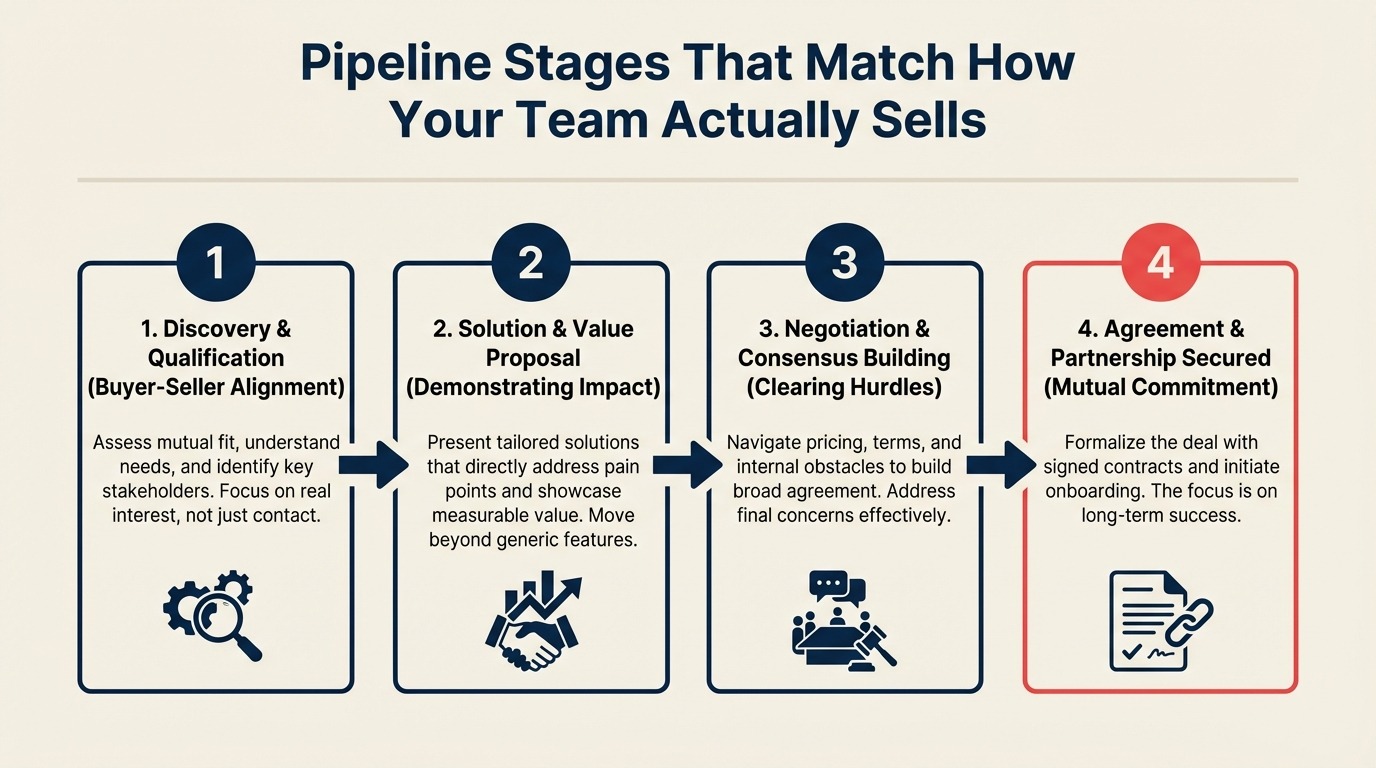
Pipeline Stages That Match How Your Team Actually Sells
Turn this article into takeaways for your work.


Each assistant summarizes the article only for you and suggests best practices for your work.
"Proposal Sent" is the most useless pipeline stage in B2B sales, and it's in 70% of CRMs.
Sending a proposal is something the rep does. It tells you nothing about where the buyer is in their decision. Harvard Business Review's analysis of B2B purchase decisions found that 5.4 people are now involved in the average B2B purchase, and pipeline stages built around rep activities rather than buyer milestones can't track the multi-stakeholder dynamics that actually determine deal outcomes. A rep can send a proposal to 50 leads in one afternoon. That doesn't mean 50 deals just moved forward.
The problem with most CRM pipeline stages is that they describe the rep's activity, not the buyer's position. And when stages describe rep activity, your pipeline tells you how busy your team is, not how likely you are to hit quota.
This guide shows you how to rebuild pipeline stages around buyer milestones so your forecast reflects what's actually happening. Your deal reviews become conversations about buyer behavior, not a list of things reps plan to do. This connects directly to building a forecasting discipline that your CRO actually trusts.
Step 1: List the Buyer Milestones for Your Deal Type
A buyer milestone is something that has to be true for the buyer. It's not a task the rep completes. The question to ask for every stage: "What has the buyer done, understood, or committed to that puts them here?"
Start by listing the real milestones in your sales cycle. What genuinely changes in a buyer's decision process between first contact and closed deal? A typical B2B SaaS deal might include:
- Buyer acknowledges they have a problem worth solving
- Buyer agrees to evaluate a solution (allocated time to assess)
- Buyer has confirmed budget exists and a timeline for decision
- Buyer has seen the product and connected it to their use case
- Buyer's internal champion has presented it to the economic buyer
- Buyer has completed legal and procurement review
- Buyer has signed
Notice what's not on that list: "Rep sent outreach," "Rep gave demo," "Rep sent proposal," "Rep followed up." Those are rep activities. They happen, but they don't define where the buyer is.
Write out your buyer milestones before you name any stages. You can name them later. Get the sequence of buyer behavior right first.
Step 2: Write Entry Criteria, Not Stage Names
Stage names like "Qualified," "Proposal," and "Negotiation" are vague. Two reps using the same stage name mean different things by it, and the result is a pipeline that looks consistent but isn't.
Entry criteria are specific. They're verifiable. And they're about the buyer's state, not the rep's opinion.
Here's the difference:
Bad (stage name as criteria): "Qualified": rep decides when a lead is qualified
Good (entry criteria): "Buyer has confirmed: budget range, decision timeline, at least two stakeholders involved, and an active problem we can solve. Rep has confirmed: we serve their company size and use case."
Entry criteria work when a rep or manager can read them and make an objective call about whether a deal belongs in that stage. "Rep believes this is qualified" is not objective. "Buyer verbally confirmed Q3 budget and two-month evaluation window" is objective.
Write entry criteria for every stage before you build them in the CRM. Format them as a checklist:
Stage: Solution Fit Confirmed Entry criteria:
- Buyer has seen the product demonstration
- Buyer has confirmed their primary use case is supported
- Rep has documented the buyer's 2-3 key requirements
- No disqualifying constraints identified (geography, compliance, integration blockers)
When a rep is uncertain whether a deal is in this stage, they read the criteria and make the call based on facts, not optimism.
Step 3: Set Exit Criteria for Each Stage
Entry criteria define what has to be true to enter a stage. Exit criteria define what has to happen before a deal advances to the next one. This is also where the CRM custom fields guide becomes directly useful: exit criteria often require specific fields to be populated before a stage change is allowed, and those fields need to be designed with the right type and governance before go-live.
The difference matters because deals can stall inside a stage. Without exit criteria, a rep can leave a deal in "Evaluation" for 45 days and call it active.
Exit criteria are usually the same as the entry criteria for the next stage. But sometimes there's an action that must happen first. For example:
Stage: Solution Fit Confirmed Exit criteria:
- Rep has sent a written summary of key requirements and solution fit to the economic buyer
- Buyer has confirmed receipt and agreed to next step (scope call, pricing call, or LOI)
The exit criteria create accountability. A deal can't move forward until these things are done. Enforce this in the CRM through required fields at stage change. In HubSpot, you can require fields on a deal record before allowing stage advancement. HubSpot's guide to required deal properties covers exactly how to configure this. In Salesforce, validation rules serve the same purpose.
Step 4: Match Stage Count to Deal Length
More stages doesn't mean more accuracy. It usually means more confusion.
A good rule of thumb: one stage per meaningful decision point in the buyer's journey. For short cycles, that's 4-6 stages. For complex enterprise deals, 7-10 is appropriate. Beyond 10 stages, you're usually splitting hairs.
Short-cycle (30 days or less, SMB): Four to five stages is right. More than that and reps are spending time moving deals between stages rather than selling. Sample:
- Prospect Connected (first meaningful two-way conversation)
- Discovery Complete (problem and fit confirmed)
- Demo Done (solution shown, use case validated)
- Proposal Accepted (pricing seen, buyer wants to proceed)
- Closed Won / Closed Lost
Mid-cycle (60-90 days, mid-market): Six to eight stages. There's more buying process to mirror: stakeholder alignment, technical evaluation, procurement review.
Long-cycle (90+ days, enterprise): Eight to twelve stages. But only if each stage represents a genuine buyer decision point. Enterprise deals have committee alignment, security reviews, legal review, and procurement steps that each represent a real stage in the buyer's process.
If you're not sure whether your cycle needs 6 or 8 stages, start with fewer. You can split a stage later. Merging stages is messier because you lose historical data on where deals spent time.
Step 5: Handle Multiple Deal Types in One CRM
Most teams have more than one deal motion: SMB vs. enterprise, new business vs. expansion, product A vs. product B. The temptation is to build a separate pipeline for each one. Sometimes that's right. Often it creates reporting fragmentation.
The question to ask: do these deal types share the same fundamental buyer journey, or are they genuinely different processes?
If they share the same journey with different timelines, one pipeline with a "Deal Type" field to segment reporting is cleaner. The stages are the same; the time in each stage and probability weights differ.
If the journeys are genuinely different, say a product-led self-serve motion vs. an enterprise direct sales motion, separate pipelines are justified. HubSpot supports multiple pipelines within a single portal. Pipedrive's multiple pipelines guide explains how to structure distinct deal flows by segment. Salesforce has Opportunity Record Types to differentiate workflows. Pipedrive supports multiple pipelines at the account level.
But before you build two pipelines, verify that the buyer milestones are actually different. If the stages for your SMB pipeline and your enterprise pipeline would be the same six steps, just build one pipeline and use a Deal Type field to filter reports.
Step 6: Connect Stages to Probability and Understand the Math
Most CRMs let you assign a close probability percentage to each stage. This is the basis for weighted pipeline forecasting: multiply deal value by probability to get expected value. For teams running a weekly review process, the weekly pipeline review guide shows how managers use stage probability data to run a deal review that's honest rather than optimistic.
The problem: default probabilities are wrong for almost every team.
HubSpot's defaults (5% at Appointment Scheduled, 20% at Qualified to Buy, 90% at Contract Sent) were built by HubSpot's internal sales team. Your conversion rates are different. If you close 60% of deals that reach your "Pricing Review" stage, that stage should be at 60%, not 20%. According to Forrester's B2B sales research, companies that calibrate pipeline stage probabilities to historical win rates outperform those using vendor defaults by an average of 14 percentage points in forecast accuracy. Salesforce Ben's guide to opportunity stage probability explains how to calibrate these weights using historical win rates.
To calibrate stage probabilities:
- Export your last 12-24 months of deals (closed won and closed lost)
- For each deal, record the stages it passed through
- For each stage, calculate: (deals that closed won from this stage) / (total deals that entered this stage)
- That ratio is your historical close probability from that stage
This isn't a perfect forecast method (it assumes your current pipeline looks like your historical pipeline), but it's far better than arbitrary defaults.
One warning: reps start gaming probabilities when compensation is tied to weighted pipeline. If hitting a "weighted pipeline target" earns a bonus, reps will move deals to high-probability stages prematurely to inflate their number. Keep probability weights as a forecasting tool for managers, not a metric tied directly to rep comp. For a broader view of how to build a forecasting culture that resists gaming, read forecasting discipline for CROs.
Step 7: Run the New Stages Through 10 Recent Deals
Before you go live with new pipeline stages, test them against history. Pull 10 recent closed won and closed lost deals and trace each one through your new stages.
For each deal, ask:
- Can you identify the moment each entry criterion was met?
- Does the stage where the deal spent the most time match where buyer uncertainty was highest?
- Does the stage where the deal died tell you something useful about why it was lost?
- Would a manager reviewing this deal's stage history know where to intervene?
This QA exercise catches gaps in your stage design before real deals fill your pipeline. Common findings:
- A stage that every deal skips (it's not a real milestone)
- Two stages that every deal passes through on the same day (they're the same milestone, split unnecessarily)
- A stage that deals enter but rarely leave with a win (likely your highest-leverage coaching opportunity)
Document what you find. If three of your 10 test deals skipped "Technical Review" entirely, either that stage only applies to enterprise deals (add it to enterprise only) or it's not a real milestone (cut it).
Common Pitfalls
Stages that require rep judgment rather than observable facts. "Strong interest" is not a stage. "Buyer has confirmed Q2 budget and a 45-day evaluation window" is a stage. If two reps would put the same deal in different stages using the same criteria, the criteria are too subjective.
Too many stages for a short cycle. A 14-day SMB deal with eight stages means a deal is moving stages almost every other day. Reps won't maintain that. The pipeline becomes a reporting exercise, not a sales tool.
Not involving reps in stage design. McKinsey's research on sales transformation found that sales process changes designed without frontline rep input have adoption rates roughly 50% lower than those co-developed with reps. If reps didn't participate in building the stages, they won't trust them. Run a working session with two or three of your best reps before finalizing stage definitions. Ask them: "Walk me through your last five deals and tell me where you'd put each in these stages." You'll find the gaps fast. The sales process guide's qualification frameworks are good supplementary material for this conversation: they give reps a shared vocabulary for assessing buyer position.
Designing for the CRM, not the conversation. Stage definitions should be useful in a deal review conversation between rep and manager. If a manager asks "Is this in Stage 4?" and the rep has to look up the criteria, the stages are too complex. The best stage designs are ones reps have internalized because they make sense.
What to Do Next
Take your draft stages, pick one rep, and pilot them for 30 days with real deals. Don't migrate the whole team yet. Ask the pilot rep to use your entry and exit criteria consciously, and to flag cases where they don't fit.
After 30 days, compare the pilot rep's forecast accuracy using the new stages to the rest of the team using the old stages. If the pilot rep's forecast is closer to their actual close, you have a winner. If not, there's still a design problem to fix.
After staging is solid, the next step is workflow automation. Build the automations that fire when deals move between stages, so reps get tasks automatically and managers get alerts without manual tracking.
Learn More
- Designing your CRM data model before you touch the software
- How to pick a CRM in 2026: the buyer's checklist
- Workflow automation: the 10 automations every CRM should have on day one
- CRM custom fields: what to add, what to avoid
- Sales pipeline stages aligned to the buyer journey
- Qualification frameworks for deal reviews
- Rework vs Pipedrive: pipeline management compared

On this page
- Step 1: List the Buyer Milestones for Your Deal Type
- Step 2: Write Entry Criteria, Not Stage Names
- Step 3: Set Exit Criteria for Each Stage
- Step 4: Match Stage Count to Deal Length
- Step 5: Handle Multiple Deal Types in One CRM
- Step 6: Connect Stages to Probability and Understand the Math
- Step 7: Run the New Stages Through 10 Recent Deals
- Common Pitfalls
- What to Do Next
- Learn More