RAG Assistant: Pattern Retrieval-Augmented Generation

Turn this article into takeaways for your work.


Each assistant summarizes the article only for you and suggests best practices for your work.
Setiap organisasi memiliki pengetahuan yang tersimpan dalam dokumen yang tidak pernah dibaca. Buku panduan kebijakan yang diperbarui tiga tahun lalu. Wiki onboarding yang sudah ketinggalan dua versi produk. Catatan resolusi support dari 2022 yang akan menjawab 30% tiket saat ini, jika seseorang bisa menemukannya.
Pengetahuan itu ada. Hanya saja tidak bisa diakses dengan cara orang-orang bertanya.
Pencarian tradisional membantu jika Anda mengetahui kata kunci yang tepat dan bersedia membaca lima dokumen untuk merangkum jawabannya. Namun kebanyakan orang yang bertanya "berapa cuti yang saya dapatkan?" tidak ingin membaca buku panduan HR setebal 40 halaman. Mereka ingin jawaban. Sekarang.
RAG Assistant pattern mengubah knowledge base Anda yang sudah ada menjadi mesin penjawab pertanyaan. Ini adalah AI pattern yang paling banyak digunakan di enterprise, dan ada alasannya: pattern ini memecahkan masalah nyata yang universal dengan formula kemampuan yang sudah dipahami dengan baik, risiko yang relatif rendah, dan benar-benar berguna sejak hari pertama. Teknik ini diperkenalkan dalam paper tahun 2020 oleh Lewis et al. dan sejak saat itu menjadi pendekatan dominan untuk mendasarkan output language model pada knowledge base yang spesifik dan terkontrol. RAG adalah titik awal yang paling aman bagi sebagian besar organisasi.
Formulanya
Ingest (pertanyaan) → Analyze (ambil dokumen relevan) → Generate (jawaban dengan kutipan)
Tiga kemampuan. Setiap langkah layak mendapat penjelasan dalam bahasa sederhana.
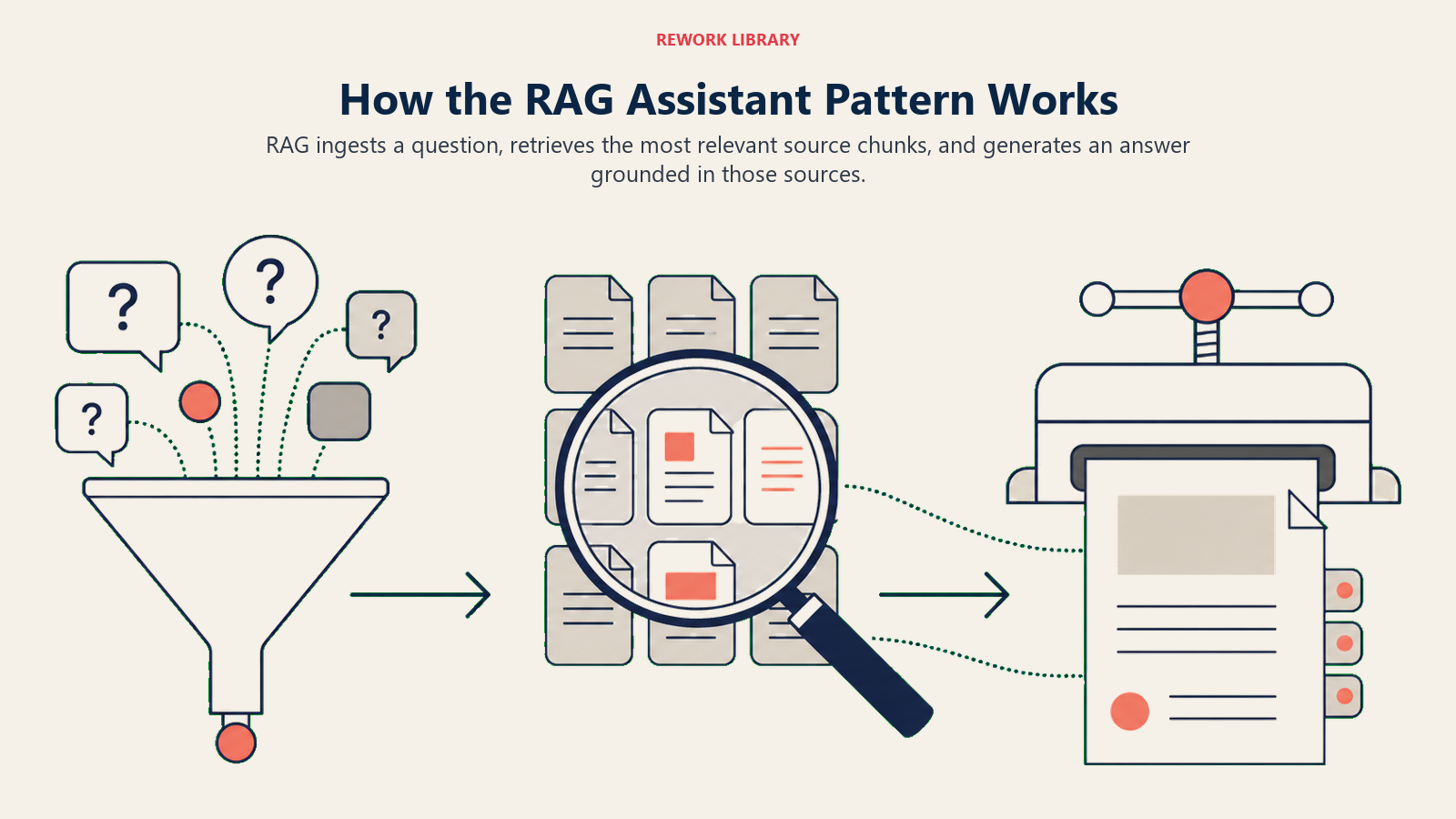
Ingest: mengonversi pertanyaan menjadi query retrieval. Ketika pengguna mengetik pertanyaan, sistem tidak hanya mencari kata kunci yang cocok. Sistem mengonversi pertanyaan menjadi vektor, representasi matematis dari maknanya, menggunakan model yang sama yang mendukung pencarian semantik modern. Query dan dokumen dikodekan sebagai vektor, dan retrieval menemukan dokumen yang paling mirip dengan query. "Berapa hari liburan yang saya dapatkan?" dan "Apa kebijakan PTO untuk karyawan senior?" adalah string yang berbeda tetapi serupa dalam makna. Representasi vektor menangkap kesamaan itu. Langkah Ingest ini memungkinkan RAG menemukan konten yang relevan bahkan ketika kata-katanya tidak persis sama.
Analyze: mengambil chunk paling relevan dari knowledge base Anda. Dokumen sumber Anda tidak dicari sebagai file utuh. Dokumen telah diproses terlebih dahulu: dibagi menjadi potongan-potongan kecil (biasanya beberapa paragraf), dikonversi menjadi vektor masing-masing, dan disimpan dalam vector database. Ketika query masuk, sistem membandingkan vektor query dengan semua vektor chunk dan mengembalikan hasil teratas berdasarkan skor kemiripan. Ini adalah langkah retrieval. Kualitas langkah ini menentukan kualitas jawaban. Jika retriever mengembalikan chunk yang salah (relevansi rendah, konten kedaluwarsa, chunk yang terlalu kecil atau terlalu besar), langkah generation bekerja dengan bahan yang buruk.
Generate: menyusun jawaban dari konteks yang diambil. Language model menerima dua input: pertanyaan asli pengguna dan chunk yang diambil. Model diperintahkan untuk menjawab pertanyaan hanya menggunakan konteks yang disediakan, dan untuk mengutip dokumen sumber untuk setiap klaim yang dibuat. Persyaratan kutipan ini penting: ia mendasarkan jawaban dan memberi pengguna cara untuk memverifikasi. Sistem RAG yang baik menampilkan sumber bersamaan dengan jawaban ("Menurut Buku Panduan Karyawan, Bagian 4..."). Langkah Generate adalah tempat jawaban menjadi mudah dibaca, tetapi akurasi berasal dari langkah Analyze (retrieval) yang memberinya masukan.
Key Facts: Adopsi dan Dampak RAG
- RAG adalah AI pattern enterprise yang paling umum digunakan, digunakan dalam 63% proyek AI knowledge management enterprise pada 2025 (Gartner Enterprise AI Survey, 2025)
- Organisasi yang menerapkan RAG Assistants untuk pencarian pengetahuan internal melaporkan rata-rata pengurangan 28% volume support ticket dalam 90 hari setelah peluncuran (Forrester Knowledge Management AI Study, 2025)
- Tim support yang menggunakan agent copilot berbasis RAG melihat pengurangan 20-30% pada average handle time untuk kategori tiket yang dicakup oleh knowledge base (HubSpot Service Benchmark, 2024)
Masalah bisnis yang dipecahkannya
Pencarian tradisional mengembalikan dokumen. RAG mengembalikan jawaban.
Perbedaan itu lebih penting dari kedengarannya. Ketika seorang karyawan mencari di wiki internal Anda untuk "kebijakan cuti orang tua," pencarian tradisional mengembalikan tiga dokumen yang mungkin berisi jawabannya. Mereka membuka yang pertama, memindai untuk menemukan bagian yang relevan, membacanya, menentukan apakah itu berlaku untuk situasi mereka, dan memeriksa yang lain untuk memastikan mereka tidak melewatkan detail apapun. Itu membutuhkan 10-15 menit untuk pertanyaan yang seharusnya memakan waktu 30 detik.
RAG mengembalikan: "Direktur di perusahaan ini menerima 16 minggu cuti orang tua berbayar, dengan opsi perpanjangan 4 minggu cuti tidak berbayar. Kebijakan berlaku sejak hari pertama kerja tanpa persyaratan masa jabatan. [Sumber: Panduan Kebijakan HR, Bagian 4.2, diperbarui Maret 2026]." Tiga puluh detik. Sumber dikutip. Pengguna selesai.
Dinamika yang sama terjadi di setiap fungsi di mana pengetahuan terdokumentasi tetapi tidak mudah diakses:
- Tim support menghabiskan waktu mencari catatan resolusi masa lalu yang akan memberi tahu mereka cara menangani tiket dengan tepat
- Sales rep mencari dokumentasi produk untuk menjawab pertanyaan prospek sebelum panggilan
- Engineer baru mencari engineering wiki untuk memahami prosedur deployment
- Tim finance mencari arsip kontrak vendor untuk menemukan klausul indemnifikasi
Semua ini adalah masalah yang sama. RAG adalah solusi yang sama, diterapkan pada knowledge base yang berbeda.
Empat contoh nyata
Contoh RAG Assistant berbeda menurut basis pengetahuannya, tetapi model operasinya sama: mengambil materi sumber yang tepercaya sebelum menghasilkan jawaban.
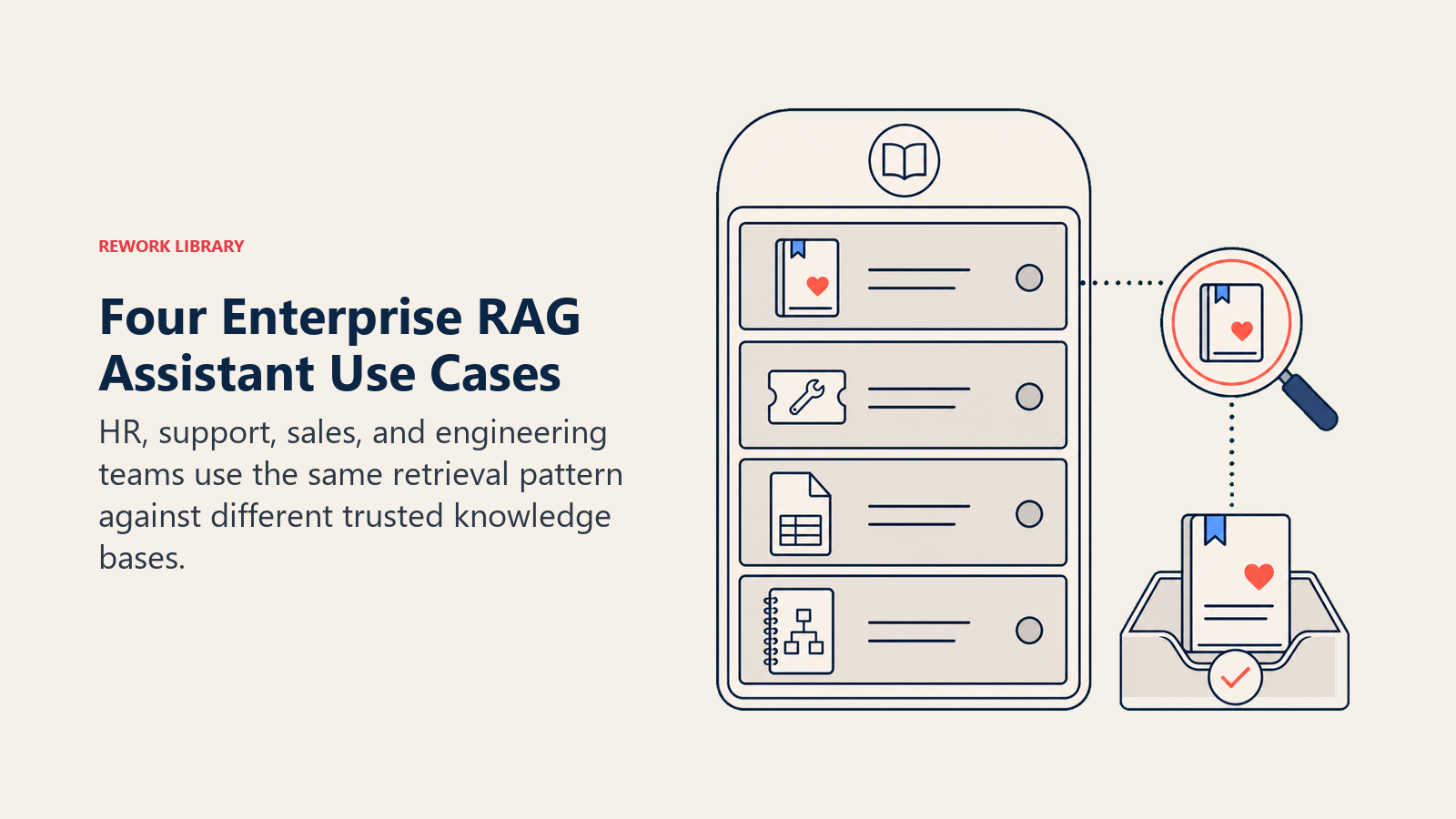
Chatbot kebijakan HR
Perusahaan dengan 500 karyawan menerapkan RAG Assistant di atas buku panduan karyawan, dokumentasi tunjangan, kebijakan PTO, dan kebijakan cuti orang tua.
Yang dimasukkan ke knowledge base: buku panduan HR lengkap (42 halaman), panduan pendaftaran tunjangan dari tahun rencana saat ini, kebijakan cuti perusahaan (orang tua, medis, berkabung), checklist onboarding, dan 150 pertanyaan yang paling sering diajukan dari dua tahun support ticket sebelumnya.
Cara retrieval bekerja: ketika seorang karyawan bertanya "apakah saya bisa menggunakan FSA untuk tagihan gigi pasangan saya?", sistem mengambil chunk dokumen kebijakan FSA, FAQ tunjangan, dan support ticket masa lalu yang relevan. Chunk yang diambil berisi jawaban (ya, pasangan adalah tanggungan yang memenuhi syarat di bawah FSA perusahaan).
Tampilan jawaban: "Ya. FSA Anda menanggung biaya gigi untuk tanggungan yang memenuhi syarat, termasuk pasangan atau mitra domestik. Layanan yang ditanggung termasuk pembersihan, tambalan, mahkota, dan perawatan ortodontik. Untuk reimbursement, kirimkan EOB dari asuransi pasangan Anda melalui portal tunjangan. [Sumber: Panduan Tunjangan FSA 2026, halaman 8]."
Tim HR tidak lagi menangani 40 pertanyaan FSA identik per musim pendaftaran terbuka. Chatbot menanganinya. Tim HR meninjau query setiap minggu untuk mengidentifikasi pertanyaan yang ditangani chatbot dengan buruk, dan memperbarui knowledge base ketika kebijakan berubah.
Copilot agen dukungan pelanggan
Perusahaan SaaS menerapkan RAG Assistant untuk agen support, bukan untuk pelanggan akhir. Agen menjaga jendela chat tetap terbuka di samping support ticket mereka dan menanyakannya saat bekerja.
Yang dimasukkan ke knowledge base: dokumentasi produk, 30.000 support ticket yang sudah diselesaikan (pertanyaan, resolusi, dan rating "resolusi baik" atau "resolusi buruk"), bug yang diketahui dan solusinya, serta prosedur eskalasi.
Cara retrieval bekerja: pelanggan melaporkan "Saya tidak bisa menghubungkan integrasi Salesforce." Agen mengetik itu ke RAG Assistant. Retrieval menampilkan tiga ticket yang diselesaikan paling relevan dengan gejala serupa (masalah timeout autentikasi, kedaluwarsa OAuth token, ketidakcocokan versi API tertentu), ditambah bagian dokumentasi yang relevan tentang troubleshooting integrasi Salesforce.
Tampilan jawaban: "Tiga kasus serupa diselesaikan dengan cara ini: (1) Masalah refresh OAuth token, diperbaiki dengan mencabut dan mengotorisasi ulang Salesforce connected app (62 kasus serupa). (2) Ketidakcocokan versi API, diperbaiki dengan memperbarui integrasi untuk menggunakan API v52 (28 kasus serupa). (3) Firewall memblokir URL callback Salesforce, diperbaiki dengan menambahkan URL ke whitelist di pengaturan jaringan (12 kasus). [Sumber: Ticket yang diselesaikan #3842, #2917, #1205]."
Agen melakukan triage berdasarkan pola mana yang sesuai dengan deskripsi pelanggan, mengajukan pertanyaan klarifikasi, dan menyelesaikan tiket lebih cepat. Average handle time turun 20-30% pada jenis tiket yang dicakup oleh knowledge base. First-contact resolution rate meningkat karena agen memiliki pola resolusi di depan mereka, bukan hanya antarmuka pencarian.
Sales rep assistant untuk pertanyaan produk
Perusahaan software dengan 200 karyawan memberi tim sales mereka yang beranggotakan 30 orang sebuah RAG Assistant yang diisi dengan dokumentasi produk, catatan rilis fitur, dokumentasi keamanan, sertifikat kepatuhan, dan jawaban RFP masa lalu.
Yang dimasukkan: situs dokumentasi produk (diekspor sebagai teks terstruktur), 18 bulan respons RFP dengan hasil menang/kalah, dokumentasi keamanan dan kepatuhan (laporan SOC 2, addendum GDPR, FAQ data residency), dan ikhtisar arsitektur teknis.
Cara retrieval bekerja: sebelum panggilan dengan prospek layanan keuangan, seorang rep bertanya "opsi data residency apa yang kami tawarkan untuk pelanggan EU?" Retrieval menampilkan bagian yang relevan dari addendum GDPR, FAQ data residency, dan kutipan dari dua respons RFP masa lalu untuk akun layanan keuangan yang mencakup pertanyaan ini.
Tampilan jawaban: "Pelanggan EU dapat memilih untuk menyimpan semua data secara eksklusif di EU (Frankfurt, AWS eu-central-1). Data tidak pernah meninggalkan infrastruktur EU kecuali pelanggan secara eksplisit mengaktifkan replikasi lintas wilayah. Produk ini sesuai GDPR dan kami menyediakan DPA standar. Dua kontrak enterprise untuk klien layanan keuangan EU (BankX, FinanceY) menentukan pengaturan data residency ini. [Sumber: GDPR Addendum v3, FAQ Data Residency, respons RFP #24 dan #31]."
Rep memasuki panggilan dengan mengetahui jawabannya. Tidak ada perburuan riset sebelum panggilan. Tidak ada "biarkan saya periksa dengan tim teknis dan kembali lagi nanti" untuk pertanyaan yang seharusnya memiliki jawaban segera.
Engineering wiki untuk onboarding new hire
Tim engineering yang tumbuh pesat menerapkan RAG Assistant di wiki internal mereka: prosedur deployment, keputusan arsitektur, standar code review, runbook insiden, dan jawaban untuk 200 pertanyaan yang dikumpulkan dari 12 bulan terakhir pesan Slack ke channel #engineering.
Yang dimasukkan: engineering wiki lengkap, architecture decision records (ADRs) dari dua tahun terakhir, runbook deployment, post-mortem insiden (sudah disanitasi), dan katalog pertanyaan Slack.
Cara retrieval bekerja: seorang engineer baru pada hari ketiga bertanya "bagaimana cara saya men-deploy hotfix ke production?" Retrieval menampilkan runbook deployment, ADR terbaru tentang proses rilis, dan dua post-mortem insiden masa lalu di mana prosedur deployment relevan.
Tampilan jawaban: "Untuk hotfix ke production: (1) Buat branch dari main dengan prefix hotfix/ (2) Buat perbaikan dan buka PR dengan setidaknya satu review senior engineer (3) Setelah merge, picu secara manual pipeline deploy production di Jenkins (bukan CI auto-deploy standar) (4) Pantau deploy di Datadog selama 30 menit setelah deploy (5) Post di #engineering dengan deskripsi hotfix dan tiket Jira. Catatan: proses hotfix melewati gerbang staging normal. Gunakan hanya untuk masalah severity-1. [Sumber: Deployment Runbook v4, ADR-024]."
Engineer baru berhenti membuat kebisingan di channel #engineering untuk pertanyaan yang dijawab wiki. Senior engineer berhenti menginterupsi pekerjaan mendalam untuk menjawab pertanyaan onboarding. RAG Assistant tidak menggantikan mentorship; ia menangani pencarian faktual sehingga waktu mentorship beralih ke penilaian dan membangun konteks.
Aturan Retrieval-Before-Generation
Prinsip inti RAG adalah bahwa generation tanpa retrieval dari sumber yang terpercaya dan terbatas menghasilkan halusinasi, dan retrieval tanpa kutipan mencegah verifikasi. Setiap sistem RAG produksi harus mengimplementasikan kedua langkah: pertama ambil konten paling relevan dari knowledge base yang dikurasi, kemudian generate jawaban yang mengutip chunk sumber spesifik yang digunakan. Melewati retrieval mengubah RAG menjadi language model serbaguna tanpa dasar. Melewati kutipan mengubah RAG menjadi black box yang tidak dapat diverifikasi pengguna. Kedua bagian diperlukan agar pattern menghasilkan akurasi dan kepercayaan yang membenarkan penerapannya dibanding pencarian tradisional.
Kapan RAG bekerja dengan baik
RAG bekerja paling baik bila pertanyaannya spesifik, basis sumbernya terawat, dan jawabannya dapat mengutip materi yang diambil.
RAG bekerja paling baik dalam empat kondisi.
Knowledge base segar dan terawat dengan baik. Jika dokumen sumber kedaluwarsa, retrieval mengembalikan konten yang kedaluwarsa dan jawaban yang dihasilkan secara percaya diri salah. Sistem RAG membutuhkan proses pemeliharaan konten, bukan hanya pengaturan satu kali.
Pertanyaan bersifat spesifik. "Apa kebijakan cuti orang tua kita?" adalah pertanyaan RAG yang baik. "Apa yang harus saya lakukan tentang keseimbangan kerja-hidup?" bukan. Pertanyaan yang samar menghasilkan chunk yang diambil samar, dan model menghasilkan jawaban yang samar atau memalsukan spesifikasi.
Atribusi sumber penting bagi pengguna. Legal, kepatuhan, HR, dan dokumentasi teknis adalah kasus penggunaan bernilai kutipan tinggi. Pengguna di domain ini ingin tahu dari mana jawaban berasal agar mereka bisa memverifikasinya atau melakukan eskalasi dengan tepat. Fitur kutipan RAG adalah fitur di sini, bukan sekadar tambahan yang menyenangkan.
Pengetahuan terbatas. RAG bekerja paling baik ketika knowledge base memiliki ruang lingkup yang jelas. "Semua kebijakan HR" adalah ruang lingkup yang terbatas. "Semua yang pernah ditulis perusahaan" bukan. Knowledge base yang tidak terbatas menghasilkan retrieval yang berisik: hasil teratas untuk pertanyaan spesifik mungkin dikuasai oleh konten yang terkait secara tangensial dari korpus yang luas.
Mode kegagalan
Mode kegagalan RAG biasanya berpangkal pada basis pengetahuan, lapisan retrieval, atau disiplin pengutipan, bukan pada antarmuka chat itu sendiri.
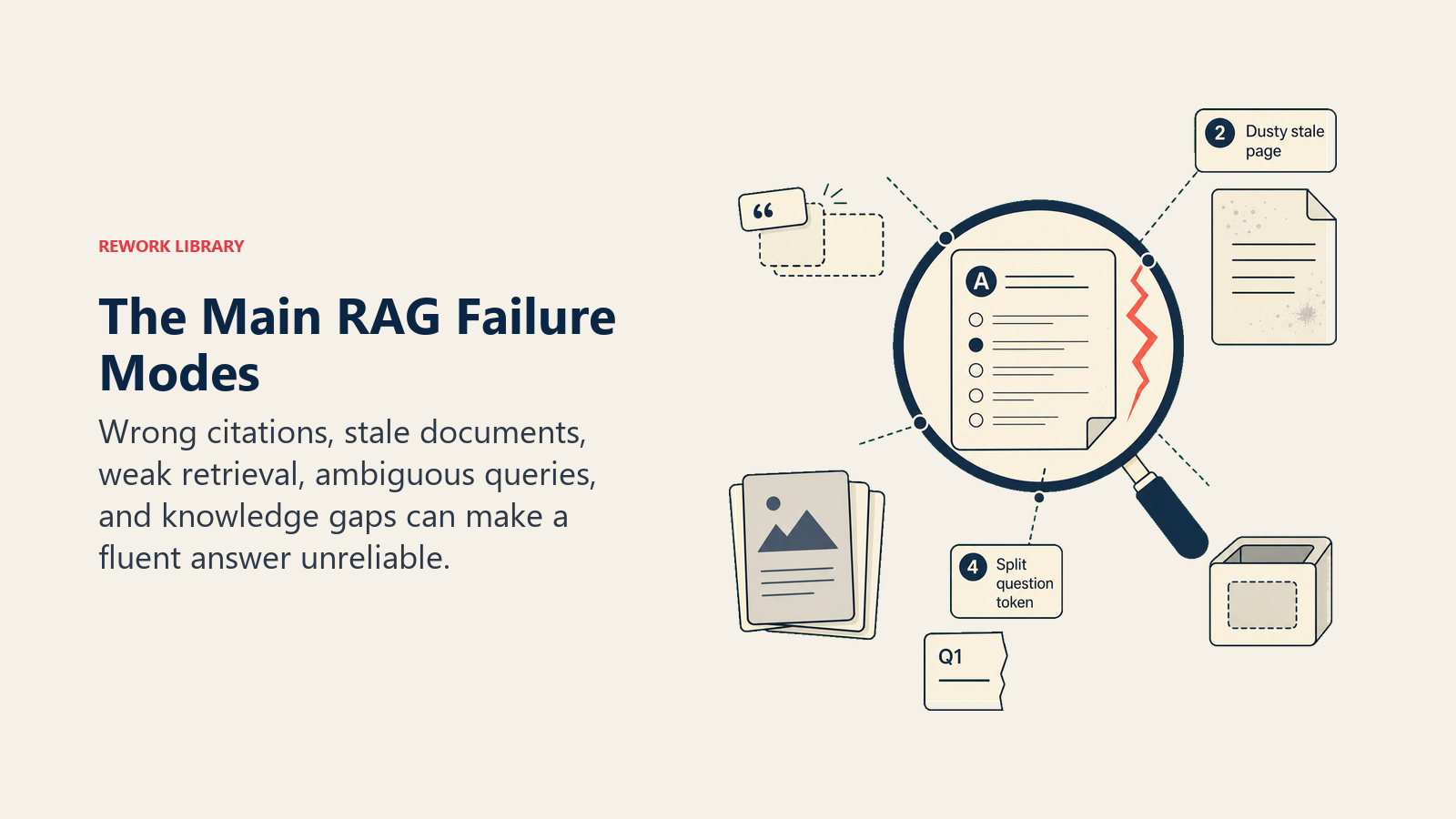
| Failure mode | Penyebab | Cara mendeteksi | Cara memperbaiki |
|---|---|---|---|
| Halusinasi kutipan | Model menghasilkan jawaban yang percaya diri tidak ditemukan dalam chunk yang diambil; mengutip sumber yang sebenarnya tidak berisi klaim | Spot-check sampel jawaban terhadap sumber yang dikutip setiap minggu | Terapkan citation grounding: instruksikan model untuk hanya mengutip konten yang dikutip langsung; gunakan threshold kepercayaan retrieval |
| Knowledge base kedaluwarsa | Dokumen sumber belum diperbarui; retrieval mengembalikan kebijakan atau dokumentasi yang kedaluwarsa | Tambahkan timestamp pada setiap chunk; audit hasil retrieval untuk usia dokumen | Tambahkan proses kedaluwarsa konten; minta pemilik dokumen meninjau setiap kuartal; tampilkan tanggal dokumen di UI jawaban |
| Retrieval buruk (chunk tidak relevan) | Vektor query tidak cocok dengan vektor konten yang relevan; chunking dokumen terlalu kasar atau terlalu halus | Pantau feedback pengguna ("apakah ini membantu?"); audit jawaban berperingkat rendah untuk kualitas retrieval | Sesuaikan ukuran chunk; tambahkan filter metadata (departemen, jenis konten, rentang tanggal); pertimbangkan re-indexing dengan strategi chunking yang lebih baik |
| Pertanyaan ambigu | Pertanyaan memiliki beberapa interpretasi yang valid; retrieval mengembalikan chunk untuk beberapa interpretasi; model menghasilkan jawaban yang luas | Lacak pertanyaan dengan rating helpfulness rendah; tinjau secara manual 20 query tidak membantu teratas | Tambahkan langkah klarifikasi untuk retrieval yang bersalah rendah; tingkatkan penanganan query dengan query rewriting |
| Kesenjangan knowledge base | Pengguna bertanya tentang topik yang tidak ada di knowledge base; model baik berkata "saya tidak tahu" atau membuat-buat jawaban | Pantau respons "saya tidak memiliki informasi itu"; audit topik pertanyaan yang tidak terjawab | Identifikasi topik kesenjangan teratas setiap bulan; tambahkan dokumentasi yang hilang ke knowledge base |
Failure mode yang paling berbahaya adalah halusinasi kutipan, karena terlihat seperti keberhasilan. Pengguna mendapatkan jawaban yang percaya diri dan terformat dengan baik dengan kutipan sumber. Mereka mungkin bertindak berdasarkannya tanpa memverifikasi. Audit spot-check adalah satu-satunya cara yang andal untuk menangkap ini secara sistematis. Riset tentang halusinasi AI mengkonfirmasi bahwa LLM menghasilkan teks yang fasih secara sintaksis yang dapat tampak akurat secara faktual tetapi sebenarnya tidak konsisten dengan materi sumber. Itulah tepatnya mengapa langkah retrieval dalam RAG sangat penting. Untuk rincian lengkap di semua pattern, lihat risiko halusinasi berdasarkan AI pattern.
Kapan memilih RAG vs. alternatif
RAG vs. Generative Research: RAG mengambil dari knowledge base tetap dan terkurasi yang Anda kendalikan. Generative Research menyintesis dari berbagai sumber eksternal (konten web, database, sumber langsung yang tidak Anda miliki). Gunakan RAG ketika jawaban ada dalam dokumentasi internal Anda. Gunakan Generative Research ketika jawaban memerlukan sintesis informasi eksternal terkini (berita pesaing, data pasar, perubahan regulasi).
RAG vs. Workflow Copilot: RAG adalah pattern tanya-jawab. Pengguna bertanya, sistem menjawab. Workflow Copilot adalah asisten sadar konteks yang membantu pengguna mengambil tindakan: buat email ini, sarankan langkah berikutnya, perbarui catatan ini. Jika pengguna Anda memerlukan jawaban, gunakan RAG. Jika mereka perlu menghasilkan sesuatu atau mengambil tindakan, pertimbangkan Workflow Copilot. Kedua pattern ini sering digabungkan: sales rep bertanya kepada RAG tentang produk (RAG), kemudian meminta copilot untuk menyusun respons kepada prospek menggunakan jawaban tersebut (Workflow Copilot).
RAG vs. Document Review: RAG menjawab pertanyaan tentang dokumen. Document Review menganalisis dokumen tertentu untuk kepatuhan, risiko, atau klausul yang hilang berdasarkan standar. Gunakan RAG ketika manusia memiliki pertanyaan dan ingin jawaban. Gunakan Document Review ketika Anda memiliki dokumen dan ingin penilaian AI tentang kualitas atau status kepatuhannya.
RAG vs. hanya meningkatkan pencarian: Jika masalah nyata Anda adalah orang-orang tidak dapat menemukan dokumen, pencarian yang lebih baik (penandaan metadata, peningkatan indeks full-text, navigasi yang lebih baik) mungkin adalah perbaikan yang tepat. RAG adalah jawaban yang tepat ketika menemukan dokumen tidak cukup -- ketika Anda memerlukan AI untuk menyintesis jawaban dari beberapa sumber menjadi satu respons. Jika pengguna Anda puas menemukan dokumen dan membacanya sendiri, Anda tidak memerlukan RAG.
Sinyal ROI
ROI untuk RAG berasal dari tiga perubahan terukur dalam perilaku dan hasil.
RAG Assistants dengan knowledge base yang terawat dengan baik dan kualitas retrieval yang kuat mencapai tingkat akurasi jawaban 88-94% untuk pertanyaan kebijakan dan dokumentasi, menurut benchmark internal dari deployment enterprise di perusahaan dengan 200-1.000 karyawan (Rework Analysis, 2026). Di bawah 80% akurasi, risiko kepatuhan dari bertindak berdasarkan jawaban yang salah mulai melebihi penghematan waktu dari pencarian yang lebih cepat.
Ticket deflection rate adalah sinyal yang paling jelas untuk deployment RAG yang menghadap pelanggan atau karyawan. Lacak berapa persentase pertanyaan yang seharusnya menjadi support ticket atau permintaan HR yang ditangani oleh RAG Assistant tanpa intervensi manusia. HR policy chatbot yang diimplementasikan dengan baik biasanya mengalihkan 35-55% pertanyaan kebijakan rutin dalam 90 hari setelah peluncuran. Support copilot yang membantu agen menyelesaikan lebih cepat tidak mengalihkan tiket, tetapi mengurangi average handle time sebesar 20-30% pada topik yang tercakup.
Time-to-answer untuk pencarian pengetahuan internal. Ukur berapa lama waktu yang dibutuhkan karyawan, rep, atau engineer untuk mendapatkan jawaban faktual yang mereka butuhkan. Tanpa RAG, ini adalah proses pencarian dan membaca yang membutuhkan 10-20 menit untuk pertanyaan yang tidak jelas. Dengan RAG, ini membutuhkan 30-60 detik. Untuk tim 50 orang yang masing-masing melakukan 3-5 pencarian pengetahuan per minggu, itu berarti 5-8 jam per minggu per 10 orang, atau 25-40 person-hour per minggu di seluruh tim, yang direklamasi untuk pekerjaan produktif.
Onboarding ramp time untuk knowledge base engineering atau sales. Lacak berapa lama waktu yang dibutuhkan new hire untuk mencapai tolok ukur produktivitas. Tim yang menerapkan RAG untuk onboarding biasanya melihat pengurangan 15-25% dalam ramp time karena new hire menghabiskan lebih sedikit waktu untuk mencari informasi prosedural dan lebih banyak waktu untuk penilaian dan pekerjaan membangun konteks.
Answer accuracy rate adalah metrik operasional, bukan metrik ROI, tetapi metrik yang memberi tahu Anda apakah sistem RAG bekerja cukup baik untuk dipercaya. Spot-check 50 jawaban per minggu terhadap sumber yang dikutip. Lacak persentase yang didasarkan dengan benar. Target 90%+ untuk kasus penggunaan berisiko tinggi (HR, legal, kepatuhan). Di bawah 80%, sistem menciptakan lebih banyak risiko daripada yang dihemat waktu.
Kesiapan data untuk RAG
Sebelum menerapkan RAG Assistant, periksa tiga hal. Prasyarat kesiapan data adalah alasan paling umum proyek RAG berkinerja buruk.
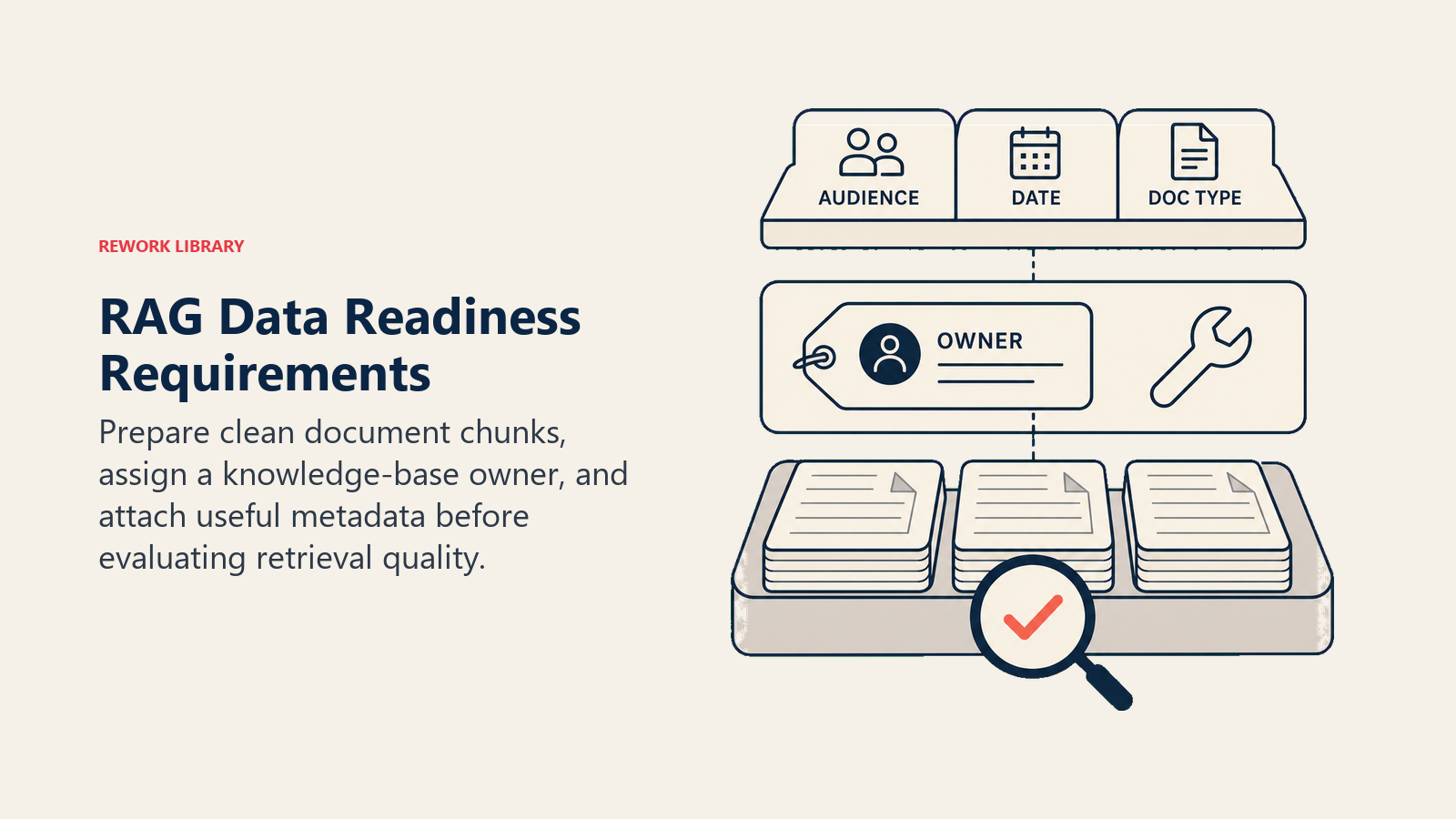
Dokumen sumber Anda diindeks dan di-chunk. Folder PDF mentah di shared drive bukan knowledge base. Dokumen perlu diproses: dikonversi ke teks bersih, dibagi menjadi chunk berukuran konsisten (250-500 token berfungsi dengan baik untuk sebagian besar konten kebijakan dan dokumentasi), dan disimpan dalam vector database dengan sumber, tanggal, dan metadata masing-masing chunk yang terlampir. Ini adalah biaya pengaturan satu kali dengan pemeliharaan berkelanjutan.
Knowledge base Anda memiliki pemilik. Sistem RAG menurun seiring usia dokumen. Seseorang perlu memiliki knowledge base: meninjau dokumen untuk akurasi, memperbarui ketika kebijakan berubah, menambahkan konten baru ketika kesenjangan pengetahuan diidentifikasi. Tanpa pemilik, sistem RAG secara bertahap menjadi mesin halusinasi karena retrieval mengembalikan konten yang kedaluwarsa dan model menghasilkan jawaban yang percaya diri namun salah.
Strategi metadata Anda mendukung filter yang Anda butuhkan. Sistem RAG tanpa filter metadata mengembalikan hasil dari seluruh knowledge base untuk setiap query. Itu baik untuk knowledge base kecil. Untuk yang besar (100+ dokumen, beberapa departemen, konten yang mencakup beberapa tahun), Anda ingin memfilter retrieval berdasarkan departemen, jenis konten, rentang tanggal, atau audiens. Rancang skema metadata Anda sebelum pengindeksan: departemen (HR, Legal, Product), jenis konten (kebijakan, runbook, FAQ, kontrak), tanggal efektif, audiens (semua karyawan, manajer, tim tertentu).
Rework Analysis: Kegagalan RAG yang paling umum bukan kegagalan teknis. Ini adalah kegagalan kepemilikan konten. Organisasi menerapkan RAG, berfungsi dengan baik selama 60 hari, kemudian knowledge base mengalami pergeseran. Sebuah kebijakan berubah, buku panduan tidak diperbarui, dan RAG Assistant mulai menjawab dengan percaya diri berdasarkan aturan tahun lalu. Pengguna mempercayai jawaban tersebut karena tampak otoritatif. Kerusakan dari RAG yang kedaluwarsa lebih sulit dideteksi daripada sistem yang hanya berkata "saya tidak tahu." Setiap deployment RAG membutuhkan pemilik konten yang ditunjuk, jadwal tinjauan dokumen, dan ambang usia yang menandai dokumen untuk tinjauan ulang. Teknologinya adalah bagian yang mudah. Disiplin pemeliharaan konten adalah yang membedakan deployment RAG yang masih dipercaya 18 bulan kemudian dari yang dimatikan setelah jawaban salah pertama yang berprofil tinggi.
Pertanyaan yang Sering Diajukan
Apa itu RAG Assistant?
RAG (Retrieval-Augmented Generation) Assistant adalah AI pattern yang menjawab pertanyaan dengan mengambil bagian relevan dari knowledge base yang dikurasi dan menghasilkan jawaban yang dikutip dari bagian-bagian tersebut. Formulanya adalah: Ingest (pertanyaan) kemudian Analyze (ambil dokumen relevan) kemudian Generate (jawaban dengan kutipan). Ini berbeda dari AI serbaguna karena jawaban didasarkan pada dokumen spesifik Anda, bukan data pelatihan umum.
Apa itu retrieval-augmented generation?
Retrieval-augmented generation (RAG) adalah teknik yang diperkenalkan dalam paper 2020 oleh Lewis et al. yang menggabungkan sistem retrieval (yang menemukan dokumen relevan dari knowledge base) dengan language model (yang menghasilkan jawaban yang koheren menggunakan dokumen-dokumen tersebut sebagai konteks). Langkah retrieval mencegah halusinasi dengan mendasarkan output model pada materi sumber yang spesifik dan terverifikasi, bukan pengetahuan pelatihan umumnya.
Kapan Anda harus menggunakan RAG daripada pencarian biasa?
Gunakan RAG ketika menemukan dokumen tidak cukup dan pengguna memerlukan jawaban yang disintesis. Pencarian tradisional mengembalikan dokumen dan memerlukan pengguna untuk membaca dan menyintesis. RAG mengembalikan jawaban langsung dengan kutipan dalam 30-60 detik. RAG adalah pilihan yang tepat ketika pertanyaan bersifat spesifik dan dapat dijawab dari pengetahuan internal Anda, atribusi sumber penting bagi pengguna, dan knowledge base terawat dengan baik.
Apa failure mode RAG yang paling umum?
Failure mode RAG yang paling berbahaya adalah halusinasi kutipan, di mana model menghasilkan jawaban yang percaya diri dengan sumber yang dikutip yang sebenarnya tidak berisi klaim tersebut. Kegagalan umum lainnya termasuk knowledge base yang kedaluwarsa (dokumen yang kedaluwarsa mengembalikan jawaban yang kedaluwarsa), retrieval yang buruk (chunk tidak relevan dikembalikan untuk query), dan kesenjangan knowledge base (topik tidak terdokumentasi). Spot-checking 50 jawaban per minggu terhadap sumber yang dikutip adalah satu-satunya cara yang andal untuk menangkap halusinasi kutipan.
Apa itu The Retrieval-Before-Generation Rule?
The Retrieval-Before-Generation Rule menyatakan bahwa setiap sistem RAG produksi harus mengimplementasikan retrieval dari sumber terpercaya dan kutipan dari konten yang diambil. Melewati retrieval menghasilkan halusinasi (model menghasilkan dari pelatihan umum tanpa dasar). Melewati kutipan menghasilkan jawaban yang tidak dapat diverifikasi yang tidak dapat diperiksa atau dieskalasi pengguna. Kedua bagian diperlukan agar RAG menghasilkan akurasi dan kepercayaan yang membenarkan penerapannya dibanding pencarian tradisional.
ROI apa yang harus Anda harapkan dari RAG Assistant?
HR policy RAG Assistant yang diimplementasikan dengan baik biasanya mengalihkan 35-55% pertanyaan kebijakan rutin dalam 90 hari. Tim support yang menggunakan agent copilot berbasis RAG melihat pengurangan 20-30% pada average handle time untuk kategori tiket yang tercakup. Sistem RAG onboarding engineering mengurangi ramp time new hire sebesar 15-25%. Akurasi jawaban harus menargetkan 90%+ untuk kasus penggunaan berisiko tinggi. Di bawah 80% akurasi, risiko kepatuhan dari bertindak berdasarkan jawaban yang salah mulai melebihi penghematan waktu.
Pelajari lebih lanjut

Co-Founder, Rework.com
On this page
- Formulanya
- Masalah bisnis yang dipecahkannya
- Empat contoh nyata
- Chatbot kebijakan HR
- Copilot agen dukungan pelanggan
- Sales rep assistant untuk pertanyaan produk
- Engineering wiki untuk onboarding new hire
- Aturan Retrieval-Before-Generation
- Kapan RAG bekerja dengan baik
- Mode kegagalan
- Kapan memilih RAG vs. alternatif
- Sinyal ROI
- Kesiapan data untuk RAG
- Pelajari lebih lanjut