AI Ticket and Conversation Summaries: What to Capture
Turn this article into takeaways for your work.


Each assistant summarizes the article only for you and suggests best practices for your work.
An AI ticket summary is a short, machine-written recap of a support ticket, chat or call that tells the next person what the customer wants, what's been tried, and what happens next. It replaces the two jobs agents hate most: scrolling through forty messages before replying, and typing wrap-up notes after hanging up. Done well, it's the quickest way to make an escalation or a shift change painless. Done badly, it's a confident paragraph that quietly leaves out the one detail that mattered.
This guide covers what a useful summary has to contain, how three major platforms generate them, where the errors come from, and how to roll summaries out so your team can trust them. It's part of the AI for Customer Service collection, so if you want the wider picture first, start with AI in customer service.
Key Facts
- Zendesk's AI ticket summaries are capped at up to 100 words, use public comments by default, and exclude side conversations.
- Salesforce's work summaries predict three outputs, a summary, an issue and a resolution, and admins can choose to save them without rep review.
- A vendor-reported case study says agents saved an average of 40 to 60 seconds per call with AI post-call summaries (Observe.AI, describing its customer DailyPay).
- ASAPP's analysis of one large enterprise contact center found that 13% of calls had no pauses at all, which is one reason typing notes during a call doesn't work well.
- Academic benchmarks of dialogue summarization find significant amounts of factual errors regardless of model size, so a human check stays in the loop.
What a Summary Is For
A support summary has two readers, and they want different things.
The first is the next handler. That's the agent who picks up an escalated ticket, the person on the next shift, or the specialist who gets the case on Tuesday morning. They need to act in a minute or two without reading the thread.
The second is the record. Weeks later, someone searching the CRM, a QA reviewer, or a manager building a report wants to know what the contact was about and how it ended. That reader needs consistent wording and structured fields, not a nice paragraph.
The best setups serve both. A short narrative recap covers the handoff, and the same output is mapped to fields (issue, resolution, status) so it can be filtered and counted. Salesforce's design reflects this: its generative work summaries produce a summary, an issue and a resolution, and those outputs can be mapped to object fields.
In ACE terms, summarization is an ingest-analyze-generate job over text and call audio. It follows the Meeting Intelligence pattern (a conversation goes in, notes come out, and the notes get pushed into the right system) and, when an agent reviews and approves the draft, the Workflow Copilot pattern too.
What a Good Summary Contains
Zendesk's documentation lists what its summaries may cover: the main problem, what the customer expects, actions taken, outcomes and current status. It also names root cause, business impact, deadlines and, when a conversation moved from an AI agent to a person, what the customer already discussed with that agent (Zendesk). That's a decent starting list, and you can tighten it for your own work.
| Field | What it holds | Why it matters |
|---|---|---|
| Customer and account | Who is asking and on what plan or account | Stops the next agent from re-verifying identity or guessing context |
| The ask | What the customer actually wants, in one sentence | Prevents answering the first message instead of the real problem |
| Facts and identifiers | Order numbers, error messages, dates, versions | The details most likely to be dropped, and the ones the next agent needs |
| Steps already tried | What's been done, by whom, with what result | Avoids asking the customer to repeat steps or repeating a failed fix |
| Commitments made | Refunds promised, callbacks, deadlines | A promise lost in a handoff becomes a complaint |
| Customer state | Frustration, urgency, churn or legal signals | Changes the tone and priority of the next reply |
| Current status | Waiting on customer, waiting on engineering, ready to close | Tells the reader what happens next |
| Next action and owner | One concrete next step and who takes it | Turns a recap into a handoff |
| Resolution (if closed) | What fixed it, in plain words | Feeds the knowledge base and reporting |
Two rules keep summaries short enough to read. First, lead with the ask and the status, then the supporting detail. Second, keep verbatim anything that must be exact: order IDs, error codes, quoted promises. A model that paraphrases an error code has deleted the useful part.
How the Main Platforms Generate Summaries
The mechanics differ enough to affect your design, so it's worth reading each vendor's documentation before you decide who sees what.
Zendesk. Ticket summaries are limited to up to 100 words. By default they include a ticket's public comments. Internal notes are an opt-in setting, and side conversations aren't included. Summaries can be saved to a ticket field when an agent refreshes them, the field holds the most recent version, and Zendesk says summaries aren't stored for closed tickets (Zendesk). Those defaults matter. If your engineers coordinate through side conversations, the summary won't see that work.
Salesforce. Work summaries run at the end of a conversation or from the case page. For messaging and voice, drafts are generated automatically, and reps review, edit and save them. Admins can turn on automatic saving so summaries are stored without rep review. Voice summaries are generated by default when a call ends, and reps can turn this off (Salesforce). The auto-save option is the one to think hardest about, because it removes the only human check.
Intercom. Its AI summarize feature creates an AI-generated summary of a customer conversation or ticket before passing it to another teammate. It's positioned squarely as a handoff tool.
The common thread: all three treat the summary as a draft for a person to read, and each makes a choice about which text goes in. When you evaluate any tool, ask what source material it reads (public replies only, internal notes, attachments, call audio), what it ignores, and whether the output is editable before it's saved.
Where Summaries Go Wrong
Summaries fail in two ways: they leave things out, and they put things in.
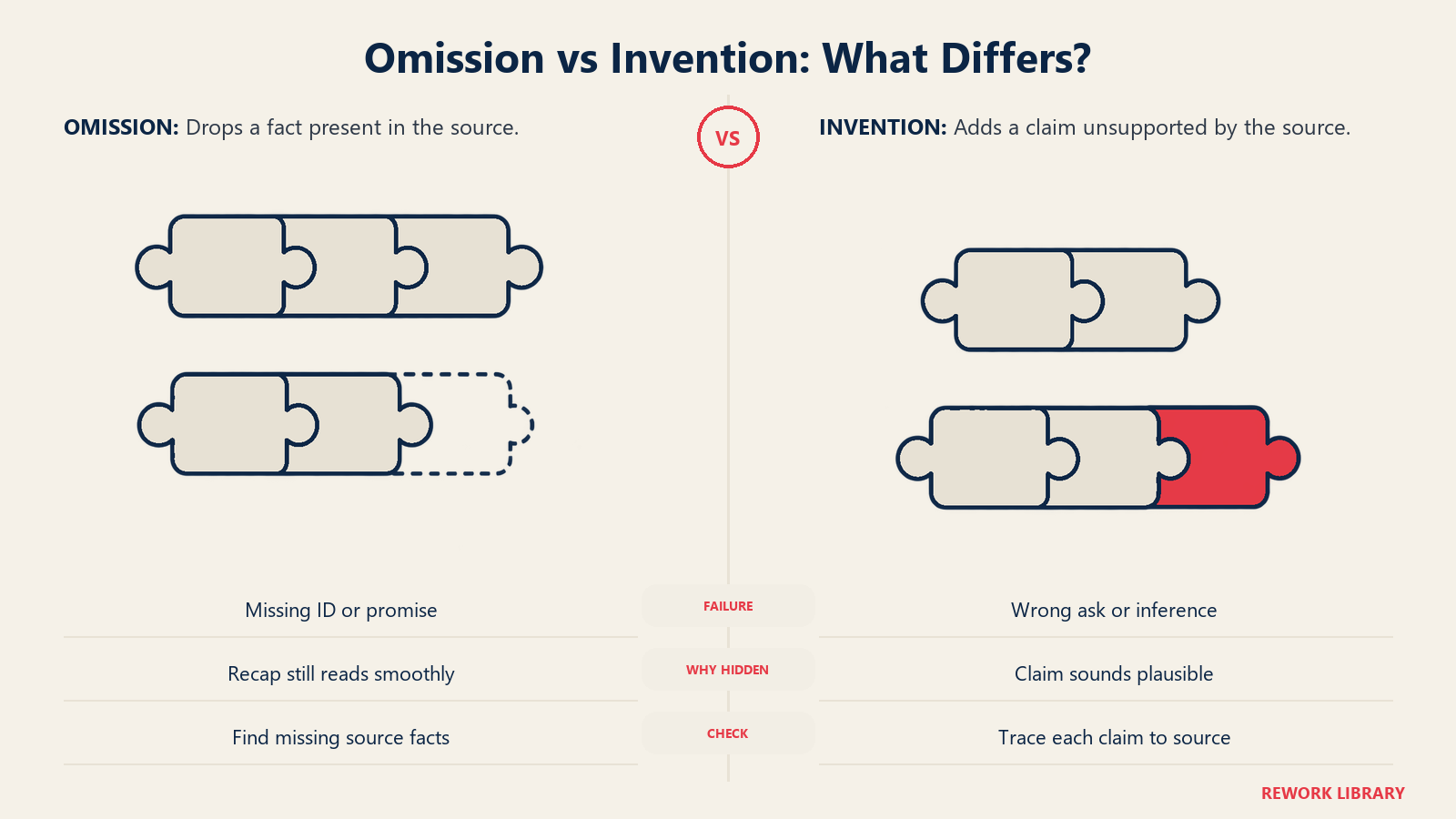
Omission. The summary reads smoothly but drops a detail. It may be an error code, a deadline, a promise, or the single sentence where the customer mentioned a legal threat. A word cap (Zendesk's is 100 words) forces trade-offs, and the model decides which details lose. Omissions are hard to catch because nothing looks wrong. You only notice them when the next agent asks the customer something they've already answered.
Hallucination and unsupported inference. The summary states something that isn't in the conversation. Research on dialogue summarization has documented this repeatedly. The TofuEval benchmark found that LLMs produce significant amounts of factual errors in dialogue summarization regardless of model size, and that LLM-based judges were poor at spotting them, with specialized factuality metrics doing better (arXiv). A separate study of GPT-4 and Alpaca-13B proposed a category called circumstantial inference: plausible conclusions the model draws from context that the conversation doesn't actually state (arXiv). In a support setting, that looks like a summary saying "customer is requesting a refund" when they asked how refunds work. A recent multi-scenario study also flagged customer service as a domain with moderate-to-high faithfulness challenges (arXiv).
Here are the failure patterns to watch for, and how they show up in practice.
| Failure | Example in support | How to catch it |
|---|---|---|
| Dropped identifier | Order number or error code missing from the recap | Spot check that every ID in the thread appears in the summary |
| Lost commitment | "I'll call you back Friday" never makes it in | Search the thread for promises and compare |
| Wrong inference | "Customer wants a refund" when they asked about policy | Compare the stated ask against the customer's own words |
| Mixed-up actors | The customer's step is credited to the agent | Read for who-did-what in the actions line |
| Missing source text | Internal notes or side conversations never read | Know your tool's inputs and test with a long, messy ticket |
| Stale summary | Thread moved on, summary didn't | Check the generated-at time against the last message |
None of this means summaries are unusable. It means they're a draft, and the quality of your process decides whether they save time or create quiet errors.
Summaries in Real Workflows
Escalation from Tier 1 to Tier 2. The classic use. Tier 1 has tried three fixes. Without a summary, Tier 2 reads the whole thread or restarts the diagnosis. With one, the first line says what's been tried and what failed. Make the "steps already tried" line mandatory for escalations.
Shift changes in a 24-hour team. An agent in Manila hands open cases to a colleague in Dublin. The summary replaces a handover meeting for most tickets. Add an explicit status and next action to each, since "waiting on customer" and "waiting on engineering" mean very different things at the start of a shift.
After-call work on phone support. Writing notes takes time. ASAPP, a vendor, states that writing notes takes on average 10% of the actual call duration, and its analysis of one large enterprise contact center suggests typing notes during the call isn't practical: half of calls had fewer than one 10-second pause every two minutes (ASAPP). Letting AI draft the notes and having the agent review them moves that work off the critical path. Observe.AI reports a customer, DailyPay, saving an average of 40 to 60 seconds per call this way (Observe.AI). Both are vendor-published numbers, so measure your own.
Account management and customer success. A CSM inheriting an account needs the history of past issues in a paragraph, not a hundred tickets. Summaries of recent contacts, grouped by theme, give a decent briefing before a renewal call.
IT help desk and internal service. A request bounces between the help desk, security and the application owner. A summary at each handoff stops the employee from re-explaining. The same discipline applies: ask, attempts, status, owner.
Quality review and coaching. Summaries give reviewers a fast index of what each conversation was about before they open it. They don't replace reading, but they help you choose which conversations to read. The same data supports AI quality assurance for support.
How to Roll Out Summaries
- Pick one handoff to fix. Choose the pain point: escalations, shift changes or after-call work. Don't launch summaries everywhere at once.
- Define the template. Use the fields in the table above, trimmed to what that handoff needs. Write it down as a short spec. A summary with no spec is whatever the model felt like writing.
- Decide the inputs. Public replies only, or internal notes too? Call audio, or the transcript? Attachments? Every input you exclude is a potential omission, and every input you include may pull in sensitive material.
- Decide where the summary lives. A ticket field, an internal note, or a CRM record. Saving to a field lets you search and report on it. Be clear about whether a refreshed summary overwrites the old one.
- Keep a person in the approval step at first. Have the agent read and edit before saving. Turn off auto-save until you've measured error rates, and keep it off for regulated or high-stakes topics.
- Build the accuracy check. Each week, sample a set of summaries and compare them against the underlying conversations. Mark each as complete and accurate, missing something important, or containing something unsupported. This is the same sampling discipline described in how to measure AI resolution rate honestly.
- Track the downstream signal. Count how often receiving agents re-ask a question the customer already answered, how often escalations bounce back for missing information, and the minutes of wrap-up work per contact. Those tell you whether summaries help.
- Tune the template. If reviewers keep adding the same thing by hand (a deadline, the plan tier), put it in the spec.
- Write the data rules. Summaries copy customer details into new places. Set rules for what must be left out, such as payment details or health information, and who can read the stored summary.
The inputs also matter more than people expect. If your ticket fields, tags and notes are inconsistent, the summary will reflect that mess. Preparing support data for AI covers the cleanup that makes this work better.
Pitfalls to Avoid
Trusting the summary over the thread for anything critical. Refunds, legal threats, safety issues and security incidents get a read of the original messages. The summary is for orientation.
Turning on auto-save too early. If nobody reads the summary before it's stored, errors become part of the record, and the next agent trusts them.
Ignoring what the tool can't see. A summary built only from public comments won't reflect an internal investigation. Know your tool's inputs.
Letting summaries grow. A summary that runs to a page is a transcript with extra steps. Hold to a word budget and make the first line carry the ask and status.
Skipping the language check. If your team handles several languages, test summaries in each one, and decide whether the summary is written in the customer's language or the team's. See multilingual customer support with AI.
Measuring only time saved. Minutes saved per call is easy to count and easy to overvalue. Pair it with a quality measure, or you'll optimize for fast and wrong.
Forgetting the people. Agents who used to write their own notes may feel the summary diminishes their judgment, or worry it's a surveillance tool. Explain what it's for, and see how AI changes support team roles. For the live version of this idea, where AI helps while the agent is still typing, see AI agent assist.
