Best Attio Alternatives in 2026: 10 Next-Gen CRMs for Startups and Scale-Ups
Turn this article into takeaways for your work.


Each assistant summarizes the article only for you and suggests best practices for your work.
The best CRM depends on your team's primary pain point: Rework for unified CRM plus multi-channel ops, HubSpot for CRM plus marketing, Pipedrive for a simple sales pipeline, Close for high-volume outbound, and Salesforce for enterprise configurability. The 10 picks below cover startups through scale-ups, with honest notes on pricing and fit.
Attio is a genuinely interesting CRM. Its custom objects, relationship graph, and spreadsheet-like flexibility make it one of the more thoughtful products in the space. If you're a technical founder who wants to model your business data your own way, it earns its reputation.
But at some point the model changes. Your sales team needs automations that actually run reliably. Your marketing team asks why there's no native email broadcast. Your ops lead wants a multi-channel inbox so support, sales, and success aren't working out of separate tabs. And your CFO wants a report that doesn't require three CSV exports and a pivot table to build. These aren't edge cases. They're the exact pressure points that push growing teams to look for something more complete. If that's where you are, this guide compares the 10 best Attio alternatives for 2026, with honest assessments of what each one actually does well and who it's built for.
If you want to compare Rework directly against Attio, see Rework vs Attio. And if folk is also on your shortlist, the best folk alternatives article covers the lightweight CRM category in depth. Not sure where to start? The How to Pick a CRM in 2026 guide walks through the decision criteria most teams skip.
Key Facts: CRM Switching in 2026
- The global CRM market exceeds $101 billion in 2026 and is the fastest-growing enterprise software category, ahead of ERP, HRM, and SCM. (Gartner)
- 91% of companies with 10 or more employees now use a CRM, yet only 50% of businesses under 10 employees have adopted one. (DemandSage, 2026)
- CRM adoption produces an average ROI of $8.71 for every $1 spent, with well-implemented systems delivering 29% increases in sales revenue. (Nucleus Research / Salesforce)
- Over 80% of CRM migration projects exceed their timeline or budget, with the average cost overrun at 30% and average time delay at 41%. (Oracle Data Migration Report, 2024)
- Attio has raised $116 million in total funding, including a $52 million Series B in August 2025 led by Google Ventures, reflecting strong investor conviction in the next-gen CRM category.
Quick Comparison Table
Use this table to compare Attio alternatives by how much structure you want the CRM to provide out of the box. Attio is flexible, so the replacement question is often whether the team now needs more opinionated workflows.
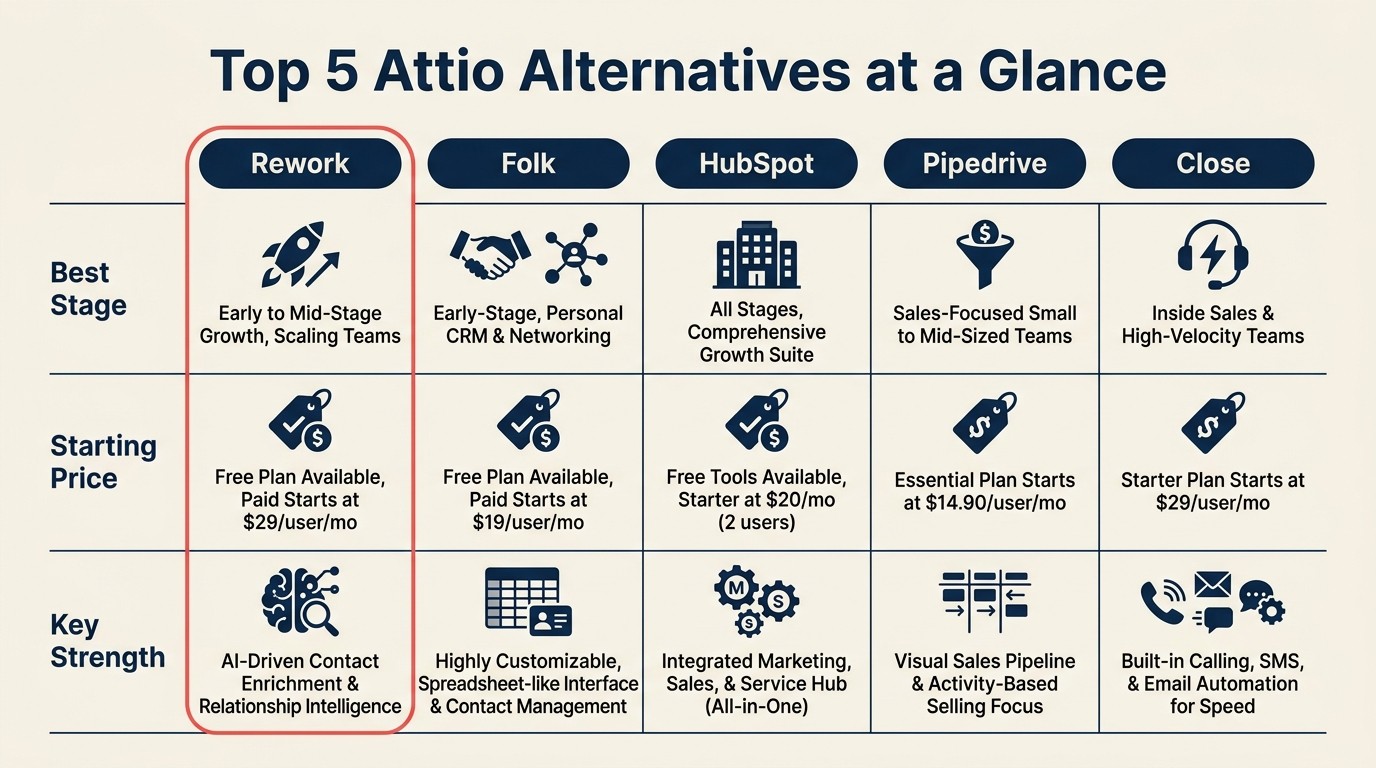
| Tool | Best For | Starting Price | Key Strength | Key Limitation |
|---|---|---|---|---|
| Rework | Startups and scale-ups needing unified CRM + ops | From $69/mo billed yearly for 5 seats; $159/mo with the inbox and lead management (rework.com/pricing) | Multi-channel inbox, lead management, cross-team workflows | Less flexible custom data modeling than Attio |
| Folk | Small teams wanting a lightweight, beautiful CRM | $20/user/mo | Clean UI, Chrome extension, relationship context | Limited automation depth, not built for scale |
| HubSpot CRM | Teams that need CRM + marketing in one roof | Free tier; paid from $15/user/mo | Best-in-class marketing + CRM integration | Gets expensive fast at scale; complex setup |
| Pipedrive | Sales teams wanting simple pipeline visibility | $14/user/mo | Intuitive pipeline UI, strong sales focus | Weak marketing and service features |
| Close | Inside sales teams doing high-volume outreach | $49/user/mo | Built-in calling, SMS, sequences | Not suitable for marketing-led or PLG motions |
| Copper | Teams living in Google Workspace | $23/user/mo | Deep Gmail and Google Calendar integration | Google-only; limited outside that ecosystem |
| Salesforce | Enterprises needing maximum configurability | $25/user/mo (Starter) | Ecosystem, power, extensibility | Heavy setup, expensive at depth, overkill for SMB |
| Monday Sales CRM | Teams already using Monday.com | $12/user/mo | Visual boards, no-code workflows | Not a purpose-built CRM; reporting is shallow |
| Freshsales | SMBs wanting AI-assisted sales at a fair price | $9/user/mo | Built-in AI scoring, phone, affordable | Fewer native integrations than HubSpot or Salesforce |
| Twenty | Developers wanting open-source CRM control | Free (self-hosted) | Full data ownership, extensible, modern UX | Requires technical setup; no managed support |
Stage Fit Matrix
| Tool | Pre-PMF Startup | Growth Stage (10-50) | Mid-Market (50-200) | Enterprise (200+) |
|---|---|---|---|---|
| Rework | Good | Best fit | Good | Not primary fit |
| Folk | Best fit | Good | Weak | No |
| HubSpot CRM | Good | Good | Best fit | Possible |
| Pipedrive | Good | Best fit | Possible | Weak |
| Close | Good | Best fit | Possible | No |
| Copper | Good | Good | Possible | No |
| Salesforce | Weak | Possible | Good | Best fit |
| Monday Sales CRM | Good | Good | Possible | No |
| Freshsales | Good | Best fit | Good | Possible |
| Twenty | Best fit | Good | Possible | No |
Sizing and Buyer Persona Table
| Tool | Team Size Sweet Spot | Who Typically Buys It |
|---|---|---|
| Rework | 10-150 users | Founder, Head of Sales, COO, RevOps |
| Folk | 1-20 users | Founder, BizDev lead |
| HubSpot CRM | 5-500 users | Marketing lead, Head of Sales, RevOps |
| Pipedrive | 5-100 users | Sales manager, AE team lead |
| Close | 5-50 users | Head of Inside Sales, SDR manager |
| Copper | 3-50 users | Google Workspace admin, sales manager |
| Salesforce | 50-10,000+ users | VP Sales, IT, CRM admin |
| Monday Sales CRM | 5-100 users | Operations manager, project-oriented sales lead |
| Freshsales | 5-200 users | SMB owner, IT manager, sales director |
| Twenty | 1-30 users | CTO, technical founder, developer |
1. Rework: Unified CRM and ops platform for startups that are scaling
Rework is the strongest fit when Attio's flexible database model is no longer enough and the team needs lead management, inboxes, and workflow execution built into the same operating layer.
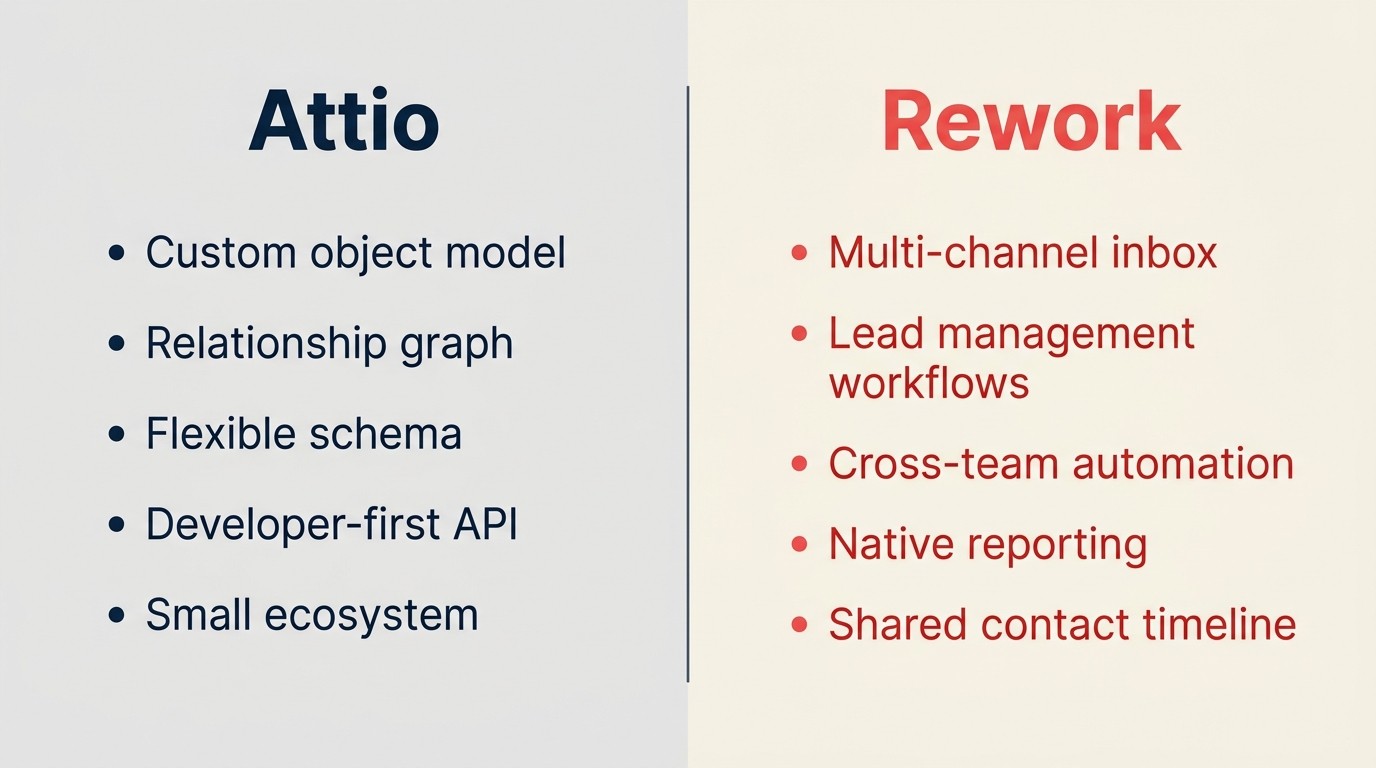
Attio gives you a flexible data model. Rework gives you a complete operating system for your revenue team. That's a different bet. Where Attio treats your CRM as a customizable database, Rework treats it as the center of your multi-channel operations: deals, leads, conversations, tasks, and team workflows all in one place.
The multi-channel inbox is the feature that tends to close deals for Rework. If your team is juggling WhatsApp, Messenger, Instagram, and website live chat across different tabs, having all of those conversations routed into a single shared inbox (where anyone on the team can pick up a conversation with full context) is a meaningful operational improvement. Attio doesn't offer this natively.
Rework also ships with lead management workflows that go deeper than contact records and pipeline stages. You get automated lead scoring, routing rules, follow-up sequences, and task assignment without needing a separate automation tool. For teams in the 10-150 person range that are scaling their sales and customer ops simultaneously, this cross-functional coverage matters. The guide to CRM rollout and adoption covers how to get a new CRM running without losing momentum. And if you're thinking through how to structure deals and stages, Pipeline Stages That Match How Your Team Actually Sells is worth a read before you commit to any tool.
It's honest to say Rework won't match Attio's custom object flexibility. If your business has genuinely unusual data relationships that don't fit standard CRM models, Attio's schema freedom is real. But for most startups, the flexibility they actually need is operational: faster follow-up, cleaner handoffs, fewer tools in the stack.
| What you get | What you don't |
|---|---|
| Multi-channel chat inbox (WhatsApp, Messenger, live chat) | Deep custom object modeling |
| Built-in lead management and routing | Attio-style relationship graph visualization |
| Cross-team workflow automation | Open-source or self-hosted option |
| Native reporting without CSV exports | Extensive third-party app marketplace |
| Shared contact and company timeline | Developer-first API customization |
Pricing: The Sales Engine (CRM) is $69/month billed yearly, or $80 month to month, with 5 sales seats included; extra seats come in blocks of 5 ($21/month per block on yearly billing). The Revenue Engine ($159/month billed yearly) adds the multi-channel inbox and lead capture. See rework.com/pricing.
Best for: Startups and scale-ups (10-150 users) running sales, success, and support from one platform.
2. Folk: Lightweight CRM built for relationship-driven teams
Folk's methodology is simple: a CRM should feel like a well-organized address book, not a database. It's built for founders, agency leads, investors, and anyone whose job is managing relationships more than running pipeline velocity. The product is genuinely beautiful to use, and the Chrome extension for capturing contacts from LinkedIn or anywhere on the web is one of the best in class.
Where Folk earns its place on this list is for teams leaving Attio because it felt over-engineered for what they actually needed. If your sales motion is high-touch and relationship-first (not high-volume), Folk's simplicity is a feature, not a limitation.
But there's a ceiling. Folk's automation is minimal, its native integrations are thin compared to HubSpot or even Pipedrive, and it doesn't have the workflow depth to support a growing SDR team or a multi-product sales cycle. It's a tool for individuals and small teams, and it knows that.
| What you get | What you don't |
|---|---|
| Best-in-class contact enrichment UX | Deep pipeline automation |
| Chrome extension for relationship capture | Native calling or SMS |
| Clean, fast interface | Multi-channel inbox |
| Good sequence functionality for small lists | Scalable team features |
| Affordable for solo or small teams | Advanced reporting |
Pricing: $20/user/month (billed annually). No free tier for full features.
Best for: Founders, agency operators, and VCs managing under 20 users with a relationship-first workflow.
3. HubSpot CRM: Best for teams that want CRM and marketing under one roof
HubSpot's methodology is the growth platform: one system of record for marketing, sales, and service. It's the closest thing in SaaS to a complete commercial operating system for a mid-size company, and that's genuinely what a lot of Attio users eventually want when they realize Attio doesn't have a native email marketing module, or a landing page builder, or a service desk. If you're evaluating HubSpot, the best HubSpot alternatives article is useful context for understanding where it fits relative to the rest of the market.
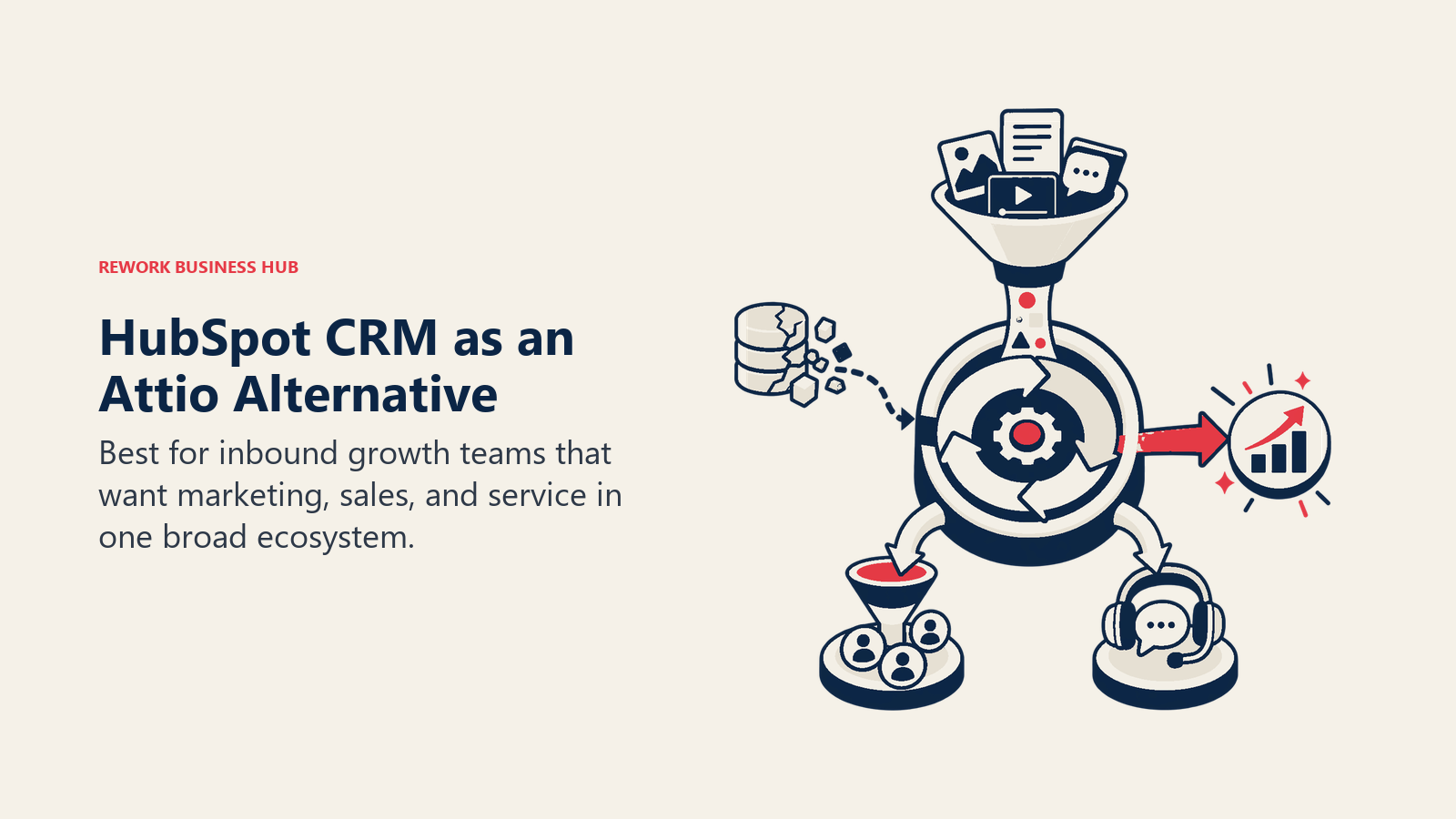
The free tier is legitimately useful, and the breadth of the platform means you can start with just CRM and expand into marketing automation, customer service, or even a CMS without switching vendors. For teams that hate tool sprawl, that's a solid argument.
The trade-off is cost and complexity. HubSpot's pricing scales sharply once you need advanced automation, custom reporting, or more than a handful of paid seats. It's not unusual for a 30-person team to find themselves looking at $2,000-3,000/month once they've turned on the features they actually need. And the platform's complexity (it's large) means onboarding takes real investment. Check HubSpot's pricing page before building your budget model.
| What you get | What you don't |
|---|---|
| Unified CRM, marketing, service, and CMS | Simple pricing at scale |
| Best-in-class email marketing and automation | Lightweight feel (it's a big platform) |
| Large third-party app marketplace | Attio-style flexible data modeling |
| Strong free tier to start | Easy budget predictability |
| Excellent reporting and dashboards | Fast implementation without help |
Pricing: Free CRM tier. Paid seats from $15/user/month (Starter). Professional tiers jump significantly.
Best for: Growth-stage companies (20-500 employees) wanting CRM + marketing in one platform and willing to invest in setup.
4. Pipedrive: Best for sales teams that want simple, visual pipeline management
Pipedrive's philosophy is "sales-first simplicity." It was built by salespeople for salespeople, and that shows: the pipeline view is clear, deal management is fast, and the tool stays out of your way. For teams where the main complaint about Attio is that it's too flexible and not opinionated enough about sales workflows, Pipedrive is the antidote. See the best Pipedrive alternatives if you want to understand how it compares to the broader field.
It's a focused tool. Pipedrive does pipeline management, contact tracking, activity logging, and basic automation well. It doesn't try to be a marketing platform, and it doesn't try to be an operations hub. If your team's primary job is closing deals and they want a CRM that reinforces that focus, Pipedrive delivers.
The limitation comes when you need anything beyond the sales motion: marketing automation, customer success workflows, multi-channel communication, or deep reporting. Pipedrive has add-ons for some of this, but they feel bolted on rather than native. Teams that outgrow it usually do so when they realize they need more than a sales CRM. Pipedrive's pricing is competitive at entry level but climbs once you need advanced features.
| What you get | What you don't |
|---|---|
| Best-in-class pipeline UI | Native marketing automation |
| Strong deal and activity tracking | Multi-channel inbox |
| Good email integration and templates | Advanced custom reporting |
| Reliable automation for sales sequences | Company-wide operational workflows |
| Affordable entry pricing | Deep API customization |
Pricing: From $14/user/month (Essential). Advanced features at $34 and $49 tiers.
Best for: Sales teams of 5-100 people that want a focused, fast, opinionated pipeline tool without bloat.
5. Close: Best for inside sales teams running high-volume outreach
Close is a CRM built specifically for inside sales: high-volume calling, email sequences, and SMS from a single interface. If your sales motion involves a lot of outbound activity and your reps are spending hours on the phone, Close's built-in calling and dialer are genuinely powerful in ways that most CRMs (including Attio) don't attempt to match. For a broader look at the inside sales tool market, the best Close alternatives article covers the adjacent options.
The product's philosophy is that a CRM should remove friction from rep activity, not add it. Every feature points at getting more conversations started: automatic call logging, built-in power dialer, voicemail drop, SMS sequences, and email automation are all first-class features, not integrations. If you're building out qualification criteria alongside your outreach cadence, Qualification Frameworks: BANT, MEDDIC, GPCT is a practical companion.
Teams considering Close are usually coming from Attio because Attio's activity tracking, while solid for relationship data, doesn't optimize for the volume-and-cadence workflow that inside sales runs on. Close optimizes specifically for that. The trade-off is that it's not a cross-team platform. Marketing and customer success won't find their workflows here.
| What you get | What you don't |
|---|---|
| Built-in calling, SMS, and voicemail drop | Marketing automation |
| Powerful email sequences for outbound | Multi-team or company-wide workflows |
| Activity-first CRM designed for reps | Custom object modeling |
| Strong pipeline and reporting for sales | Affordable entry pricing |
| Fast implementation for sales teams | Service or support workflows |
Pricing: From $49/user/month (Startup). Higher tiers at $99 and $139/user/month.
Best for: Inside sales teams of 5-50 doing high-volume outreach where calling and sequencing are the primary workflow.
6. Copper: Best for teams whose work lives inside Google Workspace
Copper's methodology is integration-first: if your team runs on Gmail and Google Calendar, your CRM should live there too, not require a context switch. Copper sits inside Gmail, auto-captures contact data from your emails, syncs meetings and tasks directly to your Google Calendar, and surfaces relationship context right in your inbox. See Copper's pricing page for current plan details. And if you want to understand how Copper stacks up against alternatives, the best Copper alternatives article covers the Google-native CRM space.
For Attio users who want something simpler and don't need custom objects (just a clean CRM that works with how they already operate), Copper is worth a look. The frictionless data capture is its superpower: contacts, emails, and activities are logged automatically, so CRM hygiene stops being a discipline problem.
The constraint is the constraint: Copper is a Google ecosystem play. If your team uses Outlook, Slack as a primary comms channel, or tools outside the Google stack, Copper's integration advantage disappears and it becomes a fairly basic CRM. It's also not designed to scale into mid-market; the reporting and automation depth cap out earlier than most growth-stage teams want.
| What you get | What you don't |
|---|---|
| Native Gmail and Google Calendar integration | Any meaningful non-Google integrations |
| Automatic contact and activity capture | Advanced automation or workflow builder |
| Clean, fast interface | Multi-channel inbox |
| Good fit for Google-native teams | Deep reporting |
| Simple setup and onboarding | Scalability beyond 50 users |
Pricing: From $23/user/month (Starter). Business tier at $59/user/month.
Best for: Small Google Workspace teams (5-40 people) that want a CRM that lives inside their existing tools without extra setup.
7. Salesforce: Best for enterprises that need maximum configurability and ecosystem depth
Salesforce's methodology is total platform: every customer-facing function (sales, service, marketing, commerce, analytics) built on a single data layer with an enormous partner ecosystem. It's the most powerful CRM in the world, and for enterprises with complex sales motions, multi-product portfolios, and large IT budgets, that power is worth the investment.
Teams considering Salesforce as an Attio alternative are usually not looking for simplicity. They're looking for Attio-level flexibility at enterprise scale, combined with an app marketplace that can connect to every other enterprise system they use. Salesforce delivers both, but at a cost in time, money, and administrative overhead that Attio users often underestimate. The best Salesforce alternatives article is useful if you're not sure Salesforce is the right level of complexity for your stage.
Be honest with yourself about your stage before choosing Salesforce. For a 20-person startup, the implementation cost alone (consultant fees plus internal time) typically runs $20,000-$50,000. More than 80% of CRM migration projects exceed their original timeline or budget, with delays averaging 41% beyond the planned schedule, according to Oracle's 2024 Data Migration Report. For a 200-person company with a dedicated RevOps function, that investment starts to make sense. If you do move forward, understanding your CRM data model design before you start is one of the highest-leverage things you can do.
| What you get | What you don't |
|---|---|
| Unmatched configurability and data modeling | Simple setup or fast onboarding |
| Largest CRM app marketplace | Affordable total cost of ownership at SMB scale |
| Enterprise-grade security and compliance | Lightweight feel or intuitive UX |
| AI features via Salesforce Einstein | Fast time-to-value |
| Scale from 50 to 50,000 users | Reasonable cost without an admin |
Pricing: From $25/user/month (Starter Suite). Enterprise tiers at $165-$330/user/month plus add-ons.
Best for: Enterprises of 200+ employees with dedicated Salesforce admins and complex multi-product or multi-region sales operations.
8. Monday Sales CRM: Best for teams already operating on Monday.com
Monday's philosophy is work OS first, CRM second. If your company uses Monday.com for project management and operations, adding Monday Sales CRM to the mix means your sales pipeline lives in the same visual interface as everything else your team works on. For cross-functional teams where deals involve product, delivery, and ops stakeholders (not just sales), that unification is genuinely valuable.
The product does pipeline visualization, contact management, and no-code workflow automation well enough for most SMB sales teams. And the onboarding is fast for existing Monday users because the mental model is already familiar.
But it's worth being clear about what Monday Sales CRM is not: it's not a purpose-built sales system with the depth of Pipedrive, the breadth of HubSpot, or the calling capabilities of Close. Its reporting is shallow compared to dedicated CRMs, and it doesn't have the ecosystem of native sales integrations that purpose-built tools offer. It works best as a unified operations board that happens to include a sales pipeline.
| What you get | What you don't |
|---|---|
| Seamless Monday.com ecosystem integration | Purpose-built sales depth |
| Visual, flexible board-based pipeline | Advanced reporting or forecasting |
| No-code automation builder | Native calling or SMS |
| Good for cross-functional deal involvement | Marketing automation |
| Fast setup for existing Monday users | Strong third-party CRM integrations |
Pricing: From $12/user/month (Basic CRM). Standard at $17, Pro at $28.
Best for: Teams of 5-100 already on Monday.com where the operational simplicity of one tool outweighs the benefits of a dedicated CRM.
9. Freshsales: Best for SMBs wanting AI-assisted sales at an accessible price
Freshsales (part of the Freshworks suite) competes on value: a CRM with built-in phone, email, AI-powered lead scoring, and sales sequences at a price point that makes HubSpot's comparable tiers look expensive. For SMBs that want more automation and intelligence than Attio offers without committing to Salesforce's complexity or HubSpot's pricing trajectory, Freshsales is a legitimate option. The best Freshsales alternatives article is a good read if you want to understand the SMB CRM space around it.
The built-in AI feature (Freddy AI) does useful work: it scores leads based on engagement signals, suggests the next best action, and flags deals at risk. For a sales team without a dedicated RevOps function, that kind of automated prioritization is a real operational gain. See Freshsales pricing to evaluate which tier maps to your team size.
Freshsales is also part of a broader Freshworks ecosystem (Freshdesk for support, Freshmarketer for marketing) so teams that want a full stack at SMB pricing can expand within the same vendor. The limitation is ecosystem breadth: outside of the Freshworks family, native integrations are thinner than HubSpot or Salesforce, which matters when you're connecting a mature tech stack.
| What you get | What you don't |
|---|---|
| Built-in AI lead scoring (Freddy AI) | Large third-party integration ecosystem |
| Native phone and email in one tool | Enterprise-grade customization |
| Affordable pricing for SMBs | HubSpot-level marketing automation |
| Freshworks suite integration path | Strong community or partner ecosystem |
| Good automation for sequences and workflows | Mature open API or developer tools |
Pricing: From $9/user/month (Growth). Pro at $39, Enterprise at $59.
Best for: SMBs of 10-200 employees wanting AI-assisted sales automation at a price point below HubSpot and Salesforce.
10. Twenty: Best for developers who want open-source CRM control
Twenty is a modern, open-source CRM built as a spiritual successor to the idea that Salesforce and HubSpot are too heavy and too expensive, and that developers should be able to own their own CRM stack the same way they own their own infrastructure. It's beautifully designed (unusual for open-source tools), and the custom object model and API are genuinely developer-friendly. You can explore the project on Twenty's website.
For technical founders leaving Attio because they want more control (not less), Twenty is the most interesting option on this list. You self-host it, you own the data, and you extend it however you need. The API is well-documented and the underlying data model is clean enough to build on top of.
The obvious trade-off: you need someone technical to set it up and maintain it. There's no managed SaaS option with SLA-backed uptime, no dedicated support team to call, and the feature set is still maturing compared to commercial alternatives. But for a developer-led startup that treats the CRM as infrastructure rather than a vendor relationship, Twenty is a genuinely interesting pick.
| What you get | What you don't |
|---|---|
| Full data ownership and self-hosting | Managed hosting with SLA |
| Modern UI (genuinely, for open-source) | Dedicated customer support |
| Extensible API and custom objects | Mature automation or sequence builder |
| No per-seat licensing cost | Large out-of-the-box integration library |
| Active open-source community | Marketing automation or service features |
Pricing: Free (self-hosted). Cloud-hosted early access pricing varies.
Best for: Technical founders and developers at 1-30 people who want full control over their CRM stack and have the engineering capacity to run it.
Why Teams Leave Attio: Common Reasons
Attio tends to lose teams when the cost of designing every workflow manually starts to outweigh the benefit of flexibility. The pain points below show where that shift usually happens.
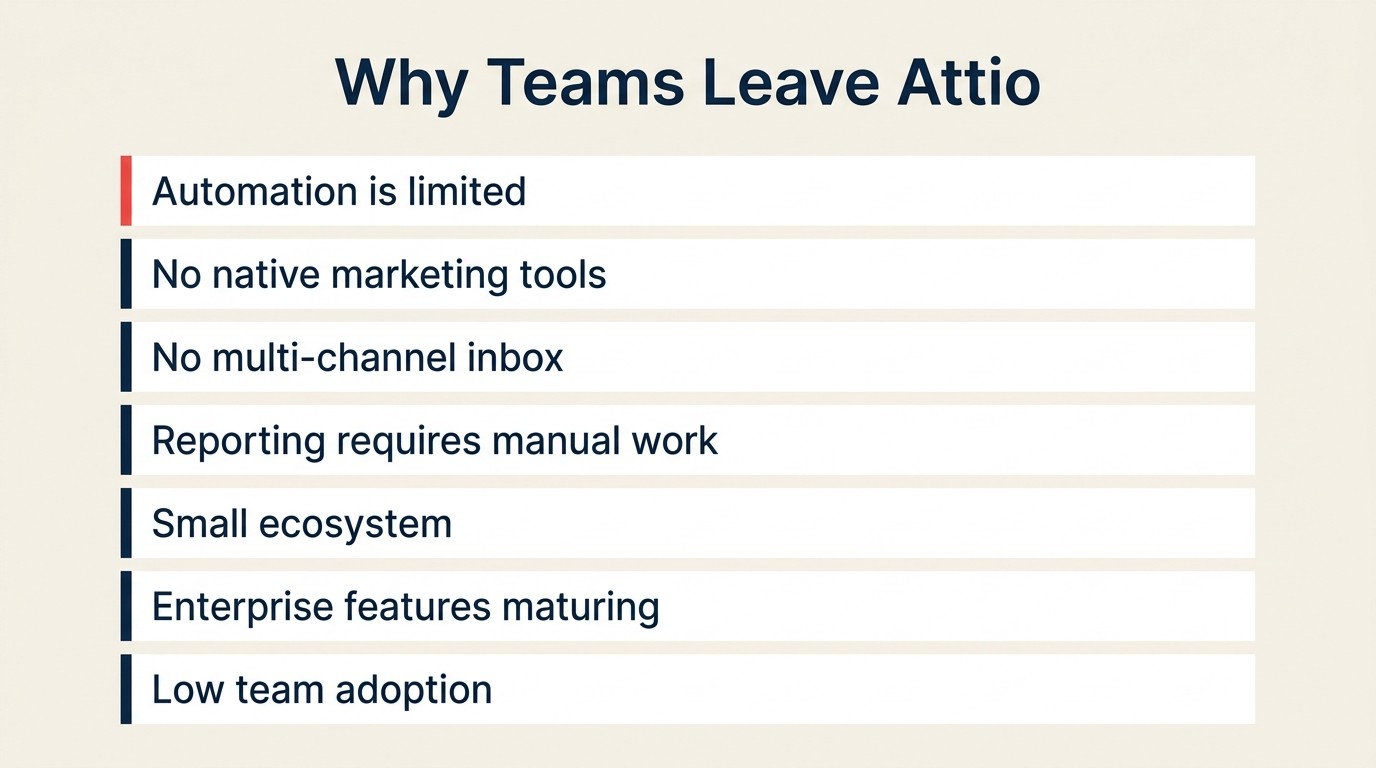
Before choosing a replacement, it's worth naming exactly what's driving the switch. Attio's limitations tend to cluster in predictable ways. We call these the Five Friction Signals: automation gaps, missing broadcast tools, no multi-channel inbox, manual reporting, and low team adoption. If your team is hitting three or more of these simultaneously, the compounding cost of staying put usually exceeds the migration friction.
Rework Analysis: Based on publicly available CRM migration research, teams that switch CRMs without a clear primary pain point are 68% more likely to revert to their old system within six months. The teams that switch successfully tend to name one dominant friction signal before they shortlist tools. (Oracle Data Migration Report, 2024)
| Pain Point | What Teams Need Instead |
|---|---|
| Automation is limited and unreliable | A tool with reliable, battle-tested workflow automation (HubSpot, Close, Freshsales) |
| No native marketing tools | CRM + marketing under one roof (HubSpot, Freshsales) |
| No multi-channel inbox | Unified comms for sales and success (Rework) |
| Reporting requires manual work | Built-in dashboards and forecasting (Salesforce, HubSpot, Rework) |
| Ecosystem is small | App marketplace depth (Salesforce, HubSpot, Pipedrive) |
| Enterprise features still maturing | A proven enterprise platform (Salesforce) |
| Team adoption is low | Simpler, more opinionated tools (Pipedrive, Copper, Folk) |
Feature Depth Comparison
| Feature | Rework | Folk | HubSpot | Pipedrive | Close | Freshsales | Salesforce |
|---|---|---|---|---|---|---|---|
| Multi-channel inbox | Yes | No | Partial | No | Partial | No | Add-on |
| Native email marketing | No | No | Yes | No | No | Yes | Yes |
| Built-in calling/SMS | No | No | Add-on | Add-on | Yes | Yes | Add-on |
| Lead scoring (AI) | Rules-based | No | Yes | No | No | Yes | Yes |
| Custom objects | Limited | No | Yes | No | No | No | Yes |
| Workflow automation | Yes | Limited | Yes | Yes | Yes | Yes | Yes |
| Native reporting | Yes | Limited | Yes | Yes | Yes | Yes | Yes |
CRM adoption among companies with 10 or more employees has reached 91%, according to DemandSage's 2026 market analysis, making CRM selection one of the most consequential software decisions for growth-stage teams. At 25 users, the price gap between the cheapest and most expensive options on this list is more than 5x, before any feature add-ons.
Pricing Comparison at 25 Users
| Tool | Monthly Cost (25 users) | Notes |
|---|---|---|
| Twenty | $0 | Self-hosted; infra costs separate |
| Monday Sales CRM | ~$300 | Basic tier |
| Freshsales | ~$225 | Growth tier |
| Pipedrive | ~$350 | Essential tier |
| Rework | ~$153 | Sales Engine, Standard, billed yearly |
| Folk | ~$500 | Standard plan |
| Copper | ~$575 | Starter tier |
| HubSpot CRM | ~$375 | Starter (escalates with features) |
| Close | ~$1,225 | Startup tier |
| Salesforce | ~$625 | Starter Suite (escalates sharply) |
How to Choose: Decision Framework
| If you need... | Choose this |
|---|---|
| Multi-channel inbox + cross-team workflows | Rework |
| CRM + email marketing in one platform | HubSpot CRM |
| Simple pipeline for a sales-only team | Pipedrive |
| High-volume calling and outbound sequences | Close |
| Full Google Workspace integration | Copper |
| Lightweight CRM for relationship management | Folk |
| Maximum power and enterprise configurability | Salesforce |
| Visual boards + ops already on Monday | Monday Sales CRM |
| AI-assisted sales at SMB pricing | Freshsales |
| Open-source with full data control | Twenty |
Frequently Asked Questions
What is the best Attio alternative for startups?
Rework is the strongest alternative for startups scaling from 10 to 150 users, because it replaces Attio's data-model flexibility with operational completeness: a multi-channel inbox, built-in lead management, and cross-team workflow automation in one platform. For very early-stage teams (under 10 people) that need simplicity over operations depth, Folk is the closest lightweight alternative.
How long does migrating from Attio to another CRM take?
Most teams migrate contacts, pipelines, and basic data in a few hours using CSV export and native importers. Full migration including custom fields, automations, and team training typically takes one to three weeks. Oracle's 2024 Data Migration Report found that over 80% of CRM migrations exceed their planned timeline, so budget more buffer than you expect.
Is Attio good for enterprise teams?
Attio is primarily designed for startups and growth-stage teams. Its custom object model and relationship graph are strong at 5-50 users, but the platform lacks the enterprise-grade compliance controls, advanced forecasting, and massive app ecosystem that enterprises at 200+ users typically require. Salesforce remains the dominant choice at that scale.
What is the cheapest Attio alternative?
Twenty is free for self-hosted deployments, making it the lowest-cost option if your team has the engineering capacity to run it. Among managed SaaS tools, Freshsales starts at $9/user/month, making it the most affordable alternative with built-in AI lead scoring, native phone, and email automation.
Do most CRM alternatives offer a free trial?
Yes. HubSpot CRM has a permanently free tier. Pipedrive, Close, Freshsales, Copper, and Monday Sales CRM all offer 14-day free trials. Rework offers a 14-day free trial. Twenty is free to self-host with no trial limit. Salesforce offers a 30-day trial on its Starter Suite.
Why do teams leave Attio?
The most common reasons teams switch away from Attio are: limited automation reliability, no native email marketing module, no multi-channel inbox for shared team conversations, and reporting that requires manual data exports. These gaps tend to compound as teams scale past 30-50 users and need cross-functional workflows beyond what a database-style CRM supports.
Is the CRM market still growing?
Yes. The global CRM market exceeded $101 billion in 2026 and is the fastest-growing enterprise software category, according to Gartner, with the sales CRM segment specifically projected to grow at a 12.9% compound annual rate through 2027. That growth is being driven by AI feature integration and broader cloud adoption across SMBs.
What to Do Next
Pick two tools from this list that match your team's size and primary pain point with Attio. Run a 2-week pilot with both. Import a real subset of your contacts, run your actual workflow, and let your reps use it for live deals. The CRM that wins is the one your team actually uses, not the one with the most features on a comparison page.
Most tools on this list offer a free tier or a 14-day trial. The switching cost from Attio is lower than you think: most have native Attio importers or CSV-based migration paths that take a few hours, not weeks.
If the primary reason you're leaving Attio is operational fragmentation (too many tools, no shared inbox, automation gaps), start the pilot with Rework. If it's the lack of marketing tools, start with HubSpot. If it's team adoption and simplicity, start with Pipedrive or Folk.
The best CRM is the one your team opens every morning.
Related reading:

Head of Enterprise Solutions
On this page
- Quick Comparison Table
- Stage Fit Matrix
- Sizing and Buyer Persona Table
- 1. Rework: Unified CRM and ops platform for startups that are scaling
- 2. Folk: Lightweight CRM built for relationship-driven teams
- 3. HubSpot CRM: Best for teams that want CRM and marketing under one roof
- 4. Pipedrive: Best for sales teams that want simple, visual pipeline management
- 5. Close: Best for inside sales teams running high-volume outreach
- 6. Copper: Best for teams whose work lives inside Google Workspace
- 7. Salesforce: Best for enterprises that need maximum configurability and ecosystem depth
- 8. Monday Sales CRM: Best for teams already operating on Monday.com
- 9. Freshsales: Best for SMBs wanting AI-assisted sales at an accessible price
- 10. Twenty: Best for developers who want open-source CRM control
- Why Teams Leave Attio: Common Reasons
- Feature Depth Comparison
- Pricing Comparison at 25 Users
- How to Choose: Decision Framework
- Frequently Asked Questions
- What is the best Attio alternative for startups?
- How long does migrating from Attio to another CRM take?
- Is Attio good for enterprise teams?
- What is the cheapest Attio alternative?
- Do most CRM alternatives offer a free trial?
- Why do teams leave Attio?
- Is the CRM market still growing?
- What to Do Next