Vision Extract: 画像を構造化データに変換する

Turn this article into takeaways for your work.


Each assistant summarizes the article only for you and suggests best practices for your work.
世界では年間約2.5兆件のドキュメントが作成されます。そのほとんどは、ある時点で画像として存在します。
経費精算のために写真に撮られた印刷された請求書。ベンダーポータルにアップロードされたスキャンされた契約書。顧客Onboardingフローで撮影されたIDカード。小売監査中に写真撮影されたサプライヤーの商品棚。受付でスキャンされた手書きの医療受付フォーム。
誰かがそれらの画像からデータを取り出してデータベースに入力する必要があります。手動では、データ入力オペレーターがドキュメントを読み、フィールドに値を入力し、正しい数値を転記したことを祈るという作業が必要です。遅く、費用がかかり、フィールドごとに意味のある人間のエラー率があります。買掛金管理だけでも、そのエラー率は重複支払い、割引の見逃し、監査の発見物の不均衡なシェアを生み出します。
Vision Extractはこのパイプラインを置き換えるAIパターンです。単なるOCRではありません。光学文字認識(OCR)は文字を読みます。Vision Extractは意味を読みます。正しいフィールドを抽出し、曖昧なフォーマットを解釈し、ビジネスルールに対して抽出された値を検証し、構造化されたレコードをダウンストリームシステムにプッシュします。この広いカテゴリがGartnerがインテリジェントドキュメント処理(IDP)と呼ぶもので、Gartnerは13% CAGRで成長し2026年までに20.9億ドルに達すると予測する市場です。この区別は購買決定と精度の期待に重要です。Vision Extractはビジネスに最もコンクリートで測定可能な問題の一つを処理します。構造化されたレコードになる必要がある非構造化の画像データです。
機能の式: Ingest、Analyze、Generate、Execute
Vision Extractは、ビジュアルのキャプチャとフィールドの解釈、書き戻しを切り分けることで、画像やスキャンを構造化されたシステムデータに変換します。
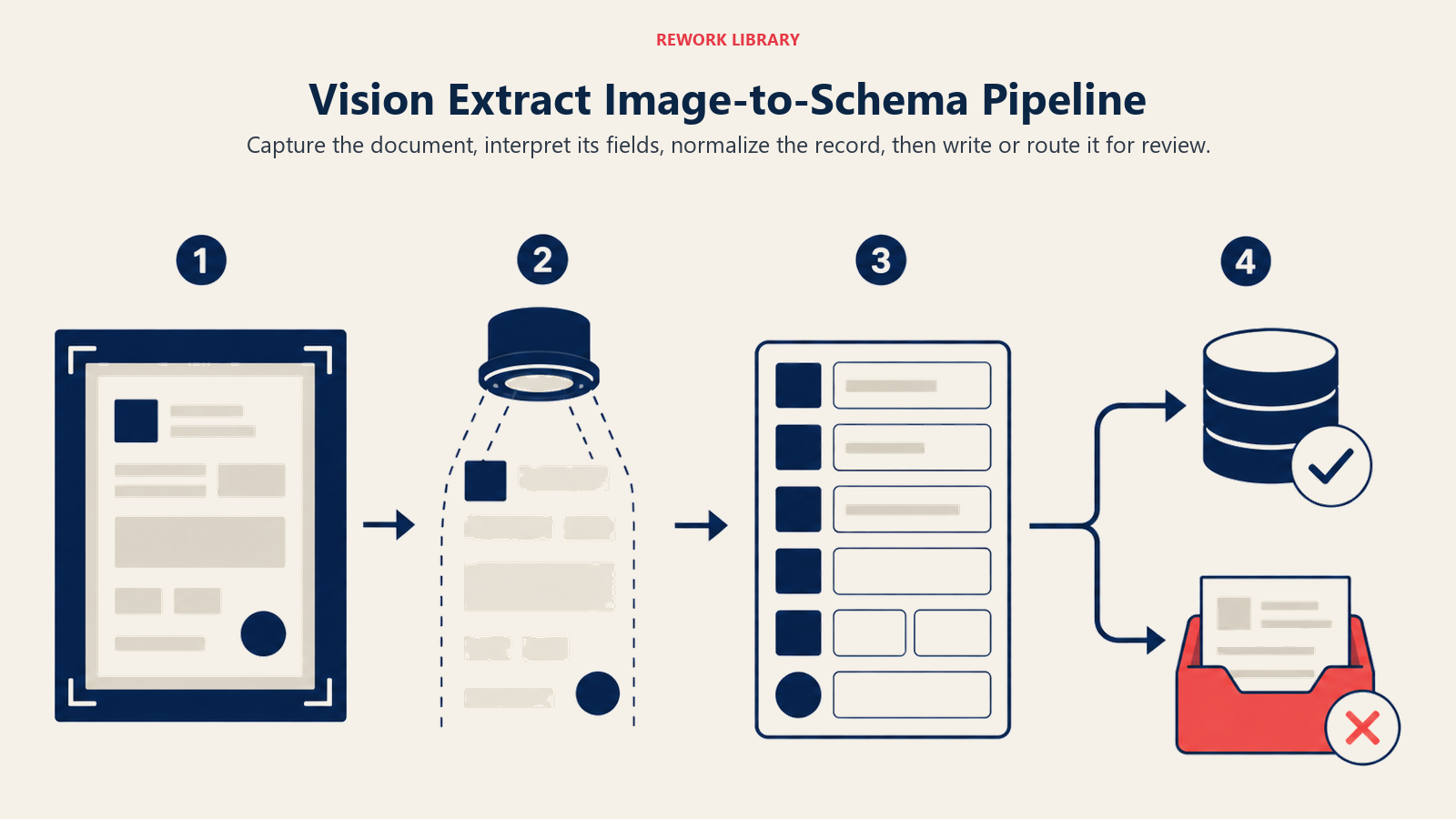
Ingest(画像またはスキャン) はビジュアルソースをキャプチャします。実際には、Webフォームでアップロードされたドキュメント、モバイルアプリで撮られた写真、メールで受け取ってインボックス統合で処理されたPDF、または工場のフロアのカメラからストリーミングされた画像の場合があります。IngestステップはソースをAIが処理できる形式に変換します。通常、ビジョンモデルが読み取れる正規化された画像または抽出されたページシーケンスです。
Analyze(フィールドの抽出と分類) は作業が行われる場所です。ビジョンモデルはドキュメントを読み、それがどの種類のドキュメントか(請求書、領収書、ID、フォーム)を識別し、関連するフィールドを見つけ、その値を読み取り、各抽出に信頼度スコアを割り当てます。よく設計された Analyze ステップは単に抽出されたテキストを返しません。コンテキストを理解します。請求書上の「Net 30」が日付ではなく支払条件を指すことを知っています。「M:」に続く名刺の番号がアカウント番号ではなく携帯電話であることを知っています。
Generate(構造化レコード) は抽出された値を構造化された出力に変換します。JSONレコード、CSVの行、データベース対応のペイロードなどです。ここでフィールドマッピングが発生します。抽出された値をターゲットシステムのスキーマにマッチングします。CRMがcontact_phoneというフィールドを必要とし、名刺に「Tel: +1 415 555 0194」と書いてある場合、Generateステップはそのマッピングを解決します。正規化も処理します。日付をISO形式に標準化し、電話番号からフォーマットを取り除き、金額を一貫した通貨記号に変換します。
Execute(システム・オブ・レコードへのプッシュ) は構造化されたレコードをダウンストリームシステムに送ります。APプラットフォームが請求書を受け取ります。Salesforceが新しい連絡先を受け取ります。KYCシステムが確認済みのIDフィールドを受け取ります。経費管理ツールが領収書の明細を受け取ります。抽出されたフィールドが信頼度閾値を下回る場合、Executeは自動的にプッシュするのではなく、ドキュメントを人間のレビューキューにルーティングします。Execute機能がどのように機能し、なぜリスクを持つかの全体像については、Execute: AIが外部状態を変えるを参照してください。
Key Facts: Vision Extractとドキュメント処理
- 手動データ入力はエンタープライズスケールでドキュメントあたり4〜6ドルかかり、フィールドあたり1〜4%の人間エラー率があります。Vision Extractは処理コストをドキュメントあたり0.10〜0.50ドルに削減し、フィールドレベルのエラー率を0.1〜0.5%にします(Gartner IDP Benchmark、2025年)
- インテリジェントドキュメント処理市場は13% CAGRで成長し2026年までに20.9億ドルに達すると予測されており、まだ手動で処理されているビジネスドキュメントの量を反映しています(Gartner IDP市場予測、2025年)
- 買掛金管理にVision Extractを導入した財務チームは、APサイクルタイムが60〜80%削減され、ドキュメントあたりの処理コストが85〜95%削減されたと報告しています(Deloitte Finance AI Benchmark、2024年)
詳細な6つの実例
以下の例では、ドキュメント、ID、棚、フォームにわたって同じ画像からスキーマへのパターンを示します。
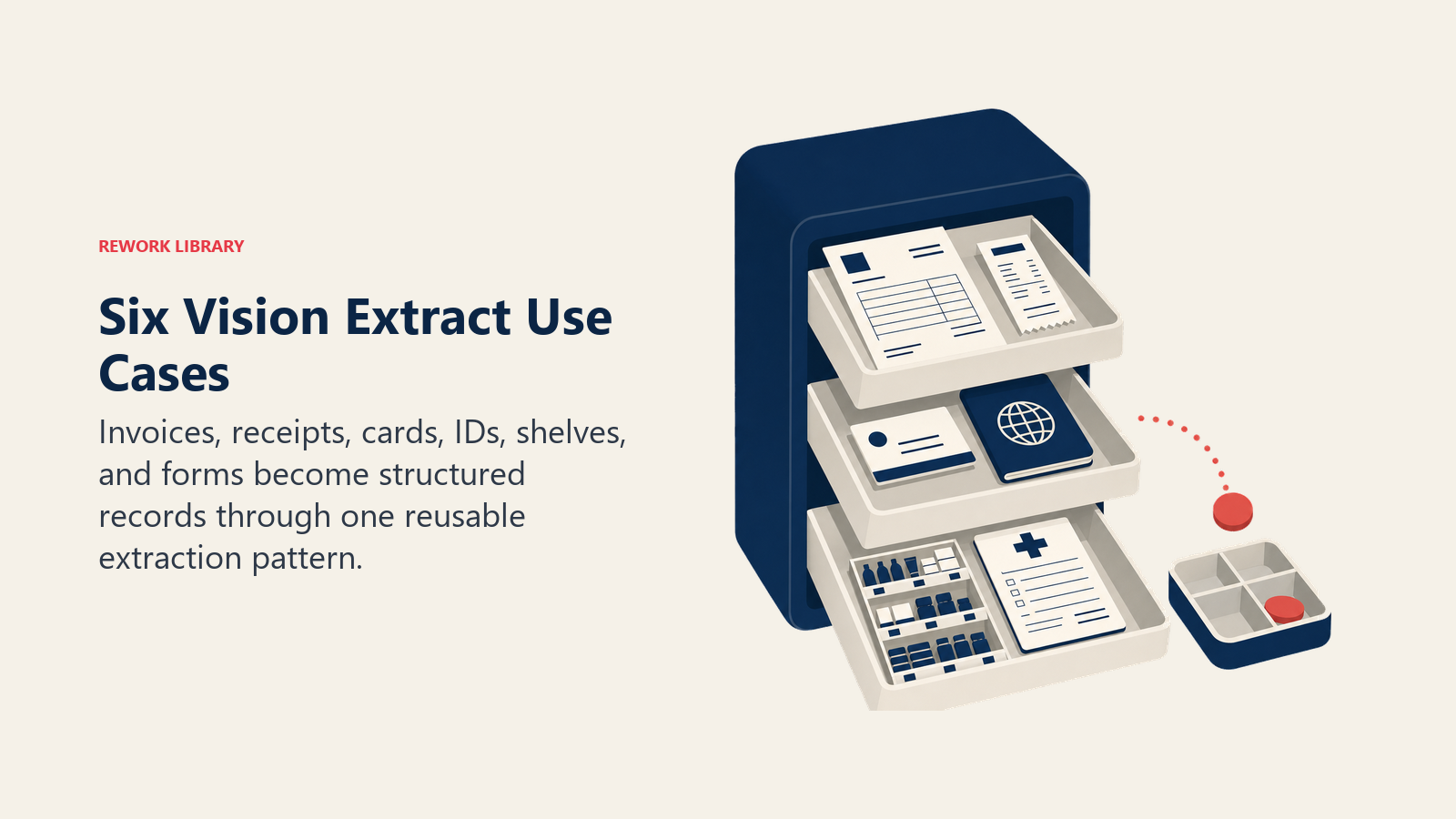
1. 請求書処理とAP自動化
中規模製造業の業務チームが毎月4つの形式で3,000件のサプライヤー請求書を受け取ります。メールのPDF、スキャンされた紙、ポータルで提出されたXML(一部のサプライヤーはまだドキュメントとして扱う)、写真に撮られた紙です。抽出の対象は: ベンダー名、ベンダーID、請求書番号、請求書日付、支払期限日、明細(説明、数量、単価)、合計金額、税金、発注書参照番号です。
Analyzeステップはまずレイアウト検出を実行します。異なるサプライヤーが請求書を異なる形式にしているからです。次に、既知のテンプレートにはゾーンベースの抽出を、初めて見るベンダーにはフリーフォーム抽出を使用してフィールドを抽出します。発注書参照番号はERPのオープン発注書リストとクロス検証されます。抽出された発注書番号がシステム内の何とも一致しない場合、ドキュメントはレビューのためにフラグが立てられます。
Executeはマッチした請求書を2ウェイまたは3ウェイの発注書マッチングと閾値金額以下の自動承認のためにAPプラットフォームにプッシュします。マッチしていないまたは低信頼度のドキュメントは例外キューに送られます。
この分野のツールにはABBYY FlexiCapture、Rossum、AWS Textract、SAPとOracleの請求書処理モジュールがあります。
2. 領収書から経費報告書へ
80人の営業担当者チームが毎月約2,400件の経費領収書を提出します。飲食費、Uber、航空券、ホテル。財務チームによる手動レビューに毎月40時間かかっていました。Vision Extractを使えば、担当者がモバイル経費アプリで領収書を写真撮影します。モデルが抽出するのは: 加盟店名、取引日、金額、通貨、税金です。Analyzeステップは経費カテゴリ(飲食・接待、出張、宿泊)も分類し、会社のポリシー制限に対して金額を確認します。
Generateステップは構造化された経費明細を作成します。Executeは自動承認(閾値以下、ポリシー準拠、高信頼度の場合)か、承認のためにマネージャーにルーティングします。Ramp、Expensify、Brex、SAP Concurはすべてこのパターンのバージョンを実行しています。
3. 名刺からCRMへ
営業担当者が展示会で20人の連絡先に会います。帰社後に手動でSalesforceに入力すると45分かかり、珍しいスペルや会社名でエラーが発生することがよくあります。Vision Extractを使えば、カンファレンスアプリで各カードを写真撮影します。抽出されるフィールド: 名、姓、タイトル、会社、電話番号、メール、URL。
抽出後、Executeステップは新しい連絡先を作成する前にSalesforceで既存のレコードを検索します。重複排除ロジックにより「同じ人物の4つのバージョン」という一般的な問題を防ぎます。これはシンプルなユースケースですが代表的なものです。価値は抽出自体にあるのではなく、物理的な成果物からCRMへの手動再入力なしの継続的なフローにあります。
4. KYCのためのIDとパスポートのスキャン
フィンテック企業が毎月数千人の顧客をOnboardingし、KYC(顧客確認)規制の下で身元確認を行う必要があります。手動のドキュメントレビューには、各提出物をレビューするドキュメントスペシャリストが必要になります。Vision Extractはパスポート、運転免許証、または国民IDの写真を取り込みます。
Analyzeステップが抽出します: ドキュメントタイプ、発行国、名前、生年月日、ドキュメント番号、有効期限、機械読み取りゾーン(MRZ)。また、改ざん検出(ドキュメントはデジタル改ざんの痕跡を示しているか?)、有効期限の検証、フォーマット検証(ドキュメントはその国とドキュメントタイプの既知のフォーマットに準拠しているか?)も実行します。
Executeは確認されたフィールドを、ウォッチリストとデータベース確認に対する身元マッチングのためのKYCワークフローに渡します。低信頼度またはフラグが立てられたドキュメントは人間の確認者に送られます。Veriff、Onfido、Jumio、Personaはすべてこのアーキテクチャを実行しています。
5. 小売棚の監査
消費財ブランドが毎月2,000の小売店舗でプラノグラムコンプライアンス(正しい場所、正しい棚の高さ、正しいフェーシング数で製品が配置されている)を確認する必要があります。棚を写真撮影してレポートを提出する人間のフィールド担当者では、その規模を確実にカバーできません。
モバイルアプリが店舗スタッフまたはフィールド担当者に各棚のセクションを写真撮影するよう促します。モデルは画像を Analyze します: 製品識別(ラベル認識とSKUマッチング)、棚の位置、フェーシング数、価格タグ、在庫切れの指標。抽出されたレイアウトをその店舗のターゲットプラノグラムと比較します。
Generateはコンプライアンスレポートを生成します: どのSKUが正しく配置されているか、どれが欠けているか、どれが誤った場所にあるか。Executeはレポートをフィールド運用プラットフォームにプッシュし、在庫切れ検出に対して補充アラートをトリガーします。Trax RetailやFocal Systemsのような企業はこれを主要製品として構築しています。
6. 医療受付フォームのデジタル化
医療クリニックが新患者に紙の受付フォームを使用しています。EHR(電子健康記録)システムへのデータ手動入力には受付スタッフが患者あたり8〜12分かかり、その後のケアに影響する転記エラーが発生します。
Vision Extractはスキャンされた受付フォームを取り込みます。ここではAnalyzeステップはより要求が高いです。手書きのフィールド(患者名、生年月日、症状、薬、アレルギー)は標準的なフィールド抽出に加えて手書き認識が必要です。フィールドごとの信頼度スコアリングが重要です。誤読された薬の名前は臨床上の影響があります。
Executeは確認されたフィールドをEHRに、低信頼度の手書きフィールドにはレビューステップを設けてプッシュします。HIPAAコンプライアンスには、すべての抽出の監査証跡と保存された画像への厳格なアクセスコントロールが必要です。NuanceやAWS HealthLakeのようなツールがこの分野を担っています。
Image-to-Schema Pipeline(画像からスキーマへのパイプライン)
Vision Extractは1つの決定点で成功または失敗します: Analyzeステップがビジュアルフィールドの位置をターゲットスキーマの意味論的な意味にマッピングできるかどうかです。OCRはピクセルを文字に変換します。Vision Extractは文字をスキーマフィールドに変換します。文字からフィールドへのジャンプには、ドキュメントタイプ認識、ラベルの曖昧さ解消、フォーマット正規化が必要です。「Net 30」を読めてもAPスキーマのpayment_termsフィールドにマッピングできないシステムは、Vision ExtractではなくOCRです。すべてのVision Extract評価は、一般的なベンチマークでの文字精度ではなく、特定のドキュメントタイプでのフィールドレベルの抽出精度をテストするべきです。
失敗モード: 実際に抽出を壊すもの
抽出の品質は、ビジョンモデル自体と同じくらい、ドキュメントの品質、フィールドの曖昧さ、レビュー閾値に左右されます。
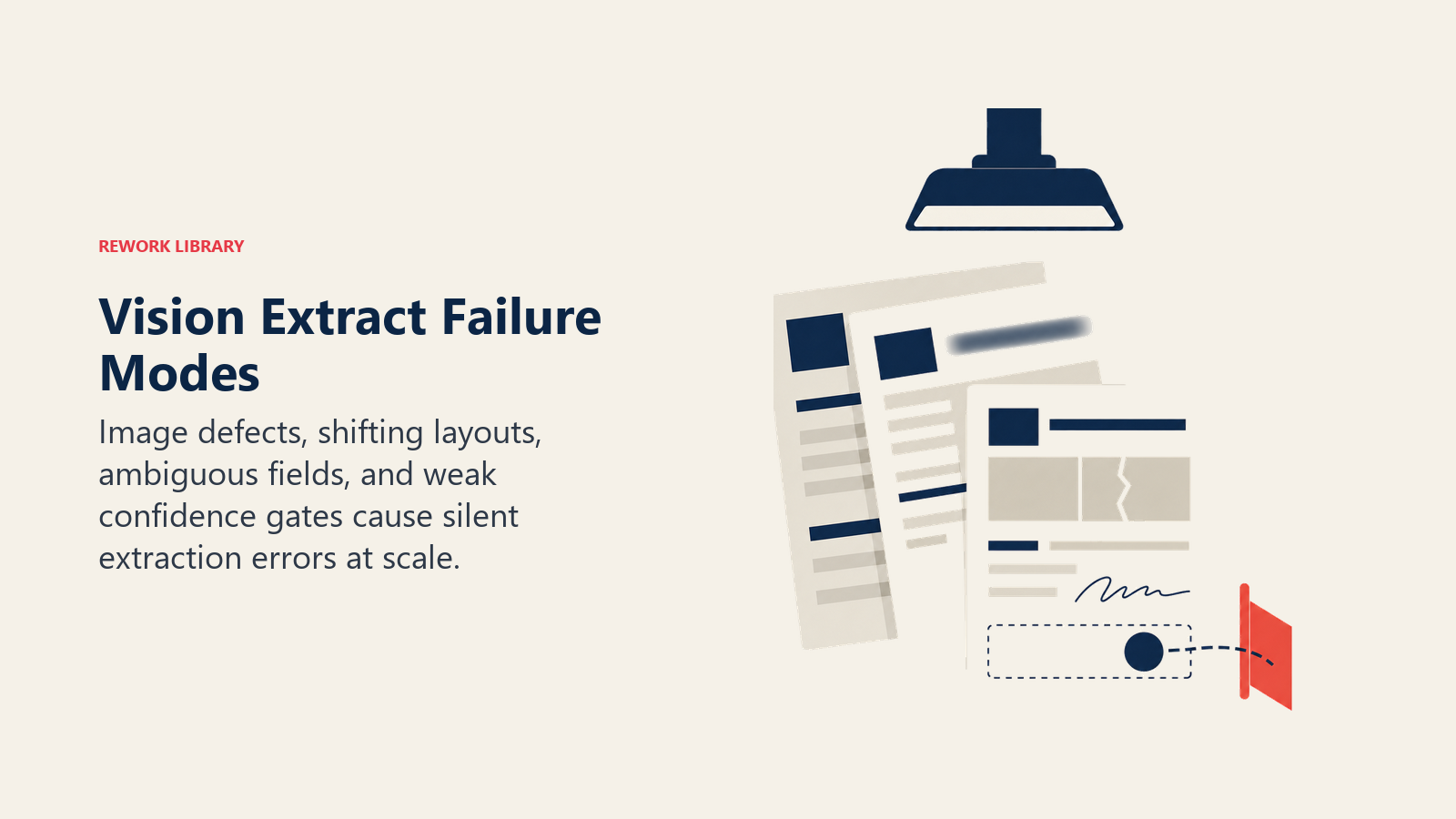
| 失敗モード | 根本原因 | 検出と軽減 |
|---|---|---|
| 低画像品質 | ぼやけた写真、傾いたスキャン、不良な照明、ドキュメントへの物理的損傷 | Ingestで品質チェック: 最小解像度/コントラスト閾値を下回る画像を拒否またはフラグを立てる。提出前にユーザーに写真品質について指示する。 |
| レイアウトの変動 | 同じサプライヤーから3年間で3つの異なる請求書テンプレート | テンプレート検出とフォールバックとしてのフリーフォーム抽出。初回発生ドキュメントをテンプレートトレーニングのためにログに記録する。 |
| フィールド解釈の曖昧さ | 「日付」とラベルされたフィールドが請求書日付、支払期限、またはサービス期間の開始を指す可能性がある | 抽出にコンテキストラベルを要求する。デプロイ前にサプライヤー/ベンダーベースの実際のドキュメントサンプルでテストする。 |
| 低信頼度のパススルー | モデルが55%の信頼度で値を抽出し、フラグを立てずにプッシュする | フィールドタイプ別に厳格な信頼度閾値を設定する。金額とアカウント番号フィールドは加盟店名フィールドより高い信頼度を必要とするべき。 |
| 手書きと印刷の混在 | 手書きの注釈(訂正、追加)が入った印刷フォーム | 別の手書き認識を実行する。混合コンテンツを含むドキュメントに人間によるレビューのフラグを立てる。 |
| 多言語ドキュメント | 日本語のベンダー請求書、ポルトガル語で記入された医療フォーム | フィールド抽出の前に言語検出が実行されることを確認する。検出された言語に抽出モデルをマッチさせる。 |
最も費用のかかる失敗は低信頼度のパススルーです。誤って抽出されるが信頼できるように見えるドキュメントです。適切に設定されていないシステムは、誰かが気づくまで数週間、スケールで誤った値をサイレントに入力します。修正は信頼度閾値を持つレビューキューですが、それらのキューは実際にスタッフが配置されて作業される必要があります。作成するだけでは不十分です。Vision Extractが他のパターンとリスクスペクトル上でどのように比較されるかについては、AIパターンのリスクグラジエントを参照してください。
フィールドタイプ別に厳格な信頼度閾値を設定する組織は(すべてのフィールドに1つの閾値を適用するのとは対照的に)、例外キューの量を単一閾値の設定と比較して35〜40%削減します。請求書金額のような高価値フィールドは加盟店名のような低リスクフィールドより高い信頼度要件でフラグが立てられるためです(ABBYY IDP Benchmark、2024年)。
Vision Extract vs. OCR: 重要な違い
最も一般的な誤解はVision ExtractとOCRを同義語として扱うことです。OCRは文字を読みます。テキストの画像を取得してテキスト文字列に変換します。「小計: ¥1,247」は文字列「小計: ¥1,247」になります。
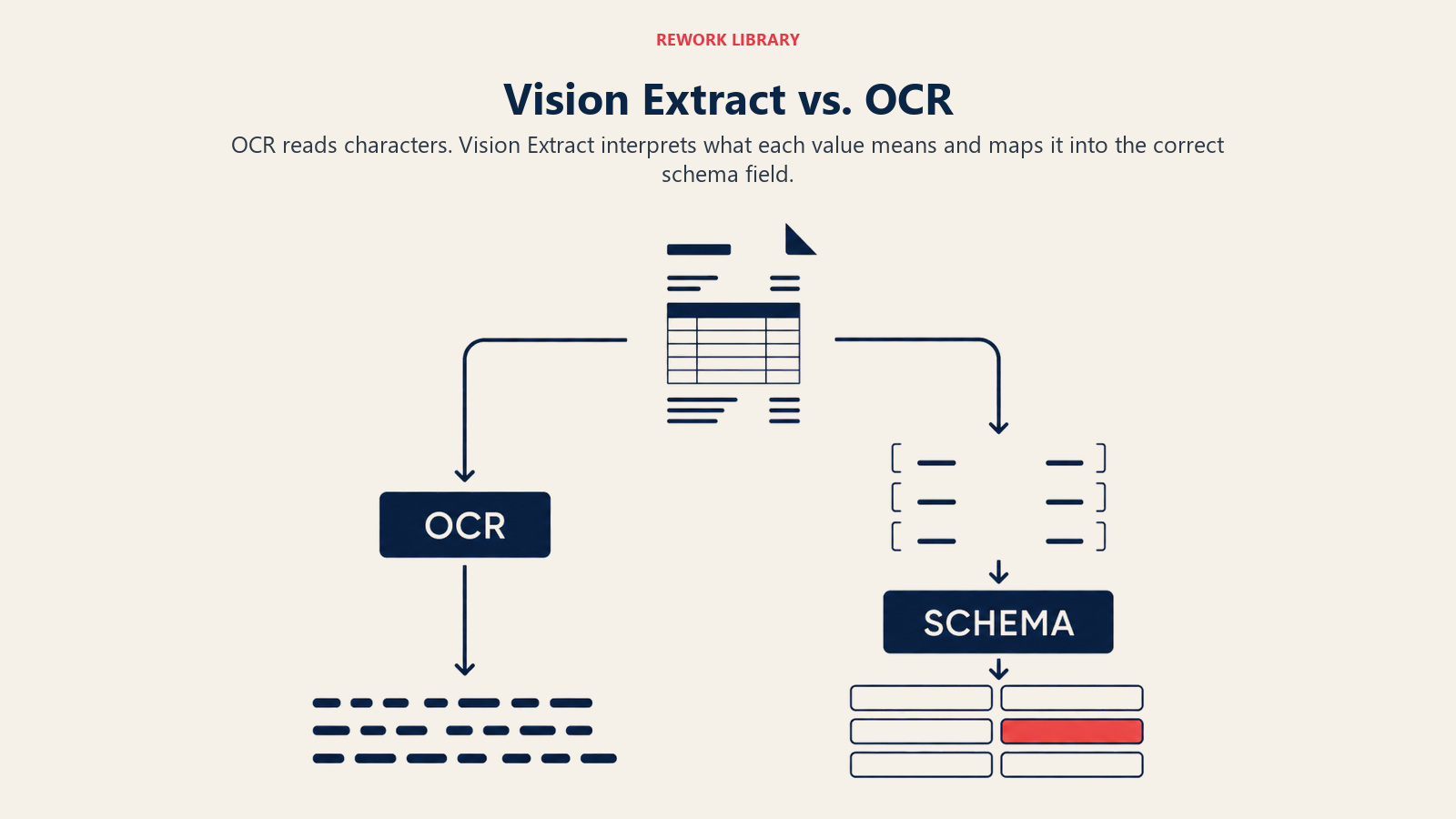
Vision Extractは意味を読みます。請求書に似た構造のドキュメントの右下セクションの「小計:」の後にある「¥1,247」が税引前の請求書金額であり、invoice_subtotalフィールドにマッピングされるべきで、その上の明細の合計に対して検証されるべきだと理解します。これは異なる機能です。単なる文字認識ではなく、ドキュメントの理解が必要です。
実際的な意味: Vision Extractツールを OCR 精度ベンチマークに対して評価する場合、間違ったものを測定しています。特定のドキュメントタイプでのフィールドレベルの抽出精度を測定してください。文字精度99%を達成するが半分の時間で間違ったフィールドを抽出するツールは、良いVision Extractツールではありません。
Vision Extractが機能するとき、しないとき
うまく機能する場合:
- ドキュメントが一貫したフォーマットに従っている。既知のテンプレート(標準的な請求書レイアウト、政府発行のIDフォーマット、ブランドの経費領収書フォーマット)は信頼性高く抽出されます。
- 画像品質がコントロールされている。フラットなスキャン、良い照明でのモバイル写真、デジタルソースからのPDFはすべてうまく抽出されます。悪い照明でのしわくちゃの紙はそうではありません。
- フィールドが明確に区切られている。ラベル付きフィールドを持つ構造化されたフォームは、自由形式のドキュメントより良く抽出されます。
- ボリュームが投資を正当化する。ROIの計算は、ドキュメントタイプの複雑さに応じて、ほとんどの実装で月500〜1,000件のドキュメント程度でプラスに転じます。
うまく機能しない場合:
- ドキュメントが主に手書きである。手書き認識の精度は、非標準化されたフォームでは特に、印刷されたテキストと比較して大幅に低下します。
- ドキュメントに複雑な推論要件がある。Vision Extractは値を見つけて読みます。タスクが「この契約書には更新条項が含まれているか、その条件は当社の標準に準拠しているか?」であれば、それはDocument Reviewであり、Vision Extractではありません。
- 画像品質がコントロールできない。ソースドキュメントが劣化している場合(アーカイブ紙、摩耗したID、しわくちゃの領収書)、精度はドキュメントごとに予測が難しい方法で劣化します。
vs. Document Review: Vision Extractはドキュメントからフィールドを抽出します。Document Reviewはドキュメントをコンプライアンス、リスク、または標準からの逸脱のために分析します。よく組み合わされます。Vision Extractが最初(条項を抽出する)、Document Reviewが2番目(それらの条項が受け入れられるかどうかを分析する)。しかし、異なる作業を行う別個のパターンです。
vs. Scoring and Routing: これらのパターンはよく連続しています。Vision Extractが構造化されたレコードを作成し、Scoring and Routingがそれらの構造化されたレコードを使って優先度を割り当てたりルーティングの決定をしたりします。代替案ではなく、補完的なパターンです。
ROIシグナル: 影響の測定
| 指標 | 手動のベースライン | Vision Extract使用時 | 典型的な改善 |
|---|---|---|---|
| ドキュメントあたりのコスト | 4〜6ドル(データ入力の人件費) | 0.10〜0.50ドル(AI処理 + 例外処理) | 85〜95%のコスト削減 |
| ドキュメントあたりの処理時間 | 5〜15分 | 数秒〜2分(例外レビューを含む) | 80〜99%の時間削減 |
| フィールドレベルのエラー率 | フィールドあたり1〜4% | 例外処理の人間レビューあり: フィールドあたり0.1〜0.5% | 70〜90%のエラー削減 |
| APサイクルタイム | 平均5〜10日 | 平均1〜2日 | 60〜80%のサイクルタイム削減 |
| 請求書の例外率 | 15〜25%が手動対応が必要 | よく調整されたモデルで5〜15% | ドキュメントの多様性に大きく依存 |
最も重要なROIドライバーは処理時間です。毎月領収書入力に40人時間を費やしていた財務チームは単に40時間を節約するだけではありません。それらの人々を判断力が必要な作業のために解放し、ボトルネックを取り除くことでダウンストリームプロセス(経費報告、AP照合、KYCレビュー)をより速くします。
画像品質基準チェックリスト
Vision Extractを導入する前に、入力品質基準を確立します。これらは理想的なものではありません。これらの基準を満たさないドキュメントは受付時に拒否され、ユーザーは再提出を求められるべきです。
最低限許容できる基準:
- 解像度: 印刷されたドキュメントは300 DPI以上; モバイル写真は1080p以上
- 向き: 5度未満の傾き; ほとんどのモデルは自動的な傾き補正を処理しますが、極端な角度は精度を低下させます
- 照明: 主要なフィールドをカバーする露出過多または影の領域がない
- カバレッジ: フレーム内にドキュメント全体が見え、エッジがカットされていない
- フォーマット: PDF、PNG、JPEG、TIFF; 高度に圧縮されたJPEGアーティファクトを避ける
拒否のトリガー:
- 画像がぼやけている(動きのぼけ、ピントが合っていない)
- 物理的な損傷が主要なフィールドをカバーしている(提出者が意図しない破れ、染み、墨消し)
- 手書きコンテンツがフィールドの50%を超える(拡張された手書き認識または人間によるレビューにルーティングする)
- ドキュメントタイプがモデルによって認識されない
1つの運用上の注意点: レビューキューがチームがクリアできるより速く積み上がる場合、画像品質の問題(ソース)、信頼度閾値の問題(保守的すぎる)、またはスタッフ不足の問題(ボリュームが計画を超えた)のいずれかがあります。デプロイ後最初の60日間は週次でキューの深さを追跡します。
データとインフラの準備状況
Vision Extractを導入する前に、これらの依存関係を確認します:
画像保存パイプライン。 抽出されたドキュメントはドキュメントタイプに適したアクセスコントロールと保持ポリシーで、通常はブロブストレージ(S3、Azure Blob)に保存される必要があります。KYCドキュメントには規制上の保持要件があります。医療フォームにはHIPAA要件があります。領収書は通常、税務目的で7年間の保持が必要です。
システム・オブ・レコードの統合。 ExecuteステップはターゲットシステムへのステーブルなAPIが必要です。AP自動化はERP統合が必要です。CRMエントリはCRM API接続が必要です。KYCはIDベリフィケーションワークフローAPIが必要です。Vision Extractツールを購入する前にこれらをマッピングしてください。この統合作業は抽出セットアップよりも時間がかかることが多いからです。
人間レビューワークフロー。 機能する例外キューなしのVision Extractの導入はリスクです。モデルが自信を持って抽出できないドキュメントが積み上がります。それらをクリアするプロセスがなければ、処理されることはありません。最初にレビューワークフローを設計し、その周りに自動化を構築します。
Rework分析: 失敗するVision Extractの導入はほとんど常に、抽出ステップのみを中心に設計され、例外キューをまったく考慮していないものです。すべてのVision Extractシステムは自信を持って抽出できないドキュメントのセットを生み出します。それらのドキュメントは、チームがクリアするために割り当てられない限り積み上がります。Vision Extractを大規模に成功させるチームは、最初に人間のレビューワークフローを設計し、その周りに自動化を構築します。抽出はクリーンな85〜90%を処理します。レビューキューはそうでない10〜15%を処理します。レビューキューにオーナーがない場合、それは積み上がり、クリアされなくなり、APやKYCチームは静かに再び手動ですべてを入力し始めます。テクノロジーは失敗しませんでした。運用が失敗しました。
よくある質問
Vision Extract AIパターンとは何ですか?
Vision Extractは画像、スキャンされたドキュメント、PDFを構造化されたデータベースレコードに変換するAIパターンです。式は: Ingest(画像またはスキャン)、Analyze(フィールドの抽出と分類)、Generate(正規化されたフィールドを持つ構造化レコード)、Execute(システム・オブ・レコードへのプッシュ)です。請求書、ID、領収書、受付フォーム、ビジュアルソースからデータベースに手動再入力なしで情報を移動する必要があるあらゆるドキュメントを処理します。
Vision ExtractはOCRとどう違いますか?
OCR(光学文字認識)は文字を読みます。テキストの画像をテキスト文字列に変換します。Vision Extractは意味を読みます。請求書の「小計:」の後にある「¥1,247」が税引前の合計金額で、invoice_subtotalフィールドにマッピングされるべきで、明細の合計に対して検証されるべきだと理解します。Vision Extractは文字読み取りに加えて、ドキュメントタイプ認識、フィールドマッピング、フォーマット正規化が必要です。
Vision Extractのドキュメント処理コスト削減はどのくらいですか?
手動データ入力はエンタープライズスケールでドキュメントあたり4〜6ドルかかり、フィールドレベルのエラー率は1〜4%です。Vision Extractは処理コストをドキュメントあたり0.10〜0.50ドルに削減し、例外の人間レビューありでフィールドレベルのエラー率を0.1〜0.5%にします。これはドキュメントあたり85〜95%のコスト削減を表します。AP自動化にVision Extractを使用している財務チームはAPサイクルタイムが60〜80%削減されたと報告しています(Deloitte、2024年)。
Image-to-Schema Pipeline(画像からスキーマへのパイプライン)とは何ですか?
Image-to-Schema Pipelineは Vision ExtractをOCRの基本から区別するコア機能です。3ステップの変換を説明します: 文字認識(テキストを読む)、フィールド識別(文字を意味論的な意味にマッピングする)、スキーマ正規化(抽出された値をターゲットシステムが期待するフォーマットに変換する)。最初のステップのみを実行するVision Extractシステムはインテリジェントドキュメントプロセッサではなく、OCRツールです。
Vision Extractの失敗の原因は何ですか?
6つの主な失敗モードがあります: 低画像品質(ぼやけたまたは傾いたドキュメント)、レイアウトの変動(異なるフォーマットを使用する異なるベンダーからの同じドキュメントタイプ)、曖昧なフィールドラベル、低信頼度のパススルー(人間のレビューをスキップする自信を持った誤った抽出)、印刷テキストと混在した手書き、言語検出なしの多言語ドキュメント。低信頼度のパススルーは検出されるまで数週間スケールで誤った値をサイレントに入力するため、最も費用のかかる失敗です。
Vision Extractの例外を効果的に処理するにはどうすればよいですか?
自動化を設計する前に人間のレビューワークフローを設計してください。フィールドタイプ別に厳格な信頼度閾値を設定します: 請求書金額とアカウント番号は加盟店名より高い信頼度を必要とします。閾値以下のすべてのドキュメントを、自動コミットではなくスタッフが配置されたレビューキューにルーティングします。フィールドタイプ固有の閾値を使用する組織は、単一閾値の設定と比べて例外キューの量を35〜40%削減します(ABBYY、2024年)。最初の60日間は週次でキューの深さを追跡して、チームを圧倒する前にボリュームの予期しない増加を発見します。
参考リンク

Co-Founder, Rework.com
On this page
- 機能の式: Ingest、Analyze、Generate、Execute
- 詳細な6つの実例
- 1. 請求書処理とAP自動化
- 2. 領収書から経費報告書へ
- 3. 名刺からCRMへ
- 4. KYCのためのIDとパスポートのスキャン
- 5. 小売棚の監査
- 6. 医療受付フォームのデジタル化
- Image-to-Schema Pipeline(画像からスキーマへのパイプライン)
- 失敗モード: 実際に抽出を壊すもの
- Vision Extract vs. OCR: 重要な違い
- Vision Extractが機能するとき、しないとき
- ROIシグナル: 影響の測定
- 画像品質基準チェックリスト
- データとインフラの準備状況
- 参考リンク