More in
Lead Capture Automation
Chat-to-CRM Automation: Connecting Respond.io with HubSpot (2026 Guide)
Apr 18, 2026
LinkedIn Lead Gen Forms to CRM: Automated Routing That Actually Works
Apr 18, 2026
Lead Scoring for Chat-Captured Leads: A Different Model Than Form Leads
Apr 18, 2026
Webhook-Based Lead Capture: A Practical Guide for Custom Integrations
Apr 18, 2026
Routing Leads to Reps Based on Chat Conversation Context
Apr 18, 2026
Automating the Post-Capture Nurture Sequence: From First Touch to Sales-Ready
Apr 18, 2026
GDPR-Compliant Lead Capture for EU Markets: A Practical Operations Guide
Apr 18, 2026
Building a No-Form Lead Capture Stack: How to Capture Leads Without a Single Form
Apr 18, 2026
Tracking Source Attribution Across Chat, Ad, and Form Leads: The Ops Guide
Apr 18, 2026
Connecting Your CMS Form to Salesforce Without Paying for Premium Connectors
Apr 18, 2026
Lead Enrichment Automation: Filling Gaps Without Paying Per Record
Turn this article into takeaways for your work.


Each assistant summarizes the article only for you and suggests best practices for your work.
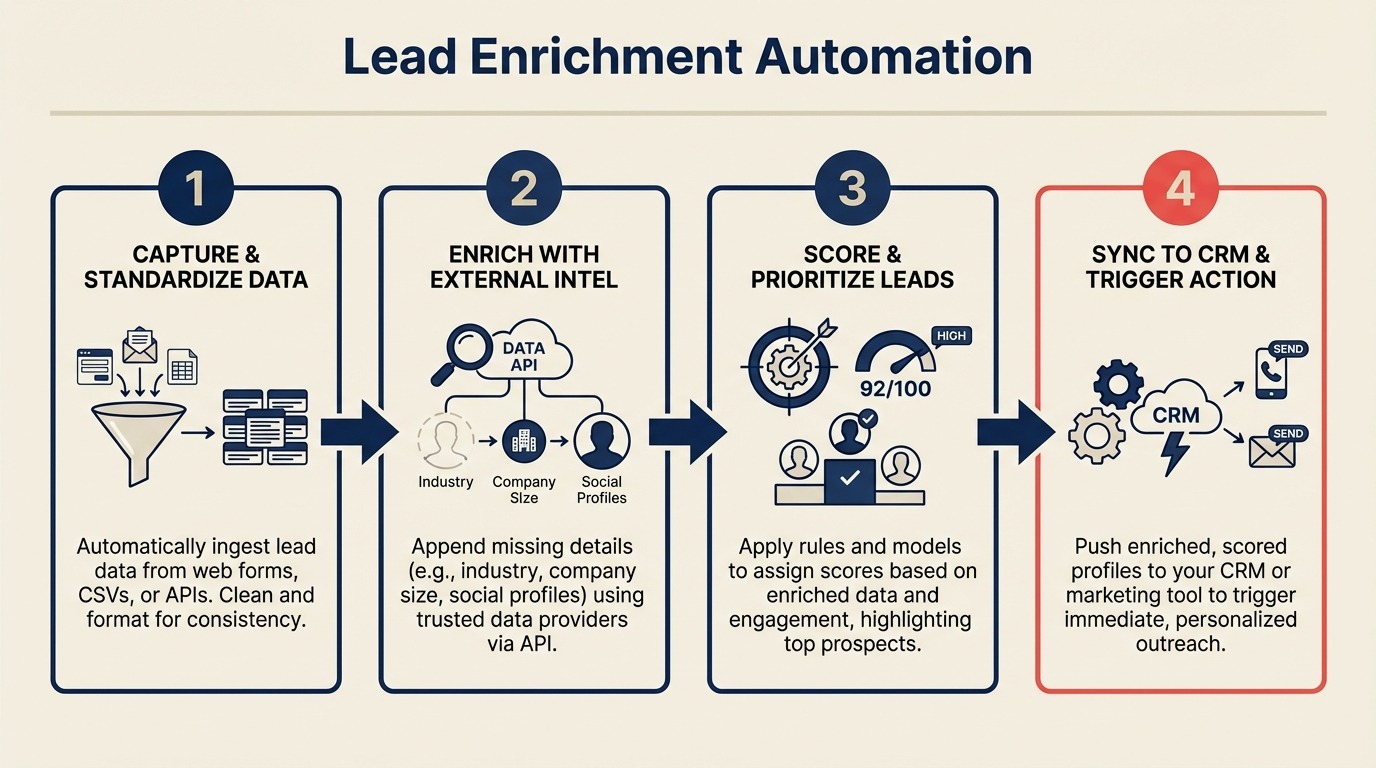
A lead capture form that only asks for name and email creates a CRM record your reps can't prioritize. A lead enrichment workflow that fires within 30 seconds of form submission adds company, role, industry, and employee count automatically. The rep opens a record, not a mystery.
Data enrichment is the process of enhancing, refining, and improving raw data with additional context from internal or external sources: in B2B lead gen, that typically means appending firmographic and technographic data to contact records based on email domain or company name.
One RevOps team was spending $3,200 per month on per-record enrichment for 4,000 leads. Coverage was good, about 85% of records got enriched. But when they analyzed which enriched fields actually influenced lead scoring and routing, they found 80% of their spend was on fields the scoring model never used. Gartner's guidance on master data management makes the same point: enrichment value is only realized when the downstream processes are designed to consume and act on the enriched fields. After switching to a tiered approach that matched enrichment investment to lead quality, same coverage at $400 per month.
Here's how to build that tiered approach.
Step 1: The 6 Fields That Actually Matter
Before you enrich, know what you're enriching for. Not all CRM fields are equal. These 6 have the highest impact on lead scoring and routing decisions:
- Company size (employee count): the single most common ICP filter. Most B2B routing rules use company size to assign enterprise vs. SMB reps.
- Industry: second most common ICP filter. Determines which product messaging and use cases apply.
- Seniority level: C-level and VP leads get different treatment than individual contributors. This feeds both scoring and routing.
- LinkedIn URL: enables manual research before a rep call and powers social selling workflows.
- Technology stack: knowing a prospect uses Salesforce vs. HubSpot changes your pitch. Tools like Clearbit and Apollo surface this from public data.
- Funding stage: for B2B SaaS selling to startups, knowing a company raised a Series B in the last 6 months is a high-intent signal.
Enrich these 6 first. Add more fields only after you can confirm they influence actual decisions downstream. If your CRM data model isn't set up to receive these fields cleanly, CRM data model design covers how to structure custom properties before you run enrichment at scale. The custom fields guide goes deeper on naming conventions and field type choices that affect enrichment writeback.
Step 2: Free Enrichment Sources
Before you spend anything, there are legitimate free enrichment options for smaller volumes:
Clearbit Reveal (IP-based company data, free tier): Clearbit Reveal identifies the company behind an anonymous website visit based on IP address. When someone submits a form on your site, you can pass their IP to Reveal and get company name, size, and industry, even if they only provided a personal email. Free tier covers up to 100 reveals per month. Useful as a first-pass enrichment layer before calling an email-based API.
Hunter.io domain search (free tier): If you have a company name but no email, Hunter.io's domain search finds email patterns for that domain. Useful for enriching form submissions where someone provided a company name but used a Gmail address. Free tier covers 25 searches per month.
LinkedIn Sales Navigator (research, not API): Free to anyone with a LinkedIn account. Not automatable at scale, but useful for manual enrichment of high-value leads before a rep call. Include a workflow step that prompts reps to check LinkedIn for leads above a company size threshold.
Free enrichment decision table:
| Scenario | Free Tool | What You Get |
|---|---|---|
| Form submission with business email | Apollo.io free tier | Company, size, industry, LinkedIn |
| Form submission with Gmail/Yahoo | Clearbit Reveal (IP) | Company from IP address |
| Company name known, email unknown | Hunter.io domain search | Email patterns for domain |
| High-value lead, manual research | LinkedIn (manual) | Role, tenure, recent activity |
Step 3: Freemium-to-Paid Enrichment Tools
Once you're processing more than a few hundred leads per month, you need an API-accessible enrichment service. Here's the pricing comparison at the volume tiers that matter:
Apollo.io Enrichment API: Apollo.io's enrichment API has the most generous free tier of the major enrichment tools: 60 email exports per month on the free plan. Paid plans start at $49/month for individual use and scale to $99/month for teams (as of early 2026). Coverage is strong for US and Western Europe, weaker for Southeast Asia and LATAM.
Clearbit Enrichment API: Email-based lookup that returns 85+ data points on a person and their company. Pricing is usage-based, roughly $0.10-0.15 per record at low volume, dropping as you scale. Best coverage for tech and SaaS companies. Less strong for traditional industries.
People Data Labs (PDL): People Data Labs offers bulk enrichment and API access. Pricing by record: approximately $0.05-0.08 per record at scale (10k+ records). Better for batch enrichment of existing records than real-time enrichment of incoming leads. Strong global coverage.
Pricing comparison at volume tiers:
| Tool | 1,000 leads/month | 5,000 leads/month | 10,000 leads/month |
|---|---|---|---|
| Apollo.io | ~$49/mo (team plan) | ~$99/mo | ~$99-149/mo |
| Clearbit | ~$150/mo | ~$500/mo | ~$900/mo |
| People Data Labs | ~$50/mo | ~$200/mo | ~$400/mo |
| Clearbit Reveal (IP) | Free (100/mo) | $199/mo | $499/mo |
Apollo is the right default for most teams under 5,000 leads per month. Switch to PDL for bulk enrichment of historical records where you need to process tens of thousands at once. For teams still choosing their middleware for the enrichment automation itself, the Zapier vs n8n vs Make comparison covers which tool handles conditional enrichment logic best at each volume tier.
Step 4: Building the Enrichment Automation
The enrichment automation fires immediately after a new CRM contact is created. Here's the flow:
Trigger: New contact created in CRM
  → Check: Is email a business domain? (not Gmail/Yahoo)
    → Yes: Call enrichment API with email
      → API returns data
        → Update CRM fields (only if empty, don't overwrite)
        → Log enrichment source and confidence score
        → Flag if enrichment returned no data
    → No: Call Clearbit Reveal with submission IP address
      → Update company fields if confidence > 70%
Building this in Make:
- Trigger module: "Watch new contacts in HubSpot" (or Salesforce)
- Filter module: Check that email is not a common personal domain
- HTTP module: POST to Apollo.io People Enrichment endpoint with email as parameter
- Router module: Branch on whether enrichment data was returned
- HubSpot module: Update contact (using "update if empty" field logic)
- Log module: Write result to Google Sheet or data store
Building this in n8n: The same flow works in n8n with the HTTP Request node calling the enrichment API and the IF node branching on data availability. n8n's advantage here is native Python/JavaScript code nodes, so you can write more sophisticated field mapping and confidence score logic without hitting Make's module limits.
Building this in Zapier: Zapier has Apollo and Clearbit as named integrations, which makes initial setup faster. But for conditional logic (update only if empty, branch on confidence score), you'll hit Zapier's limits quickly. Use Zapier for simple single-step enrichment; move to Make or n8n when you need branching.
Step 5: Enrichment for Chat-Captured Leads
Chat leads from WhatsApp or Respond.io are phone-first. You have a phone number, not necessarily an email. This requires a different enrichment path than email-based leads.
Phone-first enrichment options:
- Reverse phone lookup services (NumLookup, AbstractAPI Phone Validation): confirm the number is real and get carrier/region
- Request email in the chat flow before closing: "Can I also grab your email to send you the details?"
- Enrich after email is collected, same as form leads
The practical approach for most chat-captured leads: enrich what you can from the conversation context (the chat itself often contains company name, role, use case), then prompt for email in the follow-up message so you can run standard email enrichment.
For a complete guide to connecting chat leads to your CRM, see form-to-CRM automation patterns that actually scale. Teams using Respond.io should also check the Respond.io to HubSpot integration guide for the field-mapping specifics. And because phone-first leads often arrive without enough data to deduplicate, deduping multichannel leads covers how to match them to existing contacts before enrichment runs.
Step 6: Enrichment Confidence Scores
Not all enrichment data is equally reliable. Apollo rates its data matches with a confidence score. Clearbit includes a fuzzy flag for company matches derived from IP. People Data Labs provides likelihood scores for field accuracy.
How to use confidence scores in practice:
- Confidence > 85%: Write to CRM field, overwrite only if field is empty
- Confidence 60-85%: Write to a separate "enrichment_suggested" field, flag for review
- Confidence < 60%: Log the attempt, don't write to CRM
This prevents low-confidence enrichment from contaminating your lead scoring. A company size of "51-200" with 40% confidence that scores a lead as enterprise and triggers an enterprise rep assignment is worse than having no company size at all.
In Make, implement this as a router module that checks the confidence score field in the API response and branches to different update logic accordingly.
Step 7: Cost Optimization
Enrich smarter, not everything:
Enrich only above a minimum quality threshold: Don't enrich leads with placeholder emails, known spam domains, or missing first names. These records won't convert regardless of enrichment data. Filter them out before the enrichment API call.
Tier enrichment by lead source: Meta Lead Ad submissions get lighter enrichment (company size, industry from Clearbit Reveal). Inbound demo requests get full enrichment (all 6 priority fields plus technology stack). The cost difference is significant, and the ROI difference is even larger.
Batch enrichment for historical records: Use People Data Labs batch enrichment for existing CRM records that were created before your enrichment workflow was in place. Run it once, at bulk pricing, rather than through your real-time flow.
Enrichment by ICP fit: Build a basic ICP filter before enrichment: if the email domain is from a country you don't serve, or the form answers clearly indicate out-of-ICP (company size below minimum, industry not in target list), skip enrichment entirely. Teams operating in the EU should also review their enrichment setup against GDPR requirements for data processing: enrichment that appends personal data from third-party sources requires a lawful basis under Article 6. Log the skip so you can review the filter criteria over time.
Common Pitfalls
Overwriting manually-entered data. A rep corrected the company name from "Acme Corp" to "Acme Corporation Ltd." Your enrichment automation fires and overwrites it back. Always use update-if-empty logic for enrichment fields.
Enriching every lead regardless of quality. This is where the $3,200/month problem comes from. Set quality thresholds before the enrichment call, not after.
No confidence score check before overwriting. Low-confidence data is often wrong. Implement the confidence branching logic before writing any enrichment data to the CRM.
Enrichment API timeout causing record creation failure. If your enrichment is synchronous (the CRM record creation waits for enrichment to complete), a slow API response can cause the entire flow to fail. Make enrichment asynchronous: create the CRM record first, then enrich in a separate step.
Treating chat leads the same as form leads. Phone-first leads need a different enrichment path. Don't assume your standard email enrichment flow covers them.
What to Do Next
Identify the 3 CRM fields with the highest impact on your lead scoring and routing rules. For most B2B teams, that's company size, industry, and seniority. Check what percentage of incoming leads currently have those fields populated. If it's below 60%, that gap is costing you lead quality, and enrichment is the direct fix. Poor field coverage is also one of the core reasons attribution breaks down in RevOps teams. Fixing enrichment directly improves reporting accuracy. For the field mapping decisions that make enrichment data land cleanly, the field mapping guide is a practical complement to this workflow.
Start with Apollo's free tier and a basic Make scenario. Get coverage on those 3 fields before expanding to the full 6. Measure your scoring and routing accuracy before and after. The improvement is usually visible within two weeks.
Learn More

Co-Founder, Rework.com