Die besten Slack-Alternativen 2026: 11 Tools für Teamkommunikation für jedes Budget und jede Teamgröße
Die besten Slack-Alternativen 2026 sind Microsoft Teams und Google Chat für gebündelte Enterprise-Stacks, Discord und Pumble für kostenlosen unbegrenzten Nachrichtenverlauf, Mattermost und Rocket.Chat für self-hosted Sicherheit, Twist für async-Teams und Lark für Teams, die Chat, Dokumente, Video und HR-Tools in einer App wollen. Die richtige Wahl hängt von der Teamgröße, dem Budget und davon ab, ob Compliance oder Self-hosting eine harte Anforderung ist.
Slack ist ein wirklich gutes Produkt. Es hat das kanalbasierte Messaging populär gemacht, verfügt über eine riesige Integrationsbibliothek und ist die Standard-Kommunikationsebene in Tausenden von Unternehmen. Aber wenn Sie Alternativen prüfen, kennen Sie die Probleme bereits.
Der Kernkonflikt ist Kosten gegen Wert. Slacks kostenlose Stufe begrenzt den Nachrichtenverlauf auf 90 Tage, beschränkt Sie auf 10 App-Integrationen und schließt Voice-Huddles mit Bildschirmfreigabe aus. Der Wechsel zu Pro kostet 7,25 USD pro Platz und Monat. Business+ liegt bei 12,50 USD. Für ein 50-köpfiges Team sind das 7.500 USD pro Jahr bei Pro, und Sie erhalten dennoch nicht die Compliance-Kontrollen für Großunternehmen, die Sie möglicherweise tatsächlich benötigen. Hinzu kommt die Salesforce-Übernahme im Jahr 2021, die die Produktprioritäten zugunsten der Integration in das Salesforce-Ökosystem statt eigenständiger Teams verschoben hat. So entsteht ein wachsender Pool von Käufern, die etwas wollen, das für ihren tatsächlichen Workflow gebaut wurde, statt für die Plattformstrategie eines CRM-Giganten. Kanal-Wucherung, Benachrichtigungsüberflutung und das Fehlen nativer Workflow-Automatisierung über einfache "Wenn-dann"-Auslöser hinaus runden die Gründe ab, warum Teams diese Suche starten. Für Teams, die prüfen, ob asynchrone Kommunikation den Bedarf an Echtzeit-Messaging-Tools insgesamt verringern könnte, macht der Leitfaden zur asynchronen Kommunikation deutlich, wann eine async-first-Kultur Kosten senkt und wann sie die falsche Art von Reibung erzeugt.
Dieser Leitfaden behandelt 11 Alternativen mit ehrlichen Bewertungen. Keine vagen Zusammenfassungen. Echte Preise, echte Zielgruppen, echte Einschränkungen.
Schnelle Vergleichstabelle
| Tool | Am besten geeignet für | Einstiegspreis | Wichtigste Stärke | Wichtigste Einschränkung |
|---|---|---|---|---|
| Microsoft Teams | Großunternehmen im Microsoft-365-Stack | Inklusive bei M365 Business Basic (6 USD/Benutzer/Monat) | Tiefe Office-365-Integration, Compliance für Großunternehmen | Schwere, komplexe Oberfläche; überdimensioniert für kleinere Teams |
| Google Chat | Google-Workspace-Teams, die nativen Chat wollen | Inklusive bei Workspace Starter (6 USD/Benutzer/Monat) | Reibungslos für Google-Nutzer, Spaces- + Meet-Integration | Begrenzter eigenständiger Wert außerhalb des Google-Ökosystems |
| Discord | Startups, Communities, Dev-Teams, die kostenlose Sprache/Video wollen | Kostenlos; Nitro ab 2,99 USD/Monat | Großzügige kostenlose Stufe, exzellente Sprachkanäle | Nicht für Großunternehmen geeignet; keine Compliance, kein SSO im kostenlosen Tarif |
| Rocket.Chat | Self-hosted open-source Messaging | Kostenlos self-hosted; Cloud ab 4 USD/Platz/Monat | Volle Kontrolle, open-source, On-Prem-Option | Erfordert technische Ressourcen für die Wartung von self-hosted |
| Mattermost | Sicherheitsorientierte, self-hosted Teams in Großunternehmen | Kostenlos self-hosted; Cloud ab 10 USD/Platz/Monat | Air-gapped-Bereitstellung, Compliance für Großunternehmen, open-source | Hoher IT-Aufwand; nicht plug-and-play |
| Chanty | Kleine Teams, die einfachen + günstigen Chat wollen | Kostenlos (5 Benutzer); 3 USD/Platz/Monat (Business) | Günstigste voll ausgestattete Option; integrierter Aufgabenmanager | Begrenzt bei Skalierung; kleineres Ökosystem |
| Flock | Kleine bis mittlere Teams, die Slack-ähnliche UX zu geringeren Kosten wollen | Kostenlos; 4,50 USD/Platz/Monat (Pro) | Vertraute Oberfläche, integriertes Video, niedrigerer Preis | Kleinere Integrationsbibliothek als Slack |
| Pumble | Budgetbewusste Teams, die unbegrenzten Nachrichtenverlauf brauchen | Kostenlos (unbegrenzter Verlauf); 2,49 USD/Platz/Monat (Pro) | Unbegrenzter Nachrichtenverlauf im kostenlosen Tarif | Fehlende Tiefe bei Automatisierungen und Integrationen |
| Twist | Async-first verteilte Teams | Kostenlos; 5 USD/Platz/Monat (Unlimited) | Thread-basiertes async-Format reduziert Unterbrechungen | Nicht geeignet für synchrone oder schnelllebige Teams |
| Element | Datenschutzorientierte Teams, die Matrix-Protokoll-Föderation brauchen | Kostenlos (self-hosted); Cloud ab 5 USD/Platz/Monat | Dezentralisiert, Ende-zu-Ende-verschlüsselt, föderiert | Komplexe Einrichtung; steile Lernkurve für nicht-technische Nutzer |
| Lark | Schnell wachsende Teams im asiatischen Markt oder Nutzer im ByteDance-Ökosystem | Kostenlos (bis zu 50 Benutzer); ab 12 USD/Benutzer/Monat | All-in-one: Chat, Dokumente, Video, HR-Tools in einer App | Bedenken zur Datenhoheit; schwächerer Support für westliche Großunternehmen |
Phasen-Eignungsmatrix
| Tool | Startup (1-20) | Wachstumsphase (20-100) | Mittelstand (100-500) | Großunternehmen (500+) |
|---|---|---|---|---|
| Microsoft Teams | Überdimensioniert | Möglich | Gute Eignung | Primäres Ziel |
| Google Chat | Gute Eignung | Gute Eignung | Gute Eignung | Begrenzt (Compliance) |
| Discord | Primäres Ziel | Gute Eignung | Möglich (kulturelle Passung) | Nicht empfohlen |
| Rocket.Chat | Möglich | Gute Eignung | Starke Eignung | Gute Eignung |
| Mattermost | Möglich | Gute Eignung | Starke Eignung | Primäres Ziel |
| Chanty | Primäres Ziel | Möglich | Nicht ideal | Nicht empfohlen |
| Flock | Gute Eignung | Starke Eignung | Möglich | Nicht ideal |
| Pumble | Primäres Ziel | Gute Eignung | Möglich | Nicht ideal |
| Twist | Primäres Ziel | Gute Eignung | Gute Eignung | Möglich |
| Element | Möglich | Gute Eignung | Starke Eignung | Gute Eignung |
| Lark | Möglich | Gute Eignung | Starke Eignung | Selektiv (Asien-Pazifik) |
Tabelle zu Größe und Persona
| Tool | Ideale Teamgröße | Primäre Käufer-Persona | Sekundärer Käufer |
|---|---|---|---|
| Microsoft Teams | 100-10.000+ | IT Director, CIO, IT-Beschaffung | Abteilungsleiter |
| Google Chat | 10-1.000 | IT-Admin, Office Manager | Jedes Team in Google Workspace |
| Discord | 2-100 | Gründer, Dev Lead, Community Manager | Engineering Manager |
| Rocket.Chat | 20-500 | IT Manager, Security Lead, DevOps | COO, Compliance Officer |
| Mattermost | 50-5.000 | CISO, IT Director, Security Engineer | COO, Compliance Officer |
| Chanty | 1-50 | Gründer, Team Lead, Kleinunternehmer | Operations Manager |
| Flock | 5-200 | Operations Manager, Team Lead | IT-Admin |
| Pumble | 2-200 | Gründer, Ops Manager, Budgetverantwortlicher | Team Lead |
| Twist | 5-150 | Gründer, Remote Team Lead, Head of Async | COO, HR Director |
| Element | 20-500 | CISO, IT Manager, Behörden-/Verteidigungskäufer | Compliance Officer |
| Lark | 20-1.000 | COO, IT Manager (Fokus Asien-Pazifik) | HR Director, Operations Lead |
1. Microsoft Teams: Tiefe für Großunternehmen im Microsoft-365-Stack
Turn this article into takeaways for your work.


Each assistant summarizes the article only for you and suggests best practices for your work.
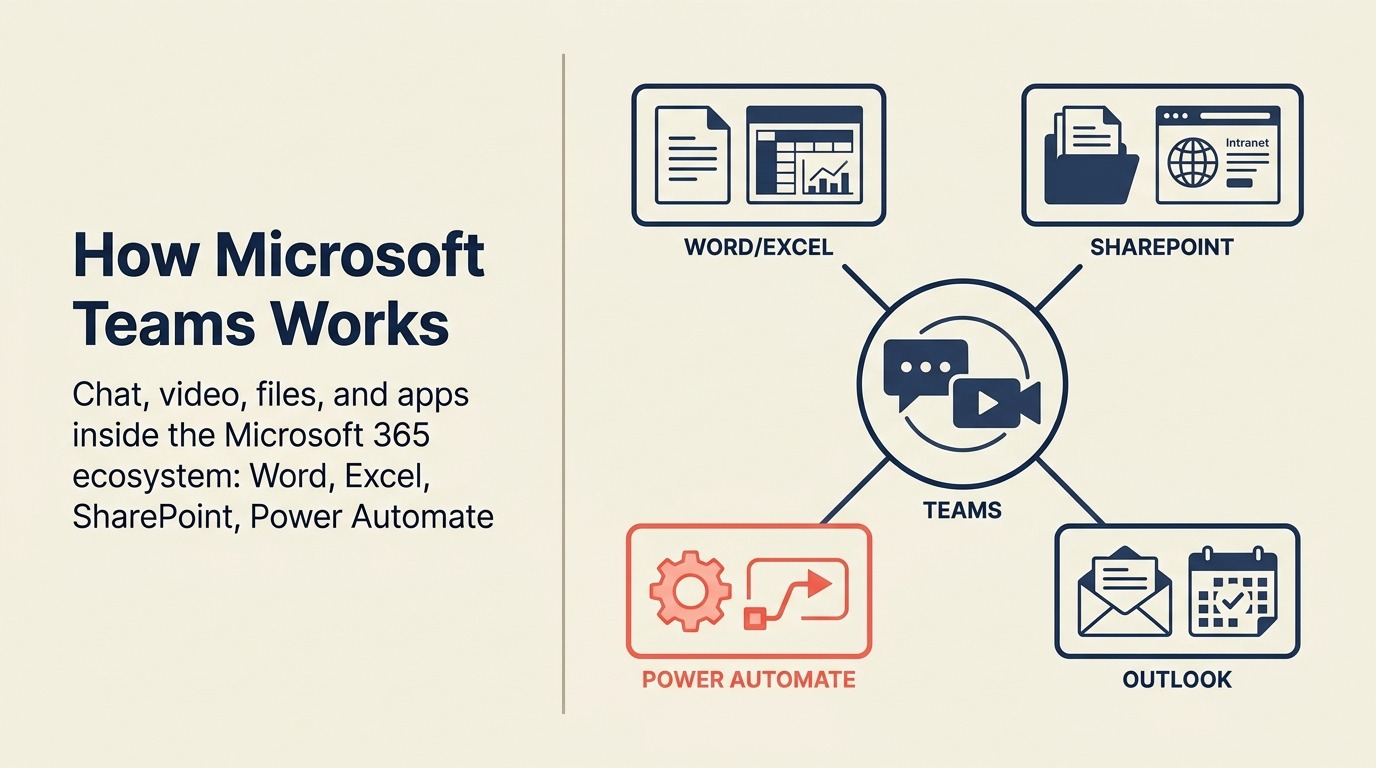
Teams ist im produktphilosophischen Sinne nicht wirklich ein Slack-Konkurrent. Es ist eine Kommunikationsebene, die dafür gebaut wurde, innerhalb der Microsoft-365-Welt zu leben. Wenn Ihre Organisation bereits für M365 zahlt, ist Teams praktisch inklusive. Allein dieses wirtschaftliche Argument erklärt den größten Teil seines Wachstums.
Das Produkt ist seit seinen frühen Versionen deutlich gereift. Teams-Kanäle, Meeting-Aufzeichnung, SharePoint-Integration, Planner-Integration und Copilot-KI-Unterstützung sind alle funktional und werden besser. Für regulierte Branchen sind die Compliance-Fähigkeiten von Teams, die eDiscovery-Unterstützung und die DLP-Richtlinien in dieser Preisklasse schwer zu übertreffen. Teams, die Microsoft Teams prüfen, überdenken im selben Projekt oft ihren gesamten Google-Workspace-Bestand; die besten Google-Workspace-Alternativen behandeln, was tatsächlich ersetzenswert ist und was nicht.
Aber Teams ist schwer. Der Desktop-Client verbraucht erheblichen Speicher, die Oberfläche ist dicht, und neue Nutzer beschweren sich regelmäßig, dass das Auffinden von Dingen schwieriger ist als es sein sollte. Für ein 15-köpfiges Startup ist es dramatisch mehr Produkt, als Sie brauchen. Für ein 5.000-köpfiges Fertigungsunternehmen, das SharePoint, Outlook und Excel als Kerntools betreibt, ist es die offensichtliche Konsolidierungsmaßnahme.
| Was Sie bekommen | Was Sie nicht bekommen |
|---|---|
| Tiefe Office-365-Integration (Word, Excel, SharePoint, Outlook) | Leichtgewichtige, schnelle UX |
| Compliance für Großunternehmen, eDiscovery, DLP-Richtlinien | Einfaches Onboarding für nicht-technische Nutzer |
| Starke Meeting- und Video-Infrastruktur | Erstklassige Drittanbieter-Integrationserfahrung |
| Copilot-KI-Unterstützung (M365-Copilot-Add-on) | Produktfokus auf SMB-Teams |
| Inklusive bei den meisten M365-Business-Plänen | Unabhängigkeit von der Anbieterbindung an das Microsoft-Ökosystem |
Preise: Inklusive bei Microsoft 365 Business Basic für 6 USD/Benutzer/Monat; Teams Essentials eigenständig für 4 USD/Benutzer/Monat
Am besten geeignet für: Großunternehmen und Mittelstands-Organisationen, die bereits im Microsoft-Ökosystem sind, besonders regulierte Branchen, die Compliance-Tooling brauchen
2. Google Chat: Natives Messaging für Google-Workspace-Teams
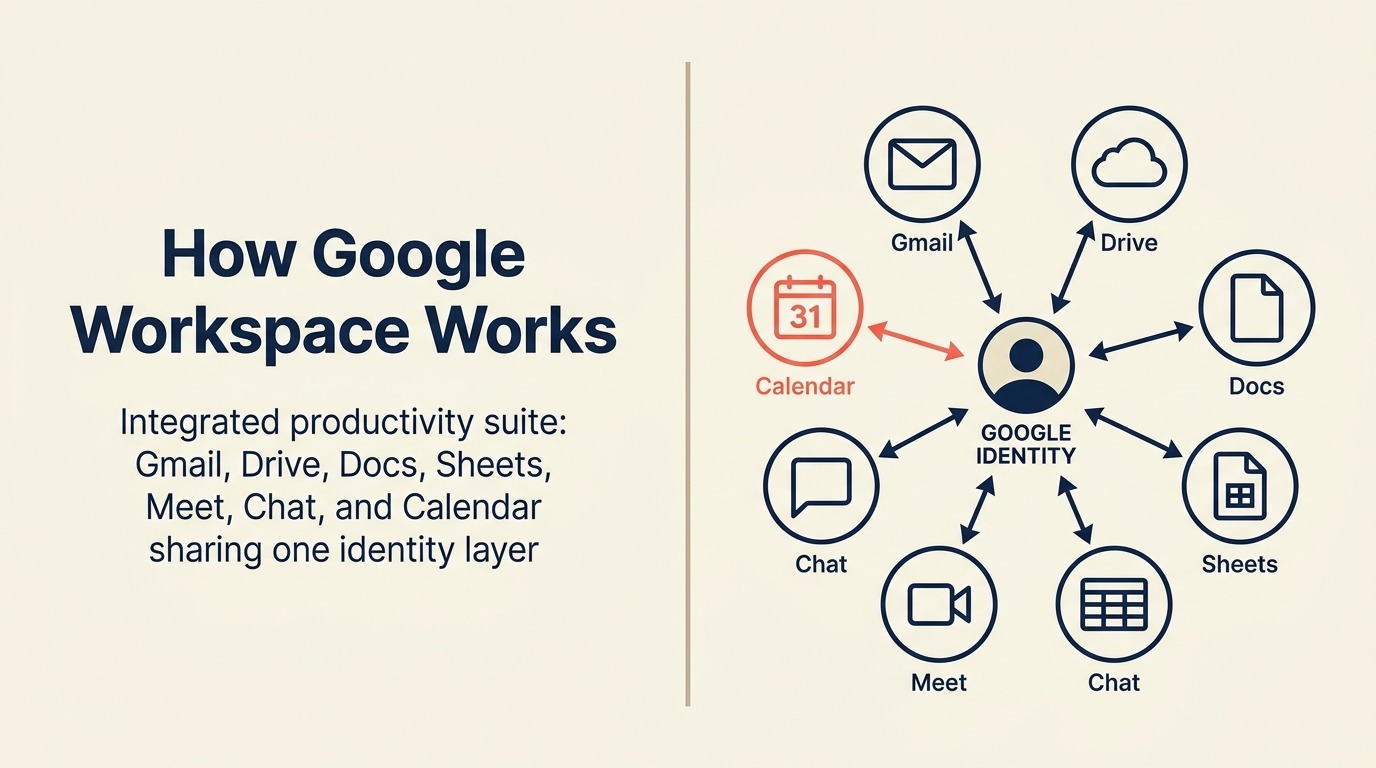
Wenn Ihr Unternehmen auf Google Workspace läuft, ist Chat bereits da. Das ist sein Hauptverkaufsargument. Spaces ersetzen Slack-Kanäle für themenbasierte Zusammenarbeit, Google Meet ist von jeder Konversation aus einen Klick entfernt, und Docs-/Drive-Vorschauen sind nativ. Sie müssen keine Integrationen für die Tools konfigurieren, die Sie ohnehin täglich nutzen.
Außerhalb des Google-Ökosystems verliert Chat den größten Teil seiner Anziehungskraft. Die Integrationsbibliothek ist dünn im Vergleich zu Slack, die Bot-/Automatisierungsmöglichkeiten sind begrenzt, und Teams, die nicht in Docs und Meet leben, werden es enttäuschend finden. Das Produkt hat sich außerdem langsam weiterentwickelt im Vergleich zu Slack und Teams, was bedeutet, dass Käufer in Großunternehmen, die nach fortgeschrittener Workflow-Automatisierung oder Compliance-lastigen Bereitstellungen suchen, schnell an Grenzen stoßen.
Für Google-native Organisationen jeder Größe ist es eine vernünftige Standardwahl. Für Unternehmen mit gemischtem Stack ist es das Kontextwechseln wahrscheinlich nicht wert.
| Was Sie bekommen | Was Sie nicht bekommen |
|---|---|
| Native Integration von Google Docs, Drive, Meet, Kalender | Starkes Drittanbieter-Integrations-Ökosystem |
| Inklusive bei allen Google-Workspace-Plänen | Fortgeschrittene Workflow-Automatisierung |
| Spaces für Themenkanäle + DMs | Ein überzeugender Grund zur Nutzung außerhalb des Google-Stacks |
| Google-Suche über Konversationen hinweg | Compliance-Tiefe für Großunternehmen vergleichbar mit Teams |
| Einfache, klare Oberfläche | Bot-/App-Marktplatz vergleichbar mit Slack |
Preise: Inklusive bei Google Workspace Starter (6 USD/Benutzer/Monat) bis hin zu Enterprise-Plänen
Am besten geeignet für: Google-Workspace-Organisationen, die integrierten Chat wollen, ohne ein weiteres kostenpflichtiges Tool hinzuzufügen
3. Discord: Asynchrones Messaging und Sprache für Startups und Dev-Teams
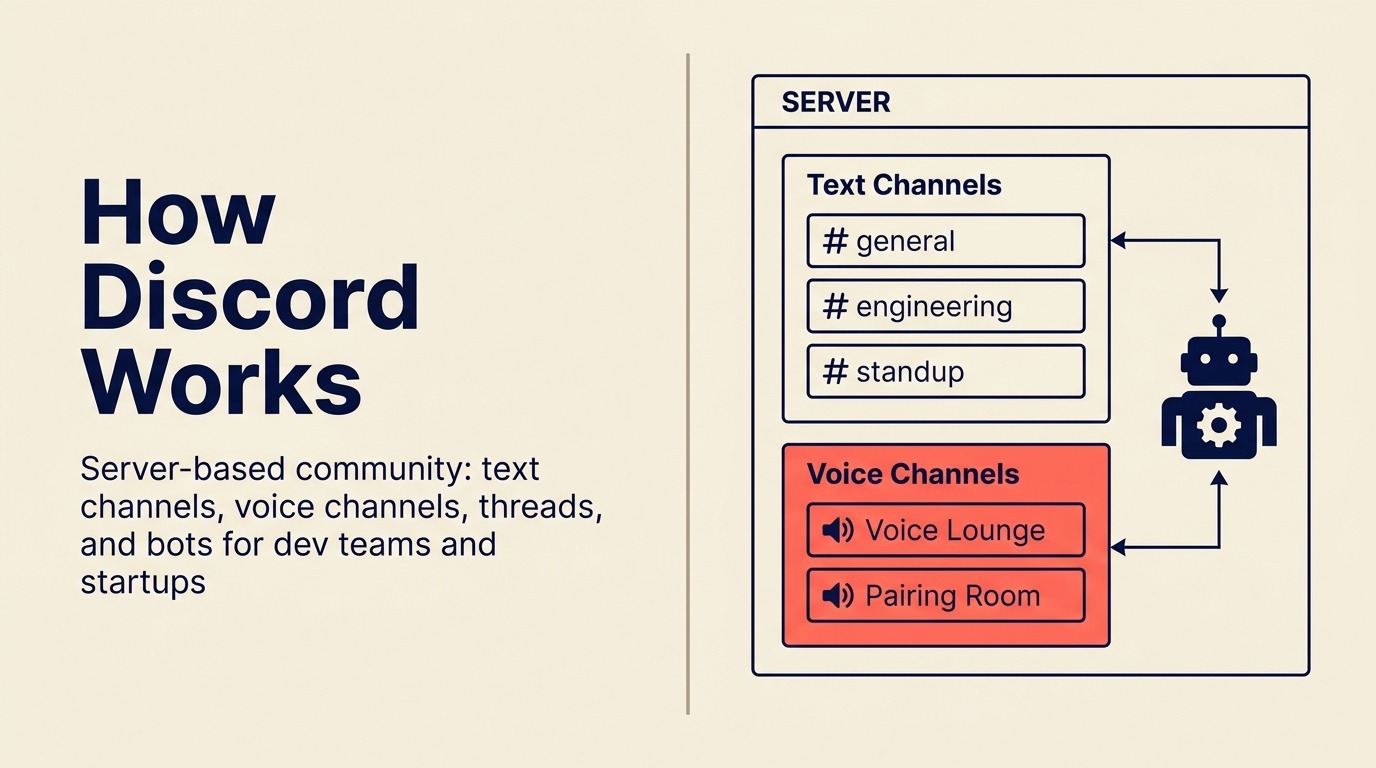
Discord wurde für Gaming-Communities gebaut. Dann entdeckten es Entwickler, und dann entdeckten Tech-Startups die Entwickler. Im Jahr 2026 bietet Discords kostenlose Stufe Funktionen, die kostenpflichtige Slack-Pläne nicht haben: persistente Sprachkanäle, in die Sie ohne Terminvereinbarung einfach hineinspringen können, unbegrenzten Nachrichtenverlauf und robuste Community-/Community-Management-Tools.
Für Startups in der Frühphase, Entwicklerteams und Produkt-Communities ist Discords kulturelle Passung oft besser als die von Slack. Es ist informell, schnell, und die Sprachkanal-Erfahrung (bei der Sie einfach "verfügbar" sein können, ohne einen formellen Anruf) ist für verteilte Teams wirklich nützlich.
Aber Discord ist keine Software für Großunternehmen. Es gibt kein SSO im kostenlosen Tarif, keine SCIM-Bereitstellung, kein eDiscovery und keine feingranularen Compliance-Kontrollen. Wenn Ihr Unternehmen eine IT-Sicherheitsprüfung, eine Richtlinie für rechtliche Aufbewahrung oder Anforderungen an die Handhabung regulierter Daten hat, wird Discord diese Prüfungen nicht bestehen. Es ist ein Tool für Teams, bei denen Kultur und Kosten die Compliance-Anforderungen überwiegen.
| Was Sie bekommen | Was Sie nicht bekommen |
|---|---|
| Unbegrenzter Nachrichtenverlauf im kostenlosen Tarif | SSO, SCIM, eDiscovery für Großunternehmen in der kostenlosen Stufe |
| Persistente Sprachkanäle (keine Terminvereinbarung nötig) | IT-Sicherheits-Compliance-Tooling |
| Starkes Community- und Rollensystem | Professionelles DM- und Posteingangs-Management |
| Aktives Entwickler- und Startup-Ökosystem | Starke Workflow-Automatisierung |
| Keine Kosten pro Platz für die meisten Anwendungsfälle | Kontrollen zur Datenhoheit |
Preise: Kostenlos für die meisten Teams; Discord Nitro für 2,99-9,99 USD/Monat pro Benutzer (optional, hauptsächlich für persönliche Funktionen)
Am besten geeignet für: Startups in der Frühphase (unter 30 Personen), Entwicklerteams und Produkt-Communities, bei denen kulturelle Passung und die Wirtschaftlichkeit der kostenlosen Stufe wichtiger sind als Compliance für Großunternehmen
4. Rocket.Chat: Open-Source-Messaging mit voller Kontrolle
Rocket.Chat ist die open-source Antwort auf "Wir wollen nicht, dass ein Anbieter unsere Kommunikationsinfrastruktur kontrolliert." Sie können es auf Ihren eigenen Servern self-hosten, auf den Quellcode zugreifen und ihn ändern und die vollständige Datenhoheit behalten. Für regulierte Branchen, Behörden und sicherheitsbewusste mittelgroße Unternehmen ist das ein bedeutsamer Unterschied.
Das Produkt ist über seinen frühen unausgereiften Zustand hinausgewachsen. Die self-hosted Version unterstützt Omnichannel-Kundenkommunikation (sodass Sie kundenseitigen Chat neben interner Kommunikation routen können), Marktplatz-Erweiterungen und REST-APIs für benutzerdefinierte Integrationen. Die cloud-gehostete Version beseitigt den Infrastruktur-Mehraufwand.
Der Kompromiss ist die Wartung. Self-hosted Rocket.Chat erfordert ein Team mit DevOps-Fähigkeit: Upgrades, Backups, Uptime-Management. Wenn Sie diese interne Kapazität nicht haben, ist der Cloud-Plan die realistische Option, und dann vergleichen Sie es mit Slack hinsichtlich der Kosten statt der Kontrolle.
| Was Sie bekommen | Was Sie nicht bekommen |
|---|---|
| Voller Quellcode-Zugriff und self-hosting-Option | Null Infrastruktur-Mehraufwand (Cloud übernimmt dies) |
| Omnichannel: internes + kundenseitiges Messaging | Plug-and-play-Onboarding-Erfahrung |
| Datenhoheit und On-Premises-Bereitstellung | Großer kommerzieller Integrationsmarktplatz |
| Aktive open-source Community | Native KI-Funktionen auf Slack-/Teams-Niveau |
| REST-API und Unterstützung benutzerdefinierter Integrationen | Enterprise-SLA ohne kostenpflichtigen Plan |
Preise: Kostenlos self-hosted (Infrastrukturkosten bei Ihnen); Cloud Community kostenlos bis zu 25 Benutzer; Pro ab 4 USD/Platz/Monat
Am besten geeignet für: Sicherheitsbewusste mittelgroße Teams (20-500), Behörden und regulierte Branchen, die self-hosted Messaging mit voller Datenkontrolle brauchen
5. Mattermost: Self-Hosted Slack für Sicherheitsanforderungen von Großunternehmen
Mattermost besetzt das ernsthafte Ende des open-source Messaging-Markts. Wo Rocket.Chat zur Vielseitigkeit neigt, neigt Mattermost zur Sicherheit für Großunternehmen: air-gapped-Bereitstellungen, militärtaugliche Verschlüsselung, SOC 2 Type 2, HIPAA-konforme Hosting-Optionen und granulare Zugriffskontrollen. Es ist das Tool, zu dem Behörden, Verteidigungsauftragnehmer und Finanzdienstleister greifen, wenn die Sicherheitsprüfung cloud-first SaaS untersagt.
Das Produkt sieht aus und verhält sich genug wie Slack, dass die Wechselkosten für Nutzer überschaubar sind. Kanäle, DMs, Threads, Slash-Befehle und App-Integrationen funktionieren alle wie erwartet. Mattermost hat außerdem eine Entwickler-Community und ein Plugin-Ökosystem, wenngleich kleiner als das von Slack.
Die Einschränkung ist dieselbe wie bei jedem self-hosted Tool: der IT-Ressourcenbedarf. Mattermosts Enterprise-Bereitstellungen brauchen Datenbankverwaltung, Server-Skalierung und regelmäßige Wartung. Das ist ein Ausschlusskriterium für Teams ohne dediziertes IT-Personal. Für Unternehmen, die diese Ressourcen haben und aus Compliance-Gründen keinen cloud-gehosteten Dienst nutzen können, ist Mattermost die glaubwürdigste Option auf dieser Liste.
| Was Sie bekommen | Was Sie nicht bekommen |
|---|---|
| Air-gapped, On-Premises-Bereitstellungsoption | Einfaches Onboarding für nicht-technische Organisationen |
| SOC 2, HIPAA, FedRAMP-fähige Optionen | Großer verbraucherorientierter Funktionsumfang |
| Vertraute Slack-ähnliche UX | Umfangreicher Drittanbieter-App-Marktplatz |
| Open-source Codebasis | Geringer IT-Ressourcenbedarf |
| Audit-Protokollierung und Compliance-Kontrollen für Großunternehmen | Schneller Wert für SMB-Teams |
Preise: Kostenlos self-hosted (Team Edition); Cloud Starter ab 10 USD/Platz/Monat; Enterprise-Preise auf Anfrage
Am besten geeignet für: Sicherheitsorientierte Organisationen in Großunternehmen (Behörden, Verteidigung, Finanzdienstleistungen, Gesundheitswesen), die self-hosted, air-gapped oder hochgradig regulierte Messaging-Infrastruktur benötigen
6. Chanty: Einfach und günstig für kleine Teams
Chanty ist, wie Slack aussehen würde, wenn es für Einfachheit und Preis statt für Funktionen und Integrationen optimiert wäre. Die UX ist klar, das Onboarding dauert Minuten, und es gibt einen integrierten Aufgabenmanager, der grundlegende Aufgabenzuweisung und -verfolgung neben dem Chat handhabt. Für ein 10-köpfiges Team, das "Slack, aber günstiger" will, erledigt Chanty die Aufgabe.
Der kostenlose Tarif unterstützt bis zu 5 Benutzer mit unbegrenztem Nachrichtenverlauf (ein direkter Seitenhieb auf Slacks 90-Tage-Grenze). Der Business-Plan für 3 USD/Platz/Monat ist eine der günstigsten Optionen in dieser Kategorie mit vollem Funktionsumfang.
Chanty funktioniert gut, bis es das nicht mehr tut. Die Integrationsbibliothek ist begrenzt. Die Automatisierungsmöglichkeiten sind minimal. Und sobald ein Team über 50-100 Personen wächst und komplexe teamübergreifende Workflows, Reporting oder Kontrollen für Großunternehmen benötigt, ist bei Chanty Schluss. Es ist ein Tool für kleine Teams, das ehrlich darüber ist, ein Tool für kleine Teams zu sein.
| Was Sie bekommen | Was Sie nicht bekommen |
|---|---|
| Unbegrenzter Nachrichtenverlauf (kostenloser Tarif bis zu 5 Benutzer) | Große Integrationsbibliothek |
| Integrierter Aufgabenmanager neben dem Chat | Fortgeschrittene Workflow-Automatisierung |
| Sehr niedrige Preise für den Business-Plan (3 USD/Platz/Monat) | Compliance-Funktionen für Großunternehmen |
| Klare, schnelle UX | Skalierbarkeit für Organisationen mit 100+ Personen |
| Audio- und Videoanrufe inklusive | Starke API für benutzerdefinierte Entwicklung |
Preise: Kostenlos (bis zu 5 Benutzer, unbegrenzte Nachrichten); Business für 3 USD/Platz/Monat
Am besten geeignet für: Kleine Teams (2-30 Personen), die Slack-ähnliches Messaging ohne Slack-Kosten wollen, besonders dort, wo der integrierte Aufgabenmanager ein separates Projekttool ersetzt
7. Flock: Slack-ähnliche UX zum Mittelstandspreis
Flock ist aus Sicht der Preis- und UX-Positionierung eine direkte Slack-Alternative. Die Oberfläche wird sich für jeden Slack-Nutzer vertraut anfühlen: Kanäle, DMs, Suche, Threads und Emoji-Reaktionen funktionieren alle wie erwartet. Flock fügt integrierte Videoanrufe, To-do-Listen, Umfragen und Erinnerungen hinzu, ohne für diese Grundlagen Drittanbieter-Integrationen zu erfordern.
Der Preispunkt ist der klarste Unterscheidungsfaktor. Mit 4,50 USD/Platz/Monat für Pro gegenüber Slacks 7,25 USD spart Flock einem 50-köpfigen Team rund 1.650 USD pro Jahr. Für preissensible Käufer, die eine Slack-äquivalente Erfahrung ohne die Preise der Salesforce-Ära wollen, macht Flock genau diesen Fall.
Die Integrationsbibliothek ist kleiner als die von Slack, und die Automatisierungsmöglichkeiten für Power-User sind begrenzt. Flock betritt bei der Produktphilosophie kein Neuland. Aber für Teams, die "Slack, aber günstiger" brauchen, ohne Kompromisse bei der zentralen täglichen Nutzung einzugehen, ist es eine saubere Option.
| Was Sie bekommen | Was Sie nicht bekommen |
|---|---|
| Vertraute Slack-ähnliche UX mit kurzer Lernkurve | Integrationsbibliothek im Umfang von Slack |
| Integrierte Videoanrufe, Umfragen, Erinnerungen, To-dos | Fortgeschrittene Workflow-Automatisierung |
| Niedrigere Preise pro Platz als Slack | Compliance-Tooling für Großunternehmen |
| Unbegrenzter Nachrichtenverlauf bei Pro | Marktglaubwürdigkeit größerer Plattformen |
| Unterstützung für Gastzugang | KI-native Funktionen |
Preise: Kostenlos (begrenzte Benutzer und Funktionen); Pro für 4,50 USD/Platz/Monat
Am besten geeignet für: Kleine bis mittlere Teams (5-200 Personen), die die Slack-Erfahrung zu einem deutlich niedrigeren Preispunkt wollen und keinen umfangreichen Drittanbieter-App-Marktplatz brauchen
8. Pumble: Unbegrenzter Nachrichtenverlauf im kostenlosen Tarif
Pumble führt mit der einen Sache, die die meisten Nutzer der kostenlosen Slack-Stufe frustriert: unbegrenzter Nachrichtenverlauf ohne Kosten. Sie können bis zum ersten Tag zurücksuchen. Sie stoßen nicht auf die 90-Tage-Klippe. Für kleine Teams, Non-Profits und bootstrapped Startups, bei denen Slacks Verlaufsbeschränkung der primäre Reibungspunkt ist, löst Pumble das Problem sauber.
Die kostenpflichtigen Pläne gehören mit 2,49 USD/Platz/Monat für Pro und 3,99 USD für Business ebenfalls zu den günstigsten am Markt. Die Kernerfahrung deckt Kanäle, DMs, Threads, Dateifreigabe und Audio-/Videoanrufe ab. Es integriert sich mit Zapier für Automatisierungsbedürfnisse.
Wo Pumble zu kurz kommt, ist die Produkttiefe. Die Automatisierung ist grundlegend. Die native Integrationsbibliothek ist dünn. Es gibt keinen ausgefeilten Workflow-Builder. Und für wachsende Teams bedeutet das Fehlen fortgeschrittener Analysen, Arbeitslastverwaltung oder Ops-Tooling, dass Sie es irgendwann entwachsen werden. Aber als budget-first Messaging-Tool mit unbegrenztem Verlauf macht es den Wertfall überzeugend.
| Was Sie bekommen | Was Sie nicht bekommen |
|---|---|
| Unbegrenzter Nachrichtenverlauf im kostenlosen Tarif | Tiefes natives Integrations-Ökosystem |
| Sehr niedrige Preise für den Pro-Plan (2,49 USD/Platz/Monat) | Fortgeschrittene Workflow-Automatisierung |
| Audio-/Videoanrufe in allen Plänen | Starke Analysen und Reporting |
| Klare, zugängliche UX | Sicherheitszertifizierungen für Großunternehmen |
| Gastzugang verfügbar | KI-native Funktionen |
Preise: Kostenlos (unbegrenzte Benutzer und Nachrichtenverlauf); Pro für 2,49 USD/Platz/Monat; Business für 3,99 USD/Platz/Monat
Am besten geeignet für: Budgetbewusste Teams (2-200 Personen), für die unbegrenzter Nachrichtenverlauf und niedrige Kosten die primären Kaufkriterien sind, besonders Startups und Non-Profits mit knappen Budgets
9. Twist: Async-first-Kommunikation für verteilte Teams
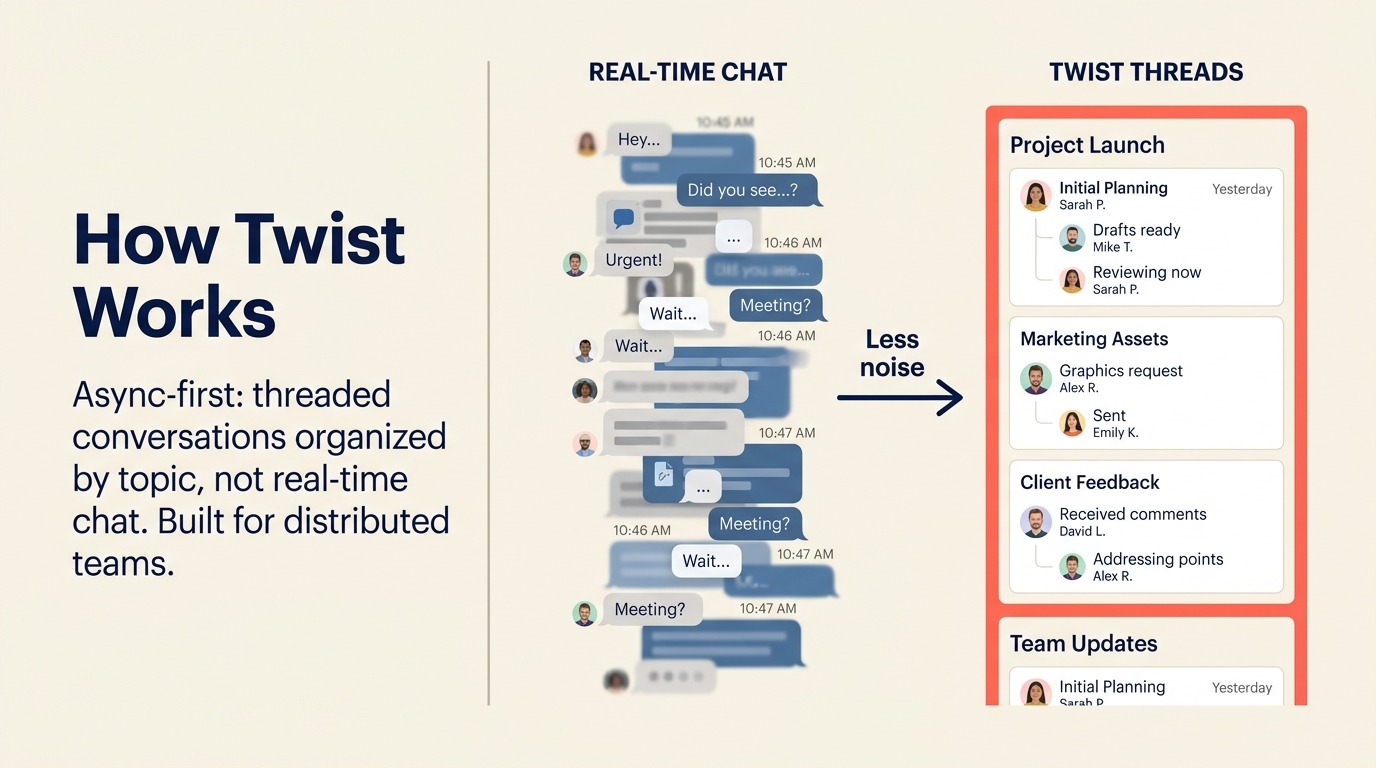
Twist baut auf einer bestimmten These auf: Echtzeit-Chat ist die falsche Standardeinstellung für die meiste Arbeit. Ständige Benachrichtigungen, der Druck, sofort zu antworten, Kontextwechsel zwischen Kanälen: Twist behandelt diese als Designfehler statt als Funktionen, die man hinzufügen sollte. Jede Konversation in Twist ist ein Thread, kein Live-Chat. Nichts ist standardmäßig dringend.
Für vollständig verteilte Teams, die bewusst eine async-first-Kultur übernommen haben (üblich in Produktunternehmen, Agenturen und remote-first Startups), passt Twist dazu, wie Arbeit tatsächlich fließt. Es gibt keine Erwartung einer sofortigen Antwort. Threads bleiben organisiert. Das Signal-Rausch-Verhältnis ist für die meisten Teams deutlich höher als bei Slack. Für Teams, die an den Daten hinter der async-Adoption interessiert sind, erklärt Async-First vs. Remote-First, wo der Unterschied wichtig ist und wo nicht.
Die Einschränkung ist symmetrisch zur Stärke: Wenn Ihr Team Echtzeit-Koordination braucht, ist Twist das falsche Tool. Incident Response, schnelllebige Vertriebszyklen oder jeder Workflow, der von synchroner Kommunikation abhängt, wird sich frustrierend langsam anfühlen. Twist ist eine bewusste Wahl für Teams, die bereits entschieden haben, dass async ihr Betriebsmodell ist.
| Was Sie bekommen | Was Sie nicht bekommen |
|---|---|
| Thread-basiertes async-Format, das Benachrichtigungslärm reduziert | Echtzeit-Chat für schnelllebige Workflows |
| Zielgerichtete Kommunikation, die organisiert bleibt | Eingebaute Sprach-/Videoanrufe (integriert mit anderen) |
| Posteingang auf Teamebene mit klarer Verantwortlichkeit | Großes Integrations-Ökosystem |
| Konzipiert für verteilte und über Zeitzonen verstreute Teams | Unterstützung für synchrone Zusammenarbeit |
| Starke Suche über alle Threads hinweg | Vertrautheit für Slack-native Nutzer |
Preise: Kostenlos (begrenzte Integrationen und Verlauf); Unlimited für 5 USD/Platz/Monat
Am besten geeignet für: Vollständig verteilte, async-first Teams (5-150 Personen), die sich bewusst von der Echtzeit-Chat-Kultur entfernt haben und ein Kommunikationstool brauchen, das diese Disziplin durchsetzt
10. Element: Dezentralisiertes Messaging auf dem Matrix-Protokoll
Element ist auf dieser Liste einzigartig, weil es auf Matrix aufbaut, einem offenen föderierten Protokoll. Das bedeutet, dass verschiedene Organisationen, die verschiedene Matrix-Server betreiben, direkt miteinander kommunizieren können, ohne dass alle auf der Plattform desselben Anbieters sein müssen. Stellen Sie sich es wie E-Mail vor: Sie müssen nicht bei Gmail sein, um einem Gmail-Nutzer eine E-Mail zu schreiben. Element bringt diese Architektur ins Team-Messaging.
Das Sicherheitsmodell ist standardmäßig stark: Ende-zu-Ende-Verschlüsselung für alle Nachrichten und Dateien, self-hosting-Optionen, serverübergreifende Föderation. Für Behörden, Gesundheitseinrichtungen und Großunternehmen mit strengen Anforderungen an die Datenhoheit bietet Elements Architektur Kontrollen, die cloud-first Tools schlicht nicht erreichen können.
Der Kompromiss ist Komplexität. Element richtig einzurichten erfordert technische Kompetenz. Die UX ist funktional, aber nicht ausgefeilt. Und Föderation, obwohl konzeptionell mächtig, erfordert Koordination mit Gegenparteien, die ebenfalls Matrix-Server betreiben. Für die meisten kommerziellen Teams ist der Einrichtungsaufwand es nicht wert. Für sicherheitsorientierte Käufer im öffentlichen Sektor und in Großunternehmen ist es die einzige glaubwürdige Ende-zu-Ende-souveräne Option.
| Was Sie bekommen | Was Sie nicht bekommen |
|---|---|
| Ende-zu-Ende-Verschlüsselung standardmäßig | Einfaches Onboarding auf Consumer-Niveau |
| Matrix-Protokoll-Föderation (organisationsübergreifendes Messaging) | Ausgefeilte UX vergleichbar mit Slack |
| Volle Datenhoheit durch self-hosting | Großer kommerzieller App-Marktplatz |
| Keine Anbieterbindung (offenes Protokoll) | Einfache Bereitstellung ohne technische Ressourcen |
| Starke Compliance- und Audit-Kontrollen | Echtzeit-Leistung cloud-nativer Tools |
Preise: Kostenlos self-hosted (Infrastrukturkosten fallen an); Element Cloud ab 5 USD/Platz/Monat; Enterprise-Preise auf Anfrage
Am besten geeignet für: Teams in Behörden, Verteidigung, Finanzdienstleistungen und Gesundheitswesen (20-500), bei denen Datenhoheit, Ende-zu-Ende-Verschlüsselung und dezentralisierte Infrastruktur nicht verhandelbare Anforderungen sind
11. Lark: All-in-One-Plattform von ByteDance
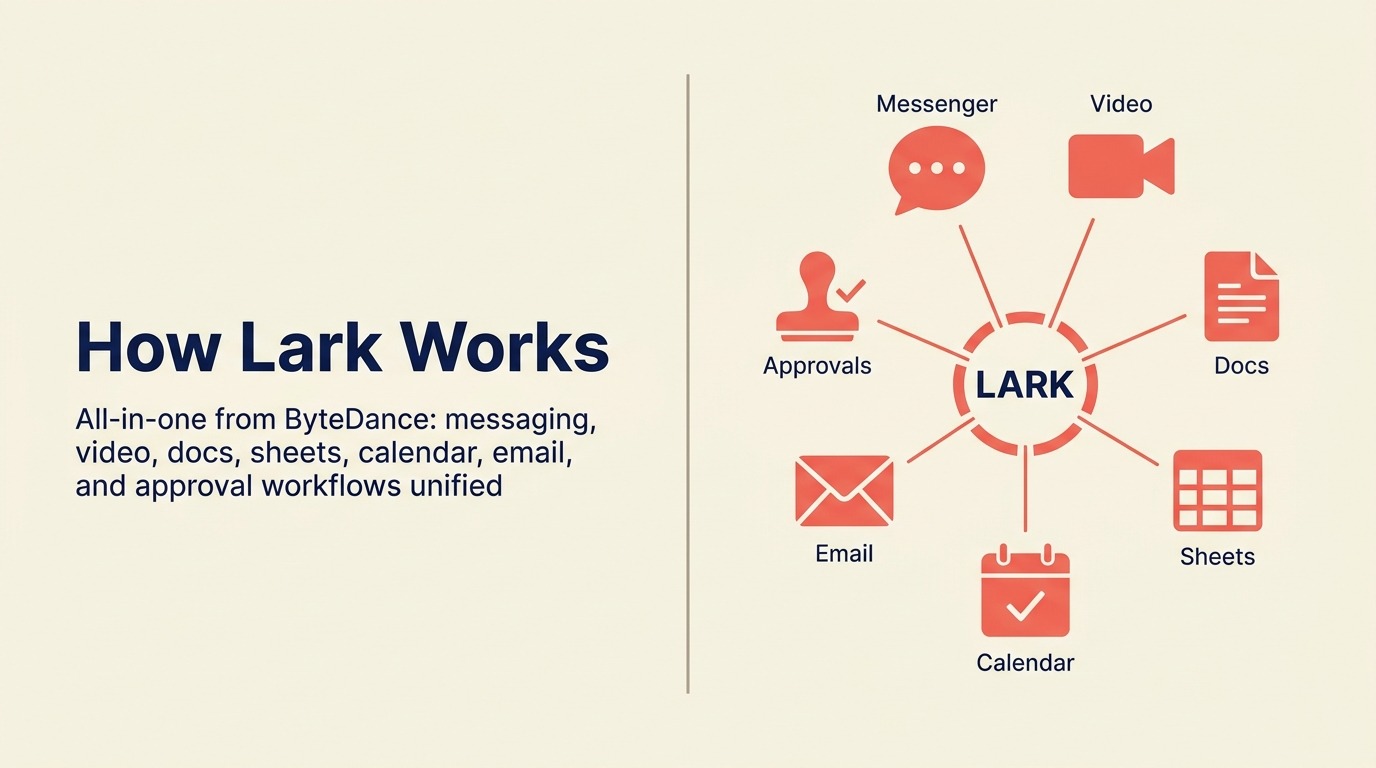
Lark (in China Feishu genannt) ist ByteDances Kollaborationsplattform für Unternehmen, und es ist eines der wirklich umfassendsten Tools auf dieser Liste. Chat, Videomeetings, kollaborative Dokumente, Tabellenkalkulationen, OKR-Tracking und HR-Tools wie Anwesenheitsverwaltung leben alle in einem Produkt. Für schnell wachsende Teams im asiatisch-pazifischen Markt, besonders solche mit Büros in China und anderswo, sind Larks Breite und Lokalisierung schwer zu übertreffen.
Die Funktionstiefe ist real. Lark Docs unterstützt Echtzeit-Zusammenarbeit auf einem Niveau, das mit Google Docs vergleichbar ist. Die Meeting- und Aufzeichnungsqualität ist solide. Und das All-in-one-Preismodell kann gegenüber dem Kauf von fünf separaten SaaS-Tools überzeugend sein.
Das Zögern außerhalb der asiatisch-pazifischen Märkte betrifft die Datenhoheit und die Frage der ByteDance-Eigentümerschaft. Käufer in Großunternehmen in den USA und Europa prüfen die Datenhandhabung für ByteDance-eigene Produkte zunehmend genau, nachdem TikTok regulatorische Aufmerksamkeit erhalten hat. Wenn Ihre Organisation eine Richtlinie gegen chinesisch-eigene Cloud-Infrastruktur hat, ist Lark unabhängig von der Funktionsqualität vom Tisch.
| Was Sie bekommen | Was Sie nicht bekommen |
|---|---|
| Chat, Dokumente, Video, Tabellen, HR in einer App | Zusicherungen zur Datenhoheit für US-/EU-Käufer in Großunternehmen |
| Starke asiatisch-pazifische Lokalisierung und Marktunterstützung | Westliches Enterprise-Ökosystem und Integrationen |
| OKR- und HR-Tools inklusive | Unabhängigkeit von ByteDance-Datenbedenken |
| Wettbewerbsfähiger kostenloser Plan für kleine Teams | Etablierter westlicher Enterprise-Support |
| Echtzeit-kollaborative Dokumente auf Notion-Niveau | Regulatorisches Vertrauen in sensiblen Branchen |
Preise: Kostenlos (bis zu 50 Benutzer, Kernfunktionen); Pro ab 12 USD/Benutzer/Monat; Enterprise-Preise auf Anfrage
Am besten geeignet für: Schnell wachsende Teams in asiatisch-pazifischen Märkten (20-1.000), die eine einzige Plattform für Kommunikation, Dokumente und People-Operations wollen, und bei denen die ByteDance-Datenhandhabung kein Compliance-Anliegen ist
Warum Teams Slack verlassen: Die spezifischen Schmerzpunkte
Das "Warum" zu verstehen ist wichtig, bevor Sie Ersatz prüfen. Die häufigsten Gründe, warum mittelgroße Teams diese Suche starten:
| Schmerzpunkt | Wer es am stärksten spürt | Worauf man stattdessen achten sollte |
|---|---|---|
| Kosten pro Platz bei Skalierung (Pro: 7,25, Business+: 12,50 USD/Platz/Monat) | COO, Finanzen, IT-Beschaffung | Pumble, Chanty, Flock fürs Budget; Teams/Chat falls gebündelt |
| 90-Tage-Begrenzung des Nachrichtenverlaufs in der kostenlosen Stufe | Kleine Teams, Startups, Non-Profits | Pumble, Discord, Chanty (unbegrenzt im kostenlosen Tarif) |
| Kanal-Wucherung und Benachrichtigungsüberflutung | Alle Teamgrößen | Twist (async-first), oder strengere Governance bei jedem Tool |
| Salesforce-Übernahme verschiebt Produktfokus | Teams außerhalb des Salesforce-Ökosystems | Unabhängige Anbieter: Flock, Chanty, Pumble, Twist |
| Kein nativer Ops-Workflow über einfache Automatisierungen hinaus | Ops Manager, RevOps-Teams | Teams (Power Automate), Mattermost |
| Anforderungen an Compliance und Datenhoheit | Sicherheit, Recht, Behörden | Mattermost, Rocket.Chat, Element |
| Bedarf an self-hosted oder On-Premises-Bereitstellung | IT, regulierte Branchen | Mattermost, Rocket.Chat, Element |
| Async-Kultur-Adoption für verteilte Teams | Remote-first Unternehmen | Twist |
| All-in-One-Plattform zur Konsolidierung der Tool-Ausgaben | COO, Finanzen | Lark, Teams |
Ein Faktor, den Käufer oft unterschätzen, sind die Wechselkosten. Der Tool-Preis lässt sich leicht vergleichen, aber die eigentlichen Kosten liegen in der Migration: Nachrichtenverlauf exportieren, Integrationen neu aufbauen und das Team neu schulen. Tools mit einer Slack-ähnlichen UX (Flock, Chanty, Pumble) senken den Schulungsaufwand, während self-hosted Optionen (Mattermost, Rocket.Chat, Element) eine aufwendigere Einrichtung gegen langfristige Kontrolle eintauschen.
| Alternative | UX-Lernkurve | Migrationsaufwand | Verlaufsimport aus Slack |
|---|---|---|---|
| Flock / Chanty / Pumble | Gering (Slack-ähnlich) | Gering | Teilweise (manueller Export) |
| Microsoft Teams / Google Chat | Mittel | Mittel (stack-weit) | Begrenzt |
| Mattermost / Rocket.Chat | Mittel | Hoch (self-hosted) | Unterstützt über Import-Tools |
| Twist | Mittel (async-Modell) | Mittel | Begrenzt |
Preisvergleichstabelle
| Tool | Kostenlose Stufe | Erster kostenpflichtiger Tarif | Mittlerer Tarif | Großunternehmen |
|---|---|---|---|---|
| Slack | 90-Tage-Verlauf, 10 Apps | Pro: 7,25 USD/Platz/Monat | Business+: 12,50 USD/Platz/Monat | Grid: Kontakt |
| Microsoft Teams | Essentials: 4 USD/Benutzer/Monat | M365 Business Basic: 6 USD/Benutzer/Monat | M365 Business Standard: 12,50 USD/Benutzer/Monat | Individuell |
| Google Chat | Mit Workspace Starter: 6 USD/Benutzer/Monat | Workspace Standard: 12 USD/Benutzer/Monat | Workspace Plus: 18 USD/Benutzer/Monat | Enterprise: individuell |
| Discord | Ja (unbegrenzter Verlauf) | Nitro Basic: 2,99 USD/Monat | Nitro: 9,99 USD/Monat | Keine Enterprise-Stufe |
| Rocket.Chat | Ja (self-hosted oder 25 Benutzer Cloud) | Pro: 4 USD/Platz/Monat | Enterprise: individuell | Individuell |
| Mattermost | Ja (self-hosted) | Cloud Starter: 10 USD/Platz/Monat | Enterprise: individuell | Individuell |
| Chanty | Ja (5 Benutzer) | Business: 3 USD/Platz/Monat | Nicht verfügbar | Nicht verfügbar |
| Flock | Ja (begrenzt) | Pro: 4,50 USD/Platz/Monat | Nicht verfügbar | Enterprise: Kontakt |
| Pumble | Ja (unbegrenzter Verlauf) | Pro: 2,49 USD/Platz/Monat | Business: 3,99 USD/Platz/Monat | Enterprise: Kontakt |
| Twist | Ja (begrenzter Verlauf) | Unlimited: 5 USD/Platz/Monat | Nicht verfügbar | Nicht verfügbar |
| Element | Ja (self-hosted) | Cloud: 5 USD/Platz/Monat | Enterprise: individuell | Individuell |
| Lark | Ja (50 Benutzer) | Pro: 12 USD/Benutzer/Monat | Enterprise: individuell | Individuell |
Integrations- und Ökosystem-Tiefe
| Tool | App-Integrationen | Native Automatisierung | API-Zugriff | Zapier-Unterstützung |
|---|---|---|---|---|
| Slack | 2.600+ | Workflow Builder | Ja | Ja |
| Microsoft Teams | 700+ (plus Power Automate) | Power Automate | Ja | Ja |
| Google Chat | Google Workspace nativ | Google Apps Script | Ja | Ja |
| Discord | Moderat (Bot-Ökosystem) | Grundlegend (Bots) | Ja | Ja |
| Rocket.Chat | Moderater Marktplatz | Grundlegende Automatisierungen | Ja | Ja |
| Mattermost | Plugin-Marktplatz | Webhooks + Plugins | Ja | Begrenzt |
| Chanty | 30+ | Grundlegend | Begrenzt | Ja |
| Flock | 60+ | Grundlegend | Ja | Ja |
| Pumble | Primär über Zapier | Grundlegend | Ja | Ja |
| Twist | 20+ | Grundlegend | Ja | Ja |
| Element | Matrix-Bridges | Begrenzt | Ja | Begrenzt |
| Lark | Wachsend (Fokus Asien-Markt) | Lark-Base-Automatisierungen | Ja | Begrenzt |
Tabelle zu Sicherheit und Compliance
| Tool | SOC 2 | HIPAA | GDPR | E2E-Verschlüsselung | Self-Hosted | Datenhoheit |
|---|---|---|---|---|---|---|
| Slack | Type 2 | Business+ und höher | Ja | Nein (in Übertragung) | Nein | US-/EU-Optionen |
| Microsoft Teams | Ja | Ja | Ja | In Übertragung | Nein (Cloud) | Multi-Region |
| Google Chat | Ja | Ja | Ja | In Übertragung | Nein | Multi-Region |
| Discord | Begrenzt | Nein | Ja | Nein | Nein | Primär nur US |
| Rocket.Chat | Ja (Cloud) | Ja (self-hosted Konfiguration) | Ja | Optional | Ja | Voll (self-hosted) |
| Mattermost | Ja | Ja | Ja | Ja | Ja | Voll (self-hosted) |
| Chanty | Ja | Nein | Ja | In Übertragung | Nein | Begrenzt |
| Flock | Ja | Nein | Ja | In Übertragung | Nein | Begrenzt |
| Pumble | Ja | Nein | Ja | In Übertragung | Nein | Begrenzt |
| Twist | Ja | Nein | Ja | In Übertragung | Nein | Begrenzt |
| Element | Ja | Möglich (self-hosted) | Ja | Ja (Standard) | Ja | Voll |
| Lark | Ja | Begrenzt | Ja (EU-Server) | In Übertragung | Nein | US/EU/Asien |
Wie man wählt: Entscheidungsrahmen
| Wenn Sie brauchen... | Wählen Sie dies |
|---|---|
| Sie sind bereits auf Microsoft 365 und brauchen Compliance für Großunternehmen | Microsoft Teams |
| Ihr gesamtes Team läuft auf Google Workspace | Google Chat |
| Ein kostenloses Tool mit Sprachkanälen und unbegrenztem Verlauf für ein kleines Startup | Discord |
| Self-hosted Messaging mit voller Datenhoheit | Mattermost (hohe Sicherheit) oder Rocket.Chat (vielseitig) |
| Die günstigste voll ausgestattete kostenpflichtige Option für ein kleines Team | Chanty (3 USD/Platz) oder Pumble (2,49 USD/Platz) |
| Slack-ähnliche UX zu einem niedrigeren Preispunkt | Flock |
| Unbegrenzter Nachrichtenverlauf ohne Kosten | Pumble |
| Async-first-Kommunikation für ein verteiltes Team | Twist |
| Ende-zu-Ende-verschlüsseltes, föderiertes, dezentralisiertes Messaging | Element |
| Eine All-in-One-Plattform (Chat + Dokumente + Video + HR) in Asien-Pazifik | Lark |
| Reiner Slack-Ersatz bei Skalierung mit großer Integrationsbibliothek | Microsoft Teams oder Rocket.Chat |
Die nächsten Schritte
Wählen Sie Ihre beiden Top-Kandidaten basierend auf dem obigen Rahmen und führen Sie einen zweiwöchigen Pilotversuch mit einem einzelnen Team von 5-10 Personen durch. Bewerten Sie Tools nicht in einer Demo-Umgebung. Echte Nutzung in echten Workflows bringt die Reibung an die Oberfläche, die ausgefeilte Demos verbergen.
Häufig gestellte Fragen
Ist Slack den Preis im Jahr 2026 wert? Für Teams, die stark in Slacks Integrationsbibliothek und Workflows investiert sind, wahrscheinlich. Für Teams, bei denen der primäre Anwendungsfall Messaging ist und die 2.600 Integrationen eher nice-to-have als essenziell sind, wird der Preis schwerer zu rechtfertigen gegenüber Flock, Pumble oder Chanty.
Was ist die beste kostenlose Slack-Alternative? Pumble bietet unbegrenzten Nachrichtenverlauf und unbegrenzte Benutzer in seiner kostenlosen Stufe, was Slacks am häufigsten kritisierte kostenlose Einschränkung direkt löst. Discord ist die beste Option, wenn persistente Sprachkanäle und Community-Funktionen wichtig sind.
Kann Microsoft Teams Slack vollständig ersetzen? Für Microsoft-365-Organisationen, ja. Die Integrationstiefe ist anders (Microsoft-Stack-first gegenüber breitem Drittanbieter-Marktplatz), und die UX ist schwerer. Aber Funktionsparität für standardmäßige Teamkommunikation ist vorhanden.
Was ist die beste Slack-Alternative zum self-hosting? Mattermost für Sicherheitsanforderungen von Großunternehmen und air-gapped-Bereitstellungen. Rocket.Chat für mehr Flexibilität und einen breiteren Anwendungsfall einschließlich kundenseitigem Messaging.
Was ist die beste async Slack-Alternative? Twist. Es ist das einzige Tool auf dieser Liste, das architektonisch async-first ist, statt Threads als eine zum Echtzeit-Chat hinzugefügte Funktion zu behandeln.
Weiterführende Lektüre
Wenn Ihr Team auch prüft, wie die Workflows automatisiert werden können, die derzeit in Slack-Kanälen leben, behandeln die besten Zapier-Alternativen Automatisierungsplattformen, die das Muster "Slack benachrichtigen, wenn X passiert" durch native Workflow-Logik ersetzen können. Für Teams, die sich in Richtung Notizen und Wikis bewegen, um Slack-Threads zu ersetzen, behandeln die besten Notion-Alternativen die Wissensmanagement-Tools, die verteilte Teams oft neben async-Messaging übernehmen. Und wenn Sie Tools konsolidieren (Slack neben anderen Abonnements pro Platz streichen), liefern Ihnen die wahren Kosten der Software-Wucherung die Zahlen, um dieses Argument in einer Budgetprüfung zu vertreten.
Externe Ressourcen:
- Slack-Preise: Pro-, Business+- und Grid-Pläne
- Microsoft-Teams-Preise: Essentials- und M365-Bundles
- Mattermost-Preise: Team Edition (kostenlos), Professional und Enterprise
- Rocket.Chat-Preise: self-hosted und Cloud-Optionen
- Twist-Preise: Free- und Unlimited-Pläne

Principal Product Marketing Strategist
On this page
- Schnelle Vergleichstabelle
- Phasen-Eignungsmatrix
- Tabelle zu Größe und Persona
- 1. Microsoft Teams: Tiefe für Großunternehmen im Microsoft-365-Stack
- 2. Google Chat: Natives Messaging für Google-Workspace-Teams
- 3. Discord: Asynchrones Messaging und Sprache für Startups und Dev-Teams
- 4. Rocket.Chat: Open-Source-Messaging mit voller Kontrolle
- 5. Mattermost: Self-Hosted Slack für Sicherheitsanforderungen von Großunternehmen
- 6. Chanty: Einfach und günstig für kleine Teams
- 7. Flock: Slack-ähnliche UX zum Mittelstandspreis
- 8. Pumble: Unbegrenzter Nachrichtenverlauf im kostenlosen Tarif
- 9. Twist: Async-first-Kommunikation für verteilte Teams
- 10. Element: Dezentralisiertes Messaging auf dem Matrix-Protokoll
- 11. Lark: All-in-One-Plattform von ByteDance
- Warum Teams Slack verlassen: Die spezifischen Schmerzpunkte
- Preisvergleichstabelle
- Integrations- und Ökosystem-Tiefe
- Tabelle zu Sicherheit und Compliance
- Wie man wählt: Entscheidungsrahmen
- Die nächsten Schritte
- Häufig gestellte Fragen
- Weiterführende Lektüre