2026年のSlack代替ツール: あらゆる予算とチーム規模に対応する12のチームコミュニケーションツール
2026年のSlack代替ツールとして最適なのは、バンドル型のエンタープライズスタックならMicrosoft TeamsとGoogle Chat、無料で無制限のメッセージ履歴ならDiscordとPumble、self-hostedのセキュリティならMattermostとRocket.Chat、非同期チームならTwist、そしてメッセージングをオペレーションワークフローに組み込みたいチームならReworkです。最適な選択は、チーム規模、予算、そしてコンプライアンスやself-hostingが必須要件かどうかによって決まります。
Slackは本当に優れた製品です。チャンネルベースのメッセージングを普及させ、膨大な統合ライブラリを持ち、何千もの企業で標準のコミュニケーション基盤になっています。しかし、あなたが代替ツールを検討しているなら、すでにその問題点を知っているはずです。
核心にある緊張関係はコスト対価値です。Slackの無料プランはメッセージ履歴を90日に制限し、アプリ統合を10個までに絞り、画面共有付きの音声ハドルを除外しています。Proに移行すると1ユーザーあたり月額7.25ドルかかります。Business+は12.50ドルです。50人のチームなら、Proで年間7,500ドルになり、それでも実際に必要かもしれないエンタープライズ向けのコンプライアンス制御は手に入りません。さらに2021年のSalesforce買収があり、これは単独チーム向けよりもSalesforceエコシステムとの統合へと製品の優先順位を移しました。その結果、CRM大手のプラットフォーム戦略ではなく自分たちの実際のワークフロー向けに作られたものを求める買い手の層が広がっています。チャンネルの乱立、通知過多、そして単純な「if-this-then-that」トリガーを超えるネイティブなワークフロー自動化の欠如が、チームがこの検索を始める理由を締めくくります。非同期コミュニケーションがリアルタイムメッセージングツールの必要性そのものを減らせるかどうかを検討するチームには、非同期コミュニケーションガイドが、非同期ファーストの文化がコストを削減する場合と、誤った種類の摩擦を生む場合とを論じています。
このガイドでは、率直な評価とともに12の代替ツールを取り上げます。曖昧な要約はありません。本物の料金、本物のターゲット層、本物の制約です。
クイック比較表
| ツール | 最適な用途 | 開始価格 | 主な強み | 主な制約 |
|---|---|---|---|---|
| Rework | 中規模チーム向けの統合オペレーションワークフロー+チームメッセージング | 1ユーザーあたり月額6ドルから (rework.com/pricing) | 部門横断のオペレーションとCRMワークフローに組み込まれたチャット | 純粋なメッセージング専用や少人数チーム向けではない |
| Microsoft Teams | Microsoft 365スタックを使うエンタープライズ組織 | M365 Business Basicに含む (1ユーザーあたり月額6ドル) | 深いOffice 365統合、エンタープライズコンプライアンス | 重く複雑なUI、小規模チームには過剰 |
| Google Chat | ネイティブチャットを求めるGoogle Workspaceチーム | Workspace Starterに含む (1ユーザーあたり月額6ドル) | Googleユーザーには摩擦ゼロ、Spaces+Meet統合 | Googleエコシステム外では単体価値が限定的 |
| Discord | 無料の音声/動画を求めるスタートアップ、コミュニティ、開発チーム | 無料、Nitroは月額2.99ドルから | 寛大な無料プラン、優れた音声チャンネル | エンタープライズ非対応、無料プランではコンプライアンスもSSOもなし |
| Rocket.Chat | self-hostedのopen-sourceメッセージング | self-hostedは無料、Cloudは1シートあたり月額4ドルから | 完全な制御、open-source、オンプレミスの選択肢 | self-hostedの維持には技術リソースが必要 |
| Mattermost | セキュリティ最優先のself-hostedエンタープライズチーム | self-hostedは無料、Cloudは1シートあたり月額10ドルから | エアギャップ展開、エンタープライズコンプライアンス、open-source | ITの負荷が重い、すぐに使えるわけではない |
| Chanty | シンプルかつ手頃なチャットを求める小規模チーム | 無料 (5ユーザー)、月額3ドル/シート (Business) | 最も安価なフル機能の選択肢、タスク管理機能内蔵 | 規模が大きくなると制約あり、エコシステムが小さい |
| Flock | より低コストでSlackのようなUXを求める小〜中規模チーム | 無料、月額4.50ドル/シート (Pro) | 馴染みのあるインターフェース、動画機能内蔵、低価格 | Slackより統合ライブラリが小さい |
| Pumble | 無制限のメッセージ履歴を必要とするコスト重視のチーム | 無料 (履歴無制限)、月額2.49ドル/シート (Pro) | 無料プランで無制限のメッセージ履歴 | 自動化と統合の深さに欠ける |
| Twist | 非同期ファーストの分散チーム | 無料、月額5ドル/シート (Unlimited) | スレッド型の非同期専用フォーマットが中断を減らす | 同期的または動きの速いチームには不向き |
| Element | Matrixプロトコルのフェデレーションを必要とするプライバシー重視のチーム | 無料 (self-hosted)、Cloudは1シートあたり月額5ドルから | 分散型、エンドツーエンド暗号化、フェデレーション対応 | 設定が複雑、非技術者には習得の難易度が高い |
| Lark | 急成長するアジア市場のチームやByteDanceエコシステムのユーザー | 無料 (50ユーザーまで)、1ユーザーあたり月額12ドルから | オールインワン: チャット、ドキュメント、動画、HRツールが1アプリに | データレジデンシーの懸念、欧米エンタープライズのサポートが弱い |
ステージ適合マトリクス
| ツール | スタートアップ (1〜20) | 成長ステージ (20〜100) | ミッドマーケット (100〜500) | エンタープライズ (500+) |
|---|---|---|---|---|
| Rework | 理想的ではない | 強く適合 | 主要ターゲット | 限定的に適合 |
| Microsoft Teams | 過剰 | 可能 | 良好な適合 | 主要ターゲット |
| Google Chat | 良好な適合 | 良好な適合 | 良好な適合 | 限定的 (コンプライアンス) |
| Discord | 主要ターゲット | 良好な適合 | 可能 (文化次第) | 推奨しない |
| Rocket.Chat | 可能 | 良好な適合 | 強く適合 | 良好な適合 |
| Mattermost | 可能 | 良好な適合 | 強く適合 | 主要ターゲット |
| Chanty | 主要ターゲット | 可能 | 理想的ではない | 推奨しない |
| Flock | 良好な適合 | 強く適合 | 可能 | 理想的ではない |
| Pumble | 主要ターゲット | 良好な適合 | 可能 | 理想的ではない |
| Twist | 主要ターゲット | 良好な適合 | 良好な適合 | 可能 |
| Element | 可能 | 良好な適合 | 強く適合 | 良好な適合 |
| Lark | 可能 | 良好な適合 | 強く適合 | 限定的 (アジア太平洋) |
規模とペルソナ表
| ツール | チーム規模の最適域 | 主要な買い手ペルソナ | 二次的な買い手 |
|---|---|---|---|
| Rework | 20〜500 | COO、Head of Ops、RevOpsディレクター | 営業ディレクター、IT Manager |
| Microsoft Teams | 100〜10,000+ | ITディレクター、CIO、IT調達 | 部門長 |
| Google Chat | 10〜1,000 | IT管理者、オフィスマネージャー | Google Workspaceの全チーム |
| Discord | 2〜100 | 創業者、開発リード、コミュニティマネージャー | エンジニアリングマネージャー |
| Rocket.Chat | 20〜500 | IT Manager、セキュリティリード、DevOps | COO、コンプライアンス担当 |
| Mattermost | 50〜5,000 | CISO、ITディレクター、セキュリティエンジニア | COO、コンプライアンス担当 |
| Chanty | 1〜50 | 創業者、チームリード、中小企業オーナー | Operations Manager |
| Flock | 5〜200 | Operations Manager、チームリード | IT管理者 |
| Pumble | 2〜200 | 創業者、オペレーションマネージャー、予算責任者 | チームリード |
| Twist | 5〜150 | 創業者、リモートチームリード、Head of Async | COO、HRディレクター |
| Element | 20〜500 | CISO、IT Manager、政府/防衛の買い手 | コンプライアンス担当 |
| Lark | 20〜1,000 | COO、IT Manager (アジア太平洋中心) | HRディレクター、オペレーションリード |
1. Rework: オペレーションワークフロー+チームメッセージングを1つのプラットフォームに
Turn this article into takeaways for your work.


Each assistant summarizes the article only for you and suggests best practices for your work.
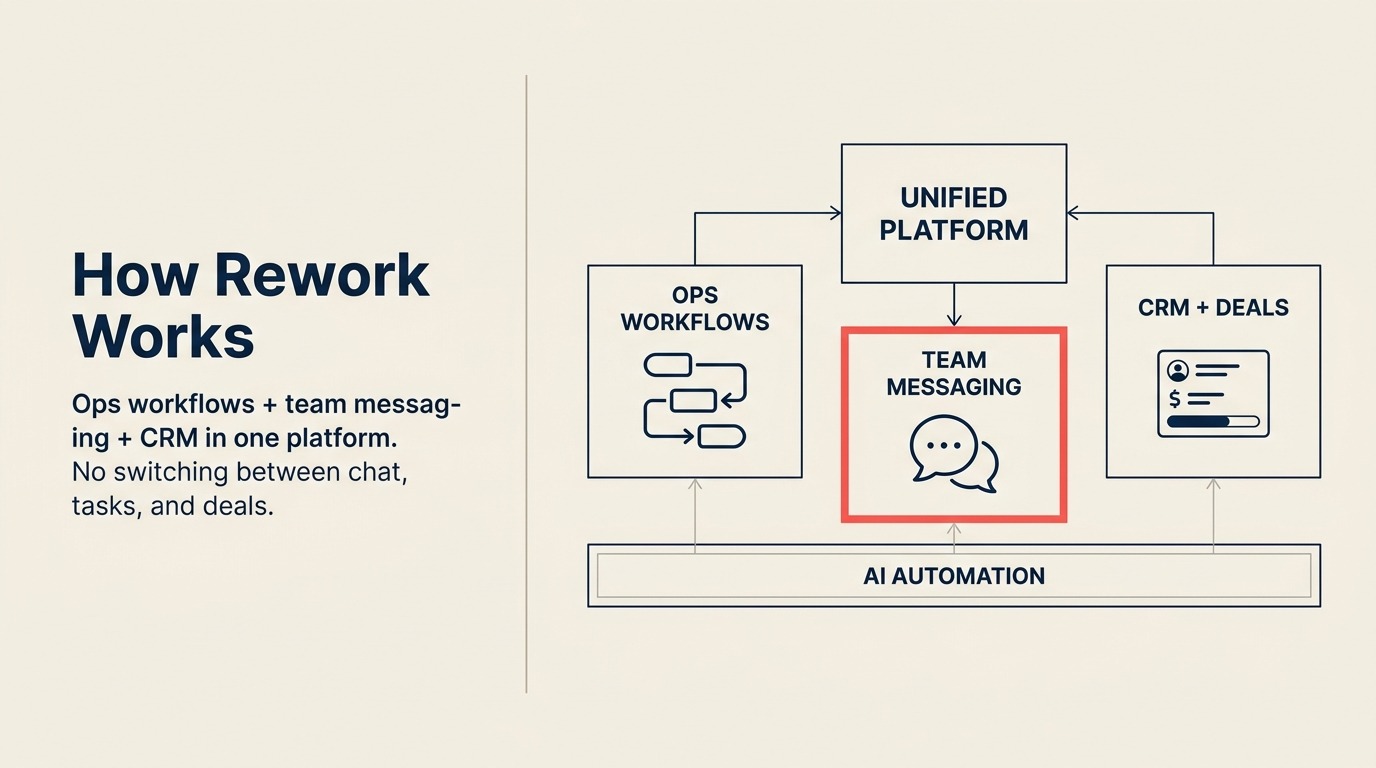
ほとんどのコミュニケーションツールは、まさにそれだけのものです。チャットし、ファイルを共有し、人にメンションを送る。そして実際のオペレーションを動かすには別の場所へ移ります。Reworkは異なるアーキテクチャの立場を取ります。メッセージングはワークフローの隣ではなく、その内側に存在します。リードのステータスが変わったとき、承認がトリガーされたとき、クライアントのオンボーディングタスクが割り当てられたとき、それについての会話は文脈の中で起こります。誰かがレコードに後からリンクし直さなければならない別チャンネルではありません。
実際の効果として、中規模チームは2つの並行システムを動かすのをやめられます。オペレーションチームは「sales-handoffs」というSlackチャンネルでCRMの中身を手作業で伝達する必要がなくなります。取引、プロジェクト、オペレーション案件についての会話は、関連するワークフローレコードの中にあります。これは純粋なメッセージングツールとは異なる製品哲学です。
Reworkは、部門横断のオペレーションを持つ20〜500人の企業向けに位置づけられています。営業からオペレーションへの引き継ぎ、クライアントのオンボーディングシーケンス、定期的な承認ワークフロー、複数チャネルにまたがるリード管理などです。シンプルなチャットアプリを求める10人のスタートアップには適していません。また、オペレーションの複雑さがなく部門間で素早い非同期メッセージングだけを必要とするチームにとっての、Slack相当でもありません。
| 得られるもの | 得られないもの |
|---|---|
| CRMとワークフローレコードに統合されたチャット | 単独のメッセージングアプリ (ワークフローの文脈を要する) |
| 構築済みのオペレーションワークフローテンプレート | 大規模なサードパーティアプリの統合マーケットプレイス |
| マルチチャネルの受信トレイ (メール、チャット、 web) を1画面に | 消費者向けの絵文字リアクションやカジュアルなソーシャル機能 |
| リード管理を内蔵した部門横断オペレーション | 少人数チーム向けの無料プラン |
| 営業、オンボーディング、調達向けの専用ワークフロー | FigmaやJiraレベルの専門ツール |
料金: 1ユーザーあたり月額6ドルから、年額請求。(rework.com/pricing)
最適な用途: 部門横断のオペレーションを動かし、メッセージングを上に重ねるのではなくワークフローの文脈に埋め込みたい中規模チーム (20〜500)
2. Microsoft Teams: Microsoft 365スタックのためのエンタープライズの厚み
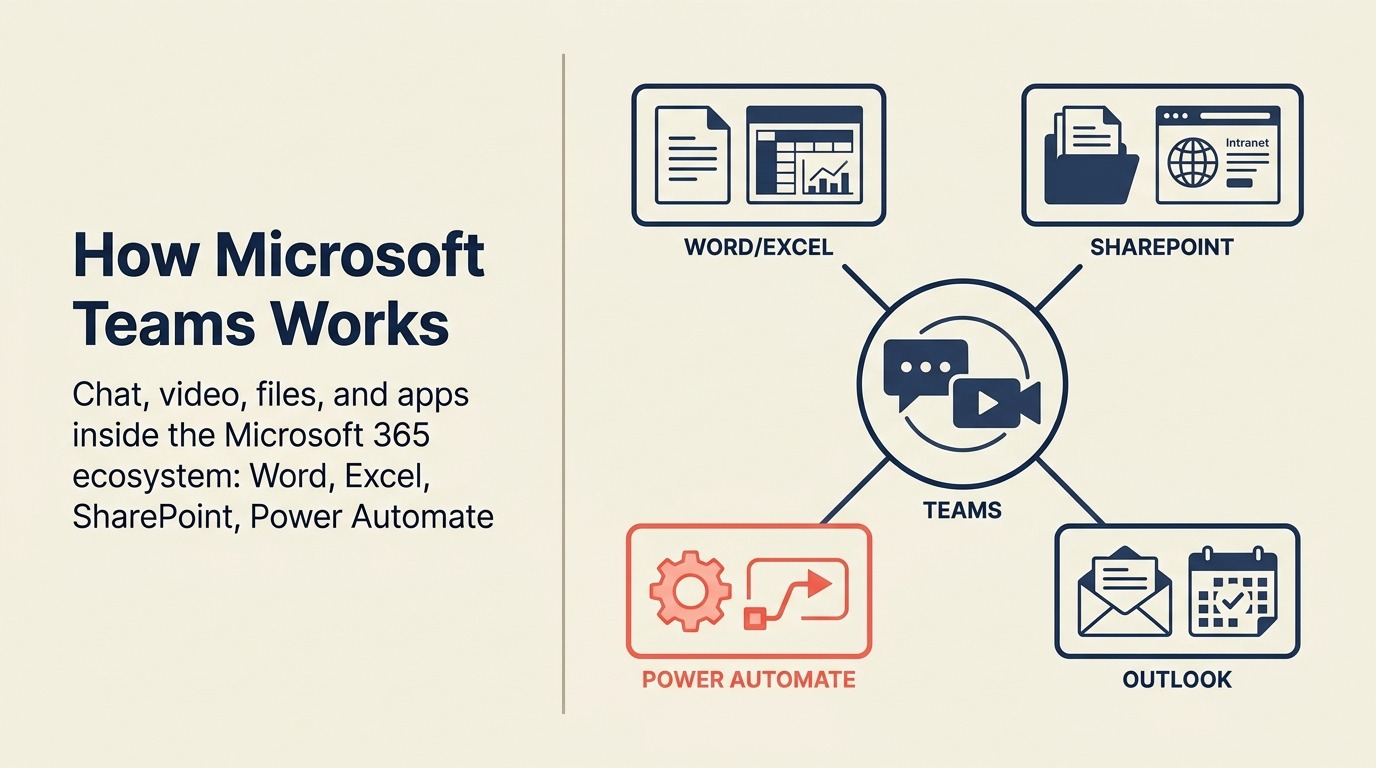
Teamsは製品哲学の意味では実のところSlackの競合ではありません。Microsoft 365の世界の内側に存在するよう設計されたコミュニケーション基盤です。組織がすでにM365に支払っているなら、Teamsは実質的に含まれています。その経済性の論拠だけで、成長の大半を説明できます。
製品は初期リリースから大きく成熟しました。Teams Channels、会議の録画、SharePoint統合、Planner統合、Copilot AIアシスタンスはすべて機能しており、改善が続いています。規制業種にとって、Teamsのコンプライアンス機能、eDiscoveryサポート、DLPポリシーは、この価格帯では他に並ぶものがありません。Microsoft Teamsを評価するチームは、同じプロジェクトの中でGoogle Workspace全体の使用状況を見直すことがよくあります。おすすめGoogle Workspace代替ツールでは、置き換える価値が本当にあるものと残すべきものをカバーしています。
しかしTeamsは重いです。デスクトップクライアントは多くのメモリを使い、UIは密で、新規ユーザーは目的のものを見つけるのが必要以上に難しいと頻繁に不満を漏らします。15人のスタートアップには、必要よりもはるかに大きな製品です。SharePoint、Outlook、Excelをコアツールとして使う5,000人の製造業企業にとっては、明白な統合の選択肢です。
| 得られるもの | 得られないもの |
|---|---|
| 深いOffice 365統合 (Word、Excel、SharePoint、Outlook) | 軽量で高速なUX |
| エンタープライズコンプライアンス、eDiscovery、DLPポリシー | 非技術者向けのシンプルなオンボーディング |
| 強力な会議と動画のインフラ | 最高水準のサードパーティ統合体験 |
| Copilot AIアシスタンス (M365 Copilotアドオン) | 中小企業チームへの製品的注力 |
| ほとんどのM365 Businessプランに付属 | Microsoftエコシステムのロックインからの独立 |
料金: Microsoft 365 Business Basicに含む (1ユーザーあたり月額6ドル)、Teams Essentials単体は1ユーザーあたり月額4ドル
最適な用途: すでにMicrosoftエコシステムにいるエンタープライズおよびミッドマーケット組織、特にコンプライアンスツールを必要とする規制業種
3. Google Chat: Google Workspaceチームのためのネイティブメッセージング
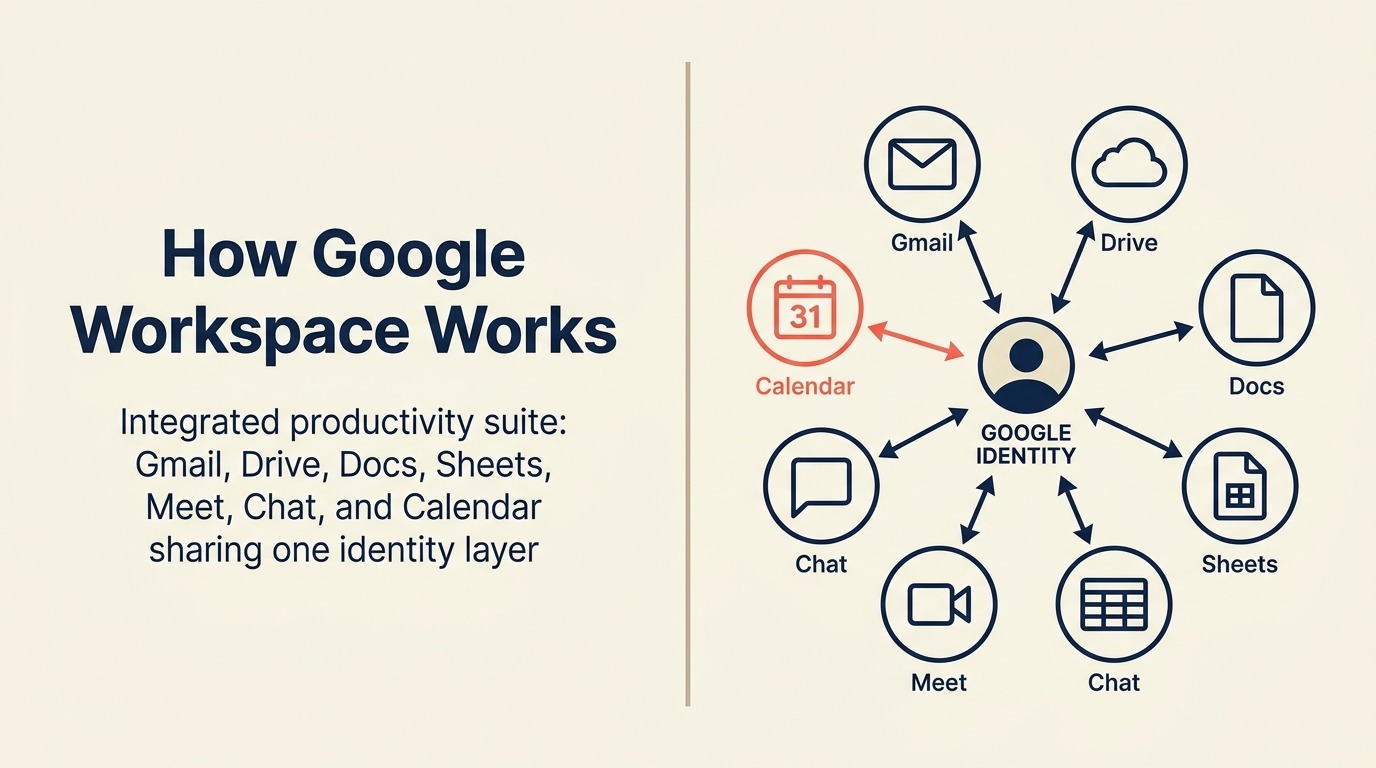
あなたの会社がGoogle Workspaceで動いているなら、Chatはすでにそこにあります。それが主なセールスポイントです。SpacesはトピックベースのコラボレーションでSlackのチャンネルを置き換え、Google Meetはどの会話からもワンクリックで開け、Docs/Driveのプレビューはネイティブです。毎日すでに使っているツールのために統合を設定する必要はありません。
Googleエコシステムの外では、Chatは魅力の大半を失います。統合ライブラリはSlackと比べて薄く、ボット/自動化のストーリーは限定的で、DocsとMeetの中で生きていないチームには物足りなく感じられます。製品はSlackやTeamsと比べて反復のペースも遅く、高度なワークフロー自動化やコンプライアンス重視の展開を求めるエンタープライズの買い手は、すぐに天井に当たります。
あらゆる規模のGoogleネイティブな組織にとっては、妥当な既定の選択肢です。混在スタックを運用する企業にとっては、おそらくコンテキストスイッチに見合いません。
| 得られるもの | 得られないもの |
|---|---|
| ネイティブなGoogle Docs、Drive、Meet、Calendar統合 | 強力なサードパーティ統合エコシステム |
| すべてのGoogle Workspaceプランに付属 | 高度なワークフロー自動化 |
| トピックチャンネル向けのSpaces+DM | Googleスタック外で使う説得力ある理由 |
| 会話全体にわたるGoogle検索 | Teamsに匹敵するエンタープライズコンプライアンスの厚み |
| シンプルで整ったUI | Slackに匹敵するボット/アプリのマーケットプレイス |
料金: Google Workspace Starter (1ユーザーあたり月額6ドル) からEnterpriseプランまでに含む
最適な用途: もう1つの有料ツールを増やさずに統合チャットを求めるGoogle Workspace組織
4. Discord: スタートアップと開発チームのための非同期メッセージングと音声
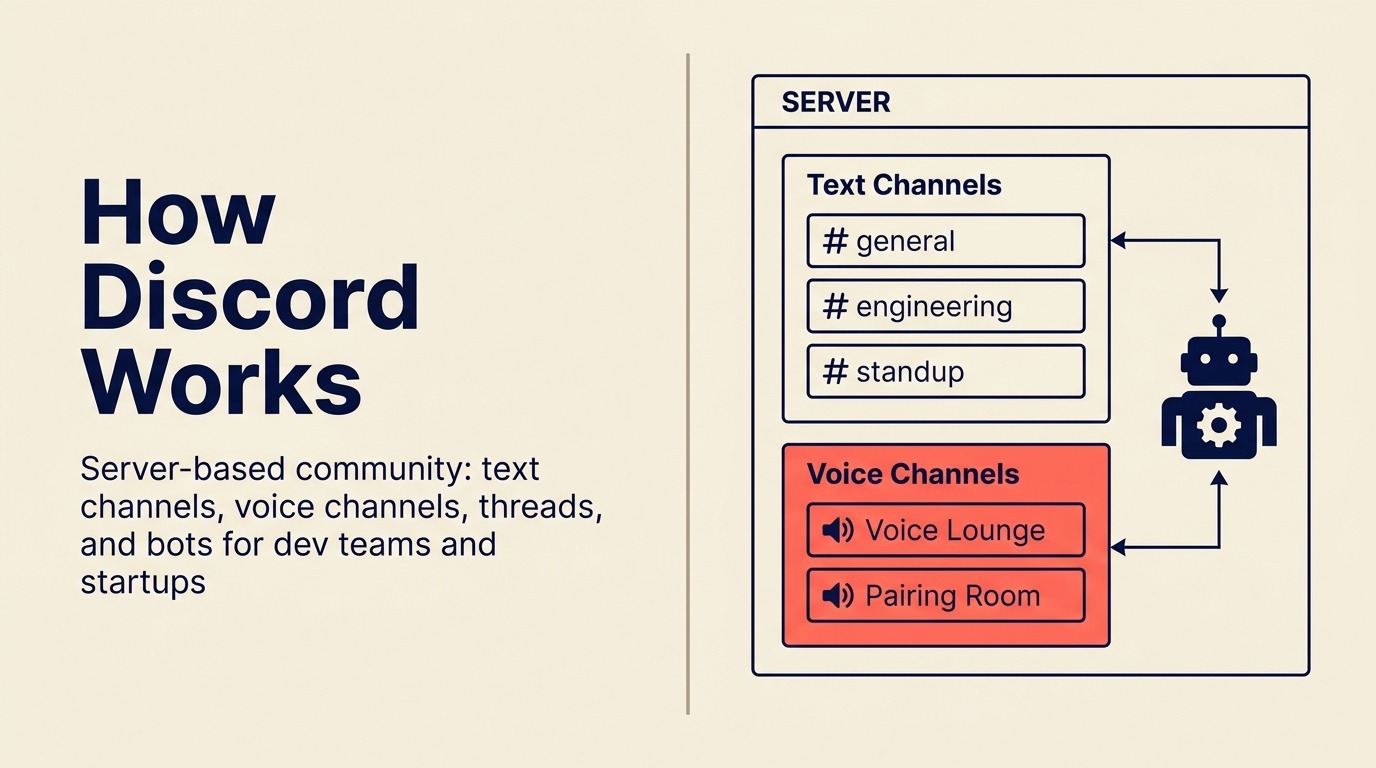
Discordはゲーミングコミュニティ向けに作られました。それから開発者が見つけ、そしてテック系スタートアップが開発者を見つけました。2026年、Discordの無料プランは有料のSlackプランにはない機能を提供します。会議を予定せずに入れる常設の音声チャンネル、無制限のメッセージ履歴、堅牢なコミュニティ管理ツールです。
アーリーステージのスタートアップ、開発チーム、プロダクトコミュニティにとって、Discordの文化的な相性はSlackよりも良いことがよくあります。インフォーマルで速く、音声チャンネルの体験 (正式な通話なしにただ「在席」できる) は、分散チームにとって本当に役立ちます。
しかしDiscordはエンタープライズソフトウェアではありません。無料プランにはSSOがなく、SCIMプロビジョニングもなく、eDiscoveryもなく、きめ細かいコンプライアンス制御もありません。あなたの会社にITセキュリティレビュー、リーガルホールド方針、規制データの取り扱い要件があれば、Discordはそれらの審査を通りません。文化とコストがコンプライアンス要件を上回るチームのためのツールです。
| 得られるもの | 得られないもの |
|---|---|
| 無料プランで無制限のメッセージ履歴 | 無料プランでのエンタープライズSSO、SCIM、eDiscovery |
| 常設の音声チャンネル (予定不要) | ITセキュリティコンプライアンスツール |
| 強力なコミュニティとロールのシステム | プロフェッショナルなDMと受信トレイ管理 |
| 活発な開発者とスタートアップのエコシステム | 強力なワークフロー自動化 |
| ほとんどのユースケースでシート単位の費用なし | データレジデンシー制御 |
料金: ほとんどのチームに無料、Discord Nitroは1ユーザーあたり月額2.99〜9.99ドル (任意、主に個人向け機能)
最適な用途: 文化的な相性と無料プランの経済性がエンタープライズコンプライアンスより重要な、アーリーステージのスタートアップ (30人未満)、開発チーム、プロダクトコミュニティ
5. Rocket.Chat: 完全な制御を備えたopen-sourceメッセージング
Rocket.Chatは「ベンダーに自社のコミュニケーション基盤を支配されたくない」への、open-sourceの答えです。自社のサーバーでself-hostでき、ソースコードにアクセスして変更でき、完全なデータ主権を維持できます。規制業種、政府組織、セキュリティ意識の高い中規模企業にとって、それは意味のある違いです。
製品は初期の手作り的な状態を超えて成熟しました。self-hosted版はオムニチャネルの顧客コミュニケーション (顧客向けチャットを社内メッセージングと並べてルーティングできる) 、マーケットプレイス拡張、カスタム統合のためのREST APIをサポートします。クラウドホスト版はインフラの負荷を取り除きます。
トレードオフは保守です。self-hostedのRocket.ChatはDevOps能力を持つチームを必要とします。アップグレード、バックアップ、稼働時間の管理です。その社内能力がなければクラウドプランが現実的な選択肢になり、そうなると制御ではなくコストでSlackと比較することになります。
| 得られるもの | 得られないもの |
|---|---|
| 完全なソースコードアクセスとself-hostingの選択肢 | インフラ負荷ゼロ (クラウドが処理する) |
| オムニチャネル: 社内+顧客向けメッセージング | すぐ使えるオンボーディング体験 |
| データ主権とオンプレミス展開 | 大規模な商用統合マーケットプレイス |
| 活発なopen-sourceコミュニティ | Slack/TeamsレベルのネイティブなAI機能 |
| REST APIとカスタム統合のサポート | 有料プランなしのエンタープライズSLA |
料金: self-hostedは無料 (インフラ費用は自己負担)、Cloud Communityは25ユーザーまで無料、Proは1シートあたり月額4ドルから
最適な用途: 完全なデータ制御を伴うself-hostedメッセージングを必要とする、セキュリティ意識の高い中規模チーム (20〜500)、政府、規制業種
6. Mattermost: エンタープライズのセキュリティ要件向けのself-hosted Slack
Mattermostはopen-sourceメッセージング市場の本格的な側を占めています。Rocket.Chatが汎用性に寄るのに対し、Mattermostはエンタープライズのセキュリティに寄ります。エアギャップ展開、軍事レベルの暗号化、SOC 2 Type 2、HIPAA準拠のホスティングオプション、きめ細かいアクセス制御です。セキュリティレビューがクラウドファーストのSaaSを禁止するときに、政府機関、防衛請負業者、金融サービス企業が手を伸ばすツールです。
製品はユーザーにとっての切り替えコストが管理可能な程度には、Slackに似た見た目と挙動をしています。チャンネル、DM、スレッド、スラッシュコマンド、アプリ統合はすべて期待どおりに動きます。MattermostにもSlackより小さいとはいえ開発者コミュニティとプラグインエコシステムがあります。
制約はself-hostedツールと同じです。ITリソースの要件です。Mattermostのエンタープライズ展開にはデータベース管理、サーバーのスケーリング、定期的な保守が必要です。専任のITスタッフがいないチームには成り立ちません。それらのリソースを持ち、コンプライアンス上の理由でクラウドホストサービスを使えない企業にとって、Mattermostはこのリストで最も信頼できる選択肢です。
| 得られるもの | 得られないもの |
|---|---|
| エアギャップのオンプレミス展開オプション | 非技術系組織向けの簡単なオンボーディング |
| SOC 2、HIPAA、FedRAMP対応のオプション | 大規模な消費者向け機能セット |
| 馴染みのあるSlackライクなUX | 広範なサードパーティアプリのマーケットプレイス |
| open-sourceのコードベース | 低いITリソース要件 |
| エンタープライズの監査ログとコンプライアンス制御 | 中小企業チームへの素早い価値 |
料金: self-hostedは無料 (Team Edition)、Cloud Starterは1シートあたり月額10ドルから、Enterpriseの料金は要問い合わせ
最適な用途: self-hosted、エアギャップ、または高度に規制されたメッセージングインフラを必要とする、セキュリティ最優先のエンタープライズ組織 (政府、防衛、金融サービス、ヘルスケア)
7. Chanty: 小規模チームにシンプルかつ手頃
Chantyは、Slackが機能と統合の代わりにシンプルさと価格を最適化したらこうなる、という姿です。UXはすっきりしており、オンボーディングは数分で済み、チャットと並んで基本的なタスクの割り当てと追跡を扱うタスク管理機能が内蔵されています。「Slackだけど安く」を求める10人のチームには、Chantyで仕事は片付きます。
無料プランは最大5ユーザーで無制限のメッセージ履歴をサポートします (Slackの90日制限への直接の一撃)。1シートあたり月額3ドルのBusinessプランは、フル機能セットを備えたこのカテゴリーで最も手頃な選択肢の1つです。
Chantyは、うまくいかなくなるまではうまくいきます。統合ライブラリは限定的です。自動化機能は最小限です。そしてチームが50〜100人を超えて複雑な部門横断ワークフロー、レポーティング、エンタープライズ制御を必要とし始めると、Chantyは行き止まりに当たります。少人数チーム向けツールであることに正直な、少人数チーム向けツールです。
| 得られるもの | 得られないもの |
|---|---|
| 無制限のメッセージ履歴 (無料プランは5ユーザーまで) | 大規模な統合ライブラリ |
| チャットと並んだタスク管理機能を内蔵 | 高度なワークフロー自動化 |
| 非常に低いBusinessプラン料金 (3ドル/シート/月) | エンタープライズコンプライアンス機能 |
| すっきりした高速なUX | 100人以上の組織へのスケーラビリティ |
| 音声・動画通話を含む | カスタム開発向けの強力なAPI |
料金: 無料 (5ユーザーまで、メッセージ無制限)、Businessは1シートあたり月額3ドル
最適な用途: SlackレベルのコストなしにSlackのようなメッセージングを求める小規模チーム (2〜30人)、特に内蔵のタスク管理機能が別のプロジェクトツールを置き換える場合
8. Flock: ミッドマーケット価格でのSlackライクなUX
Flockは料金とUXの位置づけの観点から、直接的なSlackの代替ツールです。インターフェースはどのSlackユーザーにも馴染みがあるでしょう。チャンネル、DM、検索、スレッド、絵文字リアクションはすべて期待どおりに動きます。Flockはこれらの基本のためにサードパーティ統合を必要とせず、動画通話、to-doリスト、投票、リマインダーを内蔵で追加します。
価格帯が最も明確な差別化要因です。ProでSlackの7.25ドルに対し1シートあたり月額4.50ドルなので、Flockは50人のチームでおよそ年間1,650ドルを節約します。Salesforce時代の料金なしにSlack相当の体験を求める予算重視の買い手に、Flockは直接その論拠を示します。
統合ライブラリはSlackより小さく、パワーユーザー向けの自動化のストーリーは限定的です。Flockは製品哲学で新境地を切り開くわけではありません。しかしコアな日常利用の体験を妥協せずに「Slackだけど安く」を必要とするチームには、すっきりした選択肢です。
| 得られるもの | 得られないもの |
|---|---|
| 習得の難易度が低い馴染みのあるSlackライクなUX | Slack規模の統合ライブラリ |
| 内蔵の動画通話、投票、リマインダー、to-do | 高度なワークフロー自動化 |
| Slackより低いシート単価 | エンタープライズコンプライアンスツール |
| Proで無制限のメッセージ履歴 | 大手プラットフォームの市場での信頼性 |
| ゲストアクセスのサポート | AIネイティブな機能 |
料金: 無料 (ユーザー数と機能に制限)、Proは1シートあたり月額4.50ドル
最適な用途: 意味のある低価格でSlackの体験を求め、広範なサードパーティアプリのマーケットプレイスを必要としない小〜中規模チーム (5〜200人)
9. Pumble: 無料プランで無制限のメッセージ履歴
Pumbleは、ほとんどのSlack無料ユーザーをいらだたせる1点を前面に押し出します。無償での無制限のメッセージ履歴です。初日まで遡って検索できます。90日の崖に当たりません。Slackの履歴制限が主な摩擦点である小規模チーム、非営利団体、ブートストラップのスタートアップにとって、Pumbleはその問題をすっきり解決します。
有料プランも市場で最も安い部類で、Proが1シートあたり月額2.49ドル、Businessが3.99ドルです。コアな体験はチャンネル、DM、スレッド、ファイル共有、音声/動画通話をカバーします。自動化のニーズにはZapierと統合します。
Pumbleが及ばないのは製品の深さです。自動化は基本的です。ネイティブの統合ライブラリは薄いです。洗練されたワークフロービルダーはありません。そして成長中のチームにとって、高度な分析、ワークロード管理、オペレーションツールの欠如は、いずれそれを卒業することを意味します。しかし無制限の履歴を備えた予算最優先のメッセージングツールとして、価値の論拠を強く示します。
| 得られるもの | 得られないもの |
|---|---|
| 無料プランで無制限のメッセージ履歴 | 深いネイティブ統合エコシステム |
| 非常に低いProプラン料金 (2.49ドル/シート/月) | 高度なワークフロー自動化 |
| すべてのプランで音声/動画通話 | 強力な分析とレポーティング |
| すっきりした親しみやすいUX | エンタープライズのセキュリティ認証 |
| ゲストアクセス利用可能 | AIネイティブな機能 |
料金: 無料 (ユーザーとメッセージ履歴が無制限)、Proは1シートあたり月額2.49ドル、Businessは1シートあたり月額3.99ドル
最適な用途: 無制限のメッセージ履歴と低コストが主な購入基準となる予算重視のチーム (2〜200人)、特に予算が限られたスタートアップや非営利団体
10. Twist: 分散チームのための非同期ファーストのコミュニケーション
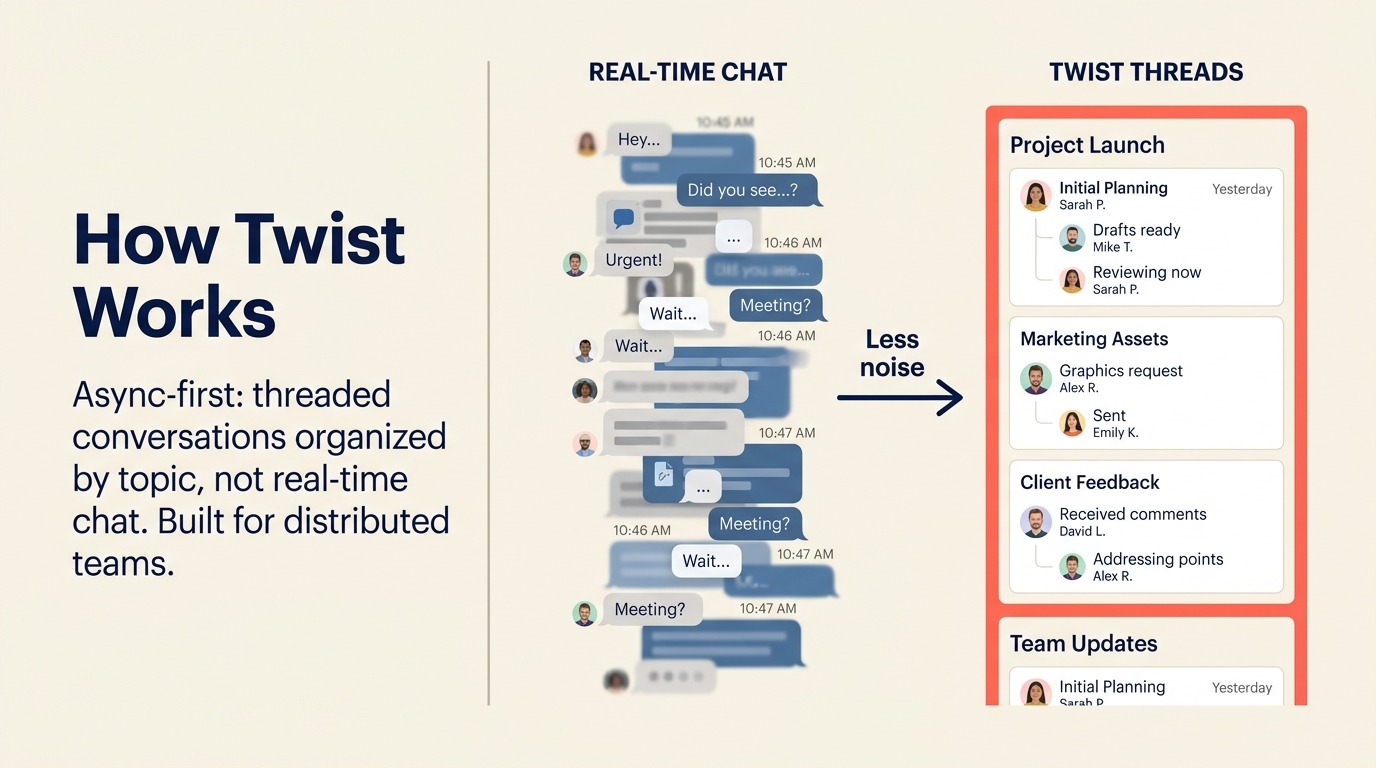
Twistは特定の論点の上に作られています。リアルタイムチャットはほとんどの仕事にとって誤った既定値だ、というものです。絶え間ない通知、即座に応答する圧力、チャンネル間のコンテキストスイッチ。Twistはこれらを、加えるべき機能ではなく設計上の失敗として扱います。Twistのすべての会話はライブチャットではなくスレッドです。既定では何も緊急ではありません。
非同期ファーストの文化を意識的に採用した完全分散チーム (プロダクト企業、エージェンシー、リモートファーストのスタートアップに多い) にとって、Twistは仕事が実際にどう流れるかと一致します。即座の応答への期待はありません。スレッドは整理されたままです。S/N比はほとんどのチームでSlackより大幅に高いです。非同期採用の裏にあるデータに関心があるチームには、非同期ファースト対リモートファーストが、その区別が重要な場合とそうでない場合を説明しています。
制約は強みと対称的です。チームがリアルタイムの連携を必要とするなら、Twistは誤ったツールです。インシデント対応、動きの速い営業サイクル、または同期的なコミュニケーションに依存するあらゆるワークフローは、もどかしいほど遅く感じられます。Twistは、すでに非同期を運用モデルだと決めたチームのための意図的な選択です。
| 得られるもの | 得られないもの |
|---|---|
| 通知ノイズを減らすスレッドベースの非同期フォーマット | 動きの速いワークフロー向けのリアルタイムチャット |
| 整理されたままの目的志向のコミュニケーション | 内蔵の音声/動画通話 (他ツールと統合) |
| 明確な責任所在を持つチームレベルの受信トレイ | 大規模な統合エコシステム |
| 分散とタイムゾーンに広がるチーム向けの設計 | 同期的なコラボレーションのサポート |
| 全スレッドにわたる強力な検索 | Slackネイティブなユーザーへの馴染みやすさ |
料金: 無料 (統合と履歴に制限)、Unlimitedは1シートあたり月額5ドル
最適な用途: リアルタイムチャットの文化から意識的に離れ、その規律を強制するコミュニケーションツールを必要とする、完全分散・非同期ファーストのチーム (5〜150人)
11. Element: Matrixプロトコル上の分散型メッセージング
Elementはこのリストの中で独特です。オープンな連合型プロトコルであるMatrixの上に作られているからです。それは、異なるMatrixサーバーを運用する異なる組織が、全員が同じベンダーのプラットフォームにいることを必要とせずに、互いに直接通信できることを意味します。メールのように考えてください。GmailユーザーにメールするのにGmailにいる必要はありません。Elementはそのアーキテクチャをチームメッセージングにもたらします。
セキュリティモデルは既定で強力です。すべてのメッセージとファイルのエンドツーエンド暗号化、self-hostingのオプション、サーバー間フェデレーションです。政府組織、ヘルスケア機関、厳格なデータ主権要件を持つエンタープライズにとって、Elementのアーキテクチャはクラウドファーストのツールには到底かなわない制御を提供します。
トレードオフは複雑さです。Elementを正しく設定するには技術的な能力が必要です。UXは機能的ですが洗練されていません。そしてフェデレーションは概念的には強力ですが、同じくMatrixサーバーを運用する相手との調整が必要です。ほとんどの商用チームにとって、設定の手間は見合いません。セキュリティ最優先の公共部門とエンタープライズの買い手にとっては、唯一の信頼できるエンドツーエンドの主権的選択肢です。
| 得られるもの | 得られないもの |
|---|---|
| 既定でのエンドツーエンド暗号化 | シンプルで消費者品質のオンボーディング |
| Matrixプロトコルのフェデレーション (組織間メッセージング) | Slackに匹敵する洗練されたUX |
| self-hostingによる完全なデータ主権 | 大規模な商用アプリのマーケットプレイス |
| ベンダーロックインなし (open protocol) | 技術リソースなしの簡単な展開 |
| 強力なコンプライアンスと監査の制御 | クラウドネイティブツールのリアルタイム性能 |
料金: self-hostedは無料 (インフラ費用がかかる)、Element Cloudは1シートあたり月額5ドルから、Enterpriseの料金は要問い合わせ
最適な用途: データ主権、エンドツーエンド暗号化、分散型インフラが譲れない要件である、政府、防衛、金融サービス、ヘルスケアのチーム (20〜500)
12. Lark: ByteDanceによるオールインワンプラットフォーム
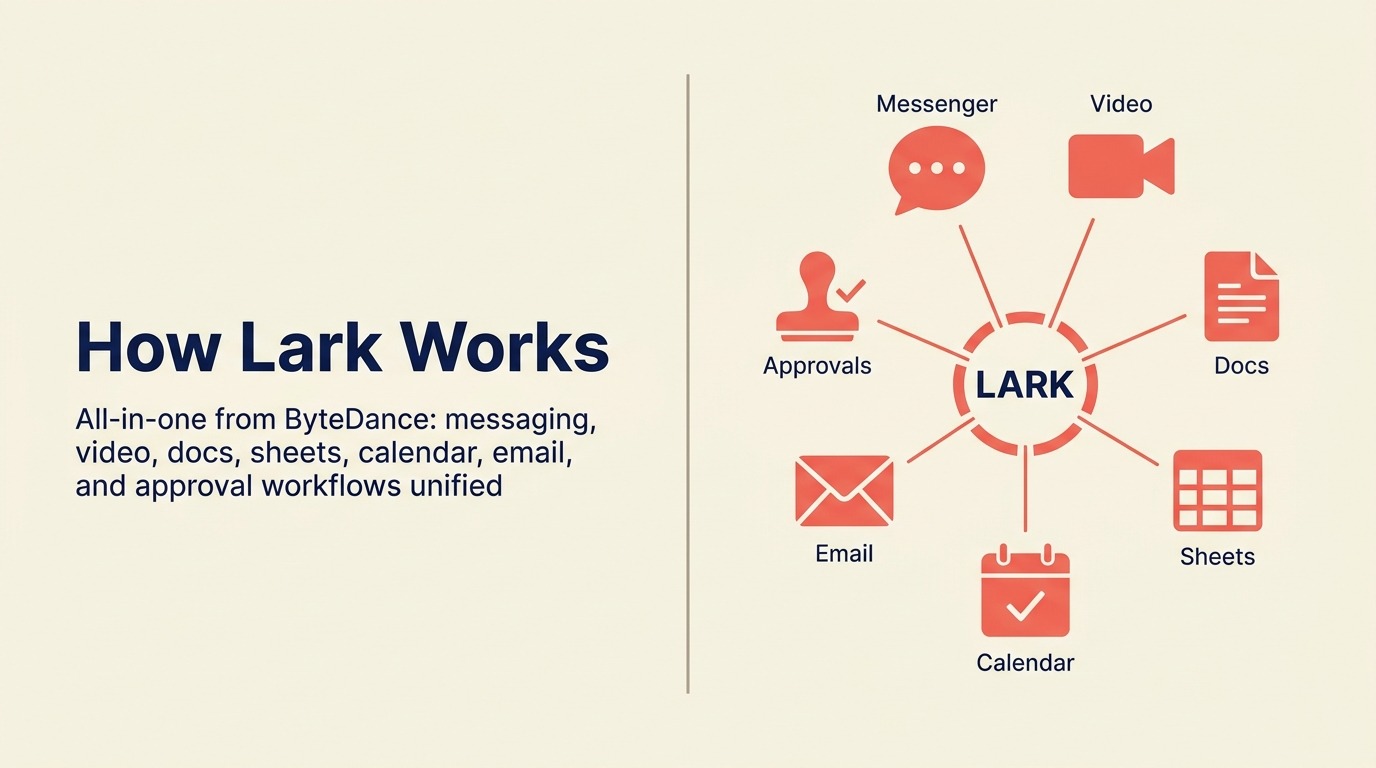
Lark (中国ではFeishuと呼ばれる) はByteDanceのエンタープライズコラボレーションプラットフォームで、このリストの中でも本当に包括的なツールの1つです。チャット、ビデオ会議、共同編集ドキュメント、スプレッドシート、OKR追跡、勤怠管理のようなHRツールがすべて1つの製品に存在します。アジア太平洋市場で急成長するチーム、特に中国などに拠点を持つチームにとって、Larkの幅広さとローカライゼーションは他に並ぶものがありません。
機能の深さは本物です。Lark DocsはGoogle Docsに匹敵するレベルのリアルタイム共同編集をサポートします。会議と録画の品質は堅実です。そしてオールインワンの料金モデルは、5つの別々のSaaSツールを買うのに対して説得力があります。
アジア太平洋市場の外でのためらいは、データレジデンシーとByteDanceの所有権の問題です。米国と欧州のエンタープライズの買い手は、TikTokへの規制上の注目を受けて、ByteDance所有製品のデータ取り扱いをますます精査しています。あなたの組織に中国所有のクラウドインフラに反対する方針があれば、機能の品質に関係なくLarkは選択肢から外れます。
| 得られるもの | 得られないもの |
|---|---|
| チャット、ドキュメント、動画、スプレッドシート、HRが1アプリに | 米国/EUのエンタープライズ買い手向けのデータレジデンシー保証 |
| 強力なアジア太平洋のローカライゼーションと市場サポート | 欧米のエンタープライズエコシステムと統合 |
| OKRとHRツールを含む | ByteDanceのデータ懸念からの独立 |
| 小規模チーム向けの競争力ある無料プラン | 確立された欧米エンタープライズのサポート |
| Notionレベルのリアルタイム共同編集ドキュメント | 機密性の高い業種における規制上の信頼 |
料金: 無料 (50ユーザーまで、コア機能)、Proは1ユーザーあたり月額12ドルから、Enterpriseの料金は要問い合わせ
最適な用途: コミュニケーション、ドキュメント、ピープルオペレーションのための単一プラットフォームを求め、ByteDanceのデータ取り扱いがコンプライアンス上の懸念でない、アジア太平洋市場で急成長するチーム (20〜1,000)
チームがSlackを離れる理由: 具体的な痛点
代替ツールを評価する前に、「なぜ」を理解することが重要です。中規模チームがこの検索を始める最も一般的な理由は以下のとおりです。
| 痛点 | 最も強く感じる人 | 代わりに探すべきもの |
|---|---|---|
| 規模拡大時のシート単価 (Pro: 7.25ドル、Business+: 12.50ドル/シート/月) | COO、財務、IT調達 | 予算重視ならPumble、Chanty、Flock、バンドルならTeams/Chat |
| 無料プランの90日メッセージ履歴制限 | 小規模チーム、スタートアップ、非営利団体 | Pumble、Discord、Chanty (無料で無制限) |
| チャンネルの乱立と通知過多 | 全チーム規模 | Twist (非同期ファースト)、または任意のツールでより厳格なガバナンス |
| 製品の焦点を移したSalesforce買収 | Salesforceエコシステム外のチーム | 独立系ベンダー: Flock、Chanty、Pumble、Twist |
| 単純な自動化を超えるネイティブなオペレーションワークフローの欠如 | オペレーションマネージャー、RevOpsチーム | Rework (オペレーション+チャット)、Teams (Power Automate)、Mattermost |
| コンプライアンスとデータ主権の要件 | セキュリティ、法務、政府 | Mattermost、Rocket.Chat、Element |
| self-hostedまたはオンプレミス展開の必要性 | IT、規制業種 | Mattermost、Rocket.Chat、Element |
| 分散チームの非同期文化の採用 | リモートファースト企業 | Twist |
| ツール支出を統合するオールインワンプラットフォーム | COO、財務 | Lark、Rework、Teams |
買い手が過小評価しがちな要素のひとつが切り替えコストです。ツールの料金は比較しやすいものの、本当のコストは移行にあります。メッセージ履歴のエクスポート、統合の再構築、チームの再トレーニングです。SlackライクなUXを持つツール(Flock、Chanty、Pumble)は再トレーニングの負担を減らす一方、self-hostedの選択肢(Mattermost、Rocket.Chat、Element)は重いセットアップと引き換えに長期的な制御を得られます。
| 代替ツール | UXの習得の難易度 | 移行の手間 | Slackからの履歴インポート |
|---|---|---|---|
| Flock / Chanty / Pumble | 低い(Slackライク) | 低い | 部分的(手動エクスポート) |
| Microsoft Teams / Google Chat | 中程度 | 中程度(スタック全体) | 限定的 |
| Mattermost / Rocket.Chat | 中程度 | 高い(self-hosted) | インポートツール経由でサポート |
| Twist | 中程度(非同期モデル) | 中程度 | 限定的 |
| Rework | 中程度(ワークフロー優先) | 中程度 | 限定的(オペレーション重視) |
料金比較表
| ツール | 無料プラン | エントリー有料 | 中位プラン | エンタープライズ |
|---|---|---|---|---|
| Slack | 90日履歴、10アプリ | Pro: 7.25ドル/シート/月 | Business+: 12.50ドル/シート/月 | Grid: 要問い合わせ |
| Rework | あり (制限付き) | 1ユーザーあたり月額6ドルから | カスタム | カスタム |
| Microsoft Teams | Essentials: 4ドル/ユーザー/月 | M365 Business Basic: 6ドル/ユーザー/月 | M365 Business Standard: 12.50ドル/ユーザー/月 | カスタム |
| Google Chat | Workspace Starter付き: 6ドル/ユーザー/月 | Workspace Standard: 12ドル/ユーザー/月 | Workspace Plus: 18ドル/ユーザー/月 | Enterprise: カスタム |
| Discord | あり (履歴無制限) | Nitro Basic: 2.99ドル/月 | Nitro: 9.99ドル/月 | エンタープライズプランなし |
| Rocket.Chat | あり (self-hostedまたはクラウド25ユーザー) | Pro: 4ドル/シート/月 | Enterprise: カスタム | カスタム |
| Mattermost | あり (self-hosted) | Cloud Starter: 10ドル/シート/月 | Enterprise: カスタム | カスタム |
| Chanty | あり (5ユーザー) | Business: 3ドル/シート/月 | 該当なし | 該当なし |
| Flock | あり (制限付き) | Pro: 4.50ドル/シート/月 | 該当なし | Enterprise: 要問い合わせ |
| Pumble | あり (履歴無制限) | Pro: 2.49ドル/シート/月 | Business: 3.99ドル/シート/月 | Enterprise: 要問い合わせ |
| Twist | あり (履歴制限付き) | Unlimited: 5ドル/シート/月 | 該当なし | 該当なし |
| Element | あり (self-hosted) | Cloud: 5ドル/シート/月 | Enterprise: カスタム | カスタム |
| Lark | あり (50ユーザー) | Pro: 12ドル/ユーザー/月 | Enterprise: カスタム | カスタム |
統合とエコシステムの深さ
| ツール | アプリ統合 | ネイティブ自動化 | APIアクセス | Zapierサポート |
|---|---|---|---|---|
| Slack | 2,600以上 | Workflow Builder | あり | あり |
| Rework | コアなオペレーション統合 | 内蔵のオペレーションワークフロー | あり | あり |
| Microsoft Teams | 700以上 (Power Automate含む) | Power Automate | あり | あり |
| Google Chat | Google Workspaceネイティブ | Google Apps Script | あり | あり |
| Discord | 中程度 (ボットエコシステム) | 基本的 (ボット) | あり | あり |
| Rocket.Chat | 中程度のマーケットプレイス | 基本的な自動化 | あり | あり |
| Mattermost | プラグインマーケットプレイス | webhook+プラグイン | あり | 限定的 |
| Chanty | 30以上 | 基本的 | 限定的 | あり |
| Flock | 60以上 | 基本的 | あり | あり |
| Pumble | 主にZapier経由 | 基本的 | あり | あり |
| Twist | 20以上 | 基本的 | あり | あり |
| Element | Matrixブリッジ | 限定的 | あり | 限定的 |
| Lark | 拡大中 (アジア市場中心) | Lark Baseの自動化 | あり | 限定的 |
セキュリティとコンプライアンス表
| ツール | SOC 2 | HIPAA | GDPR | E2E暗号化 | self-hosted | データレジデンシー |
|---|---|---|---|---|---|---|
| Slack | Type 2 | Business+以上 | あり | なし (通信中) | なし | US/EUオプション |
| Rework | あり | 場合による | あり | あり | なし | 要問い合わせ |
| Microsoft Teams | あり | あり | あり | 通信中 | なし (クラウド) | マルチリージョン |
| Google Chat | あり | あり | あり | 通信中 | なし | マルチリージョン |
| Discord | 限定的 | なし | あり | なし | なし | 主に米国のみ |
| Rocket.Chat | あり (クラウド) | あり (self-hosted構成) | あり | 任意 | あり | 完全 (self-hosted) |
| Mattermost | あり | あり | あり | あり | あり | 完全 (self-hosted) |
| Chanty | あり | なし | あり | 通信中 | なし | 限定的 |
| Flock | あり | なし | あり | 通信中 | なし | 限定的 |
| Pumble | あり | なし | あり | 通信中 | なし | 限定的 |
| Twist | あり | なし | あり | 通信中 | なし | 限定的 |
| Element | あり | 可能 (self-hosted) | あり | あり (既定) | あり | 完全 |
| Lark | あり | 限定的 | あり (EUサーバー) | 通信中 | なし | US/EU/アジア |
選び方: 意思決定フレームワーク
| 必要なものが... | これを選ぶ |
|---|---|
| 50〜500人チーム向けにオペレーションワークフロー+チャットを1製品で | Rework |
| すでにMicrosoft 365を使っていてエンタープライズコンプライアンスが必要 | Microsoft Teams |
| チーム全体がGoogle Workspaceで動いている | Google Chat |
| 小規模スタートアップ向けの音声チャンネルと無制限履歴を備えた無料ツール | Discord |
| 完全なデータ主権を伴うself-hostedメッセージング | Mattermost (高セキュリティ) またはRocket.Chat (汎用) |
| 小規模チーム向けの最も安いフル機能の有料オプション | Chanty (3ドル/シート) またはPumble (2.49ドル/シート) |
| 低価格でのSlackライクなUX | Flock |
| 無償での無制限のメッセージ履歴 | Pumble |
| 分散チーム向けの非同期ファーストのコミュニケーション | Twist |
| エンドツーエンド暗号化された、フェデレーション対応の分散型メッセージング | Element |
| アジア太平洋でのオールインワンプラットフォーム (チャット+ドキュメント+動画+HR) | Lark |
| 大規模な統合ライブラリを備えた規模拡大時の純粋なSlack置き換え | Microsoft TeamsまたはRocket.Chat |
次のステップ
上記のフレームワークに基づいて上位2つの候補を選び、5〜10人の単一チームで2週間のパイロットを実施しましょう。デモ環境でツールを評価してはいけません。実際のワークフローでの実利用が、洗練されたデモが隠す摩擦を浮かび上がらせます。
Reworkを特に評価するチームにとって、正しいテストは、1つのライブなオペレーションワークフロー (営業の引き継ぎ、クライアントのオンボーディング、または定期的な承認サイクル) を2週間プラットフォームに通すことです。ワークフローに埋め込まれたコミュニケーションモデルがチームの実際の働き方に合えば、それは明白でしょう。チームが主に摩擦のないチャットを必要とし、管理すべき部門横断のオペレーションワークフローを持たないなら、Reworkは適した選択肢ではなく、このリストの別のツールがより役立つでしょう。
よくある質問
2026年にSlackは価格に見合いますか? Slackの統合ライブラリとワークフローに深く投資しているチームにとっては、おそらく見合います。主なユースケースがメッセージングで、2,600の統合が必須ではなくあれば良い程度のチームにとっては、Flock、Pumble、Chantyに対して料金を正当化するのが難しくなります。
最も優れた無料のSlack代替ツールは? Pumbleは無料プランで無制限のメッセージ履歴と無制限のユーザーを提供し、Slackで最も不満の多い無料の制限を直接解決します。常設の音声チャンネルとコミュニティ機能が重要なら、Discordが最良の選択肢です。
Microsoft TeamsはSlackを完全に置き換えられますか? Microsoft 365組織にとっては、はい。統合の深さは異なり (Microsoftスタック優先か広範なサードパーティマーケットプレイスか)、UXはより重いです。しかし標準的なチームコミュニケーションに対する機能の同等性はあります。
self-hosting向けの最良のSlack代替ツールは? エンタープライズのセキュリティ要件とエアギャップ展開にはMattermost。顧客向けメッセージングを含む、より柔軟で幅広いユースケースにはRocket.Chatです。
最良の非同期Slack代替ツールは? Twistです。リアルタイムチャットに追加された機能としてスレッドを扱うのではなく、アーキテクチャ的に非同期ファーストであるこのリスト唯一のツールです。
関連する読み物
現在Slackチャンネルにあるワークフローの自動化方法も評価しているチームには、おすすめZapier代替ツールが、「Xが起きたらSlackに通知する」というパターンをネイティブなワークフローロジックで置き換えられる自動化プラットフォームをカバーしています。Slackのスレッドを置き換えるためにノートやwikiへ移行するチームには、おすすめNotion代替ツールが、分散チームが非同期メッセージングと併せて採用することの多いナレッジ管理ツールをカバーしています。そしてツールを統合している場合 (Slackを他のシート単位のサブスクリプションと一緒に削減する場合) には、ソフトウェアの乱立の真のコストが、予算レビューでその主張をするための数字を提供します。
外部リソース:
- Slackの料金: Pro、Business+、Gridプラン
- Microsoft Teamsの料金: EssentialsとM365バンドル
- Mattermostの料金: Team Edition (無料)、Professional、Enterprise
- Rocket.Chatの料金: self-hostedとクラウドのオプション
- Twistの料金: FreeとUnlimitedプラン

On this page
- クイック比較表
- ステージ適合マトリクス
- 規模とペルソナ表
- 1. Rework: オペレーションワークフロー+チームメッセージングを1つのプラットフォームに
- 2. Microsoft Teams: Microsoft 365スタックのためのエンタープライズの厚み
- 3. Google Chat: Google Workspaceチームのためのネイティブメッセージング
- 4. Discord: スタートアップと開発チームのための非同期メッセージングと音声
- 5. Rocket.Chat: 完全な制御を備えたopen-sourceメッセージング
- 6. Mattermost: エンタープライズのセキュリティ要件向けのself-hosted Slack
- 7. Chanty: 小規模チームにシンプルかつ手頃
- 8. Flock: ミッドマーケット価格でのSlackライクなUX
- 9. Pumble: 無料プランで無制限のメッセージ履歴
- 10. Twist: 分散チームのための非同期ファーストのコミュニケーション
- 11. Element: Matrixプロトコル上の分散型メッセージング
- 12. Lark: ByteDanceによるオールインワンプラットフォーム
- チームがSlackを離れる理由: 具体的な痛点
- 料金比較表
- 統合とエコシステムの深さ
- セキュリティとコンプライアンス表
- 選び方: 意思決定フレームワーク
- 次のステップ
- よくある質問
- 関連する読み物