Best AI Research Agents in 2026: 10 Tools for Sourced, Citable Reports
Turn this article into takeaways for your work.


Each assistant summarizes the article only for you and suggests best practices for your work.
An AI research agent is best for an analyst, strategist, or academic who needs a multi-step literature or web investigation turned into a sourced report, and the top picks split by job: OpenAI Deep Research and Google Gemini Deep Research for general-purpose investigations inside a chat app you likely already pay for, Elicit and Undermind for formal academic literature work, and Scite for checking whether a citation actually says what it's credited with saying. This guide ranks 10 of them and treats one question as more important than any feature list: when the agent hands you a cited claim, can you trust the citation without opening every source yourself?
That question is the whole story in this category. An AI research agent is different from an AI research tool: a tool (a search box, a chat assistant, a summarizer) assists a human who stays in the loop for every step. An agent plans a multi-step investigation on its own, runs searches, reads what it finds, decides what to check next, and returns a synthesized report with citations attached, largely without a human approving each step along the way. That autonomy is the entire value proposition, and it's also exactly where a fabricated or misattributed source can slip through unnoticed. This guide is scoped to general and academic research: gathering, verifying, and synthesizing information into a report. If you need competitive or commercial market intelligence specifically, that's a narrower, adjacent buying decision covered separately. If you want the underlying design of a research agent, not a product to buy, see the build-side Research Agent blueprint. And for the plain definition of what makes something an agent at all, what is an AI agent covers the plan-act-observe loop every tool below implements some version of.
Figures labeled (reported) come from independent pricing trackers rather than the vendor's own page, so confirm current pricing with each vendor before buying.
What Changed in 2026
- Deep Research went from one lab's feature to table stakes. OpenAI shipped the first mainstream Deep Research mode in February 2025; by mid-2026, Google, Anthropic, and Perplexity all ship a comparable agentic research mode, and the fight has moved to depth, source coverage, and price per run rather than whether the feature exists at all.
- You.com retired its consumer research agent. ARI, the standalone research agent You.com launched for business users in early 2025, is gone from its current pricing page. You.com now sells a usage-billed Research API aimed at developers building their own agents, not a report an analyst runs directly, so it isn't in the ranked list below.
- Pricing ladders are still being worked out. OpenAI added a new Pro-tier option in April 2026 sitting between Plus and its existing $200 Pro plan, and Google added a lower-cost AI Plus tier under AI Pro. Both moves suggest vendors are still guessing how often a real analyst needs to run a report, so recheck the current tier list before you buy.
Key Facts
- Across 1,600 queries testing 8 AI search tools against 20 news publishers, chatbots answered incorrectly more than 60% of the time collectively, with per-tool error rates ranging from 37% (Perplexity) up to 94% (Grok 3), per the Columbia Journalism Review Tow Center's 2025 study (CJR).
- The same CJR study found ChatGPT misidentified 134 of 200 articles tested but signaled a lack of confidence only 15 times, meaning a confident tone is not evidence an agent's citation is correct.
- An earlier Stanford study of general-purpose models (GPT-3.5, Llama 2, PaLM 2) answering more than 200,000 legal research queries found hallucination rates of 69% to 88%, the exact failure mode that grounded, citation-first research agents exist to reduce (Stanford HAI).
- General AI agents jumped from a 12% to roughly 66% success rate on OSWorld, a benchmark of real computer-use tasks, over the past year, yet still fail about 1 in 3 attempts on structured tasks, per Stanford HAI's 2026 AI Index report (Stanford HAI).
- 57% of organizations now have AI agents running in production, rising to 67% among enterprises with 10,000 or more employees, per LangChain's State of Agent Engineering survey of 1,340 practitioners (LangChain).
Quick Comparison Table
| Tool | Best For | Starting Price | Key Strength | Key Limitation |
|---|---|---|---|---|
| OpenAI Deep Research | General research inside ChatGPT | Plus $20/mo (10 runs/mo, reported) | Broad web reading, dozens of pages per run | Runs are capped per month even on Plus |
| Google Gemini Deep Research | Google Workspace users | Free (5 reports/mo); AI Pro ~$19.99/mo (reported) | Grounded in Google Search plus Workspace data | Full Deep Research needs a paid tier |
| Anthropic Claude Research | Analysts already living in Claude | Pro from $17-20/mo (billed annually/monthly) | Native Gmail, Calendar, and Docs grounding | Shares your normal message quota, no separate limit |
| Perplexity Deep Research | Fast, cited answers without a long wait | Free (~5/day); Pro $20/mo (reported) | Minutes, not tens of minutes, per report | Formatting and depth trail purpose-built academic tools |
| Elicit | Formal systematic literature reviews | Free; Pro $49/mo ($588/yr annual) | Named "Research Agent," screens up to 5,000 papers | Free tier's Research Agent usage is capped |
| Consensus | A fast, evidence-weighted answer | Free; Premium ~$9/mo; Deep ~$45/mo (reported) | Consensus meter shows how evidence actually leans | Built for narrow questions, not full reviews |
| Undermind | Fuzzy, hard-to-keyword literature questions | Free (3 deep searches/mo); Pro $16/mo (annual) | Iterative agent reads and adapts across hundreds of papers | A single deep search takes 8-10 minutes |
| Exa | Teams building a custom research agent | Pay-per-use; Search $7/1K requests | Clean, structured retrieval built for agent pipelines | Developer API, not a point-and-click report tool |
| Scite | Verifying what a citation actually supports | Individual $20/mo ($12/mo annual, reported) | Smart Citations: Supporting, Contrasting, or Mentioning | Not a primary research or discovery agent |
| STORM | Free, self-hosted, full control | Free, open source (MIT) | Multi-perspective research plus full cited-article writing | No vendor support, no polished consumer UI |
What Makes This an Agent, Not a Search Tool
Not everything marketed as "AI research" plans its own next step. A search box that returns ranked links is a tool. A chatbot that answers from one search pass is a tool with a citation on top. What earns the word agent here is autonomy over multiple steps: the system decides what to search first, reads what comes back, decides whether that's enough or whether it needs to search again from a different angle, and only then writes the report, largely without you approving each intermediate step. That's why OpenAI Deep Research, Gemini Deep Research, Claude Research, and Perplexity Deep Research anchor this list even though each vendor also ships a plain, single-pass chat mode that doesn't qualify.
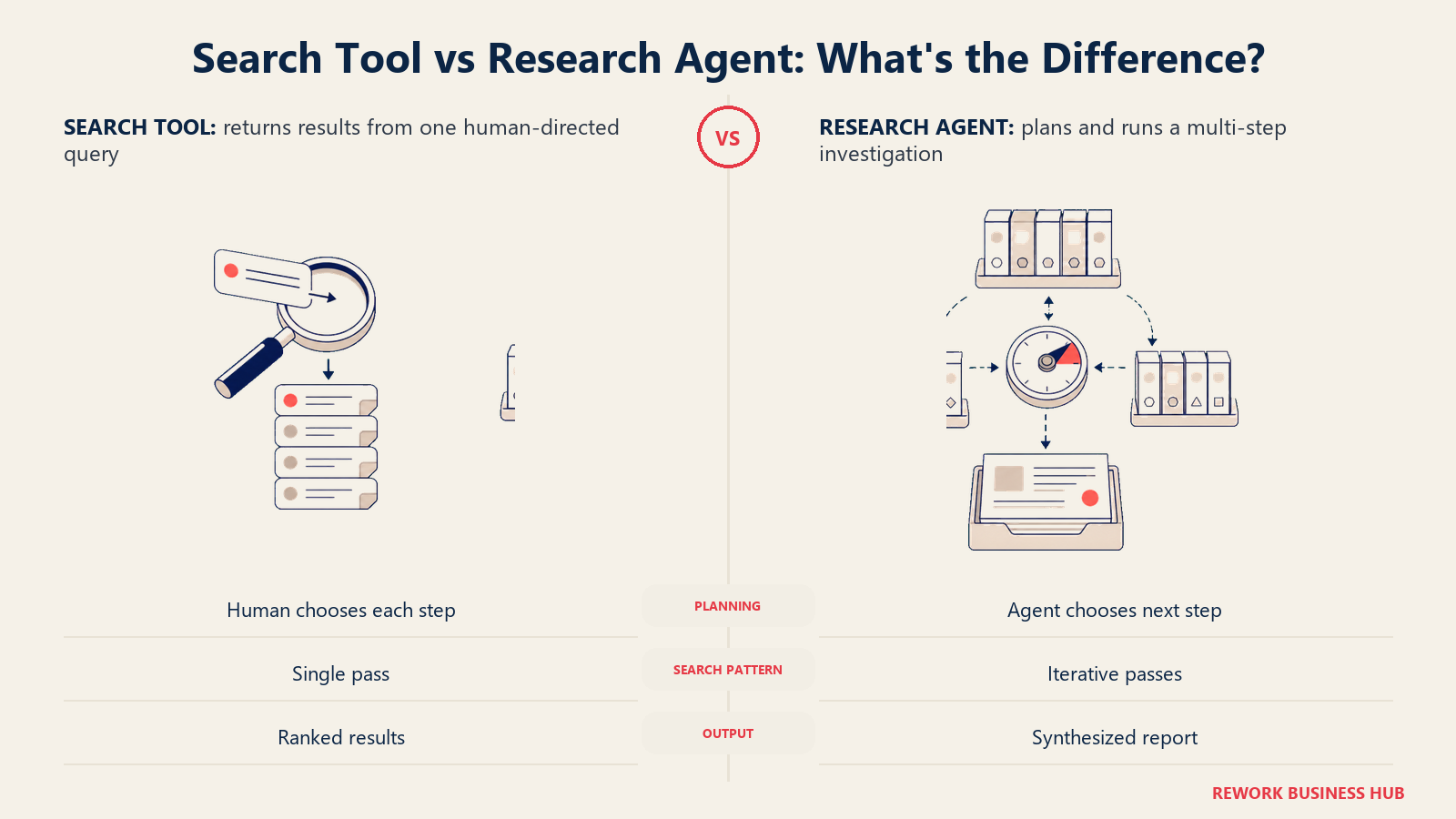
It's also why this guide stays distinct from two neighbors. Best AI tools for academic research and best AI tools for scientific research cover single-purpose research software, discovery search, reference managers, writing assistants, where a human drives every step. Several vendors below (Elicit, Consensus, Perplexity) show up in both worlds because their free or entry tier is closer to a search tool and their paid Research Agent or Deep Search mode is genuinely agentic; where that split exists, this guide evaluates the agentic mode specifically. And a research agent is not the same buying decision as an agent for commercial or competitive market intelligence, which is a narrower, business-specific research job with its own finalists.
This guide also sits one level below the broader buying decision. If you haven't picked a class of agent platform yet, no-code, managed enterprise, or developer framework, start with best AI agent platforms. It's the same relationship best AI coding agents has to that pillar: a narrow, job-specific slice of a much bigger category.
Citation Integrity: What Actually Separates These Tools
A roundup of research agents that skips this section is skipping the only thing that matters. Every tool below produces citations. Not every tool produces citations the same way, and the underlying mechanism determines how much you should trust one without checking it yourself.
| Tool | How It Sources | Structural Fabrication Exposure | Verify By |
|---|---|---|---|
| OpenAI Deep Research | Live web browsing, reads full pages | Generates synthesized prose citing sources, standard Deep Research exposure | Opening each linked source directly |
| Google Gemini Deep Research | Live web plus Google Search grounding | Same generative-synthesis exposure as above | Opening each linked source directly |
| Claude Research | Live web, plus connected Gmail/Calendar/Docs | Same generative-synthesis exposure; connected docs add a second surface to check | Opening sources; confirming connected-doc citations match the actual file |
| Perplexity Deep Research | Live web across many sources per run | Generative synthesis; CJR's study measured Perplexity's base search mode at a 37% error rate | Opening each linked source directly |
| Elicit | Retrieval over a 138-million-paper index (per elicit.com) | Lower: extraction tables pull from indexed papers rather than free-form generation | Spot-checking extracted fields against the source PDF |
| Consensus | Retrieval over an indexed corpus of peer-reviewed papers | Lower: consensus meter reflects real indexed studies, not generated claims | Checking the studies behind the meter, not just the meter itself |
| Undermind | Iterative retrieval, only surfaces papers it actually indexed | Lowest on this list: it returns a paper list, it can't invent a paper that isn't in its results | Reading the returned papers' abstracts before citing them |
| Exa | Neural search API returning structured, grounded results | Depends entirely on how the team building on it configures synthesis | Whatever verification the team building on Exa implements |
| Scite | Classifies existing citation statements, doesn't generate new claims | Lowest: it reports what a citing paper actually said, with the quoted text shown | Reading the quoted context Scite surfaces, not just the label |
| STORM | Live web or user-supplied documents, cites throughout | Generative synthesis, same category as the chat-based agents | Checking citations against source pages, same as any generative agent |
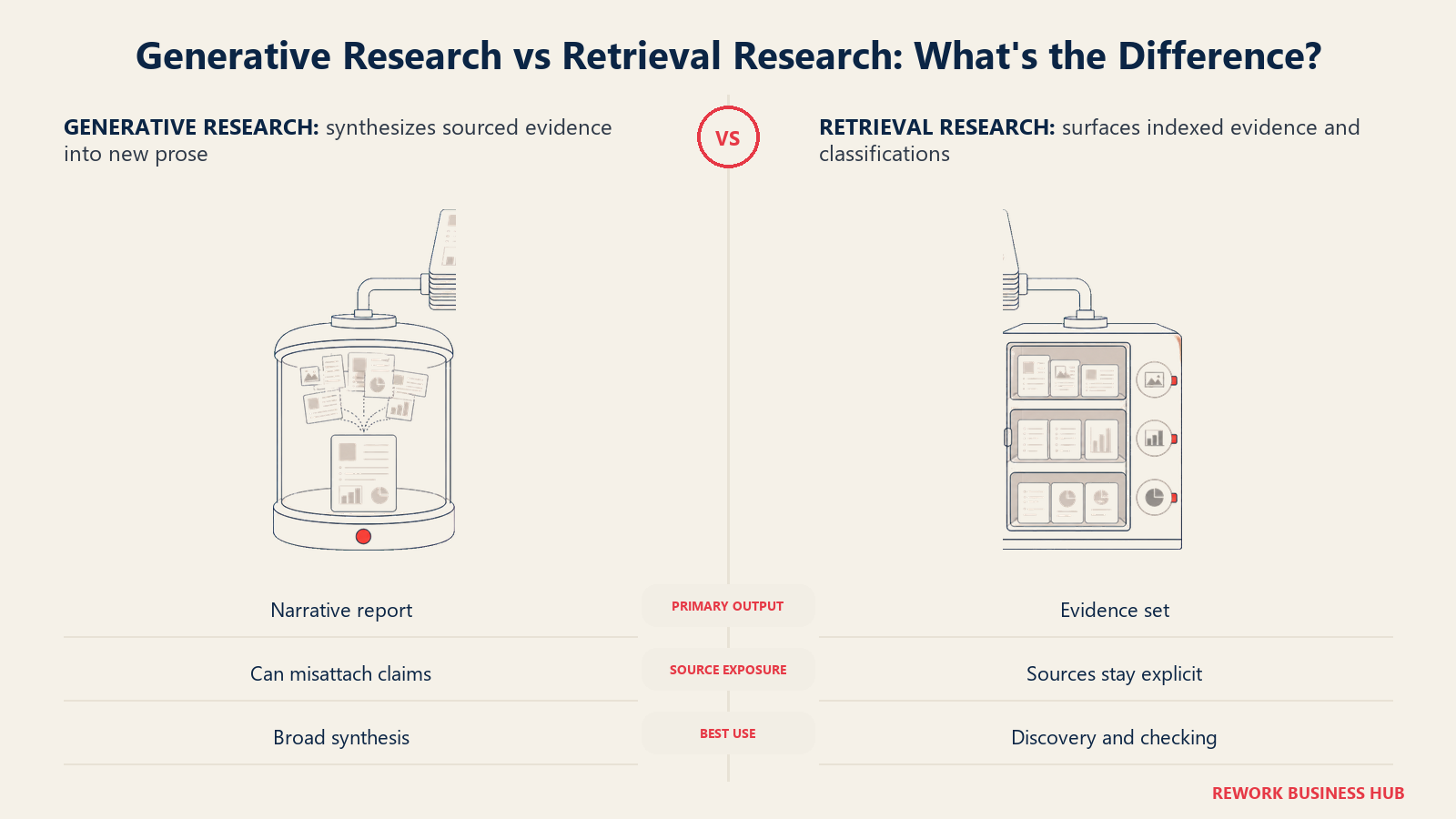
The pattern: tools built around generating synthesized prose (OpenAI, Gemini, Claude, Perplexity, STORM) carry more fabrication exposure by design, because language generation and citation accuracy are two separate capabilities bolted together. Tools built around retrieval and classification (Elicit, Consensus, Undermind, Scite) structurally can't invent a source the way a generative summary can, because their output is closer to "here is what I found" than "here is what I concluded." Neither category is inherently more useful; they answer different questions. But if a deliverable rides on a specific number or quote, know which category produced it before you cite it further.
Source Coverage and Access
| Tool | Live Web | Academic Index | Paywalled Content | Notes |
|---|---|---|---|---|
| OpenAI Deep Research | Yes | No dedicated index | Skips or flags what it can't access | General web breadth, not literature-specific |
| Gemini Deep Research | Yes, via Google Search | No dedicated index | Skips or flags what it can't access | Strong for anything Google indexes |
| Claude Research | Yes | No dedicated index | Skips or flags; can read connected Docs/Drive | Best when your own documents are part of the answer |
| Perplexity Deep Research | Yes | Academic Focus mode narrows to peer-reviewed sources | Skips or flags what it can't access | General web tool with an academic mode, not built for it |
| Elicit | Limited, index-first | 138 million papers (elicit.com) | Full text where openly available | Purpose-built for literature, not general web questions |
| Consensus | No | Indexed peer-reviewed corpus | Abstract-level where full text is closed | Best for a specific, answerable evidence question |
| Undermind | No | Large indexed literature corpus, exact size not independently confirmed | Abstract-level where full text is closed | Iterative search finds papers keyword search misses |
| Exa | Yes, real-time neural search | Configurable by the team building on it | Depends on configuration | Infrastructure, coverage is whatever you build |
| Scite | No independent discovery | 1.6 billion+ citation statements (scite.ai) | Reads citation context, not full papers | Verification layer, not a discovery engine |
| STORM | Yes, pluggable search backend (Bing, DuckDuckGo, You.com, or your own docs) | Whatever backend you configure | Depends on backend | You choose the retrieval engine |
The Verification Workflow: What to Check Before You Trust a Cited Report
None of the tools above replace the analyst. Every one of them is designed to hand a draft to a human who still owns the judgment call, the same handoff pattern the Research Agent blueprint builds in by default: the agent synthesizes, a person verifies and decides. Run this checklist before a cited report leaves your hands:
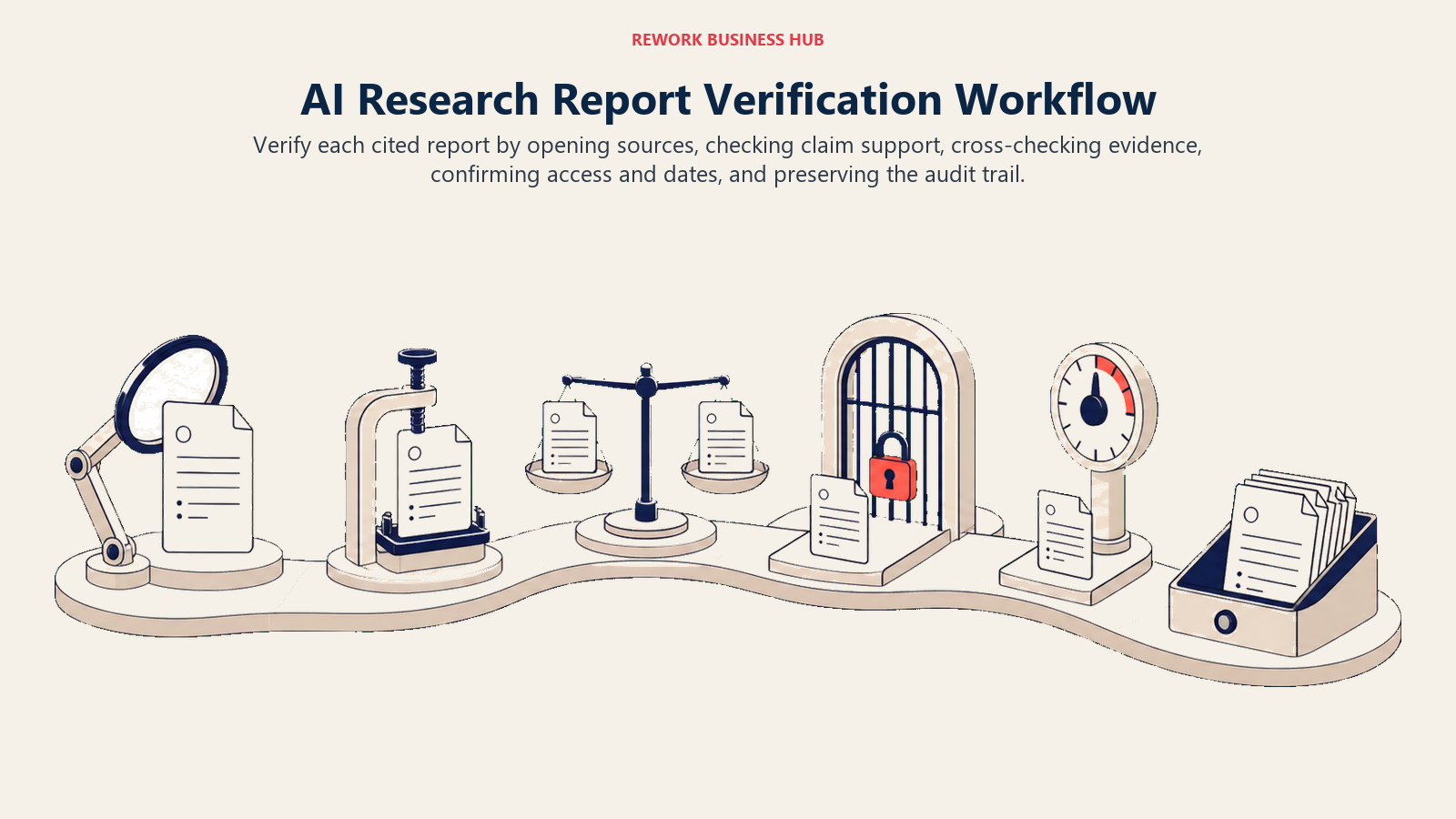
- Open every source the report leans on, not just the ones that look surprising. CJR's study found confident-sounding wrong answers outnumbered flagged-uncertain ones by roughly 9 to 1 on ChatGPT, so tone tells you nothing about accuracy.
- Run academic citations through a checker like Scite before you repeat them. A citation that resolves to a real, retrievable paper can still misstate what that paper found; Scite's Supporting, Contrasting, or Mentioning label (with the actual quoted text) catches that gap.
- Cross-check any single-source claim against a second, independent source before it goes into a deliverable with your name on it, the same authority-hierarchy discipline the build-side blueprint recommends for conflicting sources.
- Confirm the agent actually read paywalled or login-gated sources it cites, rather than inferring content from a title or a search snippet. Most tools flag this if you look; few surface it unprompted.
- Check the retrieval date. A report is only as current as its last search pass; a "sources last retrieved" line (or the lack of one) tells you whether you're looking at today's evidence or a stale draft.
- Keep the raw source list and timestamps, not just the polished summary, so the research can be retraced if a finding is challenged later. Elicit, Exa, and Undermind all preserve this by default; chat-based agents often require you to ask for it explicitly.
For a more general framework on testing whether any agent's output is reliable enough to act on, how to evaluate AI agents covers task success metrics and grading multi-step behavior beyond citation checking alone. If the research agent needs to clear a procurement or security review before a regulated team can touch it, best enterprise AI agent platforms covers that governance layer specifically.
1. OpenAI Deep Research: Broadest Web Reading Inside ChatGPT
Deep Research runs as an agentic mode inside ChatGPT: it plans a multi-step search, reads dozens of pages during a single run, and can take anywhere from 5 to 30 minutes to return a cited report, depending on how broad the question is. For a Plus subscriber, it's the fastest way to get an agentic research pass without adding a new vendor, since it lives inside a product most professionals already have open.
The catch is the monthly cap. Plus includes 10 Deep Research runs a month, which sounds generous until you're using two or three on a single research-heavy week. OpenAI added a new $100 Pro-tier option in April 2026 between Plus and its existing $200 Pro plan; the $200 tier includes 250 runs a month, aimed at people running Deep Research as a daily tool rather than an occasional one.
| What you get | What you don't |
|---|---|
| Broad, general web reading across dozens of pages per run | Only 10 runs/month on Plus, easy to exhaust |
| No new vendor if you already pay for ChatGPT | No dedicated academic paper index |
| Runs inside a tool most analysts already know | Pricing tiers shifted twice in 2026; recheck before buying |
Pricing (reported): Plus $20/month (10 Deep Research runs/month); a new Pro tier at $100/month added April 2026; Pro at $200/month (250 runs/month). Confirm the current lineup at openai.com/chatgpt/pricing before buying.
Best for: Analysts who already use ChatGPT and want general-purpose web research without adding a specialized tool.
2. Google Gemini Deep Research: Grounded in Google Search and Workspace
Gemini's Deep Research mode bets on the same advantage Google always has: the open web plus whatever lives in your Workspace and Search history. It's the only agent on this list with a real free tier for the actual multi-step feature, not just a chat mode; Google's free plan includes up to five Deep Research reports a month before you need to pay anything.
Paid tiers scale by usage rather than by feature. AI Pro (reported around $19.99/month) unlocks full Deep Research on Google's current Gemini model, and AI Ultra (reported at $99.99/month for 5x usage or $199.99/month for 20x) adds the highest limits along with Deep Think, Google's more deliberative reasoning mode. Google also introduced a lower-cost AI Plus tier between Free and Pro in 2026, though we don't list a USD price for it; check gemini.google/subscriptions for the current regional price.
| What you get | What you don't |
|---|---|
| A genuine free tier: 5 Deep Research reports/month | Full-featured Deep Research still requires AI Pro |
| Grounded in Google Search plus Workspace data if connected | No dedicated academic paper index |
| Clear usage-based scaling (5x, 20x) at the Ultra tier | Ultra pricing is a real jump for occasional users |
Pricing (reported): Free (5 reports/month); AI Pro ~$19.99/month; AI Ultra $99.99/month (5x limits) or $199.99/month (20x limits). Confirm current tiers at gemini.google/subscriptions.
Best for: Google Workspace-standardized teams and anyone who wants to try a real Deep Research agent for free before paying.
3. Anthropic Claude Research: Native Workspace Grounding
Claude's Research feature, confirmed on Anthropic's own support documentation, works agentively: it runs multiple searches that build on each other, decides what to investigate next, and delivers what Anthropic describes as thorough answers "in minutes, complete with easy-to-check citations." The differentiator is what it can ground itself in beyond the open web: when connected, Claude Research pulls from Gmail, Google Calendar, and Google Docs, so a report can cite your own internal documents alongside external sources in one pass.
Research is available on Pro and higher (Pro, Max, Team, Enterprise), not on the free plan, and it draws from the same usage pool as ordinary conversation rather than getting its own separate allowance, so a research-heavy week burns through your regular limits faster.
| What you get | What you don't |
|---|---|
| Native Gmail, Calendar, and Docs grounding when connected | No dedicated academic paper index |
| Agentic multi-search that builds on its own findings | No separate quota; shares your regular message limit |
| Cited answers Anthropic describes as delivered in minutes | Not available on the free plan |
Pricing: Pro $17/month (billed annually) or $20/month (billed monthly); Max from $100/month; Team $20-100/seat/month; Enterprise custom, per claude.com/pricing.
Best for: Analysts already working in Claude who want research grounded in their own Workspace documents, not just the open web.
4. Perplexity Deep Research: Fastest Turnaround on This List
Perplexity's Deep Research mode trades some depth for speed: it runs multiple searches and reasoning passes but is built to return a cited report in minutes rather than the longer runs OpenAI's mode is known for. For a fast-moving strategist who needs a defensible first draft before a meeting, not a definitive systematic review, that speed is the whole pitch.
The free tier includes a handful of Deep Research queries a day (reported around five), and Pro at $20/month expands that allowance substantially. Perplexity's Academic Focus mode, available across tiers, narrows results to peer-reviewed sources specifically, which is worth toggling on for anything citation-sensitive. Independent testing (the CJR study referenced above) measured Perplexity's base search mode at a 37% error rate, the lowest of the eight tools tested but still a real error rate, not a rounding error.
| What you get | What you don't |
|---|---|
| Minutes, not tens of minutes, per report | Depth and formatting trail purpose-built academic tools |
| Academic Focus mode narrows to peer-reviewed sources | Free tier's daily allowance is thin for heavy use |
| Lowest measured error rate among 8 tools in CJR's study | 37% is still a real error rate, not a pass |
Pricing (reported): Free (~5 Deep Research queries/day); Pro $20/month or $200/year; Max $200/month; Enterprise Pro $40/user/month (50 Deep Research queries/month). Confirm current limits at perplexity.ai/pro.
Best for: Strategists who need a fast, cited first pass more than an exhaustive one.
5. Elicit: A Product Literally Named "Research Agent"
Elicit is the most literal match for this category: its own pricing page names the feature "Research Agent" and "Research Reports" directly, built for systematic review work rather than general web questions. The Systematic Review Workflow can screen up to 5,000 papers on the Pro plan (40,000 on Enterprise) and extract structured, comparable data into columns you define, turning what used to be weeks of manual screening into an hours-long pass a human still reviews.
Because Elicit retrieves from an indexed base of 138 million papers rather than generating free-form web summaries, its fabrication exposure is structurally lower than the chat-based agents above: an extracted table cell traces back to a specific paper you can open, not a synthesized paragraph. The free Basic plan gives you real access (unlimited search and chat across the full index) but caps Research Agent and Research Report usage, so serious systematic review work needs Pro.
| What you get | What you don't |
|---|---|
| A literal Research Agent, screens up to 5,000 papers (Pro) | Free tier's Research Agent usage is capped |
| Structured extraction into comparable tables, not prose | Not built for general business or web research |
| Lower fabrication exposure: retrieval-based, not generative | Enterprise pricing needed for the largest reviews (40K papers) |
Pricing: Basic free (limited Research Agent/Report usage); Pro $49/month or $588/year billed annually; Scale $169/month or $2,028/year billed annually (5x Pro's usage); Enterprise custom, per elicit.com/pricing.
Best for: PhD researchers, systematic reviewers, and R&D teams who need a defensible, structured literature review, not a quick answer.
6. Consensus: Fast, Evidence-Weighted Answers
Consensus is built around one job: answering a specific research question with the actual balance of peer-reviewed evidence behind it, shown as a visual consensus meter (how many studies agree, disagree, or land mixed) rather than a single synthesized paragraph. Ask a narrow, answerable question and Consensus is often faster to a defensible answer than a general Deep Research mode, because it isn't trying to write an essay, it's trying to show you where the evidence actually sits.
The Deep Search feature (Deep tier, reported around $45/month) extends that into agentic territory: it synthesizes findings across up to 200 papers per query rather than surfacing one meter. The Free tier includes a real but limited allowance (15 Pro messages and 3 Deep Searches a month), enough to test whether the format fits your workflow before paying.
| What you get | What you don't |
|---|---|
| Consensus meter shows real agreement across indexed studies | Built for narrow, answerable questions, not broad exploration |
| Deep Search synthesizes across up to 200 papers per query | Not a full systematic review workflow like Elicit |
| A genuinely usable free tier to test the format | Deep tier pricing sits above several competitors for similar depth |
Pricing (reported; consistent with consensus.app/pricing): Free (15 Pro messages, 3 Deep Searches/month); Premium ~$9/month; Deep ~$45/month (200 Deep Searches/month).
Best for: Anyone who needs a fast, evidence-weighted answer to one specific question rather than a full review.
7. Undermind: The Iterative Agent Built for Fuzzy Questions
Undermind exists to solve a specific failure mode of keyword search: the paper that matches your actual question but doesn't share its vocabulary. Instead of a few keywords, you describe what you're looking for in a paragraph, and Undermind's agent runs successive searches, reads candidate papers, and refines the next round of searching based on what it learned, working through hundreds of papers over roughly 8 to 10 minutes per Deep Search.
Because its output is a ranked, annotated list of papers it actually found and read rather than a generated narrative, Undermind carries the lowest structural fabrication exposure of the generative-adjacent tools on this list: it cannot cite a paper that isn't in its own retrieved results. The Free plan includes 3 deep searches a month; Pro (confirmed at $16/month billed annually, roughly 10x the free usage) is the realistic tier for anyone using it regularly.
| What you get | What you don't |
|---|---|
| Iterative agent that adapts its search as it reads | A single deep search takes 8-10 minutes, not instant |
| Can't fabricate a paper; output is what it actually retrieved | Returns a paper list, not a synthesized narrative report |
| Team tier shares search history to avoid duplicate work | Free tier's 3 searches/month won't cover regular use |
Pricing: Free (3 deep searches/month, $0); Pro $16/month billed annually (roughly 20% off month-to-month); Team $15/person/month billed annually; Enterprise custom, per undermind.ai/pricing.
Best for: Researchers with a genuinely fuzzy or hard-to-keyword question who need recall a normal search engine misses.
8. Exa: The Retrieval Layer for a Custom-Built Agent
Exa is not a report-generating agent you sign into and ask a question. It's a search API built specifically for AI agents and LLMs to call, returning clean, structured, citable results instead of raw HTML. If a team wants full control over how a research agent sources information, what counts as a valid source, how citations are formatted, Exa is the infrastructure layer under that build, the same role AWS Bedrock AgentCore plays for general-purpose agents.
Its June 2026 Agent API extended this further, pricing across compute units, search calls, and enrichment add-ons for teams running Exa inside a larger autonomous pipeline rather than a single search call. That flexibility is also the honest limitation: there's no polished report UI here. An analyst without engineering support gets nothing directly usable from Exa; a technical team gets a search layer other agent products on this list are themselves partly built on.
| What you get | What you don't |
|---|---|
| Clean, structured, agent-ready retrieval, not raw search results | No end-user interface; this is a developer API |
| Pay-per-use pricing that scales with actual query volume | Not usable by a non-technical analyst directly |
| Purpose-built Agent API (June 2026) for full research pipelines | Requires engineering time to turn into a finished report tool |
Pricing: Pay-per-use; $20 signup credit plus $10/month free credit. Search $7/1,000 requests; Deep/Research search $12-15/1,000 requests; Agent API priced across compute ($0.10/unit), search calls ($0.005 each), and enrichment add-ons, per exa.ai.
Best for: Engineering and data teams building a custom, in-house research agent rather than buying a finished one.
9. Scite: The Citation Integrity Layer
Scite doesn't compete with the report-generating agents above; it checks their homework, and everyone else's. Smart Citations classify each of more than 1.6 billion indexed citation statements as Supporting, Contrasting, or Mentioning the claim it's attached to, with the actual quoted text shown, so you can see in seconds whether a citation genuinely backs a claim or just references the same general topic.
That makes Scite the natural pairing with every generative agent on this list: run a Deep Research report's key citations through Scite before you repeat them in a deliverable. It isn't a discovery tool on its own, and it won't write you a synthesized report; it answers one narrower, higher-stakes question well.
| What you get | What you don't |
|---|---|
| Supporting/Contrasting/Mentioning classification with quoted context | Not a discovery or report-generating agent on its own |
| Verification layer that pairs with any tool above | 1.6B+ citation statements is deep but not exhaustive coverage |
| Fast way to catch a citation that doesn't say what it claims | Requires you to already have a citation to check |
Pricing (reported): Individual $20/month, or $12/month billed annually ($144/year); Team reported around $30/user/month; Enterprise custom.
Best for: Anyone about to rely on an academic citation in a real deliverable, used alongside a discovery or Deep Research tool, not instead of one.
10. STORM: Free, Open Source, Full Control
STORM (Synthesis of Topic Outlines through Retrieval and Multi-perspective Question Asking), from Stanford's OVAL lab, is a genuinely different kind of entry on this list: an open-source research system, not a commercial product. It runs a two-stage process, simulating multi-perspective expert conversations grounded in web sources to research a topic, then writing a full, cited, Wikipedia-style article from what it found. Co-STORM extends it with a collaborative mode where a human participates alongside AI "experts" and a moderator agent around a shared, evolving mind map.
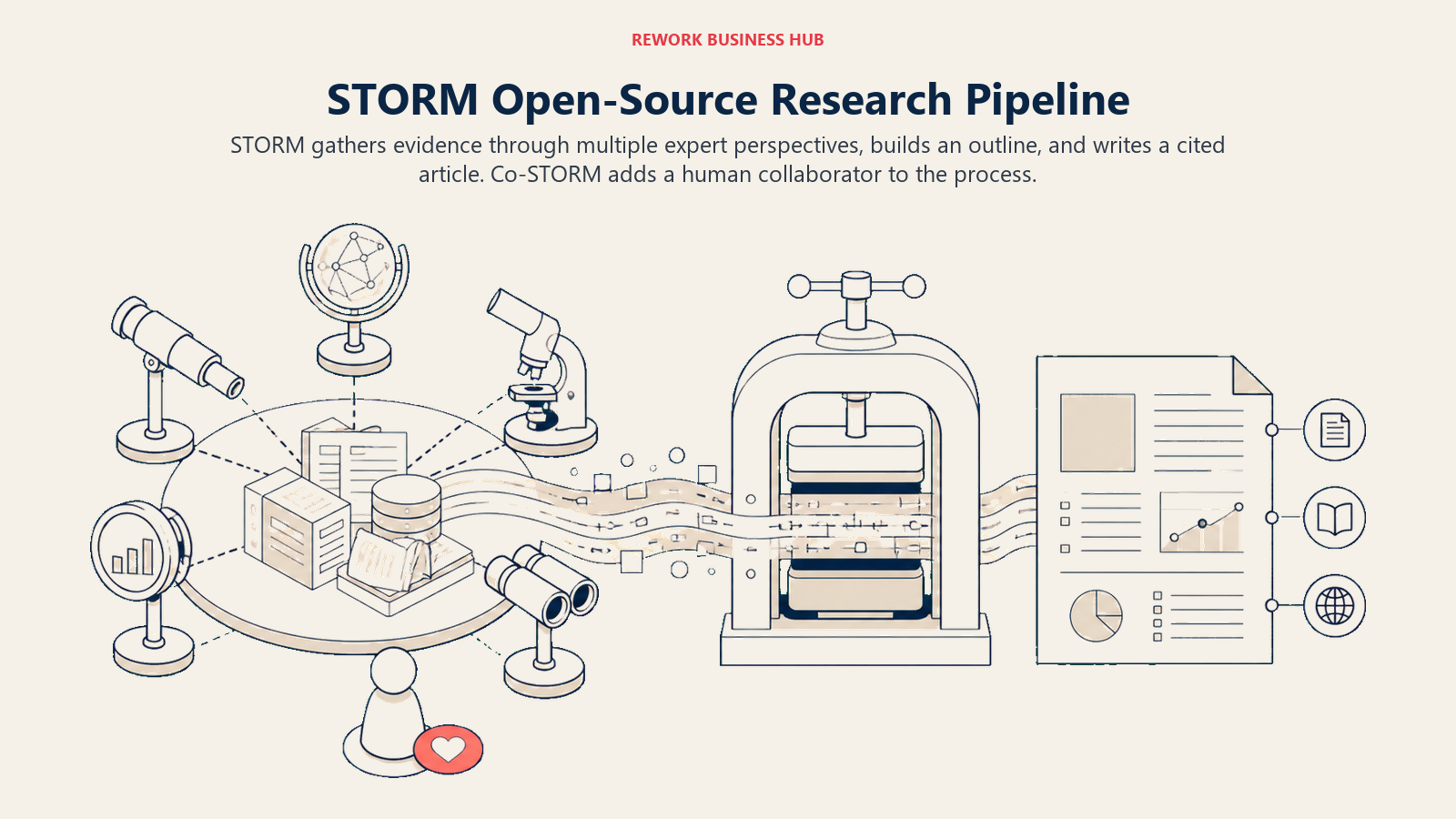
The code is MIT-licensed and actively maintained on GitHub (30,000+ stars), and a limited hosted research preview is available at storm.genie.stanford.edu for anyone who wants to try it without setup. Running it for real work means supplying your own LLM API key and choosing a retrieval backend (Bing, DuckDuckGo, You.com's API, or your own document set), which is the tradeoff for paying nothing: no vendor support, no SLA, no polished consumer interface. It's the same self-hosted tradeoff covered in best open-source AI agent frameworks: full control in exchange for owning the engineering.
| What you get | What you don't |
|---|---|
| Free and open source (MIT license), no subscription | No vendor support or SLA, community-maintained only |
| Multi-perspective research plus full article writing in one pipeline | Requires your own LLM API key and retrieval backend to run for real |
| Co-STORM adds a human-in-the-loop collaborative mode | Hosted demo is limited; real use means self-hosting |
Pricing: Free, open source (MIT license). Hosted research preview free at storm.genie.stanford.edu. Real deployment costs are your own LLM API usage plus a search backend, per github.com/stanford-oval/storm.
Best for: Academics and technical teams who want full control over the research pipeline and are comfortable self-hosting.
How to Choose: Decision Framework
Choose a research agent by the job you need it to finish: broad synthesis, workspace grounding, literature discovery, citation checking, or a custom pipeline.
| If you need... | Pick... | Why |
|---|---|---|
| A Deep Research agent inside a chat app you already pay for | OpenAI Deep Research or Gemini Deep Research | No new vendor; broad general web reading |
| Research grounded in your own Gmail, Docs, or Calendar | Claude Research | The only one with native Workspace connectors alongside web search |
| A fast, cited first draft, not an exhaustive one | Perplexity Deep Research | Minutes per report, still genuinely multi-step |
| A formal, defensible systematic review across thousands of papers | Elicit | Purpose-built Research Agent with structured, PRISMA-style screening |
| A fast answer to one specific, narrow research question | Consensus | Consensus meter shows where the evidence actually lands |
| Deep literature discovery on a fuzzy, hard-to-keyword question | Undermind | Iterative agent adapts its search as it reads |
| To verify a citation actually supports the claim attached to it | Scite | Purpose-built classification, not a competing report generator |
| Full engineering control to build a custom research agent | Exa (API) or STORM (open source) | Exa is the retrieval layer; STORM is the free, self-hosted pipeline |
Sizing and Persona Table
| Tool | Best For | Not Ideal For |
|---|---|---|
| OpenAI Deep Research | Individual analysts already inside ChatGPT | Teams needing a dedicated academic index |
| Gemini Deep Research | Google Workspace-standardized teams | Teams outside the Google ecosystem |
| Claude Research | Analysts living in Claude plus Google Workspace | Teams wanting a purpose-built paper index |
| Perplexity Deep Research | Fast-turnaround generalist research | Formal, exhaustive systematic reviews |
| Elicit | PhD researchers, systematic reviewers, R&D teams | Quick, one-off business questions |
| Consensus | Anyone with a narrow, answerable evidence question | Broad, exploratory literature reviews |
| Undermind | Researchers with a fuzzy, hard-to-keyword question | Teams wanting a synthesized narrative, not a paper list |
| Exa | Engineering teams building a custom agent | Non-technical analysts wanting a ready-made tool |
| Scite | Anyone about to cite a paper in a real deliverable | Primary discovery; it isn't a search engine on its own |
| STORM | Technical or academic users comfortable self-hosting | Anyone wanting vendor support or a consumer-grade UI |
Research Agent Buying Mistakes to Avoid
Research-agent purchases go wrong when teams trust polished output, compare the wrong unit, or choose a tool for a research job it was not built to finish.
| Mistake | What It Looks Like | What to Do Instead |
|---|---|---|
| Trusting a citation because it's formatted correctly | A clean footnote linking to a source that doesn't say what it's credited with saying | Open the source, or run it through Scite before you repeat the claim |
| Treating a confident tone as a proxy for accuracy | An agent states a figure with no hedging language at all | Per CJR's findings, confidence and correctness weren't correlated; verify anyway |
| Using a discovery agent for synthesis, or the reverse | Asking Undermind for a narrative summary, or asking Perplexity to screen 5,000 papers | Match the tool to the job: discovery, synthesis, and verification are different jobs |
| Paying for a Pro tier before hitting the free tier's ceiling | Subscribing to Elicit Pro before testing what the free Research Agent allowance covers | Exhaust the free tier on a real question first |
| Assuming "Deep Research" means the same allowance everywhere | Comparing OpenAI's 10 runs/month against Perplexity's daily allowance as equivalent | Compare the actual unit: runs/month, queries/day, or papers screened |
| Skipping the audit trail | Deleting the raw source list once the summary looks finished | Keep sources and retrieval dates attached to anything you might need to defend later |
| Assuming a paywalled source was actually read | An agent cites a paywalled article by title without flagging the access failure | Check whether the tool flags what it couldn't reach; most quietly guess instead |
Frequently Asked Questions about AI Research Agents
What's the difference between an AI research agent and an AI research tool?
An AI research tool (a search box, a citation manager, a chat assistant) helps a human who drives every step. An AI research agent plans a multi-step investigation on its own: it searches, reads, decides what to check next, and returns a synthesized, cited report with far less step-by-step supervision.
How often do AI research agents fabricate citations?
A 2025 Columbia Journalism Review study of 8 AI search tools (not limited to Deep Research modes specifically) found chatbots answered incorrectly more than 60% of the time collectively across 1,600 news queries, with per-tool error rates from 37% to 94%. That's why the verification workflow in this guide exists: treat every cited claim as unverified until you've opened the source yourself.
Is OpenAI Deep Research or Gemini Deep Research more accurate?
There's no independently verified head-to-head accuracy benchmark comparing the two specifically. Both are agentic, both can hit paywalls they can't get past, and neither replaces reading the underlying source. Treat vendor-published benchmark scores as a starting signal, not a final answer.
Can these agents access paywalled academic journals?
Generally not unless you have institutional or personal access connected. Most tools either skip paywalled content or flag that they found a source but couldn't get past the paywall; a few quietly cite the title without disclosing that the full text wasn't read, which is exactly what to check for.
What's the cheapest way to try an AI research agent?
Start with a free tier: Gemini's free plan includes 5 Deep Research reports a month, Elicit's Basic plan includes limited Research Agent usage, Undermind gives 3 free deep searches a month, and Stanford's STORM has a free hosted demo with no account required.
Should academics use Elicit or Consensus?
It depends on the question shape. Elicit is built for formal systematic reviews that screen thousands of papers and extract structured, comparable data. Consensus is built for a fast, narrow, evidence-weighted answer to one specific question. Many researchers use both for different stages of the same project.
Is Exa an AI research agent I can use directly?
Not on its own. Exa is a search API that other agents and in-house builds call for retrieval. A non-technical analyst gets nothing usable from Exa directly; a technical team gets a clean data layer to build a custom research agent on top of.
How is this different from AI agents for market research?
This guide covers general and academic research: gathering, verifying, and synthesizing information into a sourced report. Commercial and competitive market intelligence, tracking competitors, sizing a market, monitoring an industry, is a narrower, business-specific research job with its own separate buying decision.
Do I still need a human analyst if I use one of these agents?
Yes. Every agent here is designed to hand off a draft, not a final answer. The agent's job is synthesis; the judgment call, deciding whether a source is authoritative, whether a claim is safe to repeat, and what the finding actually means, still belongs to a person.
What to Do Next
Pick one tool that matches your actual job, not the biggest name on this list. If your question is exploratory and general, run OpenAI Deep Research or Gemini Deep Research on it, since you likely already have the subscription. If it's a formal literature review, start Elicit's free tier on a real question and see whether the Systematic Review Workflow covers what you need before paying for Pro. Either way, run the verification checklist above on the first report before you cite anything from it in real work, and if you're trying to justify the subscription cost to whoever approves it, the AI agent ROI framework covers how to measure whether the time saved actually holds up against the price.

Principal Product Marketing Strategist
On this page
- What Changed in 2026
- Key Facts
- Quick Comparison Table
- What Makes This an Agent, Not a Search Tool
- Citation Integrity: What Actually Separates These Tools
- Source Coverage and Access
- The Verification Workflow: What to Check Before You Trust a Cited Report
- 1. OpenAI Deep Research: Broadest Web Reading Inside ChatGPT
- 2. Google Gemini Deep Research: Grounded in Google Search and Workspace
- 3. Anthropic Claude Research: Native Workspace Grounding
- 4. Perplexity Deep Research: Fastest Turnaround on This List
- 5. Elicit: A Product Literally Named "Research Agent"
- 6. Consensus: Fast, Evidence-Weighted Answers
- 7. Undermind: The Iterative Agent Built for Fuzzy Questions
- 8. Exa: The Retrieval Layer for a Custom-Built Agent
- 9. Scite: The Citation Integrity Layer
- 10. STORM: Free, Open Source, Full Control
- How to Choose: Decision Framework
- Sizing and Persona Table
- Research Agent Buying Mistakes to Avoid
- What to Do Next