Audit Trails for AI Execute Actions: What to Log and Why
Turn this article into takeaways for your work.


Each assistant summarizes the article only for you and suggests best practices for your work.
An AI system issues an incorrect refund to 200 customers. Or updates a vendor contract with the wrong payment terms. Or routes a high-value lead to a rep who left the company two months ago.
These things happen. When they do, three questions follow immediately: What happened? When did it happen? Who or what authorized it?
An audit trail is the mechanism that answers those questions. Without it, the post-incident investigation becomes forensic archaeology, and your answers to regulators, customers, and your own board become guesswork.
This article is about building audit trails that are actually useful, legally defensible, and proportionate to the risk of the actions being logged. It builds on Data Classification for AI Access Rules and works in tandem with the AI Incident Response Playbook.
The Generate-Execute boundary as a governance line
Key Facts: AI Execute Governance Requirements
- SOX Section 404 requires organizations to maintain records relevant to internal controls over financial reporting for a minimum of seven years; AI systems that influence or execute financial transactions fall within this scope (SEC/PCAOB guidance)
- GDPR Article 33 imposes a 72-hour notification deadline from the moment an organization becomes aware of a personal data breach; AI-caused data exposures trigger this clock immediately upon discovery, not after investigation completes (GDPR Article 33)
- Gartner predicts that over 40% of agentic AI projects will be canceled by end of 2027 primarily because governance frameworks, including audit infrastructure, haven't kept pace with deployment ambition (Gartner, 2025)
The Generate vs. Execute boundary is the most important concept in AI governance. When AI produces an artifact, a draft email, a recommended action, a report, a human can review it before anything changes in the world. That's Generate. No harm done if the output is wrong. A person will catch it.
When AI executes an action directly, something real happens. Money leaves an account. An email lands in a customer's inbox. A CRM (customer relationship management) record is updated. A workflow is triggered. That's Execute. The consequences exist in the world now, and unwinding them requires real effort.
Generate errors embarrass. Execute errors cost money, damage trust, and sometimes create legal exposure.
"Generate errors embarrass. Execute errors cost money. The difference between an AI system that drafts a wrong refund and one that issues it is the difference between an awkward correction and a financial control failure. Audit trails exist for Execute, not Generate, because Execute is where the real world changes." (Rework)
The Execute Action Audit Standard
A structured specification for audit trail fields that makes AI Execute actions legally defensible and operationally investigable. The standard requires seven fields per logged action: (1) Trigger (what initiated the action: scheduled automation, user instruction, event, or autonomous agent decision), (2) Model version and prompt template (which model and version ran, what prompt produced the output), (3) AI output (what the AI generated before execution, including reasoning and confidence scores), (4) Action taken (specific details: amount, recipient, record ID, system), (5) Human approval step (who approved, at what time, or which threshold rule authorized auto-execution), (6) UTC timestamp and system context (environment, job ID, application version), (7) Outcome (downstream system confirmation: success, failure, error). An audit trail missing any of these seven fields cannot answer the question "what happened?" during an incident investigation.
Audit trails exist specifically to govern Execute. They don't matter much for Generate, where the human review step is the accountability mechanism. They matter enormously for Execute, where the action happens before human review, or where human review is limited to approving an action rather than reconstructing why it happened.
What an AI Execute audit trail must capture
A useful audit trail isn't just a timestamp and an action ID. For AI Execute actions, you need seven fields to have a defensible record.
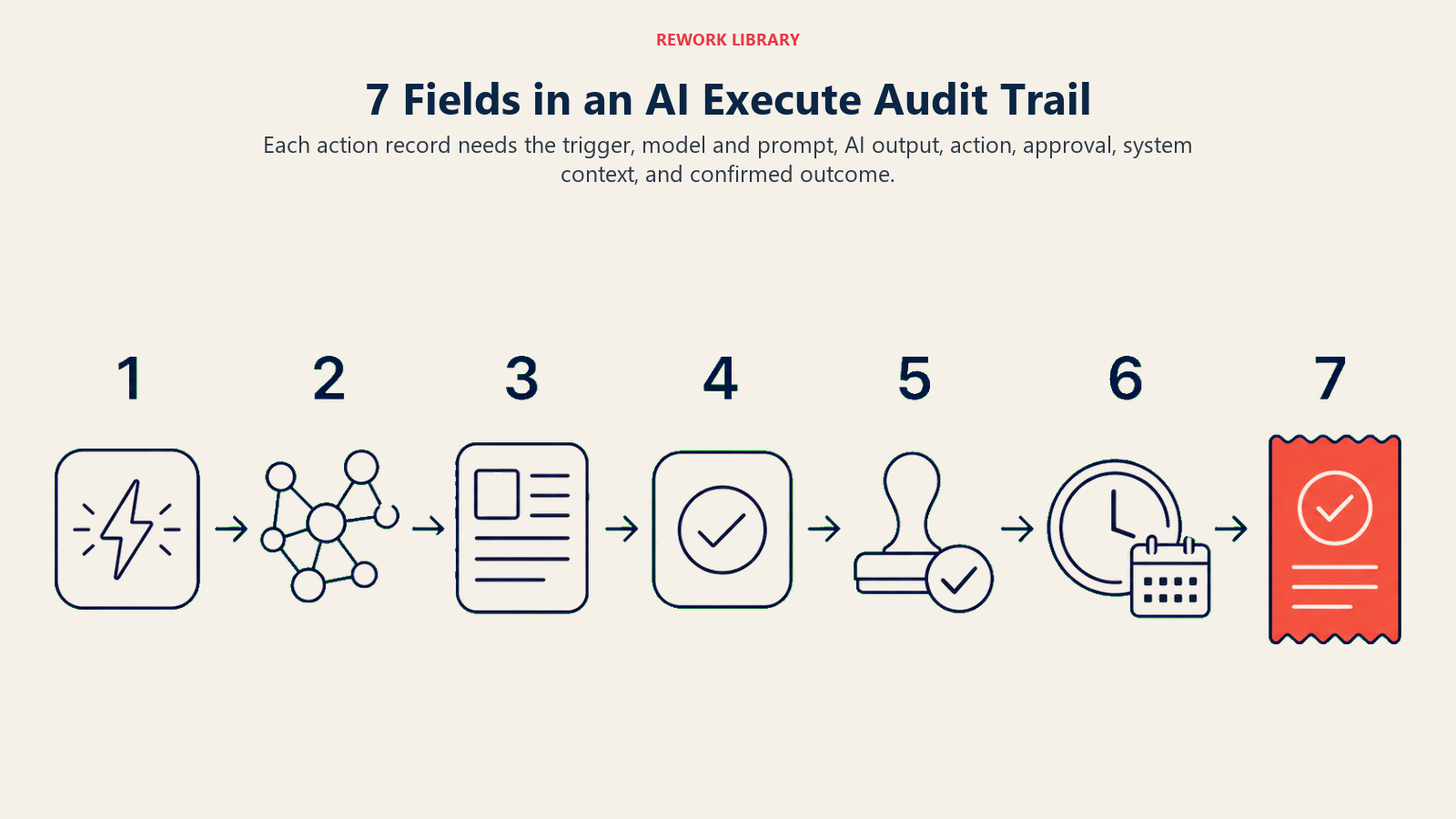
1. The trigger. What initiated the action? Was it a scheduled automation, a user instruction, an inbound event (e.g., a customer message arrived), or an autonomous agent decision? Knowing the trigger is the first step in root cause analysis when something goes wrong.
2. The model version and prompt template. Which AI model ran? What version? What prompt or prompt template produced the output that led to this action? Model updates can change behavior without anyone noticing. If your AI starts routing leads incorrectly in March, you need to know whether the March model update changed something.
3. The AI output. What did the AI actually generate or decide before execution? For a refund Execute action, this is the recommended refund amount and the reasoning the model provided. For a lead routing decision, this is the model's classification and confidence score. This field lets you distinguish between "the AI made the right call and execution failed" and "the AI made a wrong call and it was executed."
4. The action taken. What exactly was executed in the external system? Not "issued refund" but "issued refund of $340 to customer ID 44821 via Stripe charge ID ch_xyz on invoice INV-2026-04122." Specificity is the difference between a useful log and a useless one.
5. The human approval step, if any. Who approved the action, in what role, at what time? If the action was auto-approved under a threshold rule, log that: "auto-approved under threshold rule: refunds below $500 require no human review." If no human review occurred, log that explicitly as well. The absence of approval is itself an important piece of information. The AI Approval Gates framework defines which threshold rules are required for each tool tier.
6. The timestamp and system context. UTC timestamp, system version, environment (production vs. staging), and the ID of the job or workflow run. This lets you correlate your audit log with your application logs when debugging.
7. The outcome. Did the external system confirm the action? Did it succeed, fail, or produce an error? What was the external system's response? An audit trail that only logs AI decisions without confirming what actually happened in the downstream system is incomplete.
Retention requirements by regulatory context
How long you need to keep these logs depends on what the AI is doing and in what industry.
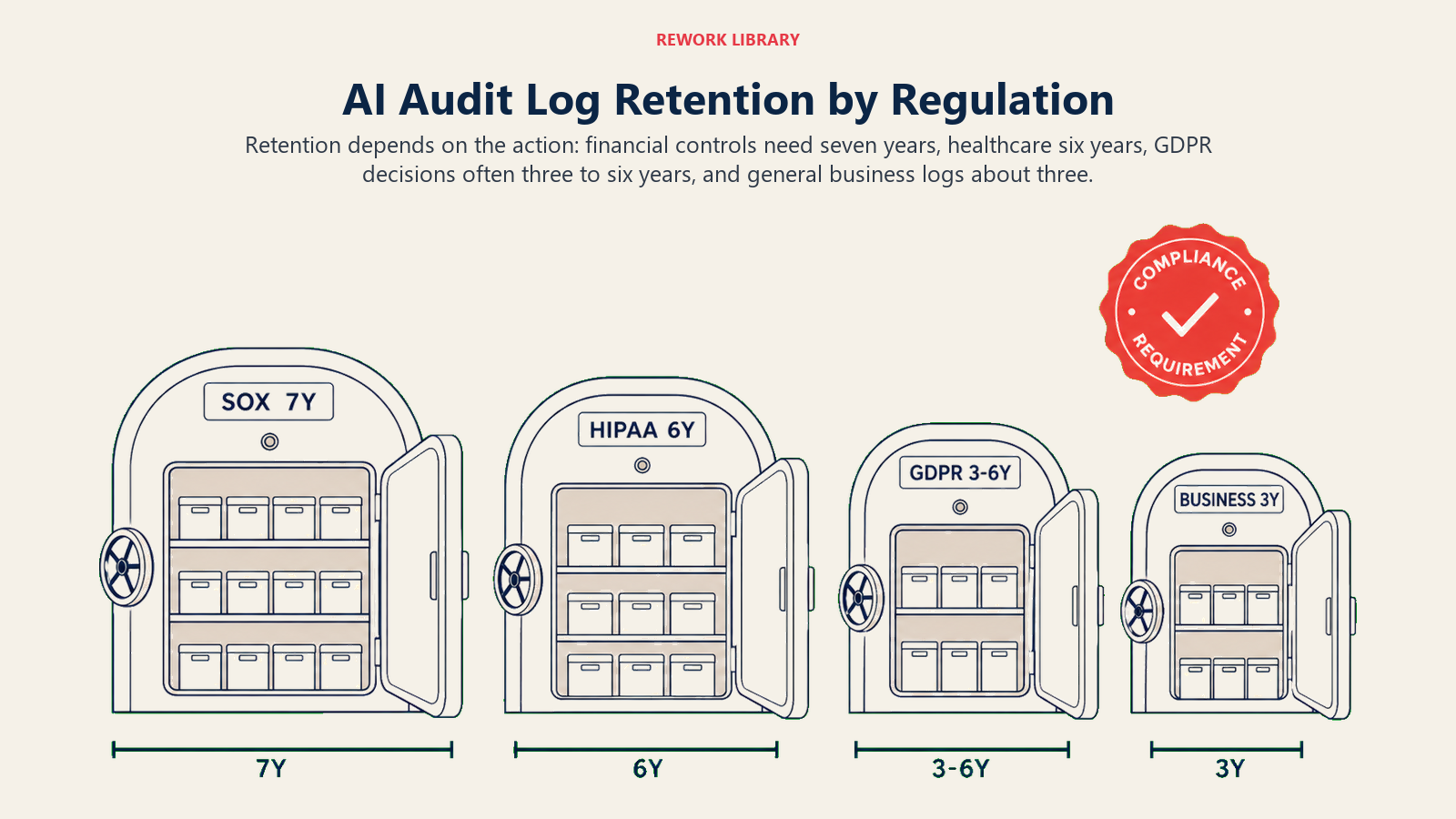
SOX Section 404 (financial reporting controls). If your AI systems are influencing, approving, or executing financial transactions or financial reporting, you're likely in SOX 404 territory. SEC guidance on SOX Section 404 requires management to assess and report on the effectiveness of internal controls over financial reporting. Records relevant to those controls should be retained for seven years at minimum. For any AI Execute action that touches financial data, a seven-year retention minimum is prudent, not optional.
GDPR Article 22 (automated decision-making). GDPR Article 22 prohibits automated decisions that produce legal or significant effects on individuals, unless the organization has obtained explicit consent or the decision is necessary for a contract. Where such automated decisions are permitted, Article 22 requires that individuals have the right to human review, the right to an explanation, and the right to contest the decision. Your audit trail for AI decisions affecting EU residents must be complete enough to reconstruct the logic of any decision if a subject requests an explanation or challenges the outcome. The practical retention horizon for GDPR-relevant decisions is the statute of limitations for claims in your jurisdiction, typically three to six years.
General business decisions. For AI Execute actions that aren't financial and don't involve individual decisions (routing internal tasks, updating internal records, triggering internal workflows), a three-year retention minimum is reasonable for most industries.
Healthcare. HIPAA requires audit trails for access to protected health information (PHI). If AI systems are accessing, processing, or making decisions based on PHI, six-year retention minimums apply under HIPAA's record-keeping requirements.
Technical implementation options
You have three main approaches to audit trail implementation, each with tradeoffs.
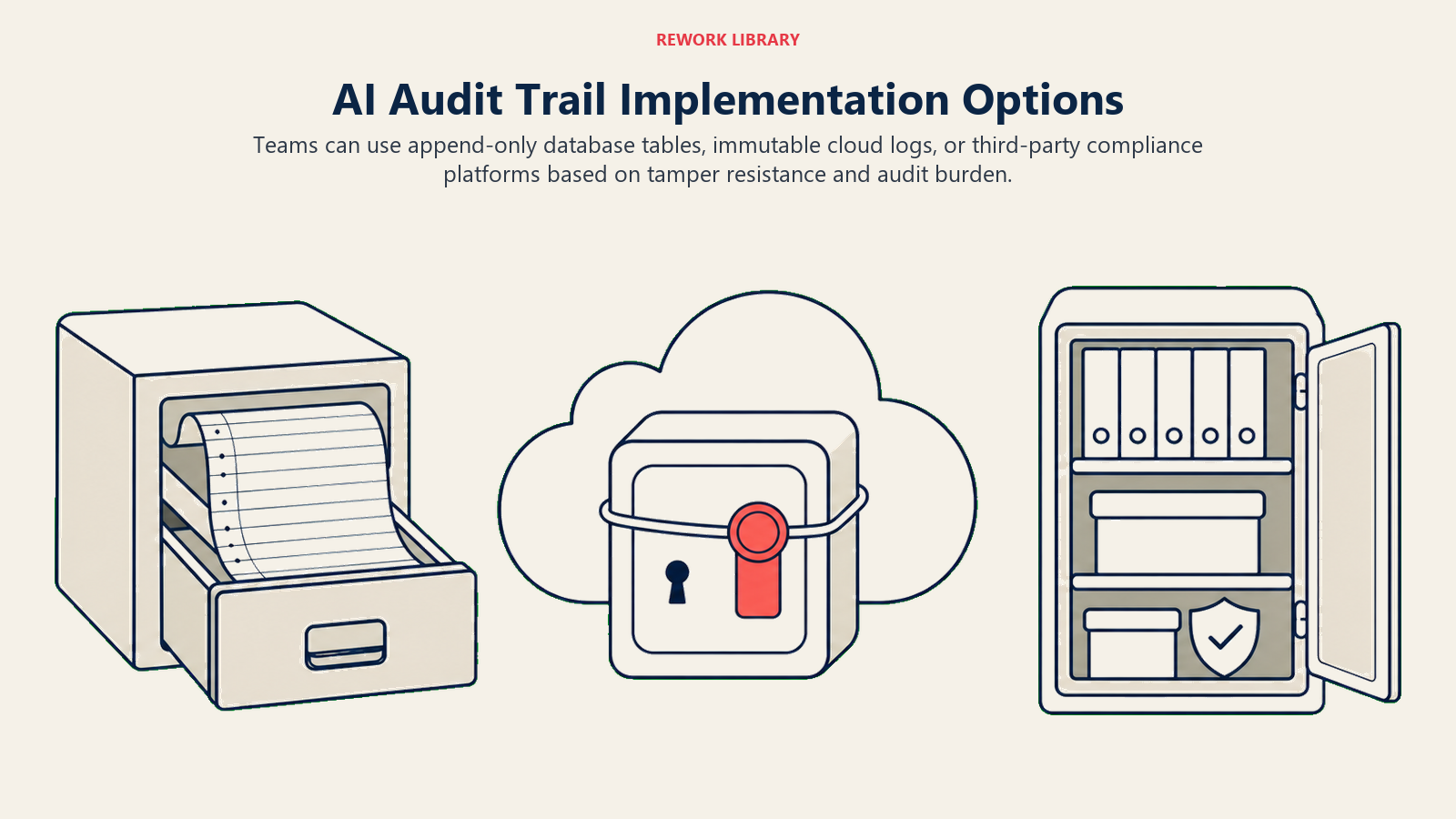
Append-only audit tables in your application database. The simplest approach. When any AI Execute action completes, write a record to a dedicated audit table with the seven fields above. The table is append-only: no UPDATE or DELETE operations permitted on audit rows. This is achievable with database-level row security or application-level controls.
Tradeoffs: cheap to implement, easy to query, but the same team that maintains the application can modify the database schema. Not fully tamper-resistant. Appropriate for most mid-market deployments.
Immutable log services. AWS CloudTrail, GCP Cloud Audit Logs, or purpose-built audit log services like Datadog or Sumo Logic can store logs in a write-once, read-many format. Logs are cryptographically signed; any modification is detectable. Better tamper-resistance than an in-app database table.
Tradeoffs: costs more per GB than a relational database, queryability depends on how well you structure your log entries. Better for regulated environments where tamper-resistance is a requirement.
Third-party audit tools. Tools like Vanta, Drata, or industry-specific compliance platforms can ingest application events and maintain audit evidence. These are particularly useful if you're pursuing SOC 2 Type II or ISO 27001 certification, where audit trail completeness is evaluated by external auditors.
Tradeoffs: higher cost, adds a vendor dependency, but significantly reduces internal compliance burden. Consider if you're already using a compliance automation platform.
A practical note on storage costs: a well-structured audit log entry for an AI Execute action is typically 2-5 kilobytes of JSON. At 1,000 Execute actions per day, that's roughly 2-5 GB per year before compression. For most mid-market deployments, storage cost is not the constraint. The constraint is schema design and ensuring the logs are actually queryable when you need them.
The human-in-the-loop gate classification
Human review should be assigned by action risk, because blanket approval rules either slow everything down or leave serious actions under-governed.
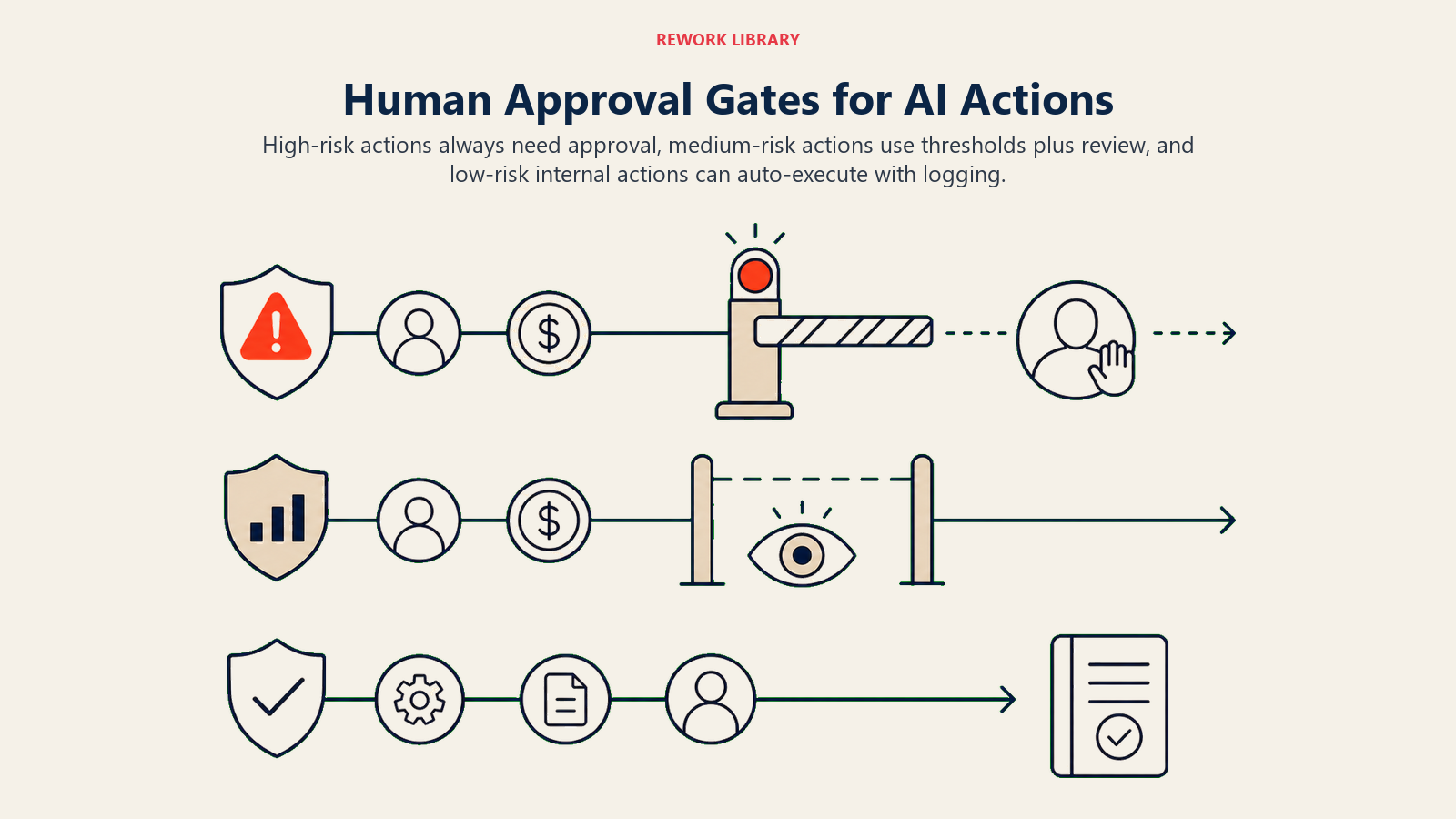
Not every Execute action needs human approval before it runs. Requiring human review of every CRM field update or every internal task creation creates paralysis, not governance.
The decision about which Execute actions require human approval before execution (as opposed to after-the-fact audit review) should be explicit and documented.
A practical classification:
Always require human approval before execution:
- Customer-facing communications (email, SMS, app notifications)
- Financial transactions above a defined threshold
- Personnel decisions (any AI-generated decision affecting hiring, compensation, or termination)
- Contract modifications or legal documents
- Deletions of any kind
Use threshold rules with post-hoc audit review:
- Financial transactions below the threshold (e.g., refunds under $100 auto-approved)
- CRM stage updates based on AI scoring
- Internal routing and assignment decisions
Auto-execute with logging only:
- Internal task creation
- Internal calendar events
- Status updates on internal records
- Non-customer-facing notifications to internal channels
The point is that the classification has to be written down and enforced in the system configuration, not left implicit. "We decided to auto-approve small refunds" is not a governance policy. "Refunds below $100 to customers with account age greater than 90 days are auto-approved under threshold rule T-2026-03, reviewed quarterly by the Finance Operations team" is a governance policy.
Document the threshold rules in the same place as your audit trail documentation. When a regulator asks why a specific automated decision was made without human review, you want to be able to point to the rule, the approval of that rule, and the evidence that it was working as intended.
The audit trail as regulatory evidence
If you're in a regulated industry, the audit trail is the evidence you produce when a regulator, auditor, or customer asks "what happened."
For SOX 404, the question is: can you demonstrate that your internal controls over financial reporting are designed and operating effectively? If AI systems make or influence financial decisions, your audit trail is part of the evidence of effective controls. An AI that approved 40,000 vendor invoices last year, with no audit trail showing which invoices were auto-approved and which were flagged for human review, is a control deficiency.
For GDPR Article 22, the question is: if a customer contests an automated decision that affected them, can you explain the basis for that decision and demonstrate that it was consistent with your legal basis for processing? An AI scoring model that categorized a credit application without an audit record of the input features and the model version cannot satisfy the right-to-explanation requirement.
For SOC 2 Type II, the question is: does your access control and monitoring evidence demonstrate that AI systems are acting within their authorized scope? Auditors will look for evidence that audit logs exist, that they capture sufficient detail, and that someone reviews them.
The audit trail isn't optional in regulated contexts. It's a fiduciary requirement.
Building the governance connection
The NIST AI RMF's Manage function describes ongoing monitoring and response as core to responsible AI deployment, and your audit trail is the data foundation for both. The audit trail supports three other governance documents:
The AI use policy defines what AI systems are authorized to do. The audit trail is the evidence that AI systems stayed within that authorization.
The AI incident response playbook defines how you respond when something goes wrong. The audit trail is the first thing your incident response team reaches for when an AI Execute action causes harm.
The AI risk register documents the known risks of each AI deployment. When you identify a new risk during an incident review, the audit trail gives you the data to understand its frequency and severity.
And the Generate vs. Execute boundary article is the conceptual foundation for why Execute actions specifically require this level of accountability. Generate errors are recoverable. Execute errors are in the world.
Designing for the investigation you'll need to run
The most useful frame for designing an audit trail is: what would I need to know if this action caused a problem?
If your AI system issued a wrong refund, you'd need to know: which customer, what amount, which model version, what the AI saw when it made the decision, whether a human reviewed it, and what the outcome was in Stripe. Design your audit trail to answer those questions.
If your AI scoring model started mis-routing leads, you'd need to know: when the behavior started, whether it correlated with a model update, which leads were affected, and what scoring criteria the model used. Design your audit trail to answer those questions.
The point isn't to log everything. It's to log the things that will matter when something goes wrong. And for AI Execute actions, those seven fields are what you need.
Start logging before you need it. The time to build an audit trail is not during an incident investigation.
Because when the incident arrives, the question isn't just "what did the AI do?" It's "what are you going to do about it in the next 72 hours?"
Rework Analysis: Based on AI governance incident patterns, the three audit trail fields most often missing during incident investigations are: the model version (teams discover they don't know which model version was running when the incident occurred), the human approval step (whether a human reviewed before execution is not logged, only the outcome), and the AI output before execution (teams know what action was taken but not what reasoning the AI provided that led to it). All three are inexpensive to log. All three become expensive when they're absent. The Execute Action Audit Standard in this article is sequenced to ensure these high-value fields are captured first.
Frequently Asked Questions
What is the Execute Action Audit Standard?
The Execute Action Audit Standard is a seven-field specification for logging AI actions that change real-world state. The seven required fields are: Trigger, Model Version and Prompt Template, AI Output before execution, Action Taken (with full specificity), Human Approval Step or threshold rule, UTC Timestamp and System Context, and Outcome from the downstream system. An audit trail missing any of these seven fields cannot fully answer "what happened?" during an incident investigation or regulatory inquiry.
Why do AI Execute actions need audit trails while Generate actions don't?
Generate actions produce outputs a human reviews before acting on. If the output is wrong, the human catches it. Execute actions change real-world state before human review (or with limited human review for threshold-approved items). When an Execute action is wrong, the consequences exist in the world. The audit trail is the mechanism for reconstructing what happened, who authorized it, and whether it followed documented governance rules. Generate errors embarrass. Execute errors cost money and create potential legal exposure.
What are the regulatory retention requirements for AI Execute audit logs?
Retention requirements vary by regulatory context. SOX Section 404 (financial controls): minimum seven years for records relevant to internal controls, including AI systems influencing financial decisions. GDPR Article 22 (automated decision-making affecting individuals): retain records long enough to respond to a data subject's right-to-explanation request, typically three to six years in most EU jurisdictions. HIPAA (PHI access): six-year retention minimum. General business decisions without regulatory specificity: three-year minimum is reasonable for most industries.
Which AI Execute actions require human approval before execution?
Actions that always require pre-execution human approval: customer-facing communications, financial transactions above a defined threshold, personnel decisions affecting hiring or termination, contract modifications, and any deletions. Actions appropriate for threshold rules with post-hoc audit review: financial transactions below the threshold, CRM stage updates from AI scoring, internal routing decisions. Actions appropriate for auto-execution with logging only: internal task creation, internal calendar events, status updates on internal records. All threshold rules must be documented, approved, and stored in the same location as the audit trail documentation.
See also:
- Building Your AI Use Policy: defines which AI Execute actions are authorized; the audit trail proves they stayed within bounds
- Stage 3 to 4: From Scaled to Integrated: why audit trail requirements expand sharply as AI is woven into core workflows
- Why Most AI Transformations Fail: how governance lag (absent audit infrastructure) is one of the five root-cause failure modes
- What Is an AI Sales Operator?: a worked example of the kind of Execute actions that require audit trails in a sales context

Co-Founder, Rework.com
On this page
- The Generate-Execute boundary as a governance line
- The Execute Action Audit Standard
- What an AI Execute audit trail must capture
- Retention requirements by regulatory context
- Technical implementation options
- The human-in-the-loop gate classification
- The audit trail as regulatory evidence
- Building the governance connection
- Designing for the investigation you'll need to run