More in
Team Productivity Guide
Running a Productive 1:1 That Reps Actually Look Forward To
Apr 18, 2026
Focus Blocks at the Team Level, Not Just the Individual
Apr 18, 2026
Weekly Status Updates Without the Theater
Apr 18, 2026
Project Kickoffs That Prevent Scope Creep
Apr 18, 2026
Prioritization Frameworks Your Team Will Remember
Apr 18, 2026
Managing Distributed Teams Across 3+ Time Zones
Apr 18, 2026
Capacity Planning Without Spreadsheets From Hell
Apr 18, 2026
The Team Norms Conversation You've Been Avoiding
Apr 18, 2026
Onboarding New Team Members to Your Ways of Working
Apr 18, 2026
Meeting Audit: How to Kill the Meetings Your Team Hates
Apr 1, 2026
Decision Logs: The Lowest-Effort Documentation That Pays Off
Turn this article into takeaways for your work.


Each assistant summarizes the article only for you and suggests best practices for your work.
A growth team at a B2B software company spent four hours in a meeting trying to reconstruct why they had chosen their current pricing structure. The person who had led that decision had left the company eight months earlier. Nobody had written anything down: not the alternatives they'd considered, not the customer data they'd used, not the specific reason they'd ruled out the option that two of the four people in the room now thought looked better in retrospect.
The meeting ended with a rough consensus to keep the pricing as-is, mostly because changing it without understanding the original reasoning felt risky. The team lead said something afterward that stuck: "We didn't make a decision today. We just admitted that we can't make this decision without context we no longer have."
A five-minute decision log entry eight months earlier would have given them that context. McKinsey's research on organizational knowledge management found that knowledge workers spend up to 20% of their time searching for information or recreating work that already exists somewhere in the organization. This kind of institutional memory problem is one of the core reasons decision-making velocity degrades as teams grow past 10 people.
What a decision log is, and what it isn't
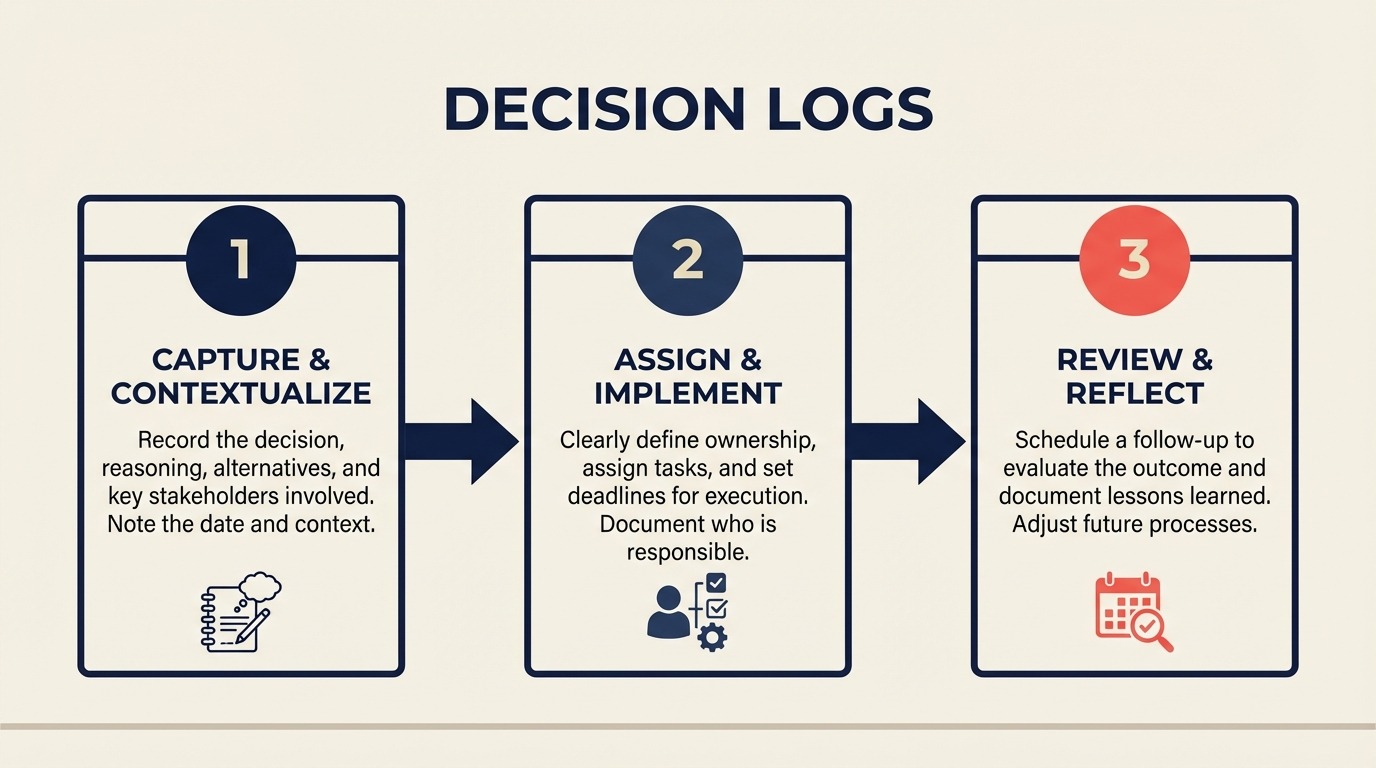
A decision log is a running record of significant choices your team makes: what you decided, the context that led to the decision, the alternatives you rejected, and who made the call. It's not a meeting notes doc. It's not a project status tracker. And it's not a comprehensive record of every team opinion.
The point is narrow and specific: when someone joins the team in six months, when you're revisiting a decision a year from now, when a stakeholder asks "why did you build it this way?", the log gives you the answer without requiring you to remember, reconstruct, or track down the person who was there. Harvard Business Review's work on organizational learning and knowledge retention frames this as the difference between single-loop learning (fixing individual errors) and double-loop learning (understanding why the error happened and encoding that understanding so it persists). A decision log is one of the simplest implementations of that second loop.
Three minutes per entry. Searchable. Done.
Step 1: Define what counts as a decision worth logging
The biggest mistake teams make with decision logs is trying to log everything. Every meeting produces "decisions" in the loose sense: you decided to use this font, you decided to start the retro at 2pm instead of 3pm. If you try to log all of them, you'll burn out in two weeks and abandon the habit.
Log decisions that meet one or more of these criteria:
Non-obvious: If a reasonable person looking at the situation might have chosen differently, the decision is worth logging. "We chose blue for the header" doesn't meet this bar. "We chose blue despite three rounds of A/B testing that favored green because our brand guidelines take priority" does.
Affects multiple people or systems: If only one person is affected and they'll remember the decision without a record, skip it. If the decision changes how two or more people work, or modifies a shared system or process, log it. This is also the category where async communication norms matter most: decisions made in Slack threads and never captured elsewhere are the ones that hurt six months later.
Will matter in 6 months: Ask: if I left the company today, would my replacement need to know why we made this choice? If the answer is yes, log it.
Involves tradeoffs with rejected alternatives: When you explicitly considered multiple options and chose one, log the alternatives and why you didn't pick them. This is the context that's hardest to reconstruct later.
Examples of decisions that should be logged: choosing a vendor, changing a pricing model, dropping a product feature, shifting a team process, setting a budget threshold, establishing a partnership, rejecting a candidate approach after evaluation.
Examples that usually don't need logging: tactical scheduling choices, minor format decisions, one-time requests with no lasting impact.
Step 2: The 5-field entry format
A decision log entry should be short enough to write in the moment, while still preserving the reasoning future teammates will need.
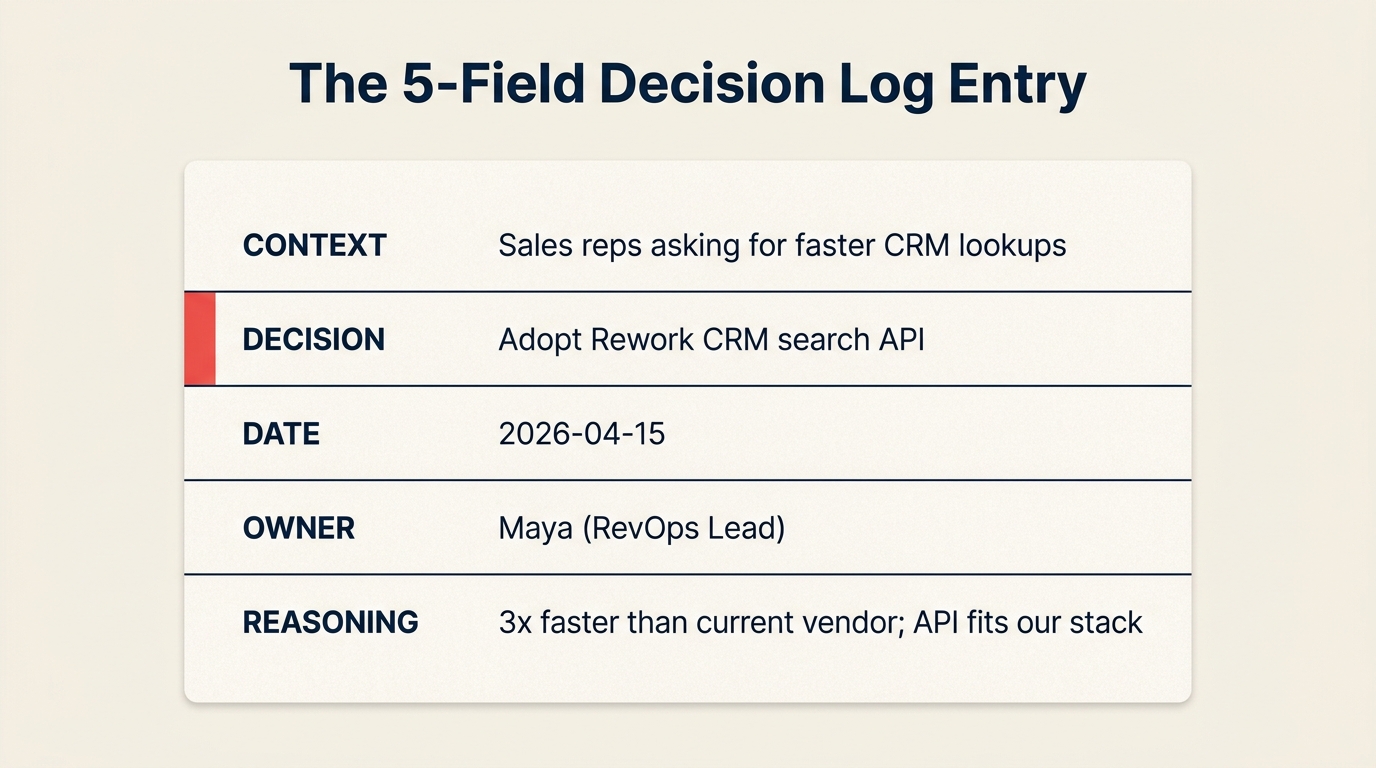
The template is short on purpose. Every additional field is a reason someone will skip filling it out.
| Field | Content |
|---|---|
| Date | When the decision was made |
| Decision | One sentence: what you decided |
| Context | 2-4 sentences: what situation prompted this, what you were trying to solve |
| Alternatives considered | Brief list: what else you looked at and why you ruled it out |
| Who decided | The person or group with authority, not everyone in the meeting |
Example entry:
Date: 2026-03-14 Decision: Switched from Intercom to Zendesk for customer support tooling. Context: Support ticket volume hit 300/week and Intercom's automation rules couldn't handle the routing complexity we needed. The current setup required manual triage on 40% of tickets. Alternatives considered: Stayed with Intercom + built custom routing (would require 6 weeks of engineering time we don't have); evaluated Freshdesk (strong routing but weaker API integration with our CRM). Zendesk had both and pricing scaled reasonably. Who decided: Head of Support, with sign-off from VP of Engineering on the integration approach.
That entry took about 3 minutes to write. It will save whoever inherits this system months of confused investigation when they wonder why you're on Zendesk.
Step 3: Where to keep it
The tool matters less than the habit, but searchability is non-negotiable. A decision that can't be found when you need it is almost as useless as a decision that was never logged. Wikipedia's overview of decision-making processes in organizations notes that the value of any decision record degrades rapidly if it isn't linked to the context that produced it, which is why the 5-field format exists.
Notion: Works well because pages are searchable, you can create a simple database template with the 5 fields using Notion's built-in templates, and the log lives in the same workspace as other team documentation. Most teams using Notion already have it. If you're evaluating whether to centralize team knowledge in Notion or a dedicated project tool, the Notion-Salesforce workflow analysis for team leads covers the tradeoffs at the team level.
Confluence: Similar to Notion. Templates work well, search is solid, and it integrates with Jira for teams that want to link decisions to tickets.
Rework: If your team uses Rework for project management, keeping the decision log there makes sense. Decisions stay near the work they influenced.
Google Doc: Works. Not ideal for search at scale, but a single shared doc with clear headers and a consistent format is better than a decision log in a fancier tool that nobody can find.
Slack is not a decision log. This needs to be stated explicitly because it feels convenient in the moment. Slack threads get buried, search is unreliable for older messages, and context collapses when people leave the company. A decision that lives only in Slack is a decision that will need to be reconstructed.
Step 4: Build the habit in 3 places
The reason decision logs fail is not that the format is hard. It's that the habit of adding to them doesn't connect to anything in the existing workflow. Fix this by embedding the log in three specific moments:
End of meeting template: Any meeting that makes a significant decision should have a standing agenda item at the end: "What decision did we make, and are we logging it?" This takes 60 seconds. Add it to your meeting template in Notion, ClickUp's meeting notes templates, Asana, or wherever your team manages meeting notes. The act of asking the question every time builds the habit faster than any policy. A meeting audit often surfaces which meetings are producing real decisions versus just filling calendar slots. Running one helps you know which meetings are worth adding this agenda item to.
Post-deal retrospective: When a deal closes, won or lost, add a brief decision log entry for any non-obvious choices made during the sales or product development process. "Why did we offer a 20% discount on this deal?" is a question someone will ask six months from now. Log the answer now.
Quarterly review: At the end of each quarter, spend 15 minutes reviewing major decisions from the last 90 days. This is a catch-up for anything that got missed and a chance to log decisions that were made informally without a meeting.
Step 5: How to catch decisions that happened informally
Not every decision happens in a meeting. Some of the most consequential ones happen in a Slack DM, a hallway conversation, or a manager's head on a Tuesday afternoon. These are the decisions that most reliably go unlogged and most reliably need to be reconstructed later.
Build a Friday check into your team's async routine. One question posted to your Slack channel or task manager: "What decision did you make this week that's worth logging?" Takes 2 minutes for whoever was involved to add an entry. The question acts as a prompt for decisions that were made but didn't get captured in a formal setting.
The key is making the check-in lightweight enough that it doesn't feel like a burden. Three out of four Fridays, the answer might be "nothing this week." That's fine. The one Friday where someone logs the decision about which analytics provider to use will pay off 18 months later when someone asks why you're not on Google Analytics.
Step 6: Using the log for onboarding
Decision logs are one of the most effective onboarding tools most teams have and almost none use intentionally.
In a new hire's first week, have them read the last three months of decision log entries. Not as a task to complete, but as a way to understand why the team works the way it does. Pair this with the ramp metrics guide if you track time-to-productivity: new hires who understand the decision history typically ramp faster. Embedding a "read the decision log" step in the 30-60-90 day plan ensures it doesn't get skipped during a busy first week. Most decisions are the product of specific constraints, failed experiments, or strategic priorities that aren't obvious from looking at the current state of things. The decision log makes the context visible.
This practice surfaces two useful things: the new hire's questions about entries they don't understand (often a sign that the entry needs more context), and the new hire's reactions to decisions that seem surprising (sometimes a fresh perspective that's worth incorporating).
Make reading the decision log an explicit step in the onboarding checklist in Notion or wherever you track onboarding tasks. Don't leave it as a "nice to have."
Step 7: Quarterly log review
Every quarter, run a 15-minute log review. The questions are:
- Which entries from 3+ months ago are no longer relevant? Archive them. A decision log that never gets pruned becomes hard to navigate, and people stop using it.
- Which decisions are coming up for review? Some decisions were explicitly time-limited ("we'll try this pricing structure for 6 months") or depend on conditions that may have changed. Flag these.
- Which entries are thin on context? If an entry just says "we decided to use React instead of Vue" with no rationale, add context while someone still remembers it.
The quarterly review doesn't need to be a formal meeting. One person owns it, spends 15 minutes, and posts a brief summary of any changes made. Folding it into your team retrospective keeps it from becoming an orphaned task that gets skipped.
Common pitfalls
Logging too much: A decision log with 200 entries about font choices and minor scheduling decisions is noise. The signal gets buried. Enforce the threshold from Step 1 strictly. When in doubt, ask: "Will someone need this in 6 months?" If no, skip it.
Logging too little: Some teams log only formal decisions made in structured meetings. This misses the informal decisions made in Slack, in 1:1s, or by individuals acting within their authority. The Friday check-in in Step 5 is the fix.
No owner: A shared decision log with no designated owner tends to fall behind. Assign one person to be the "decision log owner" for a quarter. Their job is to add entries for major decisions, remind the team about the Friday check-in, and run the quarterly review. Rotate the role so the burden doesn't fall permanently on one person. Documenting this ownership in your team operating agreement prevents the role from quietly going unfilled when someone changes projects.
Entries without context: The most common entry format teams default to is: "We decided to use Stripe instead of Braintree." That's a record, not a decision log. Without context (what problem prompted the evaluation, what data you looked at, what made Braintree fall short), the entry is nearly useless. "Decision" + "Context" + "Alternatives" is the minimum viable entry.
What to do next
Start the log today with one decision from last week. Don't wait for a formal kickoff, a team workshop, or the perfect tool setup. Open a new Notion page, a Google Doc, or a blank page in whatever workspace your team uses, and add one entry using the 5-field format.
Then, at your next team meeting, spend the last 5 minutes asking: "What decision did we make today that's worth logging?" If the answer is "nothing," that's a useful data point. If the answer reveals something significant that would have gotten lost, you have your first real argument for why the habit matters.
Learn More

On this page
- What a decision log is, and what it isn't
- Step 1: Define what counts as a decision worth logging
- Step 2: The 5-field entry format
- Step 3: Where to keep it
- Step 4: Build the habit in 3 places
- Step 5: How to catch decisions that happened informally
- Step 6: Using the log for onboarding
- Step 7: Quarterly log review
- Common pitfalls
- What to do next
- Learn More