More in
Team Productivity Guide
Running a Productive 1:1 That Reps Actually Look Forward To
Apr 18, 2026
Focus Blocks at the Team Level, Not Just the Individual
Apr 18, 2026
Weekly Status Updates Without the Theater
Apr 18, 2026
Project Kickoffs That Prevent Scope Creep
Apr 18, 2026
Prioritization Frameworks Your Team Will Remember
Apr 18, 2026
Managing Distributed Teams Across 3+ Time Zones
Apr 18, 2026
Capacity Planning Without Spreadsheets From Hell
Apr 18, 2026
The Team Norms Conversation You've Been Avoiding
Apr 18, 2026
Onboarding New Team Members to Your Ways of Working
Apr 18, 2026
Meeting Audit: How to Kill the Meetings Your Team Hates
Apr 1, 2026
Retrospectives That Lead to Behavior Change
Turn this article into takeaways for your work.


Each assistant summarizes the article only for you and suggests best practices for your work.
A product team ran 18 consecutive retrospectives over the course of a year and a half. Each one produced a document: went well, didn't go well, action items. Each document lived in Notion. None of them were ever opened again.
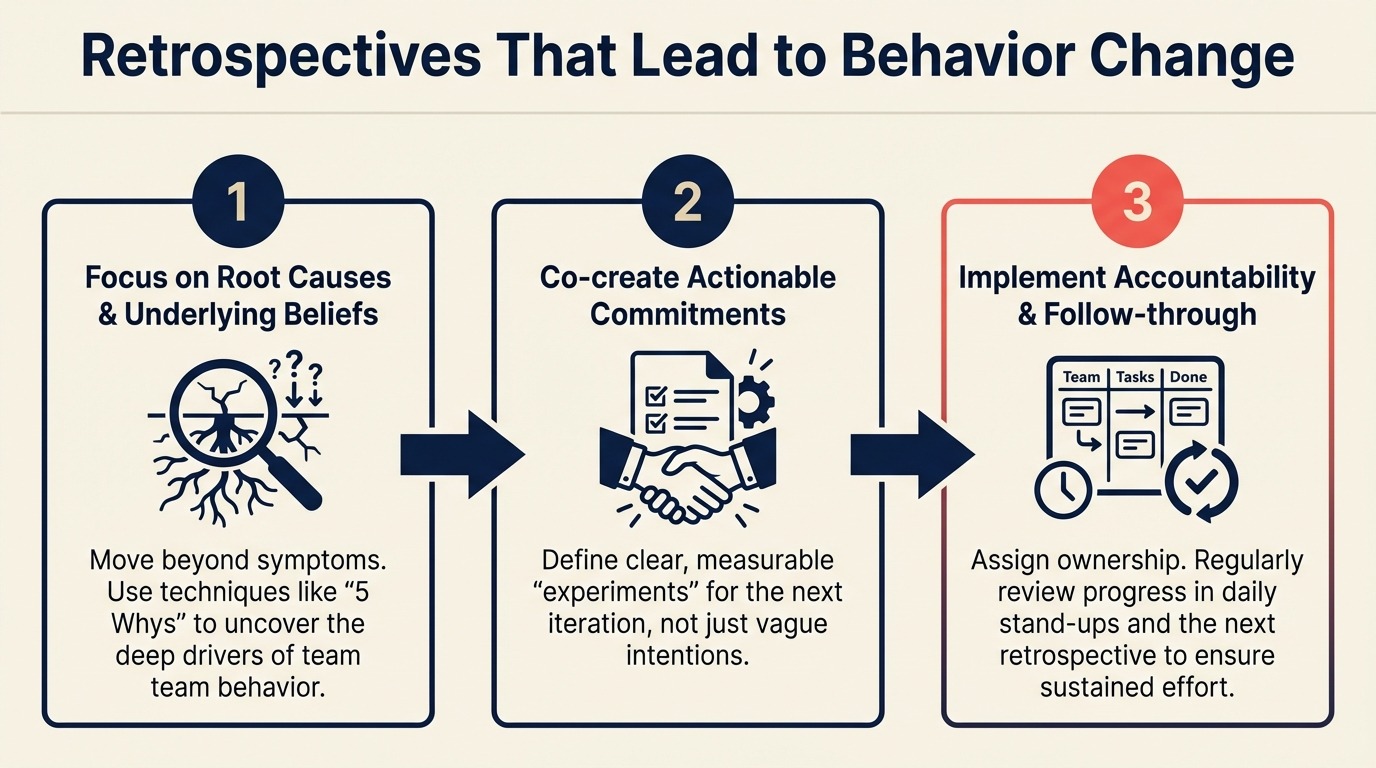
On attempt 19, the team lead made one change. At the end of the retro, instead of closing the session after agreeing on action items, she asked each person who had an action item to state exactly what they would do and when. Not "improve our estimation process." She wanted specifics: "I'll run a calibration exercise on Wednesday's planning session using the approach we discussed." She set a two-week check-in for each item before the next retro.
Three items got done. All three. In two weeks. The team had not successfully completed a retro action item in 18 months.
The format wasn't the problem. The follow-through system was. If you're choosing between a project management tool and a dedicated retrospective board, Rework vs. Asana covers how each handles recurring team workflows like retrospectives and action tracking.
Why most retrospectives don't change anything
The failure pattern is predictable. A team spends 60 minutes generating observations and action items, then closes the meeting. Someone pastes the action items into Slack. Nobody assigns owners. Nobody sets deadlines. Harvard Business Review's research on team learning and continuous improvement found that the gap between identifying problems and actually changing behavior is almost always an accountability structure problem, not an insight problem. The insight exists. The structure doesn't. Three weeks later, at the next retro, someone says "I think we said something last time about improving our deployment process?" Nobody can find the notes. Everything starts over.
There are two structural problems here. First, most retro action items are vague: "improve communication" or "fix the estimation problem." Vague items can't be completed because they don't specify what completing them looks like. Wikipedia's entry on agile retrospectives traces this problem back to the original adoption of the format: teams imported the meeting structure without importing the follow-through discipline that makes it work. Second, there's no follow-through mechanism between retros. Without someone checking on progress explicitly before the next session, action items decay to zero regardless of how energized the team felt at the end of the meeting. A decision log can help bridge this gap: logging the retro's key decisions gives you a reference point at the next session that's harder to ignore than a Notion page nobody opens.
Both problems are fixable, and neither requires a new methodology.
Step 1: Pre-work: the async reflection prompt
The quality of a retrospective is largely determined before it starts. Teams that walk into a retro cold, with no preparation and no specific observations, spend the first 20 minutes generating vague sentiments and the last 10 minutes rushing to produce action items.
Send an async prompt 24 hours before the retro. This approach is well-documented in the Agile Alliance's retrospective guide, which notes that pre-work dramatically improves the quality of observations. MIT Sloan's research on team learning in software organizations found that teams that conduct structured reflection before a meeting generate significantly more actionable insights than those that arrive cold. The preparation shifts the session from problem-discovery to problem-solving. Three questions:
- What's one specific thing that went well this sprint/cycle? Name the thing. Not "communication was better" but "the design review on Tuesday ran to time and produced a clear decision."
- What's one thing that didn't work? Be specific: "The deployment on Thursday took 3 hours because we didn't have a rollback plan ready" not "deployments are slow."
- What's one thing you'd want to be different by the end of our next sprint/cycle?
The specificity prompt is key. "Be specific: name a specific moment, meeting, artifact, or interaction" consistently produces better retro input than open-ended reflection. When people think concretely, the resulting observations are actionable. When they think in generalities, the resulting observations are useless as drivers of change.
Use a simple Slack poll, a shared Notion doc, or a tool like Monday, ClickUp, or Rework if your team uses one of those for retrospectives. The format doesn't matter. The 24-hour lead time and the specificity prompt do.
Step 2: The 60-minute retro format
The retro format needs enough structure to surface the truth without turning reflection into another status meeting.
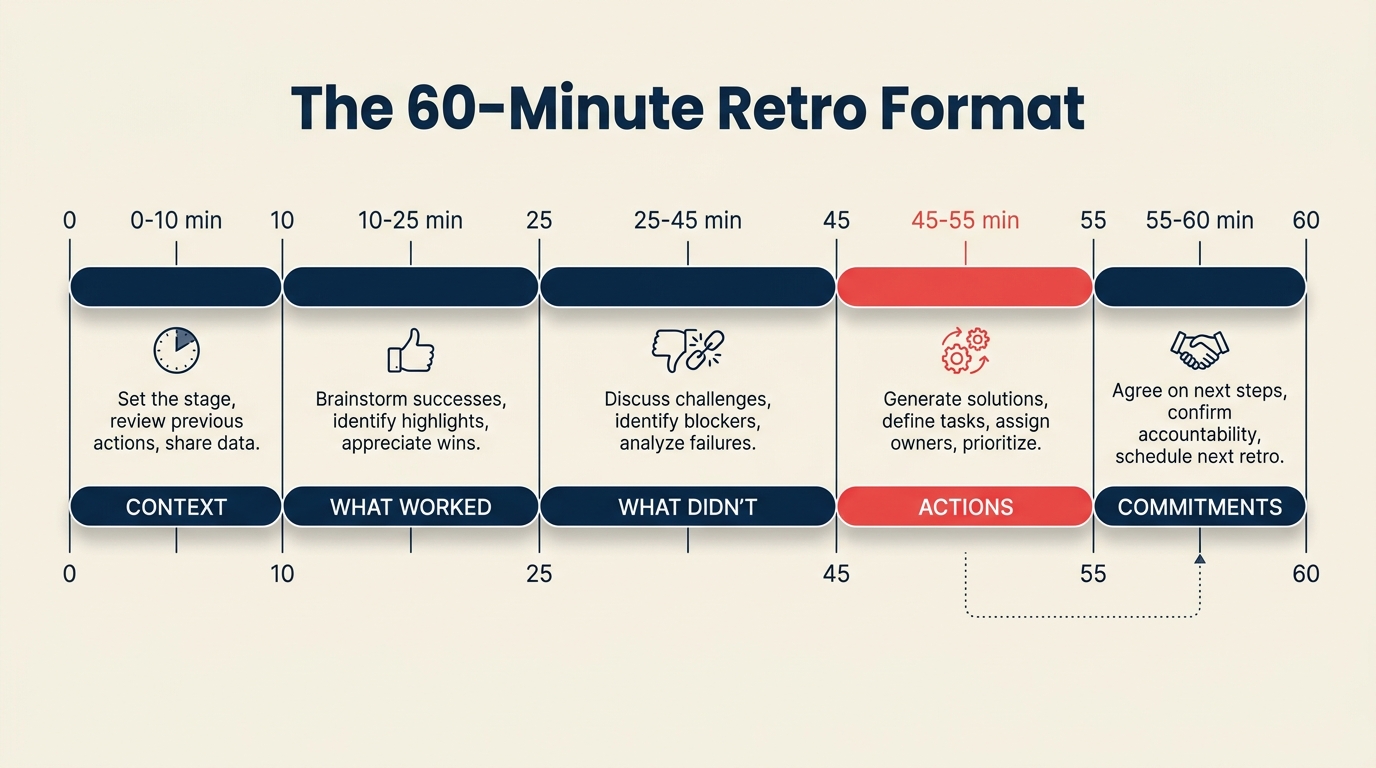
| Section | Time | Purpose |
|---|---|---|
| Review last retro's actions | 10 min | Status check on what was committed |
| Went well | 15 min | Reinforce what's working |
| Didn't work | 20 min | Identify root causes of 2 issues |
| Action items | 15 min | Produce 2-3 specific, owned commitments |
The 10-minute action review at the start is non-negotiable. Opening with "what did we commit to last time, and what actually happened?" establishes that retros produce consequences, not just lists. If items got done, say so. If they didn't, say that too, and spend 2 minutes on why before moving forward.
Don't skip or shorten this section when the sprint was bad. The teams that skip the action review during a difficult period are the teams that end up with 18 straight retros producing no change.
Step 3: The "went well" section that isn't just praise
Most "went well" sections turn into brief rounds of mutual congratulation and then the team mentally moves on to the "real" part of the retro. That's a missed opportunity.
The goal isn't to say nice things. It's to understand what made something work well enough that you can repeat it deliberately. "The Tuesday design review went well" is praise. "The Tuesday design review went well because we sent the mockups 48 hours ahead and everyone came with written feedback instead of reacting in real time" is a practice you can codify.
Push one level deeper on the top 2 items from the "went well" discussion: "What specifically made that work?" If the answer is a specific behavior or process, write it down. Consider adding it to your team operating agreement or team documentation so it persists beyond this retro. If it's a communication practice that worked, it belongs in your async communication norms too.
Step 4: Reducing "didn't work" to root causes
The "didn't work" section is where retros generate lists that lead nowhere. Eight people listing 12 things that went wrong produces 12 items with 2 minutes of attention each. Nothing gets addressed at the depth required to actually change behavior.
The fix is to identify the top 2 items from the list and run a 5-why drill on each one. Not the full list. Two.
The 5-why drill: keep asking "why?" until you reach the underlying cause, not the surface symptom.
Example:
- "Our deployment took 3 hours" → Why?
- "We didn't have a rollback plan" → Why?
- "The engineer who usually writes the rollback plan was out" → Why was it dependent on one person?
- "We don't have documentation for the process" → Why not?
- "Nobody owns documentation for deployment processes"
Root cause: unowned deployment documentation. Now you have something actionable.
The 5-why can feel uncomfortable when it implicates systems or people the team doesn't want to talk about. That discomfort is usually the sign you're close to something real. The facilitator's job is to keep the question neutral: "why did that happen?" not "whose fault is that?"
Spend 10 minutes on each of the two items. Vote on which two to dig into if the list is long. This keeps the group from spending 20 minutes debating which problems to prioritize.
Step 5: The action item filter
Every proposed action item needs to answer three questions before it gets added to the list:
- Who owns it? One person's name. Not "the team," not "we." One person who is responsible for making it happen.
- What exactly changes? A specific behavior, artifact, or process that will be different after this is done. Not "improve our deployment process" but "add a rollback checklist to our deployment template by Thursday."
- How do we verify it in 2 weeks? What will we look at to confirm it happened? A checklist exists, a meeting ran differently, a metric changed. If there's no way to verify it, the action item isn't specific enough.
Apply this filter strictly. When someone proposes an action item that fails one of the three questions, don't add it. Ask the follow-up question that would make it passable. "Improve estimation" → Who owns that, specifically? "Marcus will run a calibration exercise at Wednesday's planning session and report back on how the estimates compared to actual time."
The result is a shorter list of specific, owned items. A retro that ends with 2 items that all three questions can answer is more productive than one that ends with 12 items none of them can.
Cap action items at 3. This is a hard cap, not a guideline. If the team generates 8 great action items, vote on the top 3. The other 5 can be documented but shouldn't get owner commitments. Overloading action items is the second-fastest way to kill retro effectiveness.
Step 6: Start/Stop/Continue as a format alternative
The standard "went well / didn't go well" format works well for most teams. But some teams, especially those with high interpersonal friction or teams that have been doing the same format for 18+ months and need a change, benefit from a Start/Stop/Continue structure:
- Start: Things the team should begin doing that it currently doesn't
- Stop: Things the team should stop doing. Not because they're bad ideas in principle, but because they're not working for this team.
- Continue: Things that are working and should be explicitly maintained, not just tacitly assumed
The advantage of Start/Stop/Continue is that it separates "what we should do" from "what went wrong," which makes the conversation feel less like a post-mortem and more like a planning discussion. Teams that tend to get stuck in blame cycles often respond better to this format.
The same action item filter from Step 5 applies regardless of format. Owner, specific change, verification method.
Step 7: The 2-week action check
The retro ends. Action items are in Notion or in Rework or in a Slack message. And then life happens: a sprint starts, a release ships, an urgent customer issue lands. Two weeks go by. Nobody looks at the action items until the next retro, where the cycle repeats.
The 2-week check-in is not a meeting. It's a Slack message to each action item owner, sent 5 business days after the retro.
Three questions:
- Where are you on [specific action item]?
- Is anything blocking you?
- Will it be done by [date before next retro]?
This takes 5 minutes to send and costs the recipient about 2 minutes to reply. But it changes the social dynamics around retro commitments: owners know someone is going to ask, which changes how seriously they treat the commitment at the time they make it.
If an item is blocked, unblock it then. Don't wait for the next retro. A 10-minute conversation now is better than a 45-minute "why didn't this get done" retrospective later.
Common pitfalls
Too many action items: The cap is 3. When teams agree to 8 action items, they effectively commit to none of them. The attention spreads too thin and nobody feels the urgency of individual ownership. If 8 things came up that need fixing, prioritize mercilessly.
No owners: "We'll all try to communicate better" produces no change. "Marcus owns improving the standup format, starting Monday" produces a different relationship with the commitment. Names, not teams.
Retros that turn into status updates: If the "didn't work" section turns into a sprint status review ("we didn't ship X, Y was delayed"), you're not in a retro anymore. Redirect: "We can cover that in the sprint review. What I'm interested in here is: what about how we worked made this harder than it needed to be?"
Skipping the retro when the sprint was bad: This is the most common and most counterproductive pattern. When everything went wrong, the team doesn't want to spend another hour on it. The Atlassian State of Teams report found that high-performing teams ran retrospectives more consistently during difficult periods, not less. The discipline of reflection is what separates teams that improve from those that repeat the same failure patterns. Research on decision-making velocity shows that teams who skip post-mortems during difficult periods are the ones whose decision speed degrades fastest over the following quarter. But bad sprints are exactly when the most useful diagnostic information is available. Granola's research on team knowledge capture for team leads found that the teams most likely to skip retrospectives were also the ones with the thinnest institutional knowledge, a correlation worth noting. The norm should be: the worse the sprint, the more important the retro. Not skipping it, but shortening it to 30 minutes instead of 60, with a tight focus on one root cause and one action item.
What to do next
Before your next retro, send the async pre-work prompt described in Step 1. Send it 24 hours ahead. Use the three specific questions: one thing that worked, one thing that didn't, one thing you'd want different.
Note the difference in specificity of the responses compared to previous retros where you started cold. If the quality of input is higher, you've already identified the most impactful change to make to your retro process: a single Slack message the day before. If your team is also struggling with too many status meetings diluting the retro's purpose, run the meeting audit first: clearing the calendar gives the retro room to be the real improvement forum it's supposed to be.
Learn More

On this page
- Why most retrospectives don't change anything
- Step 1: Pre-work: the async reflection prompt
- Step 2: The 60-minute retro format
- Step 3: The "went well" section that isn't just praise
- Step 4: Reducing "didn't work" to root causes
- Step 5: The action item filter
- Step 6: Start/Stop/Continue as a format alternative
- Step 7: The 2-week action check
- Common pitfalls
- What to do next
- Learn More