More in
Team Productivity Guide
Running a Productive 1:1 That Reps Actually Look Forward To
Apr 18, 2026
Focus Blocks at the Team Level, Not Just the Individual
Apr 18, 2026
Weekly Status Updates Without the Theater
Apr 18, 2026
Project Kickoffs That Prevent Scope Creep
Apr 18, 2026
Prioritization Frameworks Your Team Will Remember
Apr 18, 2026
Managing Distributed Teams Across 3+ Time Zones
Apr 18, 2026
Capacity Planning Without Spreadsheets From Hell
Apr 18, 2026
The Team Norms Conversation You've Been Avoiding
Apr 18, 2026
Onboarding New Team Members to Your Ways of Working
Apr 18, 2026
Meeting Audit: How to Kill the Meetings Your Team Hates
Apr 1, 2026 · Currently reading
Meeting Audit: How to Kill the Meetings Your Team Hates
Turn this article into takeaways for your work.


Each assistant summarizes the article only for you and suggests best practices for your work.
Sarah managed a 9-person product team that met constantly. Tuesday planning, Wednesday standups, Thursday syncs, Friday retrospectives, plus five recurring one-offs that had accumulated over two years. When she actually listed them all out, she counted 17 weekly meetings. Then she asked her team: "Which of these would you notice if they disappeared?" Eleven had no clear answer. She cut eight of them over four weeks. Her team didn't ask for any of them back.
The average knowledge worker spends 31 hours per month in unproductive meetings, according to Atlassian's research on meeting culture. Gallup's research on workplace productivity found that the cost extends beyond time: employees in high-meeting cultures report lower engagement and higher burnout rates than their peers in organizations with structured focus time. But most managers don't cut meetings because they don't have a process. They have a vague sense that something's wrong, no tool for diagnosing which meetings are the problem, and no method for removing them without looking like they're dismantling team alignment. So the meetings stay.
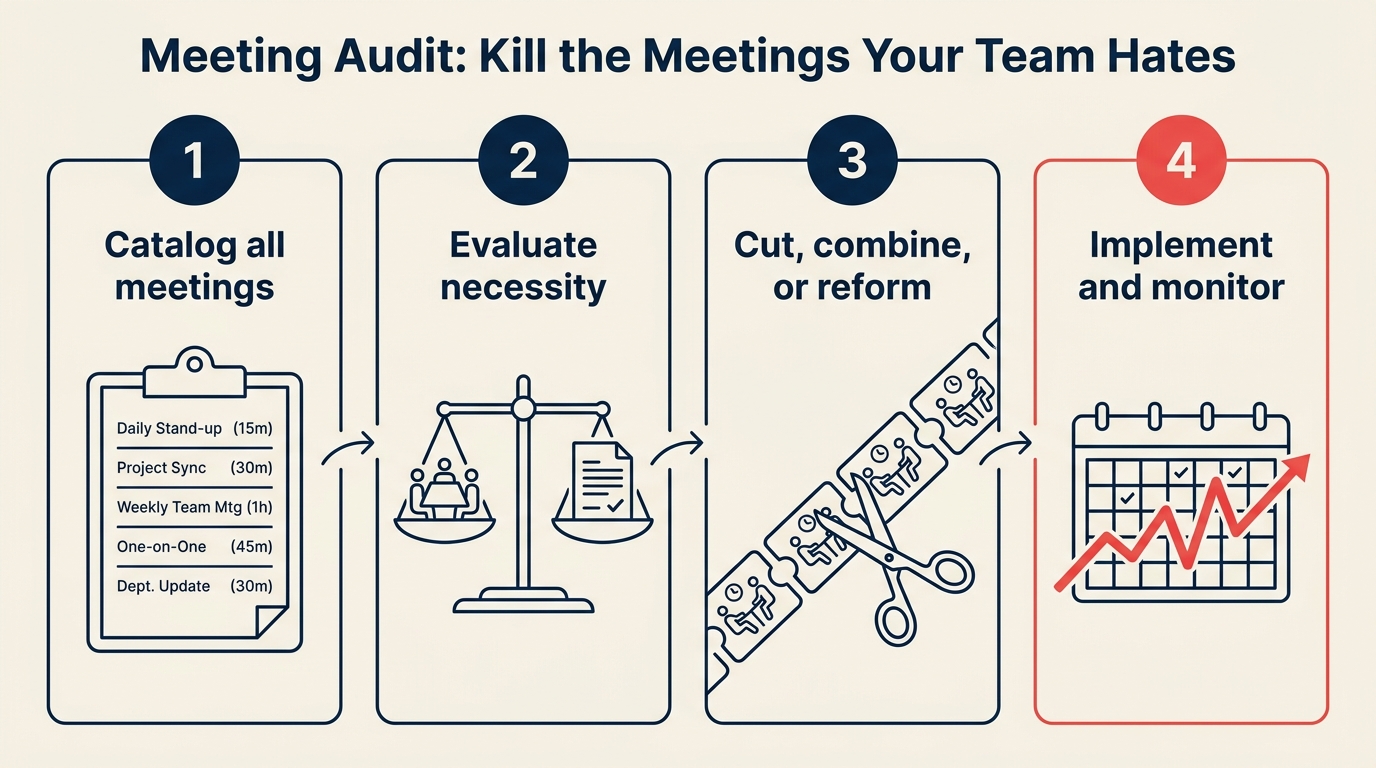
This guide gives you a structured audit that takes about two hours and produces a meeting calendar you can actually defend. If you've already tried reducing meetings informally, research suggests the problem runs deeper: meeting-heavy teams show measurably higher attrition within 18 months. And if the audit reveals your team needs a dedicated focus block as a follow-up, designing a no-meeting day is a natural next step.
Why meeting audits fail before they start
Most attempts to reduce meetings go wrong in the first step: people try to cut meetings by asking their team which ones they hate. This turns into a political negotiation where nobody wants to admit their meeting is useless, and the person who runs the most meetings has the most to lose. Nothing gets cut.
The fix is to audit before you consult. You're not asking permission to cut meetings. You're gathering data, applying a consistent scoring framework, and then bringing recommendations to meeting owners, not attendees. The distinction matters.
Step 1: Pull the full calendar inventory
Don't start by asking anyone anything. Start with raw data instead. Harvard Business Review's research on meeting overload found that executives who surveyed their teams about which meetings to cut got politically filtered results: people protect their own meetings and criticize others'. A data-first approach produces more honest diagnostics.
Export every recurring meeting from your calendar and your team's shared calendars. For each meeting, log the following:
| Field | What to capture |
|---|---|
| Meeting name | As it appears in calendar |
| Owner | Who created or runs it |
| Attendees | Everyone on the invite |
| Stated purpose | What the meeting is supposed to accomplish |
| Frequency | Weekly, biweekly, monthly |
| Duration | 30, 60, 90 minutes |
| Last held | Actual date of most recent occurrence |
This sounds tedious but it takes about 20 minutes for a 15-person team. The act of listing every meeting in one place is itself useful. Most managers haven't seen their team's meeting load as a whole. When it's all in one spreadsheet, patterns become obvious immediately.
Common findings at this stage: meetings that list four attendees but actually pull eight via forwarded invites; recurring meetings with no stated purpose; "planning" sessions scheduled the same day as "review" sessions that cover identical ground; meetings owned by people who left the company six months ago.
Step 2: Score each meeting on 4 criteria
Once you have your inventory, run every meeting through four questions. Score each Yes (1) or No (0):
1. Does it require real-time interaction? Some decisions and conversations genuinely require everyone in the same space at the same time: resolving conflict, rapid back-and-forth, reading the room. But most information sharing, status updates, and approvals don't. If the meeting's content could be communicated in a Loom video or a shared doc, that's a No.
2. Does it produce a specific decision or output? Not "alignment" or "being in the loop." A specific decision that changes what someone does next. A document that gets updated. An action item with an owner and a date. Meetings that exist to inform rather than to decide are candidates for async alternatives. If you can't name the output, that's a No.
3. Would the outcome degrade if it went async? Some meetings would actually work better as written threads, recorded updates, or comment-based reviews. Others genuinely need the conversation. If you could replace this meeting with a well-structured document and the outcome would be equivalent or better, that's a No.
4. Has it actually happened in the last 4 weeks? Recurring meetings often outlive their purpose. The Q4 planning meeting stays on the calendar in Q1. The onboarding sync stays on the books long after the person is onboarded. If a meeting hasn't occurred in a month, it either doesn't need to exist or nobody owns it anymore. If it's been skipped twice in four weeks, that's a No.
Add up the scores. A meeting that scores 3-4 is probably worth keeping in its current form. A meeting that scores 0-1 is a strong candidate for elimination or replacement.
Step 3: Categorize each meeting
Categorization turns the audit from a scorekeeping exercise into a concrete set of decisions about what to keep, change, or remove.
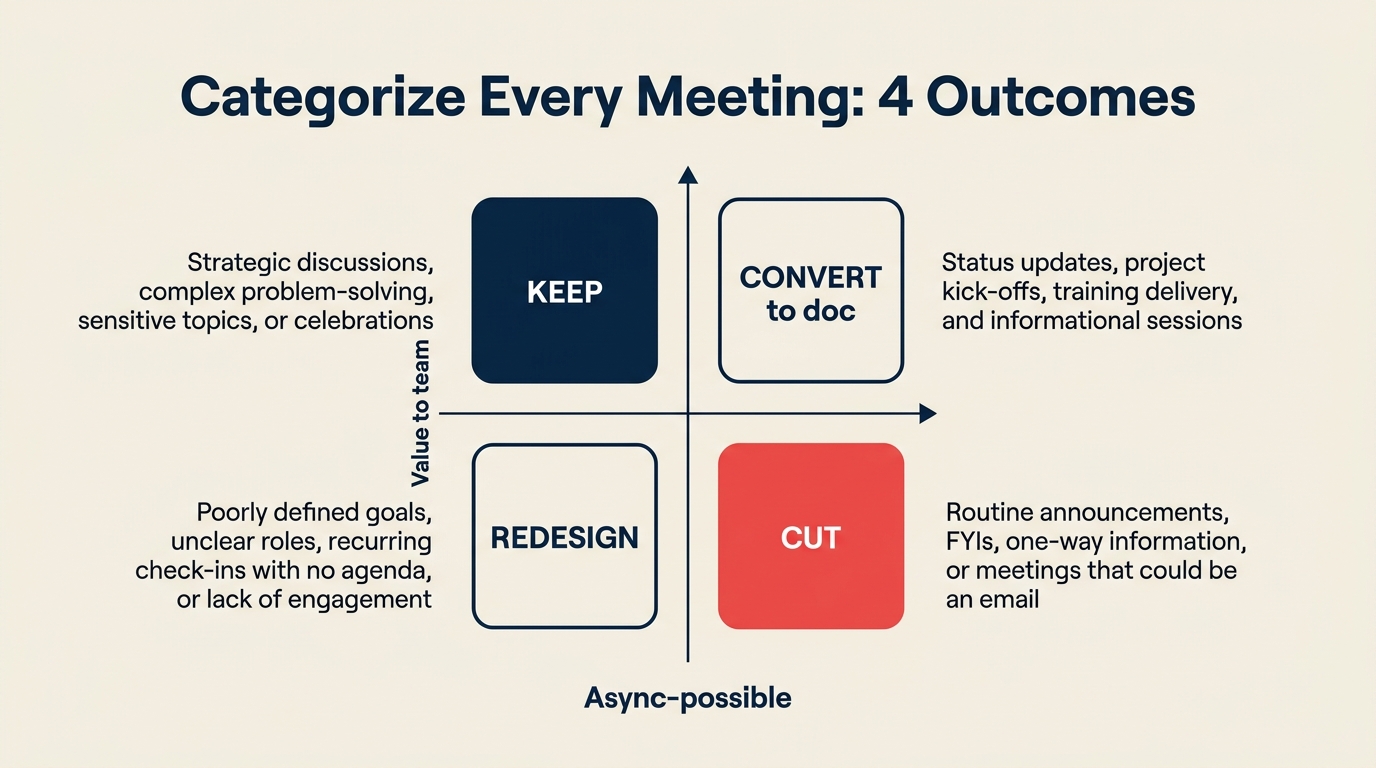
With your scores in hand, sort every meeting into one of four categories:
Keep: Scores 3-4, runs consistently, team feels the outcome. Don't touch these. The point of the audit is not to minimize meetings for its own sake, but to eliminate the ones that drain time without producing value.
Convert to doc: Scores 0-2 because it doesn't require real-time interaction. This is typically a status update meeting, a weekly report-out, or an informational briefing. Replace it with a structured async format: a shared Notion page that gets updated before a set time each week, or a Loom recording for updates that need explanation but not response. Your async communication framework should spell out exactly which channel handles which type of update so people know where to look after the meeting is gone.
Cut: Scores 0-1, hasn't happened recently, no clear owner or output. These meetings have already been abandoned in practice. Make it official. Delete them from the calendar.
Redesign: Scores 2-3 but consistently runs over, ends without clear outcomes, or has attendance that doesn't match its stated purpose. These meetings are doing something real but doing it badly. They need a tighter agenda, a smaller attendee list, or a clearer decision mandate before they're worth keeping.
Step 4: Propose changes to meeting owners, not attendees
This is where most audits fall apart. Managers announce sweeping meeting cuts to the whole team and then deal with the fallout when someone feels their meeting was dismissed without consultation.
Go to meeting owners first, privately. The conversation is short: "I'm doing a calendar audit and I want to talk through what we're getting out of [meeting name]. Here's how I scored it. What am I missing?" Most owners either agree the meeting isn't working, or they clarify something that changes your score. Either way, they're part of the decision, not just subject to it. Codifying which meetings are required versus optional in your team operating agreement prevents the same bloat from recurring in six months.
For meetings you own yourself, you can move faster. But for meetings someone else runs, they need to be in the conversation before anything changes.
When you do bring recommendations to the broader team, frame it as a trial, not a decree. "We're going to cut these four meetings for four weeks and see what happens to our workload and decision quality." McKinsey's analysis of time allocation in organizations found that reclaiming 20% of executive time from low-value meetings consistently correlates with better strategic decision quality, and the same principle holds at the team level.
Step 5: Replace cut meetings with async alternatives
Cutting meetings without replacing the function they served creates a different problem: things fall through the gaps, people don't feel informed, and within two months the meetings are back on the calendar because "we need to stay aligned."
For status updates: Move them to a shared doc or a dedicated Slack channel with a consistent weekly update format. Something like: What shipped this week, what's blocked, what's coming next. Keep it structured so it's scannable. If you're evaluating which project tool handles async status updates best, the Rework vs. Monday comparison covers how each structures team-level visibility.
For decision approvals: Use Rework, Notion, or even a simple Google Doc with a comment-based review process. Set a response window (48 hours is reasonable for most non-urgent decisions) and default to async unless the decision is blocked on live debate.
For information-sharing sessions: Loom recordings work well here. A 5-minute video explaining a product update or a process change is faster to produce than a 30-minute meeting, and people can watch it on their own schedule.
For team standups that were running 20+ minutes: Convert to an async format in Rework or a dedicated Slack channel. Three questions: What did I complete? What am I working on? What's blocking me? Async standups work especially well for distributed teams.
Step 6: Run a 4-week trial before making it permanent
Don't declare victory after one week. Run a structured four-week trial and measure three things:
Time recovered: How many hours did the team get back? Calculate this simply: (meetings cut) x (average attendees) x (meeting duration). Even cutting four 30-minute meetings with 6 attendees each returns 12 person-hours per week to the team.
Decisions made: Did the decisions those meetings were supposed to produce still get made? Did they take longer? If async alternatives are working, decisions should still happen at a comparable pace. A decision log makes it easy to verify this: if decisions are being made and logged, the meetings that were cut weren't the bottleneck.
Escalations: Are things getting escalated to live conversations that previously got resolved in meetings? Some escalation is fine and expected. A lot of escalation means you cut the wrong meeting or didn't build an adequate async replacement.
At the end of four weeks, review the data with your team. Adjust based on what actually happened, not what you predicted.
Common pitfalls
Cutting the wrong meetings: The meetings that look most wasteful, the ones with 12 attendees and no agenda, are sometimes doing more than they appear. They're social cohesion, conflict early-detection, or the one time a week two teams that need to coordinate actually talk. Before cutting, ask: "What's the worst thing that happens if this stops?" If the answer is specific and consequential, redesign rather than cut.
Not replacing with async alternatives: A meeting that existed to share information leaves an information gap when it's gone. Fill the gap before cutting the meeting, not after. Roll out the async alternative one week before removing the meeting from the calendar.
Letting cut meetings creep back in Q2: Someone schedules "just one quick sync" to handle something, and it turns into a recurring invite. Create a simple rule: any new recurring meeting requires sign-off from you or a team lead before it goes on the calendar. This isn't about control. It's about preventing the audit from needing to be repeated every quarter.
What to do next
Schedule your next meeting audit for three months out. Put it on the calendar today. Meeting load tends to grow back organically as projects add their own syncs and new joiners bring old habits. A quarterly audit keeps the calendar honest.
And before you run the audit yourself, consider running the four-question scoring exercise with your team during your next retrospective. There's also a broader lens worth applying here: what counts as a pointless meeting walks through the cognitive science behind why people attend meetings they know are useless. When people understand the criteria (real-time necessity, specific output, async viability, recency) they start applying it themselves. The best outcome of a meeting audit isn't a leaner calendar. It's a team that audits their own meeting behavior without needing a manager to prompt them.
Learn More

On this page
- Why meeting audits fail before they start
- Step 1: Pull the full calendar inventory
- Step 2: Score each meeting on 4 criteria
- Step 3: Categorize each meeting
- Step 4: Propose changes to meeting owners, not attendees
- Step 5: Replace cut meetings with async alternatives
- Step 6: Run a 4-week trial before making it permanent
- Common pitfalls
- What to do next
- Learn More