More in
Chat Funnel Setup
WhatsApp Business API Integration With Your CRM (Working Setup)
Apr 18, 2026
Click-to-WhatsApp Ad Campaigns: From Setup to First Conversion
Apr 18, 2026
Conversational Qualification: Questions That Don't Annoy Buyers
Apr 18, 2026
Designing a Chat Funnel for High-Ticket B2B (Not E-Commerce)
Apr 18, 2026
Configuring Fallback Flows When AI Agents Fail
Apr 18, 2026
Building a 24/7 Chat Funnel Without Burning Out Your Team
Apr 18, 2026
Chat Funnel A/B Testing: What to Test and How
Apr 18, 2026
GDPR-Compliant Chat Funnels for EU Buyers
Apr 18, 2026
Measuring Chat Funnel Performance: The Metrics That Matter
Apr 9, 2026
Lead Routing Automation for Chat-Captured Leads
Apr 7, 2026
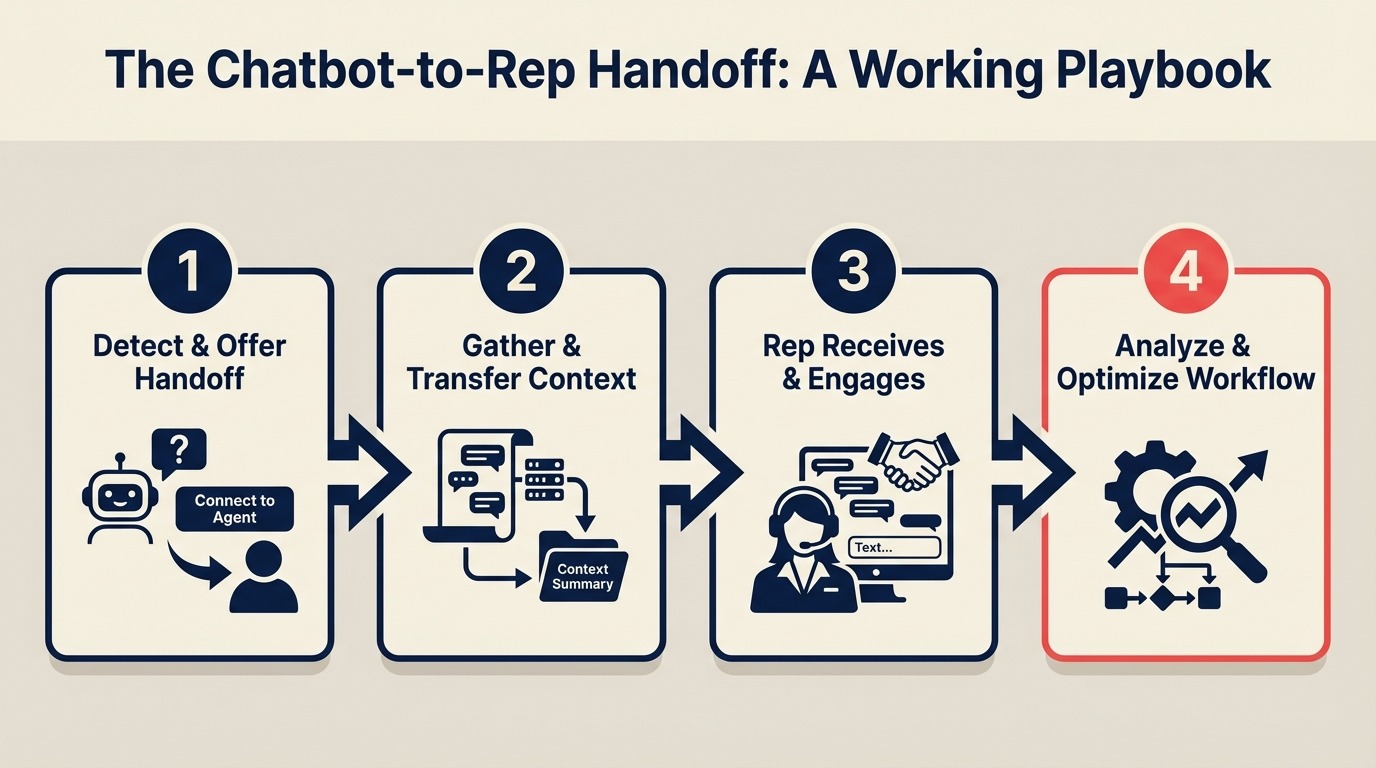
The Chatbot-to-Rep Handoff: A Working Playbook
Turn this article into takeaways for your work.


Each assistant summarizes the article only for you and suggests best practices for your work.
A chat funnel audit at a B2B software company found something uncomfortable: 40% of leads who completed the qualification flow (leads who had answered 4 questions, indicated they were actively evaluating, and fit the ICP) never received a rep response within 2 hours. Some got a response the next day. Some never got one at all. Research on lead response time consistently shows the window for a productive first contact is shorter than most teams assume. A widely cited Harvard Business Review study on lead response time found companies that contacted prospects within an hour were nearly 7 times more likely to qualify the lead than those who waited.
The chatbot was working. The qualification logic was correct. The problem was the handoff.
Qualified conversations were going to a shared Slack channel. The notification said "New qualified lead" with a link. Reps saw the notification, assumed someone else was handling it, and moved on. By the time anyone checked, the lead had gone cold.
This is the most common failure mode in chat funnels: the bot does its job, and then the lead disappears into an unowned notification. This guide gives you the playbook to prevent it, from defining the handoff trigger to measuring handoff quality 30 days after go-live.
Step 1: Define the handoff trigger precisely
Vague handoff triggers are the root cause of most handoff failures. "When the user seems interested" isn't a trigger. It's a guess.
Your handoff trigger should be a specific combination of conditions that fires automatically with no human judgment required. Respond.io's human takeover documentation covers the native bot-to-agent handoff mechanism and the handover protocol settings in detail.
Examples of precise handoff triggers:
| Trigger Condition | Platform | How to Configure |
|---|---|---|
| User clicks "Book a call" button in ManyChat flow | ManyChat | Button action → Assign to rep + send notification |
| Qualification score reaches threshold (e.g., ≥ 7) | Respond.io | Workflow: contact score updated → assign conversation |
| User answers all 4 questions AND role = decision-maker | ManyChat | Condition node: all fields set + role = Director or C-Level |
| User explicitly asks to speak with a human | Respond.io | Keyword trigger: "talk to someone", "speak with a rep", "human" |
| User requests a demo | Either | Button or keyword → assign to sales team |
Build your trigger around observable conditions (button clicks, field values, keyword matches), not inferences about intent. The same principle applies to how you structure lead routing automation downstream: routing logic that depends on interpretation instead of explicit attribute values breaks under volume.
One trigger that fails often: "when the conversation has been going on for more than 3 minutes." Time in conversation is not a qualification signal. A user asking 10 support questions for 5 minutes is not a hot sales lead. For the upstream step that produces the qualification answers that power your trigger, the ManyChat flow setup guide covers how to structure the 4-question sequence and the conditional routing that produces clean trigger inputs.
Step 2: Build the handoff notification
When the handoff trigger fires, the rep needs a notification that contains everything they need to respond, delivered in a channel they actually check.
The notification should go to a direct Slack message, email, or SMS to the specific rep, not a shared channel. Shared channels create diffused ownership. Direct notifications create clear ownership.
Notification template (Slack or email):
New Qualified Lead: WhatsApp

Name: [First Name] [Last Name]
Phone: [Phone Number]
Company Size: [Company Size Answer]
Role: [Role Answer]
Challenge: [Challenge Answer]
Timeline: [Timeline Answer]
Qualification Score: [Score]
Chat Started: [Timestamp]
Source: [Meta Ad / Organic / Referral]

Respond now: [Direct link to Respond.io or ManyChat conversation]
The "Respond now" link is critical. If the rep has to navigate to a platform, find the conversation, and click into it, response time goes up by 3-5 minutes on average. One tap should open the conversation.
In Respond.io, you can generate a direct conversation link via Workflow → Send Webhook → Slack with the Respond.io conversation URL in the body. In ManyChat, use the Send Email action with the ManyChat conversation URL.
Step 3: The context card
The context card is a pre-formatted summary the chatbot generates and attaches to the conversation before handing off. It's an internal note the rep sees before they type their first message.
Context card template (internal note in Respond.io or ManyChat):
--- HANDOFF CONTEXT ---
Lead: [First Name Last Name]
Phone: [Phone]
Channel: WhatsApp
Chat Source: [Meta Ad Campaign Name / Organic]
First Message: [Timestamp]

Qualification Answers:
- Company size: [Answer]
- Role/Title: [Answer]
- Main challenge: [Answer]
- Timeline: [Answer]

Qualification Route: [Hot / Warm]
Qualification Score: [Score]

Do NOT ask again: company size, role, challenge, timeline
Next step: [Book demo / Send case study / Qualify further]
--- END CONTEXT ---
The "Do NOT ask again" line is there for a reason. The single most common rep error after a chatbot handoff is asking the lead questions the chatbot already asked. It signals to the buyer that the chatbot experience was pointless, and it erodes trust.
In Respond.io, add this context card as a Workflow step: After handoff trigger → Add Internal Note → [context card content with merge tags]. The merge tags pull in the actual field values from the contact record.
In ManyChat, add it as an internal comment using the Add Comment action at the end of the hot-lead branch.
Step 4: The rep's first reply
The first message from a human rep sets the tone for the entire sales conversation. If it feels like the rep has no idea what the buyer said to the bot, the credibility built during the qualification flow evaporates.
Three reply templates for different qualification outcomes:
Template 1: Hot lead (active evaluation, decision-maker): "Hi [First Name]! I saw you're looking at [challenge] and evaluating options now. Good timing. I've got a 20-minute slot open today at [time] or tomorrow at [time]. Would either work to walk through how we typically handle this for [company size] teams?"
This reply references the challenge without re-asking about it. It moves directly to scheduling. It treats the buyer as someone who already shared context, because they did.
Template 2: Warm lead (researching, evaluating in 1-3 months): "Hi [First Name]! Thanks for chatting with us. Based on what you shared about [challenge], I wanted to send over two resources that are relevant for [company size] teams at your stage: [link 1] and [link 2]. Happy to get on a quick call when the timing is closer. Just reply here when you're ready."
This reply acknowledges the research stage without pushing for a meeting the buyer isn't ready for. It delivers value immediately and keeps the conversation warm.
Template 3: Follow-up needed (unclear answers, partial completion): "Hi [First Name]! I saw you started a chat with us earlier. I want to make sure we get you the right info. Quick question: are you looking to solve [challenge area] in the next couple of months, or is this more of a longer-term exploration?"
This re-engages without re-running the full qualification flow. One focused question.
Step 5: Response SLA enforcement
The handoff SLA is the maximum time from when the trigger fires to when the rep responds. For hot leads, this should be 5 minutes during business hours.
In Respond.io, configure SLA enforcement:
- Go to Settings → SLA → New SLA Policy
- Set First Response Time = 5 minutes for conversations with tag = Hot Lead
- Escalation: if unresponded after 5 minutes, send a second notification to team lead
- Escalation 2: if unresponded after 15 minutes, auto-assign to the backup rep
Respond.io's SLA configuration documentation walks through the escalation chain settings and how to configure per-team SLA policies. Gartner research on customer service technology notes that SLA enforcement at the conversation level, not just the ticket level, is increasingly the differentiator between sales teams with strong chat conversion and those without.
In ManyChat, SLA enforcement is less native. Use a Webhook to Slack with a delayed trigger. Send the initial notification at handoff time, then send a follow-up Slack message 5 minutes later if the conversation is still unassigned: "Reminder: [Lead Name] qualified 5 minutes ago and hasn't been responded to."
This two-notification system catches 80-90% of missed handoffs. The remaining 10% usually come from edge cases like a rep mid-call or a system notification failure. Those need a weekly audit process rather than automation.
Step 6: The fallback flow
Not every qualified lead will get a rep response within 5 minutes. After-hours leads, peak volume periods, and rep availability gaps mean some conversations will be waiting.
The fallback flow is what happens when the handoff trigger fires but no rep is available to respond immediately.
Fallback message (fires immediately when no rep is available): "Hi [First Name]! Thanks for qualifying with us. You're a great fit for what we do. Our team is currently at capacity right now, but [rep name] will reach out to you on WhatsApp within [specific time, e.g., 2 hours / by 9am tomorrow]. If you'd prefer not to wait, here's a direct link to book time: [Calendly link]."
Key elements of a good fallback message:
- Tells the buyer a specific person will follow up (not "our team will get back to you")
- Gives a specific time window
- Provides a self-serve option (calendar booking)
- Does NOT say "we'll reach out soon" (vague timelines kill leads)
In Respond.io, configure the fallback using a Workflow: If conversation is unassigned for 2 minutes after handoff trigger → send automated fallback message from bot → add to rep queue with priority flag.
The fallback message should come from the bot, not from a named rep. If it comes from a named rep, the buyer expects that rep to have actually read their conversation. When the rep follows up hours later and clearly hasn't read it, trust breaks.
Step 7: Measuring handoff quality
Three metrics to track weekly:
1. Time to first human response (TTFHR): Measured from the handoff trigger timestamp to the first message sent by a human rep. Target: under 5 minutes during business hours. Get this data from Respond.io's Reports → Response Time report, filtered by conversations where the handoff tag is set.
2. Handoff-to-conversation rate: What percentage of handoffs result in a real 2-way conversation within 24 hours? A handoff where the rep sends one message and the lead never replies doesn't count as a successful handoff. Target: 60%+ for hot leads, 30%+ for warm leads.
3. Handoff-to-meeting rate: Of leads who received a handoff, what percentage booked a demo or sales call within 7 days? This is your ultimate handoff quality metric. Forrester's B2B buying research shows that conversion from first contact to meeting drops sharply after 24 hours, which is why this metric needs to be tracked weekly, not monthly. Track it in HubSpot by filtering deals with source = Chat and stage = Meeting Scheduled by date of first rep contact. For a broader view of how WhatsApp fits into the B2B sales motion beyond just handoff metrics, that piece covers where chat leads convert differently from inbound form leads at each pipeline stage. For the full metrics framework covering every stage from ad click to deal creation, see measuring chat funnel performance.
Build a weekly report in Google Sheets or HubSpot with these 3 numbers. Run it every Monday morning before the week's pipeline review.
Common pitfalls
Notification to a group inbox with no individual ownership. When the handoff notification goes to a Slack channel or shared inbox, everyone sees it and nobody owns it. Route to a specific rep or use an assignment system that creates individual ownership before the notification fires.
Reps who re-ask qualification questions. Build the context card, train reps on why it matters, and audit 5 random handoffs per week. If reps are asking questions the chatbot already asked, it's usually because the context card isn't prominent enough in the platform interface.
No SLA on handoff response time. Without a hard SLA and an escalation that actually fires, response times drift. A team that starts at 5-minute average response time will be at 45 minutes within 6 weeks without SLA enforcement.
Fallback flow that promises a callback but never triggers it. If you tell the buyer "Sarah will follow up by 9am" in your fallback message, Sarah needs to follow up by 9am. Set a 15-minute reminder in the rep's calendar or use a Respond.io workflow reminder to ensure the promise is kept.
What to do next
Run 20 test handoffs through the full flow: 10 as a hot lead, 10 as a warm lead. Measure the time from when each handoff trigger fires to when the "rep" (you, testing the system) responds. Compare that to your target SLA.
If any stage takes longer than expected, isolate whether it's a notification delay, a routing issue, or a rep workflow problem. Fix the root cause before connecting the handoff to live ad traffic.
Learn More
