Investigación de Cuentas con AI Antes del Primer Contacto

Turn this article into takeaways for your work.


Each assistant summarizes the article only for you and suggests best practices for your work.
El SDR promedio dedica 45 minutos a investigar una cuenta antes de una primera llamada. Es el número de referencia de productividad de ventas que aparece en los estudios del sector, y la mayoría de los gerentes de primera línea lo reconocen.
Lo que esos estudios no muestran es qué ocurre con esos 45 minutos de investigación. La mayoría de los representantes revisan la página "Acerca de" de la empresa, escanean noticias recientes, comprueban la antigüedad del prospecto en LinkedIn y se forman una idea aproximada del tamaño e industria de la empresa. Luego comienza la llamada, la conversación va a algún lugar que no anticiparon, y la investigación no surge en absoluto.
El SDR promedio usa tal vez el 10% de lo que investigó en una primera llamada real. Los otros 35 minutos fueron fricción, no preparación.
La investigación de cuentas con AI resuelve ambos problemas. Reduce el tiempo de 45 minutos a menos de 5. Y filtra la información que es realmente relevante para la llamada, no todo lo que está disponible públicamente sobre la empresa. Este es el patrón de Generative Research aplicado a ventas, y es uno de los cuatro patrones que definen el rol del AI Sales Operator.
Qué contiene un buen brief de cuenta
Datos Clave: Investigación de SDR e Inteligencia de Cuentas con AI
- Los SDRs dedican solo 2 horas al día a vender activamente, con la mayor parte de su tiempo consumido por investigación, tareas administrativas y entrada de datos, según benchmarks de productividad de ventas.
- Las herramientas AI ahorran al representante de ventas promedio aproximadamente 2 horas al día al automatizar investigación, toma de notas y entrada de datos en el CRM. (Salesso, 2025)
- Las empresas que usan herramientas de ventas con AI reportan aumentos de productividad del 46% en comparación con equipos que dependen de workflows manuales de investigación y outreach. (Salesso, 2025)
El resultado que importa no es un dossier exhaustivo sobre la empresa. Es un brief enfocado que un representante puede leer en 3 minutos, retener en la memoria a corto plazo y usar en los primeros 10 minutos de una llamada.
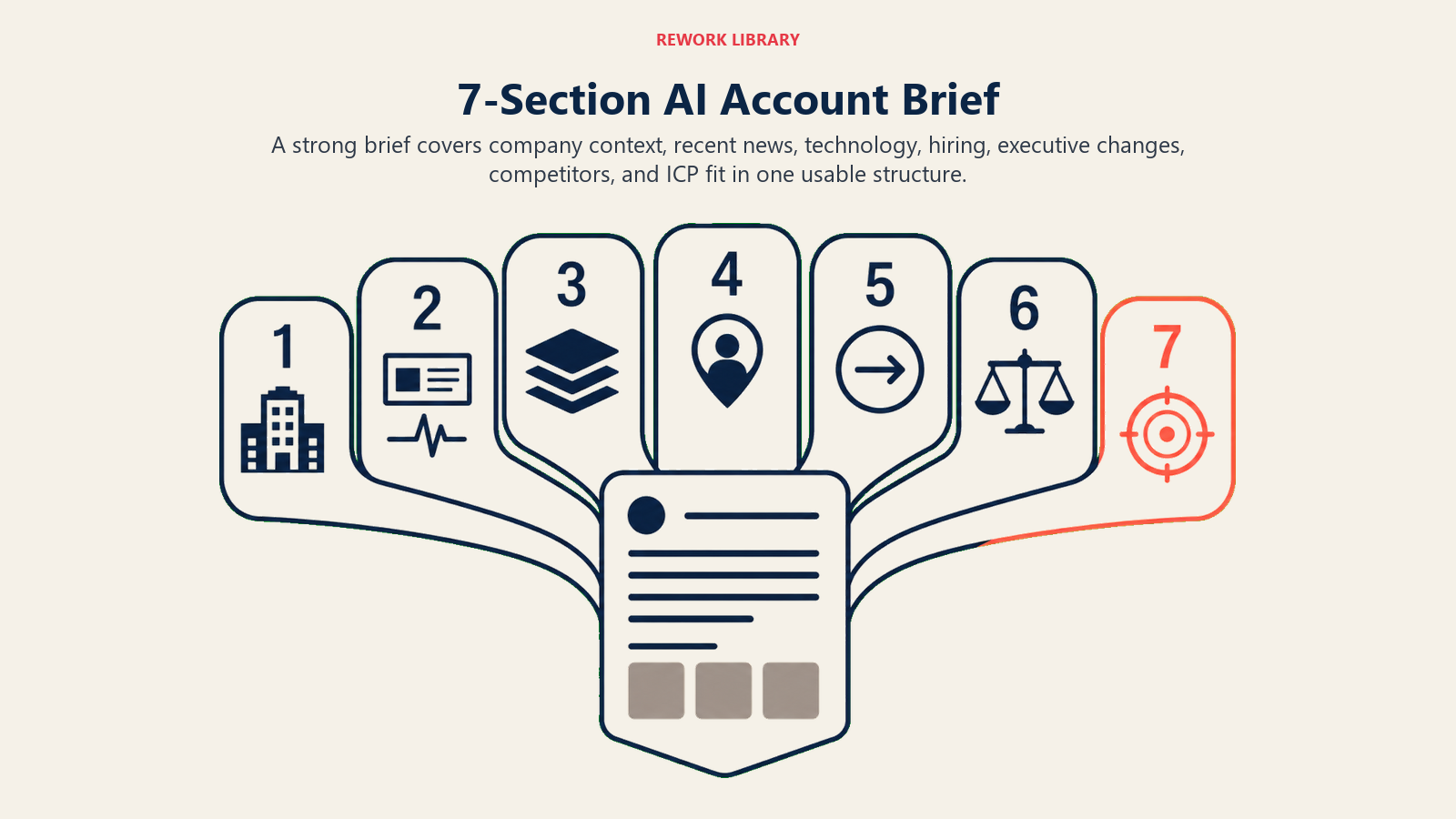
Un brief de cuenta pre-llamada de alta calidad contiene siete secciones:
1. Resumen de la empresa Tamaño, sede, industria, año de fundación, rango de ingresos (si está disponible). Lo básico, en dos o tres oraciones. El objetivo no es dar al representante información que no tiene (la mayoría conocerá el tamaño de la empresa por cómo se originó el lead). Es poner todo en un solo lugar para que no tenga que reconstruirlo.
2. Noticias recientes de la empresa (últimos 90 días) Rondas de financiación, lanzamientos de productos, adquisiciones, cambios de liderazgo, cobertura de prensa. Esta es la sección con más probabilidades de dar al representante un genuino punto de partida para la conversación. "Vi que anunciaron una Serie B en marzo. Felicitaciones. ¿Cómo se ve el crecimiento para el equipo este año?" es un comienzo mucho mejor que "cuénteme sobre su situación actual".
3. Señales del tech stack Las herramientas que la empresa usa actualmente, inferidas de ofertas de empleo, reseñas en G2/Capterra y fuentes de enriquecimiento de datos. Si la empresa usa Salesforce, HubSpot o un competidor específico, el representante debe saberlo antes de la llamada. Las señales del tech stack le dicen dónde encaja su producto, con qué tiene que integrarse y a veces quién tomó la decisión que creó al titular actual contra el que compite.
4. Señales de contratación (ofertas de empleo abiertas) En qué está contratando activamente una empresa suele predecir sus prioridades. Una empresa que contrata tres analistas de RevOps y un Sales Operations Manager probablemente está invirtiendo en procesos de ventas y herramientas. Una empresa que contrata 15 ingenieros y ningún vendedor está en una fase diferente. Los roles abiertos son uno de los mejores conjuntos de datos de señales de compra disponibles públicamente, y la mayoría de los representantes no los mira antes de una llamada.
5. Cambios de ejecutivos clave (últimos 90 días) Nuevo VP de Ventas, nuevo CRO, nuevo CTO. Los cambios ejecutivos crean ventanas de compra. Los nuevos líderes que llegan con opiniones sobre herramientas, procesos o relaciones con proveedores suelen evaluar opciones en sus primeros 90-180 días. Si el contacto en su llamada lleva dos meses en el puesto, ese contexto da forma a cómo se posiciona.
6. Señales de competidores y categoría ¿La empresa ya usa un competidor directo? ¿Hay evidencia de que han estado comparando proveedores? ¿Ha habido menciones públicas de la categoría en la que vende? Esto da forma a cómo el representante posiciona la llamada desde el primer minuto.
7. Resumen de ajuste al ICP Un resumen de una oración de cómo la cuenta se ajusta a su ideal customer profile (ICP): por qué está en el pipeline, cuál es el caso de uso de mayor relevancia y qué debería intentar establecer la primera llamada. Esta es la sección que el AI genera usando sus criterios de ICP configurados, no solo datos genéricos de la empresa.
Los SDRs que llegan a las llamadas con briefs de cuenta estructurados y generados por AI reservan reuniones a tasas del 35-50% más altas que los pares que dependen de investigación ad-hoc, porque el brief adelanta el contexto necesario para hacer una pregunta de apertura relevante en lugar de una investigación genérica.
El Brief de Cuenta de 7 Secciones
El Brief de Cuenta de 7 Secciones es el formato de salida estructurado que determina si una herramienta de investigación de cuentas produce un brief utilizable o un volcado de información. Las siete secciones son: resumen de empresa, noticias recientes (últimos 90 días), señales del tech stack, señales de contratación (ofertas de empleo abiertas), cambios de ejecutivos clave, señales de competidores y resumen de ajuste al ICP. Cada sección mapea a un momento específico de la llamada: las noticias a la apertura, el tech stack al posicionamiento, las señales de contratación al marco de urgencia y el resumen de ICP al objetivo de la llamada. Los briefs que omiten alguna de estas secciones reciben sistemáticamente puntuaciones de utilidad más bajas por parte de los representantes en los loops de retroalimentación post-llamada.
Cómo el AI genera el brief
El patrón de Generative Research se aplica directamente aquí. La fórmula ACE para la generación de briefs de cuenta es:
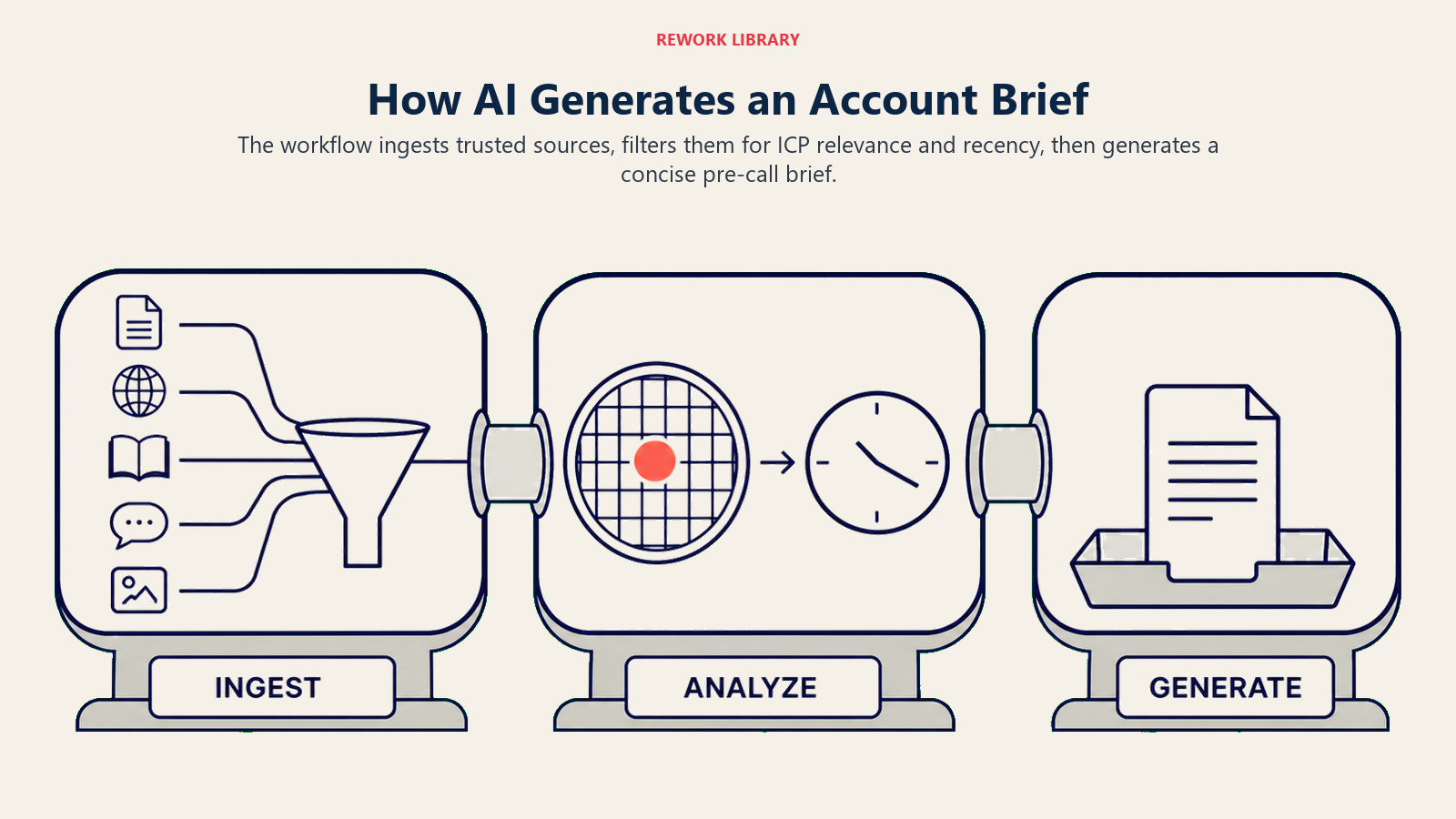
Ingest (multi-fuente): Extraer de LinkedIn (perfil de empresa y prospecto), feeds de noticias recientes (Google News, Crunchbase, APIs de comunicados de prensa), el propio sitio web de la empresa (páginas de carreras, sección de prensa), plataformas de datos de intención (Bombora, 6sense si están disponibles) y herramientas de detección de tecnología (BuiltWith, Slintel).
Analyze (filtrar y sintetizar): De las fuentes ingestadas, aplicar filtros de relevancia para extraer solo lo que importa para su ICP y movimiento de ventas específicos. Un archivo SEC de una empresa de 2019 no es relevante para una primera llamada en 2026. Su anuncio de financiación de marzo de 2026 sí lo es. El paso de Analyze elimina el ruido.
Generate (documento de brief): Ensamblar la información filtrada en la estructura de brief anterior, con encabezados de sección, puntos clave en viñetas y una línea de resumen. Entregar en 300-500 palabras.
Este es el mismo patrón que impulsa la síntesis de inteligencia competitiva, los battlecards de competidores y la investigación de mercado. La diferencia en la investigación de cuentas de ventas es que se ejecuta en alto volumen (potencialmente cientos de briefs por día para un gran equipo de SDRs) y necesita entregarse en tiempo casi real antes de una llamada programada.
La investigación de McKinsey encuentra que los equipos de ventas B2B que combinan investigación generada por AI con outreach personalizado tienen 1.7 veces más probabilidades de ganar cuota de mercado que los equipos que dependen de workflows manuales de investigación uno por uno. (McKinsey, 2024)
El problema de configuración de relevancia
La brecha entre un brief AI útil y un volcado de información está casi completamente en el paso de configuración de relevancia.
Las herramientas de investigación de cuentas con AI listas para usar extraen todo. "La empresa recaudó $50M en Serie C en 2021." "La empresa tiene 3.8 estrellas en Glassdoor." "La empresa patrocinó una conferencia comercial en 2024." Estos hechos son todos públicamente disponibles y técnicamente verdaderos. También son inútiles en una primera llamada.
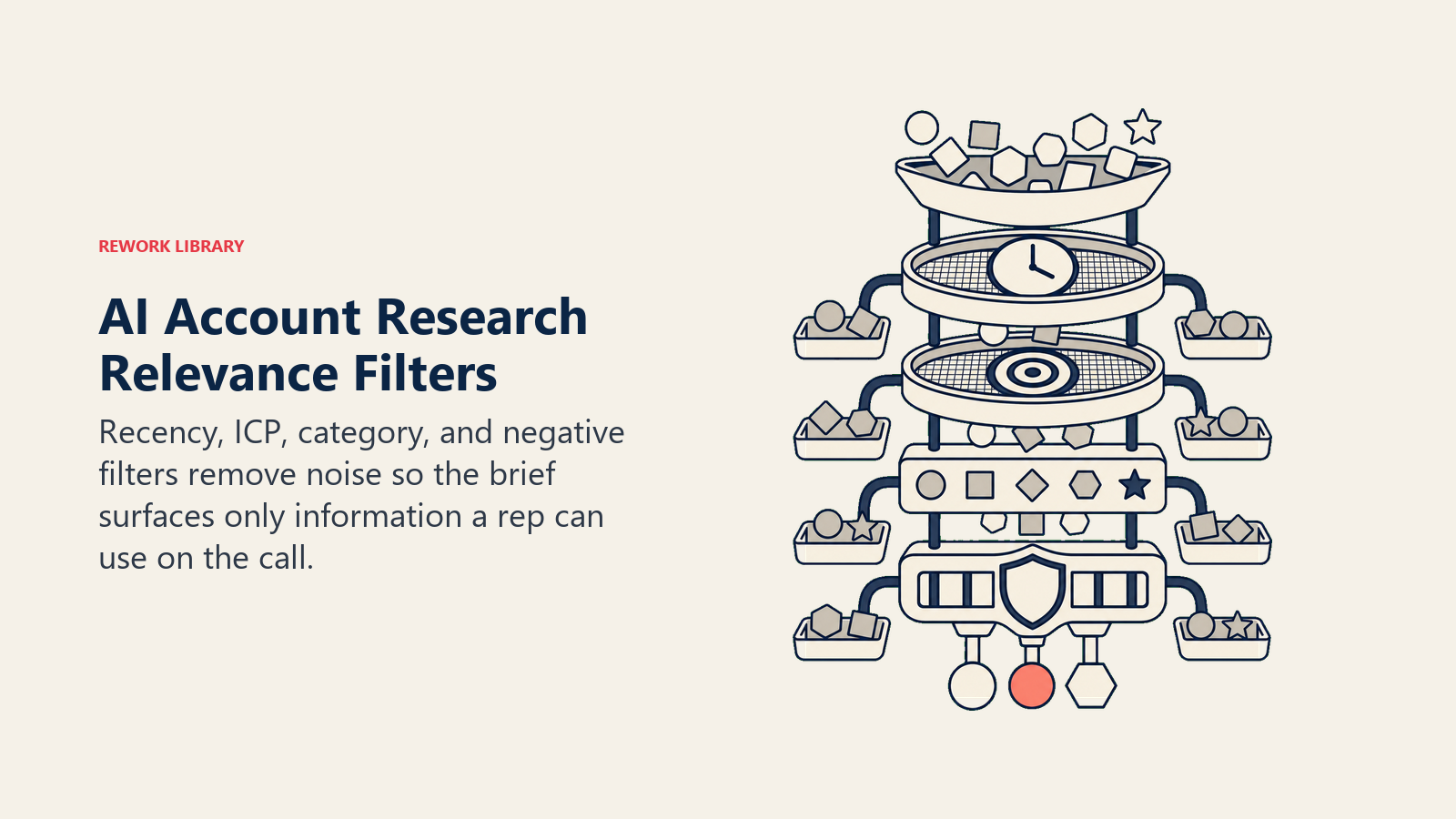
Configurar la relevancia significa dar al AI el contexto para filtrar. El análisis de Forrester sobre proveedores de inteligencia de ventas B2B identifica el filtrado de relevancia como el principal diferenciador entre las herramientas que mejoran el rendimiento del representante y las que añaden ruido. Esto generalmente implica:
Reglas de recencia. Solo mostrar noticias y señales de contratación de los últimos 60 o 90 días. La información más antigua es contexto de fondo, no material de conversación.
Reglas de relevancia para el ICP. Si está vendiendo a empresas B2B SaaS con 100-500 empleados, una señal de contratación de "Coordinador de Marketing Junior" es de baja relevancia. Una señal de contratación de "VP de Revenue Operations" es de alta relevancia. Defina qué roles y señales son significativas para su movimiento de ventas. Esto se conecta directamente con la síntesis de señales de intención del comprador, que añade datos de intención encima de estas señales de contratación.
Señales específicas de categoría. Si vende una plataforma de sales operations, las señales del tech stack sobre el CRM, el sales engagement y el stack de pronóstico son altamente relevantes. El stack de software de RRHH de la empresa no lo es. Dígale al AI qué categorías importan.
Filtros negativos. Elimine información que pueda crear momentos incómodos. Un ejecutivo que acaba de dejar la empresa, una ronda de financiación que no se cerró, una noticia sobre un retiro de producto: vale la pena conocer estos datos, pero el brief no es el lugar adecuado para mostrarlos de forma reflexiva.
El paso de configuración no es una configuración única. Mejora con el feedback de los representantes durante los primeros 30 a 60 días: qué encontraron útil en las llamadas, qué era ruido, qué querían que no estaba ahí.
Estructura de brief de muestra
Así es como se ve un brief de pre-llamada bien configurado de 5 minutos para una empresa SaaS de 150 personas:
Brief de Cuenta: Meridian Analytics Generado el 2026-05-19 | Brief pre-llamada para llamada a las 2:00 PM
Resumen de Empresa Meridian Analytics, 180 empleados, Atlanta GA. B2B SaaS, analítica de datos para empresas de logística de mercado medio. Serie B ($22M, febrero de 2026). Crecimiento del 40% interanual según cobertura reciente.
Noticias Recientes
- Anunció Serie B en febrero de 2026 (Crunchbase). Enfoque en expansión del equipo de ventas y "aceleración go-to-market".
- Cobertura en FreightTech Weekly (abril de 2026): "Meridian se expande a analítica de operaciones portuarias."
- Sin PR reciente de adquisición o liderazgo.
Señales del Tech Stack Usando Salesforce (confirmado vía requisitos de ofertas de empleo). Outreach para gestión de secuencias (según Slintel). Sin capa de analítica CRM confirmada. Sin herramienta de conversation intelligence detectada.
Señales de Contratación (últimos 90 días)
- VP de Revenue Operations (publicado en abril de 2026, aún abierto)
- 2x Sales Operations Analyst
- 3x Account Executive (expansión esperada de 8 a 11 AEs)
Cambios Ejecutivos
- Sarah Wong se incorporó como CRO en marzo de 2026 (anteriormente en FourKites). Nueva en el puesto, probablemente evaluando herramientas.
Señales de Competidores CRM Salesforce confirmado. Outreach confirmado. No se detecta herramienta activa de conversation intelligence o analítica de ventas en el stack.
Ajuste al ICP Ajuste fuerte: $25M ARR, equipo de ventas en crecimiento, liderazgo ejecutivo reciente evaluando herramientas, sin plataforma CI actual. La primera llamada debería establecer si la nueva CRO tiene herramientas de RevOps en su hoja de ruta de 90 días.
Eso es el brief. 350 palabras. Legible en 3 minutos. Accionable en la primera llamada.
Dónde se entregan los briefs
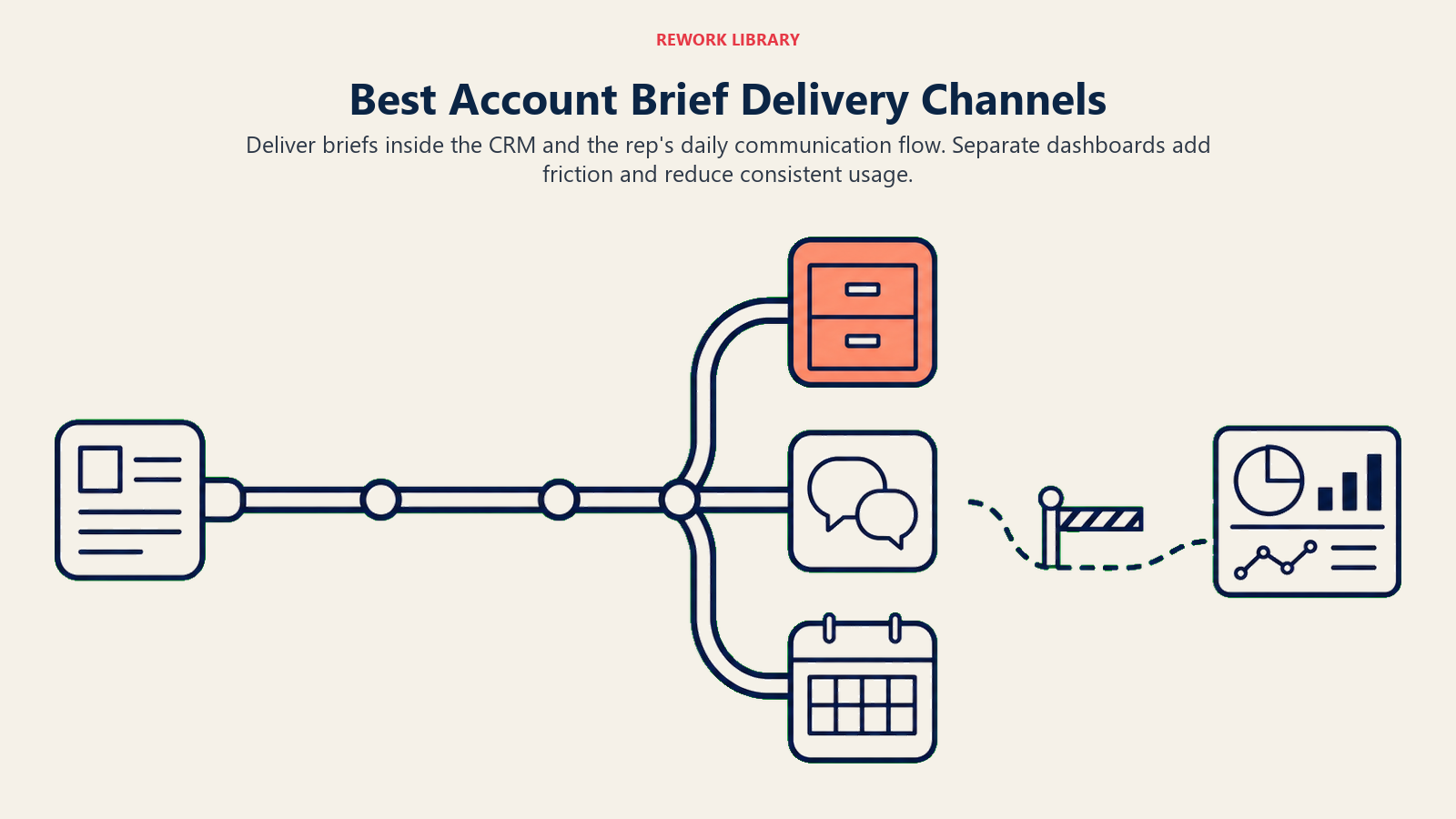
El canal de entrega importa tanto como el contenido. Un brief que requiere que el representante abra una plataforma separada y busque la cuenta se usará tal vez el 40% del tiempo. Un brief que aparece en la invitación a la reunión, en el registro CRM que el representante ya tiene abierto, o en una notificación de Slack la mañana de la llamada se usará el 80%+. Aquí es donde el patrón del workflow copilot se intersecta con Generative Research: el brief tiene que emerger dentro del workflow existente del representante, no en una pestaña separada.
| Canal de Entrega | Tasa de Uso | Complejidad de Configuración | Mejor Para |
|---|---|---|---|
| Registro CRM (auto-poblado) | Alta | Media | Equipos que siempre abren el CRM antes de las llamadas |
| Notificación Slack (mañana de la llamada) | Alta | Media | Equipos que viven en Slack |
| Cuerpo de la invitación a la reunión | Alta | Baja | Equipos que revisan el calendario antes de las llamadas |
| Feed de actividad SEP (Salesloft/Outreach) | Media | Baja | Equipos cuyo workflow comienza en SEP |
| Plataforma separada (Gong, dashboard de Clay) | Baja | Baja | No recomendado como entrega principal |
La configuración de mayor adopción es registro CRM más notificación Slack. El representante ve el brief en su revisión matutina de Slack, y sigue ahí en el registro CRM cuando abre el deal 30 minutos antes de la llamada.
Rework Analysis: En despliegues de Rework CRM, los briefs de cuenta entregados directamente dentro del registro del deal logran un uso de representantes superior al 80% de forma consistente, en comparación con el 40-50% de uso para briefs entregados a través de una plataforma o dashboard separado. El canal importa porque los representantes no añaden pasos de workflow para datos que podrían omitir. La fricción del canal de entrega es la forma más rápida de acabar con la adopción del brief, independientemente de la calidad del brief.
Herramientas para investigación de cuentas con AI
Clay.com es la opción más flexible para configurar workflows personalizados de investigación de cuentas. Conecta con más de 50 fuentes de datos (LinkedIn, Apollo, Crunchbase, Hunter, Clearbit y otras) y permite construir tablas de enriquecimiento multi-fuente que generan briefs personalizados. La curva de aprendizaje es real. Clay es una herramienta de alto rendimiento, no una solución lista para usar, pero para equipos de RevOps que quieren personalizar exactamente qué va en el brief, es la plataforma correcta.
Apollo.io Power Search combina acceso a la base de datos de contactos con outreach generado por AI e investigación de cuentas. La generación de briefs de cuenta está vinculada más estrechamente a la base de datos de contactos de Apollo que el enfoque multi-fuente de Clay, lo que significa que funciona mejor para cuentas bien representadas en la base de datos de Apollo.
ZoomInfo Copilot genera briefs de cuenta pre-llamada de forma nativa dentro de la plataforma ZoomInfo. Buena cobertura de datos para cuentas enterprise en EE.UU., integración más estrecha con los datos de intención de ZoomInfo. Mejor para equipos que ya pagan por ZoomInfo.
Rework Sales AI genera briefs de cuenta dentro del CRM de Rework usando una combinación de datos CRM, fuentes de enriquecimiento conectadas y actividad reciente en su pipeline. La ventaja es la entrega fluida: el brief emerge en el registro del deal sin cambio de contexto a una plataforma adicional.
Cognism es una opción sólida para equipos con pipeline significativo en la UE, dada la mejor cobertura de datos europeos en comparación con muchos proveedores de EE.UU. primero. Los briefs son menos configurables que Clay pero requieren menos configuración.
En qué sigue superando la investigación manual a la AI
Sea explícito con su equipo sobre dónde el brief AI tiene límites.
Caminos de referencia internos. Si un cliente actual conoce al champion en una cuenta objetivo, ese contexto de relación no vive en ninguna fuente de datos pública. El AI nunca lo mostrará. Ese es el trabajo del representante para saber desde su red y sus relaciones con clientes existentes.
Temperatura de la relación. Si la empresa tuvo una mala experiencia con un proveedor anterior, o si el CRO es personalmente escéptico de las herramientas SaaS, o si el VP de Ventas está en medio de un conflicto con su CEO: nada de eso está en un brief. Estas son las cosas que los representantes aprenden hablando con su red, con conexiones mutuas y a lo largo de múltiples llamadas.
Contexto de cuentas existentes. Para la venta de expansión (upsell/cross-sell), el historial interno de la cuenta (quién apadrinó el deal original, cómo fue la implementación, de qué se quejaron en el último QBR) es más importante que cualquier cosa en el brief externo. El brief AI es para nuevos negocios. La planificación de cuentas para clientes existentes requiere un workflow diferente.
Conclusión
La investigación de cuentas con AI no reemplaza la preparación del representante. Adelanta la información para que los 10 minutos antes de la llamada se dediquen a la estrategia, no a Google.
La investigación de crecimiento B2B de McKinsey encuentra que los equipos comerciales basados en datos que combinan AI con personalización tienen 1.7 veces más probabilidades de ganar cuota de mercado. La calidad del brief de cuenta es una de las palancas detrás de esa brecha. El SDR que llega a una primera llamada sabiendo que un nuevo CRO se incorporó hace dos meses, que la empresa está contratando activamente talento de RevOps y que no hay conversation intelligence actual en el stack está en una posición fundamentalmente diferente al SDR que pasó 45 minutos leyendo la página "Acerca de" y el perfil de LinkedIn.
El brief no cierra el deal. Lo hace el representante. Pero un representante que abre una llamada con contexto genuino crea una primera impresión diferente. Para eso es el patrón de Generative Research: comprimir el tiempo necesario para aparecer informado. Y una vez que el representante tiene ese contexto, el siguiente paso es convertirlo en outreach que lo refleje.
Para el siguiente paso en convertir la investigación en outreach, vea Outreach personalizado generado por AI.
Preguntas Frecuentes
¿Cuánto tiempo ahorra la investigación de cuentas con AI por representante de ventas?
Las herramientas de investigación de cuentas con AI comprimen 45 minutos de preparación manual pre-llamada a menos de 5 minutos al automatizar la ingestión de datos multi-fuente, el filtrado por relevancia y la generación de un brief estructurado. En un equipo SDR de 20 representantes que realiza 5 llamadas por día, eso son 50-60 horas de tiempo de venta recuperado por semana. Las herramientas AI ahorran colectivamente al representante de ventas promedio aproximadamente 2 horas al día en investigación y tareas administrativas, según investigaciones de Salesso.
¿Qué debe contener un brief de cuenta generado por AI?
Un brief pre-llamada de alta calidad contiene siete secciones: resumen de empresa, noticias recientes de los últimos 90 días, señales del tech stack, roles de contratación abiertos, cambios ejecutivos recientes, señales de competidores y categoría, y un resumen de ajuste al ICP de una oración. El formato del Brief de Cuenta de 7 Secciones asegura que cada sección mapee a un momento específico de la llamada, para que los representantes lleguen sabiendo qué referenciar y cuándo, en lugar de leer desde un dossier genérico.
¿Cuál es la mejor herramienta para construir workflows de investigación de cuentas con AI?
Clay.com es la opción más flexible para investigación personalizada multi-fuente, conectando con más de 50 proveedores de datos con reglas de relevancia configurables. ZoomInfo Copilot ofrece una integración nativa sólida para cuentas enterprise en EE.UU. Apollo.io Power Search funciona mejor cuando la mayoría de las cuentas están en la base de datos de Apollo. Para equipos que usan Rework CRM, Rework Sales AI entrega briefs directamente dentro de los registros de deals sin cambio de contexto a una plataforma adicional.
¿En qué se diferencia la investigación de cuentas con AI de la investigación manual?
La investigación manual es abierta: un representante decide qué buscar, busca en múltiples pestañas y sintetiza los hallazgos manualmente. La investigación de cuentas con AI está basada en reglas: un workflow configurado extrae de fuentes definidas, aplica filtros de recencia y relevancia para el ICP, y genera un brief estructurado en el mismo formato cada vez. La consistencia de los briefs generados por AI también facilita el coaching, ya que los gerentes pueden identificar qué elementos del brief se usan realmente en las llamadas vs. cuáles se ignoran.
¿Cuáles son los límites de los briefs de cuenta generados por AI?
Los briefs AI no pueden mostrar caminos de referencia internos (si un cliente conoce al prospecto), la temperatura de la relación (conflictos anteriores con proveedores, escepticismo personal) ni el contexto de cuentas existentes para la venta de expansión. Estas son fuentes de inteligencia del representante recopiladas a través de conversaciones de red e historial de múltiples llamadas. El AI maneja la capa de datos públicos; el representante añade la capa de relación encima.
¿Cómo deben entregarse los briefs de cuenta para maximizar el uso del representante?
La entrega en el registro CRM (auto-poblado antes de la llamada) combinada con una notificación Slack la mañana de la llamada logra las tasas de adopción más altas. Los briefs entregados a través de una plataforma separada, que requieren que el representante navegue a otra herramienta, ven tasas de uso del 40-50%. En la práctica, un brief que el representante tiene que buscar no se usará de forma consistente independientemente de la calidad del contenido.
Qué leer a continuación
- Generative Research: Compressing Hours of Reading: el patrón ACE subyacente detrás de toda investigación de cuentas con AI
- Outreach Personalizado Generado por AI a Escala: el siguiente paso después del brief: convertir la investigación en mensajes de primer contacto
- Síntesis de Señales de Intención del Comprador con AI: cómo los datos de intención se superponen a los briefs de investigación de cuentas
- Industry Insight Briefings for Account Executives: investigación más profunda para AEs en deals en etapa avanzada
- Battlecards de Competidores Generados con AI: el mismo patrón de Generative Research aplicado a inteligencia competitiva

Co-Founder, Rework.com
On this page
- Qué contiene un buen brief de cuenta
- El Brief de Cuenta de 7 Secciones
- Cómo el AI genera el brief
- El problema de configuración de relevancia
- Estructura de brief de muestra
- Dónde se entregan los briefs
- Herramientas para investigación de cuentas con AI
- En qué sigue superando la investigación manual a la AI
- Conclusión
- Qué leer a continuación