More in
Team-Produktivitäts-Playbook
Produktive 1:1s führen, auf die sich Mitarbeiter wirklich freuen
Apr. 18, 2026
Focus Blocks auf Team-Ebene, nicht nur für Einzelpersonen
Apr. 18, 2026
Wöchentliche Status-Updates ohne Theatralik
Apr. 18, 2026 · Currently reading
Projekt-Kickoffs, die Scope Creep verhindern
Apr. 18, 2026
Priorisierungs-Frameworks, die Ihr Team im Gedächtnis behält
Apr. 18, 2026
Verteilte Teams über 3+ Zeitzonen hinweg führen
Apr. 18, 2026
Kapazitätsplanung ohne Spreadsheets aus der Hölle
Apr. 18, 2026
Das Gespräch über Team-Normen, das Sie bisher vermieden haben
Apr. 18, 2026
Neue Teammitglieder in Ihre Arbeitsweise einführen
Apr. 18, 2026
Meeting-Audit: So schaffen Sie die Meetings ab, die Ihr Team hasst
Apr. 1, 2026
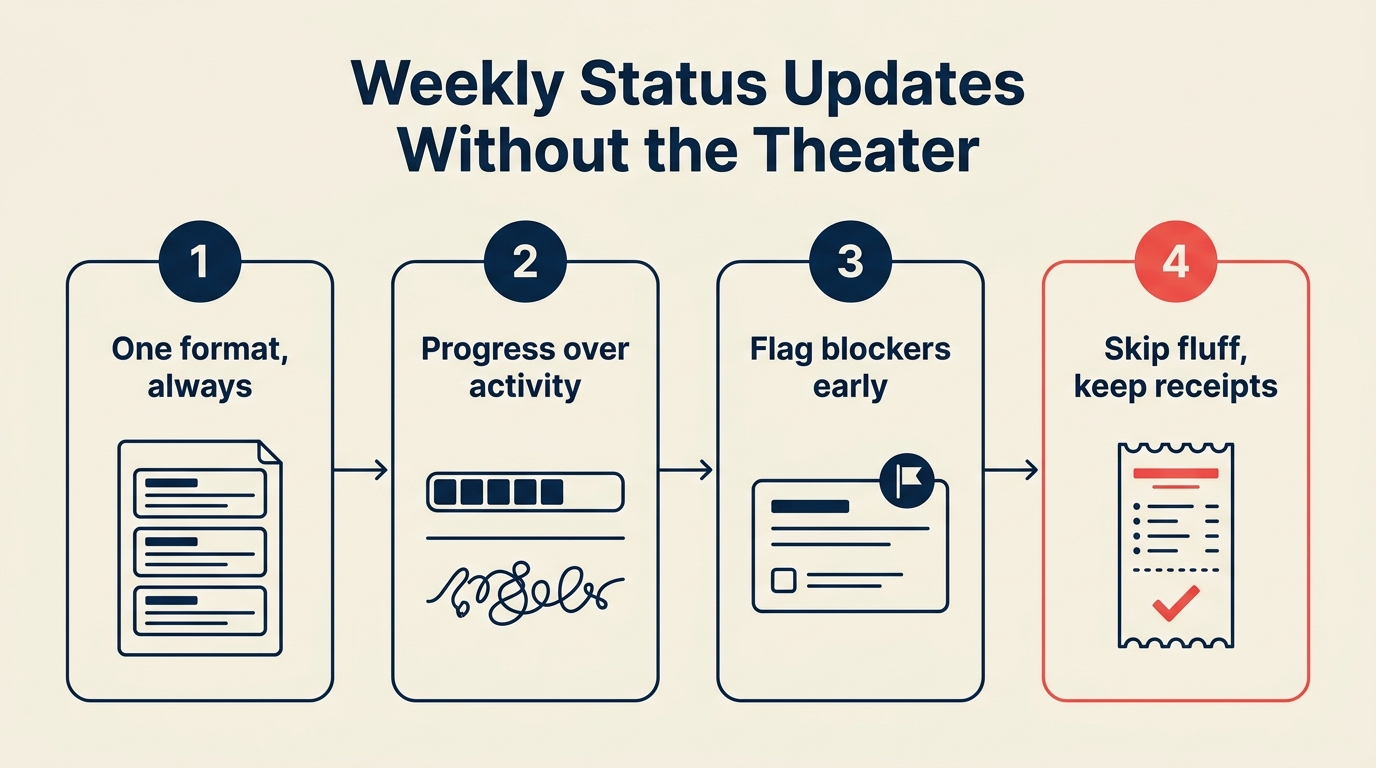
Wöchentliche Status-Updates ohne Theater
Turn this article into takeaways for your work.


Each assistant summarizes the article only for you and suggests best practices for your work.
Es ist Freitagnachmittag. Die Hälfte Ihres Teams schreibt dasselbe Update wie letzte Woche, angepasst an die Projekte dieser Woche. Niemand schreibt es gerne. Die Führungsebene fordert es, weil jemand darüber sie darum gebeten hat. Die E-Mail landet in Posteingängen im gesamten Unternehmen, wird auf rote Flaggen überflogen und größtenteils ignoriert.
Am nächsten Freitag schreibt es jeder wieder.
Das ist das performative Status-Update: ein Bericht, der existiert, um Aktivität zu demonstrieren, statt Informationen zu kommunizieren. Es ist eine der zuverlässig teuersten Gewohnheiten in Wissensarbeitsorganisationen. Teuer in der Zeit, die für die Erstellung aufgewendet wird, teuer in der Aufmerksamkeit, die beim Lesen verloren geht, und am teuersten in den Signalen, die es unter formatierten Textbausteinen begräbt, die für politische Absicherung statt operative Klarheit geschrieben wurden.
Die Lösung liegt nicht darin, Status-Updates abzuschaffen. Stakeholder brauchen genuinen Einblick. Führungskräfte müssen wissen, was blockiert ist. Die Unternehmensleitung muss Ressourcenentscheidungen treffen. Aber es gibt eine Version der Statuskommunikation, die diese Bedürfnisse wirklich erfüllt, und sie sieht der Freitags-E-Mail nicht ähnlich. Und sie beginnt mit derselben Disziplin, die Projekt-Kickoffs effektiv macht: das Format vor Arbeitsbeginn vereinbaren.
Das Problem mit dem aktuellen Format
Bevor Sie Ihr Status-Update neu gestalten, lohnt es sich, zu verstehen, warum das bestehende Format scheitert. Es gibt in der Regel drei Ursachen.
Es wird für den Schreiber, nicht den Leser verfasst. Die meisten Status-Updates sind nach der internen Arbeitsstruktur organisiert: nach Projekt, nach Teammitglied, nach Arbeitsbereich. Aber die Leser teilen dieses mentale Modell nicht. Sie stellen sich: Ist das auf Kurs? Wird etwas explodieren? Muss ich etwas tun? Ein Format, das an der internen Struktur orientiert ist, zwingt sie, diese Antworten zu suchen, statt sie direkt zu liefern.
Es begräbt Probleme in Good-News-Framing. Es gibt einen starken Anreiz, Status-Updates gut klingen zu lassen. "Das Projekt hatte diese Woche einige Herausforderungen, aber das Team arbeitet daran" ist politisch sicherer als "Wir sind bei der API-Integration blockiert, und das wird das Launch-Datum verschieben." Die erste Version schützt den Schreiber. Die zweite gibt dem Leser etwas zum Handeln. Die meisten Status-Kulturen trainieren Menschen, die erste Version zu schreiben. Harvard Business Review-Forschung zur Organisationskommunikation zeigt, dass Informationsverzerrung beim Aufwärtsberichten Unternehmen merkliche Entscheidungszeit kostet und durch strukturelle Formatänderungen weitgehend vermeidbar ist.
Es dupliziert Berichterstattung über Kanäle hinweg. Teams haben oft eine wöchentliche Status-E-Mail UND ein Slack-Update UND ein Projektmanagement-Dashboard UND eine Folie in einem Freitags-All-Hands. Jedes Format erfordert leicht unterschiedliches Framing, kostet inkrementelle Zeit und gibt Stakeholdern leicht unterschiedliche Informationen. Wenn dieselbe Frage in vier Kanälen vier verschiedene Antworten hat, schwindet das Vertrauen in alle.
Die drei Fragen, die jedes Update antreiben sollten
Reduzieren Sie ein Status-Update auf seine Funktion: Es ist ein Werkzeug, das Stakeholdern genug Kontext gibt, um Entscheidungen zu treffen und Probleme zu erkennen. Diese Funktion kann durch die Beantwortung genau drei Fragen erfüllt werden.
Was wurde geliefert? Was hat das Team seit dem letzten Update abgeschlossen, geliefert oder wesentliche Fortschritte erzielt? Das ist rückwärtsblickend und konkret. Nicht "am Redesign gearbeitet", sondern "das Login-Flow-Redesign auf Staging deployt".
Was ist blockiert? Was verhindert gerade den Fortschritt, und was muss sich ändern, damit es entsperrt wird? Das ist der wertvollste Abschnitt. Klar benannte Blocker können gelöst werden. Blocker, die in Prosa vergraben oder ganz weggelassen werden, nicht.
Was ändert sich? Verschiebt sich etwas in Scope, Zeitplan, Ressourcen oder Prioritäten? Das ist der Frühwarnabschnitt. Änderungen sind keine Versagen. Sie sind Informationen. Ein Stakeholder, der in einem wöchentlichen Update von einer Zeitplanverschiebung erfährt, kann sich in der Regel anpassen. Ein Stakeholder, der es erst am Deadline-Tag erfährt, nicht.
Jedes Status-Update, das diese drei Fragen beantwortet, ist nützlich. Jedes, das sie nicht beantwortet, ist Theater.
Einen Kanal und ein Format wählen
Eine der häufigsten Arten, wie Status-Updates scheitern, ist Proliferation. Drei Teams, die Updates in drei verschiedenen Formaten an fünf verschiedene Kanäle senden, produzieren nicht mehr Transparenz, sondern weniger. Alle lernen zu überfliegen oder zu ignorieren, weil das Volumen der Berichte das Signal überwältigt.
Treffen Sie eine bewusste Entscheidung und setzen Sie sie durch:
Ein Kanal. Status-Updates leben an genau einem Ort. Nicht in E-Mail und Slack. Nicht in einem Notion-Dokument und einer wöchentlichen Folie. Ein Ort. Stakeholder, die Status wollen, wissen, wo sie nachschauen.
Ein Format. Das Template ist jede Woche dasselbe. Die Struktur ändert sich nicht je nach dem, was passiert ist. Das wirkt starr, aber es ist das, was Updates überfliegbar macht. Wenn Leser genau wissen, wo sie den Blocker-Abschnitt finden, müssen sie nicht danach suchen.
Eine Frequenz. Wöchentlich ist für die meisten Teams richtig. Tägliche Standups decken die Meeting-Kadenz ab. Monatliche Business Reviews decken das strategische Alignment ab. Wöchentliche Updates füllen die Lücke für operative Transparenz. Fügen Sie kein zweites wöchentliches Update hinzu, weil jemand eine Frage gestellt hat, die das erste Update hätte beantworten sollen. Verbessern Sie stattdessen das erste.
Die Kanalentscheidung ist ein kurzes Teamgespräch wert. Manche Unternehmen haben starke Normen dafür, wo operative Kommunikation stattfindet. Arbeiten Sie innerhalb dieser Normen, statt einen neuen Kanal hinzuzufügen. Weniger Orte zum Nachschauen ist immer besser.
Für den beschäftigsten Leser schreiben
Die Person, die am ehesten auf Ihr Status-Update tatsächlich reagieren wird, ist auch die Person, die es am wenigsten aufmerksam lesen wird. Ihr Zielleser ist Ihre Skip-Level-Führungskraft oder ein Stakeholder zwei Ebenen höher: jemand, der Ihr Projekt auf dem Radar hat, aber nicht nah genug an der Arbeit ist, um die Details zu kennen.
Schreiben Sie für diese Person. Drei Prinzipien:
Überspringen, überfliegen, handeln. Das Update sollte auf drei Ebenen gleichzeitig funktionieren. Jemand mit 30 Sekunden kann zum Ampel-Status springen und wissen, ob etwas seine Aufmerksamkeit braucht. Jemand mit 2 Minuten kann die Überschriften überfliegen und verstehen, was sich bewegt hat. Jemand, der tiefer einsteigen möchte, kann den Blocker-Abschnitt vollständig lesen und verstehen, was er tun muss. Das Format erledigt die Arbeit. Der Leser wählt seine Tiefe.
Konkret schlägt allgemein. "Gute Fortschritte beim Q2-Launch" sagt dem Leser nichts Umsetzbares. "Authentifizierungs-Flow an QA geliefert; warte auf Design-Review für die Einstellungsseite" sagt ihnen, wo das Projekt steht, was erledigt ist und was als Nächstes kommt. Konkretheit ist, wie Sie Glaubwürdigkeit demonstrieren und Probleme frühzeitig sichtbar machen.
Der Blocker-Abschnitt ist nicht optional. Hier weichen die meisten Update-Schreiber aus. Sie beschreiben den Blocker im Passiv ("es gab einige Verzögerungen"), rahmen ihn als bereits gehandhabt ("wir arbeiten daran") oder lassen ihn ganz weg, um nicht schlecht dazustehen. Aber ein klar benannter Blocker ist eine Bitte um Hilfe. Das ist es, wofür Status-Updates da sind.
Das Ampel-System
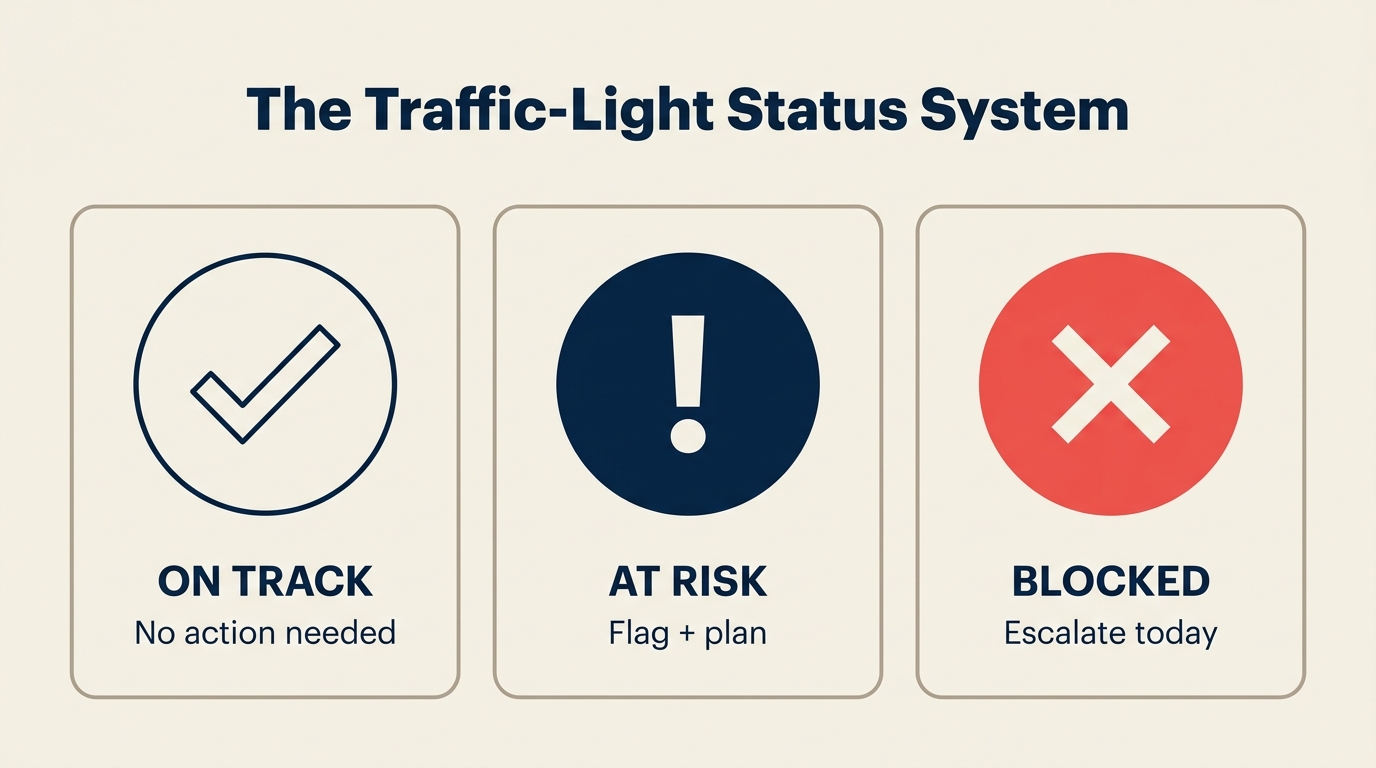
Status-Updates in Prosa haben ein Signalproblem: Sie sind schwer auf den aggregierten Gesamtzustand über mehrere Projekte hinweg zu scannen. Wenn ein Führungsteam den Status von sechs Projekten überprüft, kann es Risiken nicht effizient über eine Wand aus Text hinweg vergleichen.
Ein Ampel-System löst das. Weisen Sie jedem Projekt oder Arbeitsbereich einen von drei Status zu:
Grün: Auf Kurs. Keine wesentlichen Bedenken. Die Lieferung läuft planmäßig.
Gelb: Gefährdet. Es gibt einen Blocker, ein Zeitplanproblem oder eine Abhängigkeit, die gelöst werden muss. Noch keine Krise, aber erfordert Aufmerksamkeit.
Rot: Abseits der Spur. Dieses Projekt oder dieser Arbeitsbereich braucht sofortige Diskussion. Eine Entscheidung oder Ressourcenänderung ist erforderlich.
Entscheidend ist, zu definieren, was diese Status für Ihr Team konkret bedeuten. Ohne eine gemeinsame Definition wird Gelb bedeutungslos. Alle färben ihre eigene Arbeit Grün, um ein Gespräch zu vermeiden, und das Signal kollabiert. PMI's Pulse of the Profession-Bericht identifiziert schlechte Risikokommunikation, also die Tendenz, Gelb- und Rot-Status unterzuberichten, konsequent als einen der wichtigsten Beiträge zu Projektüberschreitungen und Lieferversagen. Schreiben Sie die Definitionen auf, nehmen Sie sie in Ihre Teamnormen auf und wenden Sie sie konsequent an.
Ein praktischer Hinweis: Führungskräfte sollten Teams für ehrliche Rot-Signale belohnen. Wenn ein Projekt erst dann rot wird, wenn es bereits ein öffentlicher Notfall ist, haben Sie Ihr Team trainiert, dass Rot-Status Konsequenzen hat. Machen Sie Gelb- und Rot-Status sicher zu berichten, und Sie erhalten frühzeitige Warnung bei echten Problemen. Diese Sicherheit muss auch in den Kapazitätsplanungs-Prozess des Teams eingebaut werden: Wenn Sprint-Verpflichtungen realistisch sind, gibt es weniger politischen Druck, alles grün zu färben.
Die Schreibzeit begrenzen
Status-Updates sollten 15 Minuten dauern. Nicht 45. Nicht anderthalb Stunden. Fünfzehn Minuten.
Wenn Ihr Status-Update länger dauert, liegt das fast immer daran, dass der Scope falsch ist. Entweder beziehen Sie zu viele Projekte ein (lösen Sie durch Einschränkung des Updates auf das, was das Publikum wirklich wissen muss), oder Sie erklären zu viel (lösen Sie durch die Drei-Fragen-Struktur und den Widerstand, Kontext hinzuzufügen, den niemand erfragt hat).
Ein Timer ist hier ein nützliches Werkzeug. Stellen Sie ihn auf 15 Minuten, wenn Sie sich hinsetzen, um das Update zu schreiben. Wenn er klingelt, ist das, was Sie haben, das Update. Das erzwingt redaktionelles Urteilsvermögen. Sie streichen die Abschnitte, die nicht wirklich wichtig sind, und mit der Zeit trainiert das alle, prägnanter zu schreiben.
Das Status-Update-Template
Hier ist ein Format, das Sie sofort verwenden können. Es passt in eine Slack-Nachricht, eine E-Mail oder ein gemeinsames Dokument. Das Ganze sollte in unter zwei Minuten lesbar sein.
Team Status: [Woche vom Datum]
Gesamtgesundheit: [Grün / Gelb / Rot]
Was geliefert wurde
- [Konkretes Ergebnis 1]
- [Konkretes Ergebnis 2]
- [Konkretes Ergebnis 3]
Blocker
- [Blocker 1]: [Was zur Entsperrung nötig ist und von wem]
- [Blocker 2]: [Was zur Entsperrung nötig ist und von wem]
- Keine diese Woche (falls zutreffend)
Was sich ändert
- [Jede Änderung in Scope, Zeitplan, Ressourcen oder Prioritäten]
- Keine Änderungen (falls zutreffend)
Fokus nächste Woche
- [1-2 Sätze Vorschau auf das, worauf das Team nächste Woche hinarbeitet]
Ampel-Legende:
- Grün = auf Kurs
- Gelb = gefährdet, wird beobachtet
- Rot = braucht Diskussion
Das war es. Dieses Template produziert ein nützliches Update in 15 Minuten, ist in unter zwei Minuten lesbar und bringt Blocker in einer Form ans Licht, auf die tatsächlich reagiert werden kann.
Kanal-Entscheidungsmatrix
Wenn Sie unsicher sind, wo Status-Updates gespeichert werden sollen, hilft diese Matrix:
| Publikum | Update-Typ | Bester Kanal |
|---|---|---|
| Ihre Führungskraft | Wöchentlich operativ | Async (Slack-Nachricht oder E-Mail) |
| Bereichsübergreifende Stakeholder | Projektgesundheit | Gemeinsames Projektdokument oder Tool |
| Unternehmensleitung | Programmgesundheit | Strukturierte E-Mail oder Dashboard |
| Ihr Team | Teamstatus | Slack-Kanal oder gemeinsames Dokument |
Das Schlüsselprinzip: Passen Sie den Kanal daran an, wie das Publikum Informationen am liebsten konsumiert. Manche Führungskräfte wollen E-Mail. Manche wollen ein Dashboard prüfen. Manche wollen einen Slack-Ping. Fragen Sie einmal, dann standardisieren Sie.
Häufige Fehler
Für politische Absicherung statt Klarheit schreiben. Sie erkennen das, wenn das Update Passiv verwendet, um Probleme zu beschreiben ("Verzögerungen sind entstanden"), Blocker ans Ende begräbt oder vor jedem Problem einen Absatz Kontext hinzufügt. Beheben Sie es, indem Sie aus der Perspektive des Lesers redigieren: sagt dieser Satz ihm etwas, auf das er reagieren kann, oder lässt er die Situation nur gemanagt wirken?
Mehr Formate als Empfänger erstellen. Jede neue Stakeholder-Anfrage nach einem Status-Update sollte eine Frage auslösen: Kann diese Person das, was sie braucht, aus dem bestehenden Update entnehmen, oder braucht sie ein genuines anderes Format? Oft braucht sie nur ein anderes Detailniveau, das Sie im selben Update mit geschichteter Struktur liefern können, nicht in einem separaten Dokument.
Das Update als Ersatz für das Gespräch nutzen. Ein wöchentliches Status-Update ist kein Ersatz dafür, ein echtes Problem zu flaggen, wenn es eines wird. Wenn etwas am Mittwoch rot wird, warten Sie nicht bis Freitag. Schicken Sie sofort eine kurze async-Notiz. Das wöchentliche Update erfasst dann den Kontext, nicht die Neuigkeit.
Nicht überprüfen, ob das Format funktioniert. Fragen Sie Ihre Stakeholder jedes Quartal: Gibt Ihnen dieses Update das, was Sie brauchen? Fehlen Informationen oder gibt es Informationen, die Sie nicht brauchen? Die meisten Menschen bieten dieses Feedback nicht freiwillig an, geben es aber ehrlich, wenn Sie fragen. Das Format sollte sich auf der Basis dessen weiterentwickeln, was tatsächlich nützlich ist, nicht zur Gewohnheit erstarren.
Status-Updates mit Ihrem Betriebssystem verbinden
Status-Updates existieren nicht in Isolation. Sie sind ein Knoten in einem breiteren Kommunikationssystem.
Der Leitfaden zur asynchronen Kommunikation behandelt die vorgelagerte Frage: Welche Gespräche gehören in Status-Updates vs. Slack vs. ein Meeting? Das richtig hinzubekommen, reduziert den Druck auf Status-Updates, Kontext zu tragen, der woanders hingehört.
Ihre Entscheidungsprotokolle ergänzen Status-Updates, indem sie die Begründung hinter Entscheidungen festhalten, insbesondere Scope-Änderungen, Ressourcenverschiebungen und Prioritätsentscheidungen. Wenn ein Status-Update auf eine Änderung verweist, sind die Entscheidungsprotokolle der Ort, an dem Leser erfahren können, warum die Änderung stattgefunden hat.
Und wenn das Status-Meeting, das Ihr Team derzeit nutzt, um diese Informationen zu teilen, in Ihrer Meeting-Überprüfung aufgetaucht ist, ist seine Ersetzung durch ein async-Update einer der einfachsten Meeting-Schnitte, die Sie vornehmen können. Status-Meetings sind fast immer bessere Kandidaten für eine async-Ablösung als jeder andere Meeting-Typ.
Wie gute Ergebnisse aussehen
Ein Status-Update funktioniert, wenn drei Dinge wahr sind. McKinsey-Forschung zur Organisationsgesundheit verknüpft Informationstransparenz direkt mit der Ausführungsgeschwindigkeit: Teams mit klarer, konsistenter Statuskommunikation reduzieren die Entscheidungslatenz um 20-30 % im Vergleich zu Teams mit Ad-hoc-Berichterstattung.
Stakeholder-Fragen zum Status sinken. Wenn Sie nach dem Wechsel zu einem konsistenten, gut strukturierten Update weniger "Wie läuft X?"-Nachrichten erhalten, liefert das Update die Transparenz, die die Menschen durch diese Fragen gesucht haben. Das ist auch ein nützlicher Maßstab für RevOps und Pipeline-Hygiene-Kultur: Teams mit guter Status-Disziplin tendieren auch zu besserer Forecast-Genauigkeit.
Blocker werden schneller gelöst. Wenn Blocker im Update klar benannt werden, sehen die richtigen Personen sie und können handeln. Verfolgen Sie, wie lange Blocker von ihrem ersten Auftreten in einem Update bis zur Lösung brauchen. Wenn diese Zeit sinkt, funktioniert das Format.
Zeit für Updates sinkt. Das Ziel sind 15 Minuten pro Update, maximal. Wenn das Team immer noch 45 Minuten bis eine Stunde für ein wöchentliches Status-Update aufwendet, müssen Scope oder Format sich ändern. Atlassian's State of Teams-Bericht zeigt, dass Wissensarbeiter durchschnittlich 4-6 Stunden pro Woche für Berichterstattung und Statuskommunikation aufwenden: eine Zahl, die gut gestaltete async-Formate um mehr als die Hälfte reduzieren können.
Die Freitags-Status-E-Mail, die niemand liest, ist behebbar. Die Lösung erfordert kein neues Tool und keine große Prozessänderung. Sie erfordert ein gemeinsames Template, ein klares Format und die Disziplin, für den Leser statt für den Schreiber zu schreiben.
Fünfzehn Minuten. Drei Fragen. Ein Kanal. Das ist alles, was es braucht.
Mehr erfahren: Erkunden Sie das vollständige Team Productivity Playbook für weitere Leitfäden zu effektiven Kommunikationsrhythmen in Ihrem Team. Verwandte Artikel: Priorisierungsrahmen, an die sich Ihr Team erinnern wird, das Gespräch über Teamnormen, das Sie vermieden haben und wie KI die Leistungsmessung verändert.

Principal Product Marketing Strategist
On this page
- Das Problem mit dem aktuellen Format
- Die drei Fragen, die jedes Update antreiben sollten
- Einen Kanal und ein Format wählen
- Für den beschäftigsten Leser schreiben
- Das Ampel-System
- Die Schreibzeit begrenzen
- Das Status-Update-Template
- Kanal-Entscheidungsmatrix
- Häufige Fehler
- Status-Updates mit Ihrem Betriebssystem verbinden
- Wie gute Ergebnisse aussehen