Best Productivity Tracking Software in 2026: 14 Tools for Measuring Output Without Surveillance
Turn this article into takeaways for your work.


Each assistant summarizes the article only for you and suggests best practices for your work.
Three changes worth flagging from this year: Clockify capped its free plan at 5 users in April 2026, ActivTrak added a separate AI-adoption tracking add-on, and Insightful opened a new Workflow Optimization tier still in beta.*
ActivTrak and Microsoft Viva Insights are best for a manager who wants capacity and workload data without ever opening a screenshot folder, RescueTime and Memtime are best for someone tracking their own individual focus time, and Insightful or Time Doctor are best for a team lead who still wants an occasional screenshot as backup evidence. All fourteen tools in this guide answer a different question than most "employee monitoring" roundups ask. They don't try to confirm someone is at their desk. They report where the hours went, how much focus time survived a day full of meetings, and whether one person on the team is quietly carrying twice the workload of everyone else.
That's a different job than security or compliance monitoring, and it's worth being precise about which one you're buying. If what you actually need is screen recording, keystroke logging, insider-threat detection, or DLP, read Best Employee Monitoring Software in 2026 instead; that guide covers the deeper capture layer this one deliberately sets aside, and our roundup of Teramind alternatives goes further into the insider-risk end of that market. The 14 tools below were evaluated on pricing transparency, whether output can be measured without a screenshot, and the depth of workload and focus reporting.
Key Facts
- The global workforce analytics market is projected to grow from $2.72 billion in 2026 to $7.12 billion by 2034, a 12.78% compound annual growth rate. (Fortune Business Insights)
- 87% of employees report they're productive at work, but 85% of leaders say hybrid work has made it hard to trust that their people are actually getting things done, a gap Microsoft's own researchers named "productivity paranoia." (Microsoft Work Trend Index Pulse Report)
- 56% of workers who are electronically monitored report feeling tense or stressed during the workday, compared with roughly 40% of workers who are not monitored. (APA 2023 Work in America Survey)
- After a single digital interruption, office workers take an average of 23 minutes and 15 seconds to fully return to the task they were doing, per a UC Irvine study that tracked real office workers across full workdays. (Gloria Mark, UC Irvine, "The Cost of Interrupted Work")
- A four-experiment 2024 study found that algorithmic surveillance lowered workers' sense of autonomy and increased resistance behaviors, including intent to quit, more than equivalent monitoring performed by a human manager. (Schlund and Zitek, Communications Psychology)
Quick Comparison Table
| Tool | Best For | Starting Price | Key Strength | Key Limitation |
|---|---|---|---|---|
| ActivTrak | Workforce analytics with a hard no on screenshots | Free (up to 3 users); Work Activity Tracking $10/worker/mo annual | No screenshot capability at any price | Free tier caps out fast at 3 users |
| Insightful | Analytics first, screenshots as an optional add-on | Workforce Analytics $8/seat/mo annual | Base plan is capture-free by default | Add-ons stack up quickly once enabled |
| Time Doctor | Screenshots and distraction alerts for remote teams | Basic $8/user/mo monthly, $6.67 annual | Screenshots, activity, and payroll add-ons together | Marketing pricing page shows no figures |
| DeskTime | A productivity score with optional, disable-able screenshots | Pro $6.42/user/mo billed annually | Screenshots stay off unless you turn them on | Screenshots only exist on Premium and up |
| Hubstaff | Time tracking plus activity data for distributed teams | Starter $7/seat/mo monthly, $4.99 annual | Time, screenshots, and payments in one app, with GPS as a paid add-on | GPS needs the Team tier plus that add-on; no free plan, 2-seat minimum |
| RescueTime | Personal focus tracking with zero screenshots | Free Lite; Solo Focus $7/mo annual ($9 monthly) | Fully automatic, built for individuals first | Thin as a manager-facing team dashboard |
| Timely | Automatic time capture, no manual timer or screenshots | Starter $11/user/mo monthly, $9 annual | Memory-based capture with zero capture layer | No free tier, 5-user cap on Starter |
| Toggl Track | A manual timer with zero monitoring features | Free (limited users); Starter $9/user/mo annual | No activity or surveillance features anywhere | No workload or focus analytics of any kind |
| Clockify | Budget teams that want screenshots optional, not default | Free (up to 5 users); Basic $4.99/user/mo annual | Screenshots held back until the Pro tier | Free plan capped at 5 users since April 2026 |
| TimeCamp | Unlimited free users, capture reserved for the top tier | Free (unlimited users); Starter $5.49/user/mo annual | Screenshots don't appear below Ultimate | Reporting trails purpose-built analytics tools |
| Memtime | Activity data that never leaves the employee's device | Basic $18/user/mo monthly, $14 annual | Local-only data, never uploaded unreviewed | Highest entry price in this list |
| Apploye | The cheapest capture-based screenshot monitoring | Free (up to 10 users, 1 screenshot/hour) | Screenshots at every tier, including free | No screenshot-free plan exists |
| Prodoscore | An output score built from Workspace and M365 signals | From $300/mo, covers 15 seats | No screenshots or keystroke logging by design | Poor per-head fit under 15 seats |
| Microsoft Viva Insights | Aggregate signals already inside Microsoft 365 | $4/user/mo paid yearly | No new agent for teams already on Microsoft 365 | Little value outside the Microsoft ecosystem |
Aggregate Analytics or Capture-Based: Know Which Half of the Market You're Looking At
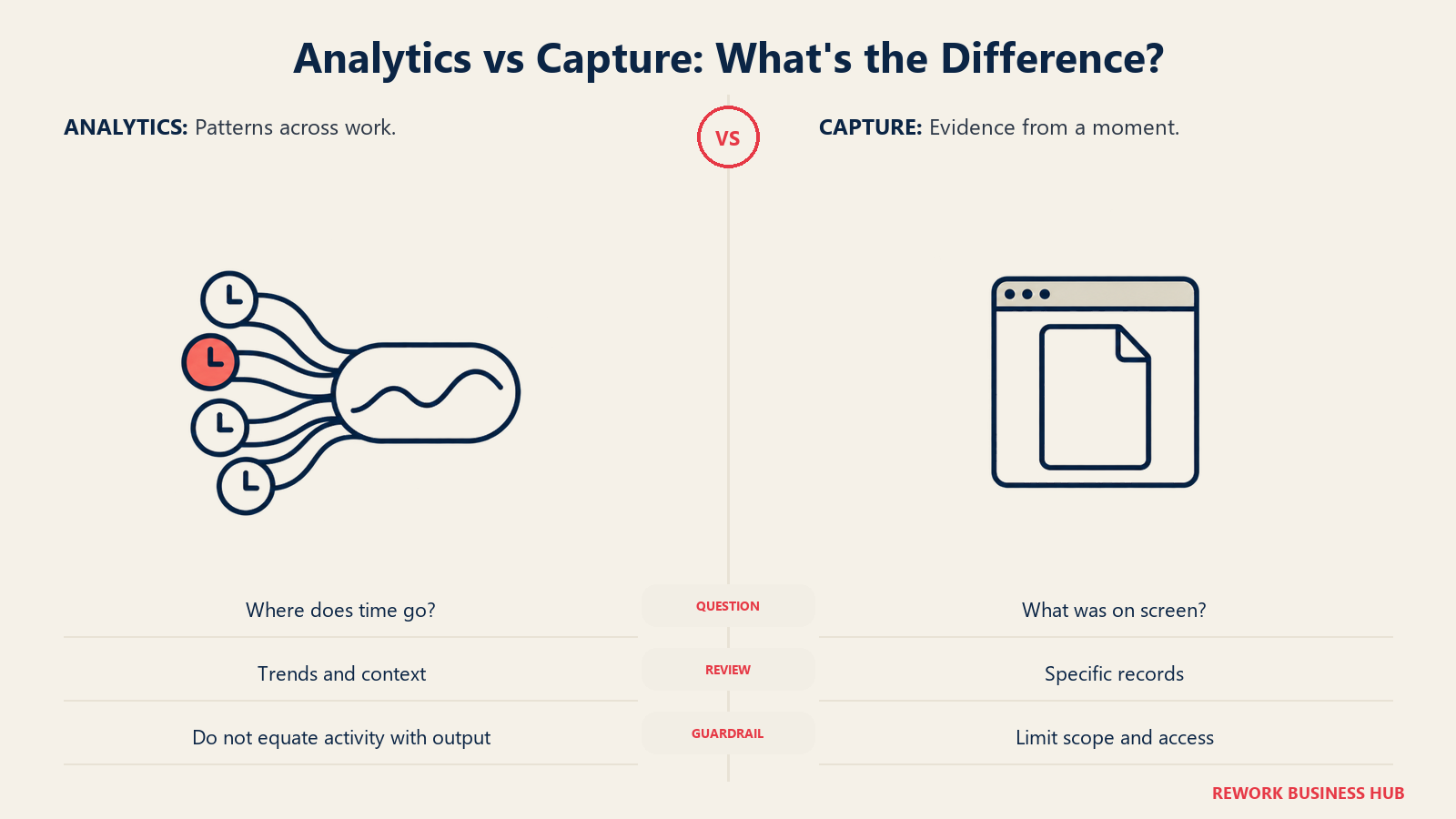
Every tool below falls into one of two camps, and the split matters more than any single feature comparison. Aggregate-analytics tools report time, activity, and focus patterns without ever taking a screenshot or logging a keystroke, on any plan they sell. Capture-based tools can take screenshots, record screens, or log keystrokes somewhere in their lineup, even if it's an optional add-on tucked behind the cheapest tier. If the deal-breaker for your team is "no screenshots, full stop," this table rules out half the field before you read another word.
| Tool | Data Model | What That Means |
|---|---|---|
| ActivTrak | Aggregate analytics, no screenshots | Activity and benchmark scoring built specifically without screen capture |
| RescueTime | Aggregate analytics, no screenshots | App and website time tracked automatically, reported as focus versus distraction |
| Timely | Aggregate analytics, no screenshots | Time inferred from calendar, apps, and documents, confirmed after the fact |
| Toggl Track | Aggregate analytics, no screenshots | Manual timer only, no monitoring features anywhere in the product |
| Memtime | Aggregate analytics, no screenshots | Activity data stays on the device and is never uploaded unreviewed |
| Prodoscore | Aggregate analytics, no screenshots | Scores built from Workspace and Microsoft 365 signals, not screen capture |
| Microsoft Viva Insights | Aggregate analytics, no screenshots | De-identified, aggregated signals from Microsoft 365 usage |
| Insightful | Capture-based (screenshots as an add-on) | Screen Recording and On-Demand Screenshots are priced add-ons, not default |
| Time Doctor | Capture-based | Screenshots and activity ship on every paid plan; screen recording is Premium |
| DeskTime | Capture-based (Premium only) | Screenshots are a Premium-tier feature and can be disabled per user |
| Hubstaff | Capture-based | Screenshots, activity levels, and GPS location tracking |
| Clockify | Capture-based (Pro tier) | Screenshots and GPS tracking are Pro-and-up features |
| TimeCamp | Capture-based (top tier) | Screenshots and remote-work detection live on the Ultimate plan |
| Apploye | Capture-based (every tier) | Screenshot frequency scales from 1/hour free to 60/hour on Power |
Sizing and Stage Fit
| Company size | Best-fit picks | Why |
|---|---|---|
| 1 to 10 | RescueTime, Toggl Track, Apploye (free tier) | Free or near-free tiers cover a whole small team |
| 10 to 50 | Timely, Memtime, DeskTime | Automatic capture without heavy monitoring overhead |
| 50 to 200 | ActivTrak, Insightful, Clockify | Workforce-wide analytics with room to add capture selectively |
| 200 to 1,000 | Time Doctor, Hubstaff, TimeCamp | Distributed or contractor-heavy teams needing activity plus payroll |
| 1,000-plus, already on Microsoft 365 | Microsoft Viva Insights, Prodoscore | Output scored from an existing productivity suite, not a new rollout |
1. ActivTrak: Analytics Built From the Ground Up Without Screenshots
ActivTrak's whole pitch rests on one decision: it doesn't take screenshots, on any plan, at any price. Where most of this category treats "no capture" as a stripped-down mode, ActivTrak built its entire analytics stack, benchmarking, and a new AI-adoption tracker around activity signals instead. That makes it the cleanest fit in this guide for a manager whose real question is where capacity goes, not what's on someone's screen right now.
| What you get | What you don't |
|---|---|
| Activity analytics and benchmarking with zero screenshot capture | Screen recording or keystroke logging at any tier |
| A genuinely free plan for teams up to 3 users | A workforce-scale free tier |
| AI-adoption tracking as a dedicated add-on | The deepest security or DLP feature set |
| Retention tiers from 30 days to a full year of data | The lowest entry price in this list |
Pricing: Free for up to 3 users, 30-day retention. Work Activity Tracking $10/worker/month billed annually, 6-month retention. Workforce Management $15/worker/month annual. Productivity Optimization $17/worker/month annual, 1-year retention. AI-adoption tracking is a $4/month add-on. (ActivTrak) Best for: Managers and ops leaders who want workforce-wide activity analytics with a hard no on screenshots. See Best ActivTrak Alternatives if the retention windows or free-tier cap are the sticking point. Not ideal for: Security or compliance teams that need screen recording or DLP; see Best Employee Monitoring Software instead.
2. Insightful: Workforce Analytics as the Base Plan, Screenshots as the Add-On
Insightful, formerly Workpuls, built its reputation on screenshot monitoring, but its current plan structure inverts the usual order: the base Workforce Analytics plan is pure activity and time analytics, and screenshots only enter the picture as separate, itemized add-ons. That structure makes Insightful one of the few tools here where a buyer can start capture-free and add exactly the level of screenshot intensity they need later, instead of buying a bundle that assumes capture from day one.
| What you get | What you don't |
|---|---|
| A base analytics plan with no screenshots included | A single flat price once add-ons stack up |
| Screenshot frequency and screen recording priced separately | The lowest entry price in this list |
| A newer Workflow Optimization tier, still in beta | A mature, out-of-beta workflow product yet |
| Granular add-on pricing down to $0.50/seat for data warehousing | Bundled pricing simplicity |
Pricing: Workforce Analytics $8/seat/month billed annually. Workflow Optimization $12/seat/month, beta. Combo $16/seat/month. Enterprise custom. Add-ons per seat/month: Screen Recording $4, On-Demand Screenshots $4, Increased-Frequency Screenshots $3, Workspace Security $4, Data Warehouse Integrations $0.50. (Insightful) Best for: Teams that want to start with analytics only and add screenshot capture selectively, if at all. See Best Insightful Alternatives if the add-on pricing gets complicated to budget. Not ideal for: Buyers who want one flat number instead of a base plan plus a menu of add-ons.
3. Time Doctor: Screenshots and Distraction Alerts for Teams That Want the Detail
Time Doctor sits firmly in the capture-based camp: screenshots and activity levels are part of every paid plan, with screen recording and AI anomaly detection reserved for Premium, aimed at managers of remote or outsourced teams who want more than a time total. Worth noting: the public marketing pricing page renders no figures at all; the real numbers live in Time Doctor's own support documentation, a gap that's easy to miss if you only check the homepage.
| What you get | What you don't |
|---|---|
| Screenshots and activity levels on every paid plan | A pricing table on the main marketing page |
| Payroll and HRIS integration add-ons | The lightest possible setup for a small team |
| Two free months built into annual billing | A free tier at any plan level |
| Software Cost Insights add-on for SaaS spend visibility | GPS attendance for field or shift crews |
Pricing: Basic $8/user/month monthly, $6.67 annual. Standard $14 monthly, $11.67 annual. Premium $20 monthly, $16.70 annual, two free months included on annual billing. Enterprise custom. Add-ons: Software Cost Insights $3/user/month, HRIS or payroll integration $200 per integration per month. (Time Doctor support documentation) Best for: Managers of remote or outsourced teams who want screenshot-backed evidence alongside activity data. See Best Time Doctor Alternatives if that depth feels heavier than the team needs. Not ideal for: Teams that have already ruled out screenshot capture as a requirement.
4. DeskTime: A Productivity Score With Screenshots You Can Turn Off
DeskTime's core product is an automatic productivity score built from app and website usage, not screenshots. Screenshots exist, but only on the Premium tier, and the feature is genuinely optional there, administrators can enable or disable it per team or per user, which makes DeskTime a middle-ground option for a team that wants the option of capture without making it the default.
| What you get | What you don't |
|---|---|
| An automatic productivity score without manual timers | Screenshots on the entry Pro tier |
| Optional, disable-able screenshots on Premium | The lowest price point in this list |
| URL and app-category tracking out of the box | Payroll processing built in |
| Project and shift-based time reporting | GPS or geofenced attendance |
Pricing: Pro $6.42/user/month billed annually ($7 month-to-month). Premium $9.17/user/month annual ($10 monthly). Enterprise custom, 200-plus users. (DeskTime) Best for: Teams that want an automatic productivity score first, with screenshots as an option to hold in reserve rather than a default. Not ideal for: Buyers who want screenshots ruled out entirely rather than just disabled; ActivTrak or RescueTime remove the capability instead of the setting.
5. Hubstaff: Time Tracking Plus Activity Data for Distributed Teams
Hubstaff pairs a timer with optional screenshots, app and URL activity, and GPS location, then adds built-in payments so contractors can be paid directly off tracked hours. GPS is not part of that entry price: it arrives through Hubstaff's Locations add-on, priced at $3.33/seat/month on the Team tier and marked Included on Enterprise, and it is not offered on Starter or Grow at any price. Budgeting Hubstaff for a field crew means Team plus that add-on, roughly $13.33/seat/month on annual billing, not the $4.99 headline. That combination is why it shows up constantly in field-service and contractor-heavy rosters, even though it starts from a time-tracking base rather than a pure analytics one.
| What you get | What you don't |
|---|---|
| Time tracking, screenshots, and payments in one app, with GPS available as an add-on | GPS on the entry tier, or a free plan to start with |
| Built-in payments for contractors by tracked time | The lightest configuration for capture-averse teams |
| Activity levels and idle-time detection | A budget option below the 2-seat minimum |
| Strong reporting across a distributed, contractor-heavy team | Deep HRIS or payroll-country coverage |
Pricing: No free plan, 14-day trial. Starter $7/seat/month monthly, $4.99 annual. Grow $9 monthly, $7.50 annual. Team $12 monthly, $10 annual. Enterprise $25/seat/month monthly, annual custom. 2-seat minimum. Locations, the add-on that carries GPS, geofenced job sites, and work orders, runs $3.33/seat/month on Team and is marked Included on Enterprise; it is not available on Starter or Grow. (Hubstaff) Best for: Distributed teams and agencies that want activity visibility and contractor payments bundled together. See Best Time Tracking Software for how Hubstaff compares against pure timers. Not ideal for: Teams that have already decided screenshots and GPS are off the table.
6. RescueTime: The Original Focus Tracker, Built for Individuals First
RescueTime predates most of this category and still runs on its founding idea: track app and website time automatically in the background, then score it as focus time versus distraction, without ever taking a screenshot. It was built for an individual monitoring their own habits, and that shows in the product; team plans layer reporting on top of a personal tool rather than the other way around.
| What you get | What you don't |
|---|---|
| Fully automatic tracking with zero screenshots | A tool built manager-first instead of individual-first |
| Focus Sessions that block distracting sites on request | Team-wide workload or capacity dashboards as the core feature |
| A usable free Lite plan | Screenshot or activity-verification evidence |
| Category-based distraction scoring out of the box | GPS or shift-based attendance features |
Pricing: Free Lite plan. Solo Focus $9/month monthly, $7/month billed annually ($84/year). Solo+ $15/month monthly, $12 annual. Team Focus $12/user/month monthly, $10 annual. Team+ $18/user/month monthly, $16 annual. (RescueTime) Best for: Individuals and small teams who want personal focus-time data without any capture layer at all. Not ideal for: Ops leaders needing a workforce-wide capacity dashboard; RescueTime's team tier is closer to individual reporting rolled up than a management console.
7. Timely: Automatic Time Capture With Zero Screenshots
Timely's differentiator is that it tracks time in the background across the calendar events, documents, and apps someone actually uses, then lets them confirm or adjust entries afterward, all without a manual timer or a single screenshot. Agencies that have tried and failed to get consistent manual time entry are the clearest fit, and the memory-based approach happens to also be one of the least intrusive options in this guide.
| What you get | What you don't |
|---|---|
| Automatic, memory-based time capture | The lowest price point in this list |
| No manual timer and no screenshot capture | A free tier |
| An AI auto-categorization layer for entries | Employee monitoring or activity screenshots |
| A confirm-and-adjust workflow instead of blank timesheets | GPS attendance for hourly crews |
Pricing: Starter $11/user/month monthly, $9 annual, capped at 5 users. Premium $20 monthly, $16 annual, capped at 50 users. Unlimited $28 monthly, $22 annual. Enterprise custom. Tasks add-on from about $5/person. (Timely) Best for: Agencies and teams whose staff consistently forget to log time and want it captured automatically instead, with no screenshot layer attached. See Best Time Tracking Software for how it compares against manual timers. Not ideal for: Budget-conscious small teams, since there's no free tier and the 5-user cap on Starter comes fast.
8. Toggl Track: A Manual Timer With Zero Monitoring Features, by Design
Toggl Track draws the cleanest line in this entire guide: no screenshots, no activity scoring, no idle detection, nothing that could be read as monitoring, anywhere in the product. It's a one-click timer with clean reporting, and that narrow scope is a deliberate choice, not a missing feature.
| What you get | What you don't |
|---|---|
| The fastest, simplest timer to start using | Any activity, focus, or capacity analytics |
| Zero monitoring features anywhere in the product | Workload or capacity dashboards for managers |
| A genuinely usable free tier | Screenshot or screen-recording capability at any tier |
| Clean reporting and CSV/PDF export | Automatic time capture, entries are manual |
Pricing: Free for a limited number of users. Starter $9/user/month billed annually ($10 month-to-month). Premium $18/user/month annual ($20 monthly), with a first-year promotional rate of $14/user/month that renews to $18. (Toggl Track) Best for: Teams that want time logged, full stop, with no analytics or monitoring layer attached to it at all. See Best Toggl Alternatives or Toggl Track vs Clockify if reporting depth becomes the limiting factor. Not ideal for: Managers who need workload or focus-time reporting; Toggl Track reports only what was manually logged.
9. Clockify: The Budget Pick That Adds Screenshots Once You Upgrade
Clockify's free plan covers the basics for a small team, and its paid ladder undercuts almost everything else in this category on price, but the free tier is narrower than most listicles claim: CAKE.com capped it at 5 users in April 2026 and moved billable hours, kiosk clock-in, and CSV or Excel export to paid plans. Screenshots and GPS tracking don't appear at all until the Pro tier.
| What you get | What you don't |
|---|---|
| One of the cheapest paid ladders in the category | An unlimited free tier, it's capped at 5 users |
| Screenshots and GPS held back until Pro, not the default | Advanced approvals and audit trail below Pro |
| Four paid tiers that scale gradually | Client-invoicing depth |
| Kiosk mode for shared-device clock-in on paid plans | The deepest activity analytics in this list |
Pricing: Free for up to 5 users. Basic $4.99/user/month monthly, $3.99 annual. Standard $6.99 monthly, $5.49 annual. Pro $9.99 monthly, $7.99 annual, screenshots and GPS tracking live here. Enterprise $14.99 monthly, $11.99 annual. (Clockify) Best for: Budget-conscious small teams wanting to stay screenshot-free by simply not upgrading past Standard. See Best Clockify Alternatives for the wider field. Not ideal for: Teams past 5 users wanting to stay on the free plan; that changed in April 2026.
10. TimeCamp: Unlimited Free Users, With Capture Reserved for the Top Tier
TimeCamp's free tier undercuts almost everything else here: unlimited users and unlimited projects, not a capped headcount. Screenshots and remote-work detection exist, but only on the Ultimate plan, which keeps the free and mid tiers genuinely capture-free for a team that wants to start there and stay there.
| What you get | What you don't |
|---|---|
| Unlimited users and projects on the free plan | Reporting polish on par with dedicated analytics tools |
| Automatic time tracking, idle detection, app tracking | Screenshots below the Ultimate tier |
| Budgeting and billable-rate tools on paid tiers | Native scheduling for hourly or shift crews |
| One of the lowest entry prices in this list | GPS attendance tracking outside the top tier |
Pricing: Free, unlimited users and projects. Starter $5.49/user/month monthly, $3.99 annual. Premium $9.99 monthly, $6.99 annual. Ultimate $13.99 monthly, $9.99 annual, screenshots and remote-work detection live here. Enterprise on request. (TimeCamp) Best for: Small teams and startups wanting every employee on a free plan without a per-seat cap, and screenshots left off unless they explicitly upgrade to Ultimate. Not ideal for: Teams needing deep reporting or invoicing depth; TimeCamp trails purpose-built tools on both.
11. Memtime: Activity Data That Never Leaves the Device
Memtime takes the no-surveillance angle further than any other tool in this guide: it tracks activity automatically in the background, but the data stays local on the employee's own device and is never uploaded anywhere, including to Memtime's own servers, until the employee reviews and confirms it. That's a structurally different privacy model than simply skipping screenshots; it's closer to Memtime never seeing the raw data at all.
| What you get | What you don't |
|---|---|
| Automatic activity tracking with data staying on-device | Team-wide dashboards built from raw, unreviewed activity |
| A confirm-before-share workflow the employee controls | A free tier |
| A genuinely distinct privacy model in this category | The lowest price point here |
| Retroactive time capture without a manual timer | Screenshot or screen-recording capability at any tier |
Pricing: Basic $18/user/month month-to-month, $14 annual. Connect $26 monthly, $21 annual. Premium $35 monthly, $29 annual. Enterprise custom. (Memtime) Best for: Privacy-conscious teams, often in regulated or works-council environments, that want automatic capture without raw activity data ever leaving the employee's machine. Not ideal for: Budget-conscious teams; Memtime's entry price is the highest of any tool in this guide.
12. Apploye: Budget Screenshot Monitoring That Scales With Plan Tier
Apploye is squarely capture-based: screenshots ship even on its free tier, just at a lower frequency, and scale up as you move to paid plans. It's the most aggressively priced capture option in this guide, which makes it a common pick for cost-sensitive teams that have already decided screenshots are acceptable and just want the cheapest way to get them.
| What you get | What you don't |
|---|---|
| A free forever tier for up to 10 users | A screenshot-free plan at any tier |
| Screenshot frequency that scales with the plan you pick | The lowest-friction option for capture-averse teams |
| Quarterly and annual pricing options for flexibility | The deepest workforce analytics in this list |
| One of the lowest capture-based price points here | A large enterprise feature set |
Pricing: Starter free forever, up to 10 users, 1 screenshot/hour, 3 projects. Elite $7/user/month monthly, $6 quarterly, $4.50 annual, 18 screenshots/hour. Power $12 monthly, $8 annual, 60 screenshots/hour. Enterprise custom. (Apploye) Best for: Cost-sensitive teams that have already decided on screenshot monitoring and want the cheapest way to get it. Not ideal for: Teams shopping specifically to avoid screenshots; every Apploye tier, including the free one, includes them.
13. Prodoscore: An Output Score Built From Workspace and Microsoft 365 Signals
Prodoscore skips screenshots and keystroke logging by design, scoring output instead from signals already flowing through Google Workspace or Microsoft 365 integrations: email volume, document activity, calendar events, and meeting participation, rolled into a single daily score. It's aimed at leaders who want one comparable number across a large org rather than a granular activity feed, and it layers in additional integrations beyond the two core platforms for a fuller signal set.
| What you get | What you don't |
|---|---|
| A productivity score with no screenshots or keystroke logging | Granular, minute-by-minute activity detail |
| Deep Google Workspace and Microsoft 365 integrations | A published per-seat price below 15 users |
| A single score comparable across a large organization | Deep project-level time or budget tracking |
| Pricing that bundles the first 15 seats | The lowest entry price in this list |
Pricing: Basic from $300/month, covering up to 15 seats, extra seats $19.99/seat/month. Premium priced by team size and configuration. 500-plus users, contact sales. (Prodoscore) Best for: Leaders who already run on Google Workspace or Microsoft 365 and want an organization-wide output score without screenshots or keystroke logging. Not ideal for: Small teams under 15 seats, where the bundled base price is a poor per-head fit, or teams needing project-level time detail instead of a single score.
14. Microsoft Viva Insights: Aggregate Signals Already Inside Microsoft 365
For an organization already running Microsoft 365, Viva Insights is the lowest-friction option in this guide: it's built into the ecosystem, reports on focus time, collaboration load, and meeting patterns from de-identified, aggregated usage signals, and requires no separate agent or screenshot capability of any kind. Basic personal insights ship with Microsoft 365 itself; the paid tiers add organization-wide reporting and manager-facing dashboards on top.
| What you get | What you don't |
|---|---|
| Aggregated, de-identified signals with no screenshots | A tool that works outside the Microsoft 365 ecosystem |
| Built-in personal insights at no extra cost | Contractor-payment or invoicing features |
| Organization-wide focus and collaboration reporting on paid tiers | Deep per-employee activity drill-down, by design |
| No new agent to deploy across the fleet | Standalone pricing outside yearly billing |
Pricing: Viva Insights standalone $4/user/month paid yearly. Viva Workplace Analytics and Employee Feedback $6/user/month yearly. Viva Suite $12/user/month yearly. Basic personal insights included with Microsoft 365. (Microsoft Viva) Best for: Organizations already standardized on Microsoft 365 that want capacity and focus-time reporting without adding a new vendor or agent. See Best HR Software for how it compares against dedicated HR analytics platforms. Not ideal for: Teams outside the Microsoft ecosystem, or anyone needing per-employee activity detail rather than aggregated trends.
How to Choose: Decision Framework
Run whichever pick survives this table against one real sprint or pay period before committing to an annual contract. See Best Performance Management Software if the real goal is tying output data to reviews, not just tracking it.
| If you need... | Best pick |
|---|---|
| Zero screenshot capability under any plan, at any price | ActivTrak or Prodoscore |
| Free, individual focus-time tracking with no team monitoring | RescueTime (Solo) or Toggl Track's free plan |
| Workload and capacity data across a distributed team without capture | Timely or Microsoft Viva Insights |
| An occasional screenshot as backup evidence, priced separately from analytics | Insightful |
| Deep monitoring, screen recording, or DLP instead of output measurement | See Best Employee Monitoring Software |
| The cheapest capture-based option that still scales | Apploye or TimeCamp |
| Activity data that never leaves the employee's device | Memtime |
| An output score built from Microsoft 365 or Google Workspace signals | Microsoft Viva Insights (agent-free) or Prodoscore |
What to Do Next
Start with the aggregate-versus-capture table, not the alphabet: decide whether the real question is where capacity goes or what's on someone's screen, because that single choice eliminates roughly half of the 14 tools here before you compare a single feature. Then run your top two picks against one real sprint or pay period, not a sandbox account, before signing an annual contract. If the actual need runs deeper than output measurement, screen recording, DLP, or insider-threat detection, start at Best Employee Monitoring Software in 2026 instead.

Principal Product Marketing Strategist
On this page
- Key Facts
- Quick Comparison Table
- Aggregate Analytics or Capture-Based: Know Which Half of the Market You're Looking At
- Sizing and Stage Fit
- 1. ActivTrak: Analytics Built From the Ground Up Without Screenshots
- 2. Insightful: Workforce Analytics as the Base Plan, Screenshots as the Add-On
- 3. Time Doctor: Screenshots and Distraction Alerts for Teams That Want the Detail
- 4. DeskTime: A Productivity Score With Screenshots You Can Turn Off
- 5. Hubstaff: Time Tracking Plus Activity Data for Distributed Teams
- 6. RescueTime: The Original Focus Tracker, Built for Individuals First
- 7. Timely: Automatic Time Capture With Zero Screenshots
- 8. Toggl Track: A Manual Timer With Zero Monitoring Features, by Design
- 9. Clockify: The Budget Pick That Adds Screenshots Once You Upgrade
- 10. TimeCamp: Unlimited Free Users, With Capture Reserved for the Top Tier
- 11. Memtime: Activity Data That Never Leaves the Device
- 12. Apploye: Budget Screenshot Monitoring That Scales With Plan Tier
- 13. Prodoscore: An Output Score Built From Workspace and Microsoft 365 Signals
- 14. Microsoft Viva Insights: Aggregate Signals Already Inside Microsoft 365
- How to Choose: Decision Framework
- What to Do Next