More in
チーム生産性プレイブック
担当者が楽しみにする1on1の進め方
4月 18, 2026
個人だけでなくチーム全体でのフォーカスブロック活用法
4月 18, 2026 · Currently reading
形式的にならない週次ステータス更新の方法
4月 18, 2026
スコープクリープを防ぐプロジェクトキックオフ
4月 18, 2026
チームが覚えられる優先順位付けフレームワーク
4月 18, 2026
3つ以上のタイムゾーンをまたぐ分散チームのマネジメント
4月 18, 2026
スプレッドシートに頼らないキャパシティプランニング
4月 18, 2026
避け続けてきたチームの規範(Team Norms)についての対話
4月 18, 2026
新メンバーへの業務スタイルOnboarding
4月 18, 2026
会議の見直し:チームが嫌う会議をなくす方法
4月 1, 2026
個人だけでなくチームレベルでのfocus block
Turn this article into takeaways for your work.


Each assistant summarizes the article only for you and suggests best practices for your work.
生産性に関するどの記事も、カレンダーに集中時間をブロックするよう勧めます。2時間のウィンドウを確保して、通知をオフにして、deep workをする。
問題があります。実際にやってみると、チームメートから「急いでいます」というメッセージが届きます。マネージャーが5分間必要になります。Slackに技術的には緊急ではないが無視するのは失礼に思える質問が投稿されます。午前11時には、カレンダーの「focus block」は単なる見せかけになっています。
個人のfocus blockが機能しない理由は、それが集団的な問題に対する個人的な解決策だからです。割り込みのプレッシャーはチームから来ます。集中時間を本当に守る唯一の方法は、チーム全体で調整することです。全員が同じ理由で同時に対応不可になるように。
それがチームレベルのfocus blockです。そして、それは機能します。
なぜ個人の意志力は問題ではないか
focus timeを奨励しようとしたほとんどのマネージャーは、それを個人の生産性習慣として位置付けてきました。カレンダーをブロックする。ステータスをビジー表示にする。ポモドーロ技法を使う。このフレーミングは個人に負担を置き、ほとんどの場合失敗します。
失敗する理由は構造的です。つながったチームでは、対応可能であることがデフォルトです。メッセージへの返信が規範です。「focus block」中に一貫して返信しない人は、チームの輪を乱すように感じられ始めます。社会的コストは現実のものであり、ほとんどの人はそのコストを払うより割り込みを受け入れます。
コンテキストスイッチングのコストはこれを複雑にします。認知作業に関する研究は一貫して、割り込みの後に完全な集中力を取り戻すのに15〜20分かかることを示しています。2時間のブロック中に3回メッセージを受け取ったチームメンバーは、どの割り込みも「合理的な定義で緊急ではない」としても、実質的に30分未満の集中した作業しか完了できないかもしれません。UC Irvineの広く引用されている研究は、1回の割り込み後の平均回復時間を23分以上と示しており、このコストはナレッジワークチーム全体で急速に積み重なります。
asyncツール(Slack、メール、ドキュメントコメント)は、チームがレスポンスタイムの規範に合意していない場合、この問題を解決しません。asyncチャンネルの存在は、人々がそれを非同期に使用することを意味しません。ほとんどのチームはSlackをリアルタイムチャットとして扱うため、誰かのカレンダーに何と書いてあっても、メッセージには暗黙の素早い返信の期待が伴います。
「asyncツールがある」と「実際にasyncで働いている」の差は、テクノロジーの問題ではなくチームとしての合意の問題です。チームレベルのfocus blockは、asyncな行動を現実にする共有コミットメントを生み出します。この同じ原則がチームの規範に関する会話の根底にあります。明示的な共有合意なしに行動を変えることはできません。
チームレベルのfocus blockの実際の姿
コンセプトはシンプルです。チーム全体が、特定の日の定義されたウィンドウ中は、お互いと外部のステークホルダーに対して対応不可であることに合意します。そのウィンドウ中は、誰も返信を期待しません。誰のスケジュールも会議に使えません。全員が最も集中力を要するタスクに取り組みます。
実際には、これは通常週2回のウィンドウを意味します。火曜日と木曜日の午前9時〜12時が一般的な設定です。月曜日と水曜日の午後を好むチームもあります。具体的なスロットは、一貫性と共有コミットメントほど重要ではありません。
それらのウィンドウ中:
- SlackのステータスがDNDまたは「集中中」に設定される
- 会議はスケジュールされない
- メールへの返信はウィンドウが閉じるまで保留
- 社内のSlackメッセージはウィンドウ中ではなくその後に返信
- 緊急事態には定義されたエスカレーションパスが用意される(詳細は後述)
チームカレンダーにこれらのブロックが表示されるため、外部のステークホルダー(プロダクトマネージャー、クライアント、他のチーム)はそれらの時間帯はアドホックなスケジューリングに使えないことがわかります。
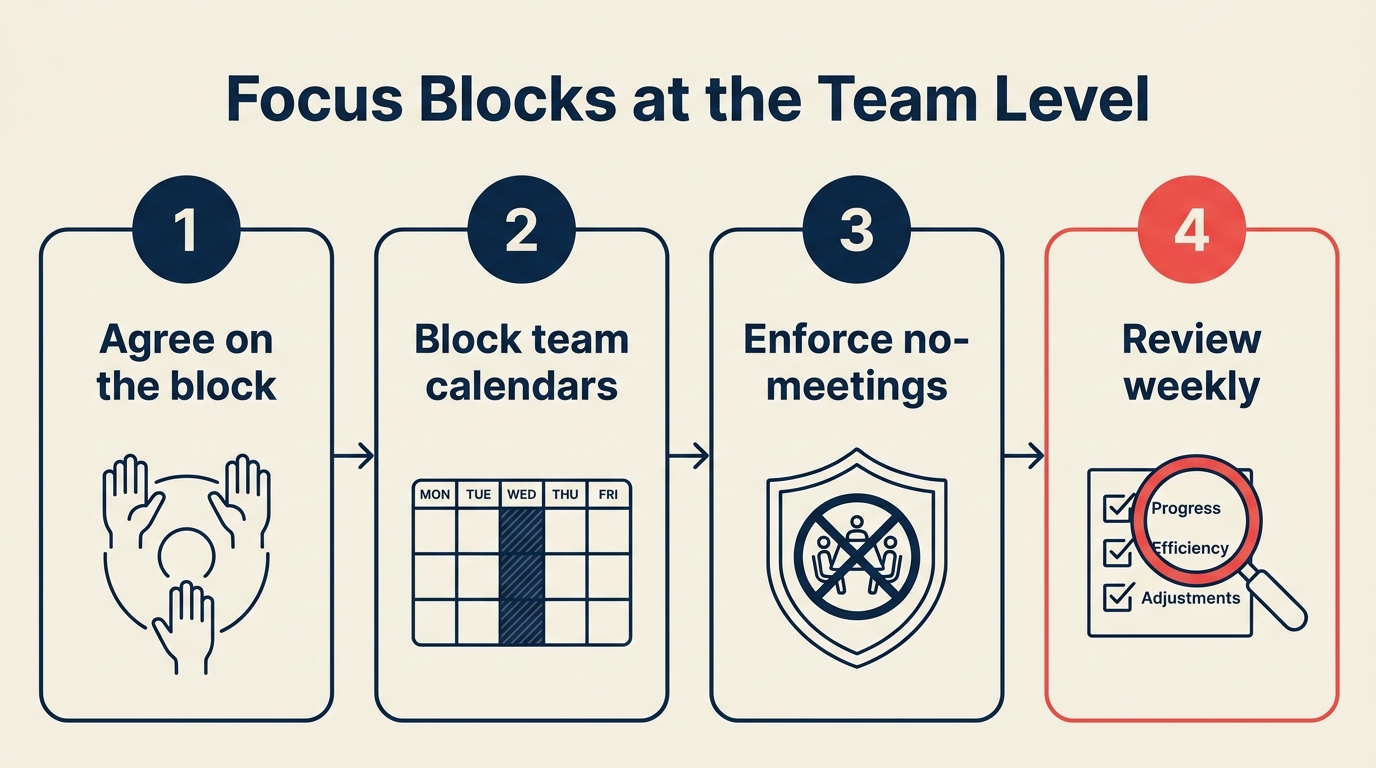
設定の手順
Step 1: まず現在のカレンダーを確認する
何かを追加する前に、現状を把握してください。チーム全体の定期的な割り込みのパターンをマッピングします。毎週すでに何がカレンダーに入っていますか? 実際のfocus workが理論上は可能なギャップはどこですか?
ノーミーティングデーの取り組みをすでに行っているなら、その観点から見てください。focus blockとノーミーティングデーは異なる粒度で重複する問題を解決します。ノーミーティングデーは1日全体から会議を排除します。focus blockは会議の多い日の中に保護された時間を刻み込みます。
各チームメンバーに1週間の割り込みを追跡してもらってください。会議だけでなく、Slackのメッセージ、ちょっとした質問、突発的な電話も含めて。そのデータは通常、同じ2〜3時間のウィンドウが繰り返し断片化されていることを示します。それがfocus blockを配置したい場所です。
Step 2: 共有する2つのウィンドウに合意する
週2回のウィンドウが適切な出発点です。1回は脆弱です。締め切りが迫っているかメンバーが不在の場合、その週のfocus timeがすべてなくなります。週3〜4回のウィンドウは、チームが習慣を形成する前にステークホルダーの摩擦を生みます。
2回のウィンドウは現実の条件の中で生き残り、実際に意味のある保護された時間を提供します。
具体的なスロットを決めるために、チーム全員を部屋(または電話)に集めます。一方的に決めないでください。チームが選択を所有すると、それを守ります。
守るべき主要な制約:
- クロスチームの同期やカスタマーコールと常時衝突する時間は避ける
- 金曜日の午後は避ける(チームはプレッシャー下でここから最初にキャンセルする)
- チーム全員が認知的にベストな状態の時間を選ぶ。多くの人にとって午前中が良く、午後が良い人もいる。
Step 3: 共有チームカレンダーにブロックする
合意したら、個人のカレンダーだけでなく、共有チームカレンダーにウィンドウをブロックします。この区別は重要です。個人のブロックはチーム全体をまたいでスケジュールしようとする人には見えません。共有チームカレンダーのブロックは、チームとのクロスチーム調整のためにアクセスする人を含む、アクセス権を持つすべての人に見えます。
ステータスを「チームfocus time: 対応不可」などに設定し、繰り返しにします。そして組織がクロスチーム調整に使用しているスケジューリングツールで表示されることを確認してください。
さらに進んで、ブロックにポリシーを説明する短いメモを追加するチームもあります。「チームはfocus modeです。緊急のエスカレーションには[連絡方法]をご利用ください。その他のメッセージには正午以降に返信します。」
Step 4: SlackとTeamsをDNDに設定する
カレンダーのブロックはSlackを止めません。両方が必要です。
共有のSlackリマインダーを設定するか、SlackのスケジュールされたDND機能を使用して、各focus windowの開始時にチーム全体のステータスが自動的に切り替わるようにします。これにより、自分でステータスを設定することを覚えるという個人的な手間がなくなり、チーム全体でシグナルが一貫します。
チームがMicrosoft Teamsを使用している場合も同じ原則が適用されます。Focus機能またはステータスのスケジューリングを使用して、ウィンドウ中に一貫した「集中中」のシグナルを表示します。
DNDの表示ステータスは技術的なものと同様に社会的なシグナルです。チーム外の人に、チームが今は対応不可であることを伝えます。特定の個人が対応不可なのではなく、チーム全体がこれに合意していることを示します。その集団的なシグナルは個人のステータスメッセージより重みを持ち、より少ない不快感を生み出します。
Step 5: 正当な割り込みの定義を決める
focus blockが機能するのは、何がそれを破れるかを全員が知っている場合だけです。定義なしでは個人が独自の閾値を設定し、チームで最も割り込みに寛容な人がすべてに返信することでシステム全体を損なわせます。
シンプルな判断ツリーがうまく機能します。
これは2時間待てますか? はいなら、asyncです。そのメンバーにメッセージを送り、focus blockが終わった後の返信を期待します。
これは本当に時間的に重要ですか(何かが壊れている、顧客の緊急事態、今日のデリバリーに影響するブロッキングの決断)? それなら割り込みは正当化されます。指定されたエスカレーションパスを使用してください。件名に「URGENT:」を付けたDM、または真の緊急事態には電話です。
「今答えられるが実際には緊急ではない」に該当しますか? これがほとんどの割り込みが実際に属するカテゴリです。このパターンを記録してください。同じ種類のリクエストが常に割り込みとして来る場合、質問自体をなくす常設プロセスや共有リソースが必要というシグナルです。
判断ツリーを文書化し、チーム運営規約に入れてください。その場での判断が不要になるよう明示します。
Step 6: 外部のステークホルダーに伝える
チームのfocus blockは、チーム外の人たちが知っている場合にのみ持続可能です。そうでなければ、なぜ2時間も誰も返信しないのかという不満が生まれます。
主要なステークホルダーにスケジュールを説明した簡単なメモを送ってください。「私たちのチームには毎週2つの保護されたfocus windowがあります。火曜日と木曜日の午前中です。これらのウィンドウ中は、アドホックなスケジューリングやリアルタイムのメッセージには対応できません。緊急のニーズには[エスカレーションパス]をご利用ください。その他すべてには[時刻]までに返信します。」
ほとんどのステークホルダーは適応します。反論する人もいるでしょう。その反論は乗り越える価値があります。通常、focus timeに対する原則的な反論ではなく、自分のニーズが依然として満たされるかどうかの不安から来ています。エスカレーションパスとレスポンスタイムのコミットメントについて安心させてください。
Step 7: 毎月見直して調整する
focus blockに特化した月次15分のレトロを設定してください。チームに3つの質問をします。
- ウィンドウは守られていますか? (何回、なぜ破られましたか?)
- 適切なスロットですか? (より効果的な別の時間はありますか?)
- focus block中のアウトプットは、そうでない時間と意味のある差がありますか?
3番目の質問がほとんどのチームでスキップされますが、最も重要です。チームがfocus blockのおかげで完了できた、そうでなければできなかった作業を指摘できない場合、ブロックはdeep workのための条件を作れていません。チームがfocus blockに持ち込んでいるタスクが間違っているかもしれません。ウィンドウが短すぎるかもしれません。DNDステータスでは捕捉できない系統的な割り込みがあるかもしれません。
聞いたことをもとに調整してください。最初の設定は完璧ではありません。ブロックが実際に価値を生み出すまで繰り返し改善することが重要です。
よくある落とし穴
マネージャーが自分を例外にする。 これがシステム全体を損なわせる最も典型的なパターンです。あなたがDNDの状態でも「ちょっとした質問」でメンバーに連絡し続けると、ポリシーは彼らには適用されるが自分には適用されないというシグナルになります。毎回、完全にそのブロックの中にいてください。MITスローン・マネジメント・レビューの心理的安全性とチーム規範に関する研究は、リーダーがチームに求める行動を自らモデルにするとき、命令のみのアプローチと比べて導入率が2倍以上になることを示しています。
ウィンドウを長く設定しすぎる。 3時間のfocus blockは理論的には素晴らしく聞こえます。実際には、ほとんどの人はその集中を維持できず、ブロックが保護的というより抑圧的に感じられ始めます。90分か2時間のウィンドウから始めてください。習慣が確立してから長くすることができます。
ステークホルダーに伝えない。 チームが予告なくエスカレーションパスも示さずに2時間オフラインになります。ステークホルダーが気づきます。エスカレーションします。リーダーシップが不安になります。単に対応可能でいた場合より、説明と謝罪に多くの時間を費やします。先に伝えてください。
会議カルチャーを修正せずにfocus blockを作る。 残りの週の会議が多すぎて、focus blockが唯一の実際の作業時間になっているなら、より深い問題を特定しています。focus blockは良い会議衛生の補完であり、代替ではありません。まず会議の棚卸しを行ってください。
focus timeをリアクティブな作業に使う。 focus blockはuninterruptedな集中を必要とする作業のためです。設計、執筆、分析、コーディング、戦略。受信トレイを整理したり、朝のSlackをキャッチアップするためではありません。本当に断片化した状態では完成しない作業のために守ってください。
割り込みトリアージの判断ツリー
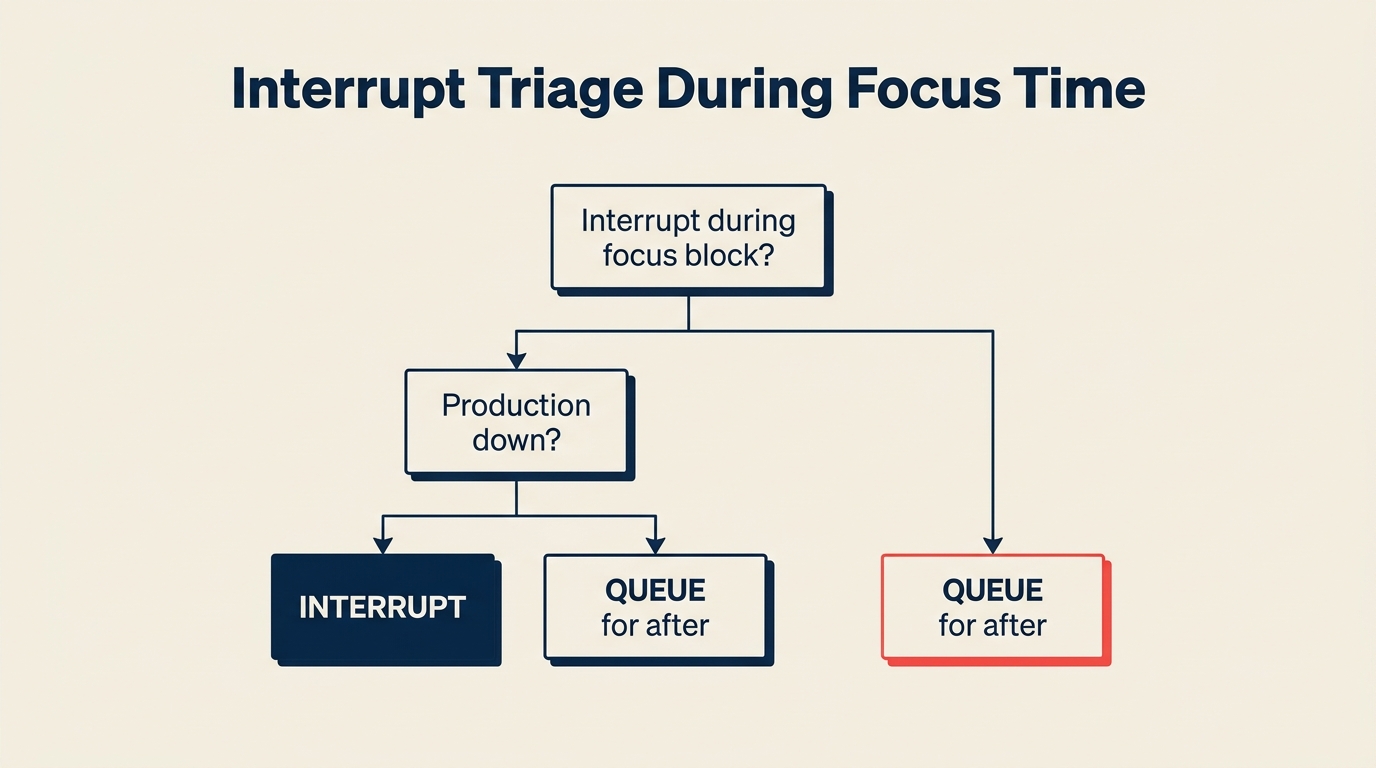
チームのドキュメントにコピーできる形式を紹介します。
focus time中にチームメートに割り込む前に、自問してください:
これは今後2時間以内に返信が必要ですか?
- いいえ → asyncメッセージを送り、focus block終了後の返信を期待する
- はい → Step 2へ
これが放置されると、何かが壊れる、顧客の期限を逃す、または今日のデリバリー決定がブロックされますか?
- いいえ → おそらく本当は緊急ではありません。asyncで送ってください。
- はい → エスカレーションパスを使用: [URGENT]プレフィックス付きのDM、または真の緊急事態には電話
迷ったらasyncをデフォルトにしてください。疑問がある場合は待てます。
15分間の月次レトロの形式
時間: 15分 | 頻度: 毎月 | オーナー: チームリード
- (5分)各メンバー: 今月のfocus blockでうまくいったことを1つ共有
- (5分)各メンバー: うまくいかなかったことや摩擦を生んだことを1つ共有
- (5分)来月に行う1つの調整に合意する
調整を記録して、何を変えてきたかが時間とともに確認できるようにしてください。
成功を測る方法
focus blockの測定指標は複雑にする必要はありません。3つのシグナルから始めてください。
ブロック中のメッセージ量の減少。 ほとんどのチームコミュニケーションツールは時間ごとのメッセージ量を示します。focus windowが機能しているなら、最初の月後にそれらのウィンドウ中のメッセージ量が大きく減少するはずです。60〜70%の減少が合理的な目標です。
自己申告のfocus品質。 チームに毎月尋ねてください。1〜5のスケールで、どれくらいの頻度でfocus blockを終えて本当のdeep workができたと感じますか? これは主観的ですが、適切な質問です。集中した作業を生み出そうとしており、単に沈黙を求めているわけではありません。
Sprint当たりのアウトプット。 これが本当のテストです。focus blockが機能していれば、時間とともにデリバリー速度が改善するはずです。Sprint毎により多くの計画作業が完了し、持ち越し項目が減ります。因果関係は実在しますが即時ではありません。2週間ではなく6〜8週間後に動きが見えることを期待してください。これは正直なキャパシティプランニングと組み合わせて時間が実際にどこに使われたかを確認してください。Deloitte Insightsの働き方の未来に関するレポートによると、明示的な共有生産性規範を持つ組織は、個人の生産性実践のみに頼る組織と比べて自己申告のアウトプット品質が20〜30%優れているという結果が示されています。
focus blockとasync規範との連携
チームレベルのfocus blockが機能するのは、asyncコミュニケーション規範が整っている場合だけです。focus block外でのレスポンスタイムの期待値に関する共有合意なしには、ウィンドウ中に人々は不安を感じ、「念のため」Slackを確認し続け、deep workは起きません。
focus blockの問題は、意思決定ログでカバーされる意思決定権限の問題と密接に関連しています。ブロック中の多くの割り込みは実際には意思決定のリクエストであり、意思決定フレームワークがより明確であればチームメンバー自身が決められることです。良い意思決定ログにより、リアルタイムのインプットの必要性が減り、全員への割り込み負荷が減ります。
集団的な合意についてのシンプルな真実
個人のfocus blockが機能しない理由は明確です。その時間を保護することに合意していないチームの流れに逆らって1人が泳ぐよう求めるからです。すべてのSlackメッセージがブロックを諦めるよう小さな社会的プレッシャーをかけます。ほとんどの人は、ほとんどの場合、返信します。
集団的な合意は流れを変えます。チーム全体が同時に対応不可のとき、返信しないことで誰も流れに逆らっているとは感じません。社会的コストはありません。DNDウィンドウはただのチームの働き方になります。Stanfordの社会規範と職場行動に関する研究は、共有された目に見えるコミットメントが個人の決意よりはるかに持続性が高いことを示しています。チームのコンテキストがコンプライアンスをより難しくするのではなく、より簡単にします。
それがシフトです。個人の意志力についてではありません。生産的な行動をデフォルトにすることについてです。全員に対して、同時に。
カレンダーに2つのウィンドウを入れ、ステークホルダーに伝え、自分自身もその中にいてください。残りは繰り返しの改善です。
詳細を確認する: asyncフレンドリーで高い生産性を持つチームを構築するための詳細は、チーム生産性プレイブックをご覧ください。関連記事: チームが覚えていられる優先順位付けフレームワーク、タイムゾーンをまたいだ分散チームのマネジメント、会議過多のチームが高い離職率に直面する理由。

Principal Product Marketing Strategist