More in
Sales-Tech-Nachrichten
AI-Vertriebsteams wachsen 2,6-mal schneller. Gartner sagt: Käufer wollen trotzdem einen Ansprechpartner
Juni 6, 2026
Aircall kauft Piper AI, um jeden Verkaufsanruf in Pipeline zu verwandeln
Juni 6, 2026
Salesforce gibt Marketingteams AI-Agents, die Sales Pipeline aufbauen
Juni 6, 2026
Revenue Intelligence hat das Risiko gezeigt. Revenue Execution handelt danach.
Juni 5, 2026
Meta hat einen AI-Agent in WhatsApp integriert, der für jedes Unternehmen Verkäufe abschließt
Juni 4, 2026
VCs haben über 200 Mio. Dollar in AI-Sales-Startups investiert: Das GTM-Stack-Signal
Juni 4, 2026
Sind AI SDRs in 2026 ihr Geld wert? Die Daten sprechen für ein hybrides Team
Juni 3, 2026
GTM Engineering in 2026: Die Vertriebsstelle, die drei Rollen ersetzt
Juni 3, 2026
ZoomInfo versorgt Ihre AI-Sales-Agents mit verifizierten Daten: Der Kompromiss beim Single-Vendor-Ansatz
Juni 3, 2026
Salesforce Summer '26 bringt Multi-Agent-Orchestration am 15. Juni. Das Sales-Ops-Audit, bevor Ihre Agents anfangen, Aufgaben weiterzureichen
Juni 2, 2026
Slackbot MCP erreichte 1 Million aktive Nutzer in 6 Wochen: Warum Ihr Sales-Ops-Stack gerade eine neue Eingangstür bekommen hat
Turn this article into takeaways for your work.


Each assistant summarizes the article only for you and suggests best practices for your work.
Eine Million Nutzer in sechs Wochen. Das ist keine Produktmetrik. Das ist ein Governance-Ereignis.
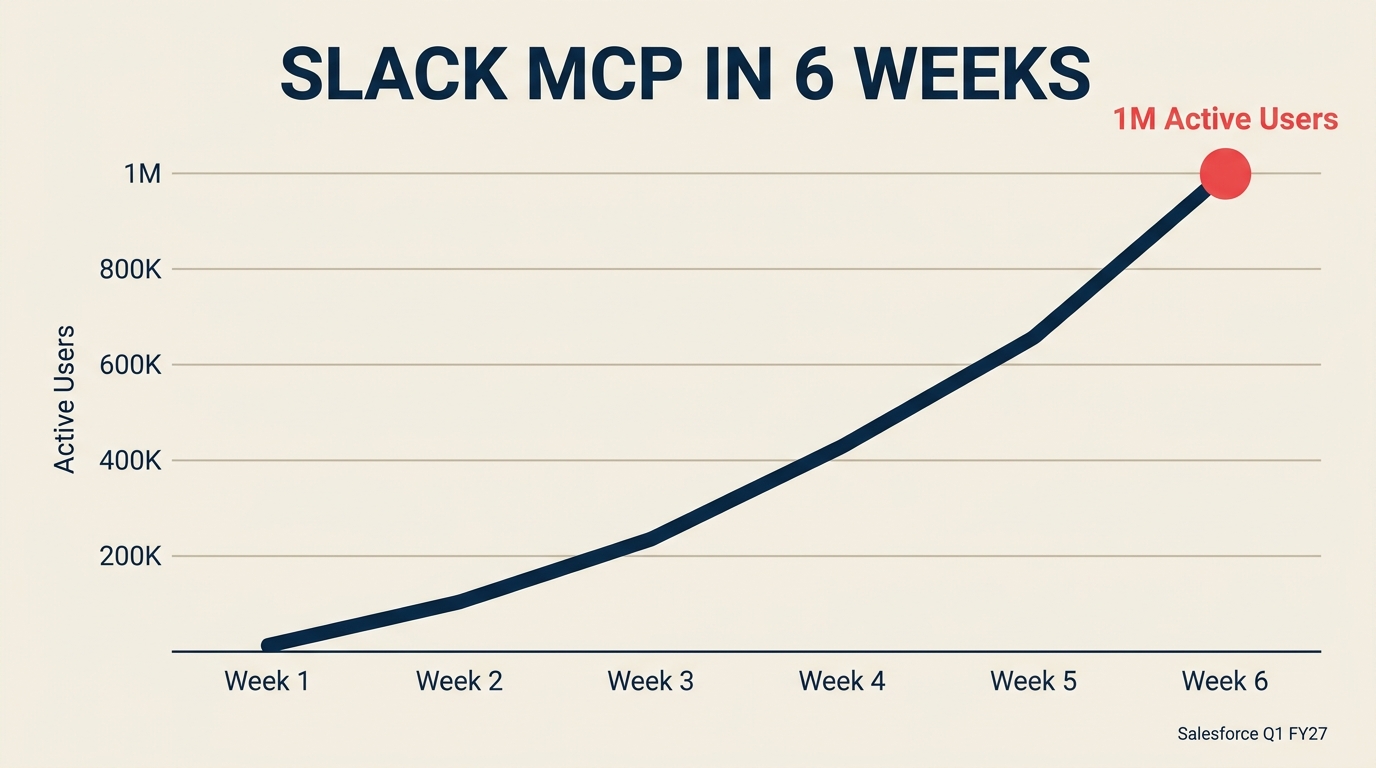
In seinem Q1-FY27-Earnings Call am 27. Mai 2026 gab Salesforce bekannt, dass der Slackbot Model Context Protocol (MCP) Client innerhalb von etwa sechs Wochen nach dem Launch mehr als 1 Million aktive Nutzer überschritt. Der MCP-Client wurde am 31. März zusammen mit 30 KI-Funktionen veröffentlicht. Bis Mitte Mai war er einer der schnellsten MCP-Client-Adoptionen, die je verzeichnet wurden. Diese Geschwindigkeit ist bedeutsam, weil sie etwas Wichtiges verrät: Ihre Vertriebsmitarbeiter haben nicht auf eine Genehmigung gewartet. Sie haben es adoptiert, während Sales Ops noch darüber nachdachte, ob sie es evaluieren sollen.
Derselbe Call enthüllte, dass Slack für fast die Hälfte von Salesforces neuen Deals mit einem Wert von über einer Million Dollar im Quartal verantwortlich war, ein Anstieg von etwa 80 % gegenüber dem Vorjahr. Slack ist kein Produktivitätsbonus mehr. Es ist eine umsatzkritische Oberfläche und Salesforces stärkstes Upsell-Vehikel im Portfolio. Das vollständige Quartalsbild: 11,1 Milliarden USD Umsatz, plus 13 % gegenüber dem Vorjahr, mit einem Gewinn je Aktie, der sich auf GAAP-Basis nahezu verdoppelte.
Die Zahl, die auf jeder Sales-Ops-Präsentation stehen sollte
Was der Earnings Call offenbarte
- Slacks MCP-Client überschritt 1 Million aktive Nutzer in 6 Wochen nach seinem Launch am 31. März (Salesforce Q1 FY27 Earnings, 27. Mai 2026)
- Slack war für fast die Hälfte von Salesforces neuen Deals mit einem Wert von über einer Million Dollar in Q1 FY27 verantwortlich, ein Anstieg von rund 80 % gegenüber dem Vorjahr (Salesforce Q1 FY27)
- Salesforces interner KI-in-Slack-Einsatz sparte schätzungsweise 3,8 Millionen Produktivitätsstunden jährlich bei den eigenen Mitarbeitern (Salesforce interne Offenlegung)
Platzieren Sie die 1-Million-in-6-Wochen-Zahl auf einer Folie. Dann fragen Sie Ihr Führungsteam: Wie viele unserer Vertriebsmitarbeiter gehören zu dieser Gruppe? Denn das wissen Sie wahrscheinlich nicht. Und genau das ist das Problem.
Das traditionelle Sales-Ops-Denkmodell behandelt Slack als Einbahnkanal: ein Ort, an dem Salesforce Benachrichtigungen, Deal-Alerts und Pipeline-Zusammenfassungen sendet. Vertriebsmitarbeiter lesen davon, schreiben aber in die Salesforce-Oberfläche. Dieses Modell ist überholt. Der MCP-Client dreht die Richtung um. Jetzt können Vertriebsmitarbeiter CRM-Datensätze erstellen und aktualisieren, KI-Agents auslösen und plattformübergreifende Aktionen ausführen, ohne den Conversation-Thread zu verlassen.
Das ist eine nützliche Funktion. Aber es ist auch eine unbeobachtete Schreiboberfläche, wenn Sales Ops keine Regeln festgelegt hat.
Warum Slack gerade zur Schreiboberfläche Ihres CRM wurde (nicht nur ein Benachrichtigungskanal)
Hier ist ein konkretes Szenario. Ein 50-köpfiges BDR-Team bei einem mittelständischen SaaS-Unternehmen nutzt Slack seit drei Jahren. Jeder Vertriebsmitarbeiter ist dort bereits aktiv. Als der Slackbot-MCP-Client verfügbar wurde, war die Adoptionshürde nahezu null. Keine neue App, kein neuer Login. Nur eine neue Sache, die man in einem Tool tun kann, das den ganzen Tag offen ist.
Ein BDR in diesem Team kann jetzt, mitten in einem Gespräch, an den Slackbot schreiben: „Aktualisiere diese Opportunity-Phase auf 'Angebot eingereicht', hinterlege eine Gesprächsnotiz und markiere sie zur Überprüfung durch den Manager." Erledigt in Sekunden. Kein Tab-Wechsel zu Salesforce, keine Suche in Dropdown-Menüs, kein auszufüllendes Formular.
Das ist das Versprechen. Und es ist wirklich überzeugend. Salesforces eigener interner Einsatz dieser Tools sparte schätzungsweise 3,8 Millionen jährliche Produktivitätsstunden, eine Zahl, die groß genug ist, um zu erklären, warum die öffentliche Version ausgeliefert wurde.
Aber die Sales-Ops-Frage lautet nicht: „Ist das nützlich?" Sie lautet: „Was bricht das?"
Was es brechen kann: Feldvalidierungslogik, die in Salesforce-UI-Flows lebt, die Vollständigkeit des Aktivitätsprotokoll (wurde diese Aktualisierung als Aufgabe erfasst?), Stage-Gate-Regeln (hat der Vertriebsmitarbeiter Pflichtfelder übersprungen, weil der natürlichsprachliche Befehl nur einige davon berührte?) und quotasensitive Daten, die in Ihre Prognose einfließen.
Ein Enterprise-AE-Team mit 200 Vertriebsmitarbeitern bei einem Unternehmen, das ein 300-Millionen-USD-SaaS-Geschäft betreibt, kann erheblichen Prognose-Lärm erzeugen, wenn 40 davon Opportunity-Phasen über einen Kanal aktualisieren, der Ihren Standard-Validierungs-Workflow umgeht. Der RevOps-Director erfährt es, wenn die Abschlussrate nach Phase aufzuhören beginnt, sinnvoll zu sein, meist in der Quartalsmitte.
KI-Agents in der Vertriebs-Pipeline führen ähnliche Datenqualitätsrisiken ein, wenn sie auf veralteten oder teilweise aktualisierten Datensätzen handeln. Slack als Schreiboberfläche verstärkt dieses Risiko.
Die drei Governance-Hebel, die Sales Ops dieses Quartal betätigen muss
Das ist der Teil, den die meisten Sales-Ops-Teams überspringen werden, weil er technisch erscheint. Überspringen Sie ihn nicht.
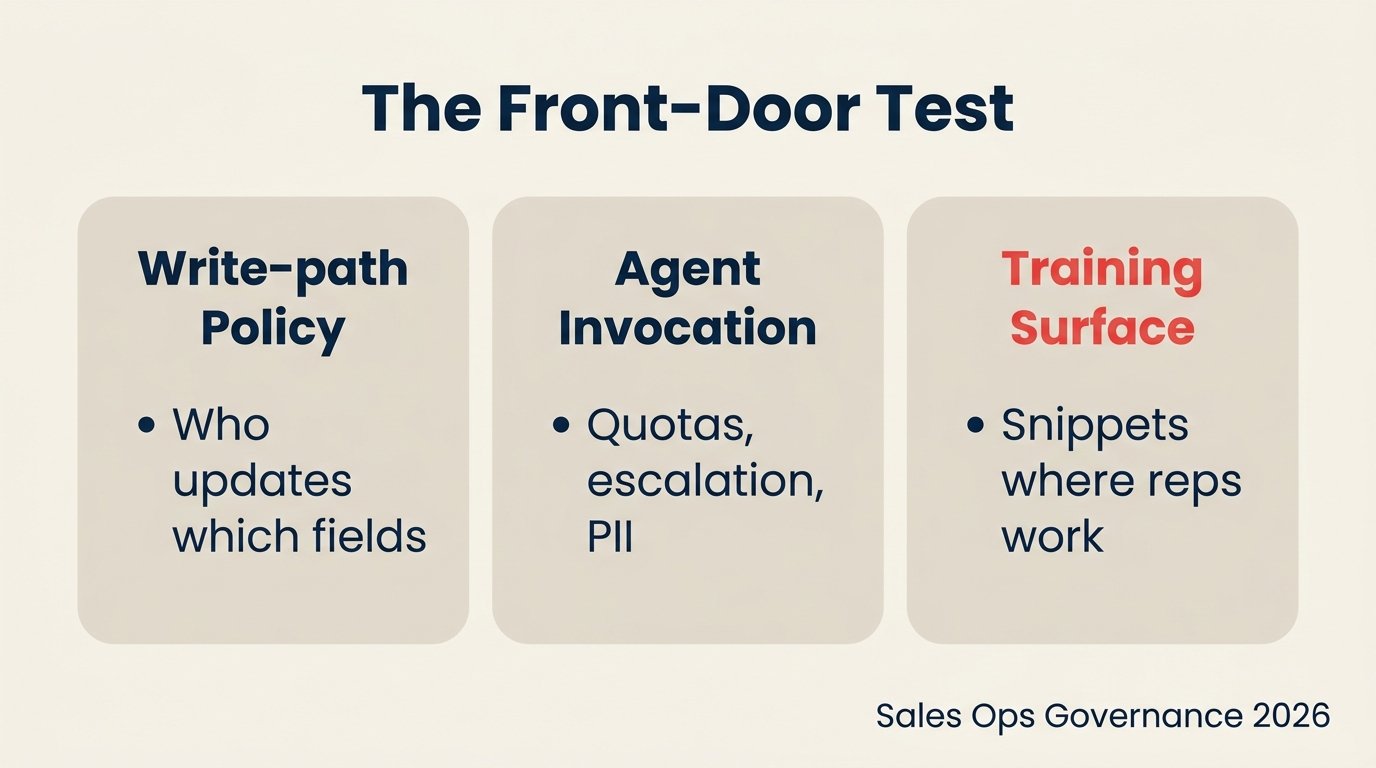
Wir nennen das den Front-Door-Test: Wo starten Ihre Vertriebsmitarbeiter jeden Morgen tatsächlich ihren Workflow? Wenn die Antwort Slack ist (und für die meisten Teams ist sie das), dann ist Slack Ihre Eingangstür. Ihre CRM-Oberfläche ist jetzt ein Back-Office-System, das Vertriebsmitarbeiter gelegentlich besuchen. Die Frage ist, ob Ihre Governance für diese Realität aufgestellt ist.
Drei Hebel:
Hebel 1: Schreibpfad-Richtlinie. Entscheiden Sie, welche Salesforce-Felder von Slack aus aktualisiert werden können und welche die Salesforce-Oberfläche erfordern. Risikoreiche Felder (Opportunity-Phase, Abschlussdatum, Vertragswert, Hauptkontakt) sollten eine Bestätigung in der Oberfläche oder einen Genehmigungsschritt durch den Manager erfordern. Dokumentieren Sie das in einer Richtlinie, geben Sie sie an Ihren Salesforce-Administrator weiter und verankern Sie sie in Ihrer MCP-Konfiguration. Darum geht es nicht darum, Slack zu blockieren, sondern dem Schreibkanal klare Leitplanken zu geben. Lesen Sie Pipeline-Hygiene als kulturelle Praxis, warum diese Art von Richtlinie eine kulturelle Norm sein muss und nicht nur eine technische Einstellung.
Hebel 2: Agent-Aufrufregeln. Der MCP-Client aktualisiert nicht nur Datensätze. Er kann Agentforce-Agents auslösen. Das bedeutet, ein Vertriebsmitarbeiter könnte aus einer Slack-Nachricht heraus eine automatisierte Follow-up-Sequenz starten, einen Angebotsentwurf erstellen oder einen Deal eskalieren. Das ist mächtig und braucht Regeln. Welche Agents kann ein BDR aufrufen? Welche erfordern einen Account Executive oder Manager? Was passiert, wenn eine Agent-Aktion personenbezogene Daten (PII) betrifft, wie die persönliche E-Mail oder Telefonnummer eines Kontakts? Legen Sie Aufrufberechtigungen nach Rolle fest, definieren Sie Eskalationspfade und legen Sie fest, was protokolliert wird. Ihr RevOps-Reifegradmodell sollte bereits eine Ebene für KI-Agent-Governance haben. Wenn nicht, fügen Sie jetzt eine hinzu.
Hebel 3: Migration der Trainings-Oberfläche. Wenn Ihre Sales-Ops-Enablement-Ressourcen in einem Salesforce-Onboarding-Deck, einem Confluence-Wiki und gelegentlichen Zoom-Sitzungen liegen, befinden sie sich am falschen Ort. Der Workflow Ihrer Vertriebsmitarbeiter hat sich nach Slack verlagert. Ihre Schulungen, Textbausteine, Deal-Phase-Definitionen und Onboarding-Sequenzen müssen dort leben, wo die Mitarbeiter tatsächlich sind. Dazu gehören Slack-Kanäle für Deal-Support, angeheftete Ressourcen in den Kanälen, die Ihr BDR-Team am meisten nutzt, und ein Slackbot-Befehlsleitfaden, der Vertriebsmitarbeitern genau zeigt, was sie im Kanal tun können und was nicht. Für einen Sales Leader in den ersten 90 Tagen mit einem neuen Team ist das jetzt Day-One-Onboarding-Material.
Das Governance-Fenster ist dieses Quartal. Bis Q3 werden die Nutzungsmuster im Muskelgedächtnis der Vertriebsmitarbeiter verankert sein und sich viel schwerer umgestalten lassen.
Wie HubSpots KI-Connectors dieselbe Geschichte aus einem anderen Blickwinkel erzählen
Es wäre einfach, die Slack-MCP-Geschichte als Salesforce-spezifisches Problem zu rahmen. Aber HubSpot setzt auf dieselbe Strategie aus der entgegengesetzten Richtung. HubSpots KI-Connectors-Strategie leitet CRM-Daten in ChatGPT, Gemini, Claude und Microsoft Copilot, damit Vertriebsmitarbeiter Deal-Daten aus dem KI-Interface ihrer Wahl abfragen und potenziell handeln können.
Der architektonische Unterschied: Salesforce zieht Slack in Richtung CRM. HubSpot schiebt CRM-Daten dorthin, wo KI-Nutzer bereits sind. Beide führen zur selben betrieblichen Realität: Die primäre Vertriebsmitarbeiter-Oberfläche ist nicht mehr die CRM-Oberfläche.
Das hat Auswirkungen auf Attributionsmodelle, die bereits unter Druck stehen. Wenn Aktionen von Vertriebsmitarbeitern über Slack, ChatGPT und drei verschiedene KI-Agents stattfinden, ist das Aktivitätsprotokoll in Ihrem CRM kein vollständiges Bild mehr davon, was einen Deal vorangebracht hat. Sales-Ops-Teams, die ihr Attributionsmodell auf CRM-Aktivitätsdaten aufgebaut haben, müssen diese Annahme jetzt überprüfen, bevor sich die Datenlücken summieren.
Das zeigt sich auch in der Prognosedisziplin. Wenn Abschlussdaten und Phasen-Aktualisierungen zunehmend aus natürlichsprachlichen Befehlen in Slack kommen statt aus bewussten Feldbearbeitungen in Salesforce, verändert sich die Zuverlässigkeit der von Vertriebsmitarbeitern eingegebenen Daten. Top-Forecaster müssen für die neue Eingabemethode kalibrieren.
Die Erkenntnis hier ist nicht, dass HubSpot oder Salesforce falsch liegen. Es ist, dass die Gesprächsoberfläche gewechselt hat und Sales Ops die neue Oberfläche unabhängig davon, welchem Anbieter sie gehört, steuern muss.
Das 30-Tage-Slack-als-Eingangstür-Audit für Sales Ops
Das ist umsetzbar. Führen Sie es dieses Quartal durch.
Woche 1: Bestandsaufnahme. Ziehen Sie eine Liste aller in Ihrer Salesforce-Organisation, die den Slackbot-MCP-Client aktiv haben. Ihr Salesforce-Administrator kann dies über API oder die Slack-Admin-Konsole abfragen. Wenn Sie nicht wissen, wer ihn nutzt, ist das Ihr erster Befund.
Woche 2: Schreibzurückführungen stichprobenartig prüfen. Wählen Sie 20 Opportunity-Aktualisierungen aus den letzten 30 Tagen aus. Prüfen Sie für jede, ob die Aktualisierung über die Salesforce-Oberfläche oder den Slack-MCP erfolgte. Schauen Sie auf Vollständigkeit der Felder, Einhaltung der Stage-Gates und Aktivitätsprotokolleinträge. Vergleichen Sie mit Ihrer Baseline. Wenn eine Lücke besteht, haben Sie das Governance-Problem quantifiziert.
Woche 3: Richtlinie definieren. Nutzen Sie Ihre Erkenntnisse, um eine Schreibpfad-Richtlinie zu entwerfen (Hebel 1 oben). Holen Sie die Zustimmung Ihres VP of Sales und Salesforce-Administrators ein. Übertreiben Sie es nicht. Eine einseitige Richtlinie für fünf risikoreiche Felder wird eher genutzt als ein 20-seitiges Governance-Dokument.
Woche 4: Ein Enablement-Asset migrieren. Nehmen Sie Ihre Deal-Phase-Definitionen (oder Ihre meistgenutzten Sales-Ops-Ressourcen) und veröffentlichen Sie sie als angeheftete Slack-Ressource in Ihrem primären Vertriebskanal. Kündigen Sie sie an. Das ist der erste Schritt, Ihre Mitarbeiter dort zu treffen, wo sie sind.
Nach 30 Tagen wissen Sie, ob Sie eine Governance-Lücke haben, und haben begonnen, sie zu schließen. Das ist eine bessere Position, als auf Prognose-Lärm in Q3 zu warten, der das Problem aufdeckt.
Die Vertriebsmitarbeiter, die in sechs Wochen 1 Million aktive Nutzer erreichten, warteten nicht auf eine IT-Freigabe. Sie fanden einen Workflow, der funktioniert. Die Aufgabe von Sales Ops ist jetzt, dafür zu sorgen, dass dieser Workflow saubere Daten, konformes Agent-Verhalten und eine skalierbare Trainings-Oberfläche produziert.
Weiterführende Links
- Die Governance-Lücke: Was Leader bei KI am Arbeitsplatz falsch machen
- KI-Copiloten vs. KI-Agents: Den Unterschied verstehen
- Vertriebsorganisations-Design als Wachstumshebel
- CAC Payback: Die Metrik, die das SaaS-Überleben vorhersagt
FAQ
Können wir den Slack-MCP-Write-back blockieren, wenn wir noch nicht bereit sind, ihn zu steuern?
Ja, aber „alles blockieren" ist keine nachhaltige Position. Der Salesforce-Administrator kann einschränken, welche Felder und Objekttypen der MCP-Client über API-Berechtigungen aktualisieren kann. Ein praktischerer Weg ist ein abgestufter Ansatz: standardmäßig lesend für BDRs, eingeschränkter Schreibzugriff für AEs bei wenig risikoreichen Feldern und vollständiger Schreibzugriff nur nach Abschluss eines 30-minütigen Governance-Trainings. Das verschafft Zeit für die Erstellung der Richtlinie, ohne Frustration bei Vertriebsmitarbeitern zu erzeugen, indem ein Tool entfernt wird, das sie bereits als nützlich empfunden haben.
Ersetzt das die Salesforce-Oberflächen-Schulung für neue Vertriebsmitarbeiter?
Es ersetzt sie nicht, aber fügt eine parallele Spur hinzu. Neue Vertriebsmitarbeiter müssen weiterhin das Salesforce-Datenmodell, die Feldlogik und die Phasendefinitionen verstehen, denn diese Regeln gelten unabhängig davon, ob sie über die Oberfläche oder per Slack-Befehl aktualisieren. Was sich ändert, ist das Schnittstellentraining. Onboarding braucht jetzt ein Modul „Wie man Salesforce von Slack aus aktualisiert" neben der standardmäßigen Navigationseinführung. Planen Sie 30 bis 60 zusätzliche Minuten in Ihrer Onboarding-Sequenz und eine Slackbot-Befehlsreferenz ein, die Vertriebsmitarbeiter anheften können.
Wie unterscheidet sich das von den alten „Salesforce in Slack"-Benachrichtigungen?
Die frühere Integration war aus Sicht des Vertriebsmitarbeiters weitgehend lesend: Deal-Alerts, Aktivitätserinnerungen, Phase-Änderungsbenachrichtigungen. Der MCP-Client ist eine Schreiboberfläche. Vertriebsmitarbeiter können jetzt Datensätze erstellen, Feldwerte ändern und KI-Agents aus dem Gespräch heraus auslösen. Das ist eine grundlegend andere Daten-Fluss-Richtung und eine grundlegend andere Governance-Anforderung. Die Lese-Integration brauchte einen Administrator, der sie einmalig konfigurierte. Die Schreib-Integration braucht laufende Richtlinie, Überwachung und Schulung.

On this page
- Die Zahl, die auf jeder Sales-Ops-Präsentation stehen sollte
- Warum Slack gerade zur Schreiboberfläche Ihres CRM wurde (nicht nur ein Benachrichtigungskanal)
- Die drei Governance-Hebel, die Sales Ops dieses Quartal betätigen muss
- Wie HubSpots KI-Connectors dieselbe Geschichte aus einem anderen Blickwinkel erzählen
- Das 30-Tage-Slack-als-Eingangstür-Audit für Sales Ops