Dari Call ke Pembaruan CRM Secara Otomatis

Turn this article into takeaways for your work.


Each assistant summarizes the article only for you and suggests best practices for your work.
Tanyakan kepada AE mana pun ke mana waktu mereka pergi, dan Anda akan mendengar versi jawaban yang sama: setelah setiap call, mereka menghabiskan 20 hingga 30 menit memperbarui CRM. Catatan dari apa yang dikatakan prospek. Langkah selanjutnya yang disepakati dalam call. Informasi kontak yang muncul. Penilaian ulang tahap deal. Field MEDDIC yang perlu diperbarui.
Kalikan 25 menit dengan enam call per hari, dan Anda mendapatkan dua setengah jam waktu non-penjualan, setiap hari, untuk setiap rep di tim Anda. Riset McKinsey tentang AI dan pekerja pengetahuan mengidentifikasi entri data dan dokumentasi rutin sebagai tugas dengan potensi otomasi tertinggi bagi pekerja pengetahuan, dengan AI generatif mampu mengotomasi 60-70% aktivitas kerja pengetahuan. Pada tim sales 20 orang, itu adalah 50 jam per minggu, lebih dari satu karyawan penuh waktu, yang digunakan untuk pengisian formulir.
Otomasi call-to-CRM tidak menghilangkan pekerjaan itu. Ini memadatkannya. AI melakukan ekstraksi, membuat draft pembaruan, dan mempresentasikannya kepada rep untuk review-and-confirm 3-5 menit daripada rekonstruksi 25 menit. Yang dulunya adalah mengingat kembali menjadi meninjau. Ini adalah Pola Meeting Intelligence yang menyelesaikan siklus penuhnya: dari pengambilan audio hingga catatan CRM yang benar-benar mencerminkan apa yang terjadi.
Apa arti "auto-update dari call" sebenarnya
Dalam pola Meeting Intelligence ACE Framework (Ingest, Analyze, Predict, Generate, Execute), langkah Execute adalah yang memindahkan konten yang dihasilkan dari draft ke sistem catatan. Alurnya adalah:
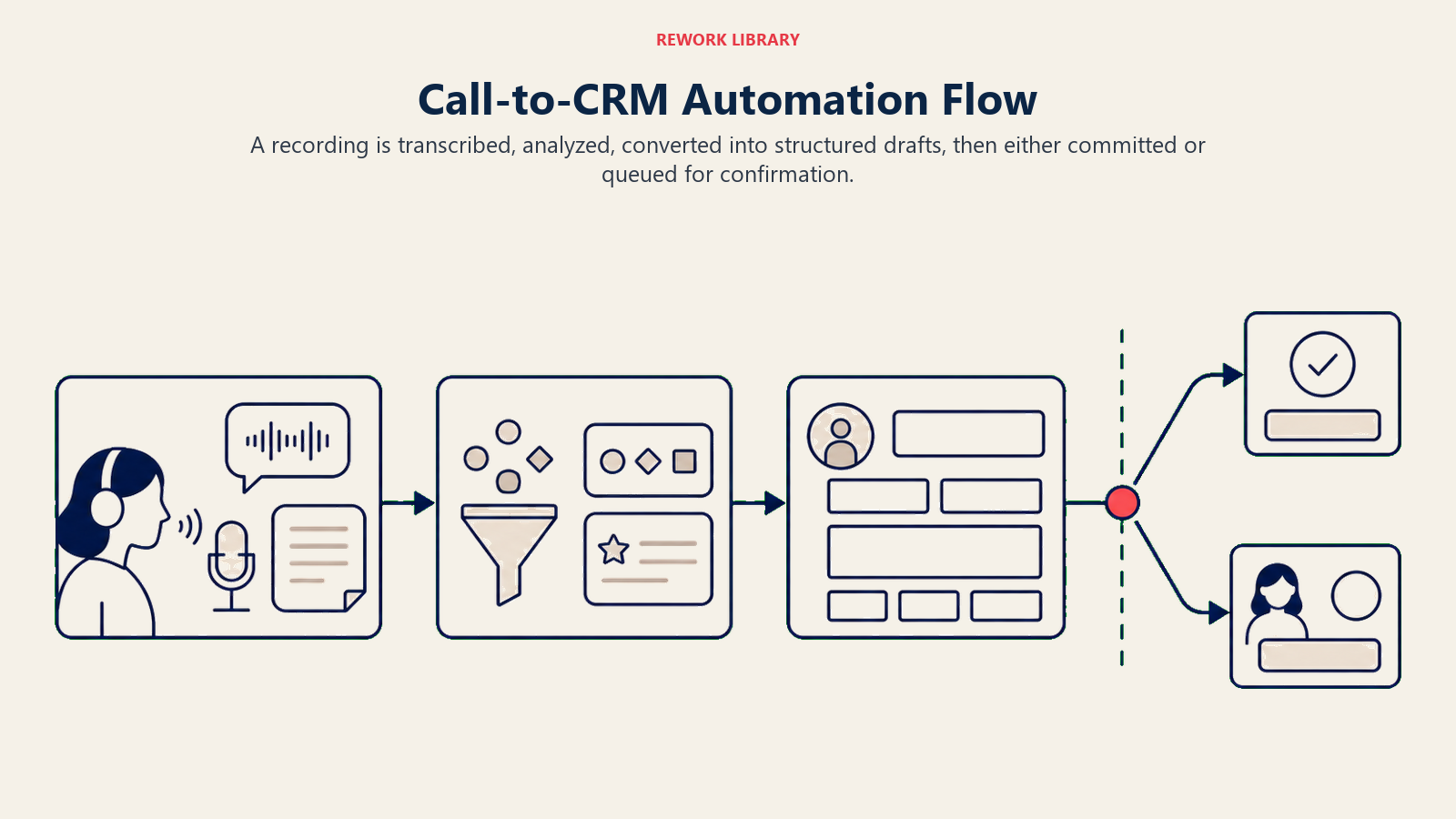
- Ingest: Rekaman call ditangkap dan ditranskripsikan.
- Analyze: Transkrip diurai untuk elemen kunci: langkah selanjutnya, keberatan, nama pemangku kepentingan, field MEDDIC, sebutan kompetitor, sinyal deal.
- Generate: Draft pembaruan terstruktur dibuat untuk setiap field CRM yang relevan.
- Execute: Draft tersebut didorong ke CRM, baik auto-committed (kepercayaan tinggi) atau diantrekan untuk konfirmasi rep (kepercayaan lebih rendah).
Kemampuan Execute adalah yang menjadikan ini perubahan operasional daripada hanya alat pencatatan yang lebih baik. Tanpa Execute, AI merangkum call dan rep masih harus menyalin output secara manual ke dalam CRM. Dengan Execute, field CRM diisi langsung.
Sebagian besar platform conversation intelligence kini memiliki integrasi CRM native yang menangani alur ini: Gong dengan Salesforce dan HubSpot, Clari Copilot dengan Salesforce, Fireflies dengan sebagian besar CRM utama melalui Zapier atau API langsung. Pemetaan field spesifik dikonfigurasi oleh RevOps, dan logika confidence scoring menentukan apa yang di-commit secara otomatis vs. apa yang diserahkan ke rep untuk ditinjau.
Key Facts: Otomasi Call-to-CRM
- Reps menghabiskan 20-30 menit memperbarui CRM setelah setiap call; dengan 6 call per hari, itu adalah 2+ jam waktu non-penjualan harian per rep, atau 50+ jam per minggu untuk tim 20 orang
- McKinsey mengidentifikasi entri data dan dokumentasi rutin sebagai tugas dengan potensi otomasi tertinggi bagi pekerja pengetahuan, dengan AI generatif mampu mengotomasi 60-70% aktivitas kerja pengetahuan dalam kategori ini
- Field MEDDIC secara kronis kurang terisi dalam catatan CRM yang dikelola secara manual; otomasi call-to-CRM menutup kesenjangan itu dengan mengekstrak data deal terstruktur dari transkrip setelah setiap call, terlepas dari apakah rep memperbarui secara manual
Ambang Kepercayaan Call-ke-CRM
Ambang Kepercayaan Call-ke-CRM adalah model tata kelola yang menentukan data call yang diekstrak AI mana yang auto-commit ke CRM vs. mana yang masuk ke antrean review rep. Ekstraksi kepercayaan tinggi (pernyataan eksplisit dengan pemilik, tanggal, dan tindakan yang disebutkan) auto-commit setelah delay window yang dapat dikonfigurasi (biasanya 30 menit hingga 4 jam). Ekstraksi kepercayaan sedang (inferensi dari konteks atau nada) diantrekan untuk konfirmasi rep dengan kutipan sumber yang terlihat. Item kepercayaan rendah (penilaian tahap deal, konteks hubungan strategis) ditandai untuk input manual rep. Threshold tersebut ada karena pembaruan CRM otomatis dengan informasi yang salah lebih buruk daripada tidak ada pembaruan sama sekali; model kepercayaan melindungi kualitas data sambil menangkap 60-70% dokumentasi rutin yang tidak memerlukan penilaian manusia untuk diekstrak secara akurat.
Field mana yang di-auto-populated
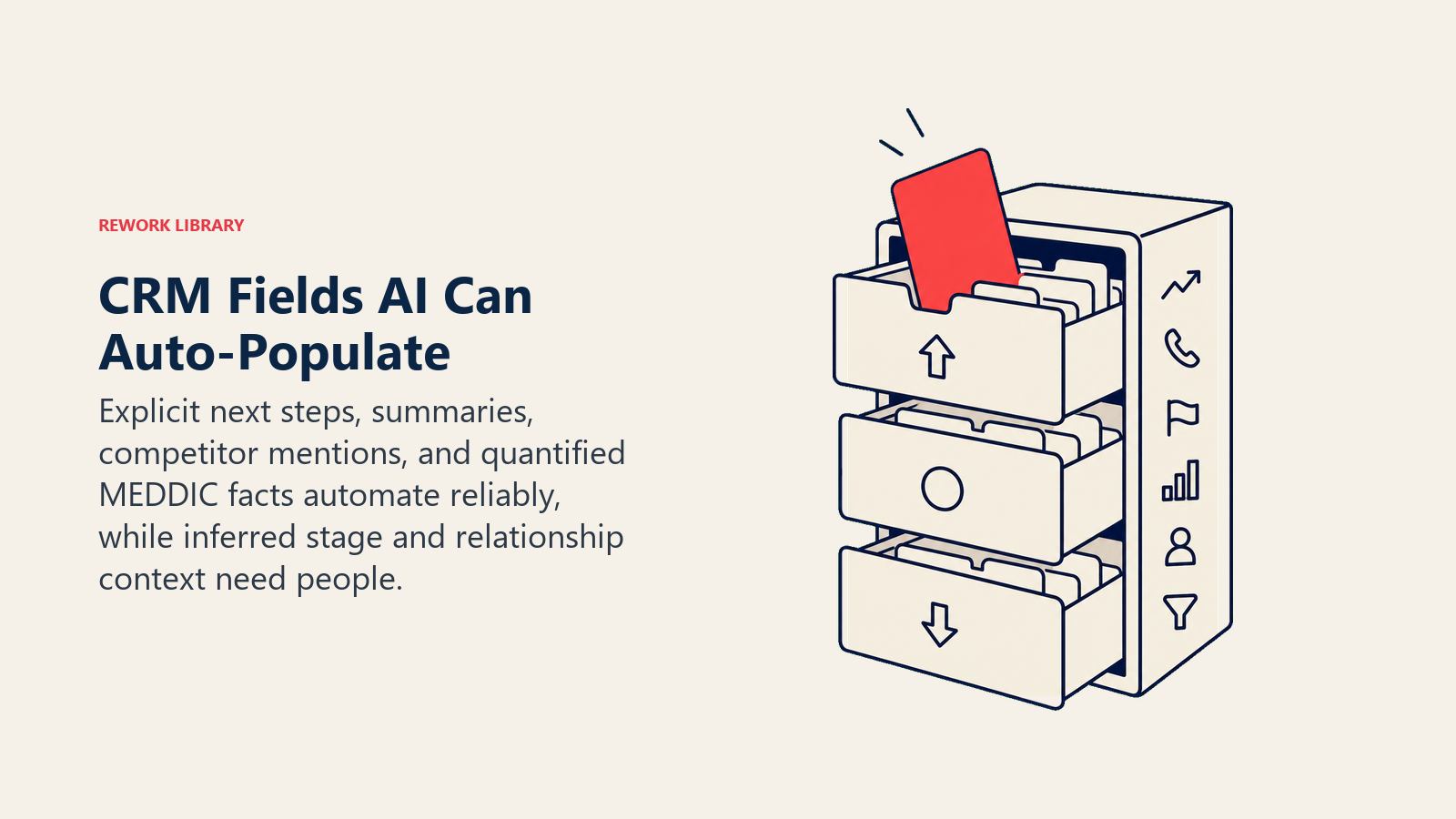
Field yang layak diotomasi adalah yang secara konsisten dilupakan, ditunda, atau diisi secara salah oleh reps ketika melakukannya secara manual.
| Field CRM | Sumber dalam Transkrip | Tingkat Kepercayaan |
|---|---|---|
| Langkah selanjutnya | Pernyataan tindakan eksplisit ("Saya akan mengirimkan kontrak pada Jumat") | Tinggi |
| Catatan meeting / ringkasan call | Transkrip lengkap yang diringkas | Tinggi |
| Sebutan kompetitor | Kompetitor yang disebutkan oleh prospek atau rep | Tinggi |
| Sentimen kontak | Analisis nada dan bahasa sepanjang call | Sedang |
| MEDDIC: Identify Pain | Pernyataan pain dan deskripsi masalah | Sedang |
| MEDDIC: Metrics | Angka spesifik yang terkait dengan outcomes ("kami kehilangan 3 deals per bulan karena ini") | Tinggi ketika eksplisit |
| MEDDIC: Economic Buyer | Decision-maker yang disebutkan dengan referensi anggaran | Tinggi ketika eksplisit; sedang ketika disimpulkan |
| MEDDIC: Decision Criteria | Kriteria evaluasi yang dinyatakan | Sedang |
| MEDDIC: Decision Process | Deskripsi proses ("kami menjalankan tinjauan komite") | Sedang |
| MEDDIC: Champion | Advokat yang disebutkan dengan bahasa pengaruh internal | Sedang |
| Pertanyaan terbuka / tindak lanjut | Pertanyaan yang diajukan tetapi tidak dijawab dalam call | Tinggi |
| Sinyal risiko deal | Bahasa negatif, penanda keraguan, preferensi kompetitif | Sedang |
| Tahap deal | Disimpulkan dari kemajuan percakapan | Rendah: tinjauan rep diperlukan |
Tingkat kepercayaan menentukan apakah setiap field auto-commit atau masuk ke antrean review rep. Ekstraksi kepercayaan tinggi adalah yang AI menemukan pernyataan eksplisit dan tidak ambigu. Ekstraksi kepercayaan sedang adalah inferensi dari konteks. Item kepercayaan rendah memerlukan input rep karena penilaian melibatkan pengetahuan deal yang tidak dimiliki AI.
Tahap deal adalah contoh yang baik dari kategori kepercayaan rendah. Call yang mencakup demo dan diakhiri dengan permintaan proposal mungkin secara logis menyarankan kemajuan dari Discovery ke Proposal di CRM Anda. Tetapi rep tahu bahwa pembeli juga menyebutkan mereka berjarak 90 hari dari siklus anggaran, dan memajukan tahap akan mendistorsi forecast. AI harus menandai pertanyaannya, bukan menjawabnya.
Model confidence threshold
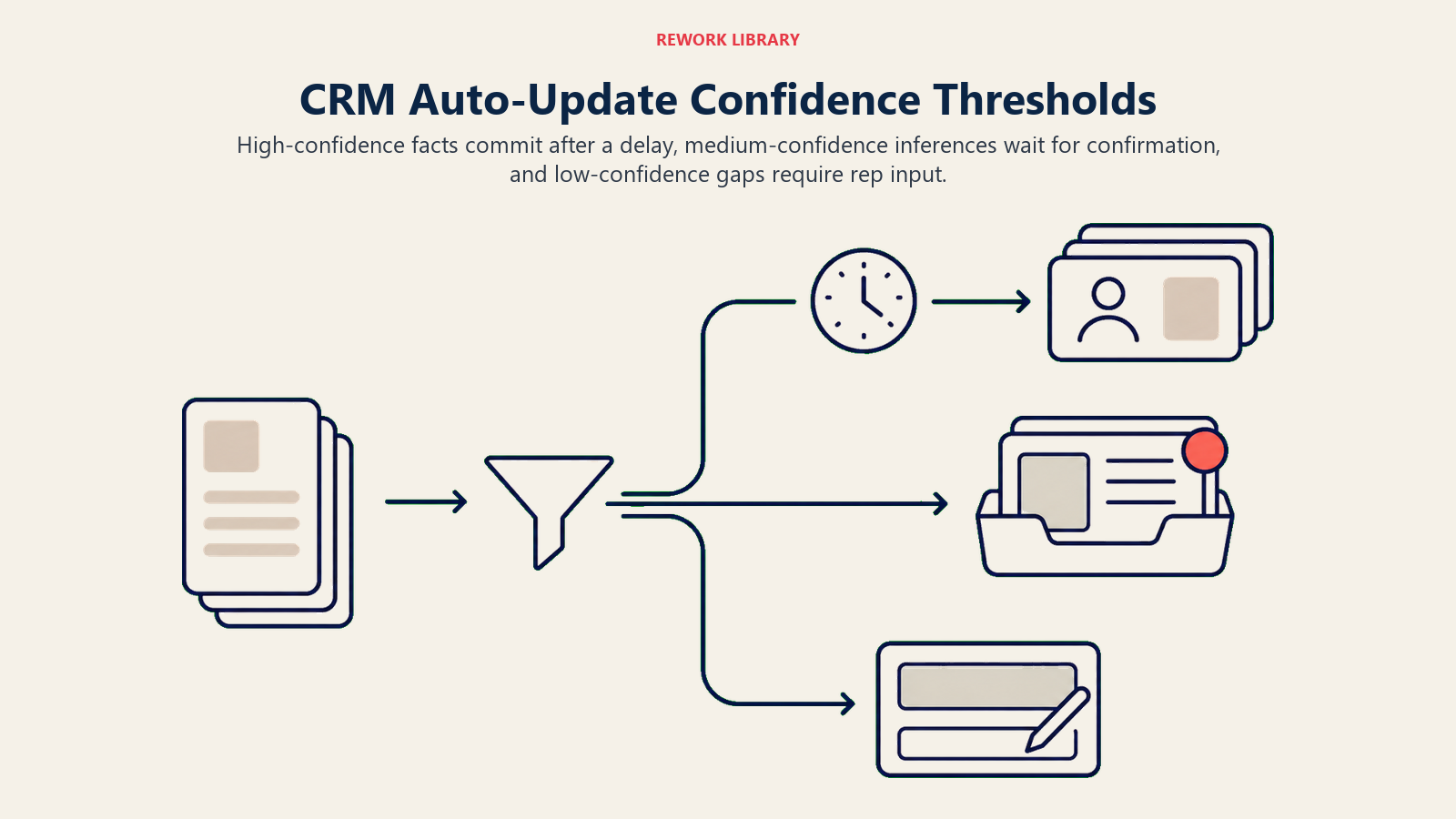
Confidence scoring adalah mekanisme yang memutuskan apa yang di-auto-committed vs. apa yang masuk ke antrean review. Mendapatkan ini dengan benar adalah perbedaan antara otomasi yang berguna dan yang menciptakan lebih banyak pekerjaan daripada yang dihemat.
Model tipikal bekerja seperti ini:
Kepercayaan tinggi (auto-commit setelah delay yang dapat dikonfigurasi): Pernyataan yang eksplisit dan tidak ambigu. "Saya akan mengirimkan dokumentasi security review pada Kamis" adalah langkah selanjutnya yang eksplisit dengan pemilik, tindakan, dan tanggal yang disebutkan. AI mengekstraknya, memetakannya ke field tugas CRM, dan auto-commit setelah delay window (biasanya 30 menit hingga 4 jam) untuk memungkinkan koreksi rep.
Kepercayaan sedang (diantrekan untuk konfirmasi rep): Pernyataan yang bermakna tetapi memerlukan interpretasi. "Mereka tampaknya tertarik dengan tier enterprise" adalah sinyal sentimen kontak, tetapi "tampaknya tertarik" adalah inferensi. AI memunculkannya sebagai field yang di-draft dengan kutipan sumber yang disorot, dan rep mengonfirmasi atau mengedit sebelum di-commit.
Kepercayaan rendah (ditandai untuk input rep): Kesenjangan dalam data. AI mengenali bahwa Economic Buyer dibahas tetapi tidak bisa mengekstrak pemangku kepentingan yang disebutkan. Ini menandai field sebagai belum terselesaikan dan membuat tugas bagi rep untuk mengisinya secara manual.
Delay window pada auto-commits penting untuk adopsi. Reps yang tahu mereka memiliki 2 jam untuk mengganti auto-commit kepercayaan tinggi merasa dalam kendali atas CRM mereka. Reps yang melihat CRM mereka diperbarui secara real-time saat call masih berlangsung merasa diawasi. Hasil teknis yang sama, framing psikologis yang berbeda.
Aturan 30-hari pertama. Untuk tim yang mengimplementasikan pembaruan CRM otomatis untuk pertama kalinya, praktik terbaik yang umum adalah menjalankan dalam mode "suggest only" selama 30 hari pertama. Semua field masuk ke antrean review rep, terlepas dari tingkat kepercayaan. Tidak ada yang di-auto-commit. Ini membangun keakraban rep dengan akurasi ekstraksi AI sebelum otomasi diaktifkan, dan memunculkan kesalahan pemetaan field lebih awal sebelum menciptakan masalah kualitas data pada skala besar.
Pengalaman pengguna (UX) review 3-5 menit
Ketika rep menyelesaikan call dan membuka CRM (atau platform conversation intelligence), mereka melihat kartu terstruktur. Kira-kira terlihat seperti ini:
Ringkasan call (2-3 kalimat, dihasilkan otomatis): "Berbicara dengan Marcus Chen, VP of Operations di Acme Corp. Mendiskusikan kekhawatiran timeline implementasi seputar migrasi Q3. Sepakat untuk mengirimkan referensi kasus dari deployment serupa pada Jumat."
Draft pembaruan CRM (field yang sudah diisi, disorot untuk ditinjau):
- Langkah selanjutnya: "Kirimkan referensi kasus implementasi pada [Jumat, 22 Mei]" (konfirmasi atau edit)
- Sebutan kompetitor: "SAP disebutkan sebagai vendor saat ini yang sedang dipertimbangkan" (konfirmasi atau abaikan)
- MEDDIC: Identify Pain: "Marcus mendeskripsikan kehilangan 3 kontrak di Q1 akibat keterlambatan pelaporan" (konfirmasi atau edit)
- MEDDIC: Economic Buyer: "Belum dikonfirmasi. Marcus menyebutkan VP of Finance memiliki otoritas anggaran akhir (diperlukan tindak lanjut)" (tambahkan ke tugas tindak lanjut)
- Sentimen kontak: "Positif dengan hati-hati. Keterlibatan tinggi tetapi kekhawatiran diajukan tentang risiko migrasi" (konfirmasi atau edit)
Rep membaca kartu, mengklik konfirmasi pada field yang akurat, mengedit apa pun yang perlu disesuaikan, dan menambahkan item yang diperlukan secara manual (pembaruan tahap deal, catatan hubungan strategis). Lima menit, selesai.
Alternatifnya adalah merekonstruksi informasi yang sama dari ingatan 30 menit setelah call, ketika detailnya sudah memudar dan tiga pesan Slack telah tiba.
Yang tidak digantikannya
Jujur dengan tim sales Anda tentang apa yang tidak dilakukan pembaruan CRM otomatis.
Konteks hubungan strategis. AI dapat mengekstrak bahwa prospek menyebutkan dewan mereka gugup tentang lingkungan makro. Tidak bisa menangkap bahwa rep tahu Champion baru saja dipromosikan dan memiliki modal politik baru yang membuat deal ini lebih mungkin. Jenis pengetahuan hubungan itu ada dalam catatan manual dan tetap di luar ekstraksi field otomatis.
Penilaian tahap deal. Kemajuan tahap harus tetap dengan rep, dengan pengawasan manajer. Kemajuan tahap otomatis menciptakan distorsi forecast dan menghilangkan akuntabilitas dari rep yang mengetahui kondisi aktual deal.
Catatan coaching kualitatif. Reps sering memiliki hal yang ingin mereka catat untuk pengembangan mereka sendiri atau konteks manajer mereka yang tidak cocok dalam field CRM terstruktur. Ini tetap manual.
Strategi akun. Gambaran agregat di mana deal berada secara strategis, tingkat risikonya, dan jalur kuartal selanjutnya adalah pekerjaan manajemen hubungan. AI membantu dengan datanya; penilaiannya adalah manusia.
Catatan implementasi spesifik CRM
Pendekatan pemetaan field dan integrasi berbeda per CRM.
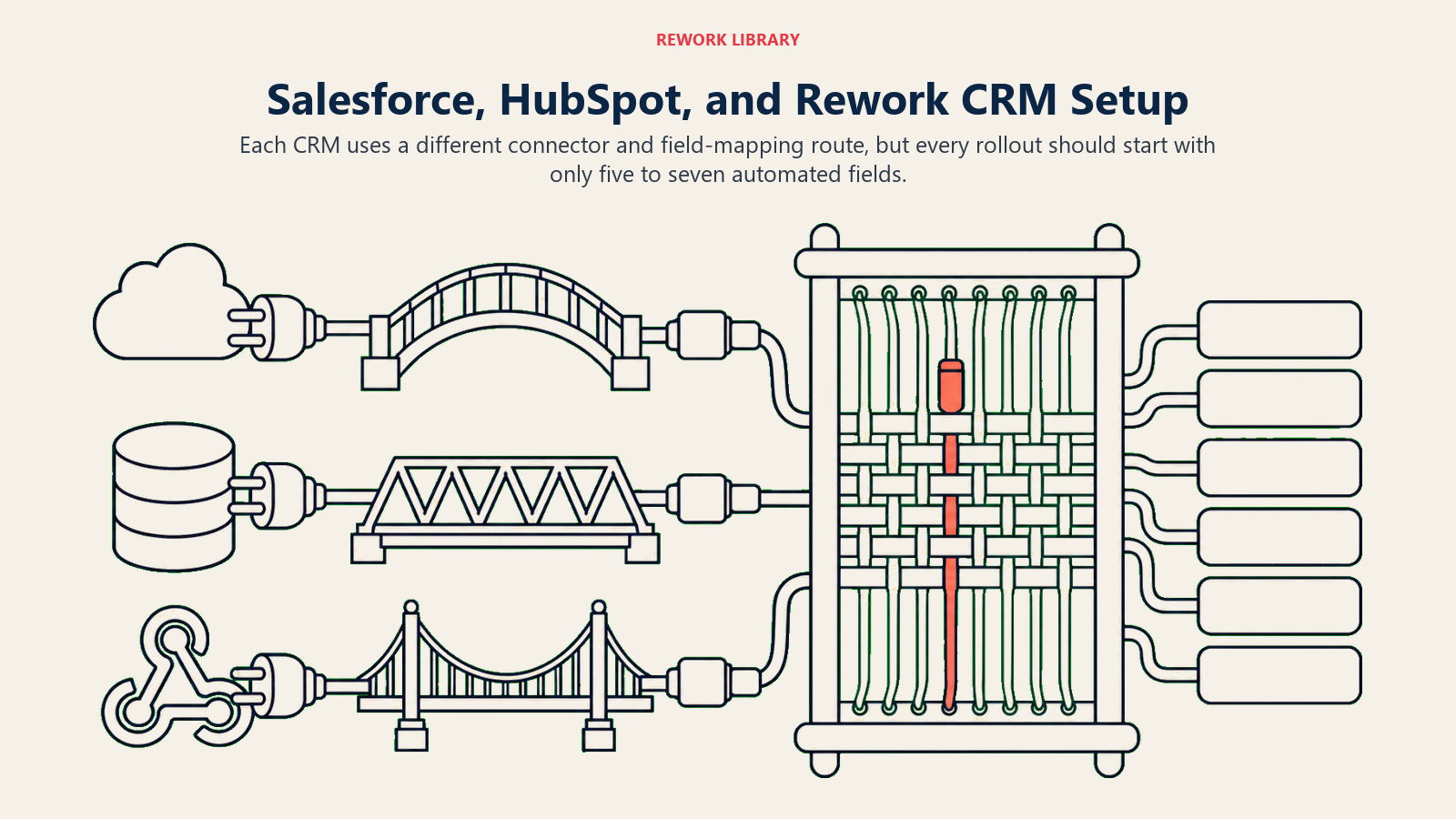
Salesforce: Gong dan Clari Copilot memiliki integrasi native yang paling mendalam. Pengaturan tipikal memetakan field yang diekstrak AI ke catatan Activity dan field kustom Contact/Opportunity. Field MEDDIC biasanya memerlukan konfigurasi custom object di Salesforce, yang perlu disiapkan RevOps sebelum integrasi akan berfungsi. Salesforce Einstein Conversation Insights adalah opsi native untuk tim yang menginginkan semuanya di dalam Salesforce.
HubSpot: Gong dan Fireflies keduanya mendukung HubSpot melalui konektor native. Fitur Copilot HubSpot sendiri (ditambahkan pada 2024-2025) mencakup ringkasan call bawaan dan write-back CRM. Pemetaan field ditangani melalui mesin workflow HubSpot. Catatan kontak dan properti Deal adalah target yang paling umum dipetakan.
Rework CRM: Otomasi call-to-CRM bekerja melalui lapisan workflow berbasis API Rework. Alat conversation intelligence dengan integrasi webhook atau API dapat mendorong JSON terstruktur ke endpoint catatan kontak dan deal Rework. Skema field mendukung semua field MEDDIC standar sebagai properti kelas satu, dan langkah selanjutnya dipetakan langsung ke modul Tasks. RevOps mengonfigurasi pemetaan field melalui pengaturan operasi Rework.
Untuk ketiga CRM tersebut, langkah pengaturan kritis adalah menentukan field mana yang dalam lingkup untuk otomasi. Memulai secara sempit (5-7 field) dan memperluas berdasarkan umpan balik rep menghasilkan adopsi yang lebih baik daripada memulai dengan set field komprehensif yang menciptakan kelelahan tinjauan. Field mana yang paling penting dijawab dengan melihat data apa yang sebenarnya dibutuhkan model AI hilir.
Rework Analysis: Dividen kualitas data adalah ROI yang paling kurang dihargai dari otomasi call-to-CRM. Tim mengimplementasikannya untuk menghemat waktu rep, yang nyata dan berharga. Tetapi manfaat yang berlipat ganda adalah bahwa setiap model AI hilir (lead scoring, forecasting, next best action) berjalan pada data yang lebih bersih dan lebih lengkap mulai dari bulan kedua. Kami telah melihat tim di mana tingkat penyelesaian field MEDDIC meningkat dari 30% menjadi 85% dalam 90 hari setelah mengaktifkan otomasi call-to-CRM. Peningkatan itu langsung mengalir ke akurasi forecast: model forecasting yang dapat melihat aktivitas kompetitor, status champion, dan detail decision process di 85% deals menghasilkan prediksi yang secara material lebih baik daripada yang bekerja dengan cakupan 30%. Penghematan waktu rep membayar kembali biaya alat. Peningkatan kualitas data membayar kembali investasi AI.
Dividen kualitas data
Ada manfaat yang berlipat ganda dari pembaruan CRM otomatis yang penting untuk AI Sales Operator jangka panjang: kualitas data.
Keterbatasan terbesar dari AI lead scoring, AI forecasting, dan alat AI next-best-action adalah bahwa mereka bergantung pada data CRM yang seringkali tidak lengkap, kedaluwarsa, atau diisi secara tidak konsisten. Reps yang secara manual memperbarui CRM mengisi field yang mereka anggap berguna dan melewati field yang terasa abstrak. Field MEDDIC khususnya secara kronis kurang terisi dalam catatan CRM yang dikelola secara manual. Artikel data readiness for AI menjelaskan persis mengapa ini penting untuk setiap model hilir dalam stack Anda.
Ketika otomasi call-to-CRM berjalan, kesenjangan itu menutup. Setiap call berkontribusi data terstruktur ke catatan CRM. Field MEDDIC diisi secara konsisten. Sebutan kompetitor dicatat. Sentimen kontak dilacak dari waktu ke waktu. CRM menjadi dataset yang benar-benar representatif daripada tambalan kebiasaan pelaporan rep.
Dataset yang lebih bersih itu secara langsung meningkatkan model scoring yang menggerakkan rekomendasi next best action dan workflow kebersihan data CRM. Roda berputarnya adalah: otomasi yang lebih baik menghasilkan data yang lebih baik, yang menghasilkan prediksi yang lebih baik, yang menghasilkan otomasi yang lebih berguna.
Kesimpulan
Pembaruan CRM otomatis bukan otomasi admin dalam cara routing email otomatis adalah otomasi admin. Ini adalah mekanisme di mana AI Sales Operator menjaga dirinya sendiri dipasok dengan data terstruktur yang dibutuhkannya untuk berfungsi.
Model forecasting yang dilatih pada data CRM di mana 40% field MEDDIC kosong adalah model forecasting yang buruk. Model lead scoring yang tidak bisa melihat aktivitas kompetitor dari call terbaru kehilangan sinyal. Ketika otomasi call-to-CRM berjalan dengan baik, kesenjangan tersebut menutup secara sistematis, deal demi deal, call demi call.
Untuk rep, itu berarti 2+ jam per hari kembali. Untuk RevOps, itu berarti dataset CRM yang cukup akurat untuk benar-benar dipercaya. Dua outcome itu berlipat ganda.
Batas execution dalam ACE Framework ada karena tindakan otomatis memiliki konsekuensi yang tidak dimiliki draft manual. Catatan CRM yang di-auto-update dengan informasi yang salah lebih buruk daripada tidak ada pembaruan sama sekali. Model confidence threshold, UX review, dan pendekatan rollout 30-hari pertama semuanya dirancang untuk mengelola batas tersebut dengan hati-hati. NIST AI Risk Management Framework secara khusus mengidentifikasi akuntabilitas dan transparansi sebagai persyaratan kepercayaan inti untuk sistem AI mana pun yang mengambil tindakan dengan konsekuensi nyata, dan workflow review-and-confirm yang dijelaskan dalam artikel ini adalah implementasi langsung dari prinsip-prinsip tersebut dalam konteks sales. Lihat batas generate vs. execute untuk mengapa perbedaan ini penting di setiap deployment AI. Gunakan keduanya.
Pertanyaan yang Sering Diajukan
Apa itu pembaruan call-to-CRM otomatis?
Pembaruan call-to-CRM otomatis menggunakan AI untuk mengekstrak data terstruktur dari rekaman dan transkrip call, lalu mendorong data tersebut langsung ke field CRM daripada memerlukan rep untuk merekonstruksi dan mengetiknya secara manual setelah call. Sistem menangkap langkah selanjutnya, sebutan kompetitor, field MEDDIC, sentimen kontak, dan sinyal deal dari percakapan, membuat draft pembaruan CRM, dan mempresentasikannya kepada rep untuk review-and-confirm 3-5 menit, daripada sesi entri manual 20-30 menit.
Berapa banyak waktu yang dihemat pembaruan CRM otomatis per rep?
Rep yang menjalankan 6 call per hari dengan 25 menit pembaruan CRM pasca-call per call menghabiskan sekitar 2,5 jam per hari untuk dokumentasi. Pembaruan CRM otomatis dengan workflow review-and-confirm mengurangi itu menjadi 3-5 menit per call, memulihkan sekitar 2 jam per rep per hari. Untuk tim sales 20 orang, itu adalah 40+ jam per minggu kapasitas penjualan yang dipulihkan, setara dengan menambahkan satu rep penuh waktu tanpa biaya headcount.
Apa itu model confidence threshold untuk auto-update CRM?
Ekstraksi kepercayaan tinggi (pernyataan eksplisit dan tidak ambigu dengan pemilik, tanggal, dan tindakan yang disebutkan) auto-commit ke CRM setelah delay window yang dapat dikonfigurasi, biasanya 30 menit hingga 4 jam. Ekstraksi kepercayaan sedang (inferensi dari konteks) diantrekan untuk konfirmasi rep dengan kutipan transkrip sumber yang ditampilkan. Item kepercayaan rendah (penilaian tahap deal, konteks hubungan strategis) ditandai untuk input manual rep. Model melindungi kualitas data dengan memastikan hanya ekstraksi kepastian tinggi yang di-commit secara otomatis.
Field CRM mana yang paling cocok untuk otomasi call-to-CRM?
Field bernilai tertinggi untuk otomasi adalah yang secara konsisten ditunda atau dilewati reps ketika memperbarui secara manual: langkah selanjutnya dan item tindakan (kepercayaan tinggi ketika eksplisit), catatan meeting dan ringkasan call (kepercayaan tinggi), sebutan kompetitor (kepercayaan tinggi ketika disebutkan), field pain dan metrics MEDDIC (kepercayaan tinggi ketika angka atau pernyataan masalah eksplisit muncul), dan sentimen kontak (kepercayaan sedang). Kemajuan tahap deal dan catatan hubungan strategis harus tetap manual karena memerlukan penilaian yang tidak dimiliki AI.
Mengapa otomasi call-to-CRM meningkatkan AI lead scoring dan forecasting?
Lead scoring, forecasting, dan model next-best-action semuanya melatih dan beroperasi pada data CRM. Ketika field MEDDIC 30-40% lengkap (rata-rata entri manual tipikal), model tersebut membuat prediksi dengan informasi yang tidak lengkap. Otomasi call-to-CRM secara konsisten mendorong tingkat penyelesaian field ke 80-90%, memberi model hilir data yang lebih penuh untuk dikerjakan. Model forecasting yang melihat status champion, aktivitas kompetitor, dan detail decision process di 85% deals menghasilkan prediksi yang secara material lebih baik daripada yang bekerja dengan cakupan 30%.
Bagaimana tim harus mengimplementasikan pembaruan CRM otomatis untuk pertama kalinya?
Jalankan dalam mode "suggest only" selama 30 hari pertama: semua field yang diekstrak masuk ke antrean review rep, tidak ada yang di-auto-commit, terlepas dari skor kepercayaan. Ini membangun keakraban rep dengan akurasi ekstraksi AI, memunculkan kesalahan pemetaan field lebih awal, dan membangun kepercayaan sebelum otomasi dimulai. Setelah 30 hari, tinjau umpan balik rep tentang akurasi per field, konfigurasikan confidence thresholds berdasarkan akurasi yang diamati, dan aktifkan auto-commit untuk field kepercayaan tinggi dengan delay window. Mulai dengan 5-7 field dan perluas berdasarkan data adopsi rep.
Apa yang tidak digantikan pembaruan CRM otomatis?
Pembaruan CRM otomatis tidak menggantikan konteks hubungan strategis (rep tahu champion baru saja dipromosikan dan memiliki modal politik baru), penilaian tahap deal (memajukan tahap berdasarkan percakapan saja mengabaikan konteks deal yang tidak dimiliki AI), catatan coaching kualitatif (observasi rep tentang dinamika call yang tidak cocok dalam field terstruktur), atau strategi akun (gambaran agregat risiko dan jalur ke depan yang melibatkan penilaian di luar analisis transkrip). Otomasi menangani ekstraksi data terstruktur; rep menangani penilaian dan konteks.
Pelajari Lebih Lanjut
- Sales Call Recording and Transcript Analysis
- Coaching Reps With Conversation Intelligence
- Discovery Question Compliance With AI Review
- CRM Data Hygiene With an AI Copilot
- Next Best Action for Each Open Deal
- Choosing a Conversation Intelligence Tool
- Meeting Intelligence: From Audio to Action Items
- The Generate vs. Execute Boundary
- McKinsey: The Economic Potential of Generative AI
- NIST AI Risk Management Framework

Co-Founder, Rework.com