2026年版 最良のプロジェクト管理ソフトウェア: あらゆるチーム規模と働き方に対応した15ツール
プロジェクト管理ソフトウェアの選定は、必要以上に難しく感じられます。どのツールも作業を整理し、チームを調整し、プロジェクトを期日通りに完了すると約束しています。技術的にはそのほとんどが可能です。本当の問題は、どのツールに最も機能があるかではなく、どのツールがチームの実際の働き方に、現在の規模と現在のステージに合っているかです。
このガイドは2種類の購買者向けです。初めて専用PMツールを選ぶチーム (スプレッドシート、メールスレッド、または非公式のSlackチャンネルから移行するチーム) と、使い古したツールを置き換えるチームです。方法論、ターゲット適合性、料金、正直なトレードオフで15ツールを評価しました。Reworkは私たちのプラットフォームとしてリストの先頭にありますが、各ツールの説明は、各ツールが劣っている点も含めた正直な評価です。
クイック比較表
| ツール | 最適な用途 | 開始価格 | 主な強み | 主な制約 |
|---|---|---|---|---|
| Rework | オペレーションworkflow + CRMを一プラットフォームに求めるミッドサイズチーム | $6/ユーザー/月から (rework.com/pricing) | ネイティブCRMとマルチチャネル受信箱を持つプロセス強制workflow | ブランクキャンバスツールではない、純粋にクリエイティブな作業には柔軟性が低い |
| Asana | 構造化されたタスクと目標管理を必要とするグロースステージチーム | 無料 (限定)、$10.99/ユーザー/月から | 成熟したGoals + Portfolios、クリーンなUX、強力な連携 | スケールで高価になる、リソース管理はアドオン |
| Monday.com | 最大限のビジュアル柔軟性と自動化を求めるチーム | 無料 (2シート)、$9/シート/月から | 最も柔軟なWork OS、強力な自動化、優れたdashboard | ガバナンスなしではスケールで混乱する可能性、料金が積み上がる |
| ClickUp | 一つの屋根の下にすべての機能を求めるチーム | 無料、$7/ユーザー/月から | 市場で最も広い機能セット、高いカスタマイズ性 | 急な習得の難易度、機能過多が一般的 |
| Notion | ドキュメントとタスクを一か所で扱うナレッジワークチーム | 無料、$10/ユーザー/月から | ベストなドキュメント + データベース + タスクの組み合わせ | タスク管理が軽い、複雑なプロジェクト依存関係に弱い |
| Wrike | 高度なPM + リソース管理 + 校正を必要とするエンタープライズチーム | 無料 (限定)、$9.80/ユーザー/月から | エンタープライズグレードのリソース管理とクリエイティブ校正 | 複雑なセットアップ、新しいユーザーには直感的でないUI |
| Smartsheet | スプレッドシートスタイルの作業に慣れたPMOとOpsチーム | $9/ユーザー/月から | Gantt、自動化、レポートを持つスプレッドシートネイティブ | 硬い構造、アジャイルまたはKanban優先チームには不向き |
| Trello | シンプルなKanbanボードを求める小規模チーム | 無料、$5/ユーザー/月から | 最速のオンボーディング、クリーンなKanban、シンプルなworkflowに最適 | 複雑なプロジェクトには弱い、レポートが限定的 |
| Basecamp | コミュニケーション優先、機能ごとの料金なしを求めるチーム | $15/ユーザー/月から (または$299/月定額) | 意見が組み込まれたシンプルさ、定額料金、非同期優先 | 非常に意見が強い、カスタマイズと連携が限定的 |
| Airtable | カスタムOpsアプリを構築する構造化データチーム | 無料、$20/ユーザー/月から | データベース優先の柔軟性、データ重視のworkflowに最適 | 設定に時間がかかる、標準的なPMにはすぐに使えない |
| Linear | 速くてモダンな課題追跡を求めるエンジニアリング隣接チーム | 無料、$8/ユーザー/月から | 市場で最速のUI、キーボード優先、エンジニアリング以外にも拡大中 | 技術チームに最適、非エンジニアリング部門には限定的 |
| Jira | エンタープライズ規模のエンジニアリング組織 | 無料 (10ユーザー)、$8.15/ユーザー/月から | ソフトウェアチームのための最も深いScrum/Kanban、巨大なエコシステム | 急な習得の難易度、管理が重い、技術系でないユーザーには不親切なUX |
| Teamwork | 代理店とクライアントサービスチーム | 無料 (限定)、$10.99/ユーザー/月から | 組み込みの時間追跡、請求、クライアントポータル | 社内のみのチームには重すぎる |
| Coda | 数式で動くカスタムアプリを求めるOpsと戦略チーム | 無料、$10/ユーザー/月から | Coda Packsを持つドキュメント-アズ-アプリ、高いプログラマビリティ | 相当なセットアップ投資が必要、Notionより急な習得の難易度 |
| Height | AIネイティブのプロジェクト管理を求めるアーリーアダプターチーム | 無料、$8.50/ユーザー/月から | AIタスク生成、サブタスク推論、スマート割り当て | 初期段階の製品、確立されたツールより連携が少ない |
ステージ適合マトリクス
| ツール | スタートアップ (1-15人) | グロースステージ (15-100人) | ミッドマーケット (100-500人) | エンタープライズ (500人以上) |
|---|---|---|---|---|
| Rework | 限定的 | 良い | 最適 | 機能するが F500ではない |
| Asana | 機能する | 強い | 良い | あり、コスト高 |
| Monday.com | 良い | 強い | 良い | Enterpriseティアあり |
| ClickUp | 良い | 強い | 機能する (ガバナンスが必要) | エンタープライズ管理が限定的 |
| Notion | 強い | 良い | 機能する | スケールでのOpsに弱い |
| Wrike | 限定的 | 機能する | 良い | 最適 |
| Smartsheet | 不向き | 機能する | 良い | 強い |
| Trello | 強い | 機能する | 限定的 | 非推奨 |
| Basecamp | 良い | 強い | 機能する | エンタープライズ向け設計でない |
| Airtable | 機能する | 良い | 強い | Enterpriseティアあり |
| Linear | 強い (技術) | 強い | 機能する | 大規模非エンジニアリング組織には限定的 |
| Jira | 機能する | 良い | 強い | 最適 |
| Teamwork | 機能する (代理店) | 強い | 良い | 限定的 |
| Coda | 機能する | 良い | 良い | 機能する |
| Height | 強い | 機能する | 限定的 | 未対応 |
規模とペルソナの比較表
| ツール | 最適なチーム規模 | 購買者 | 典型的な購買担当者の職位 |
|---|---|---|---|
| Rework | 20-200人 | オペレーションリーダー、Opsをスケールする創業者 | COO、オペレーション責任者、RevOpsディレクター |
| Asana | 10-500人 | あらゆる機能のプロジェクト志向チーム | PMOディレクター、マーケティングOps、チームリード |
| Monday.com | 5-500人 | Ops、マーケティング、プロダクト、部門横断 | Operations Manager、ディレクター、チームリード |
| ClickUp | 5-300人 | すべてに1つのツールを求めるチーム | Ops Manager、スタートアップ創業者、CTO |
| Notion | 2-100人 | ナレッジワーカー、プロダクトチーム | プロダクト責任者、創業者、EA/Chief of Staff |
| Wrike | 50-1,000人 | エンタープライズPMチーム、マーケティングOps | VP of Marketing、PMOディレクター、IT Manager |
| Smartsheet | 20-5,000人 | PMO、Ops、財務隣接チーム | PMOディレクター、IT Ops、Program Manager |
| Trello | 1-30人 | シンプルなニーズの小規模チーム | チームリード、創業者、個人貢献者 |
| Basecamp | 5-50人 | クライアント対応または非同期優先チーム | 代理店オーナー、コンサルタント、スタートアップ創業者 |
| Airtable | 5-300人 | データ駆動のOpsチーム、プロダクト、マーケティング | Ops担当ディレクター、データアナリスト、Product Manager |
| Linear | 5-200人 (技術) | ソフトウェアとプロダクトチーム | CTO、Engineering Manager、Product Manager |
| Jira | 10-10,000人以上 | エンジニアリングと納品組織 | VP Engineering、Scrum Master、IT Director |
| Teamwork | 5-200人 | 代理店、コンサルタント、クライアントサービス | 代理店オーナー、Account Manager、PM |
| Coda | 5-200人 | 戦略、Ops、RevOpsチーム | Chief of Staff、戦略リード、RevOps Manager |
| Height | 2-50人 | テクノロジー先進のアーリーアダプターチーム | スタートアップ創業者、Engineering Lead、Product Manager |
1. Rework: 専用オペレーションworkflow + CRMを一プラットフォームに
Turn this article into takeaways for your work.


Each assistant summarizes the article only for you and suggests best practices for your work.
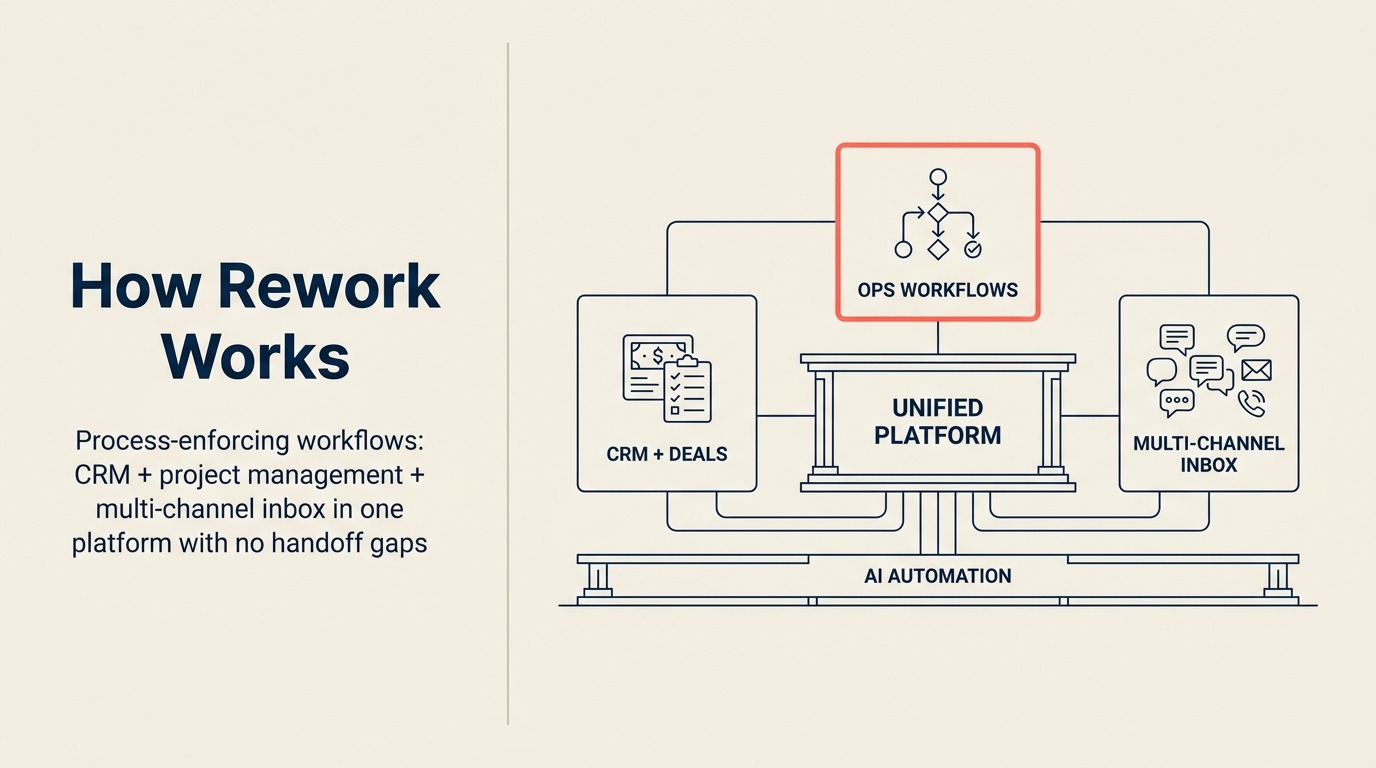
Reworkはこのリストのほとんどのツールとは異なる形でプロジェクトとオペレーション管理にアプローチします。ほとんどのPMソフトウェアがブランクキャンバス (ボード、リスト、タスク、自分で入力) として始まるのに対して、Reworkは構造から始まります。繰り返しのオペレーションプロセスを持つチーム向けに構築されています。オンボーディングシーケンス、クライアント納品パイプライン、承認フロー、案件追跡。プラットフォームは個々の規律に任せるのではなくプロセスを強制します。
際立った機能は、CRM、マルチチャネル受信箱、workflow自動化を1つのプラットフォームに組み合わせたことです。20-200人でオペレーションを運営するほとんどのチームは、CRM、プロジェクト管理ツール、コミュニケーションハブ、自動化レイヤーを繋ぎ合わせることになります。Reworkはこの4つすべてを置き換えます。それが重要なのは、ツール間のハンドオフこそ作業が落ちる場所だからです。CRMで案件がクローズし、誰かがAsanaにプロジェクトを手動で作成し、別の人がSlackスレッドを始める。Reworkはこれらのスレッドを設計により繋ぎ続けます。
すべてのチームに適したツールではありません。作業が非常にクリエイティブまたは非構造的 (コンテンツ制作、デザイン探索、リサーチ) であれば、強制されたworkflowモデルが制約に感じられる可能性があります。また、エンジニアリングツールでもありません。Jiraスタイルのsprintや課題キューをここでは管理しません。
| 得られるもの | 得られないもの |
|---|---|
| 1つのプラットフォームのCRM + プロジェクト管理 | ブランクキャンバスの柔軟性 |
| クライアントコミュニケーションのためのマルチチャネル受信箱 | 深いコード/エンジニアリングworkflowサポート |
| ステップをスキップさせないプロセス強制workflow | 大規模なサードパーティ連携ライブラリ |
| 1つのdashboardでの部門横断オペレーション可視性 | セルフサービスのスタートアップ価格 |
料金: 年払いで$6/ユーザー/月から。(rework.com/pricing)
最適な用途: CRMとプロジェクトworkflowを同一システムで管理したいオペレーションチーム、RevOps、クライアント納品チーム、ミッドサイズ企業。
2. Asana: 目標とPortfoliosを持つ成熟したPM
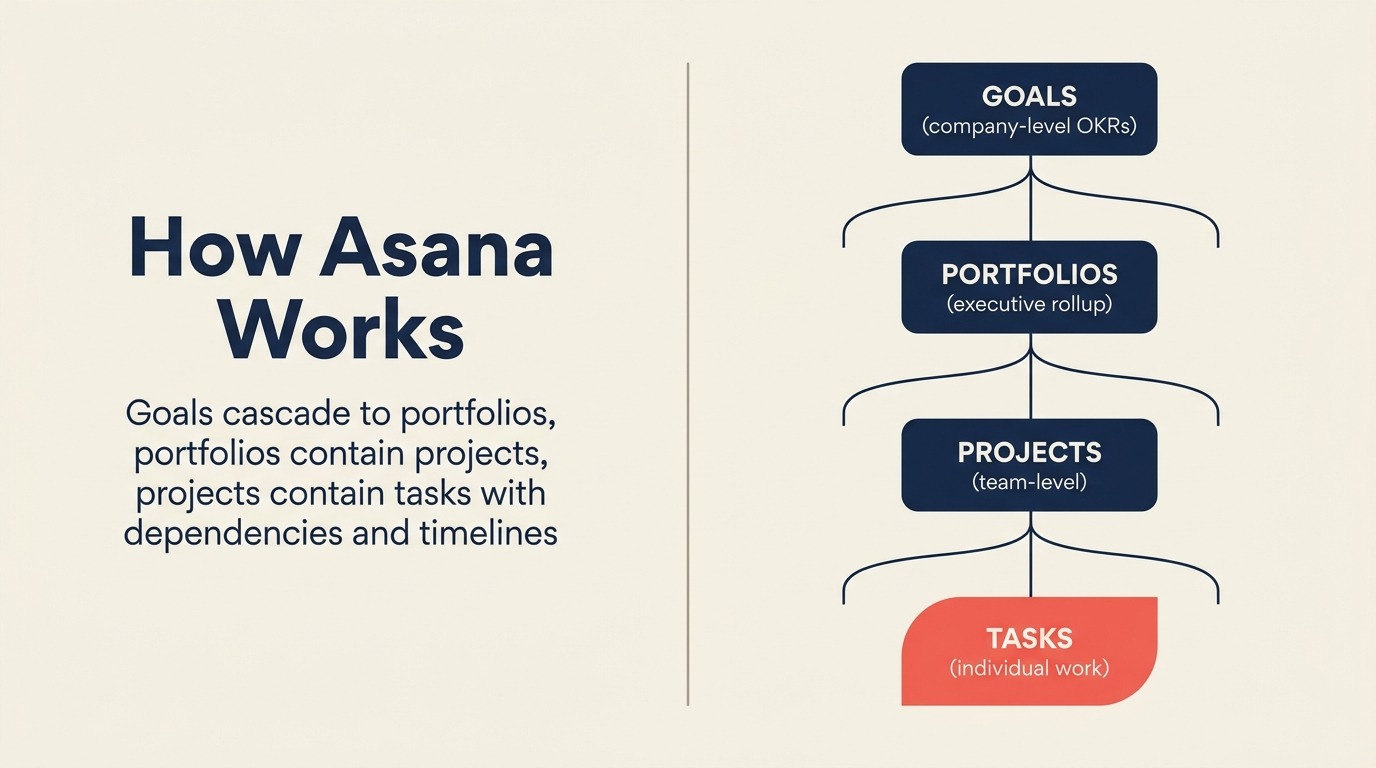
Asanaは2008年からプロジェクト管理を洗練させ続けており、それが伝わります。2026年時点で、市場で最も成熟したツールの1つです。タスク管理、プロジェクトタイムライン、依存関係、ワークロード管理、Goals (リアルタイム進捗追跡付きのOKR)、Portfolios (複数プロジェクトの役員ロールアップビュー) がすべてネイティブで構築されています。UXはクリーンで一貫しており、何十人ものチームメンバーをオンボーディングするスケールでは重要です。
Goals機能は特に言及に値します。ほとんどのPMツールはOKRを後付けとして追加します。AsanaはそれらをタスクグラフにBuilt-inします。目標をプロジェクトに、プロジェクトをタスクに接続し、リアルタイムの進捗が階層を通じてロールアップされるのを見ます。個人の作業を会社レベルの成果に結びつけようとしている企業にとって、これは本当に役立ちます。
Asanaが苦労するのはコストと複雑さの端です。リソース管理 (ワークロードバランシング、キャパシティプランニング) は$24.99/ユーザー/月のAsana Businessの裏にあります。50ユーザーでは、これは重大です。そしてAsanaは部門横断の作業をうまく処理しますが、CRMや財務計画ツールの代替ではありません。自分のレーンを保ちます。
| 得られるもの | 得られないもの |
|---|---|
| OKRアラインメントのための成熟したGoals + Portfolios | 上位ティアなしのリソース管理 |
| 技術系でないユーザーのためのクリーンで一貫したUX | CRMまたはクライアント関係機能 |
| 強力な連携 (Slack、Salesforce、200以上のアプリ) | 定額料金 (ペルシートが急速にスケールする) |
| TimelineとDependencyビュー | 優れたモバイル体験 |
料金: 無料 (限定)、$10.99/ユーザー/月 (Premium) から、$24.99/ユーザー/月 (Business)。
最適な用途: 機能横断での構造化された目標からタスクへのアラインメントを求めるグロースステージとミッドマーケットチーム。
3. Monday.com: 最大の柔軟性を持つビジュアルWork OS
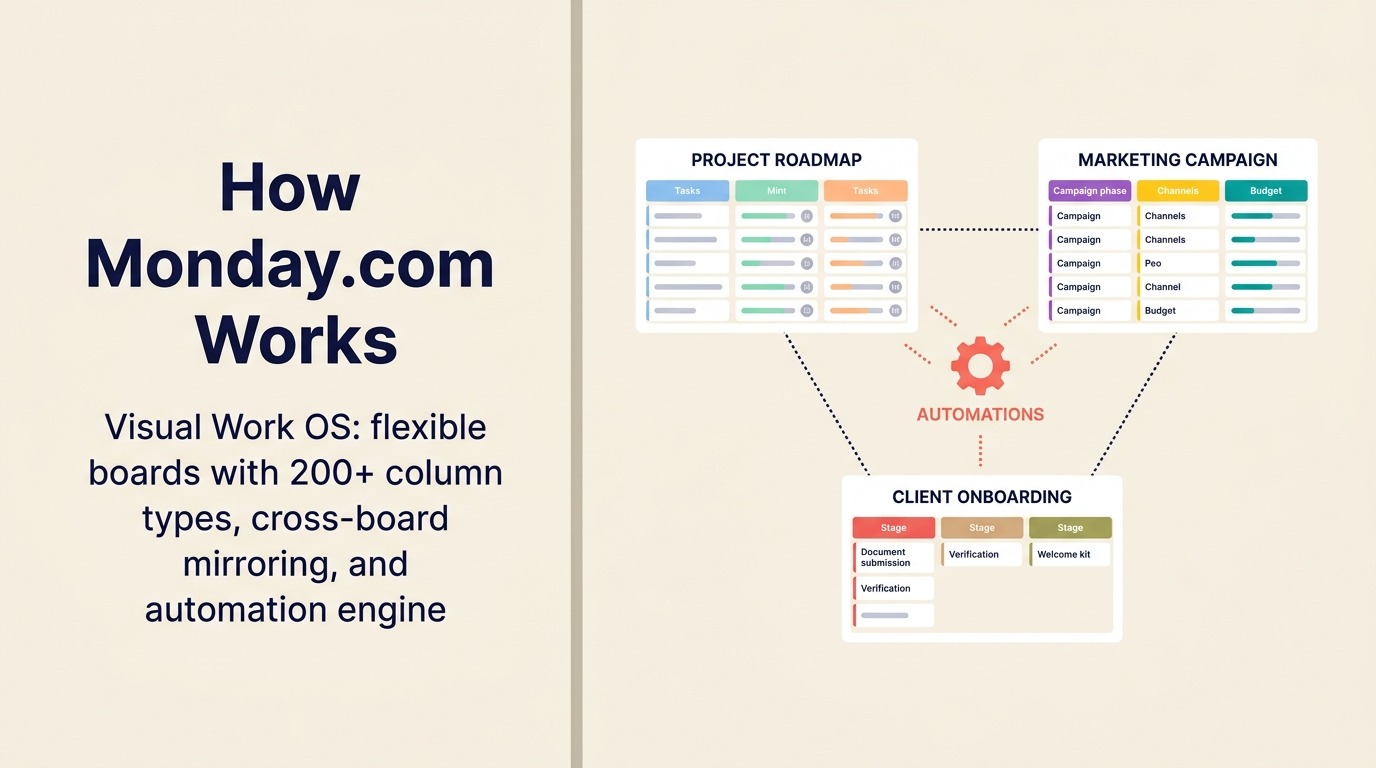
Monday.comの「Work OS」としてのポジショニングはマーケティングのかけ声ではありません。構築できるものという観点では、このリストで本当に最も柔軟なツールです。営業パイプライン、イベント計画、プロダクトroadmap、HRオンボーディング、マーケティングキャンペーン、建設スケジューリング。200以上のカラムタイプ、ボード間ミラーリング、成熟した自動化エンジンを持つボード優先モデルにより、ほぼあらゆるビジネスプロセスをモデル化できます。
dashboardは特に強みです。複数のボードにわたって集計されたチャート、数値、タイムラインビューのリアルタイムのビジュアルレポートにより、オペレーションリーダーはスプレッドシートへのエクスポートなしで意味のある可視性を得られます。自動化ビルダー (トリガー + 条件 + アクション) は技術系でないユーザーにもアクセスしやすく、複雑なマルチステップフローには十分強力です。
柔軟性はMonday.comの主なリスクでもあります。慎重なガバナンスがなければ、ワークスペースが増殖し、ボードが構造的に乖離し、システムが混乱します。Monday.comで成功するチームには通常、ワークスペースの健全性を積極的に維持するOpsまたはRevOpsロールの担当者がいます。プロ機能を重ねると、ペルシート料金も急速に積み上がります。
| 得られるもの | 得られないもの |
|---|---|
| あらゆるworkflowのための最大の構造的柔軟性 | 組み込みのガバナンスまたはプロセス強制 |
| 強力なボード横断dashboardとレポート | 専用CRM製品アドオンなしのネイティブCRM |
| 200以上のカラムタイプと自動化レシピ | スケールでの定額で予測可能な料金 |
| 一般的なユースケースのための強力なオンボーディングテンプレート | Notionほど有能なネイティブドキュメント |
料金: 無料 (2シート)、$9/シート/月 (Basic) から、$12/シート/月 (Standard)、$19/シート/月 (Pro)。
最適な用途: ビジュアルWork OSを求め、ガバナンスを行える運営上の成熟度を持つオペレーション、マーケティング、部門横断チーム。
4. ClickUp: 最も広い機能セットを持つオールインワンアプリ
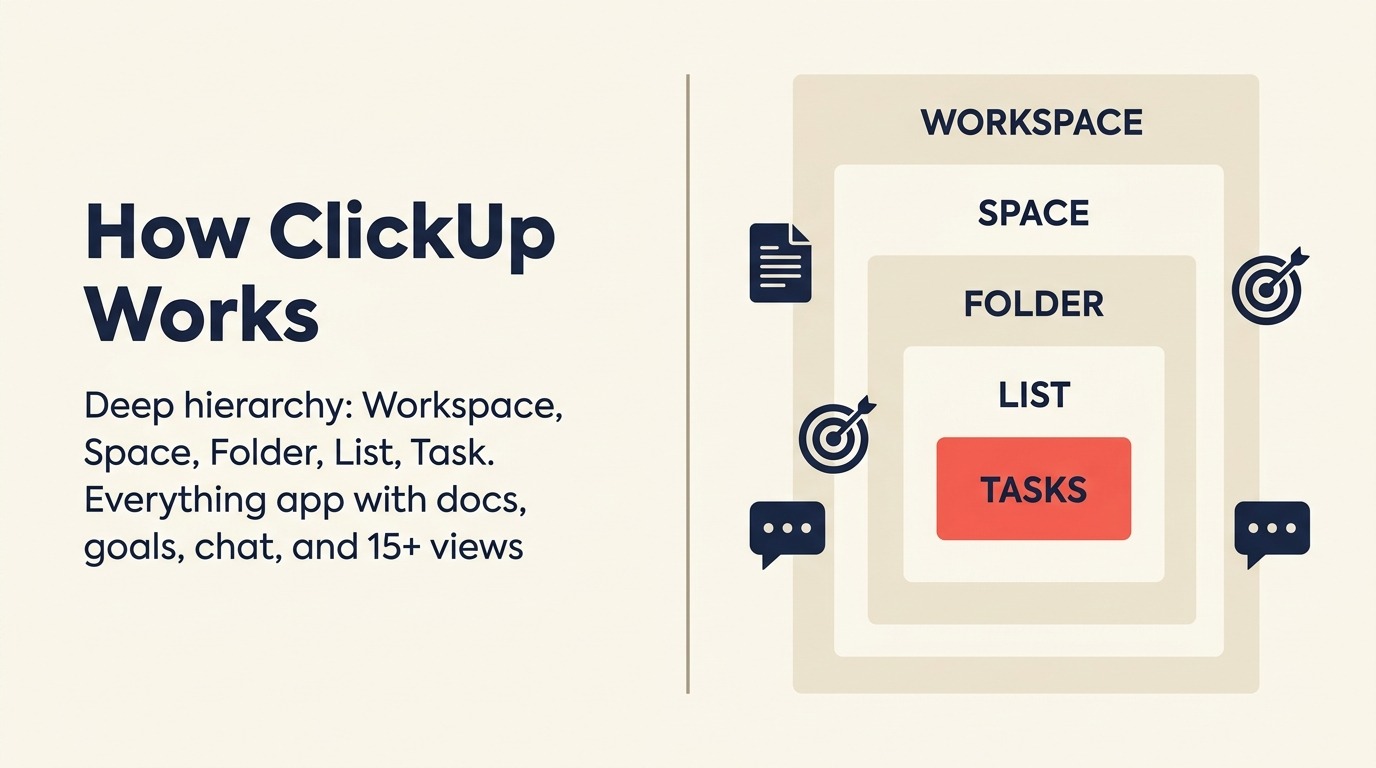
ClickUpの野心は自社のポジショニングに明示されています。すべてを置き換える1つのアプリ。2026年時点で、機能の生の数という点ではその約束に最も近いです。タスク、ドキュメント、ホワイトボード、sprint、目標、時間追跡、チャット、メール連携、AI執筆支援、リソース管理、カスタムビュー (リスト、ボード、Gantt、カレンダー、ワークロード、マインドマップ) がすべて含まれています。機能あたりのコストで選ぶチームには、これを超えるものはありません。
トレードオフは複雑さです。ClickUpの階層 (Workspace → Space → Folder → List → Task → Subtask) は強力ですが、意図的なセットアップが必要です。古いAsanaやTrelloのデータをインポートして即興で使おうとするチームは通常、1か月以内に整理されていない混乱に陥ります。意図的なClickUpのセットアップに投資するチーム (階層の定義、リストごとのステータスのカスタマイズ、繰り返し作業のための自動化の構築) は高い満足度を報告します。違いは完全に実装にあります。
ClickUpの無料プランは市場で最も充実しています。ブートストラップされたチームや初期ステージのスタートアップにとって、基本的な機能のためにアップグレードを強制されない正当な選択肢です。
| 得られるもの | 得られないもの |
|---|---|
| 最低価格で最も広い機能セット | シンプルで意見が組み込まれたセットアップ体験 |
| 小規模チームのための充実した無料ティア | 軽量なUX (重く感じる可能性がある) |
| あらゆる働き方のためのカスタムビュー | 洗練されたモバイルアプリ (デスクトップ優先) |
| プラットフォームに組み込まれたAI機能 | Business Plusプランなしのエンタープライズグレードのコンプライアンス |
料金: 無料、$7/ユーザー/月 (Unlimited) から、$12/ユーザー/月 (Business)、$19/ユーザー/月 (Business Plus)。
最適な用途: 最大限の機能カバレッジを求め、意図的なセットアップに投資する意欲があるスタートアップからグロースチーム。
5. Notion: ドキュメント + データベース + 軽量タスク管理
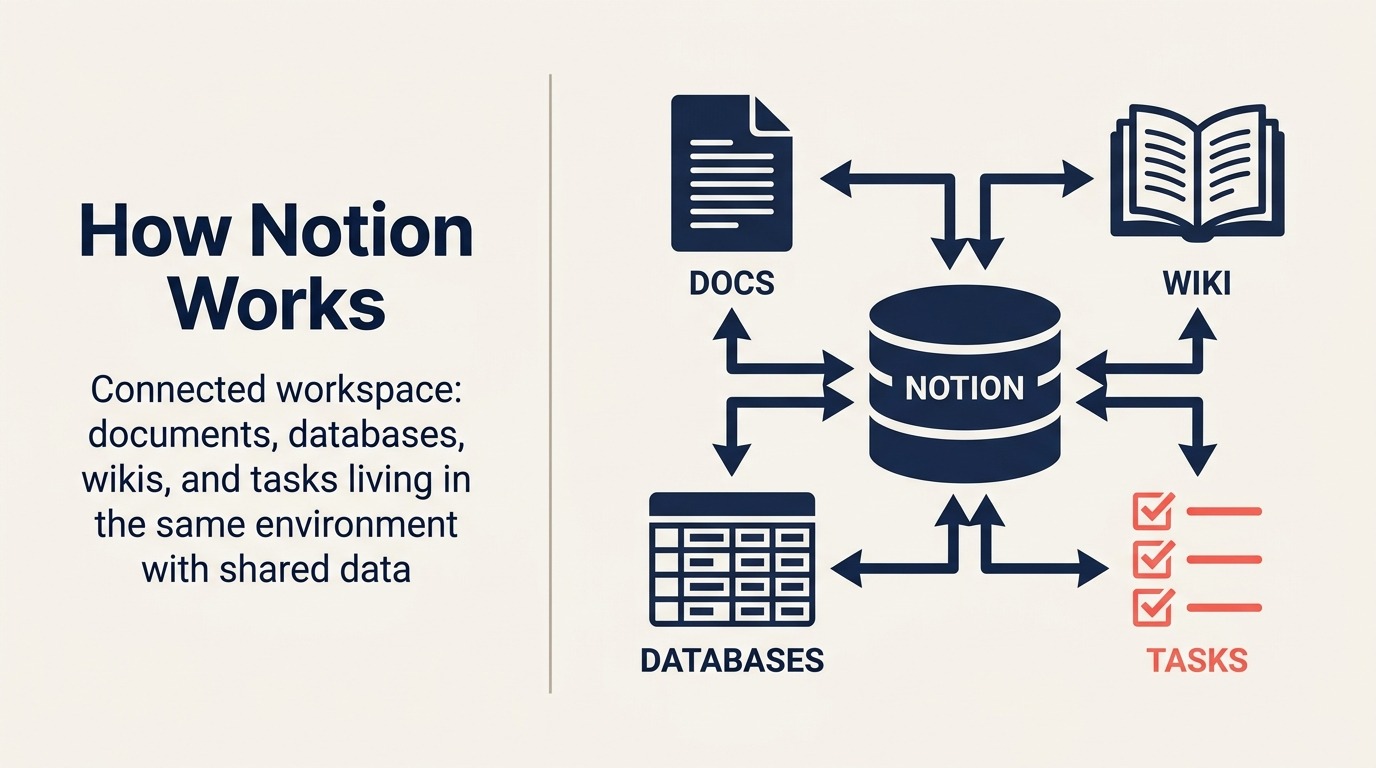
Notionは従来のプロジェクト管理ツールになろうとしておらず、それがまさに強みです。ドキュメント、データベース、Wiki、タスクが同じ環境に存在する接続されたワークスペースです。ナレッジワークチーム (プロダクト、戦略、コンテンツ、リサーチ) にとって、仕様を書き、タスクデータベースにリンクし、roadmapを埋め込み、パブリックページとして共有できる機能は本当に役立ちます。
データベースシステム (テーブル、ボード、カレンダー、ギャラリー、タイムラインがすべて同じ基盤データのビューとして) は、多くのチームの軽量なプロジェクト管理を処理するのに十分な柔軟性があります。2022年に開始され2024-25年を通じて改善されたNotion Projectsにより、適切なタスク割り当て、期日、サブタスクが追加されました。すでにNotionで主に作業するチームには、PMにも使うことでコンテキストスイッチングを避けられます。
Notionが競争しないのは複雑なプロジェクト管理です。タスク間の依存関係、リソースワークロードの可視性、クリティカルパス分析、承認workflow。ナレッジと軽量な作業を管理するための優れたシステムです。複雑なクライアントプロジェクトで20人の納品チームを運営するには無理があります。
| 得られるもの | 得られないもの |
|---|---|
| 1製品でベストインクラスのドキュメント + データベース | 複雑なタスク依存関係とGanttビュー |
| ほとんどのナレッジワークに適応する柔軟なワークスペース | ワークロードとリソース管理 |
| 執筆と要約のための強力なAI機能 | 通知管理 (ノイズが多くなる可能性がある) |
| アカウントなしのパブリックページと共有 | ネイティブの時間追跡 |
料金: 無料 (限定ブロック)、$10/ユーザー/月 (Plus) から、$15/ユーザー/月 (Business)。
最適な用途: 接続されたナレッジとタスクのワークスペースを求め、複雑なプロジェクト依存関係を必要としないプロダクト、コンテンツ、戦略チーム。
6. Wrike: エンタープライズPM + リソース管理 + クリエイティブ校正
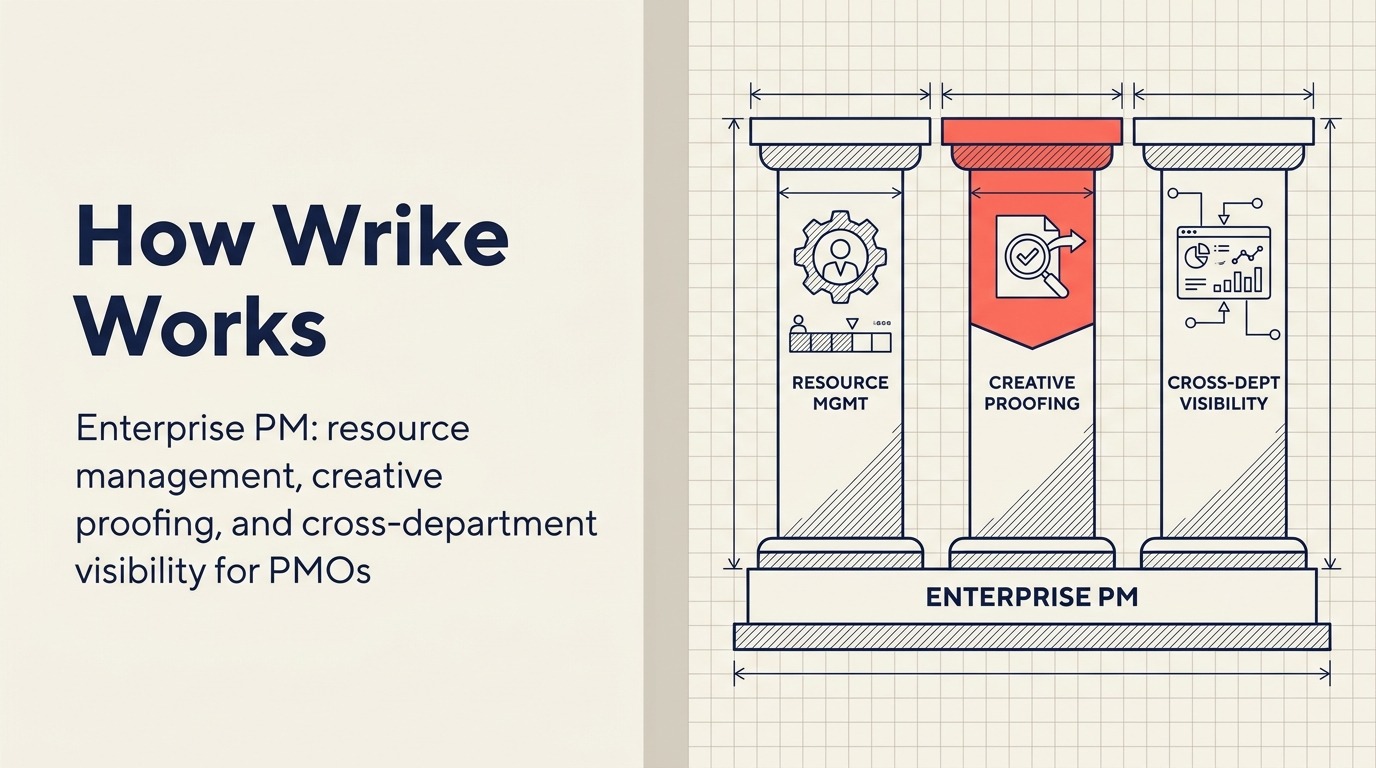
Wrikeは特定の問題をターゲットにしています。マーケティング、オペレーション、納品機能にわたって複雑なプロジェクト管理を行うエンタープライズチームが、クリエイティブ校正とリソースキャパシティプランニングも必要としている場合。3つすべてをネイティブで処理できる数少ないツールの1つであり、要件リストに「PMツール内でクリエイティブアセットのレビューと承認が必要」が含まれる場合の本格的なエンタープライズの選択肢となります。
リソース管理機能は本物です。Wrikeはプロジェクト全体にわたるチームキャパシティを表示し、過配分にフラグを立て、プロジェクトマネージャーが人々が燃え尽きる前にワークロードを再バランスできるようにします。60人のチームで20以上の同時進行プロジェクトを管理するPMOディレクターにとって、このような可視性は高価なアドオンなしにはAsanaやMonday.comのようなツールからは得るのが難しいです。
欠点は現実のものです。Wrikeは複雑です。フォルダ階層とパーミッションモデルは正しく設定するのに時間がかかります。UIは新しいユーザーにとって最も直感的ではなく、オンボーディングには通常管理の投資が必要です。50人未満のチームでは、オーバーヘッドがしばしば利点を上回ります。
| 得られるもの | 得られないもの |
|---|---|
| ネイティブのクリエイティブ校正とアセット承認 | シンプルで直感的なUI |
| 本物のリソース管理とキャパシティプランニング | 管理のオーバーヘッドなしの素早いオンボーディング |
| エンタープライズグレードのセキュリティとパーミッション管理 | 定額料金 (ペルシートが高価にスケールする) |
| プロジェクト横断レポートと役員dashboard | スタートアップまたはSMBに優しいエントリーポイント |
料金: 無料 (限定)、$9.80/ユーザー/月 (Team) から、$24.80/ユーザー/月 (Business)、高度な機能はエンタープライズ価格。
最適な用途: 1つのプラットフォームで校正 + リソース管理が必要な50-1,000人のエンタープライズマーケティングOps、PMO、クリエイティブ/納品チーム。
7. Smartsheet: PMO向けスプレッドシートネイティブ
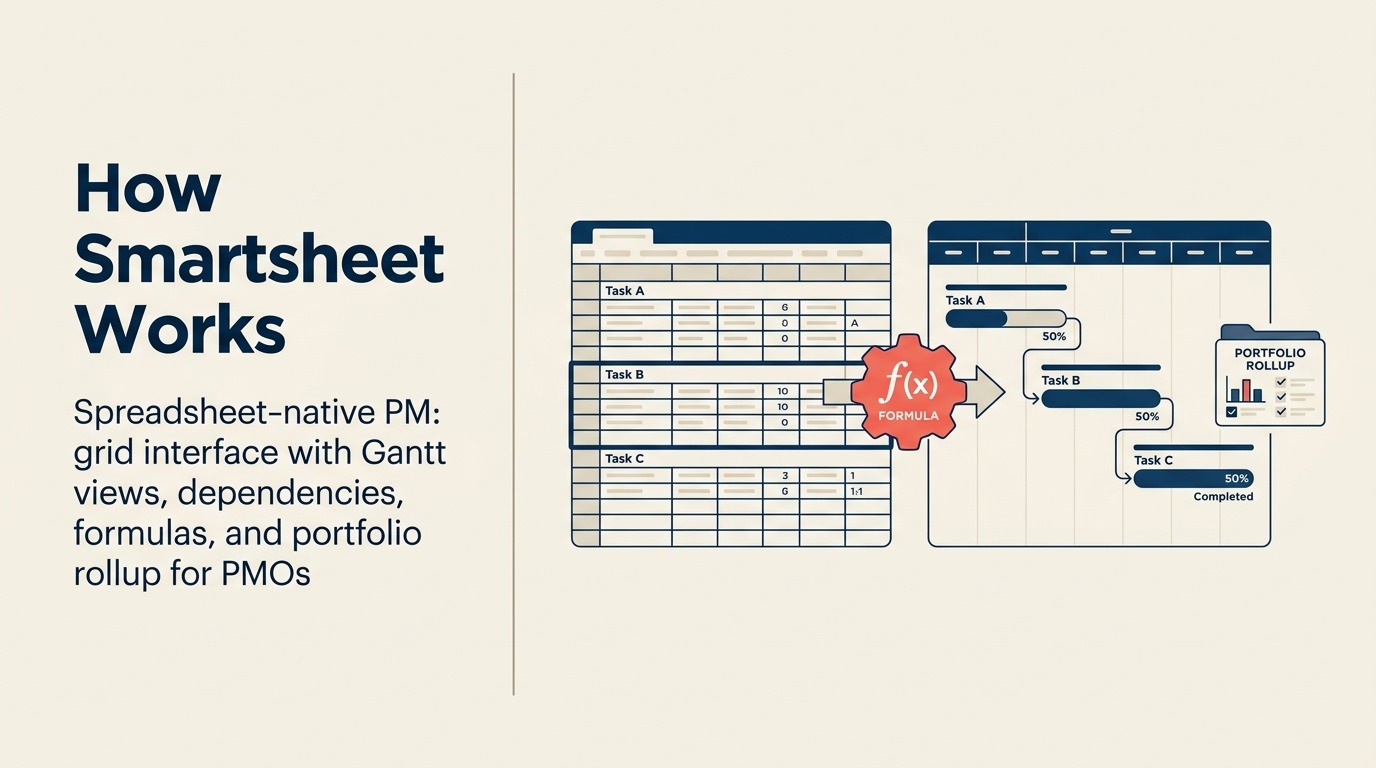
Smartsheetは特定のニッチを占めています。スプレッドシートで考えるが、その上に実際のプロジェクト管理機能が必要なチームです。コアインターフェースはグリッド (カラム、行、数式) のように見えますが、Ganttビュー、依存関係、自動化、クロスシート数式、ポートフォリオレベルのロールアップレポートを追加します。自然言語が行と列である財務、オペレーション、PMOチームにとって、これは最も快適なPMツールです。
数式エンジンは見た目以上に強力です。クロスシート参照、VLOOKUPスタイルのリンク、レポート集計により、SmartsheetはチームがかつてExcelで手動で維持していた複雑なモデルを置き換えられます。自動化 (アラート、更新リクエスト、承認workflow) は、スケールでPMOの効率を損なう手動のフォローアップを削減します。
Smartsheetはアジャイルソフトウェアチームには適していません。sprintの計画なし、課題キューなし、エンジニアリングチームを満足させるGitHub連携なし。高度にビジュアルな作業やKanban優先のworkflowにも最適ではありません。しかし、Excelが共通言語である組織で資本プロジェクト、ITガバナンス、または運営計画を管理するプログラムマネージャーには、最も強力な選択肢です。
| 得られるもの | 得られないもの |
|---|---|
| 本物のPM機能を持つスプレッドシートネイティブUX | モダンなKanbanまたはアジャイル優先の体験 |
| 強力なクロスシート数式とレポート集計 | クリエイティブまたはナレッジワークへの適合 |
| 承認workflowと自動更新リクエスト | スプレッドシート以外のユーザーへの直感的なUI |
| エンタープライズグレードのセキュリティとコンプライアンス | スタートアップに優しい料金 |
料金: $9/ユーザー/月 (Pro) から、$19/ユーザー/月 (Business)。Enterpriseの価格あり。
最適な用途: スプレッドシートをネイティブで使う20-5,000人の組織のPMO、財務隣接のオペレーションチーム、プログラムマネージャー。
8. Trello: 小規模チーム向けシンプルなKanban
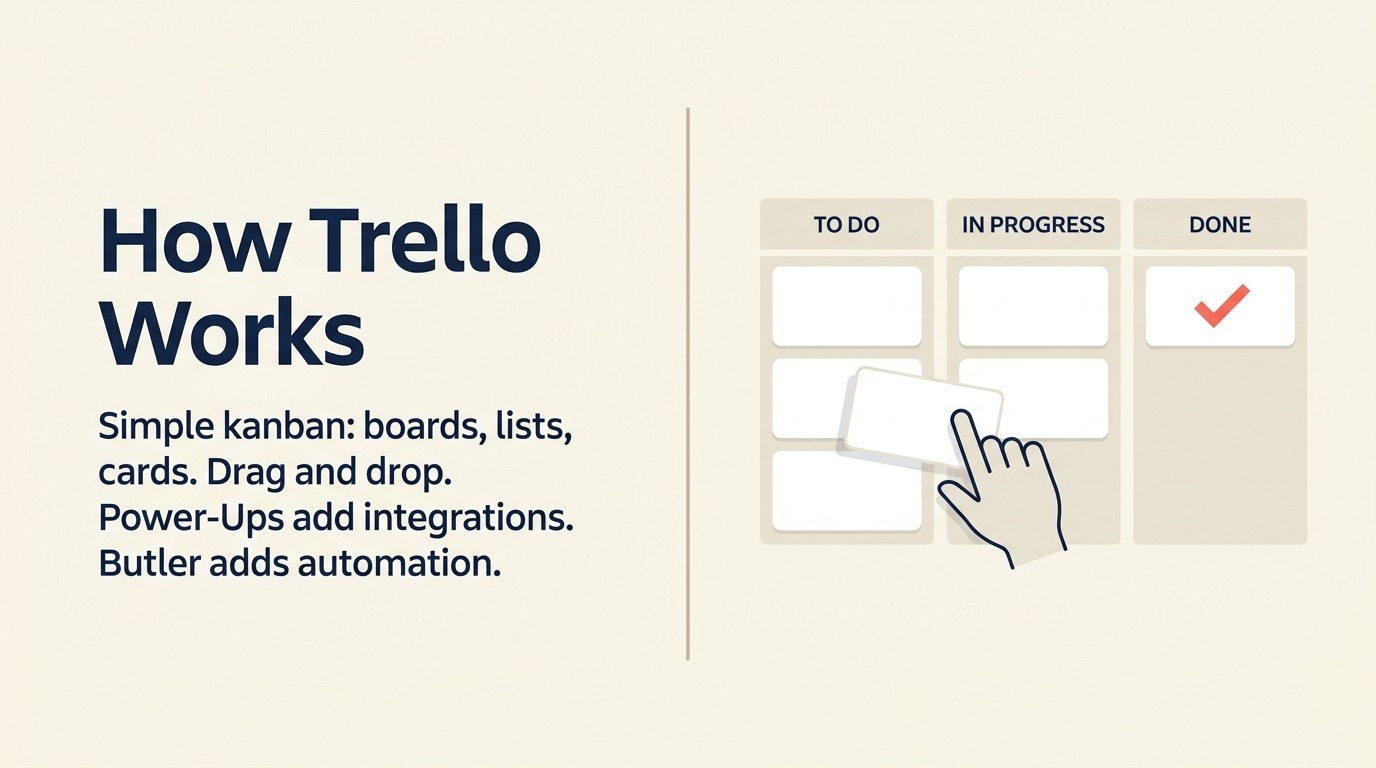
TrelloはKanbanが何であるかを世代のチームに教えたツールです。カードは列間 (To Do、進行中、完了) を移動し、誰もが何が起きているかを見られます。「これを整理する必要がある」から「整理できた」まで、トレーニング不要でチームを運ぶ最速のツールです。
2026年時点で、Trelloは集中したニーズへの集中したツールとして最もよく理解されます。シンプルなworkflowの小規模チーム、個人プロジェクト追跡、軽量なコンテンツカレンダー、個人タスク管理。Power-Upsシステム (連携と追加機能) はTrelloを意味のある形で拡張しますが、ある時点で拡張機能がベース製品を上回ります。
正直な現実: 依存関係、レポート要件、リソース制約を持つ複雑なプロジェクトで2-3人以上を管理しているなら、Trelloの限界に達します。そして達したとき、Trelloからの移行は簡単です。これはエクスポートが最も簡単なツールの1つだからです。
| 得られるもの | 得られないもの |
|---|---|
| このリストで最速のオンボーディング | 複雑なプロジェクト依存関係またはGantt |
| クリーンで直感的なKanbanボード | ワークロードの可視性またはリソース管理 |
| シンプルなマルチカラムworkflowには十分 | 基本的なカード数を超えるレポート |
| 本当に役立つ無料プラン | シンプルなタスク追跡を超えた成長の余地 |
料金: 無料 (無制限カード)、$5/ユーザー/月 (Standard) から、$10/ユーザー/月 (Premium)。
最適な用途: シンプルなビジュアルworkflowニーズを持つ個人、フリーランサー、小規模チーム (1-15人)。
9. Basecamp: コミュニケーション優先の意見が組み込まれたシンプルさ
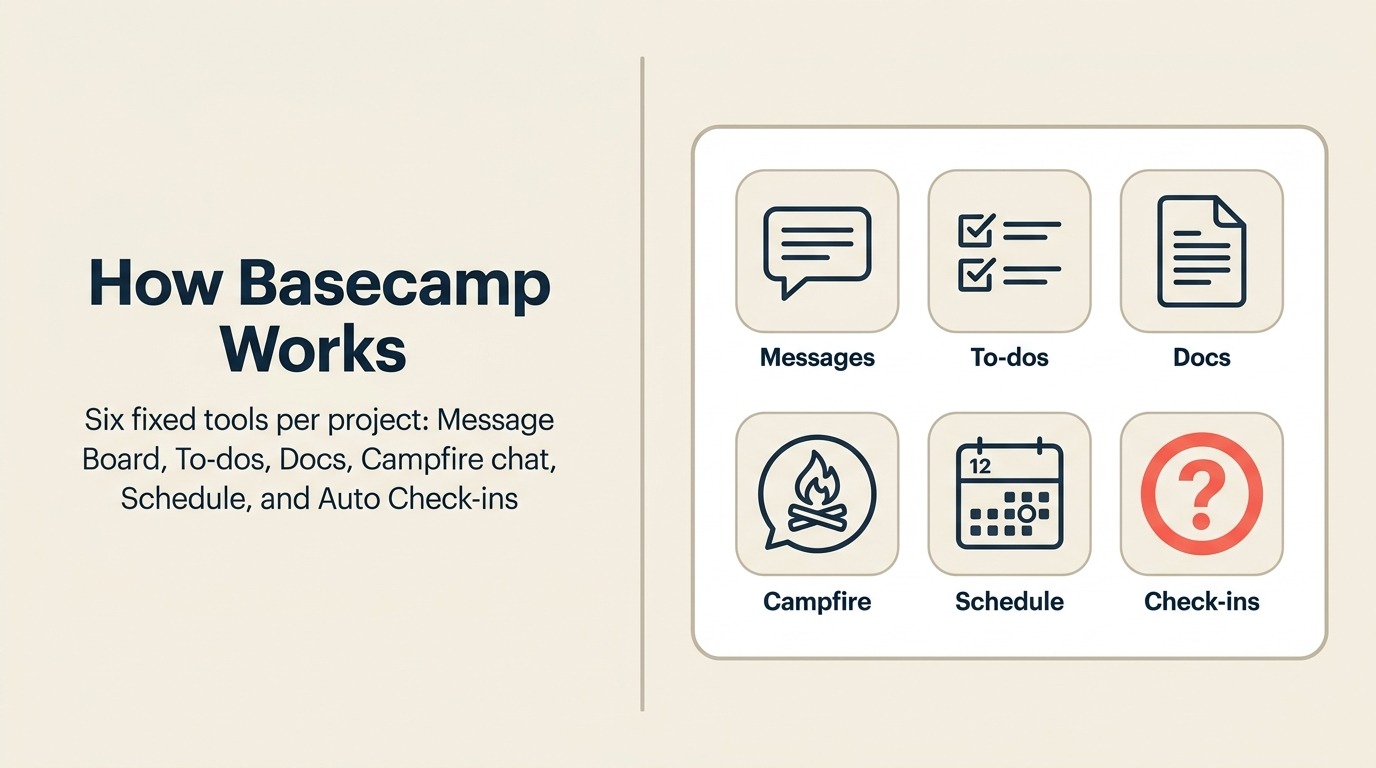
Basecampの哲学は、ほとんどのプロジェクト管理ツールは複雑さを減らすのではなく生み出す機能マシンだというものです。Basecampはその反対に賭けます。機能を少なく、デフォルトを良くし、ミーティングなしに全員が同じページにいられるコミュニケーション優先モデルです。
各Basecampプロジェクトには同じ6つのツールが付きます。メッセージボード (非同期アナウンス)、To-Dos (タスクリスト)、ドキュメントとファイル、Campfire (グループチャット)、スケジュール、自動チェックイン (繰り返しステータスプロンプト)。それだけです。カスタムビューなし、複雑な自動化なし、リソース管理なし。制約がポイントです。全員がすべてがどこにあるかを正確に把握しています。
定額料金 ($15/ユーザー/月、または無制限ユーザーへの月額$299) により、Basecampは大規模チームには珍しく経済的です。50人チームは月$299で10人チームと同じ料金を払います。これは難しい。しかしBasecampの意見が組み込まれた構造はその限界でもあります。カスタムworkflow、データエクスポート、またはCRMとの連携が必要なチームには不満に感じるでしょう。
| 得られるもの | 得られないもの |
|---|---|
| 機能の肥大化を防ぐ意見が組み込まれたシンプルさ | 柔軟性またはカスタマイズ |
| スケールでユーザーあたり安くなる定額料金 | 複雑なプロジェクト依存関係またはレポート |
| 組み込みの非同期コミュニケーション (メール減少、ミーティング削減) | リソース管理またはワークロードの可視性 |
| 全員が理解できる明確な情報階層 | 幅広い連携ライブラリ |
料金: $15/ユーザー/月から、無制限ユーザーには月額$299定額 (Basecamp Pro Unlimited)。
最適な用途: 非同期優先のコミュニケーションとシンプルなプロジェクト構造を求める小中規模チーム (5-50人)、代理店、リモートファーストの企業。
10. Airtable: データベース優先の構造化された作業
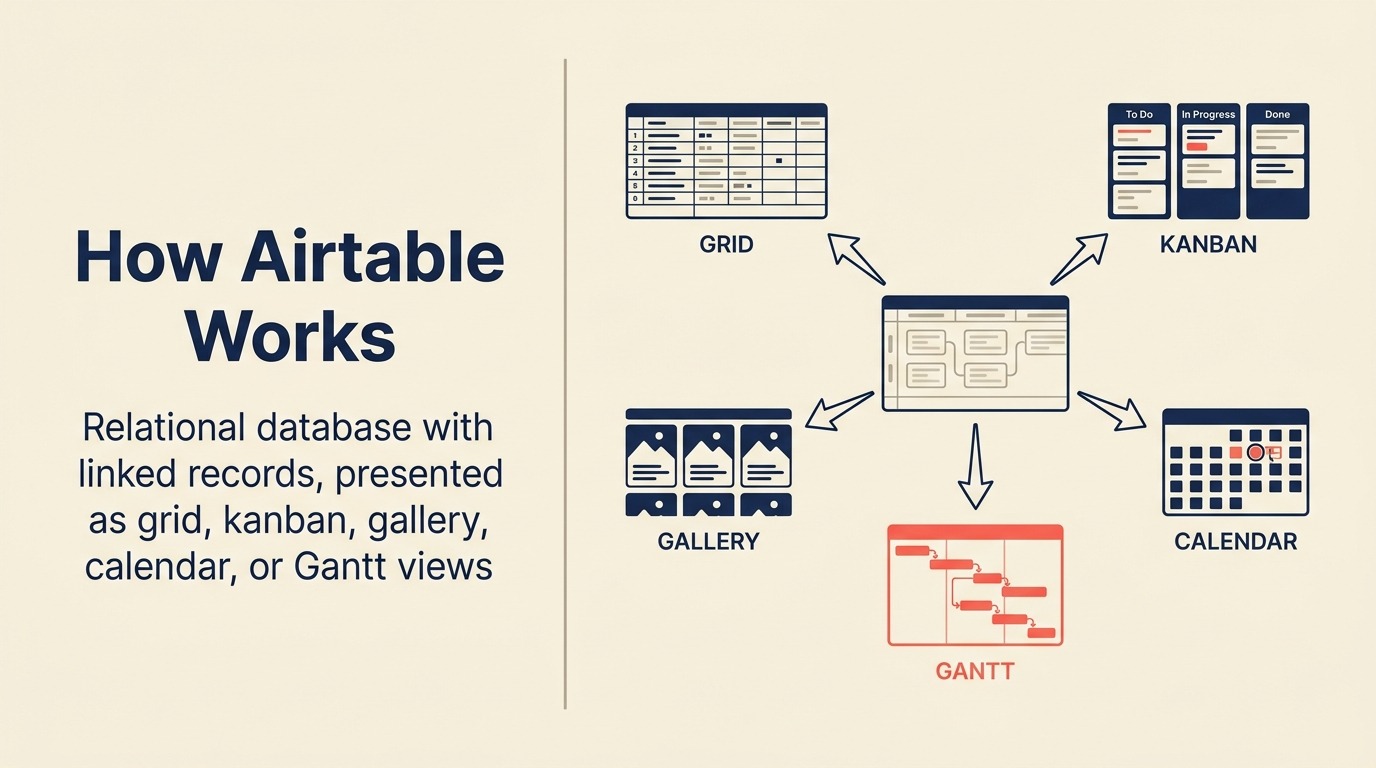
Airtableはスプレッドシートとデータベースの間のスペースを占めています。すべてのテーブルはリンクされたレコード、ロールアップ数式、ルックアップフィールドを持つリレーショナルデータベースですが、スプレッドシートのように感じるグリッドで表示されます。複数のビュー (グリッド、Kanban、ギャラリー、カレンダー、Gantt、フォーム) により、異なるチームメンバーが同じ基盤データを自分に合った形式で見られます。
Airtableの力はカスタムオペレーションシステムにあります。プロダクトチームはroadmapとsprintデータにリンクされた機能トラッカーを構築します。オペレーションチームはリンクされた契約と連絡先を持つベンダー管理システムを構築します。マーケティングチームはマスタープランニングデータベースにロールアップするキャンペーントラッカーを構築します。これらは他の場所ではカスタムソフトウェアや高価なバーティカルツールが必要なものです。
Airtableの課題はその強みと同じです。設定が必要です。新しいAirtableユーザーはツールを開いて即座に便利なプロジェクトマネージャーを見るわけではありません。ブランクデータベースを見ます。Airtableのセットアップに投資するチーム (テーブルの構築、データのリンク、ビューの作成) は高い満足度を報告します。そうでないチームは通常60日以内に離れます。
| 得られるもの | 得られないもの |
|---|---|
| スプレッドシートに優しいUXのリレーショナルデータベースパワー | すぐに使えるプロジェクト管理セットアップ |
| 同じデータの複数ビュー (Kanban、カレンダー、Gantt) | シンプルで意見が組み込まれた構造 |
| マルチステップworkflowのためのAirtable Automations | 優れたモバイル体験 |
| 関係者向けのインターフェース (カスタムアプリライクなdashboard) | Notionのような共同ドキュメント |
料金: 無料 (限定レコード)、$20/ユーザー/月 (Team) から、$45/ユーザー/月 (Business)。Enterpriseの価格あり。
最適な用途: カスタムの構造化された作業システムを構築したいデータ駆動のオペレーション、プロダクト、マーケティングチーム (5-300人)。
11. Linear: モダンな課題追跡、エンジニアリングを超えて拡大
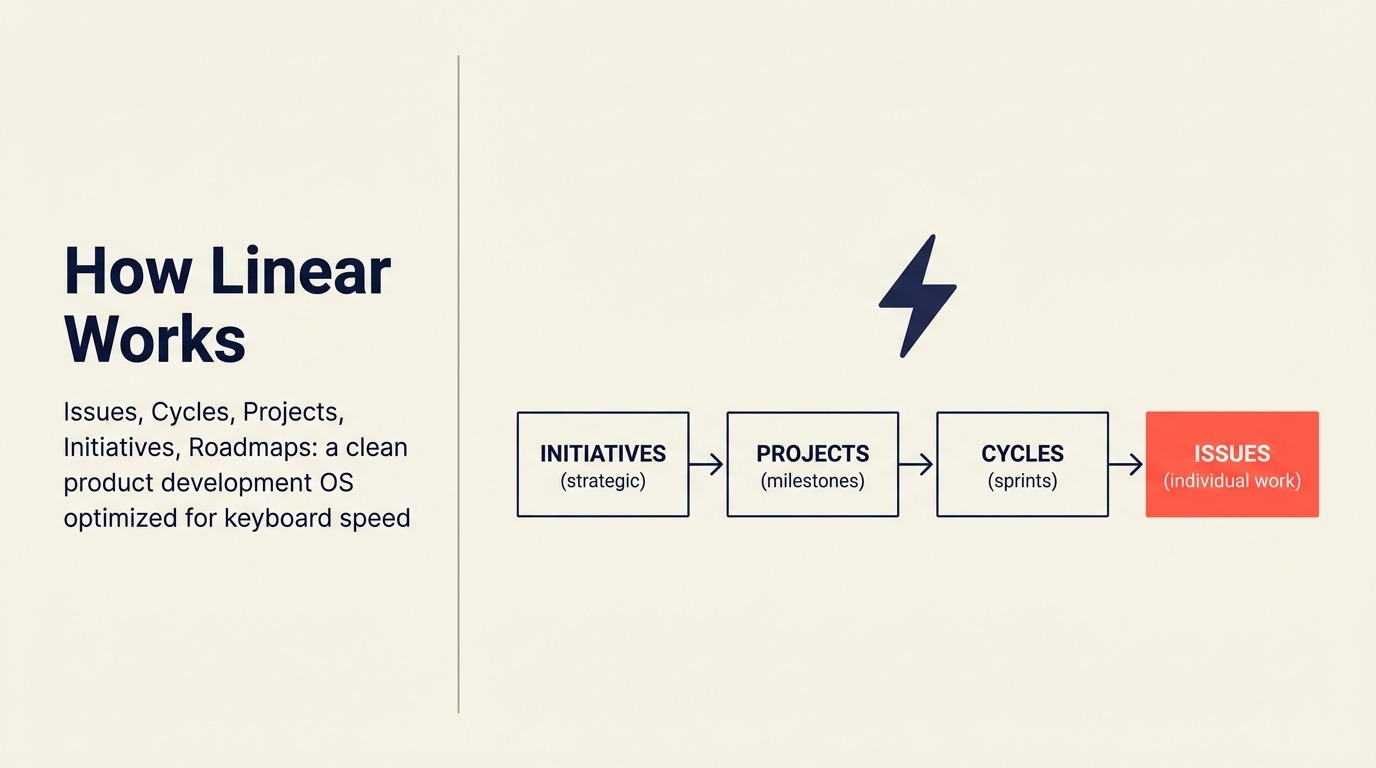
Linearは2019年に1つのミッションで立ち上げました。課題追跡をテキストエディタで作業するように速く感じさせること。すべてのキーボードショートカット、ほぼ瞬時のロード時間、設定不要のクリーンで意見が組み込まれたUI。Jiraから来るソフトウェアとプロダクトチームにとって、体験は足から重りを外すように感じました。
2026年時点で、Linearは純粋なエンジニアリング課題追跡からより広いプロダクト開発管理へと拡大しました。サイクル (sprint)、プロジェクト (テーマとマイルストーン)、イニシアチブ (戦略的な賭け)、roadmap (何がいつ出荷されるかのビジュアルタイムライン) が今や一貫したプロダクト開発オペレーティングシステムを形成しています。一部のグロースステージ企業はLinearをプロダクトとエンジニアリング横断の主要PMツールとして使っています。
Linearがなっていない、またはなろうとしていないのは、マーケティング、営業、HR、またはオペレーションのためのツールです。データモデル (課題、サイクル、チーム) はソフトウェア開発を中心に構築されています。すべての部門で機能する1つのPMツールが必要なら、Linearではありません。テクノロジー優先チームのための最速でクリーンなツールが欲しいなら、これに勝るものは難しいです。
| 得られるもの | 得られないもの |
|---|---|
| 市場で最速でキーボードに優しいUI | 技術系でないチームのための部門横断サポート |
| プロダクト/エンジニアリングにうまく機能する意見が組み込まれた構造 | 複雑なリソース管理 |
| 戦略的可視性のためのroadmapとイニシアチブ | 広いカスタマイズオプション |
| 強力なGitHubとGitLab連携 | 幅広いサードパーティ連携ライブラリ |
料金: 無料 (最大250課題)、$8/ユーザー/月 (Standard) から、$14/ユーザー/月 (Plus)。
最適な用途: エンタープライズの複雑さなしにスピードと構造を求めるソフトウェアチーム、プロダクトエンジニアリング組織、テクノロジー優先スタートアップ。
12. Jira: エンタープライズ規模でのエンジニアリング優先
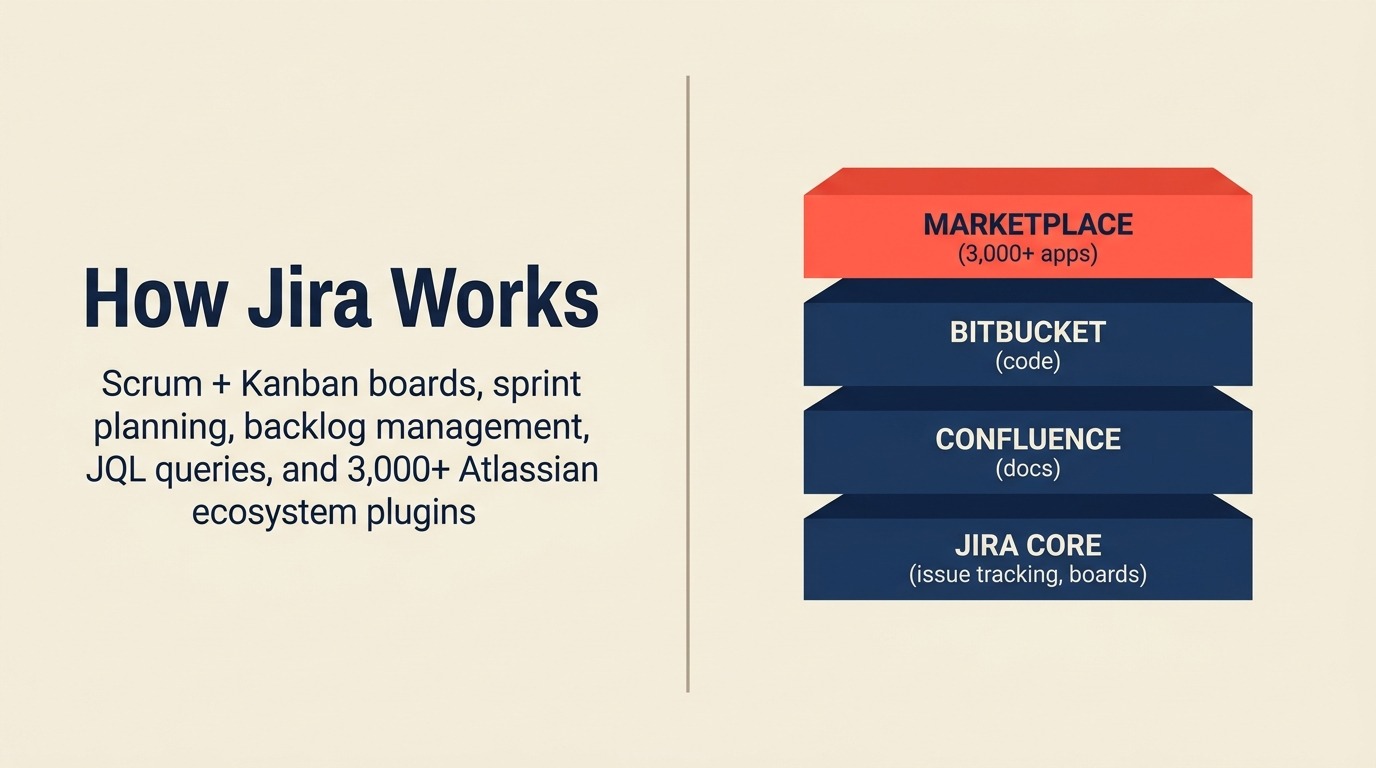
Jiraはソフトウェアエンジニアリングプロジェクト管理のカテゴリを定義するツールです。Scrumボード、Kanbanボード、sprintの計画、backlog管理、ベロシティチャート、バーンダウンレポート、高度なJQL (Jira Query Language) フィルタリング、3,000以上のアプリを持つプラグインエコシステム。フォーマルなAgileプロセスを実行するエンジニアリング組織にとって、Jiraはデフォルトです。このユースケースのために特別に設計され、20年の改善を経ているからです。
AtlassianエコシステムはJiraの価値を増幅します。ドキュメント向けのConfluence、コード向けのBitbucket、インシデント管理向けのOpsgenie、軽量作業向けのTrelloがすべてネイティブで統合されます。すでにAtlassianを標準化しているエンジニアリング組織にとって、Jiraに統合するのは論理的な選択です。
しかし、Jiraの弱点はよく知られています。複雑な管理、レガシー感が完全には払拭されていないUI、技術系でないユーザー間でのほぼ普遍的な不満。役員に部門横断の可視性を提供するためにJiraインスタンスに追加されたマーケティング、HR、財務チームは通常フラストレーションで反応します。Jiraは優れたエンジニアリングツールですが、たまたま貧弱な汎用PMツールでもあります。
| 得られるもの | 得られないもの |
|---|---|
| ソフトウェアチームのための最も深いScrum/Kanban | 技術系でないユーザーへの親しみやすいUX |
| 巨大なAtlassianエコシステム連携 | 管理投資なしの素早いセットアップ |
| 複雑なフィルタリングのための高度なJQL | エンジニアリングを超えた部門横断の魅力 |
| Atlassian Marketplaceの3,000以上のプラグイン | 大規模での手頃な料金 |
料金: 無料 (最大10ユーザー)、$8.15/ユーザー/月 (Standard) から、$16/ユーザー/月 (Premium)。Enterpriseの価格あり。
最適な用途: AtlassianスタックでフォーマルなAgileプロセスを実行する10-10,000人以上のエンジニアリング組織。
13. Teamwork: 請求機能付きの代理店・クライアントサービスPM
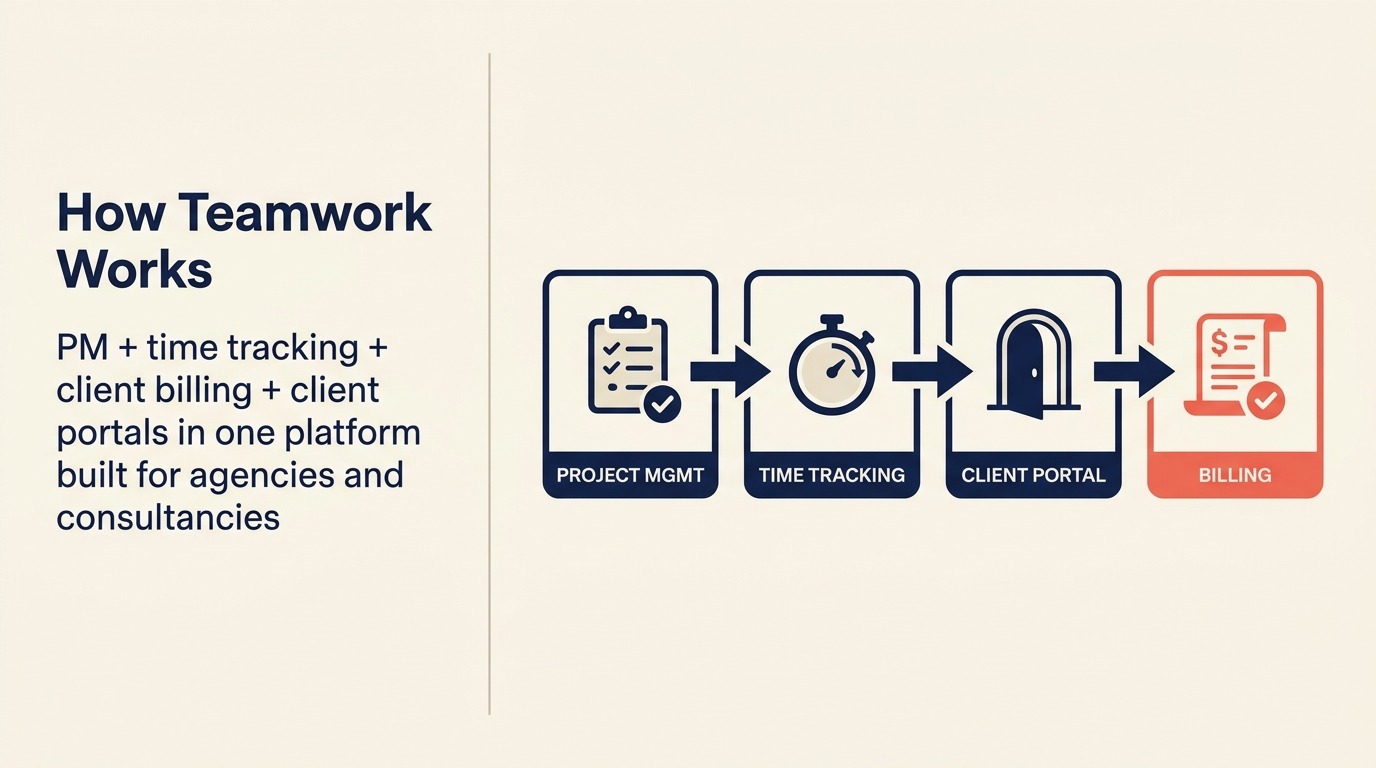
Teamworkは特定の、あまり対応されていないユースケースのために構築されています。プロジェクト管理とクライアント請求を同一プラットフォームで必要とする代理店、コンサルタント、専門サービス企業です。プロジェクトに対する時間追跡、請求可能時間レポート、外部可視性のためのクライアントポータル、リテイナー管理、請求書連携がすべて組み込まれています。このリストの他のツールはこれらすべてをネイティブで処理しません。
10-30件の同時進行クライアントプロジェクトを運営する代理店にとって、タスクを管理する同じツール内でプロジェクトの収益性 (予算時間 vs 追跡実時間、請求可能 vs 非請求可能時間) を見られる機能は本当に価値があります。代替手段は別個の時間追跡ツール、別個の請求システムを維持し、毎月手動で突き合わせることです。
トレードオフは、Teamworkが社内のみのチームには必要以上に重いことです。クライアントがいない場合、請求と時間追跡機能は使わずに料金を払うオーバーヘッドです。純粋に社内プロジェクトを運営するチームは、Asana、Monday.com、またはClickUpにより低コストでより良く対応されます。
| 得られるもの | 得られないもの |
|---|---|
| ネイティブの時間追跡と請求可能時間レポート | 軽量で速い体験 |
| 外部プロジェクト可視性のためのクライアントポータル | 社内のみのチームへの最適 |
| リテイナー管理と予算追跡 | モダンでミニマルなUI |
| プロジェクト収益性レポート | 幅広いAIネイティブ機能 |
料金: 無料 (限定)、$10.99/ユーザー/月 (Starter) から、$19.99/ユーザー/月 (Deliver)、$54.99/ユーザー/月 (Grow)。
最適な用途: 時間またはプロジェクト単位でクライアントに請求する代理店、コンサルタント、専門サービス企業 (5-200人)。
14. Coda: 数式パワーを持つドキュメント-アズ-アプリ
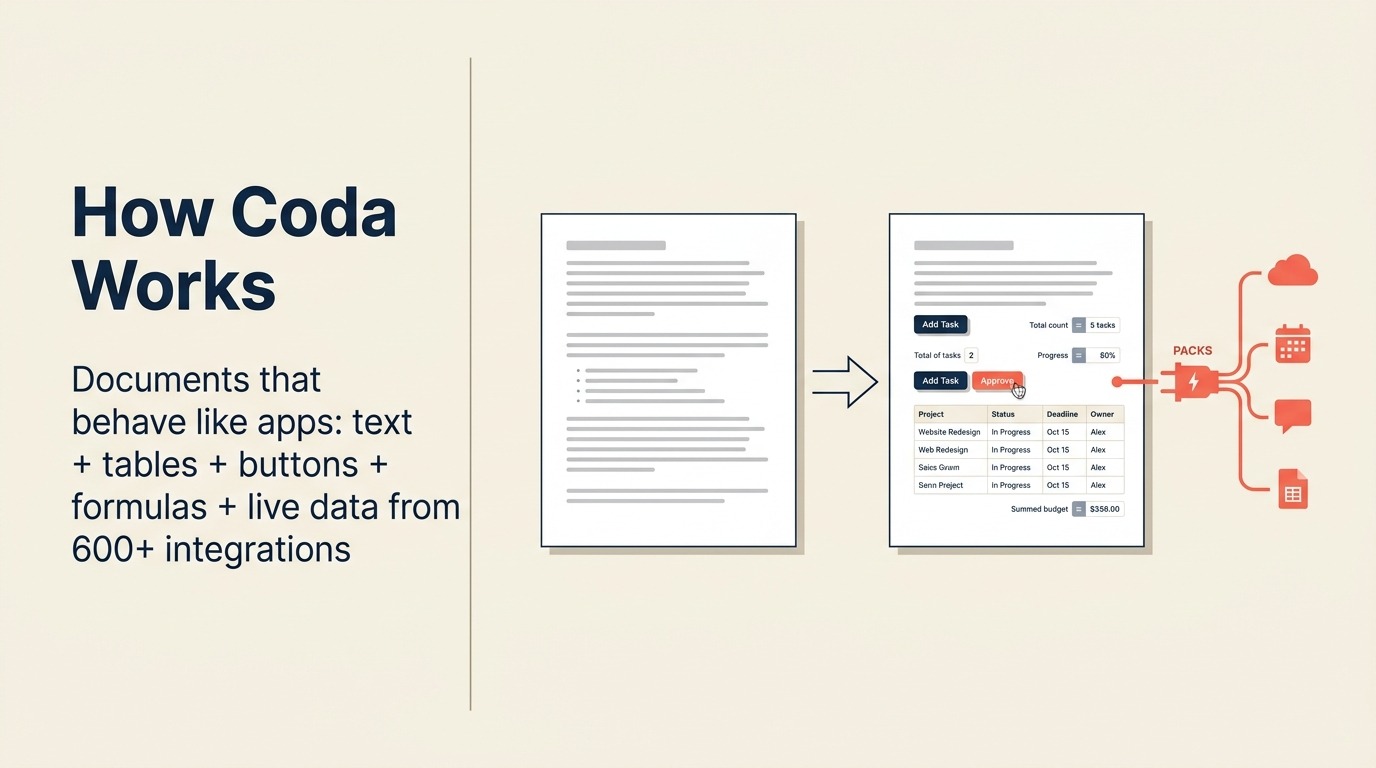
Codaのコアとなる洞察は、ドキュメントとスプレッドシートは同じものであり、両方ともプログラマブルであるべきだというものです。Codaのドキュメントはテキスト、テーブル、ボタン、条件ロジック、クロスドキュメントデータ同期、Coda Packs (Salesforce、GitHub、Jira、600以上の他のツールからライブデータを取り込む連携) を含めることができます。結果は、他の場所ではカスタムソフトウェアを必要とするアプリケーションを構築できるツールです。
最も強力なCodaのユースケースはオペレーションです。GitHubから課題とJiraのroadmapアイテムを同期するプロダクト開発トラッカーの構築、またはCRMデータ、マーケティングパイプラインのメトリクス、営業担当者のパフォーマンスを1つのインタラクティブなドキュメントに引き込むRevOpsコマンドセンター。Chief of Staffロール、戦略チーム、現在複数のスプレッドシートとdashboardを維持しているRevOps担当者がCodaの自然な採用者です。
習得の難易度は現実のものです。Codaの数式システムはNotionより複雑で、メンタルモデル (アプリとしてのドキュメント) は調整が必要です。Codaにオールインして数式システムを学ぶことに投資するチームは通常熱狂者になります。シンプルなメモ取りツールとして使おうとするチームはその力に混乱します。
| 得られるもの | 得られないもの |
|---|---|
| アプリのように動作する数式で動くドキュメント | 速く低オーバーヘッドのオンボーディング |
| ライブデータ連携のための600以上のPacks | シンプルなKanban優先のタスク管理 |
| クロスドキュメントデータ参照と同期 | 標準PMのためのすぐに使えるテンプレート |
| ドキュメント内のボタンとインタラクティブ要素 | 強力なモバイル体験 |
料金: 無料 (限定ドキュメントサイズ)、$10/ユーザー/月 (Pro) から、$30/ユーザー/月 (Team)。Enterpriseの価格あり。
最適な用途: コードを書かずにカスタムオペレーションアプリを構築したいRevOps、戦略、オペレーションチーム (5-200人)。
15. Height: AIネイティブのプロジェクトトラッカー
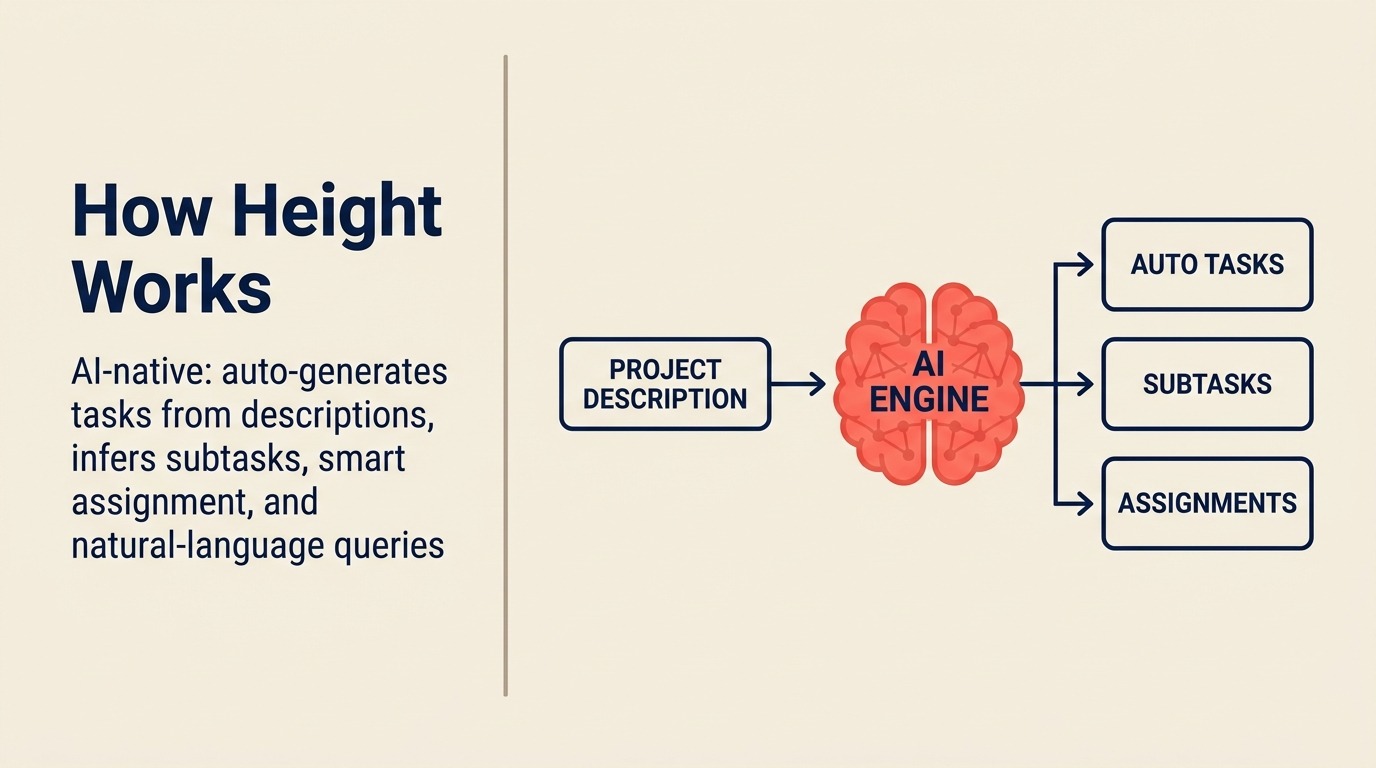
Heightはこのリストで最も新しい参入者であり、AIをアドオンではなくコア製品機能として賭けることに最も明示的です。プロジェクト説明からのタスク生成、自動サブタスク推論、過去のパターンに基づくスマート割り当て、AIによるステータスサマリー、作業を見つけるための自然言語クエリインターフェースがすべて最初から組み込まれています。仮説はAIがプロジェクト管理システムを維持するオーバーヘッドを30-50%削減できるというものです。
実際には、Heightは深いエンタープライズ管理を必要とせず速く動きたい小規模でテクノロジー先進のチームにうまく機能します。UIはモダンでクリーンです。AI機能はタスク作成とステータスレポートの繰り返し作業を本当に削減します。しかし連携ライブラリは確立されたツールより薄く、プラットフォームはまだ成熟中で、SSO、監査ログ、コンプライアンス認証が必要なエンタープライズ購買者は製品が追いつくのを待つべきです。
Heightは50人未満のアーリーアダプターチームが実験を実行したい場合に評価する価値があります。AIファーストのプロジェクト管理はチームの働き方を変えるのに十分な摩擦を削減できるか? 安定性と幅が必要な大規模チームには時期尚早です。
| 得られるもの | 得られないもの |
|---|---|
| 組み込みのAIタスク生成とサブタスク推論 | 成熟した連携ライブラリ |
| 自然言語プロジェクトクエリ | エンタープライズのコンプライアンスとセキュリティ機能 |
| クリーンな情報デザインのモダンで速いUI | 大きなコミュニティまたはテンプレートライブラリ |
| 基本的なプロジェクト管理への緩やかな習得の難易度 | スケールでの実績 |
料金: 無料 (限定)、$8.50/ユーザー/月 (Team) から、$14/ユーザー/月 (Business)。
最適な用途: AIネイティブのプロジェクト管理を試したいテクノロジー先進のスタートアップおよびグロースステージチーム (2-50人)。
選び方: 意思決定フレームワーク
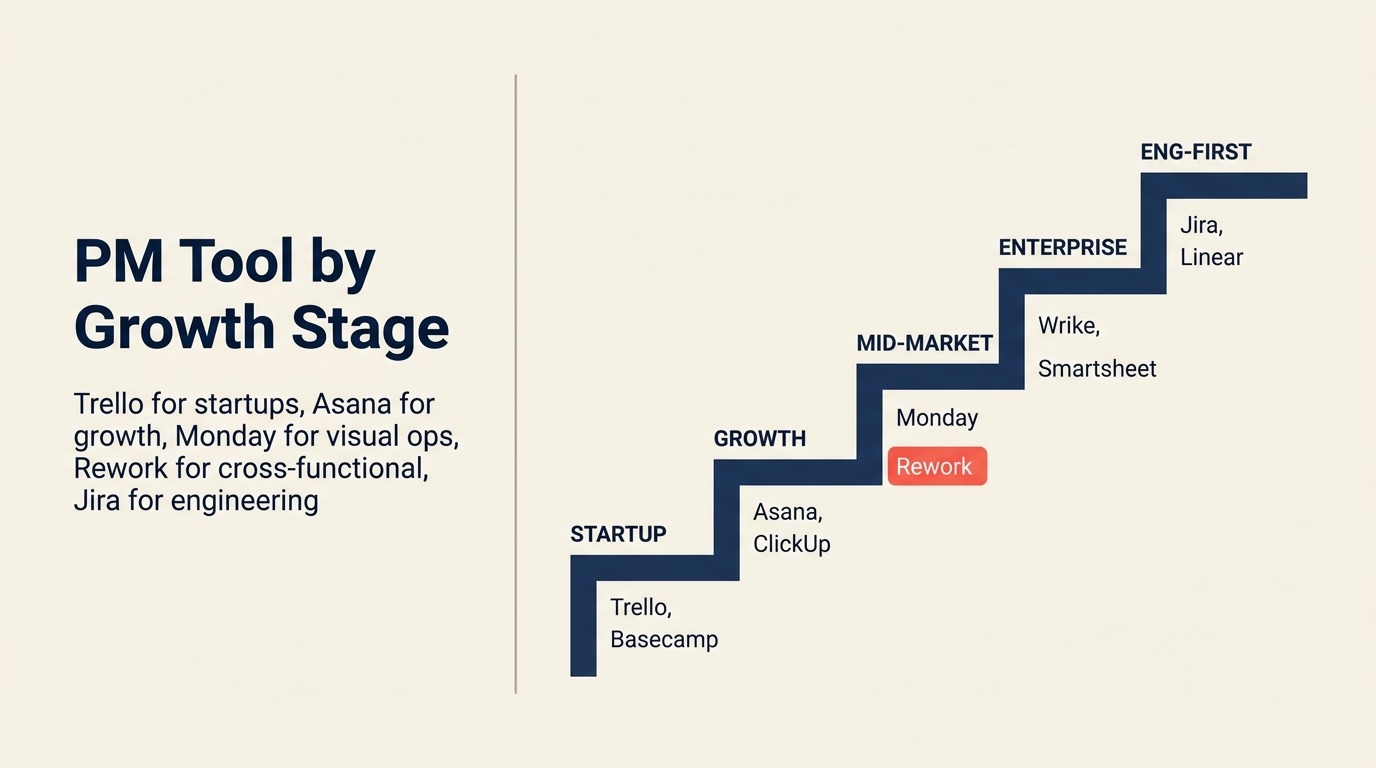
このテーブルは最も一般的な購買者のニーズを最適なツールにマッピングします。2-3候補に絞り込んだ後に使用してください。
| こんなことが必要なら... | このツールを選ぼう | 理由 |
|---|---|---|
| 1つのプラットフォームのCRM + プロジェクト管理 | Rework | ツールを繋ぎ合わせることなく統合されたOpsworkflowとクライアント管理 |
| 役員ロールアップを持つ目標からタスクへのアラインメント | Asana | Goals + Portfoliosがネイティブに構築、成熟したOKRからタスクへの接続 |
| あらゆるworkflowをモデル化する最大の柔軟性 | Monday.com | 最もカスタマイズ可能なWork OS、あらゆるチームタイプに対応 |
| 最低価格のすべてのPM機能 | ClickUp | 無料と$7/ユーザーティアで最も広い機能セット |
| 1つの接続されたワークスペースのドキュメントとタスク | Notion | 最良のナレッジワークの組み合わせ、軽量タスク管理が組み込み |
| エンタープライズのリソース管理 + 校正 | Wrike | ネイティブのキャパシティプランニングとクリエイティブアセット承認 |
| スプレッドシートネイティブのオペレーションとPMO作業 | Smartsheet | その上に本物のPM機能が重ねられたグリッド優先モデル |
| 小規模チームまたは個人使用の最もシンプルなKanban | Trello | 最速のセットアップ、1-15人のシンプルなworkflowに最適 |
| 非同期優先コミュニケーション + 定額料金 | Basecamp | 意見が組み込まれたシンプルさ、無制限ユーザーへの月額$299 |
| データベースで動くカスタムオペレーションシステム | Airtable | リレーショナルデータベースUX、あらゆる構造化された作業アプリを構築 |
| 技術チームのための速くてモダンな課題追跡 | Linear | キーボード優先のスピード、プロダクト + エンジニアリングに最適 |
| エンタープライズ規模でのエンジニアリンググレードのAgile | Jira | 最も深いScrum/Kanban、Atlassianエコシステム全体 |
| 請求機能付きの代理店またはクライアントサービスPM | Teamwork | ネイティブの時間追跡、請求可能時間、クライアントポータル |
| 数式で動くオペレーションドキュメントとアプリ | Coda | コードを書かずにドキュメントからカスタムアプリを構築 |
| アーリーアダプターチームのためのAIネイティブPM | Height | AIタスク生成とサブタスク推論が組み込み |
PMソフトウェアを選ぶ際のよくある間違い
ほとんどの悪いPMソフトウェアの決定は、間違った次元で最適化することから来ます。購買者が間違える場所はここです。
適合ではなく機能で購入する。 ClickUpはこのリストのどのツールよりも多くの機能を持っています。それはシンプルなタスク可視性を必要とする5人のクリエイティブエージェンシーにとって正しい選択を意味しません。多くの機能はより多くの設定オーバーヘッドと遅いオンボーディングを生み出します。
実際に誰が使うかを考慮しない。 COOが好むがチームが無視するツールはPMツールではありません。それはレポートレイヤーです。作業をしているチームはトレーニングなしでツールを使いやすいと感じる必要があります。Trelloが「より良いツールがある」という何十年もの議論を生き延びているのは、チームが自発的に採用するからです。
明日の規模ではなく今日の規模のために選ぶ。 無料でシンプルだからTrelloを選んだスタートアップはそれを卒業します。移行コスト (データのエクスポート、チームの再トレーニング、workflowの再構築) は現実のものです。15-20人を超えて成長する計画があるなら、スケールできるツールを選んでください。
連携要件を無視する。 営業チームがHubSpotで生活し、エンジニアリングチームがGitHubで生活するなら、PMツールは両方に接続する必要があります。契約にサインする前に、重要な連携をマッピングし、Zapierの回避策ではなくネイティブ連携として存在することを確認してください。
実際の作業でパイロットを行わない。 どのツールもデモでは良く見えます。実際のプロジェクト、実際のチーム、実際のworkflowで2週間のパイロットを実行してください。パイロットの2週目で見つける摩擦が次の3年間付き合う摩擦です。
次のステップ
上記の意思決定フレームワークを使って2つのツールにリストを絞り込み、集中した2週間のパイロットを実行してください。実際のアクティブなプロジェクトを各ツールにインポートしてください。実際のチームメンバーに作業を割り当ててください。テストではなく永続的であるかのようにツールを使用してください。2週間の終わりに2つの質問をしてください。チームは実際に使ったか? ステータスアップデートとプロジェクト調整に費やす時間を削減したか?
これら2つの質問への回答は、あらゆる機能比較より多くを教えてくれます。
CRMとプロジェクト管理ツールの両方を置き換える評価が含まれているなら、Reworkから始めてください。1つのプラットフォームにおけるOpsworkflow、クライアント管理、マルチチャネルコミュニケーションの組み合わせは、ミッドサイズチームのツール切り替えオーバーヘッドのかなりのカテゴリを排除します。

On this page
- クイック比較表
- ステージ適合マトリクス
- 規模とペルソナの比較表
- 1. Rework: 専用オペレーションworkflow + CRMを一プラットフォームに
- 2. Asana: 目標とPortfoliosを持つ成熟したPM
- 3. Monday.com: 最大の柔軟性を持つビジュアルWork OS
- 4. ClickUp: 最も広い機能セットを持つオールインワンアプリ
- 5. Notion: ドキュメント + データベース + 軽量タスク管理
- 6. Wrike: エンタープライズPM + リソース管理 + クリエイティブ校正
- 7. Smartsheet: PMO向けスプレッドシートネイティブ
- 8. Trello: 小規模チーム向けシンプルなKanban
- 9. Basecamp: コミュニケーション優先の意見が組み込まれたシンプルさ
- 10. Airtable: データベース優先の構造化された作業
- 11. Linear: モダンな課題追跡、エンジニアリングを超えて拡大
- 12. Jira: エンタープライズ規模でのエンジニアリング優先
- 13. Teamwork: 請求機能付きの代理店・クライアントサービスPM
- 14. Coda: 数式パワーを持つドキュメント-アズ-アプリ
- 15. Height: AIネイティブのプロジェクトトラッカー
- 選び方: 意思決定フレームワーク
- PMソフトウェアを選ぶ際のよくある間違い
- 次のステップ